
Your product team needs a mobile experience now. Marketing wants a link that works everywhere, operations wants reliable offline workflows, security wants tighter control over device access, and engineering wants to avoid maintaining two products that drift apart. The familiar question, PWA vs native apps, sounds like a technology choice. In production, it’s an allocation decision: which capabilities deserve native implementation, and which can remain web-delivered?
A Progressive Web App can reduce installation friction and support fast web distribution. Native software can provide deeper platform integration and more predictable performance. A hybrid architecture can combine both, but only if the team defines the boundary carefully. The right answer depends less on whether the application is “modern” and more on its workload, operating environment, release model, and long-term maintenance burden.
Table of Contents
- Understanding the Real Decision Behind PWA vs Native Apps
- Comparing Performance, Updates, and Distribution Model
- Why Native Apps Still Outperform in Intensive Workloads
- Using a Capability Framework to Choose the Right Architecture
- Real-World Use Cases Across Fintech, Healthcare, E-Commerce, and Field Service
- How to Map Your App Requirements Before Deciding
- Making the Final Decision with Confidence
Understanding the Real Decision Behind PWA vs Native Apps
Two teams can receive the same product request and make opposite architectural choices without either team being careless.
The first team is building a customer portal for orders, account details, document access, and service requests. Users arrive from email, search, and support links. They need immediate access, occasional offline reading, and a consistent experience across phones and desktops. The team chooses a PWA because a URL is part of the acquisition journey, the workflows fit browser capabilities, and central deployment matters more than deep operating-system integration.
The second team serves field technicians who scan equipment, collect location data, work in poor-connectivity environments, and continue processing tasks while the application is backgrounded. Its product also depends on dependable notifications and device integrations. That team chooses a native shell with selected web-delivered screens because the capability boundary is more important than keeping every feature in the browser.
Neither team really answered “PWA or native?” They answered a more useful question: which parts of the product require native control?
The architecture decision is operational
A PWA changes how users discover and launch the product. They can open a link before committing to an installation, and a team can update the web-delivered experience centrally. Native applications offer established store distribution, deeper operating-system integration, and stronger control over intensive or hardware-dependent behavior.
Those differences affect incident response, release governance, support, security review, and testing. A user running an older native version may encounter behavior that the backend no longer expects. A PWA can make a fix available quickly, but the team must manage browser caching, service-worker behavior, and compatibility across engines.
A useful overview of the trade-offs appears in this comparison of native applications and web applications, but architecture decisions still need to be grounded in the product’s own requirements.
Practical rule: Treat native code as a capability boundary, not as a default destination for every screen.
That boundary can sit around biometric authentication, background location, Bluetooth communication, or high-performance rendering while the rest of the interface remains web-based. This approach avoids turning a simple content workflow into a fully native project, while also avoiding the opposite mistake of forcing browser technology into a workload it can’t reliably support.
The decision should connect deployment speed, runtime behavior, security expectations, offline design, and maintenance. Optimizing one dimension in isolation often creates a problem elsewhere. A lightweight PWA may launch quickly but require fallback logic for restricted APIs. A native application may deliver excellent device integration but add platform-specific release work for every change.
Comparing Performance, Updates, and Distribution Model
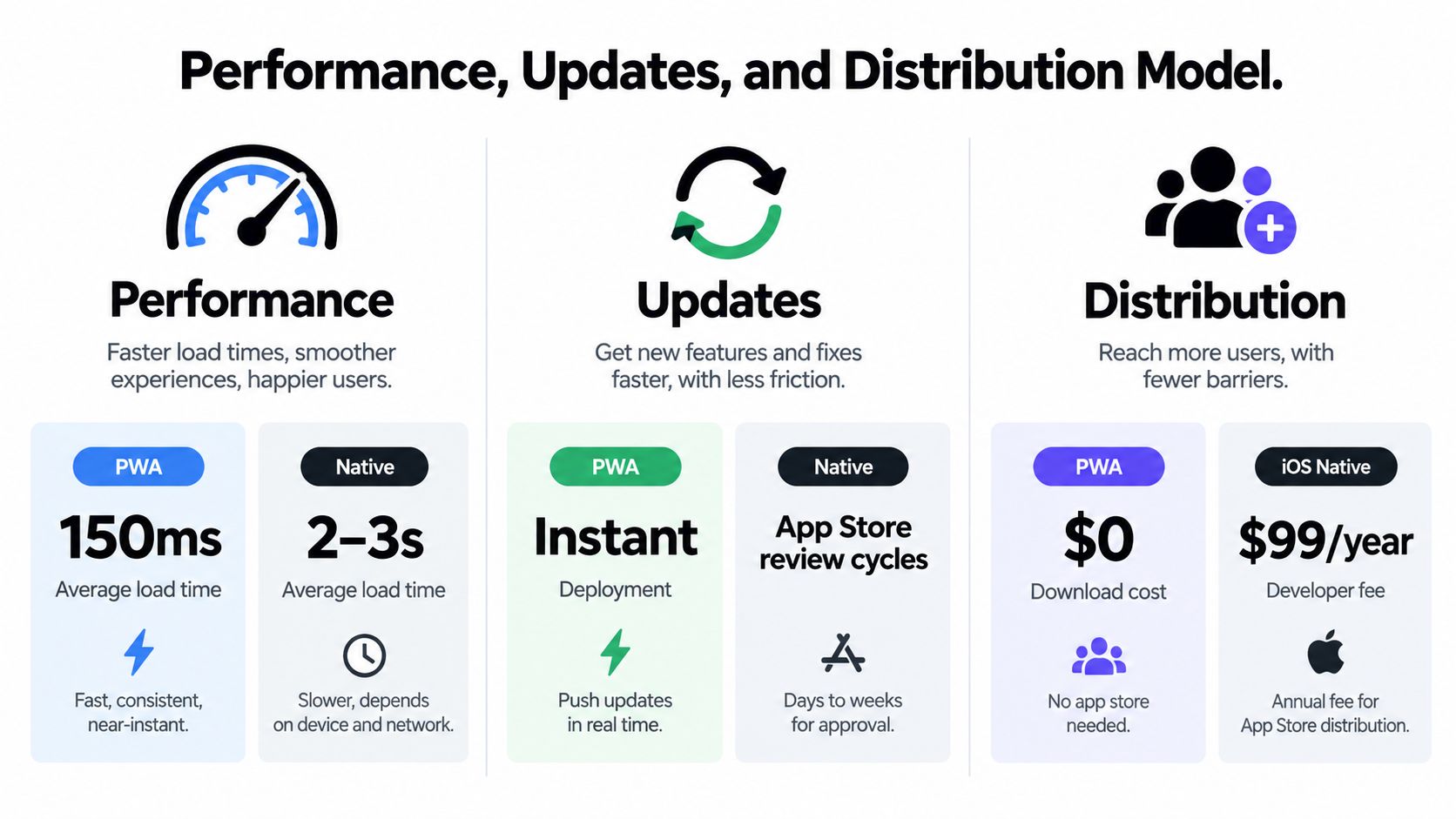
A practical comparison starts with the delivery model, not with a generic claim that one technology is faster. PWAs and native applications can both feel responsive when their primary workflows are designed well, but they expose teams to different constraints.
| Decision area | PWA | Native application |
|---|---|---|
| Access | Opened through a URL and installable on supported platforms | Downloaded through an app store or managed distribution |
| Core delivery | Browser-delivered HTML, CSS, JavaScript, and cached resources | Platform-specific application package |
| Updates | Central web deployment, with caching and rollout behavior to manage | Store or managed-release process |
| Offline behavior | Service workers and application-managed local data | Greater control over local storage and background execution |
| Hardware access | Limited by browser and operating-system support | Broader platform API access |
| Distribution friction | Low for first use | Higher before first use, but stronger store presence |
| Runtime profile | Well suited to ordinary content, commerce, and productivity workflows | Stronger for intensive graphics, computation, and hardware-dependent tasks |
| Testing burden | Browser, device, network, and cache combinations | Device, operating-system, native SDK, and store combinations |
A multi-device evaluation reported an average PWA load time of 2.8 seconds, compared with 3.5 seconds for native apps, but measured runtime efficiency at 80% for PWAs and 90% for native apps. The same evaluation measured memory usage at 220 MB for PWAs and 350 MB for native apps, with estimated 10-minute battery consumption of 5.2% and 6.8%, respectively. These are experimental results rather than universal benchmarks, and the study notes that device, browser engine, network, caching, and application architecture can change the outcome. The comparative evaluation is useful for understanding the trade-off, not for promising a result for every product.
Updates and incident recovery
A PWA lets a team publish web changes without waiting for an app-store release. That can simplify copy fixes, interface changes, configuration updates, and certain production corrections. It doesn’t eliminate release risk. Service workers can retain stale assets, version mismatches can break clients, and a rushed deployment can affect every user at once.
Native release channels provide more separation between versions. Store review and user adoption introduce delay, but they also create a deliberate checkpoint. Teams can stage a release, monitor crashes, and maintain compatibility with older versions while users update over time.
For CapacitorJS teams, Capgo provides a live-update path for signed JavaScript, CSS, copy, configuration, and asset bundles. It supports targeted channels, per-device logs, adoption and failure metrics, version history, and rollback protection. That model is described in this overview of live updates for Capacitor applications. It should complement store governance, not replace careful testing or platform review where native code changes.
Offline behavior and developer workflow
Offline support is an application design problem in either model. A PWA can cache the shell, selected assets, and data through service workers, but the team must define what users can read, edit, submit, and synchronize without a connection. Native software gives developers more control over storage and background work, yet it still requires explicit conflict handling and recovery logic.
The developer experience also differs. A web team can reuse browser tooling and shared UI patterns across platforms. Native teams gain platform-specific APIs and conventions, but they must maintain platform build systems, permissions, testing matrices, and release processes. Neither approach removes complexity. It moves complexity to a different layer.
Why Native Apps Still Outperform in Intensive Workloads
A team usually feels this decision under load, not during a demo. The first version looks fine on both paths, then the product starts doing real work. A field app keeps scanning, syncing, and tracking location across a full shift. A commerce app adds richer animations, image processing, and wallet flows. A clinical workflow depends on timely background events. At that point, the useful question is no longer “PWA or native?” It is which capabilities can stay web-delivered, and which ones need native control to stay reliable.
Native applications still hold an advantage when the workload stays close to the device’s graphics stack, processor, sensors, or background services for long periods. The difference comes from execution model and operating-system access. Native implementations call platform APIs and rendering paths more directly. Browser applications still run inside browser scheduling, permission, and lifecycle constraints, even when the experience is polished.
The comparative evaluation cited earlier found stronger native results in complex animations and data-heavy operations. It also reported higher runtime efficiency for native apps, while the tested PWA used less memory and showed lower estimated battery use in that setup. That is a workload distinction, not a verdict for every product. A PWA can handle content, search, account work, and checkout well, while a native implementation is usually more predictable for continuous rendering or sustained device communication.
Match the architecture to the workload
Graphics-heavy products expose the boundary fast. Real-time visualization, advanced camera processing, dense motion, and sustained computation can push browser rendering and JavaScript execution into visible trade-offs. Native code uses platform-specific rendering pipelines and hardware acceleration with fewer browser-layer limits. Teams that need to quantify those differences should measure frame timing, startup cost, memory pressure, and input latency with a clear app performance optimization workflow.
Background execution is another clear separator. Service workers are useful, but they do not give the same control as native background services. The operating system decides when browser processes run, how long they stay alive, and what they can do. If the product must collect data, sync work, or deliver dependable events while the user is away from the screen, validate that path natively before you commit the capability to the web layer.
Hardware access has the same pattern. Bluetooth, NFC, advanced sensors, background GPS, and specialized camera controls are not simple feature checkboxes. Each one depends on browser support, permission behavior, operating-system version, and the level of consistency the workflow requires.
Architecture test: If a missed background event, delayed sensor reading, or dropped device connection creates operational or safety risk, validate a native implementation before committing to a browser-only design.
Where PWAs remain a strong fit
PWAs still fit many products well. They work especially well when users browse, search, submit forms, manage accounts, read content, place orders, or complete standard productivity tasks. They also help when the first interaction starts from a shared link instead of an app-store search, because users can reach the product immediately.
A documented comparison of PWA, React Native, and native iOS implementations found that native iOS delivered the strongest CPU and memory efficiency, while React Native showed the shortest measured response times. The PWA supported or partially supported most tested features, but the study also noted weak support for several advanced capabilities on iOS, especially push notifications and background synchronization. The full comparison supports a capability-by-capability review on each target platform, not a blanket assumption about “web” or “native.”
The practical conclusion is narrow and useful. Choose the architecture that matches the riskiest capability. Then keep the rest as web-delivered if it does not need native control.
Using a Capability Framework to Choose the Right Architecture
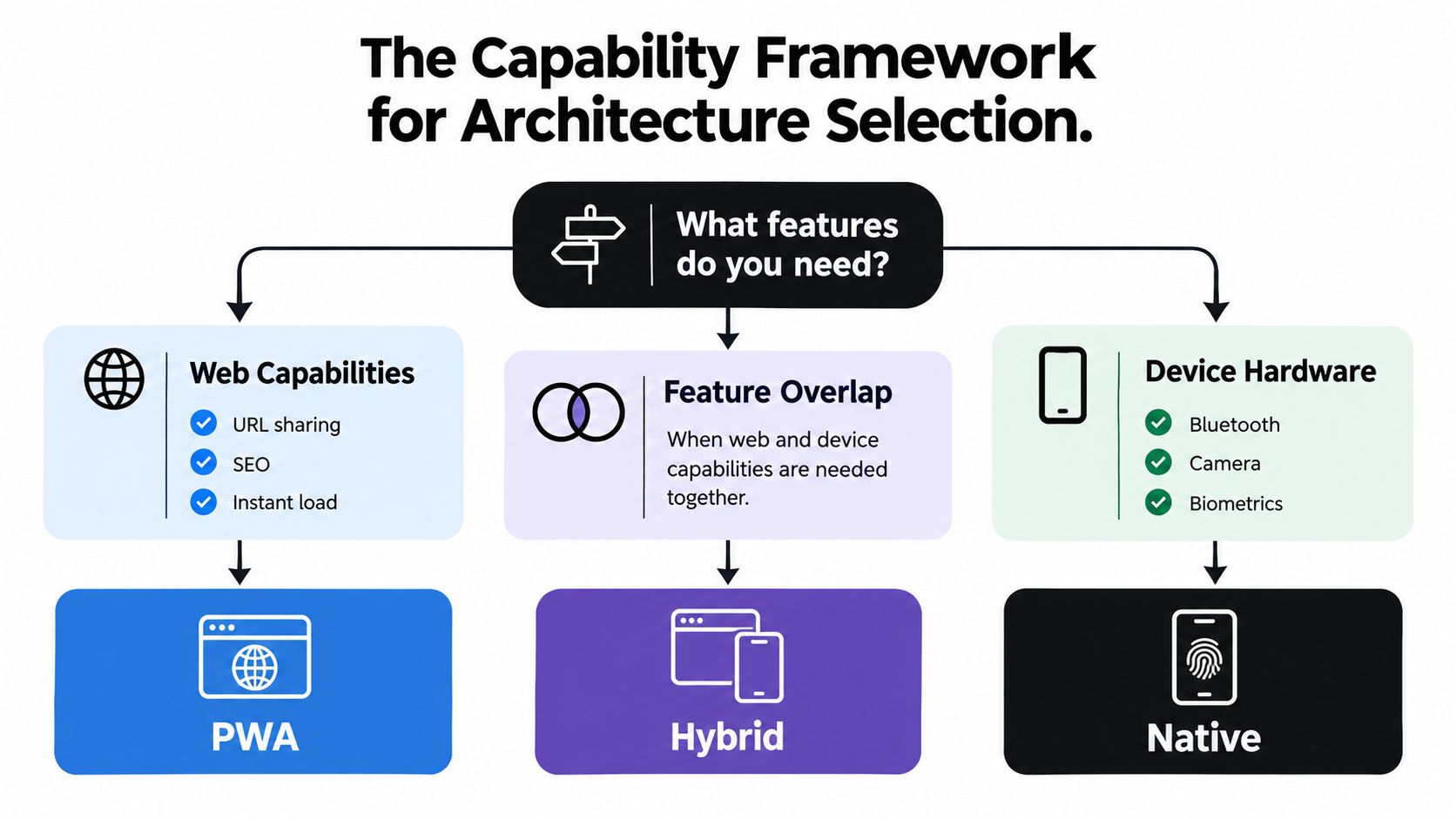
The most reliable architecture review begins with capabilities, not technology labels. List what the product must do, then classify each requirement by the kind of control it needs.
Use four dimensions:
- Hardware APIs: Does the feature depend on Bluetooth, NFC, biometrics, advanced camera functions, sensors, or continuous location?
- Background execution: Must it run, sync, notify, or collect information while the user isn’t viewing the application?
- Offline data volume: Does offline mode mean reading a cached page, or managing a substantial local dataset with queued writes and conflict resolution?
- Distribution requirements: Do users need search discovery, direct links, managed enterprise distribution, or app-store presence?
A feature that stays inside standard web capabilities can remain web-delivered. A feature that depends on predictable hardware access or operating-system scheduling should receive native treatment. The rest belongs in a review category where a proof of concept decides the boundary.
Draw the boundary around risk
A hybrid architecture works when the native layer has a clear job. It might expose biometric authentication, secure storage, a scanner, background location, or a device connection, while the web layer handles account screens, workflows, content, configuration, and reporting.
That split keeps product work centralized without pretending that all capabilities behave identically on iOS and Android. The PWA study cited in the previous section found that support for advanced features wasn’t uniform, particularly for push notifications and background synchronization on iOS. Teams should validate the exact operating-system versions and APIs they support rather than treating “PWA support” as a universal property.
Include compatibility maintenance in the estimate
The initial development difference is only part of the decision. Browser changes, operating-system updates, permission changes, fallback logic, security reviews, and device-specific testing can shape the long-term cost. A browser-first product may avoid duplicate native interfaces but still need extensive compatibility testing. A native product may offer better control but require separate platform implementations and release pipelines.
Teams evaluating a shared mobile codebase can also review cross-platform mobile app development versus native to understand where a hybrid approach fits. The goal isn’t to maximize shared code. The goal is to keep shared code where behavior is genuinely shared and isolate platform-specific code where reliability demands it.
The smallest native surface isn’t automatically the best architecture. The right surface is the one that protects the capabilities the business can’t afford to lose.
Real-World Use Cases Across Fintech, Healthcare, E-Commerce, and Field Service
Industry labels don’t decide the architecture, but they reveal which constraints deserve attention first.
Fintech
A fintech team may use web-delivered screens for education, account discovery, support, and ordinary account management. The security-critical path can require native storage, biometric integration, platform-specific authentication, and carefully controlled device behavior. If the product needs dependable background alerts or transaction-related device verification, the team shouldn’t assume that browser support is sufficient.
The useful split is between reach-oriented account experiences and high-trust device workflows. A native shell can protect the latter while the web layer keeps lower-risk product surfaces easier to update.
Healthcare
Healthcare applications often combine administrative workflows with sensitive clinical or operational tasks. Appointment search, forms, education, and non-critical content may fit a PWA. Clinical capture, offline records, barcode or device scanning, background synchronization, and strict access controls can push selected modules toward native implementation.
Offline design deserves special care. “Works offline” might mean showing cached instructions, or it might mean allowing a clinician to create and reconcile records without connectivity. Those are different engineering problems and should not receive the same architecture decision.
E-commerce
E-commerce often benefits from a PWA entry point. Search, product pages, sharing, promotions, account access, and checkout are naturally linked to web distribution. A retailer may still add a native application for repeat customers who need richer notifications, loyalty features, or deeper device integration.
The right question is whether the native channel adds a capability users value, rather than whether a mobile store listing looks more complete. A PWA can remain the acquisition layer while native software serves customers with a stronger repeat-use case.
Field service
Field service is where native requirements commonly become unavoidable. Technicians may need scanning, GPS, large offline datasets, queued updates, background synchronization, and reliable access to work orders in difficult network conditions. A hybrid design can still keep forms, instructions, and administrative screens web-delivered, but the device and offline engine need explicit ownership.
The architecture should follow the failure cost. If a delayed update merely requires a refresh, browser delivery may be enough. If it causes a missed job, duplicate record, or unsafe field decision, native control and deeper local testing deserve priority.
How to Map Your App Requirements Before Deciding
Start with a feature inventory, not a framework preference. Write every user-visible workflow and every invisible system behavior into the same register. Include authentication, scanning, notifications, synchronization, analytics, deep links, media, payments, and administration.
Then score each item qualitatively across four questions:
- Does it require hardware? Mark the exact API, not just “device access.” Camera capture and continuous Bluetooth communication have different risks.
- Must it run in the background? Identify whether delayed execution is acceptable. A reminder can tolerate different behavior from a task queue that must synchronize reliably.
- What does offline mean? Separate cached reading from offline creation, editing, submission, and conflict resolution.
- Where must users find it? Record whether the product depends on search, links, app-store discovery, managed enterprise deployment, or all of these.
For API-heavy products, an interactive map for API endpoints can help teams inspect service boundaries and identify which client workflows depend on which backend capabilities. It won’t decide the mobile architecture, but it can expose synchronization, authentication, and data ownership assumptions before they become mobile constraints.
Turn the map into an architecture test
Classify every feature as web-safe, native-required, or uncertain. Build a small proof of concept for the uncertain group on the oldest and most restricted target environment you support. Test permissions, lifecycle behavior, offline recovery, notifications, and failure states, not just the happy path.
Next, define the release model. If copy, configuration, and workflow changes need rapid controlled delivery, document how the web layer will update and how caches will invalidate. If native code changes frequently, account for build, testing, signing, review, and adoption processes.
Finally, compare total ownership rather than initial build effort. Include browser and device compatibility, platform SDK changes, security testing, support diagnostics, rollback, and the cost of maintaining fallback paths. Teams considering a web-to-mobile migration can use Capacitor for turning a web application into a mobile app as one possible route, especially when the existing interface already covers most lower-risk workflows.
The output should be a capability map with named owners, test evidence, and a clear reason for every native boundary. A vague preference for “cross-platform” isn’t an architecture.
Making the Final Decision with Confidence
Choose a PWA when the product depends on reach, direct linking, searchable content, rapid web delivery, and workflows that fit browser capabilities. Choose native when sustained performance, deep hardware access, dependable background execution, extensive offline operation, or regulated device behavior defines the product’s value.
Choose hybrid when those conditions coexist. Keep account screens, content, configuration, and ordinary workflows web-delivered, then isolate native modules around the capabilities that browsers can’t provide reliably. That structure can preserve a shared product surface without forcing the entire application into one runtime model.
The final decision should survive a production incident, an operating-system update, and a maintenance review. If the team can’t explain how the app behaves offline, how it recovers from a failed update, and which APIs require device-specific testing, the architecture isn’t ready.
A PWA isn’t a cheaper native app, and a native app isn’t automatically a better product. They are different delivery and execution models. Map the capabilities, test the uncertain boundaries, and choose the smallest architecture that meets the actual operational requirements.
Capgo helps CapacitorJS and Electron teams deliver signed JavaScript, CSS, configuration, copy, and asset updates through targeted channels, with per-device logs and rollback protection. If your product needs web-delivered workflows with native modules at the capability boundary, visit Capgo to evaluate a controlled live-update workflow for your mobile releases.





