Die richtigen Geräte erreichen
Registriere Geräte mit externer ID, Tags, Attributen und Consent, damit Kampagnen echte Zielgruppen statt anonymer Tokens ansprechen können.
Nutzer benachrichtigen, Badges aktualisieren und Live-Update-Checks direkt aus demselben Capgo Release-Workflow auslösen. Notifications verbinden jetzt Native Push mit progressivem Deployment, statt Release-Teams das mühsame Zusammenfügen zu überlassen.
14 Tage unbegrenzt testen. Keine Kreditkarte nötig 14 Tage Geld-zurück-Garantie. Jederzeit kündbar.
Native Notifications funktionieren nahtlos mit Capgo Live Updates und Channel-Rollouts.
iOS + Android
Native Push-Zustellung
Externe ID
Bekannte Nutzer ansprechen
Badge + Events
Opens & Status tracken
Update-Checks
Silent Push Companion
Next or set
Installationsmodus steuern
Channel-basiert
Live Updates steuern
Animierte Illustration: Eine Capgo Console-Card erstellt einen Alert für die externe ID user_8421, sendet ihn ab, und der Push landet auf einem iPhone-Sperrbildschirm und einem Android-Home-Screen. Die Zähler für Delivered und Opened steigen, und das App-Badge wandert von 2 auf 3. Danach wechselt die Card zu einem Silent-Update-Check für den Production-Channel, und beide Geräte laden Bundle 1.4.1 herunter, um es beim nächsten Start zu installieren.
Capgo Notifications bietet Produktteams die erwartete Messaging-Oberfläche und ermöglicht Release-Teams, Geräte nativ für Live Update-Checks aufzuwecken.
Registriere Geräte mit externer ID, Tags, Attributen und Consent, damit Kampagnen echte Zielgruppen statt anonymer Tokens ansprechen können.
Nutze Silent Notifications, um opt-in Geräte anzuweisen, das neueste Capgo Bundle für den gewählten Channel zu prüfen, herunterzuladen und zu queueen.
Verfolge Provider-Setup, Kampagnen, Delivery-Events, Opens, Badge-Änderungen und die Ergebnisse der Hintergrund-Update-Checks direkt über die Capgo Konsole.
Das Notification-Plugin, die Capgo Console und der Updater arbeiten nun nahtlos für Capacitor Apps zusammen.
Füge Android- und iOS-Push-Credentials in der Capgo Console hinzu und führe das Notification-Setup aus, um das native Plugin mit dem Updater zu verbinden.
Verknüpfe externe IDs, Tags, Attribute, Consent und Badges aus deiner App, damit Support-, Growth- und Release-Workflows dieselbe Device-Identity nutzen.
Alerts broadcasten, API Notifications an einen User senden oder einen Background-Update-Check während eines Progressive Rollouts pushen.
Capgo übernimmt die Bereiche, die sonst zu einmaligem Glue code rund um Push, User-Targeting und Update-Nudges werden.
$ npx @capgo/cli@latest notifications setup
provider ready | recipients linked | update check enabled
Halte Android- und iOS-Notification-Provider im selben Capgo App-Settings-Screen aktiv, den dein Release-Team nutzt.
Erstelle Alert-, Background-, Badge- oder Update-Check-Kampagnen, wenn du alle passenden Geräte erreichen musst.
Sende eine Notification an eine bekannte externe ID und prüfe die mit diesem Empfänger verknüpften Geräte, bevor du sie triggerst.
Lese, schreibe und synchronisiere App-Badge-Counts über das native Plugin, damit der Benachrichtigungsstatus für Nutzer sichtbar bleibt.
Verarbeite Foreground-Empfänge, das Öffnen von Benachrichtigungen und Background-Daten-Notifications in deiner Capacitor App.
Verfolge Kampagnenstatus, Zustellungsraten, Opens und Update-Check-Ergebnisse, ohne den Capgo Release-Workflow zu verlassen.
Silent Notifications können Geräte anweisen, nach einem neuen Bundle zu suchen, während Capgo Channels, der Install-Mode und Progressive-Rollout-Regeln weiterhin bestimmen, was jedes Gerät installieren darf.
persönlicher Support von Martin
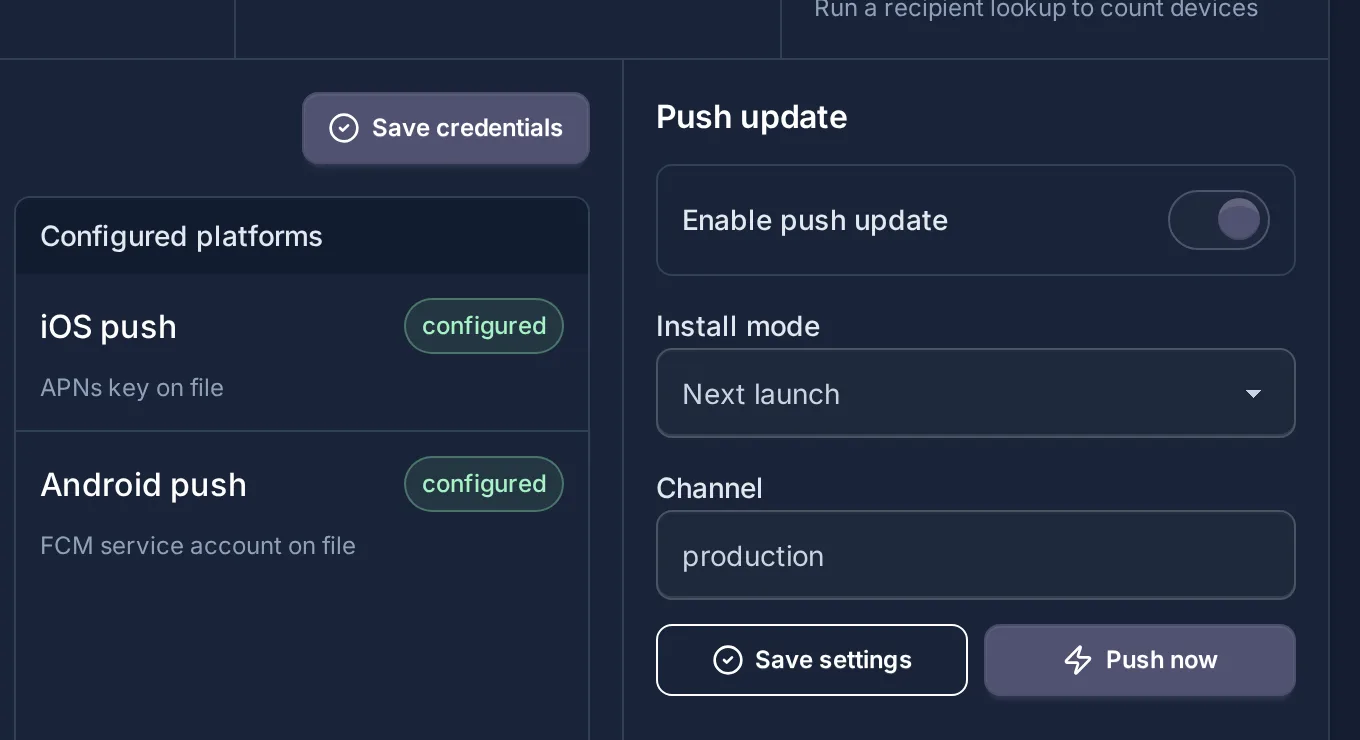
$ notification.kind = update_check
Channel ausgewählt | Installationsmodus: next
Progressive Rollout steuert weiterhin berechtigte Geräte
Geräte prüfen, laden und das Bundle in die Queue stellen
Push-Benachrichtigungen mit AI-Agents
Capgo Agent Skills bringen Claude Code, Codex oder Cursor bei, wie sie das Notifications-Plugin installieren, Geräte registrieren und Background-Callbacks in deiner Capacitor App handhaben.
Frag deinen Agenten
npx @capgo/cli@latest bundle upload npx @capgo/cli@latest mcp npx skills add Cap-go/capgo-skills capgo.app/llms-full.txt Benachrichtigungen laufen direkt im Capgo Account, den Teams bereits für Live Updates und Native Builds nutzen.

Geräte-IDs bestimmten Gruppen zuzuweisen und Änderungen gezielt nur an diese Gruppen zu pushen, ist ein echter Gamechanger.
Produktions-OTA-Updates sofort zu pushen, ohne auf die Review-Zyklen des App Stores warten zu müssen, ist ein riesiger operativer Vorteil.
Erweitere deinen Capacitor Release-Workflow um Native Push, Badge-Steuerung, Kampagnen-Stats und Silent Update Checks.
persönlicher Support von Martin
14 Tage unbegrenzt testen. Keine Kreditkarte nötig 14 Tage Geld-zurück-Garantie. Jederzeit kündbar.


