


1. 소개
라피도 클라우드 (www.rapido.cloud)에서 Salesforce 고객을 위한 모바일 애플리케이션을 개발하고 있습니다. 이 애플리케이션은 Salesforce 고객이 자신의 브랜드를 가진 모바일 애플리케이션을 쉽게 배포할 수 있도록 해 주며, Salesforce Mobile __CAPGO_KEEP_0__ 또는 Salesforce Mobile Publisher를 사용하는 어려운 루프를 피할 수 있습니다.이 모바일 애플리케이션은 Ionic 8, Angular 18, TypeScript, __CAPGO_KEEP_0__ 및 __CAPGO_KEEP_1__ CapacitorUpdater와 같은 현대적이고 표준화된 플랫폼에 개발되었습니다. 이 플랫폼은 널리 사용되는 컴포넌트와 도구를 포함하고 있으며, Salesforce 플랫폼의 특정 사항을 관리하지 않아도 되므로 클라이언트가 더 쉽게 관리할 수 있습니다. 또한, 저는 Ionic + Angular 모바일 애플리케이션의 개발자와 유지보수자들을 더 쉽게 채용하고 유지할 수 있습니다.), I am developing a mobile application for Salesforce clients to easily deploy their own branded mobile application without having to go through the difficult loops of using the Salesforce Mobile SDK or the Salesforce Mobile Publisher.
I have developed this mobile app on a modern and “standard” platform with widespread components and tools including Ionic 8, Angular 18, TypeScript, Capacitor and now Capgo CapacitorUpdater. These are more simple to handle for clients who do not want to manage Salesforce platform specifics such as Lightning Web Components; and its easier and cheaper for me to recruit developers and maintainers of Ionic + Angular mobile applications.
이 글은 내 설계, 내 선택 및 구현을 설명하는데, Capgo과 semantic-release Github Actions을 통해 모든 배포를 자동으로 관리하는 매우 성공적인 무리수입니다. 모든 것은 Capgo CapacitorUpdater의 14일 무료试用 기간 동안 설계, 테스트 및 문서화되었습니다.
2. Capgo을 사용하는 이유는 무엇입니까? Capgo semantic-release를 사용하는 이유는 무엇입니까?
Capgo CapacitorUpdater는 앱 배포를 더 간단하고 빠르게, 유연하게 할 수 있는 약속으로 나를 끌어들였습니다. 앱 스토어(Apple AppStore/Google PlayStore) 배포 프로세스를 거치지 않고도.
I was rather afraid of the learning curve to make this successful but I got my app onto Apple TestFlight quite easily. I was then in position to use Capgo CapacitorUpdater to deploy my updates much faster.
배포를 성공적으로 하기 위해 필요한 학습 곡선을 피하기 위해 두려웠지만, Apple TestFlight에 내 앱을 쉽게 올릴 수 existed. 그 후에, Capacitor CapacitorUpdater를 사용하여 업데이트를 더 빠르게 배포할 수 있게되었습니다.
Capgo Capgo CapacitorUpdater가 내 모바일 애플리케이션을 실시간으로 1분 이내에 업데이트하는 데 도움이 되었으며, 소스 code에서 새로운 기능이나 수정을 저장한 후에.
3. 내 브랜칭 및 릴리스 모델, 그리고 semantic-release가 어디에 들어가는지
Capgo Capgo 서버로의 배포가 정상적으로 작동하고 있으므로, 이 과정을 자동화하고 CI/CD pipeline에 통합해야 합니다.
이것이 내 브랜칭 및 릴리스 모델을 어떻게 구성하는지 설명합니다.
모바일, 웹 또는 Salesforce를 위한 모든 애플리케이션에 대해:
- 개발은 branches에서
feature/...분기되어main, 그리고 유지보수 및 특정 기능을 위한 커스터마이즈된 배포 외의 개발 branch의 대부분은mainreference로 - 배포는 release branches에서 어떤 경우에는 :
production, prerelease branch (alpha,beta,nightly, etc.) 및 고객 또는 컨텍스트에 맞는 브랜치도 사용할 수 있습니다. - 배포는 pull request가 deployment branch에 merge될 때 트리거됩니다. 태그 트리거 배포를 사용하지 않습니다. semantic release는 태그와 나머지 모든 것을 관리하기 때문입니다.
기본적으로 이것은 Gitlab Flow :
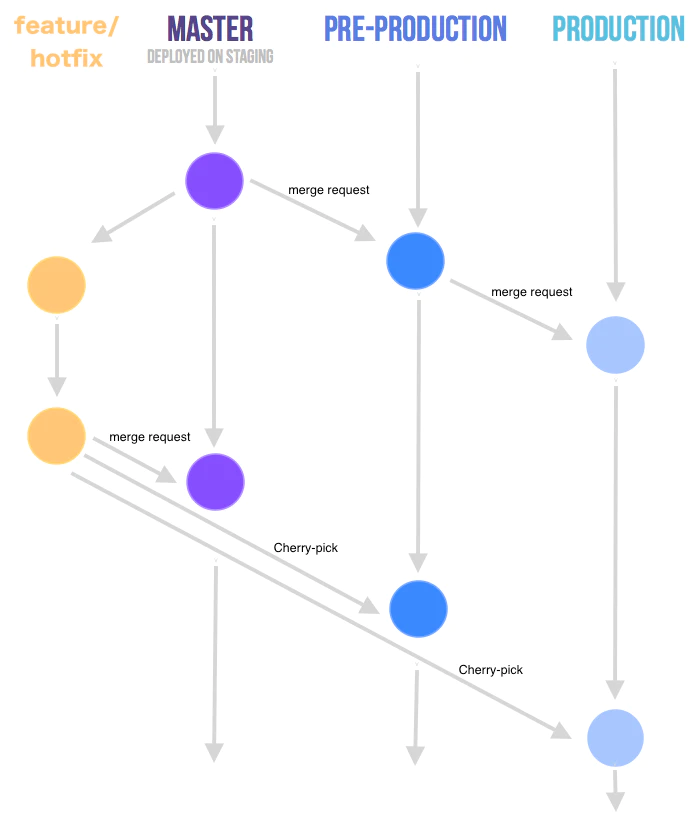
Gitlab Flow - source https://faun.dev/c/stories/manuelherrera/git-branching-strategies-in-2022
semantic-release에 대한 한 가지 주의사항 :
배포 브랜치에서 semantic-release가 트리거될 때, semantic-release는 자동으로 브랜치 내의 이전 태그의 버전 번호와 제공된 수정 사항 또는 기능에 따라 새로운 버전 번호를 계산합니다. 수정 사항은 새로운 패치 버전을 생성하며, 기능은 새로운 마이너 버전을 생성합니다. 또한 prerelease alpha, beta, etc.도 버전 번호에 자동으로 포함됩니다.
Semantic release는 커밋에서 변경 로그를 생성하고, conventional commits (see <https://www.conventionalcommits.org/en/about>)에 정의된修정 및 기능을 그룹화하고, semantic release에서 구성합니다. https://www.conventionalcommits.org/ko/about) 및 semantic release에서 구성되었습니다.
It will also update all your git (Github, in my case) merged pull requests and related issues with comments linking them to the tag and release. Finally, in this Github release, it will attach assets such as source code, binaries if necessary, CHANGELOG.md, etc.
Capgo는 'Conventional Commits'의 버전을 개발하고 문서화했습니다.
Capgo의 fork된 저장소
https://__CAPGO_KEEP_0__.com/Cap-go/standard-version
Capgo의 standard-version own standard-version (https://github.com/Cap-go/standard-versionown capacitor-standard-version (https://github.com/Cap-go/capacitor-standard-version) 그리고 capacitor-plugin-standard-version (https://github.com/Cap-go/capacitor-plugin-standard-version) 저장소들에 있습니다. 그들은 블로그에 Capgo의 배포에서 사용하는 버전 체계에 대해 문서화했습니다 (https://capgo.app/blog/버전-관리-방법-in-capgo/) 자바스크립트 번들을 위한 'Semantic Versioning'은 'standard' semver를 따릅니다 (https://semver.org) 또한 (물론입니다!) semantic-release So
그것은 훌륭하고, 나에게는 큰 편안함입니다. 나는 semantic-release extensively
또한, semantic release가 다양한 채널에서 앱 배포를 생성하도록 하고 싶습니다.
위에 설명된 것과 같이, prerelease 버전을 branch에서 배포해야 합니다. alpha, beta, nightly etc., 그러나 고객별 버전도 branch 형태로 관리합니다. production-customer-jones, production-customer-doe, etc.
Capgo은 "채널" 기능을 제공하는데, 이 기능은 semantic release도 지원하는 기능이기 때문에 이들을 함께 사용할 수 있는 기대감을 가지고 있습니다. 이 기능은 또한 XCode Cloud가 관리하는 다양한 branch 빌드와도 잘 맞습니다.
Capgo Capacitor Updater에서 semantic release를 사용하여 prereleases에서 생성된 Semver 버전 번호는 다음 형식으로 보입니다. 1.0.0-alpha.1이 branch에서 연속적인 빌드는 build 번호를 증가시킵니다. 1.0.0-alpha.2, etc. Capgo 버전은 명시적으로 문서화되지 않았지만 Capgo 채널을 사용하여 앱의 버전을 생성할 수 있습니다.
5. Capgo을 사용하여 내 애플리케이션을 릴리스하는 방법은 무엇입니까?
애플리케이션 번들을 Capgo로 자동 배포하기 위해서는 Capgo CLI 명령어를 사용해야 합니다. bundle upload. 타입 npx @capgo/cli@latest bundle upload --help 다양한 업로드 옵션을 얻기 위해. 그 중에서 사용할 옵션은 다음과 같습니다.
npx @capgo/cli bundle upload --channel $CHANNEL --apikey $CAPGO_APIKEY --bundle $VERSION --bundle-url $CAPGO_APPID- CHANNEL은 배포하고 싶은 Capgo 채널입니다 (예:
alpha) - 버전은 semantic release (예)
1.0.0-alpha.1) - CAPGO_APIKEY는 Capgo에서 제공하는 CI/CD pipeline 로그인을 고유하게 식별하기 위해 제공됩니다.
- CAPGO_APPID는 Capgo에서 제공하는 애플리케이션을 고유하게 식별하기 위해 제공됩니다 (예)
com.mystartup.mysuperapp)
6. semantic release + Capgo CapacitorUpdate 설정
마지막으로, 이것은 어떻게 모두가 연결되어 있는가?

semantic release와 Github Actions을 사용한 앱 번들 버전
semantic release 자동화와 Github Actions
semantic release의 아름다움은 배포 자동화, Github Action 워크플로우의 형태로 매우 간단합니다. 다른 CI/CD 플랫폼에서 매우 유사하게 보일 것입니다.
# ./github/workflows/release.yml

name: Release

on:
  workflow_dispatch:
  push:
    branches: [alpha, alpha-nocapgo, dev-rupert]    # <--- adapt this

env:
  CAPGO_APPID: com.mystartup.mysuperapp             # <--- adapt this
  CAPGO_APIKEY: ${{ secrets.CAPGO_APIKEY }}

jobs:
  build:
    runs-on: ubuntu-latest
    steps:
      - uses: actions/checkout@v6
      - uses: actions/setup-node@v6
        with:
          node-version: 24
          cache: "npm"
      - run: npm install
      - run: npx semantic-release
        env:
          DEBUG: true
          GITHUB_TOKEN: ${{ github.token }}
이것은 NodeJS 환경을 설치한 다음 semantic release를 호출합니다.
branch 목록에 있는 모든 머지에 대해 semantic release는 배포를 트리거합니다.
배포를 branches설정 CAPGO_APIKEY In repository의 secret에서.
Capgo의 CAPGO_APPID 여기.
semantic release의 동작은 Capgo CapacitorUpdater에서 설정합니다. .releaserc.json 설정 파일입니다.
아래는 나의 설정입니다.
// .releaserc.json

{
  "branches": [
    {
      "name": "release",
      "channel": "production"
    },
    {
      "name": "alpha",
      "channel": "alpha",
      "prerelease": "alpha"
    },
    {
      "name": "alpha-nocapgo",
      "channel": "alpha",
      "prerelease": "alpha-nocapgo"
    },
    {
      "name": "dev-rupert",
      "channel": "development",
      "prerelease": "development"
    },
    {
      "name": "dev-paul",
      "channel": "development",
      "prerelease": "development"
    }
  ],
  "ci": true,
  "debug": true,
  "dryRun": false,
  "repositoryUrl": "https://github.com/RupertBarrow/mysuperapp",

  "verifyConditions": ["@semantic-release/github"],

  "plugins": [
    [
      "@semantic-release/commit-analyzer",
      {
        "preset": "angular",
        "releaseRules": [
          { "type": "breaking", "release": "major" },
          { "type": "feat", "release": "minor" },
          { "type": "fix", "release": "patch" },
          { "type": "ci", "release": "patch" },
          { "type": "doc", "release": "patch" },
          { "type": "docs", "release": "patch" },
          { "type": "refactor", "scope": "core-*", "release": "minor" },
          { "type": "refactor", "release": "patch" },

          { "scope": "no-release", "release": false }
        ]
      }
    ],

    "@semantic-release/release-notes-generator",

    ["@semantic-release/changelog", { "changelogFile": "CHANGELOG.md" }],

    [
      "@semantic-release/git",
      {
        "assets": ["package.json", "CHANGELOG.md", "ios/App/App.xcodeproj/project.pbxproj"],
        "message": "chore(release): ${nextRelease.version} [skip ci]\n\n${nextRelease.notes}"
      }
    ],

    ["@semantic-release/github", { "assets": ["CHANGELOG.md"] }],

    [
      "@semantic-release/exec",
      {
        "prepareCmd": "npm run build",
        "publishCmd": "npm add -D @capgo/cli && npx @capgo/cli bundle upload --channel ${branch.channel} --apikey $CAPGO_APIKEY --bundle ${nextRelease.version} --bundle-url $CAPGO_APPID"
      }
    ]
  ]
}branches:branches버전 번호가 semantic release에 의해 생성될 것입니다.name), 맵핑된 Capgo 채널 (channelCapacitor Updater를 사용하여prereleasebranch가 모두 앱을 Capgo에 배포합니다.branch.prerelease = "development"Capacitor Updater를 사용하여x.y.z-development.n- Capacitor Updater를 사용하여
alphaandalpha-nocapgoCapacitor Updater를 사용하여alpha채널이지만 버전 번호에 다른 prerelease 이름이 있습니다. - 개발자 branch로의 배포
dev-rupert또는dev-paul채널에 모두 배포할 것입니다.development채널에 Capgo에 모두 배포할 것입니다.development버전 번호에 prerelease 키워드가 동일합니다.
verifyConditions: semantic release의 첫 번째 단계에서 Github에 대한 올바른 접근 권한이 있는지 확인합니다. 인증 체크를 Capgo CLI에 추가할 예정입니다.@semantic-release/commit-analyzer: semantic release의 표준 기능입니다. 자세한 내용은 문서를 참조하세요.https://github.com/semantic-release/semantic-release?tab=readme-ov-file#commit-message-format)@semantic-release/release-notes-generator: Ionic 빌드와 semantic release 작업으로 업데이트된 파일을 커밋합니다.CHANGELOG.md@semantic-release/git그리고package.json,CHANGELOG.mdandios/App/App.xcodeproj/project.pbxproj- 안드로이드 빌드가 아직 안되요)@semantic-release/github: __CAPGO_KEEP_0__ 릴리즈에 파일을 첨부합니다CHANGELOG.md파일을 Github 릴리스에 자산으로 추가합니다.@semantic-release/exec) 그리고 __CAPGO_KEEP_0__ 서버에 앱 번들을 효과적으로 배포합니다 (prepareCmd) 그리고 앱 번들을 효과적으로 빌드 및 배포하기 위해 Capgo 서버에 업로드합니다.publishCmd)
You will notice that their is no fiddling around with explaining how we want the version number to be calculated and incremented, how we need to generate a changelog, a Github tag or release, etc. : everything is handled by default by semantic release, with minimal configuration.
XCode Cloud를 사용한 새로운 바이너리 빌드
XCode Cloud 프로세스를 설정하여 특정 branch에서 변경이 발생할 때 빌드를 자동화합니다 (예를 들어, 이 branch에서 XCode Cloud를 빌드하도록 설정하여, __CAPGO_KEEP_0__ 파일이 업데이트된 후에 빌드를 자동화합니다)
- 다른 branch에서 빌드를 트리거하여 채널별로 배포를 시뮬레이션할 수 있습니다. 각 XCode Cloud 빌드 구성에서, 다른 branch에서 빌드를 트리거할 때, 환경 변수를 수동으로 설정하여 __CAPGO_KEEP_0__ 값으로 설정합니다
production) - __CAPGO_KEEP_0__
CHANGELOG.md__CAPGO_KEEP_0__ - __CAPGO_KEEP_0__
branch.channel설정releaserc.json(예, 이는 수동 복제입니다) 그리고 만약에 내가 원한다면, 나는 각 사용자 지정 고객 애플리케이션에 대해 다른 앱 스토어 애플리케이션을 배포할 수 있으며, 이전에 언급된 것과 같이 사용자 지정 릴리즈 branch에서 사용자 지정 고객 애플리케이션을 배포할 수 있습니다.
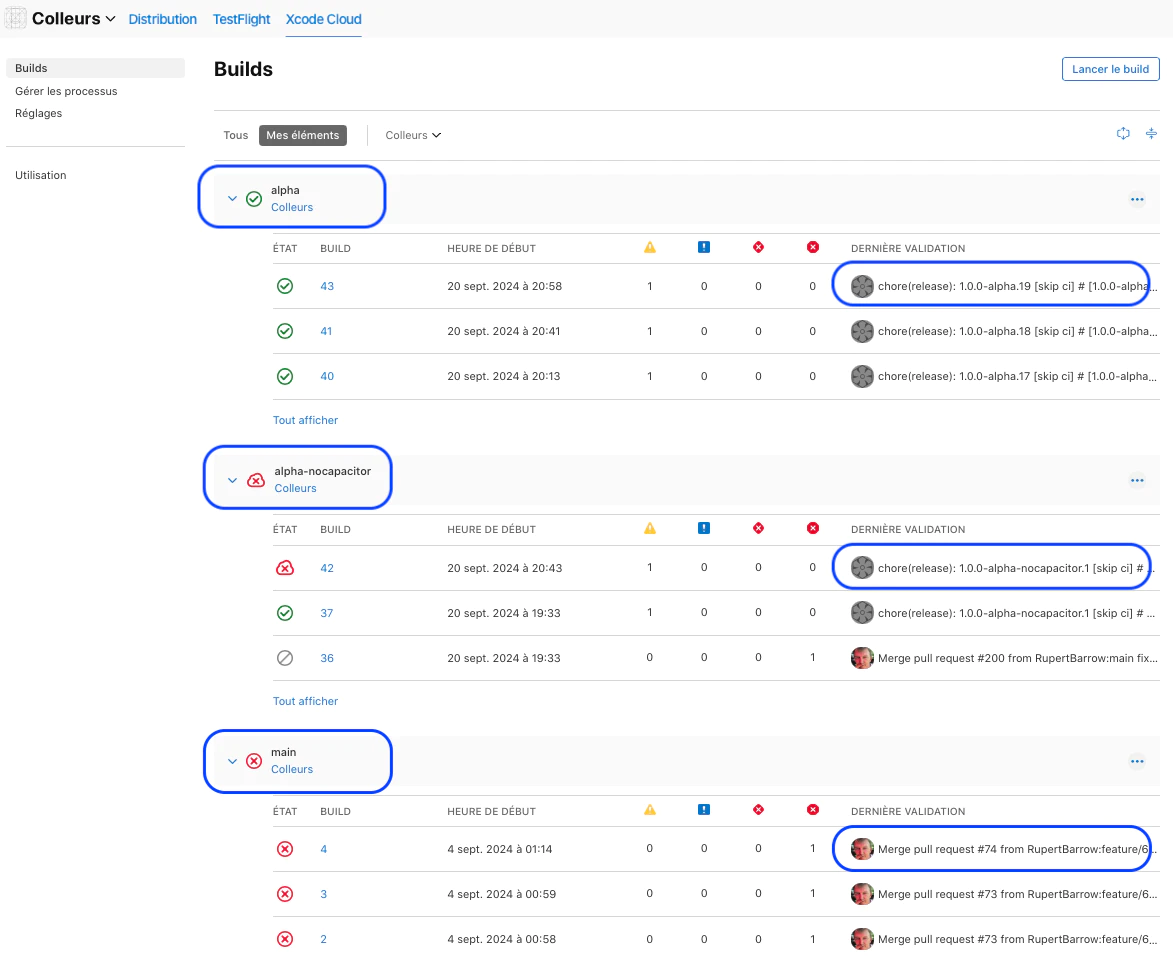
XCode Cloud에서 앱 바이너리를 Capgo 채널로 빌드합니다.
7. 결론
결론을 내리자면, 나는 Capgo CapacitorUpdater를 내장된 의미론적 릴리스 PIPELINE에 통합할 수 있었고, 14일 무료 테스트 기간 내에 빠르게 통합할 수 있었으며, 결과는 다음과 같습니다.
- bundle 버전 번호는 의미론적 릴리스에 의해 자동으로 생성되며 Capgo 서버와 호환됩니다.
- 의미론적 릴리스는 Capgo 애플리케이션 번들을 자동으로 배포하며, Capgo 채널도 사용합니다.
- 이것은 XCode Cloud 애플리케이션 바이너리 빌드와 잘 맞습니다.
다음 단계
나는 현재 이 앱의 개발 단계에 있습니다. 나는 이 앱을 빠르게 테스터에게 TestFlight(아이오스용)로 제공할 것입니다. Capgo의 힘을 고려할 때, 나는 무료 버전의 앱을 테스트하기 위해 앱 스토어에 배포할 것입니다. 그리고 테스트 중에는 Capgo로 정기적으로 업데이트할 것입니다. 그리고 테스트를 위해 앱 스토어에 또 다른(유료) 버전의 앱을 배포할 것입니다. 그리고 또 다른 레코드에서 배포하고, 테스트 중에는 Capgo로 정기적으로 업데이트할 것입니다.
나는 Capgo에 대한 더 나은 빌드 전 검증을 추가하길 바랍니다. bundle upload Capgo
I now have a clean, simple an reproducible semantic release pipeline for future mobile apps developed with Ionic + Angular + Capacitor.
Live Update
Cloudflare GitHub Capgo
API SDK.
CLI npm bun Semantic Release 구성에 필요한 prerequisites를 내 semantic release 구성에 추가했습니다. (개발 중입니다.)
Rapido Cloud와 Capgo CapacitorUpdater를 사용하여 Semantic Release를 관리하는 방법
CapacitorUpdater를 사용 중이라면 Rapido Cloud와 Capgo CapacitorUpdater를 사용하여 Semantic Release를 관리하는 방법 live update Live Updates와 연결하여 Capgo 실시간 업데이트 for the product workflow in Capgo Live Updates, Live Updates Live Updates Live Updates Live Updates Live Updates Capgo의 Capacitor Updater를 사용하여 Semantic Release 관리하는 방법 업데이트 유형 업데이트 유형에 대한 구현 세부 사항.





