


1. 简介
在Rapido Cloud(www.rapido.cloud)中,我正在开发一个用于Salesforce客户的移动应用程序,使他们能够轻松部署自己的品牌移动应用程序,而无需通过Salesforce Mobile SDK 或Salesforce Mobile Publisher进行困难的循环。
我已经在现代和“标准”的平台上开发了这个移动应用程序,使用了广泛的组件和工具,包括Ionic 8、Angular 18、TypeScript、Capacitor 和现在 Capgo CapacitorUpdater。这些对于不想管理Salesforce平台具体细节的客户来说更简单;并且对于我来说更容易和便宜地招募Ionic + Angular移动应用程序的开发者和维护者。
本文解释了我的设计、我的选择和实现使得 Capgo 和 semantic-release 一个非常成功的无脑方法来自动化所有部署通过 Github Actions。所有这一切是在 Capgo CapacitorUpdater 的nice 14天免费试用期内设计、测试和文档化的。
2. 为什么使用 Capgo ? 为什么使用 semantic-release ?
Capgo CapacitorUpdater 的承诺吸引了我,使得移动应用部署变得更加简单、快速和灵活,远远超过了通过标准的 Apple AppStore/Google PlayStore 交付过程。
I was rather afraid of the learning curve to make this successful but I got my app onto Apple TestFlight quite easily. I was then in position to use Capgo CapacitorUpdater to deploy my updates much faster.
我对学习曲线感到担忧,但我很容易地将我的应用推送到 Apple TestFlight。然后我就可以使用 Capacitor CapacitorUpdater 来快速部署我的更新。
So Capgo CapacitorUpdater helped me update my application on my mobile, live, 1 minute after saving a new feature or fix in my source code : so relieving, and so flexible, and easy to set up !
3. 我的分支和发布模型,以及语义发布如何融入其中
所以现在我已经将我的交付到 Capgo 服务器上工作正常了,我需要自动化并将其整合到我的 CI/CD pipeline 中
这就是我如何组织我的分支和发布模型
对于每个应用程序,无论是移动、web还是 Salesforce:
- 开发 在
feature/...分支main,并将它们合并到main,这是大多数开发分支的参考,除了维护和特定功能的定制交付(关于此更多信息见下文) - 部署 从发布分支 可能是:
production, 预发布 branch(alpha,beta,nightly, 等)以及客户特定或上下文特定分支用于自定义交付 - 部署由 pull request 触发 部署由 pull request 触发,因为我不使用标签触发部署,因为 semantic release 为我管理标签和其他所有内容
基本上,这是 Gitlab Flow :
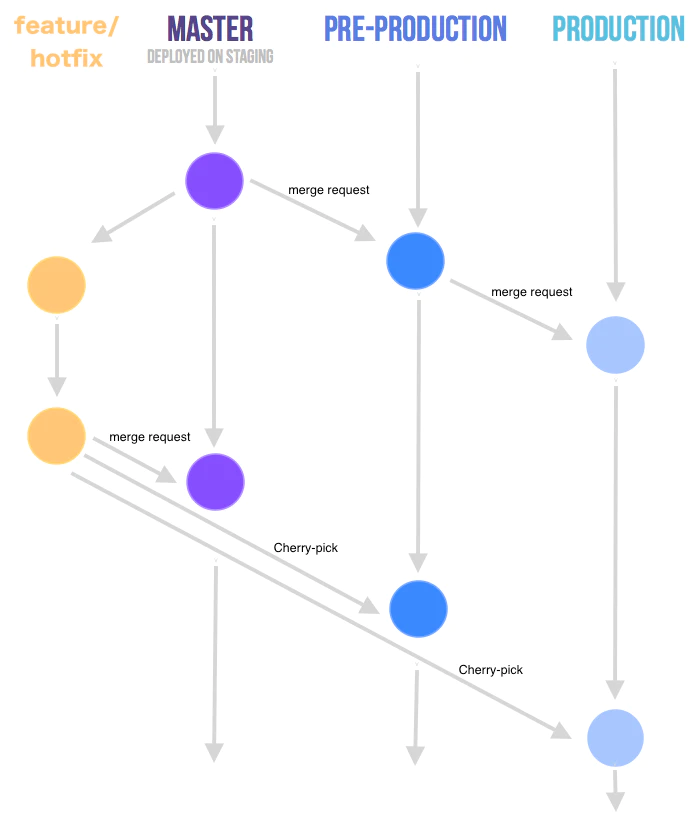
Gitlab 流程 https://faun.dev/c/stories/manuelherrera/git-branching-strategies-in-2022
关于 semantic-release 的一则小贴士 :
在部署 branch 中,当 semantic-release 被触发时,它会自动计算新版本号,依据此 branch 上的前一个标签版本号和修复或特性交付。修复会创建一个新的小版本号,而特性会创建一个新的小版本号。它还自动包含预发布 alpha, beta, 等在版本号中
semantic release 根据您的提交生成 changelog, 将修复和功能按照 conventional commits (参见 https://www.conventionalcommits.org/en/about并且在 semantic release 中配置。
It will also update all your git (Github, in my case) merged pull requests and related issues with comments linking them to the tag and release. Finally, in this Github release, it will attach assets such as source code, binaries if necessary, CHANGELOG.md, etc.
4. semantic release 中的 branch、release、prerelease 和 channel 以及在 Capgo 中的这些概念
Capgo 已经开发并文档化了他们自己的“Conventional Commits”
工具, 并且他们的 forked repo
https://Capgo.com/Cap-go/standard-version standard-version ) 和他们自己的 standard-version (https://github.com/Cap-go/standard-version__CAPGO_KEEP_2__ capacitor-standard-version (https://github.com/Cap-go/capacitor-standard-version)以及 capacitor-plugin-standard-version (https://github.com/Cap-go/capacitor-Capacitor标准版本插件)仓库。他们在博客中记录了Capgo在部署中使用的版本方案(https://capgo.app/blog/how-version-work-in-capgo/)。JavaScript包遵循“标准”语义版本“语义版本控制”(https://semver.org),它 semantic-release 也遵循(显然!)
因此,这很好,给我带来了很大的放心,因为我使用 semantic-release 它的功能非常全面。
我还希望语义发布生成不同频道的应用部署
我需要从分支如上述的部署预发布版本 alpha, beta, nightly 例如,需要部署从以下分支的预发布版本 production-customer-jones, production-customer-doe, etc.
Capgo provides the “channels” feature which is exactly what semantic release also supports, so I am excited to make them work together. These also fit in with the different branch builds managed by XCode Cloud (see more about this below).
, etc. 1.0.0-alpha.1,等 1.0.0-alpha.2, etc. Although not documented explicitly, these version numbers are supported by Capgo, which is great news for me : I will use semantic release channels and prerelease to generate versions of my app with Capgo channels.
5. 我如何使用 Capgo 来发布我的应用程序 ?
为了自动部署您的应用程序包到Capgo,您需要使用CapgoCLI命令。 bundle upload. Type npx @capgo/cli@latest bundle upload --help 。 Successive builds on this branch will increment the build number to
npx @capgo/cli bundle upload --channel $CHANNEL --apikey $CAPGO_APIKEY --bundle $VERSION --bundle-url $CAPGO_APPID- CHANNEL 是我们想要部署的 Capgo 通道(例如
alpha) - 版本号是由语义发布 (例如
1.0.0-alpha.1) - CAPGO_APIKEY 由 Capgo 提供,用于唯一标识您的 CI/CD pipeline 登录
- CAPGO_APPID 由 Capgo 提供,用于唯一标识您的应用程序 (例如
com.mystartup.mysuperapp)
6. 我的语义发布 + Capgo CapacitorUpdate 配置
最后,这些都如何结合起来?

使用语义发布和 Github Actions 构建的应用程序包版本
语义发布的自动化操作使用 Github Actions
语义发布的美妙之处在于,部署自动化,形如 Github Action 工作流,非常简单。这将在其他 CI/CD 平台上看起来非常相似。
# ./github/workflows/release.yml

name: Release

on:
  workflow_dispatch:
  push:
    branches: [alpha, alpha-nocapgo, dev-rupert]    # <--- adapt this

env:
  CAPGO_APPID: com.mystartup.mysuperapp             # <--- adapt this
  CAPGO_APIKEY: ${{ secrets.CAPGO_APIKEY }}

jobs:
  build:
    runs-on: ubuntu-latest
    steps:
      - uses: actions/checkout@v6
      - uses: actions/setup-node@v6
        with:
          node-version: 24
          cache: "npm"
      - run: npm install
      - run: npx semantic-release
        env:
          DEBUG: true
          GITHUB_TOKEN: ${{ github.token }}
这只会安装 NodeJS 环境,然后调用语义发布。
对于列表中的每个 branch 分支中的每个 mzerge,语义发布都会触发部署。
设置 branches当你配置好 semantic release 后,Capgo 会自动触发部署。 CAPGO_APIKEY In您的仓库的机密中。
更新您的 CAPGO_APPID 这里。
语义发布的行为是通过其 .releaserc.json 配置文件来设置。
以下是我的设置,详细说明如下:
// .releaserc.json

{
  "branches": [
    {
      "name": "release",
      "channel": "production"
    },
    {
      "name": "alpha",
      "channel": "alpha",
      "prerelease": "alpha"
    },
    {
      "name": "alpha-nocapgo",
      "channel": "alpha",
      "prerelease": "alpha-nocapgo"
    },
    {
      "name": "dev-rupert",
      "channel": "development",
      "prerelease": "development"
    },
    {
      "name": "dev-paul",
      "channel": "development",
      "prerelease": "development"
    }
  ],
  "ci": true,
  "debug": true,
  "dryRun": false,
  "repositoryUrl": "https://github.com/RupertBarrow/mysuperapp",

  "verifyConditions": ["@semantic-release/github"],

  "plugins": [
    [
      "@semantic-release/commit-analyzer",
      {
        "preset": "angular",
        "releaseRules": [
          { "type": "breaking", "release": "major" },
          { "type": "feat", "release": "minor" },
          { "type": "fix", "release": "patch" },
          { "type": "ci", "release": "patch" },
          { "type": "doc", "release": "patch" },
          { "type": "docs", "release": "patch" },
          { "type": "refactor", "scope": "core-*", "release": "minor" },
          { "type": "refactor", "release": "patch" },

          { "scope": "no-release", "release": false }
        ]
      }
    ],

    "@semantic-release/release-notes-generator",

    ["@semantic-release/changelog", { "changelogFile": "CHANGELOG.md" }],

    [
      "@semantic-release/git",
      {
        "assets": ["package.json", "CHANGELOG.md", "ios/App/App.xcodeproj/project.pbxproj"],
        "message": "chore(release): ${nextRelease.version} [skip ci]\n\n${nextRelease.notes}"
      }
    ],

    ["@semantic-release/github", { "assets": ["CHANGELOG.md"] }],

    [
      "@semantic-release/exec",
      {
        "prepareCmd": "npm run build",
        "publishCmd": "npm add -D @capgo/cli && npx @capgo/cli bundle upload --channel ${branch.channel} --apikey $CAPGO_APIKEY --bundle ${nextRelease.version} --bundle-url $CAPGO_APPID"
      }
    ]
  ]
}branches:branches设置分支的配置(name),映射到Capgo频道(channel)以及如何为预发布版本号命名(prerelease)。例如,如果branch.prerelease = "development",语义发布将生成的版本号将是x.y.z-development.n- 部署到
alpha和alpha-nocapgo分支将同时部署应用到alphachannel, 但版本号中有不同的预发布名称 - 开发者分支的发布
dev-rupert或dev-paul将会部署到developmentchannel 在 Capgo 上,所有相同development版本号中有相同的预发布关键字
verifyConditions: in the first stage of semantic release, it checks that it has the correct access to Github. I hope to add an authentication check for the Capgo CLI here later@semantic-release/commit-analyzer: 标准语义发布内容 - 请参阅他们的文档(https://github.com/semantic-release/semantic-release?tab=readme-ov-file#commit-message-format)@semantic-release/release-notes-generator: 生成CHANGELOG.md@semantic-release/git: 将以下文件提交,文件由 Ionic 构建和语义发布工作更新package.json,CHANGELOG.md和ios/App/App.xcodeproj/project.pbxproj- 我不构建 Android,(yet)@semantic-release/github: 将文件附加到 __CAPGO_KEEP_0__ 发布作为资产CHANGELOG.md将文件作为Github的资产发布到文件中@semantic-release/exec) 并将应用程序包装部署到 __CAPGO_KEEP_0__ 服务器 (prepareCmd您会注意到没有解释如何计算和递增版本号,如何生成更改日志,Capgo 标签或发布等:所有内容都由语义发布处理,配置最少publishCmd)
You will notice that their is no fiddling around with explaining how we want the version number to be calculated and incremented, how we need to generate a changelog, a Github tag or release, etc. : everything is handled by default by semantic release, with minimal configuration.
使用 XCode Cloud 构建新二进制文件
我设置了一个 XCode Cloud 过程,以便在我希望使用的分支上发生变化时构建(例如
- 在此分支上,我将 XCode Cloud 配置为仅在文件更新时构建。这是在语义发布生成的每个版本之后更新的
production) - 我可以在不同的分支上触发构建以模拟不同渠道的部署。在每个 XCode Cloud 构建的配置中,我手动设置一个环境变量,其值为
CHANGELOG.mdBuilding new binaries with XCode Cloud - Integrating all this with XCode Cloud building new versions of the application binary is simple (I am not yet deploying on Google Play, but that build should be similar) :
branch.channel在此releaserc.json(是的,这是一个手动重复)然后,如果我想,我可以部署一个不同的AppStore应用程序,用于每个自定义客户端应用程序,部署自定义发布分支,正如前面提到的。
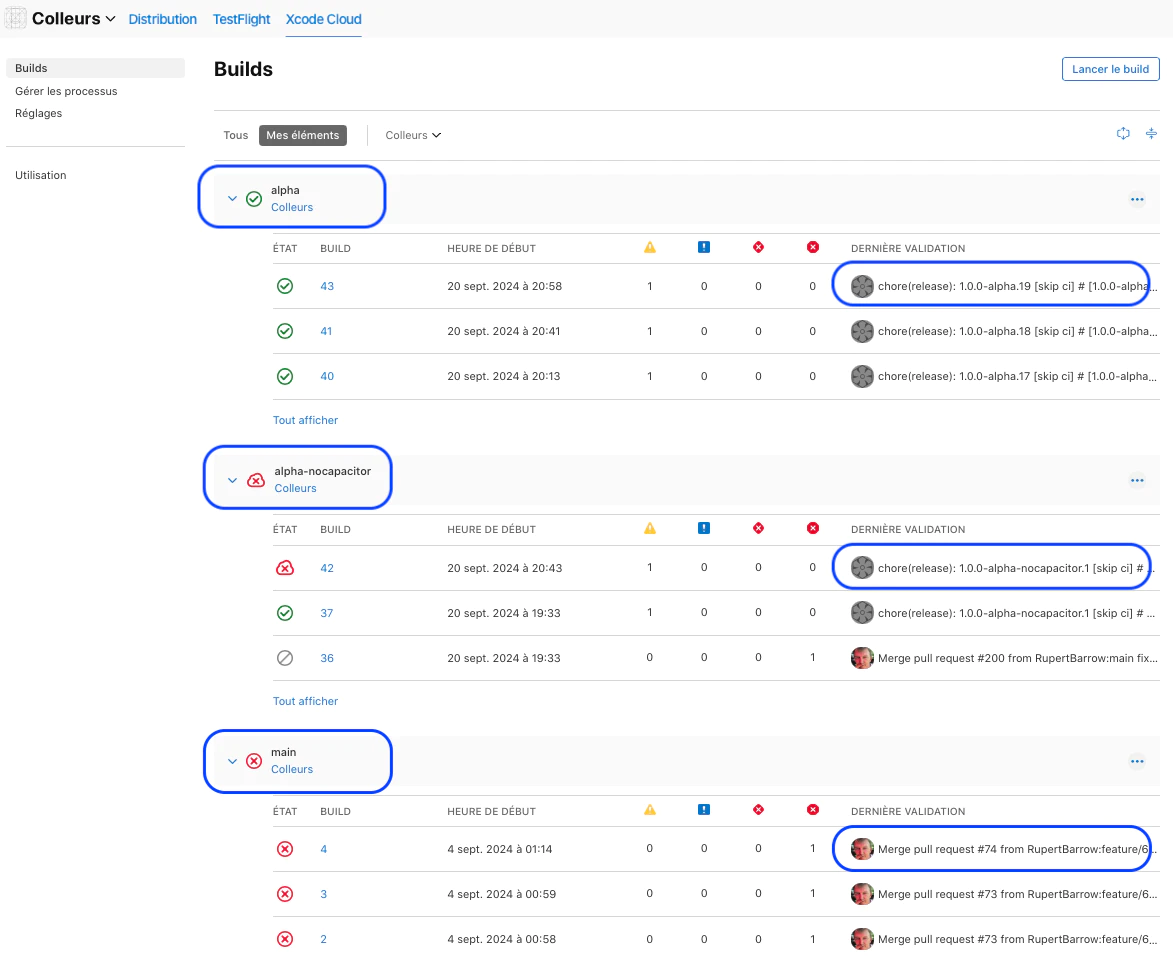
在XCode Cloud上使用Capgo频道构建应用程序二进制文件
7. 结论
总之,我很高兴能够在14天试用期内快速地将Capgo CapacitorUpdater集成到我的标准语义发布管道中,结果如下:
- 语义发布自动为Capgo服务器生成的捆绑包版本号
- 语义发布自动部署Capgo应用程序捆绑包,也使用Capgo频道
- 这与XCode Cloud应用程序二进制文件的构建非常匹配
下一步
我目前正在开发这个应用程序。通过TestFlight (用于iOS)我将快速将其提供给测试者。考虑到Capgo的力量,我将肯定地将应用程序的免费版本部署到AppStore进行测试,并且将其定期更新为Capgo。然后我将部署另一个(付费)应用程序的版本到AppStore,另一个记录下,并且也定期更新为Capgo。
我希望添加更好的预构建验证Capgo bundle upload CapacitorUpdater
我现在有一个干净、简单、可重复的语义发布管道,用于未来的移动应用,开发 Ionic + Angular + Capacitor。
Capacitor
Capacitor Capacitor Capacitor
Capacitor Capacitor.
Capacitor Capacitor Capacitor Capacitor (正在开发中)。
从如何Rapido Cloud管理Semantic Release with Capgo CapacitorUpdater继续。
如果您正在使用 如何Rapido Cloud管理Semantic Release with Capgo CapacitorUpdater 来规划live update的交付,连接它与 Capgo 实时更新 为Capgo Live Updates产品工作流程 概览 了解__CAPGO_KEEP_0__ Live Updates的实现细节 功能 了解__CAPGO_KEEP_0__ Live Updates的实现细节 更新行为 为 __CAPGO_KEEP_0__ 的更新行为提供详细信息,并 更新类型 为 __CAPGO_KEEP_1__ 的更新类型提供详细信息。





