


1. はじめに
Rapido Cloud(www.rapido.cloud)で、Salesforce クライアント向けのモバイル アプリケーションを開発しています。このアプリケーションを使用すると、Salesforce クライアントは、Salesforce Mobile SDKまたはSalesforce Mobile Publisherを使用する難しいループを回避して、自社ブランドのモバイル アプリケーションを簡単に展開できます。
このモバイル アプリケーションは、現代的な標準プラットフォームで開発されており、広く使用されているコンポーネントとツールを使用しています。これには、Ionic 8、Angular 18、TypeScript、Capacitor、そしてCapgoCapacitorUpdaterが含まれます。これらのツールは、Lightning Web ComponentsなどのSalesforceプラットフォームの特定の管理を避けるために、クライアントにとって扱いやすく、また、開発者やメンテナンス者を募集し、Ionic + Angularモバイル アプリケーションを維持することが簡単かつ安価です。
この記事では、私の設計、選択、実装について説明します。これらはCapgoと semantic-release と組み合わせて、自動的にすべてのデプロイを管理するための非常に簡単な方法を提供します。これはGithubアクションを使用して実現します。すべてのこの機能は、CapgoCapacitorUpdaterの14日間の無料試用期間中に設計、テスト、ドキュメント化されました。
2. なぜCapgoを使用するのですか? なぜセマンティックリリースを使用するのですか?
CapgoCapacitorUpdaterは、標準のApple AppStore/Google PlayStoreの配布プロセスを通過することなく、モバイルアプリのデプロイをより簡単、迅速、柔軟にすることを約束したことが私のモバイルアプリの開発に惹かせました。 これは、私が過去にWebアプリを開発することに集中していたため、最初のモバイルアプリでした。Salesforce Experience Cloudで開発するWebアプリが主な経験でした。
私は、成功するために必要な学習曲線を恐れていましたが、Apple TestFlightにアプリを簡単にアップロードできました。次に、CapgoCapacitorUpdaterを使用して、更新をより速くデプロイすることができました。
My first requirement and test case was to deploy for myself to test my app as a real mobile app on my own phone, instead of testing in a mobile emulator or in a simulator via the Nexus mobile browser suggested by IIonic. That’s because my app uses native features such as Geolocation or accessing the Photo Gallery and Camera. Not having the past experience of testing a Capacitor mobile app, I wasn’t sure if everything was going to work properly : nothing better than to test the real app, in real conditions !
CapgoのCapgo CapacitorUpdaterは、モバイル上で私のアプリケーションをリアルタイムで1分以内に更新するのに役立ちました。新しい機能や修正をソースcodeに保存した後、
3. 分枝とリリースモデル、そしてセマンティックリリースの位置付け
CapgoのCapgoサーバーへの配信が正しく動作しているので、CI/CDパイプラインに自動化して組み込む必要があります。
分枝とリリースモデルをどのように組織するか
モバイル、Web、Salesforceなど、すべてのアプリケーションに対して
- 開発は ブランチ
feature/...から行われmain、メンテナンスやカスタムデリバリー用の特定の機能の外では、mainほとんどの開発ブランチの基準となる - デプロイは リリースブランチからトリガーされる Capgoを使用してCapacitorUpdaterを管理する方法
production、alpha,beta,nightlyなど)およびカスタマー固有のまたはコンテキスト固有のブランチ(カスタムデリバリー用) - デプロイメントは、デプロイメントブランチにマージされるプルリクエストによってトリガーされます。 タグトリガーによるデプロイメントは使用していません。なぜなら、セマンティックリリースはタグとすべての残りのものを管理してくれるからです。
基本的には、GitLabフローです。
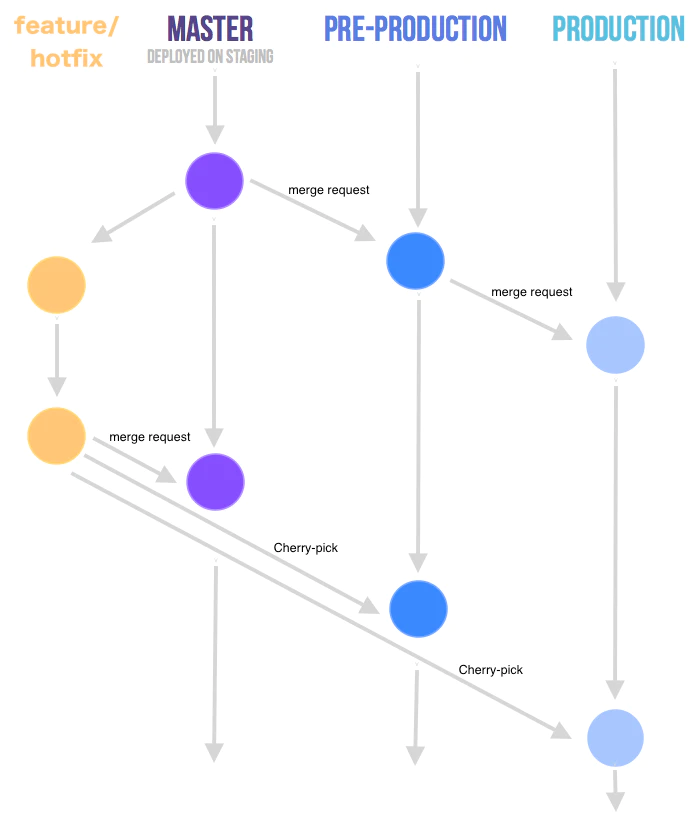
GitLabフロー - ソース https://faun.dev/c/stories/manuelherrera/git-branching-strategies-in-2022
セマンティックリリースの動作についての補足
デプロイメントブランチでセマンティックリリースがトリガーされると、セマンティックリリースは自動的にそのブランチ上の前のタグのバージョン番号と修正または機能の提供された修正に基づいて新しいバージョン番号を計算します。修正はパッチバージョンを新しく作成し、機能はマイナーバージョンを新しく作成します。さらに、プリリリース alpha, betaなどをバージョン番号に含めます。
セマンティック リリースは、コミットから変更ログを生成し、修正と機能を定義されたコミット (https://www.conventionalcommits.org/en/about を参照) に基づいてグループ化します。 https://www.conventionalcommits.org/en/about) です。Capgo CapacitorUpdaterでセマンティックリリースを管理しています。
It will also update all your git (Github, in my case) merged pull requests and related issues with comments linking them to the tag and release. Finally, in this Github release, it will attach assets such as source code, binaries if necessary, CHANGELOG.md, etc.
4. セマンティック リリースと Capgo で使用されるブランチ、リリース/プレリリース、チャネルについて。
So したがって、私は Capgo のデプロイメントでセマンティック リリースが行うことを以下のようにしたい。
セマンティック リリースはバージョン番号を生成するようにしたい。
Capgoは、"Conventional Commits"の独自バージョンを開発し、ドキュメント化しています。 standard-version Capgo のフォークされたリポジトリは https://__CAPGO_KEEP_0__.com/Cap-go/standard-version です。 standard-version (https://github.com/Cap-go/standard-version__CAPGO_KEEP_0__ capacitor-standard-version (https://github.com/Cap-go/capacitor-standard-version) そして capacitor-plugin-standard-version (https://github.com/Cap-go/capacitor-plugin-standard-version) リポジトリ。彼らは、Capgoのデプロイメントで使用されているバージョンスキームについて、ブログで詳細に説明しています (https://capgo.app/blog/how-version-work-in-capgo/) JavaScript バンドルは、標準的なsemver「意味論的バージョニング」(https://semver.org) に従っています。 ( semantic-release も同様です。
So それはすばらしいことであり、自分自身にとっては大きなリリーフとなります。なぜなら、自分自身は semantic-release を非常に多用しているからです。
また、シナティック リリースが、異なるチャンネルでアプリのデプロイメントを生成したいと考えています。
上記のように、CapGo CapacitorUpdaterを使用して、ブランチなどのプリリリースバージョンをデプロイする必要があります。 alpha, beta, nightly etc.、が含まれるブランチからもプリリリース版を展開する必要があります。 production-customer-jones, production-customer-doeetc.
Capgoは「チャンネル」機能を提供しており、これはセマンティックリリースもサポートしている機能です。セマンティックリリースとCapgoを組み合わせることができるので、非常に嬉しいです。これは、XCode Cloudが管理する異なるブランチのビルドと一致しています。
セマンティックリリースが生成したセマンティックバージョン番号は、プリリリースの場合 1.0.0-alpha.1。プリリリースのビルドごとに、ビルド番号は 1.0.0-alpha.2、などと増えていきます。セマンティックバージョン番号は、Capgoによってサポートされています。これは私にとって大きなニュースです。セマンティックリリースのチャンネルとプリリリースを使用して、Capgoチャンネルでアプリのバージョンを生成することができます。
5. Capgoを使用してアプリケーションをリリースする方法はありますか。
アプリケーションバンドルをCapgoに自動的にアップロードするには、Capgo CLIコマンドを使用する必要があります。 bundle upload。 npx @capgo/cli@latest bundle upload --help アップロードオプションが多数表示されます。その中から、以下のオプションを使用します。
npx @capgo/cli bundle upload --channel $CHANNEL --apikey $CAPGO_APIKEY --bundle $VERSION --bundle-url $CAPGO_APPID- CHANNELは、Capgoにアップロードしたいチャンネル名です(例えば
alpha) - バージョンはsemantic release (例えば
1.0.0-alpha.1) - CAPGO_APIKEYはCapgoからCI/CDパイプラインのログインに一意の識別子として提供されます。
- CAPGO_APPIDはCapgoからアプリケーションに一意の識別子として提供されます (例えば
com.mystartup.mysuperapp)
6. semantic release + Capgo CapacitorUpdate設定
最後に、これらはどのように組み合わさりますか?

semantic releaseとGithub Actionsで構築されたアプリケーションバンドルバージョン
semantic releaseの自動化はGithub Actionsで行われます。
The beauty of semantic release is that the deployment automation, in the form of a Github Action workflow, is very simple. This will look very similar on other CI/CD platforms .
# ./github/workflows/release.yml

name: Release

on:
  workflow_dispatch:
  push:
    branches: [alpha, alpha-nocapgo, dev-rupert]    # <--- adapt this

env:
  CAPGO_APPID: com.mystartup.mysuperapp             # <--- adapt this
  CAPGO_APIKEY: ${{ secrets.CAPGO_APIKEY }}

jobs:
  build:
    runs-on: ubuntu-latest
    steps:
      - uses: actions/checkout@v6
      - uses: actions/setup-node@v6
        with:
          node-version: 24
          cache: "npm"
      - run: npm install
      - run: npx semantic-release
        env:
          DEBUG: true
          GITHUB_TOKEN: ${{ github.token }}
この設定では、NodeJS環境をインストールし、semantic releaseを呼び出します。
すべてのブランチリストに記載されているマージごとに branches__CAPGO_KEEP_0__はCapacitorUpdaterのことです。 CAPGO_APIKEY In your repository's secrets.
Capgoを更新する CAPGO_APPID ここ。
セマンティック リリースの動作は、設定ファイルに記載されています。 .releaserc.json 設定ファイルの説明
// .releaserc.json

{
  "branches": [
    {
      "name": "release",
      "channel": "production"
    },
    {
      "name": "alpha",
      "channel": "alpha",
      "prerelease": "alpha"
    },
    {
      "name": "alpha-nocapgo",
      "channel": "alpha",
      "prerelease": "alpha-nocapgo"
    },
    {
      "name": "dev-rupert",
      "channel": "development",
      "prerelease": "development"
    },
    {
      "name": "dev-paul",
      "channel": "development",
      "prerelease": "development"
    }
  ],
  "ci": true,
  "debug": true,
  "dryRun": false,
  "repositoryUrl": "https://github.com/RupertBarrow/mysuperapp",

  "verifyConditions": ["@semantic-release/github"],

  "plugins": [
    [
      "@semantic-release/commit-analyzer",
      {
        "preset": "angular",
        "releaseRules": [
          { "type": "breaking", "release": "major" },
          { "type": "feat", "release": "minor" },
          { "type": "fix", "release": "patch" },
          { "type": "ci", "release": "patch" },
          { "type": "doc", "release": "patch" },
          { "type": "docs", "release": "patch" },
          { "type": "refactor", "scope": "core-*", "release": "minor" },
          { "type": "refactor", "release": "patch" },

          { "scope": "no-release", "release": false }
        ]
      }
    ],

    "@semantic-release/release-notes-generator",

    ["@semantic-release/changelog", { "changelogFile": "CHANGELOG.md" }],

    [
      "@semantic-release/git",
      {
        "assets": ["package.json", "CHANGELOG.md", "ios/App/App.xcodeproj/project.pbxproj"],
        "message": "chore(release): ${nextRelease.version} [skip ci]\n\n${nextRelease.notes}"
      }
    ],

    ["@semantic-release/github", { "assets": ["CHANGELOG.md"] }],

    [
      "@semantic-release/exec",
      {
        "prepareCmd": "npm run build",
        "publishCmd": "npm add -D @capgo/cli && npx @capgo/cli bundle upload --channel ${branch.channel} --apikey $CAPGO_APIKEY --bundle ${nextRelease.version} --bundle-url $CAPGO_APPID"
      }
    ]
  ]
}branches:branchesセマンティック リリースの動作を設定するには、以下の設定を参照してください。name), マップされた Capgo チャンネル (channel) を指定し、__CAPGO_KEEP_0__ チャンネル (prerelease) にマップし、プレリリース バージョン番号の呼び出し (branch.prerelease = "development") を指定します。たとえば、x.y.z-development.n- セマンティック リリースが生成するバージョン番号は、
alphaデプロイ先のalpha-nocapgoそして、alphaチャンネルですが、バージョン番号に異なるプレリリース名が含まれています。 - 開発者ブランチへのデプロイ
dev-rupertまたはdev-paulチャンネルに__CAPGO_KEEP_0__に、すべて同じプレリリースキーワードが含まれるdevelopmentchannel における Capgo のすべてdevelopmentバージョン番号のプレリリースキーワード
verifyConditions: in the first stage of semantic release, it checks that it has the correct access to Github. I hope to add an authentication check for the Capgo CLI here later@semantic-release/commit-analyzer: standard stuff - see their documentationhttps://github.com/semantic-release/semantic-release?tab=readme-ov-file#commit-message-format)@semantic-release/release-notes-generator: 以下のファイルをコミットします。アプリケーションのIonicビルドによって更新されたファイルとセマンティックリリースによって更新されたファイルCHANGELOG.md@semantic-release/gitそしてpackage.json,CHANGELOG.mdandios/App/App.xcodeproj/project.pbxproj- Android にビルドすることはありません、まだ)@semantic-release/github: __CAPGO_KEEP_0__ リリースにアセットとしてファイルを追加するCHANGELOG.mdファイルをCapgoのGithubリリースにアセットとして追加します。@semantic-release/exec) と、__CAPGO_KEEP_0__ サーバーにアプリ バンドルを有効にビルドして配布する (prepareCmd) そして、実際にアプリケーション バンドルを Capgo サーバーにデプロイするには、publishCmd)
You will notice that their is no fiddling around with explaining how we want the version number to be calculated and incremented, how we need to generate a changelog, a Github tag or release, etc. : everything is handled by default by semantic release, with minimal configuration.
XCode Cloudで新しいバイナリをビルドする
XCode Cloud プロセスを設定して、指定したブランチで変更が発生したときにビルドするようにします (例えば
- このブランチでは、ファイルが更新されたときにのみ XCode Cloud をビルドするように設定します。この更新は、シーマティック リリースによって生成される各バージョン後に実行されます。
production) - このブランチでは、XCode Cloudはビルドを実行するのは、
CHANGELOG.mdXCode Cloud で新しいバイナリをビルドする - XCode Cloud と統合することで、シーマティック リリースによって生成される各バージョンに対して、簡単にアプリケーション バイナリの新しいバージョンをビルドできます (Google Play にデプロイすることはまだしていませんが、ビルド方法は似ています) :
branch.channelset inreleaserc.jsonCapgoを使用してCapacitorUpdaterを管理する方法について ( yes, これは手動の複製です ) そして、もし私がしたいなら、カスタムリリースブランチから展開されたカスタムカスタマーアプリケーションごとに、別のAppStoreアプリケーションを展開することもできます。
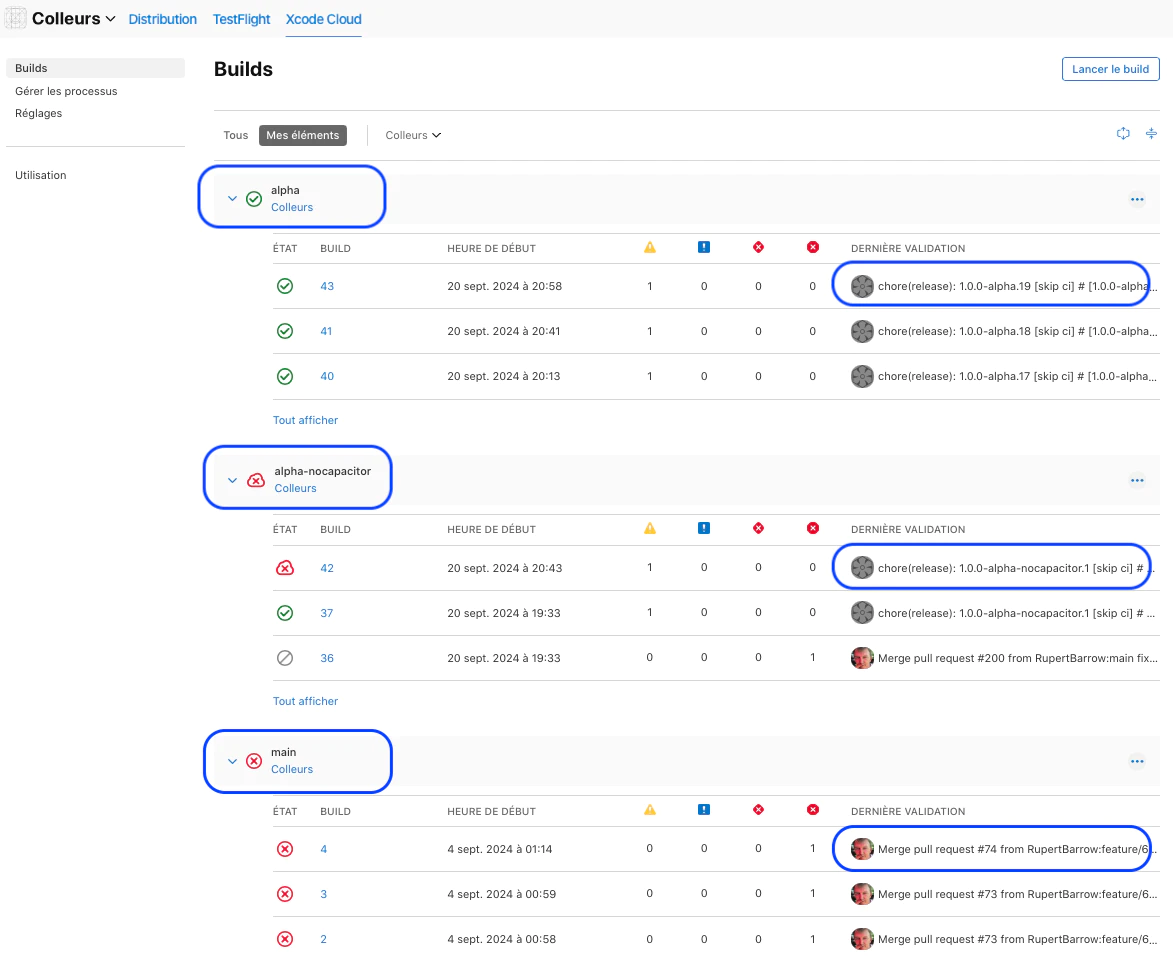
XCode Cloudでアプリバイナリをビルドする際のCapgoチャンネル
7. 結論
In conclusion, I am very happy to have been able to integrate Capgo CapacitorUpdater into my standard semantic release pipeline, rapidly within the delay of the 14-day trial period, and the result is the following :
- バンドルバージョン番号は、セマンティックリリースによって自動生成され、Capgoサーバーと互換性があります。
- セマンティック リリースは、Capgo アプリケーション バンドルを自動的にデプロイし、Capgo チャンネルも利用します。
- XCode Cloudのアプリケーションバイナリのビルド
次のステップ
私はこのアプリの開発段階にあります。このアプリをテスト用にテストフライト(iOS用)で迅速に提供し、Capgoの力に感銘を受けた私は、無料版のアプリをAppStoreにテスト用にリリースし、テスト中はCapgoで定期的に更新する予定です。次に、AppStoreに別のレコードで有料版のアプリをリリースし、Capgoで定期的に更新する予定です。
I hope to add better pre-build verification of Capgo bundle upload CapgoのCapacitorUpdaterを使用してセマンティックリリースを管理する方法
I now have a clean, simple an reproducible semantic release pipeline for future mobile apps developed with Ionic + Angular + Capacitor.
著者 - ルパート・バロー
22年以上のSalesforceの経験があります。クライアントとユーザー、パートナーと統合者、設計者、開発者、ビジネスアナリスト、コンサルタントとして。13年間、フランスの成功したSalesforce SIパートナーであるAltius ServicesのCOOとCTOを共同設立し、共同管理し、Salesforceのソロプレネュアとして新しい冒険を始めました。 Cloudflare LinkedInで私を見つけてください
https://linkedin.com/in/rbarrow Rapido CompanionのSalesforceオファリングをご覧ください.
https://www.rapido-companion.app そして and and (開発中)
Keep going from How Rapido Cloud manage Semantic Release with Capgo CapacitorUpdater
Capgoを使用している場合、CapacitorUpdaterを使用してセマンティックリリースを管理することができます。 How Rapido Cloud manage Semantic Release with Capgo CapacitorUpdater to plan live update delivery, connect it with Capgo Live Updates for the product workflow in Capgo Live Updates, 概要 概要の実装詳細について 機能 Capgoの機能詳細について アップデート動作 Capgoのアップデート動作の実装詳細について アップデートの種類 Capgoのアップデートの種類の実装詳細について。





