


Capacitor-updater now supports end-to-end code encryption. Code signing makes sure the updates run by end users’ devices have not been tampered with and provides an extra level of protection above Capacitor-updater’s standard web-grade security.
The default security of Capacitor-updater
By default, Capgo’s security model is similar to that of web hosting providers. Capgo stores updates encrypted at rest and serves them over HTTPS using modern ciphers. Similarly, publishing an update from a developer’s computer always uses HTTPS.
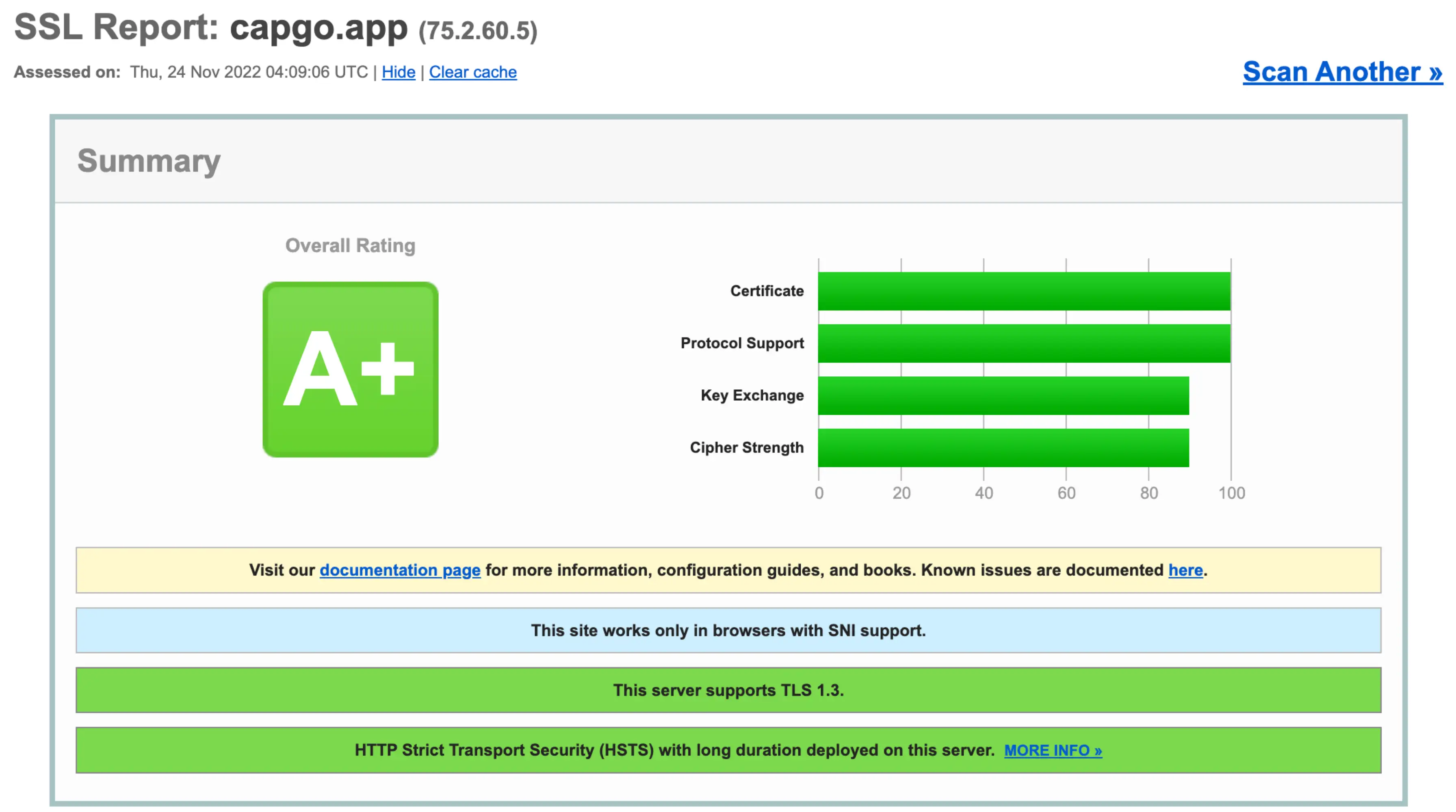
Capgo’s default security scores an A+ on SSL Labs’ HTTPS test (https://www.ssllabs.com, November 2022)
Like best-in-class web hosts, Capgo uses HTTPS to protect the privacy and integrity of network connections between the server and end users’ devices. This is an excellent level of security that works well both for the web and Ionic apps that use Capgo.
The cloud infrastructure supply chain
Another thing Capgo and most web hosts have in common is they run on lower-level cloud infrastructure, often from AWS, GCP, or another popular cloud provider. The hardware and software operated by these cloud providers and Capgo or other web hosts are part of the cloud supply chain.
The cloud supply chain and its security model work for a vast number of websites and apps. Every web developer who uses a cloud provider puts trust in that provider and expects the files they upload to be the files that are run or served without being tampered with. And cloud providers work hard at keeping their infrastructure secure.
But obviously, hardware and software vulnerabilities get discovered. Cloud providers patch vulnerabilities on timely schedules, proactively prevent malicious software(e.g. Google’s SLSA), and build layers of defense in depth, and in practice, cloud infrastructure has shown to meet most websites and apps’ security needs. However, some Ionic apps include compromised cloud infrastructure in their threat models. For these Capacitor JS apps with the highest security requirements above the web, we built end-to-end code signing in to Capgo and the Capgo Updates standard protocol.
End-to-end code signing with Capgo
Capgo’s end-to-end code signing uses public-key cryptography to ensure end users’ devices run only unmodified, original updates from the Capacitor app developer.
“End-to-end” means this security covers the flow from the time a developer publishes an update to the time an end user’s device receives and runs the update. “Code signing” is using cryptography and a secret private key to “sign” code, and later using a trusted public key to verify the signature.
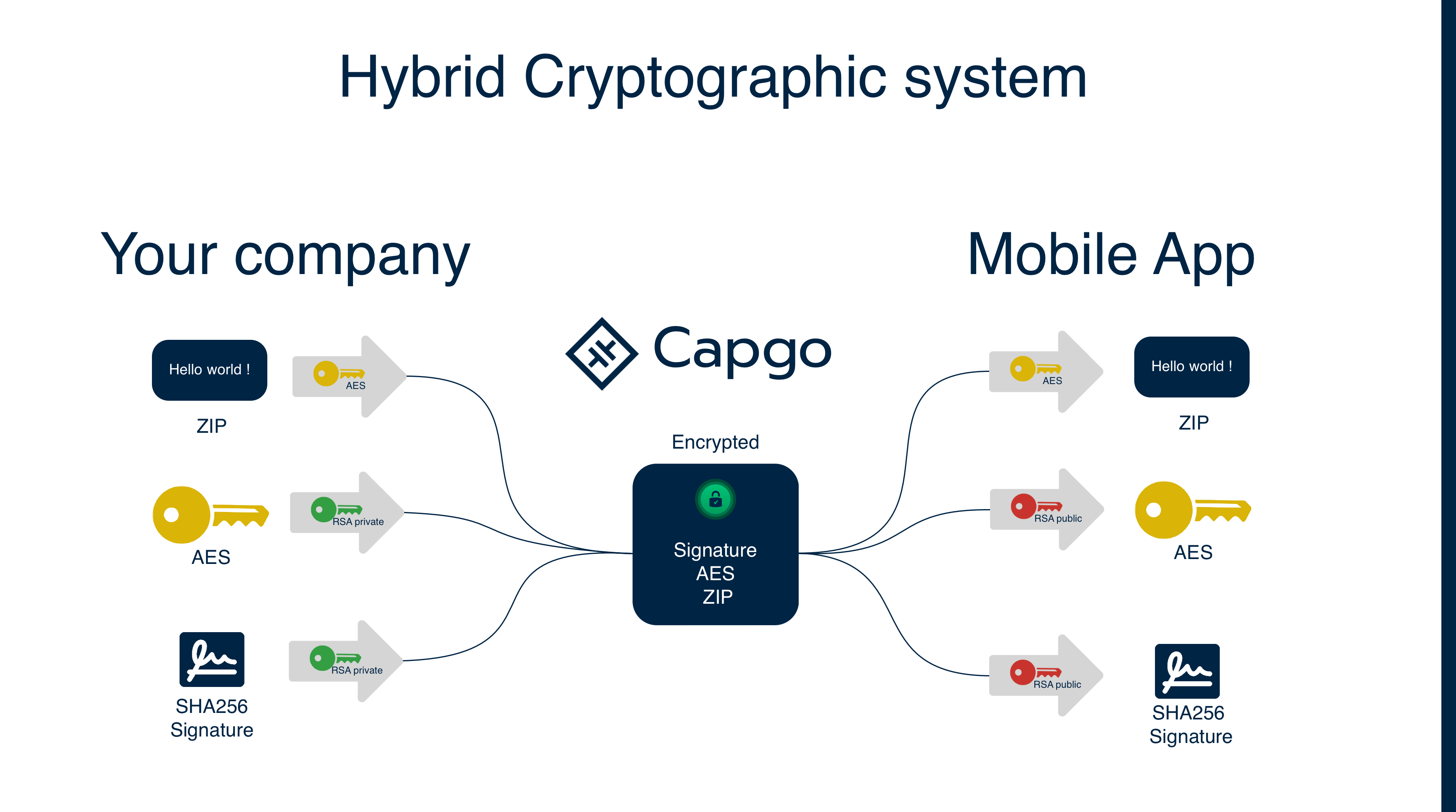
Here is a simple* schema to explain how it works:
- Complex in practice, cryptography is hard
Definition:
- AES: Advanced Encryption Standard, a symmetric encryption algorithm, one key for encryption and decryption.
- RSA: Rivest–Shamir–Adleman, an asymmetric encryption algorithm, two keys are used: a public key and a private key.
- Cypher: The encrypted data.
- Session key: An AES key used to encrypt and decrypt data.
- Checksum: A hash calculated for a file
- Signature: A checksum that was encrypted with a private RSA key. It can be verified with a public RSA key
We use the AES algorithm to encrypt the update. A random AES key is generated for every upload, then the AES key and checksum (hereafter “signature”) are encrypted with the private RSA key of the developer. The developer’s public RSA key is used in the app to decrypt the AES key and the signature (converting it back to a checksum). Later, the decrypted AES key is used to decrypt the update; a checksum of the decrypted update is calculated, and it is compared with the decrypted signature.
We use two different encryption algorithms because RSA cannot be used to encrypt large amounts of data. AES is used to encrypt the update and RSA is used to encrypt the AES key and the checksum.
With this, even Capgo cannot read the content of your bundle. This is a robust security model that is used by many enterprise customers.
Update encryption V2 2024-08-27:
- We switched the key type that is stored in the app. This was done in order to prevent inferring the public key (previously used for encryption) from the private key (previously used for decryption). Now, the app stores the public key (now used for decryption).
- We switched the checksum from the CRC32 algorithm to the SHA256 algorithm. We also started signing the bundle. When encryption V2 is configured, an update must have a valid signature. This is strictly enforced by the plugin.
- We now enforce a valid signature encryption V2 is configured. These 3 changes have been done after a security analysis from a member of the community. They are here to prevent cryptographic attacks during update.
If you used encryption V1, migrate to V2 to benefit from the new security features. Follow the migration instructions.
With end-to-end code signing, Capgo becomes a “trustless” cloud infrastructure. If one of Capgo’s cloud providers or even Capgo itself were to modify a code-signed update, end users’ devices would reject that update and run the previous, trusted update that’s already on the device.
While web-level HTTPS is sufficient for many apps, some large companies find the extra level of security from end-to-end code signing appealing. Some of these companies make finance apps that issue high-value, permanent transactions. Other companies have CISOs who include compromised cloud infrastructure in their threat models. We built end-to-end code signing in to Capgo for these use cases and are interested in hearing more from companies with higher-level security needs.
Getting started for enterprise customers
For large companies or projects who care deeply about security, we want to make code signing easy to set up and maintain. To that end, we now provide the following features:
- Quick certificate setup and configuration
- Support for code signing development servers with both Capgo and development builds
- Production code signing on every update
Capgo code signing is available for all customers. To get started, follow the setup instructions.
Credits
Thanks a lot to Ionic, this article is based on this article rewrote with chat-gpt-3 and adapted.
Keep going from E2E Encryption for Capacitor Updater via Code Signing
If you are using E2E Encryption for Capacitor Updater via Code Signing to plan security and compliance, connect it with Encryption for the implementation detail in Encryption, Compliance for the implementation detail in Compliance, Capgo Security Scanner for the product workflow in Capgo Security Scanner, Capgo Security for the product workflow in Capgo Security, and Capgo Trust Center for the product workflow in Capgo Trust Center.





