


Capacitor-updater codeのエンドツーエンド暗号化に対応しました。Code署名により、エンドユーザーのデバイスで実行されるアップデートの改ざんを防ぎ、Capacitor-updaterの標準的なWebレベルのセキュリティに加え、さらなる保護層を提供します。
Capacitor-updaterのデフォルトのセキュリティ
デフォルトでは、CapgoのセキュリティモデルはWebホスティングプロバイダーと同様です。Capgoはアップデートを保存します 保存時に暗号化され、 最新の暗号方式を用いたHTTPS経由で配信されます。同様に、開発者のPCからアップデートを公開する際も、常にHTTPSが使用されます。
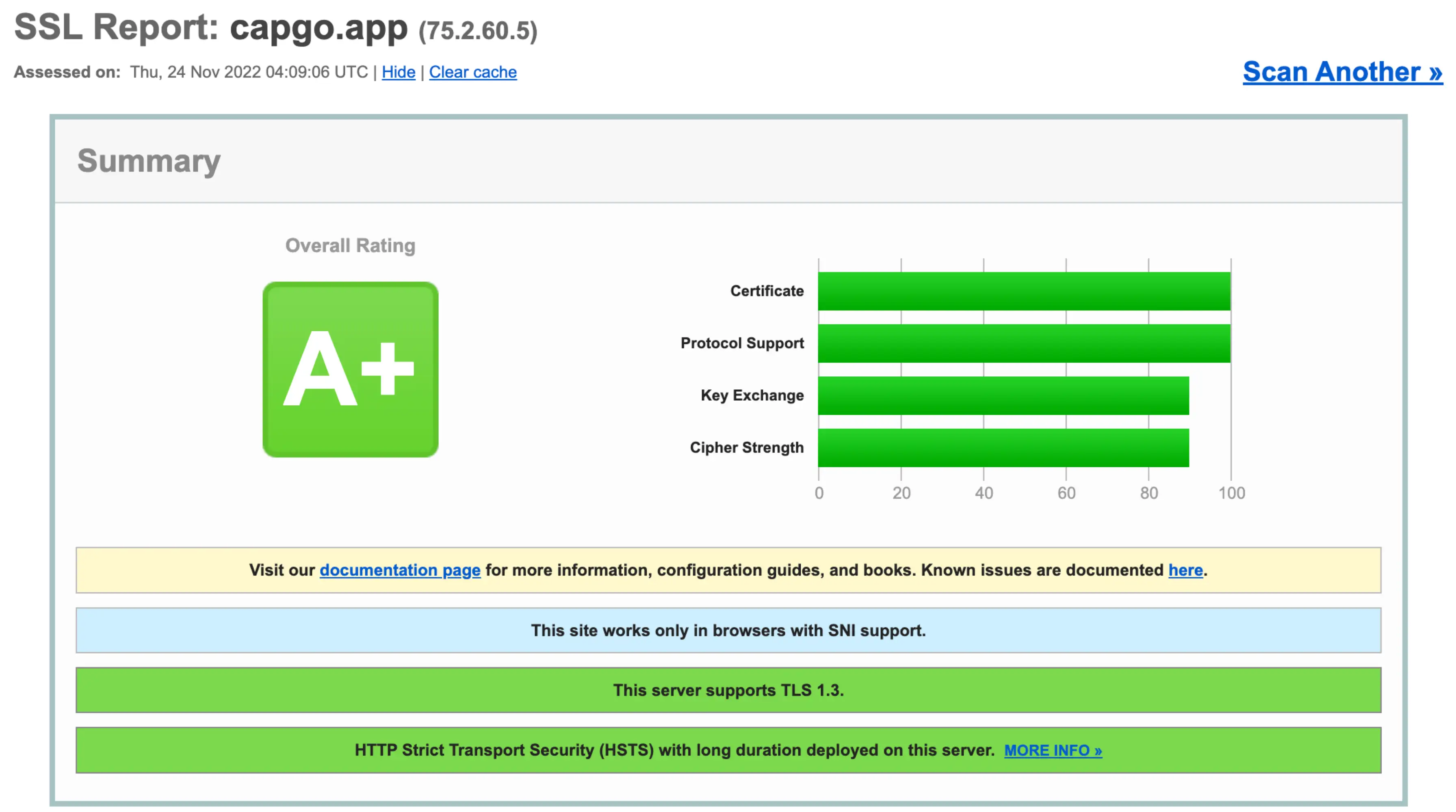
Capgo のデフォルトのセキュリティは、SSL Labs の HTTPS テストで A+ を獲得しています(https://www.ssllabs.com2022年11月時点)
最高水準のウェブホストと同様に、Capgo は HTTPS を使用して、サーバーとエンドユーザーのデバイス間のネットワーク接続のプライバシーと整合性を保護します。これは、ウェブおよび Capgo を使用する Ionic アプリの両方において、非常に優れたセキュリティレベルです。
クラウドインフラのサプライチェーン
Capgo と多くのウェブホストに共通するもう一つの点は、AWS、GCP、またはその他の主要なクラウドプロバイダーが提供する低レイヤーのクラウドインフラ上で動作していることです。これらのクラウドプロバイダー、および Capgo やその他のウェブホストが運用するハードウェアとソフトウェアは、クラウドサプライチェーンの一部を構成します。
クラウドサプライチェーンとそのセキュリティモデルは、膨大な数のウェブサイトやアプリを支えています。クラウドプロバイダーを利用するすべてのウェブ開発者は、そのプロバイダーを信頼し、アップロードしたファイルが改ざんされることなく実行または配信されることを期待しています。そして、クラウドプロバイダーはインフラの安全性を維持するために尽力しています。
しかし、当然ながらハードウェアやソフトウェアの脆弱性は発見されます。クラウドプロバイダーは適切なスケジュールで脆弱性のパッチを適用し、悪意のあるソフトウェアを未然に防いでいます(例: Google の SLSA), and build layers of defense in depth, and in practice, cloud infrastructure has shown to meet most websites and apps’ security needs. However, some Ionic apps include compromised cloud infrastructure in their threat models. For these Capacitor JS apps with the highest security requirements above the web, we built end-to-end code signing in to Capgo and the Capgo Updates 標準プロトコル.
Capgo による code エンドツーエンド署名
Capgo のエンドツーエンド code 署名は、公開鍵暗号方式を使用して、エンドユーザーのデバイスが Capacitor アプリ開発者による、改ざんされていないオリジナルのアップデートのみを実行することを保証します。
「エンドツーエンド」とは、開発者がアップデートを公開してから、エンドユーザーのデバイスがそのアップデートを受信して実行するまでのフロー全体をこのセキュリティがカバーすることを意味します。「Code 署名」とは、暗号技術と秘密のプライベートキーを使用して code に「署名」し、後に信頼できる公開鍵を使用してその署名を検証することを指します。
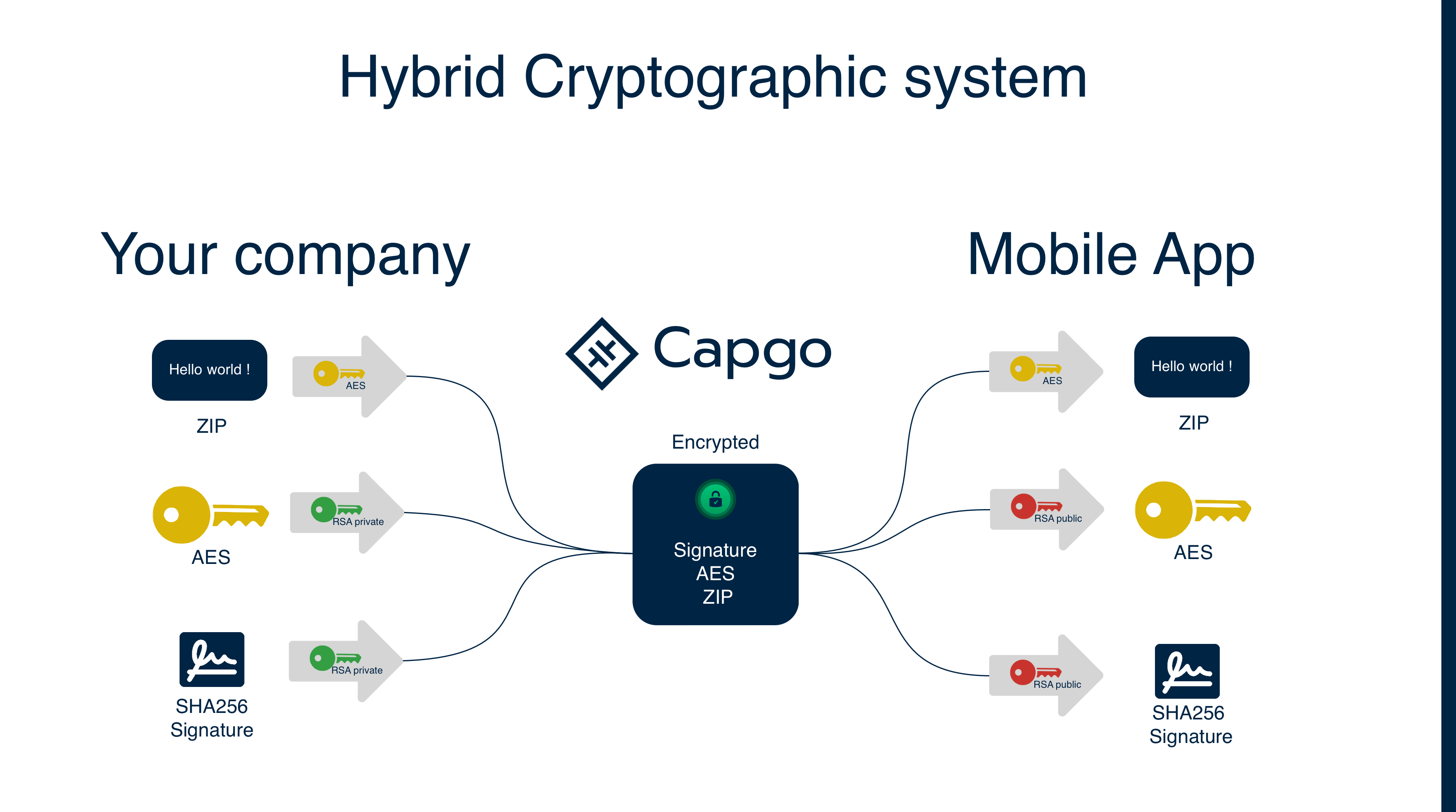
仕組みを説明するための簡略化された*スキーマは以下の通りです:
- 暗号技術は、実用上は複雑で難解です
定義:
- AES: Advanced Encryption Standard。共通鍵暗号アルゴリズムで、暗号化と復号に同じ鍵を使用します。
- RSA: Rivest–Shamir–Adleman。公開鍵暗号アルゴリズムで、公開鍵と秘密鍵の2つの鍵を使用します。
- Cypher: 暗号化されたデータ。
- セッションキー: データの暗号化と復号に使用されるAESキー。
- チェックサム: ファイルから計算されるハッシュ値
- 署名: RSA秘密鍵で暗号化されたチェックサム。RSA公開鍵で検証できます
アップデートの暗号化にはAESアルゴリズムを使用します。アップロードごとにランダムなAESキーが生成され、そのAESキーとチェックサム(以下「署名」)が開発者のRSA秘密鍵で暗号化されます。アプリ内では開発者のRSA公開鍵を使用して、AESキーと署名(チェックサムに復元)を復号します。その後、復号されたAESキーを用いてアップデートを復号し、復号後のアップデートのチェックサムを計算して、復号された署名と比較します。
RSAは大量のデータの暗号化には向かないため、2種類の暗号化アルゴリズムを併用しています。AESはアップデートの暗号化に、RSAはAESキーとチェックサムの暗号化に使用されます。
これにより、Capgo であってもバンドルの内容を読み取ることはできません。これは多くのエンタープライズ顧客が採用している堅牢なセキュリティモデルです。
アップデート暗号化 V2 2024-08-27:
- アプリに保存するキーの種類を変更しました。これは、以前は復号に使っていた秘密鍵から、以前は暗号化に使っていた公開鍵を推測できないようにするためです。現在、アプリには公開鍵(復号に使用)を保存しています。
- チェックサムのアルゴリズムをCRC32からSHA256に変更しました。また、新たに バンドルの署名を開始しました暗号化V2が設定されている場合、アップデートには有効な署名が必須となります。これはプラグインによって厳格に強制されます。
- 暗号化V2が設定されている場合、有効な署名を必須化しました。 これら3つの変更は、コミュニティメンバーによるセキュリティ分析を受けて実施されました。アップデート中の暗号学的攻撃を防ぐための措置です。
暗号化V1を使用している場合は、新しいセキュリティ機能を利用するためにV2へ移行してください。詳細は以下の 移行手順.
エンドツーエンドの code 署名により、Capgo は「トラストレス」なクラウドインフラストラクチャとなります。もし Capgo のクラウドプロバイダーや Capgo 自体が code で署名されたアップデートを改ざんしたとしても、エンドユーザーのデバイスはそのアップデートを拒否し、デバイスに既に存在する信頼済みアップデートを実行します。
多くのアプリではWebレベルのHTTPSで十分ですが、大規模な企業の中には、エンドツーエンドの code 署名による追加のセキュリティ層を求めるケースがあります。高額で永続的な取引を行う金融アプリを開発している企業や、脅威モデルにクラウドインフラの侵害を含めるCISOがいる企業などが該当します。私たちは、こうしたユースケースのために Capgo にエンドツーエンドの code 署名を組み込みました。より高度なセキュリティ要件を持つ企業様からのフィードバックもお待ちしております。
エンタープライズのお客様向けスタートガイド
セキュリティを極めて重視する大規模な企業やプロジェクトのために、code 署名のセットアップと運用を容易にしたいと考えています。そのために、以下の機能を提供します。
- 証明書の迅速なセットアップと設定
- Capgo と development build の両方による code 署名済開発サーバーのサポート
- すべてのアップデートにおける本番環境用 code 署名
Capgo code 署名はすべてのユーザーが利用可能です。開始するには、 セットアップ手順.
クレジット
感謝: Ionic、この記事は この記事 をベースに、chat-gpt-3 でリライトおよび調整しました。
Code 署名による Capacitor Updater の E2E 暗号化から次へ
以下を使用している場合: Code による署名で Capacitor Updater に E2E 暗号化を実現 セキュリティとコンプライアンスの計画に使う場合は、以下と連携してください: 暗号化 実装の詳細は「暗号化」を参照: コンプライアンス 実装の詳細は「コンプライアンス」を参照: Capgo セキュリティスキャナー Capgo セキュリティスキャナーの製品ワークフローについては: Capgo セキュリティ Capgo Security でのプロダクトワークフロー向け、および Capgo Trust Center Capgo Trust Center でのプロダクトワークフロー向け。





