


Capgo の Live Updates がさらなる進化を遂げ、Self-hosted Live Updates をリリースできることを大変嬉しく思います。
現在、多くの企業が SDK の Live Updates を利用して、アプリの最新の JavaScript、HTML、CSS を取得していますが、社内ポリシーや業界規制、地理的な制限によって制約を受けるケースもあります。Self-hosted Live Updates を使えば、自社のインフラ経由で Web ビルド成果物を配信できるようになります。
これにより、App Store の審査待ちによる遅延を回避し、バグ修正やコンテンツ更新をより迅速に行えるほか、ユーザーが常にアプリの最新バージョンを利用できる環境を整えられます。また、厳格なコンプライアンス基準により Live Updates の導入に課題を感じていた多くの大企業からも要望をいただいていました。Self-hosted Live Updates の登場により、その問題は過去のものとなります。
Self-hosted Live Updates の仕組みとは?
Capgo ホストの Live Updates のデプロイは、以下を使えば簡単です: Capgo SDK。Self-hosted Live Updates については、お使いのインフラで設定できるよう、Capgo CLI に必要な機能を追加しました。
最新の Web ビルド成果物をエンドユーザーへ安全かつ整合性の取れた形で配信するため、Capgo では Capacitor Live Updates プラグインが公開鍵/秘密鍵のペアを使用できるようになりました。Self-hosted Live Updates を使用する場合、企業のインフラからプラグイン経由でダウンロードした成果物が変更されていないことを確認するため、追加のハンドシェイクが行われます。
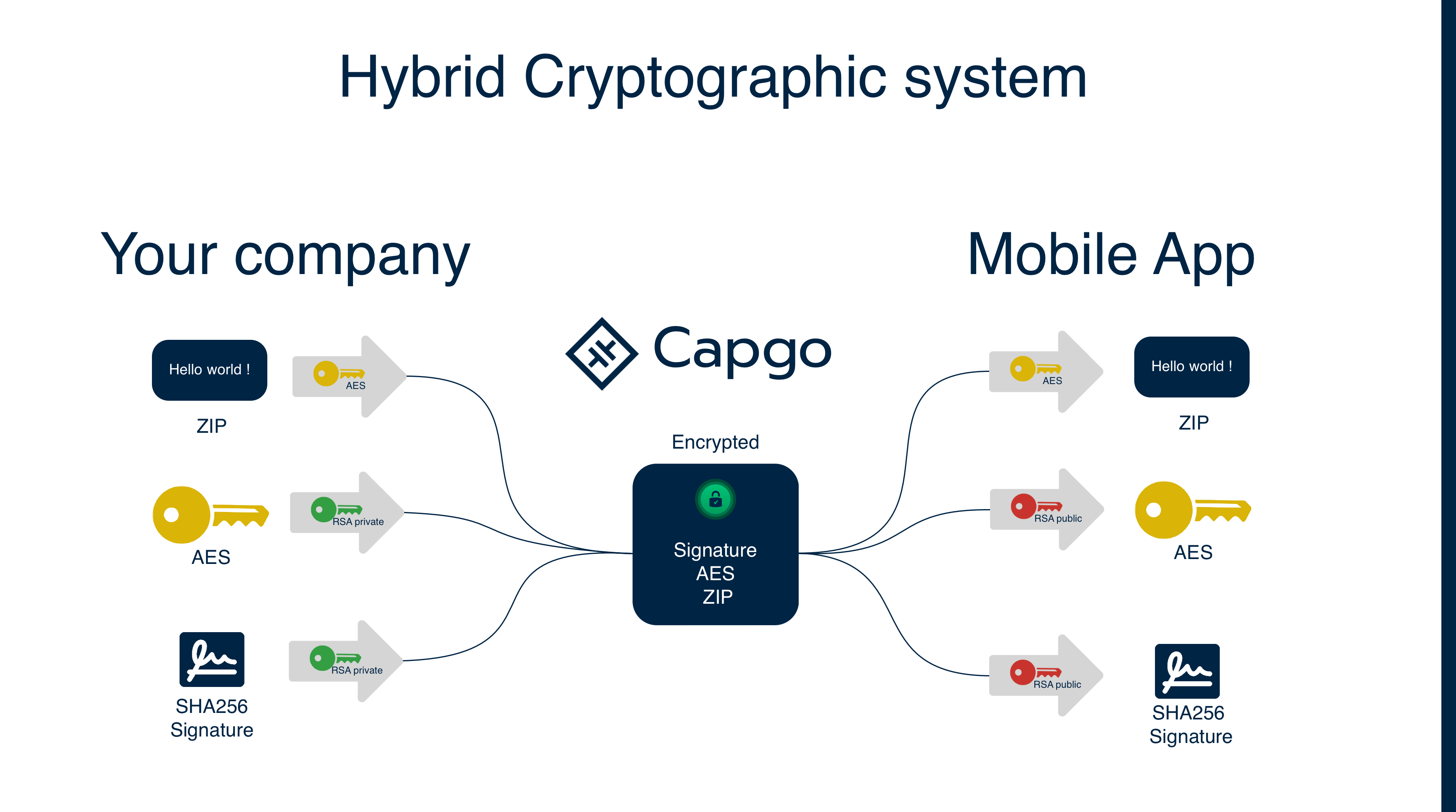
以下では、鍵ペアの設定手順と、更新された体験をエンドユーザーに届けるその後のプロセスを説明します。
初回のみの鍵ペア設定
公開鍵/秘密鍵のペアを生成するには、企業は次の Capgo Cloud CLI コマンドを利用できます:
npx @capgo/cli@latest key createこのコマンドは、 CapacitorUpdater.privateKey 設定ファイルのプロパティを設定し、2 つの鍵ファイルを capgo_key.pub と capgo_key プロジェクトのルートディレクトリに生成します。
このキーペアは、アップデートへの署名と、アプリ側でのアップデート検証に使用されます。
セルフホスト型 Live Updates のワークフロー
セルフホスト型 Live Updates の実装を開始するには、まず企業側でバグ修正やコンテンツ更新、その他のウェブベースの code の変更に対してウェブビルドを行う必要があります。次に、初回セットアップ時に取得した秘密鍵を使用してビルドアーティファクトに署名し、最後に任意のストレージにバンドルをアップロードします。
まず code をビルドします:
npm run build次にビルドを Zip 形式にします:
npx @capgo/cli@latest bundle zip次に Zip を暗号化します:
npx @capgo/cli@latest bundle encrypt abc123.zip”このコマンドを実行すると ivSessionKey が表示されます。次のステップのために必ず保存しておいてください。
暗号化した Zip を企業のストレージにアップロードし、その Zip ファイルの URL を取得します。
その後、利用可能な新しい Live Update があることを Capgo に通知する必要があります。これは別の CLI コマンドを使用して行います:
npx @capgo/cli@latest bundle upload --external=https://abc.com/app/updates/abc123.zip --iv-session-key=YourKeyコマンドを実行すると、Capgo はアプリのユーザーに配信可能な新しいアップデートを認識します。アプリ起動時、Live Updates プラグインは Capgo に問い合わせ、適用すべき変更があるかを確認します。
Capgo がプラグインに「はい、アップデートがあります」と応答すると、Live Updates プラグインは `register` CLI コマンドで提供された URL を使用して、新しい live update をダウンロードします。
https://abc.com/app/updates/abc123.zip組織の API が指定の場所から Live Update バンドルを返し、アプリが Zip を復号して live update を適用します。これで完了です!
今すぐ始める
Capgo によるセキュアな OTA アプリアップデートの配信は、企業や Ionic アプリユーザーの双方に大きなメリットをもたらすと確信しています。
Capgo による Self-hosted Live Updates の詳細については、 ドキュメントをご確認ください。ユーザーへ即座にアプリアップデートを配信する準備はできていますか? 今すぐこちらから登録!
Self-hosted Live Updates の詳細を見る
使用している場合 Live Updateのセルフホスト 移行計画やエンタープライズ運用については、こちらと連携してください: Capgo エンタープライズ Capgo Enterprise のプロダクトワークフロー向けに、 Ionic Enterprise プラグインの代替案 Ionic Enterprise Plugin Alternatives のプロダクトワークフロー向けに、 Capgo の代替案 Capgo Alternatives でのプロダクトワークフロー向け、 Capgo コンサルティング Capgo Consulting でのプロダクトワークフロー向け、および Capgo プレミアムサポート Capgo Premium Support でのプロダクトワークフロー向け。





