


1. 소개
Rapido Cloud (www.rapido.cloud)에서 저는 Salesforce 고객사들이 Salesforce Mobile SDK 또는 Salesforce Mobile Publisher를 사용하는 복잡한 절차를 거치지 않고, 자체 브랜드를 적용한 모바일 앱을 쉽게 배포할 수 있도록 모바일 애플리케이션을 개발하고 있습니다.
저는 Ionic 8, Angular 18, TypeScript, Capacitor 그리고 이제는 Capgo CapacitorUpdater까지, 널리 쓰이는 컴포넌트와 도구로 구성된 현대적이고 "표준적인" 플랫폼에서 이 모바일 앱을 개발했습니다. 이런 구성은 Lightning Web Components 같은 Salesforce 플랫폼 특유의 기술을 관리하고 싶지 않은 클라이언트에게 훨씬 다루기 쉽습니다. 또한 저에게도 Ionic + Angular 모바일 앱 개발자와 유지보수 담당자를 채용하기가 더 쉽고 비용도 저렴합니다.
이 글에서는 저의 설계와 선택, 구현을 설명합니다. 이것들이 Capgo과 함께 semantic-release 모든 배포를 Github Actions로 자동 관리하는 아주 성공적이고 간단한 방법이 되게 합니다. 이 모든 것은 Capgo CapacitorUpdater의 14일 무료 체험 기간 동안 설계하고 테스트하고 문서화했습니다.
2. 왜 Capgo를 사용할까요? 왜 semantic-release를 사용할까요?
Capgo CapacitorUpdater는 표준 Apple AppStore/Google PlayStore 배포 과정보다 모바일 앱 배포를 훨씬 더 단순하고 빠르고 유연하게 해준다는 점에 끌렸습니다. 그동안 주로 Salesforce Experience Cloud에서 웹 앱을 개발해 왔기에, 이번이 스토어에 출시하는 저의 첫 번째 모바일 애플리케이션입니다.
성공적으로 출시할 수 있을지 학습 곡선이 걱정스러웠지만, 앱을 Apple TestFlight에 올리는 건 꽤 쉬웠습니다. 그 후 Capgo CapacitorUpdater로 업데이트를 훨씬 빠르게 배포할 수 있었습니다.
저의 첫 번째 요구사항이자 테스트 케이스는 Ionic에서 권장하는 Nexus 모바일 브라우저를 통한 모바일 에뮬레이터나 시뮬레이터에서 테스트하는 대신, 실제 제 휴대폰에서 실제 모바일 앱으로 앱을 배포해 직접 테스트하는 것이었습니다. 제 앱은 Geolocation이나 사진 갤러리, 카메라 접근 같은 네이티브 기능을 사용하기 때문입니다. Capacitor 모바일 앱을 테스트해 본 경험이 없어서 모든 것이 제대로 작동할지 확신할 수 없었습니다. 실제 환경에서 실제 앱을 테스트하는 것만큼 좋은 방법은 없죠!
그래서 Capgo CapacitorUpdater 덕분에 소스 code에 새로운 기능이나 수정 사항을 저장한 지 단 1분 만에 제 모바일에서 실시간으로 앱을 업데이트할 수 있었습니다. 정말 안심됐고, 유연하며 설정도 간편했습니다!
3. 브랜치 및 릴리스 모델과 semantic-release 활용법
이제 Capgo 서버로의 배포가 정상적으로 작동하니, 이를 자동화해 CI/CD 파이프라인에 통합해야 합니다.
제가 브랜치와 릴리스 모델을 구성하는 방식입니다
모바일, 웹, Salesforce 등 모든 애플리케이션에 대해:
- 개발은 다음에서 이루어집니다
feature/...분기된 브랜치main, 그리고 다음으로 머지됩니다main대부분의 개발 브랜치의 기준이 되는 브랜치입니다. 유지보수나 특정 커스텀 배포를 위한 기능 브랜치는 제외됩니다(자세한 내용은 아래 참조) - 배포가 트리거됩니다 release 브랜치로부터 다음과 같은 브랜치들이 포함될 수 있습니다:
production, prerelease 브랜치 (alpha,beta,nightly, 등) 및 커스텀 배포를 위한 고객별 또는 컨텍스트별 브랜치 - 배포는 pull request를 통해 트리거됩니다 배포 브랜치에 머지될 때 트리거됩니다. semantic-release가 태그와 나머지 모든 과정을 관리해주기 때문에 tag-triggered 배포는 사용하지 않습니다.
기본적으로 이는 Gitlab Flow 방식입니다:
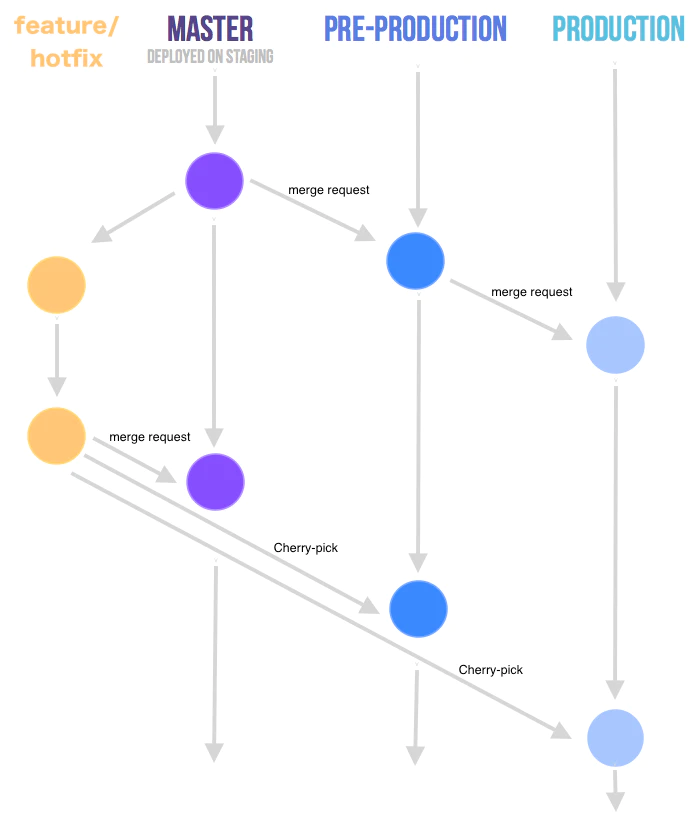
Gitlab Flow - 소스 https://faun.dev/c/stories/manuelherrera/git-branching-strategies-in-2022
semantic-release 작동 방식에 대한 참고 사항:
배포 브랜치에서 semantic-release가 트리거되면, 해당 브랜치의 이전 태그 버전과 포함된 수정 사항 또는 기능에 따라 새로운 버전 번호를 자동으로 계산합니다. Fix는 새로운 patch 버전을, feature는 새로운 minor 버전을 생성합니다. 또한 prerelease도 자동으로 포함합니다 alpha, beta, 등이 버전 번호에 포함됩니다.
Semantic release는 커밋에서 changelog를 생성하고, conventional commits에 정의된 대로 fix와 feature를 그룹화합니다(참조: https://www.conventionalcommits.org/en/about) 및 semantic release에서 설정한 대로.
또한 git(Github, 제 경우)의 머지된 pull request와 관련 issue 모두에 태그와 release에 연결하는 코멘트를 남겨 업데이트합니다. 마지막으로 이번 Github release에서는 소스 code, 필요 시 바이너리 등 CHANGELOG.md등의 에셋을 첨부합니다.
4. semantic release 및 Capgo에서의 브랜치, release/prerelease, 채널
그래서 Capgo 배포를 위해 semantic release가 하길 원하는 작업은 다음과 같습니다.
semantic release가 버전 번호를 생성하도록 하고 싶습니다.
Capgo는 “Conventional Commits” 도구의 자체 버전을 개발하고 문서화했습니다. standard-version fork한 레포지토리와 함께 standard-version (https://github.com/Cap-go/standard-version), 그리고 각자의 capacitor-standard-version (https://github.com/Cap-go/capacitor-standard-version) 및 capacitor-plugin-standard-version (https://github.com/Cap-go/capacitor-plugin-standard-version) 레포지토리입니다. 이들은 블로그를 통해 Capgo의 배포 시 사용하는 버전 체계를 설명했습니다 ("https://capgo.app/blog/how-version-work-in-capgo/"). JavaScript 번들은 “standard” semver인 “Semantic Versioning”을 따르며 ("https://semver.org"), 이는 semantic-release 당연히 (물론이죠!) 다음을 따릅니다:
So that’s great, and is a relief for me because I use semantic-release extensively.
또한 semantic release가 다양한 채널에 앱 배포를 생성하도록 만들고 싶습니다.
앞서 언급했듯이, 다음과 같은 브랜치에서 prerelease 버전을 배포해야 합니다. alpha, beta, nightly 등등, 그리고 다음과 같은 브랜치에서는 고객별 버전도 배포해야 합니다. production-customer-jones, production-customer-doe등의 에셋을 첨부합니다.
Capgo는 semantic release가 지원하는 기능과 정확히 같은 “channels” 기능을 제공하기 때문에, 이 둘을 함께 연동할 수 있어 기대가 큽니다. 이는 XCode Cloud에서 관리하는 브랜치별 빌드와도 잘 맞습니다(자세한 내용은 아래 참조).
semantic release가 prerelease에서 생성하는 Semver 버전 번호는 다음과 같습니다. 1.0.0-alpha.1이 브랜치에서 빌드가 이어지면 빌드 번호가 다음과 같이 증가합니다. 1.0.0-alpha.2, 등입니다. 명시적으로 문서화되어 있지는 않지만 Capgo가 이런 버전 번호를 지원하며, 이는 저에게 매우 반가운 소식입니다. 저는 semantic release의 channels와 prerelease를 활용해 Capgo 채널로 앱 버전을 만들 계획입니다.
5. Capgo를 사용해 애플리케이션을 릴리스하려면 어떻게 해야 하나요?
앱 번들을 Capgo에 자동으로 배포하려면 Capgo CLI 명령어를 사용해야 합니다. bundle upload다음 명령어를 입력하세요. npx @capgo/cli@latest bundle upload --help 다양한 upload 옵션을 볼 수 있습니다. 그중에서 다음 옵션을 사용하겠습니다:
npx @capgo/cli bundle upload --channel $CHANNEL --apikey $CAPGO_APIKEY --bundle $VERSION --bundle-url $CAPGO_APPID- CHANNEL은 배포하려는 Capgo 채널을 의미합니다 (예:
alpha) - VERSION은 semantic release에 의해 생성됩니다 (예:
1.0.0-alpha.1) - CAPGO_APIKEY는 CI/CD 파이프라인 로그인을 고유하게 식별하기 위해 Capgo에서 제공합니다
- CAPGO_APPID는 애플리케이션을 고유하게 식별하기 위해 Capgo에서 제공합니다 (예:
com.mystartup.mysuperapp)
6. semantic-release와 Capgo CapacitorUpdate 설정
마지막으로, 이 모든 과정이 어떻게 연결될까요?

semantic release 및 Github Actions로 빌드된 App bundle 버전
Github Actions를 이용한 semantic-release 자동화
semantic release의 장점은 Github Action 워크플로우 형태의 배포 자동화가 매우 간단하다는 것입니다. 이는 다른 CI/CD 플랫폼에서도 매우 유사한 방식으로 작동합니다.
# ./github/workflows/release.yml

name: Release

on:
  workflow_dispatch:
  push:
    branches: [alpha, alpha-nocapgo, dev-rupert]    # <--- adapt this

env:
  CAPGO_APPID: com.mystartup.mysuperapp             # <--- adapt this
  CAPGO_APIKEY: ${{ secrets.CAPGO_APIKEY }}

jobs:
  build:
    runs-on: ubuntu-latest
    steps:
      - uses: actions/checkout@v6
      - uses: actions/setup-node@v6
        with:
          node-version: 24
          cache: "npm"
      - run: npm install
      - run: npx semantic-release
        env:
          DEBUG: true
          GITHUB_TOKEN: ${{ github.token }}
이 과정은 NodeJS 환경을 설치한 다음 semantic release를 호출하기만 하면 됩니다.
다음 목록에 있는 브랜치에 머지(merge)가 발생할 때마다 branches, semantic release가 배포를 트리거합니다.
설정하세요 CAPGO_APIKEY 저장소의 secrets에.
다음 항목을 업데이트하세요 CAPGO_APPID 여기에서.
semantic release의 동작은 다음의 .releaserc.json 설정 파일에서 지정합니다.
제 설정값은 다음과 같습니다:
// .releaserc.json

{
  "branches": [
    {
      "name": "release",
      "channel": "production"
    },
    {
      "name": "alpha",
      "channel": "alpha",
      "prerelease": "alpha"
    },
    {
      "name": "alpha-nocapgo",
      "channel": "alpha",
      "prerelease": "alpha-nocapgo"
    },
    {
      "name": "dev-rupert",
      "channel": "development",
      "prerelease": "development"
    },
    {
      "name": "dev-paul",
      "channel": "development",
      "prerelease": "development"
    }
  ],
  "ci": true,
  "debug": true,
  "dryRun": false,
  "repositoryUrl": "https://github.com/RupertBarrow/mysuperapp",

  "verifyConditions": ["@semantic-release/github"],

  "plugins": [
    [
      "@semantic-release/commit-analyzer",
      {
        "preset": "angular",
        "releaseRules": [
          { "type": "breaking", "release": "major" },
          { "type": "feat", "release": "minor" },
          { "type": "fix", "release": "patch" },
          { "type": "ci", "release": "patch" },
          { "type": "doc", "release": "patch" },
          { "type": "docs", "release": "patch" },
          { "type": "refactor", "scope": "core-*", "release": "minor" },
          { "type": "refactor", "release": "patch" },

          { "scope": "no-release", "release": false }
        ]
      }
    ],

    "@semantic-release/release-notes-generator",

    ["@semantic-release/changelog", { "changelogFile": "CHANGELOG.md" }],

    [
      "@semantic-release/git",
      {
        "assets": ["package.json", "CHANGELOG.md", "ios/App/App.xcodeproj/project.pbxproj"],
        "message": "chore(release): ${nextRelease.version} [skip ci]\n\n${nextRelease.notes}"
      }
    ],

    ["@semantic-release/github", { "assets": ["CHANGELOG.md"] }],

    [
      "@semantic-release/exec",
      {
        "prepareCmd": "npm run build",
        "publishCmd": "npm add -D @capgo/cli && npx @capgo/cli bundle upload --channel ${branch.channel} --apikey $CAPGO_APIKEY --bundle ${nextRelease.version} --bundle-url $CAPGO_APPID"
      }
    ]
  ]
}branches:branches브랜치 설정을 지정합니다 ("name"), Capgo 채널에 매핑되는 ("channel") 및 prerelease 버전 번호 명명 방식 ("prerelease"). 예를 들어,branch.prerelease = "development", semantic release가 생성한 버전 번호는x.y.z-development.n- 를 위한 배포
alpha및alpha-nocapgo두 브랜치 모두 앱을 다음 위치에 배포합니다:alpha채널에 배포하되, 버전 번호의 prerelease 이름은 서로 다릅니다. - 개발자 브랜치로의 배포
dev-rupert또는dev-paul둘 다 다음 채널로 배포됩니다:developmentCapgo의 채널로, 모두 동일한development버전 번호의 prerelease 키워드를 사용합니다.
verifyConditions: semantic release의 첫 번째 단계에서는 Github에 대한 올바른 접근 권한이 있는지 확인합니다. 나중에 여기에 Capgo CLI에 대한 인증 체크를 추가할 계획입니다.@semantic-release/commit-analyzer: 표준 semantic release 작업 - 공식 문서를 참조하세요 (https://github.com/semantic-release/semantic-release?tab=readme-ov-file#commit-message-format)@semantic-release/release-notes-generator: changelog 파일을 생성합니다.CHANGELOG.md@semantic-release/git: 애플리케이션의 Ionic 빌드 및 semantic release 작업으로 인해 업데이트된 다음 파일들을 커밋합니다 (package.json,CHANGELOG.md및ios/App/App.xcodeproj/project.pbxproj- 아직 Android 빌드는 하지 않지만)@semantic-release/github: 다음을CHANGELOG.mdGithub release의 asset으로 파일에 첨부합니다@semantic-release/exec: 앱 빌드를 준비하기 위해 다음 2개 명령어를 사용합니다 ("prepareCmd") 그 다음 앱 번들을 Capgo 서버에 효과적으로 빌드 및 배포합니다 ("publishCmd)
버전 번호를 어떻게 계산하고 올릴지, changelog나 Github tag 또는 release를 어떻게 생성할지 일일이 설정할 필요가 없다는 점을 알게 될 것입니다. 최소한의 설정만으로 semantic release가 이 모든 것을 기본적으로 처리합니다.
XCode Cloud를 이용한 새로운 바이너리 빌드
이 모든 과정을 XCode Cloud와 통합하여 애플리케이션 바이너리의 새 버전을 빌드하는 것은 매우 간단합니다 (아직 Google Play에는 배포하지 않지만, 빌드 방식은 비슷할 것입니다):
- 사용하려는 브랜치에 변경 사항이 생기면 빌드하도록 XCode Cloud 프로세스를 설정했습니다 (예:
production) - 이 브랜치에서, XCode Cloud가 오직
CHANGELOG.md파일이 업데이트될 때만 빌드하도록 설정했습니다. 이 파일은 semantic release에 의해 버전이 생성될 때마다 업데이트됩니다. - 다양한 채널에 대한 배포를 시뮬레이션하기 위해 서로 다른 브랜치에서 빌드를 트리거할 수 있습니다. 각 브랜치의 XCode Cloud 빌드 설정에서 환경 변수를 다음과 같은 값으로 수동 설정합니다.
branch.channel설정된releaserc.json(네, 수동으로 중복 작업하는 것이 맞습니다) 그러면 앞서 언급했듯이, 커스텀 릴리스 브랜치에서 배포되는 각 고객용 앱에 대해 서로 다른 AppStore 애플리케이션을 배포할 수도 있습니다.
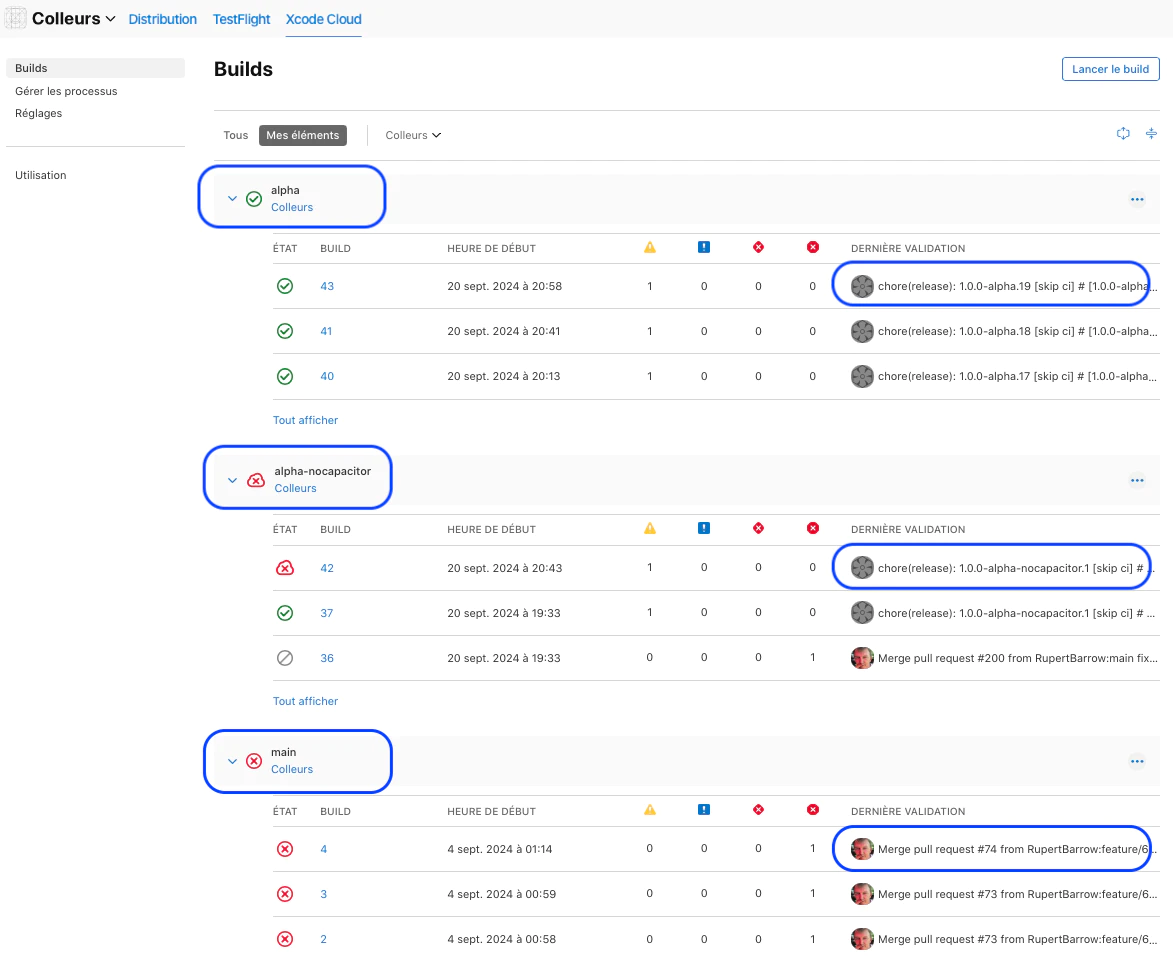
Capgo 채널을 사용한 XCode Cloud 앱 바이너리 빌드
7. 마치며
결론적으로, 14일의 트라이얼 기간 내에 Capgo CapacitorUpdater를 표준 semantic release 파이프라인에 성공적으로 통합하게 되어 매우 기쁩니다. 그 결과는 다음과 같습니다.
- bundle 버전 번호가 semantic release에 의해 자동으로 생성되며 Capgo 서버와 호환됩니다
- semantic release가 Capgo 애플리케이션 bundle을 자동으로 배포하며, Capgo 채널도 활용합니다
- 이는 애플리케이션 바이너리의 XCode Cloud 빌드와 잘 맞물려 돌아갑니다
다음 단계
현재 이 앱은 개발 단계에 있습니다. 곧 TestFlight(iOS용)를 통해 테스터들에게 공개할 예정입니다. Capgo의 강력한 기능을 고려할 때, 테스트용 무료 버전을 AppStore에 배포하고 테스트 기간 동안 Capgo로 정기적으로 업데이트할 계획입니다. 그 후 다른 레코드로 유료 버전을 AppStore에 배포하고, 이 역시 Capgo를 통해 정기적으로 업데이트할 것입니다.
Capgo의 더 나은 빌드 전 검증 기능을 bundle upload semantic release 설정에 추가하고 싶습니다.
이제 Ionic + Angular + Capacitor로 개발할 향후 모바일 앱을 위한 깔끔하고 단순하며 재현 가능한 semantic release 파이프라인을 갖추게 되었습니다.
저자 - Rupert Barrow
I have over 22 years’ experience of Salesforce, as a client and user, as a partner and integrator, architect, developer, business analyst and consultant. I co-founded and co-managed Altius Services as COO and CTO for 13 years, a successful Salesforce SI partner in France, before setting off on a new adventure as a Salesforce solopreneur with my Rapido Cloud 제품군을 통해 활동하고 있습니다.
LinkedIn에서 저를 만나보실 수 있습니다: https://linkedin.com/in/rbarrow.
저희의 Salesforce 서비스는 다음에서 확인하실 수 있습니다: https://www.rapido-companion.app 및 https://www.rapido.cloud (개발 중).
Rapido Cloud가 Capgo CapacitorUpdater로 Semantic Release를 관리하는 방법
사용 중이라면 Rapido Cloud가 Capgo CapacitorUpdater로 Semantic Release를 관리하는 방법 live update 배포를 계획하려면, 다음과 연결하세요 Capgo Live Updates Capgo Live Updates의 제품 워크플로우를 보려면, 개요 Overview의 구현 상세를 보려면, 기능 Features의 구현 상세를 보려면, 업데이트 동작 Update Behavior의 구현 세부 사항은 다음과 같고, 업데이트 유형 Update Types의 구현 세부 사항은 다음과 같습니다.





