


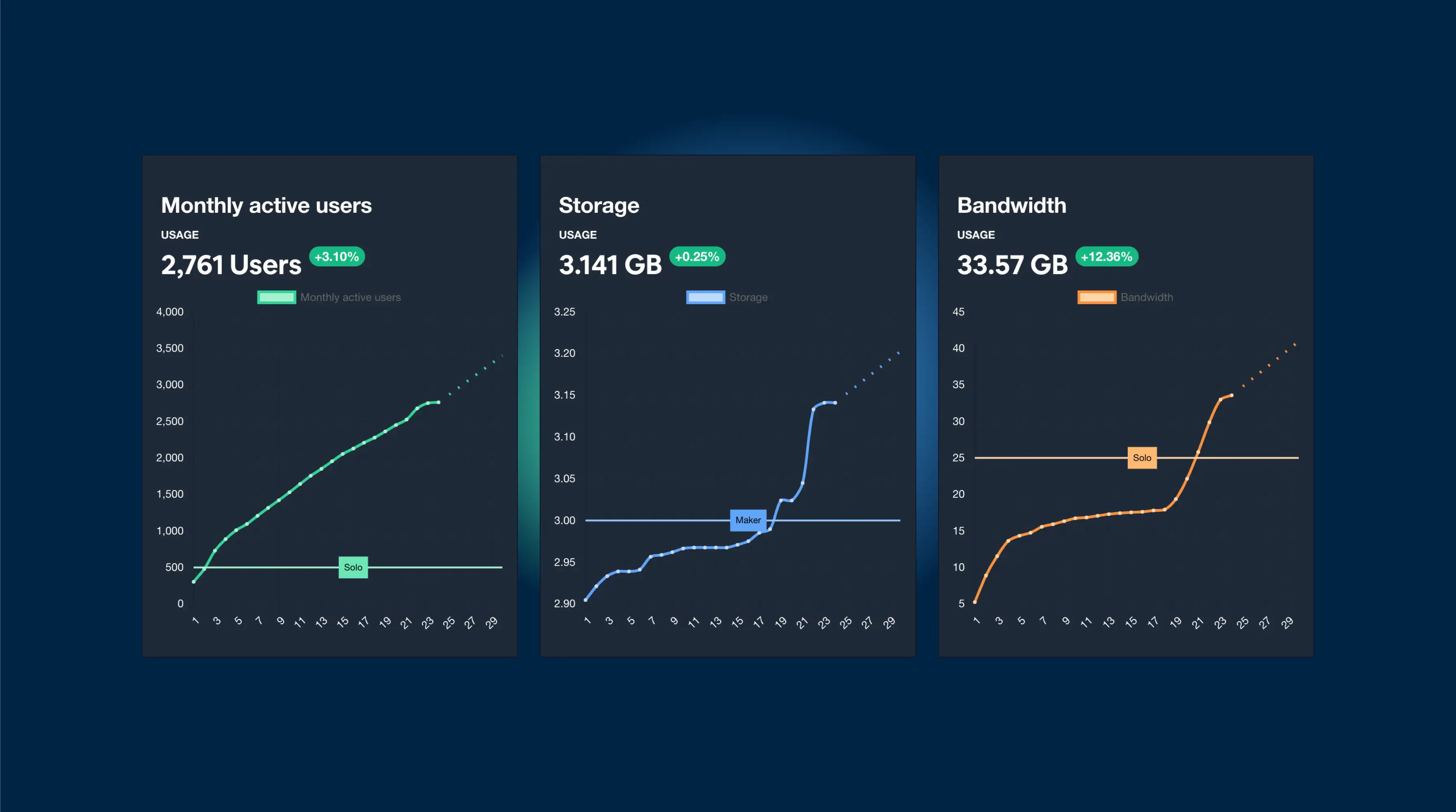
Capgo에서는 다음 3가지 지표를 기준으로 사용량을 산정합니다
- 사용자
- 저장 공간
- 대역폭
각 항목은 측정 방식이 조금씩 다릅니다
사용자
사용자가 Capacitor JS 앱을 다운로드하고 실행할 때마다, 업데이트가 있는지 확인하기 위해 Capgo 백엔드로 요청을 보냅니다.
이때 앱은 가장 중요한 정보를 포함한 소량의 데이터를 전송합니다. DeviceID
DeviceID: 바로 기기에서 생성된 고유 ID(UUID)입니다. 플러그인 버전 v5.10.0, v6.25.0, v7.25.0부터, 이 ID는 앱을 재설치해도 유지됩니다(기기 저장소에 안전하게 저장됨). 이전 버전에서는 앱을 설치할 때마다 ID가 초기화되었습니다.
계정에 새로운 Device ID가 등록될 때마다 데이터베이스에 저장됩니다.
기존 ID가 DeviceID 업데이트를 요청(앱 실행)할 때마다, 해당 기록이 업데이트됩니다(데이터베이스의 updated_at 필드).
이 데이터는 다음 두 곳에 저장됩니다:
- device 테이블 및
update_at값은 - app_stats 테이블의 일일 카운터(오늘 처음 활성화되었으며 이번 달에는 활동 기록이 없는 기기 수를 나타냄)
플랜 한도 계산에는 100% 정확한 첫 번째 방식을 사용하며, 차트 표시에는 두 번째 방식을 사용합니다. 계정 홈 페이지에서 두 방식 모두 확인하실 수 있습니다:
- 차트에는 두 번째 방식이 표시됩니다
- 앱 테이블에는 첫 번째 방식이 표시됩니다.
Capgo는 사용량 계산 시 에뮬레이터와 dev build를 제외합니다. 트라이얼 종료 후에는 이들의 비중이 3%를 넘지 않도록 주의하세요. 초과 시 계정이 잠길 수 있으며, 문제를 해결해야 해제됩니다.
Capgo는 필터링 작업도 수행합니다. CI/CD를 통해 Google PLAY로 버전을 전송하도록 설정한 경우, Google은 Capacitor 앱을 매번 20대 이상의 실제 기기에서 실행합니다. 새 번들이 배포된 후 첫 4시간 동안은 Google 데이터 센터 IP가 사용량에 포함되지 않도록 차단합니다.
이 데이터는 매달 0부터 다시 시작됩니다.
- 기기 요청 시마다 데이터베이스의 기기 정보를 생성하거나 업데이트합니다
- 이번 달에 활동이 없었던 활성 기기 수를 일일 카운터에 추가합니다.
첫 번째 방식은 900명 이상의 사용자로 나타나지만, 계정의 두 번째 방식은 200명 이상의 사용자로 나타납니다. 플랜 한도에는 100% 신뢰할 수 있는 첫 번째 방식을 사용하고, 차트에는 두 번째 방식을 사용합니다. 계정 홈 페이지에서 두 수치를 모두 확인할 수 있습니다.
저장 공간
번들을 upload할 때마다 이 수치는 upload 크기만큼 증가합니다.
이 데이터는 오직 upload 크기와 관련이 있습니다. 앱 크기를 최적화할수록 플랜 한도를 더 여유롭게 유지할 수 있습니다.
한도에 도달했거나 임박했다면, CLI에서 번들을 확인할 수 있습니다:
npx @capgo/cli@latest bundle list
번들을 삭제하여 저장 공간을 확보하되, 통계 데이터는 유지하여 정리할 항목을 확인하세요.
정리할 준비가 되었다면, 다음 명령어를 사용하여 여러 번들을 한 번에 삭제할 수 있습니다:
npx @capgo/cli@latest bundle cleanup
참고: 이는 지구 환경뿐만 아니라 여러분의 지갑에도 도움이 됩니다 💪.
또한 다음을 사용할 수도 있습니다:
--external업로드 방식의 저장 공간을 사용하여 플랜 사용량에 포함되지 않게 할 수 있습니다.
대역폭
이 값의 계산 방식은 조금 더 복잡하지만, 저장 공간과 개념은 동일합니다.
사용자가 번들을 다운로드할 때마다, 다운로드 크기만큼 이 수치가 증가합니다.
이 데이터는 다운로드 크기와만 관련이 있습니다. Capacitor JS 앱의 크기가 작을수록 플랜 한도를 유지하기 유리합니다.
중요한 점은, Capgo가 실제 다운로드된 크기를 알 수는 없고 번들의 크기만 확인한다는 것입니다. 따라서 번들 크기가 크고 다운로드에 실패하는 사용자가 많다면 한도에 빠르게 도달할 수 있습니다.
플랜을 효율적으로 유지하는 가장 좋은 방법은 번들 크기를 작게 유지하는 것입니다. 만약 어렵다면 사용자에게 다운로드 바를 보여주어 남은 다운로드 양을 알 수 있게 하세요.
향후 Capgo는 번들을 한 번에 더 원활하게 다운로드할 수 있도록 다운로드 시스템을 개선할 예정입니다.
Capgo 사용량 산정 방식 알아보기
사용 중인 경우 Capgo 사용량 산정 방식 live update 배포를 계획하려면, 이를 다음 항목과 연결하세요: Capgo Live Updates Capgo Live Updates의 제품 워크플로우를 위해, 개요 Overview의 구현 세부 사항을 위해, 주요 기능 Features의 구현 세부 사항은, 업데이트 동작 Update Behavior의 구현 세부 사항은, 업데이트 유형 Update Types의 구현 세부 사항을 참고하세요.





