
差分アップデート
インストール手順と、このプラグインの完全なMarkdownガイドを含むセットアッププロンプトをコピーします。
CapgoのLive Updateシステムは、JS bundle全体ではなく変更されたファイルのみを送信するため、より高速かつ効率的なアップデートが可能です。
これにより、ダウンロードが必要なデータ量が最小限に抑えられるため、低速な回線や従量制のネットワークを利用しているユーザーにとって特に大きなメリットとなります。
もう一つの利点は、画像や動画など、めったに変更されない大容量のアセットが含まれるアプリにおいて、zip圧縮されたJSファイルのみがダウンロードされる点です。
Delta Updateの仕組み
「Delta Updateの仕組み」というセクションCapgo の Delta update は、アプリにインストールされている Capgo プラグインによって処理されます。以下の --delta フラグを使用してアプリの新しいバージョンをアップロードすると、Capgo は次の処理を行います:
- ビルド内の各ファイルが、Deltaファイルとして個別にアップロードされます
- 各Deltaファイルに対してチェックサムが生成されます
- パスとチェックサムを含むDeltaファイルのリストが、Capgo のデータベースに保存されます
アプリを実行中のデバイスがアップデートを確認すると、Capgo プラグインが新しいbundleのDeltaファイルリストを受信します。プラグインは、チェックサムとファイルパスに基づいて、既存のファイルと比較してどのファイルが変更されたかを特定します。
その後、プラグインはJS bundle全体ではなく、変更されたファイルのみをダウンロードします。ダウンロードしたファイルと、既に保持している変更のないファイルを組み合わせることで、アプリの新しいバージョンを再構築します。
どのデバイスがDeltaを受け取り、どのデバイスがフルzipを受け取るか
「どのデバイスがDeltaを受け取り、どのデバイスがフルzipを受け取るか」というセクションを使用してアップロードされたbundleには、 --delta フルzipとdeltaファイルの両方が含まれています。デフォルトの Zip + 差分データ ダウンロード形式では、各デバイスはサポートされている最適なパッケージを取得します:
- Deltaをサポートしているプラグインバージョンのデバイスは、
5.10.0+,6.25.0+,7.0.35+、または8+変更されたdeltaファイルのみをダウンロードします。 - Deltaをサポートしていない古いプラグインバージョンのデバイスは、フルzipをダウンロードします。
- を使用せずにアップロードされたbundleには
--deltadeltaファイルが含まれていないため、すべてのデバイスがフルzipをダウンロードします。
Deltaを有効にしても、一部のデバイスでは依然としてフルzipのダウンロードが発生する場合があります。これは、古いプラグインバージョンを含む古いNative Buildを実行しているデバイスによるものです。ユーザーがストアからアプリをアップデートすれば、これらは解消されます。
これは、チャンネルごとに以下の ダウンロード形式 設定で変更可能です。
Deltaアップデートと帯域幅の使用量
「Deltaアップデートと帯域幅の使用量」というセクションDeltaアップデートを使用すると、Capgoの帯域幅使用量も削減できます。帯域幅はデバイスが実際にダウンロードしたファイルのみをカウントするため、Deltaではバンドル全体ではなく、変更されたファイルのみがカウント対象となります。エッジにキャッシュされているファイルやフルzipはカウントされず、中断されたダウンロードも、ダウンロード済みの部分を二重にカウントすることなく再開されます。詳細は 帯域幅のカウント方法.
Deltaアップデートを有効にする
「Deltaアップデートを有効にする」というセクションCapgoアプリでDeltaアップデートを有効にするには、新しいバージョンをアップロードする際に、単に次の --delta フラグを使用してください:
npx @capgo/cli@latest bundle upload --deltaもし autoUpdate が即時適用モード("atInstall", "onLaunch"、または "always")に設定されている場合、 capacitor.config、お使いの CLI がそれを検出します。非対話型環境では Delta updates を自動送信し、対話型環境ではアップロード前に確認を求めます。従来の directUpdate 設定も引き続き検出されます。フルバンドルを強制的にアップロードするには --no-delta を使用してください。
Delta update の制限事項
「Delta update の制限事項」というタイトルのセクション- 空のファイル: CLI のログ
Ignoring empty file...また、deltaファイルから0バイトのファイルを除外します。アップロード自体は失敗しないため、空のファイルを追加してもデプロイを止めることなく、結果として生成されるbundleの内容を変更できます。Delta bundleのパスには0バイトのファイルを含めないでください。 - パス内のスペースについて: bundleのパスにスペースが含まれている場合、ファイルのアップロードが始まる前にDeltaアップロードが失敗します。Delta updateをアップロードする前に、ファイル名やディレクトリ名からスペースを削除してください。
Delta Updatesの強制適用
「Delta Updatesの強制適用」というセクションすべてのアップロードをDelta updateに限定し、誤ってフルbundleをアップロードしてしまうのを防ぎたい場合は、以下の --delta-only フラグを使用できます:
npx @capgo/cli@latest bundle upload --delta-only次の場合: --delta-only が使用されると、Capgo はフルzipではなくdeltaファイルのみをアップロードします。Deltaをサポートしていないプラグインバージョンのデバイスでは、このupdateをダウンロードできなくなります。
以下を使用することをお勧めします: --delta-only if:
- 常にDeltaアップデートを使用し、フルバンドルのアップロードを許可したくない場合
- CI/CDパイプラインを構築しており、すべての自動アップロードをDeltaに強制したい場合
- アプリのサイズが大きく帯域幅が限られているため、アップロード/ダウンロードサイズを最小限に抑えたい場合
もし、作業中にフルバンドルのアップロードを行う必要がある場合は --delta-only が設定されている場合は、単に upload コマンドを実行してください --delta-onlyこれにより、そのアップロード時のみ設定が上書きされ、必要な時に完全なバンドルをプッシュできます。
トラブルシューティング
「トラブルシューティング」セクションDeltaアップデートが機能していないように見える場合(例:小さな変更でもデバイスが常にフルJSバンドルをダウンロードしている場合)は、以下を再確認してください:
- 新しいバージョンをアップロードするたびに、
--deltaフラグを使用していること - 使用する場合、
--delta-only、誤って以下を省略していないか確認してください:--deltaフラグ - デバイスでDeltaをサポートするプラグインバージョンが実行されています(
5.10.0+,6.25.0+,7.0.35+、または8+) - チャンネルのダウンロード形式が一致しません Full zipのみ対応
- デバイスのネットワーク接続が安定しており、Capgo サーバーにアクセス可能です
Capgo webapp を使用して、前回のアップロードの詳細を確認することもできます:
- 以下にアクセスしてください: ウェブアプリ
- アプリをクリックしてください
- 統計バーの bundles 数をクリックします。
- 最新の bundle を選択します
- の
Delta files行を確認してください。ここには、 差分ファイルなし と表示されます。これは bundle がフル zip としてのみアップロードされた場合に発生します。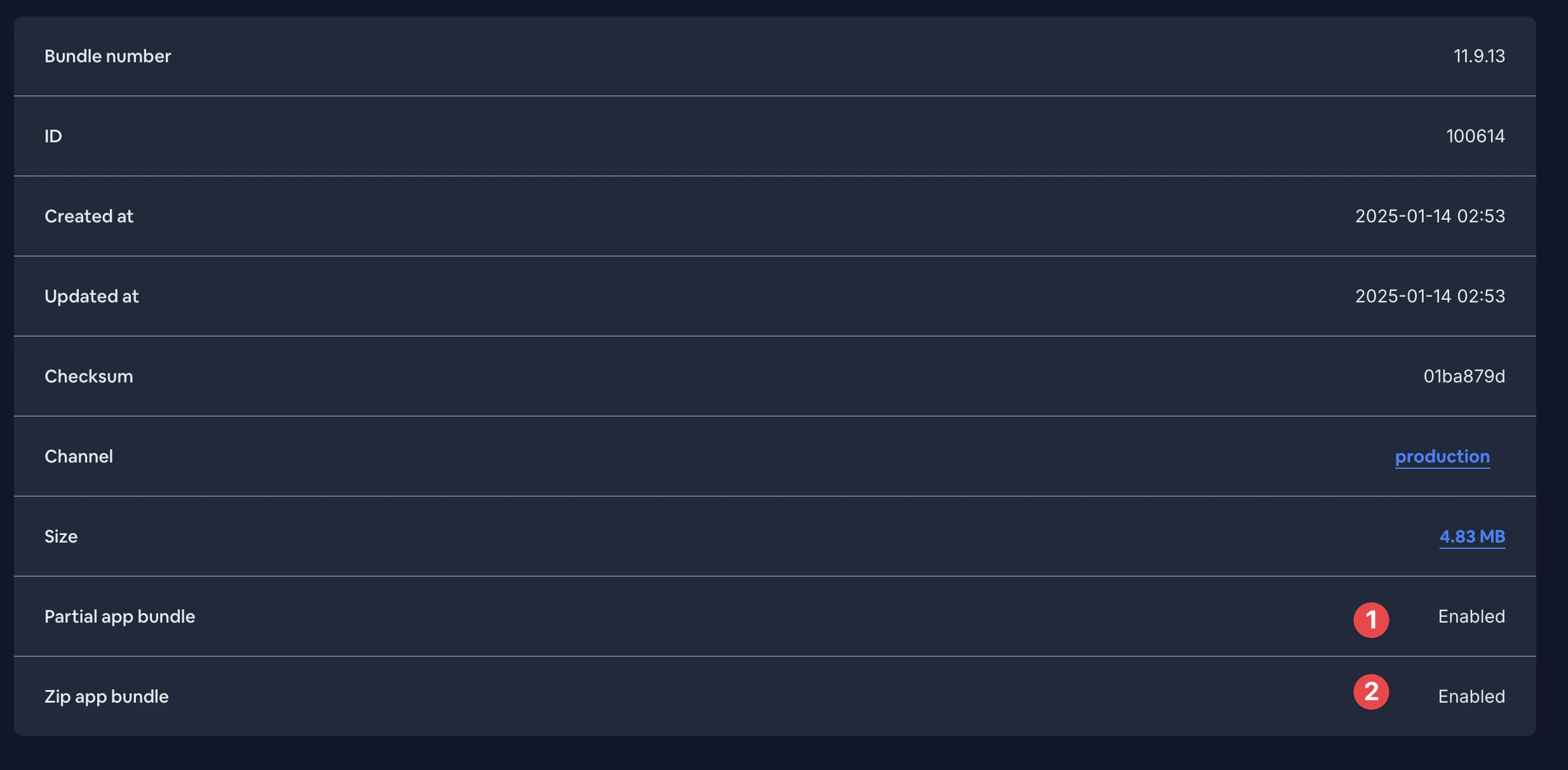
問題が解決しない場合は、Capgo サポートまでお問い合わせください。サーバーログを確認し、Delta アップロードが正しく処理されているか、デバイスが delta ファイルを受信できているかを調査いたします。
完了です! --delta フラグによって、Capgo は Delta アップデートに必要な個別の delta ファイルをアップロードします。
注意:Delta アップデートとして配信したい新しいバージョンをアップロードする際は、毎回 --delta を使用する必要があります。このフラグを省略すると、Capgo は JS bundle 全体を単一のファイルとしてアップロードするため、一部のみが変更された場合でもデバイスは bundle 全体をダウンロードすることになります。
Delta updatesで開発を加速
「Delta updatesで開発を加速」というセクション使用している場合 差分アップデート live update の配信を計画するには、以下と連携させます: Capgo Live Updates Capgo Live Updatesのプロダクトワークフローにおいて、 概要 実装の詳細は Overview を 機能 実装の詳細は Features を アップデートの動作 実装の詳細はアップデートの動作を、および アップデートの種類 実装の詳細はアップデートの種類を。


