


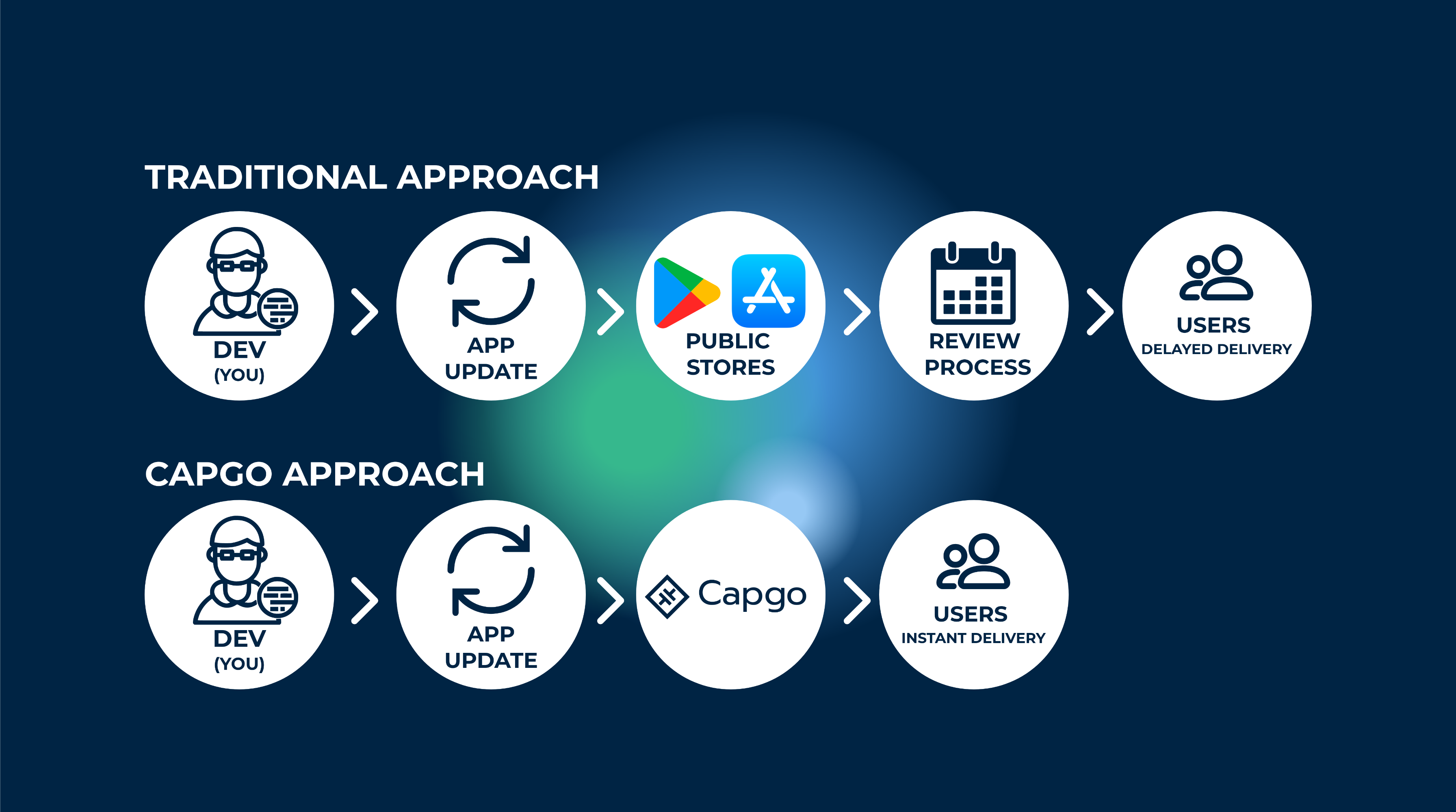
Capacitor-updater란 무엇인가요?
Capacitor-updater는 최종 사용자에게 앱 업데이트와 개선 사항을 즉시 전달할 수 있도록 돕는 기술입니다.
App Store 심사를 거치지 않고도 중요한 버그를 수정하고 즉시 배포해야 할 때 특히 유용합니다.
업데이트가 준비되는 즉시 사이드로딩(side-loading)하여 웹처럼 민첩하게 대응할 수 있다고 생각하면 됩니다.
또한, 새로운 업데이트로 인해 앱이 충돌할 경우 롤백 기능을 제공합니다.
어떻게 작동하나요?
Capgo는 앱의 JavaScript 번들을 Capgo 서버와 동기화합니다. 사용자가 앱을 열 때마다 Capgo 서버를 통해 번들에 적용할 새로운 업데이트가 있는지 확인합니다. 물론 사용자 경험을 세밀하게 조정할 수 있는 다양한 설정 옵션도 함께 제공됩니다.
저는 제가 만드는 모든 프로젝트에 Capgo를 사용합니다. 덕분에 App Store 심사 과정에 쓰는 시간을 줄일 수 있습니다.
자세히 알아보기 여기.
Capgo로 알아보는 Semantic Versioning
Capgo는 Semantic Versioning(semver)을 사용하여 앱에 업데이트를 적용할 시점과 방식을 결정합니다. 이를 통해 사용자는 호환 가능한 업데이트만 받게 되며, Breaking Change가 자동으로 배포되는 것을 방지할 수 있습니다.
Semantic Versioning의 형식은 다음과 같습니다. MAJOR.MINOR.PATCH:
- 메이저: 네이티브 앱 스토어 릴리스가 필요한 Breaking Change
- 마이너: 하위 호환성이 유지되는 새로운 기능
- PATCH: 하위 호환성이 유지되는 버그 수정
예를 들어, 앱 버전이 1.0.0 이고 다음 버전으로 업데이트하려면 1.0.1 (patch 버전), Capgo가 이 업데이트를 자동으로 적용합니다. 하지만 1.0.0 대상 2.0.0 에서 (major 버전)으로 업데이트하려면 breaking changes가 포함되어 있으므로 Native Build를 통한 앱 스토어 출시가 필요합니다.
Capgo의 채널 설정을 통해 어떤 유형의 업데이트를 자동으로 적용할지 구성할 수 있습니다:
- Major 전략: 모든 업데이트 허용 (주의해서 사용)
- Minor 전략: 마이너 및 패치 업데이트만 허용
- Patch 전략: 패치 업데이트만 허용
- Metadata 전략: 최소 버전 요구 사항 충족 필요
저희가 제공하는 Semver Tester 도구를 사용하면 Capgo의 업데이트 로직에서 다양한 버전 조합이 어떻게 작동하는지 테스트할 수 있습니다. Semver Tester. 이 도구를 통해 채널 설정에 따라 업데이트가 정확히 언제 적용되는지 파악할 수 있습니다.
제한 사항이 있나요?
매우 유용해 보이지만, 몇 가지 유의해야 할 점이 있습니다. 먼저 OTA 업데이트는 웹 번들에서만 작동합니다. Capacitor JS에서는 거의 모든 code을 JS, CSS, HTML로 작성하기 때문에 큰 제한이 아니라고 생각할 수도 있습니다. 하지만 앱에 설치된 네이티브 모듈도 존재합니다. 만약 모듈이 Android 또는 iOS 디렉토리를 변경한다면, OTA로 앱을 업데이트할 수 없습니다. 이 디렉토리의 콘텐츠는 OTA가 업데이트할 수 없는 Native 바이너리 컴파일에 사용되기 때문입니다. 네이티브 앱조차도 이 부분은 업데이트할 수 없습니다.
하지만 CI/CD를 설정해 이 과정을 자동화할 수 있습니다. 방법은 다음 튜토리얼을 참고하세요. iOS용 가이드.
자동 Capgo 설정
이제 가입하고 첫 버전을 업로드할 API 키를 받을 차례입니다! 먼저 Capgo 계정에 가입하세요.
Capgo에 로그인하면 온보딩 페이지가 나타납니다.
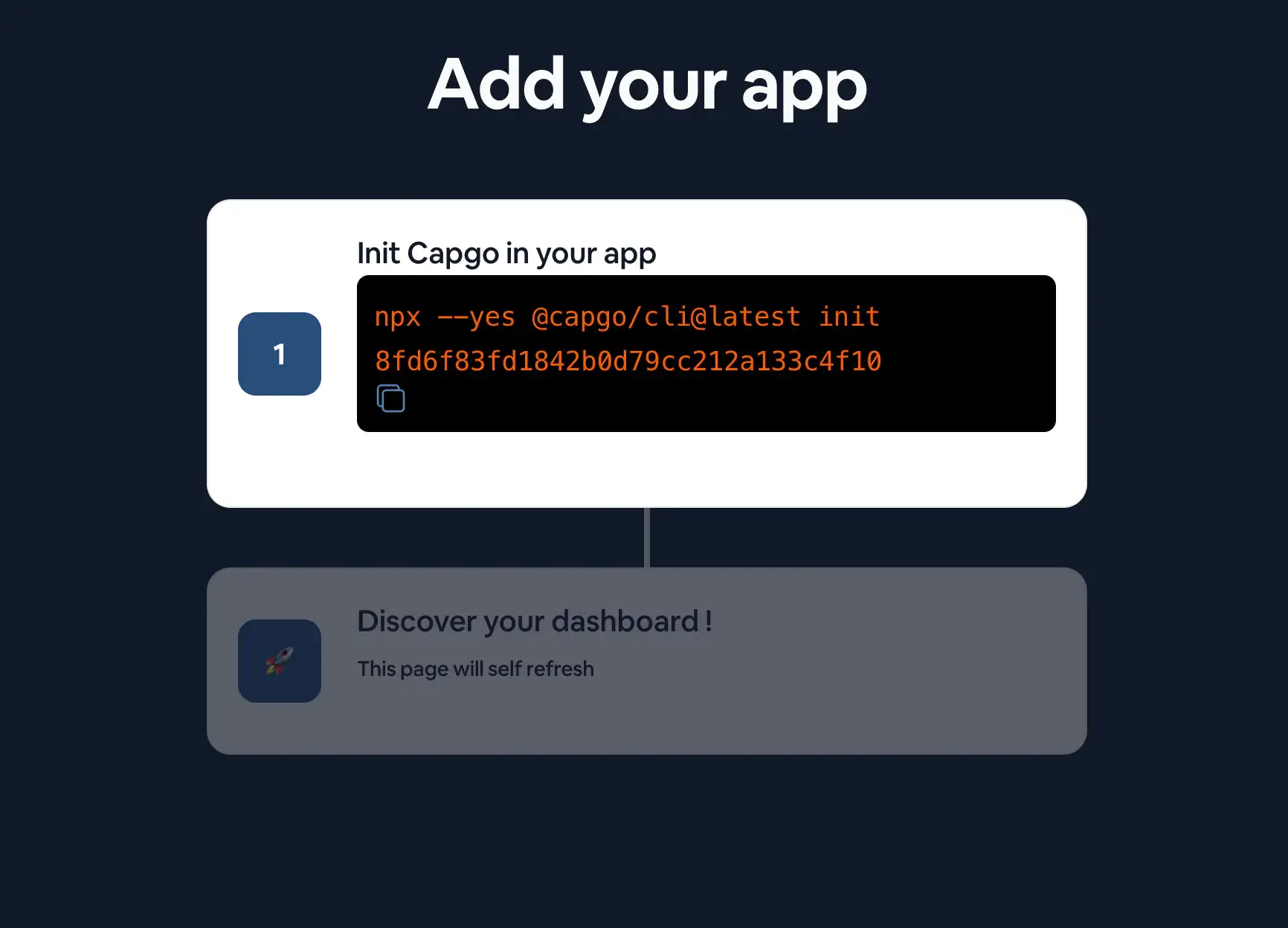
온보딩 페이지의 안내에 따라 첫 번째 앱을 추가하세요.
CLI 가이드를 따르세요.
터미널에서 Capacitor 앱 루트 디렉토리로 이동한 뒤 다음 명령어를 실행하세요:
npx @capgo/cli@latest init
Capacitor 앱에 Capgo를 설치하려면, CLI가 Capgo를 이용한 앱 설정 과정을 안내해 드립니다.
수동으로 설정하려면 아래 단계를 따르세요.
수동 Capgo 설정
플러그인 설치
앱에 다음과 같은 code를 추가해야 합니다:
npm i @capgo/capacitor-updater && npx cap sync
Capacitor 앱에 플러그인을 설치합니다.
그 다음, JS bundle이 정상임을 네이티브 플러그인에 알리기 위해 다음 code를 앱에 추가하세요 (이 과정을 생략하면 네이티브 플러그인이 이전 버전으로 롤백합니다):
import { CapacitorUpdater } from '@capgo/capacitor-updater'

CapacitorUpdater.notifyAppReady()
이 과정을 통해 네이티브 플러그인에 설치가 성공했음을 알립니다.
그 다음 아래 명령어를 실행하여 npm run build && npx cap copy 앱을 업데이트하세요.
Capgo CLOUD 로그인
먼저, all apikey를 사용하세요 계정에 있는 CLI로 로그인하려면:
npx @capgo/cli@latest login YOU_KEY
첫 번째 앱 추가하기
CLI를 사용하여 Capgo Cloud에서 앱을 먼저 생성해 보겠습니다.
npx @capgo/cli@latest app add
이 명령은 Capacitor 설정 파일에 정의된 모든 변수를 사용하여 앱을 생성합니다.
첫 번째 버전 업로드하기
다음 명령을 실행하여 code를 빌드하고 Capgo로 전송하세요:
npx @capgo/cli@latest bundle upload
기본적으로 버전 이름은 다음에 있는 이름이 됩니다: package.json 다운로드됩니다.
체크인 Capgo 빌드가 있으면.
다음 앱으로 직접 테스트할 수도 있습니다: 모바일 sandbox 앱.
채널 기본값 설정
앱을 Capgo에 전송한 후에는, 채널을 default 설정해야 앱이 Capgo로부터 업데이트를 받을 수 있습니다.
npx @capgo/cli@latest channel set production -s default
기기에서 Live Update 받기
Deploy를 통해 앱이 live update를 받으려면, 기기나 에뮬레이터에서 앱을 실행해야 합니다. 가장 간단한 방법은 다음 명령어를 사용하여 컴퓨터에 연결된 기기나 에뮬레이터에서 로컬 앱을 실행하는 것입니다.
npx cap run [ios | android]앱을 열었다가 백그라운드로 전환한 뒤 다시 열어보세요. 로그에서 앱이 업데이트를 완료한 것을 확인할 수 있습니다.
축하합니다! 🎉 첫 번째 Live Update 배포에 성공했습니다. 이것은 Live Updates로 할 수 있는 일의 시작일 뿐입니다. 더 자세한 내용은 전체 Live Updates 문서.
로컬에서 업데이트 수신을 중단하려면 다음 명령어를 실행하세요
npx @capgo/cli@latest channel set
Capacitor-updater를 사용하여 Capacitor 앱을 원활하게 업데이트하기 다음 단계
사용 중이라면 Capacitor-updater로 Capacitor 앱을 끊김 없이 업데이트하세요 마이그레이션과 엔터프라이즈 운영을 계획하려면 다음과 연결하세요: Capgo 엔터프라이즈 Capgo Enterprise의 제품 워크플로우를 위해, Ionic Enterprise 플러그인 대안 Ionic Enterprise 플러그인 대안의 제품 워크플로우를 위해, Capgo 대안 Capgo Alternatives의 제품 워크플로우용, Capgo 컨설팅 Capgo Consulting의 제품 워크플로우용, Capgo 프리미엄 지원 Capgo Premium Support의 제품 워크플로우용.





