 PRODUCTIVITY
My Swisscom
Account app where support, plan, and billing changes should ship quietly.
- Google Play installs
- 1.8M
- Store rating
- 4.4
Set & Forget
Install the native app once through MDM or your internal store. After that, Capgo downloads new web bundles in the background, applies them when you choose, rolls back a bundle that fails to start, and shows which version each device runs.
14-day unlimited free trial. No credit card required
Channel map
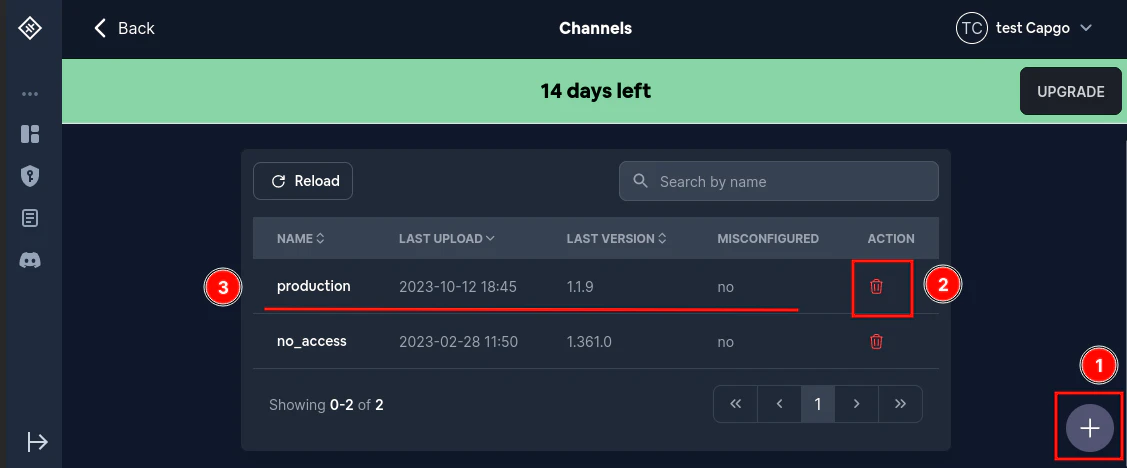
Kiosks, shared tablets, and field devices often run one app all day. Users do not open a store to update it, and IT does not want to push a new package for every web fix. Capgo keeps the web layer current on its own, backs out a bundle that fails to start, and tells you what each device runs.
Use Capgo as the release lane for web assets, not as a replacement for your native distribution. Native binaries still go through your enterprise packaging flow.
How it works
Configure the app once, then release from CI and watch from the console. Every command and setting below is from the Capgo docs.
defaultChannel puts every device from this build on the right channel, for example one per site. autoUpdate: 'always' applies a new bundle as soon as it downloads, which suits kiosk apps that never go to the background.
// capacitor.config.ts
plugins: {
  CapacitorUpdater: {
    defaultChannel: 'site-eu',
    autoUpdate: 'always',
    autoSplashscreen: true,
  },
},This tells the updater the new bundle loaded. If a bundle never gets there, the device returns to the last working one by itself.
import { CapacitorUpdater } from '@capgo/capacitor-updater'

// once your app has loaded
CapacitorUpdater.notifyAppReady()Upload with --delta so devices download only changed files. When the first site looks right, link the same bundle to the other channels.
npx @capgo/cli@latest bundle upload --channel site-eu --delta
# after the first site checks out
npx @capgo/cli@latest channel set site-us com.example.app \
--bundle 1.4.2Device logs show each check, download, install, and failure. Observe (beta) compares launch and WebView timing by bundle version. To roll a site back, link its previous bundle.
# roll site-eu back to the previous bundle
npx @capgo/cli@latest channel set site-eu com.example.app \
--bundle 1.4.1Apps built with Capacitor
Telecom and support apps have billing, plan, support, and device workflows that must stay current without asking users to install a new binary for every small improvement.
PRODUCTIVITY
Account app where support, plan, and billing changes should ship quietly.
 TOOLS
TOOLS
Carrier self-service app where users should not manage every minor update.
 Tools
Tools
Support app where diagnostic and help flows need maintenance without release overhead.
Customer proof

Developer, Webincode
“Being able to add Device ID's to certain groups and push the changes to only certain groups is a life saver.”

 Lead Developer, drivolino GmbH
“The Capgo Capacitor Updater plugin completely transformed how we ship updates. What used to take days now takes just minutes.”
Founder, NuTriQ
“Being able to push production OTA updates instantly without waiting for full App Store review cycles has been a massive operational advantage.”
FAQ
For kiosk, MDM, and internal apps where nobody updates by hand.
Yes, with autoUpdate set to 'always'. The plugin checks every 10 minutes while the app is open (periodCheckDelay, 600 seconds minimum) and applies a downloaded bundle right away. With the default 'atBackground', the bundle waits until the app is backgrounded. Instant apply also needs @capacitor/splash-screen with autoSplashscreen turned on.
Update behavior docsIf the new bundle does not call notifyAppReady() within 10 seconds, the device goes back to the previous working bundle. You can also point the channel back to an earlier bundle, or force the built-in bundle, and devices pick it up on their next check.
Rollbacks docsWith Capgo Notifications set up, channel set --send-update-notification sends a silent update-check notification after you change the channel's bundle. Delivery is best effort and depends on the operating system, network, and device state. It cannot reach offline or force-quit apps.
Silent update checksYes, for the native app. Capgo updates JavaScript, HTML, CSS, and assets. New plugins, native code, and Capacitor config changes still ship as a new signed package through your MDM or internal store.
What needs a native buildThe Enterprise plan offers dedicated, hybrid, and licensed self-hosted setups. You can also run your own update server with the open-source updater, but then you build features such as channels and statistics yourself.
Self-hosted updater docsTell us how your devices are enrolled and connected. We can walk through channels, update timing, and rollback for your fleet.
Keep kiosk and MDM devices current with Capgo background live updates.
human support from Martin
14-day unlimited free trial. No credit card required
Enterprise needs? Talk to our team


