


该插件现已迁移至 RevenueCat 官方仓库。请查看 官方文档 了解更多信息。
如果你更喜欢不依赖 RevenueCat 的简单原生 API, @capgo/native-purchases 通过 StoreKit 和 Google Play Billing 直接实现应用内购买和订阅。
Capacitor Purchases 是 Capacitor 框架的一个插件,支持在 iOS 和 Android 上进行应用内购买。它在多个平台间提供简单且一致的 API,让开发者能够轻松在移动应用中实现应用内订阅和购买。
Capacitor Purchases 插件的核心特性之一是它集成了 RevenueCat,这是一个为应用内订阅和购买提供工具的平台。RevenueCat 通过在多个平台提供简单且一致的 API,并自动处理收据验证和用户管理等任务,简化了应用内订阅与购买的实现流程。
借助 RevenueCat,开发者可以轻松管理订阅、追踪营收并执行其他相关任务。RevenueCat 提供的一些功能包括:
- 自动收据验证
- 用户管理
- 支持自定义定价模型
- 详细的数据分析 - 可扩展性
通过将 Capacitor Purchases 插件与 RevenueCat 结合使用,开发者在移动应用中实现应用内订阅和购买时可以节省大量时间和精力,并能提供更多有助于提升用户体验和增加营收的功能。
通过使用 Capacitor Purchases 插件和 RevenueCat,开发者可以轻松管理和追踪应用内订阅与购买、验证收据,并在多个平台间管理用户。它还支持创建自定义定价模型,并提供详细的数据分析以提升性能和营收。
安装
请务必使用最新版本的 Capacitor 和 Capacitor Purchases 插件。您可以在 Capacitor 网站上查看 Capacitor 和 Capacitor Purchases 插件的最新版本。
要安装 Capacitor Purchases 插件,请运行以下命令:
npm i @capgo/capacitor-purchases
将插件添加到您的应用原生 code 中
npx cap sync
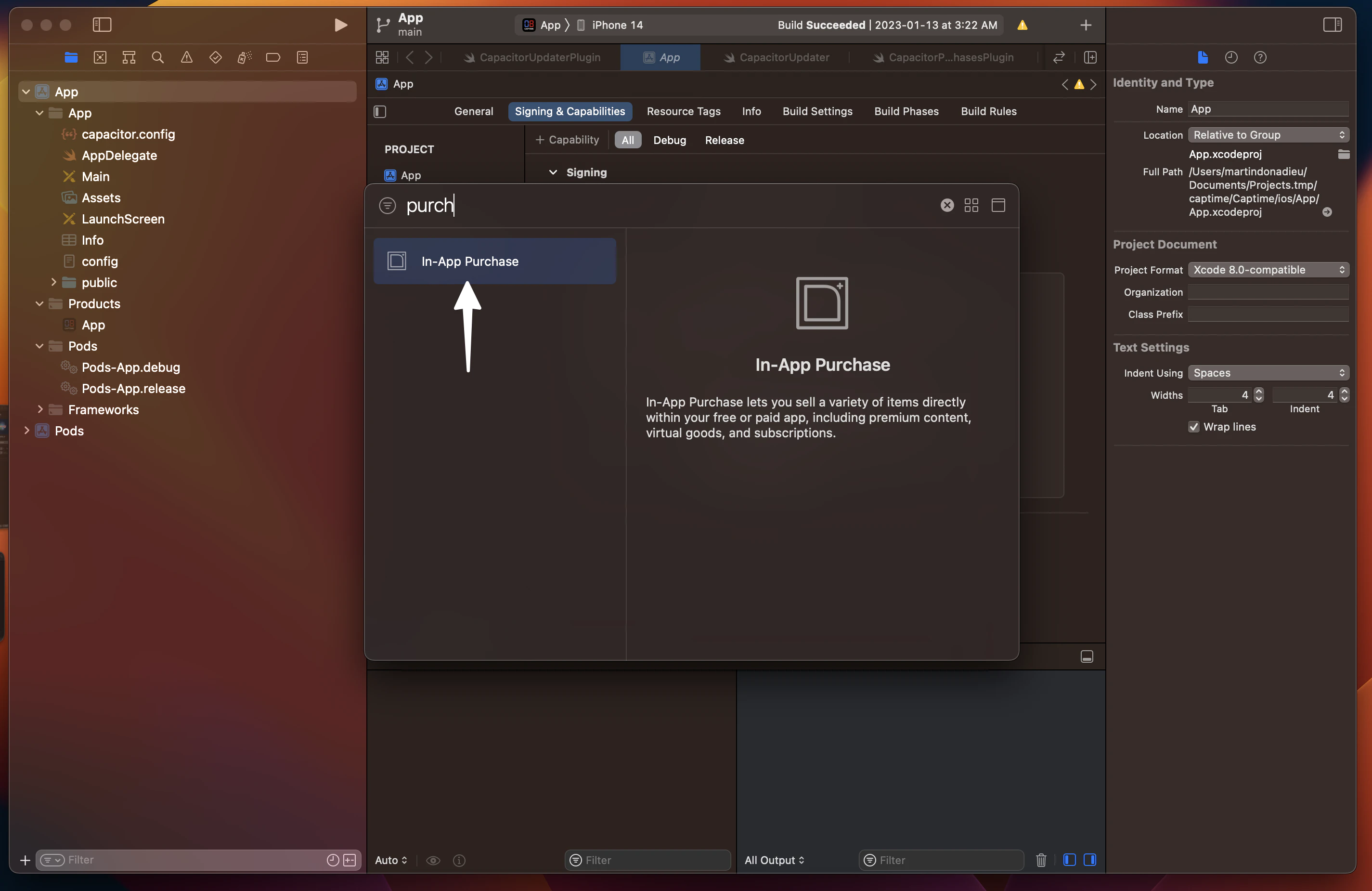
在 Xcode 中添加应用内购买功能:
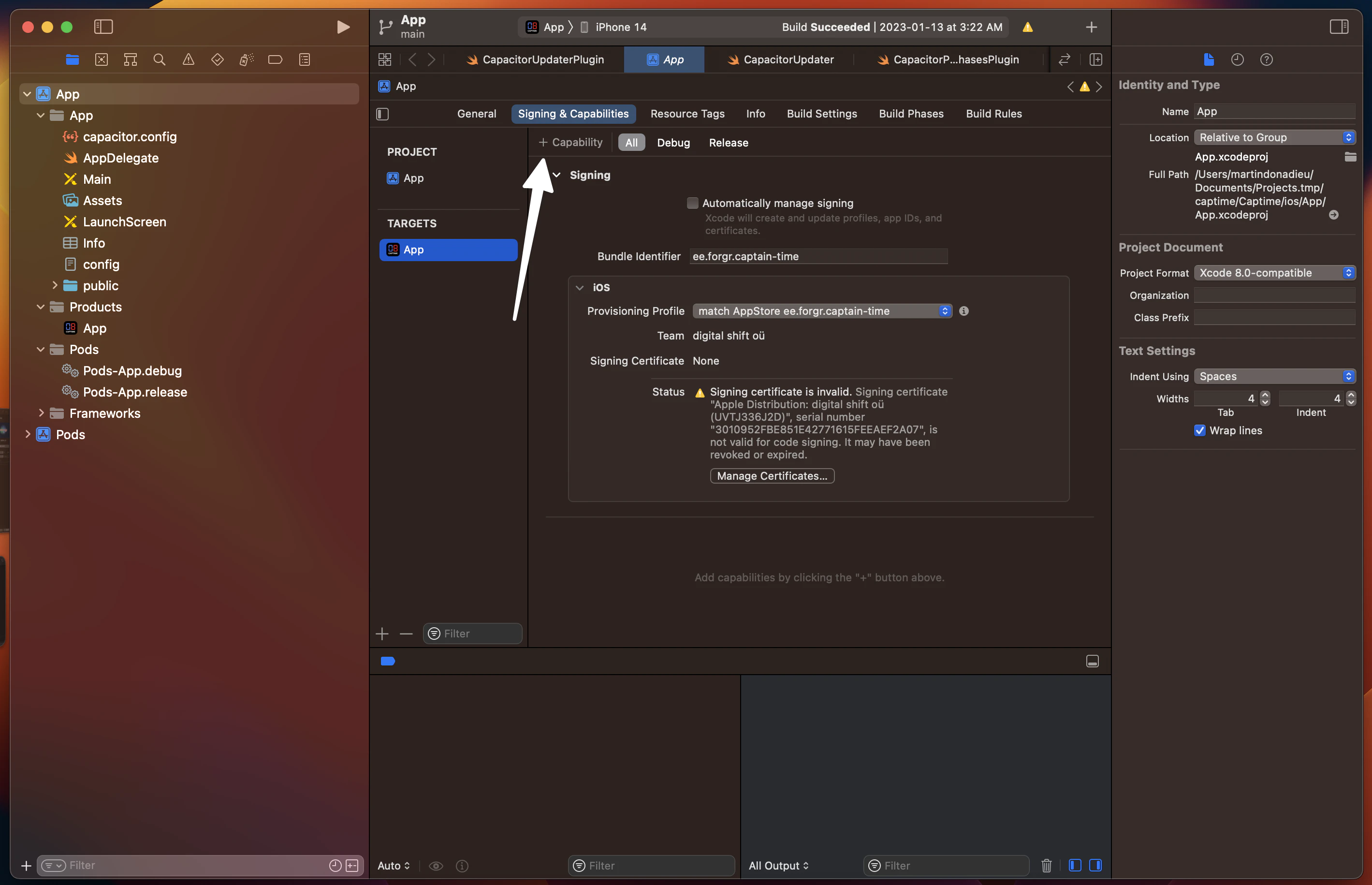 然后
然后
1. 创建 RevenueCat 账号
本指南将带您快速上手订阅功能,只需几行 code 即可实现 RevenueCat 与 SDK 的集成。
注册新的 RevenueCat 账号 此处.
📘
💡 小贴士!
RevenueCat 建议为每个应用/项目单独创建一个 RevenueCat 账号,尤其是如果你打算出售该应用。这样能加快转让流程,因为你可以直接转让整个账号,而不用等 RevenueCat 支持团队逐个转让项目。
组织 / 企业版
我们建议在注册 RevenueCat 以及在项目中设置应用时使用公司账号。你就能邀请团队其他成员作为 协作者 加入你的项目,但 只有项目所有者能管理账单。项目协作者无法管理账单详情。
2. 项目与应用配置
▶️ 创建项目
前往 RevenueCat dashboard 并 添加新项目 从顶部导航菜单的下拉列表中选择 Projects.
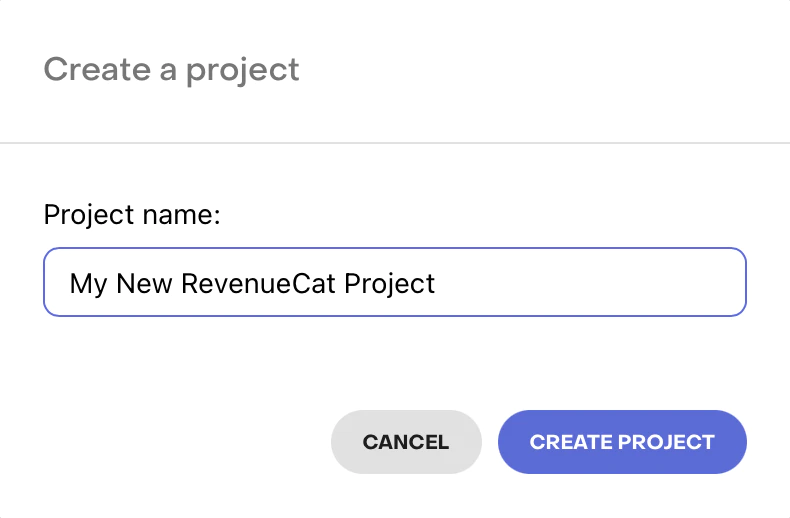
创建新 Project 的弹窗
▶️ 添加 App / 平台
从 Project Settings > Apps 在项目 dashboard 左侧菜单中,选择你要添加的 App 平台。
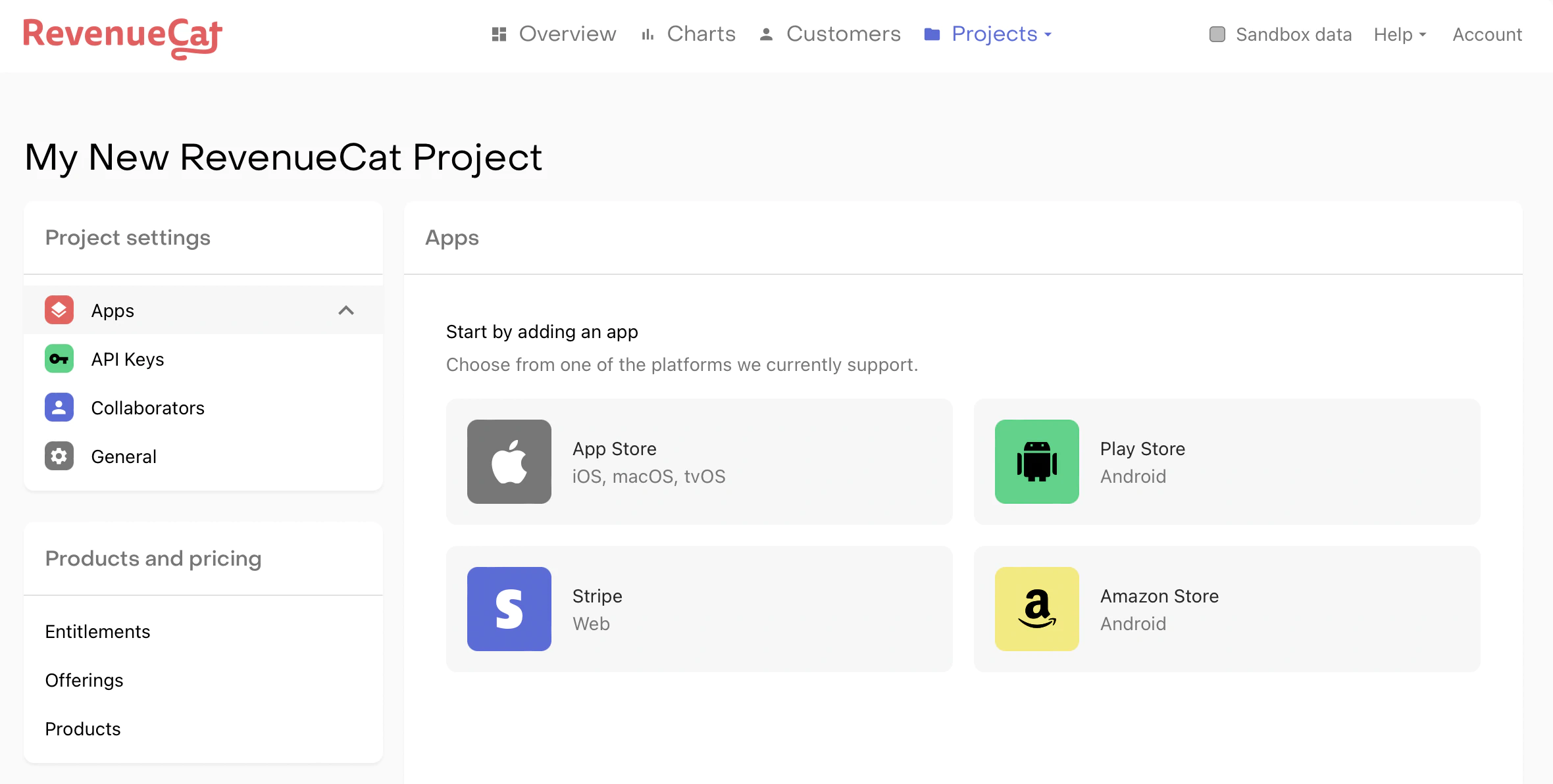
用于选择 App 平台的 Project dashboard
字段 应用名称 是将其应用添加到 RevenueCat 的必要条件。其余配置字段稍后可以添加。若要进行测试和生产环境购买,必须配置 Bundle ID (iOS) / Package Name (Android) 以及 Shared Secret (iOS) / Service Credentials (Android)。
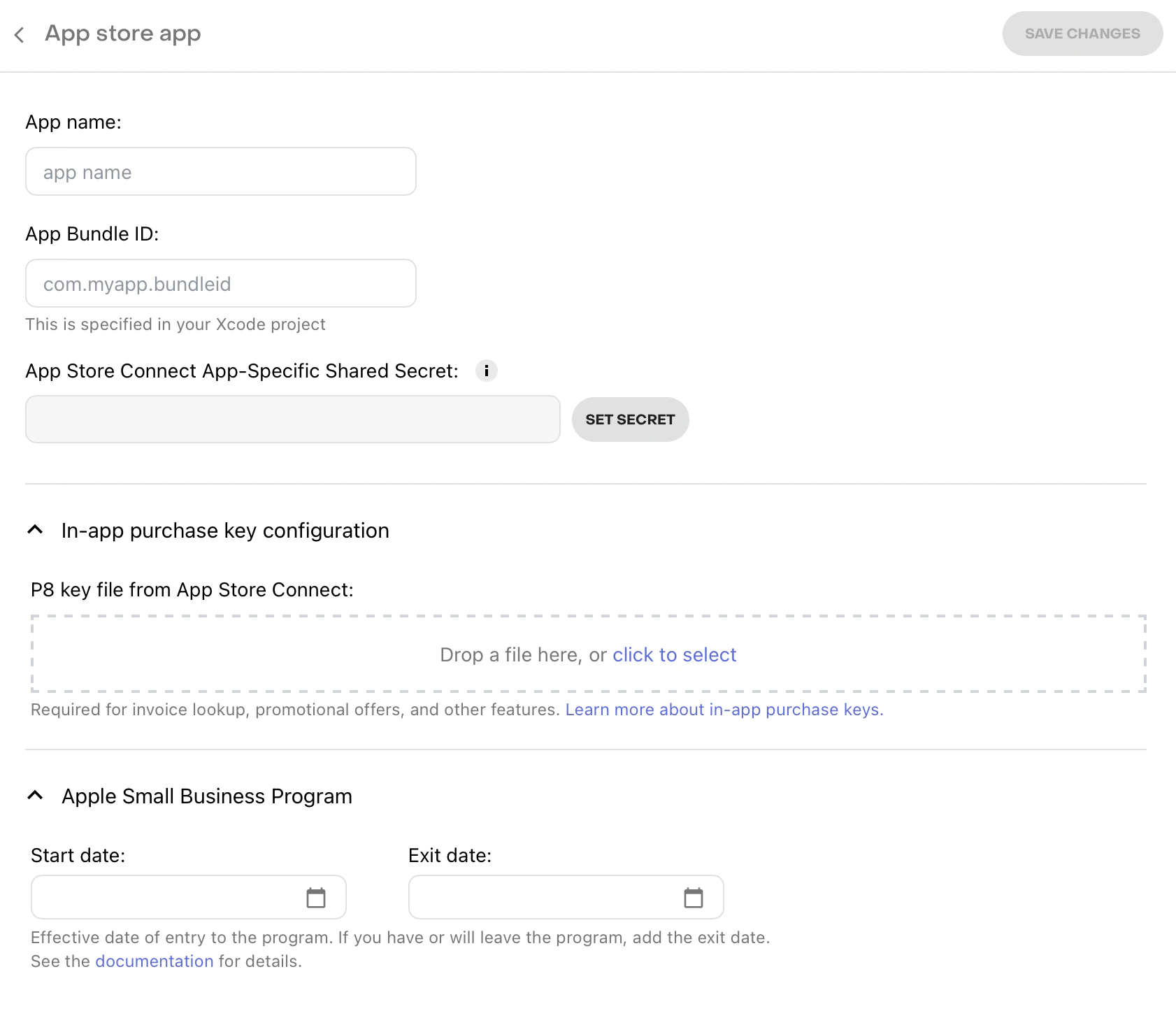
Apple App Store 应用的配置页面
📘
💡 小贴士!
注册应用后,RevenueCat 建议设置 平台服务端通知。这些通知并非强制要求,但可以加快 webhooks 以及集成交付速度,并减少更新订阅者时的延迟。
📘
Staging 与 Production 应用及用户对比
RevenueCat 本身没有独立的 Staging 和 Production 环境。相反,用户的底层交易是通过 sandbox 和 production 进行区分的。
任何 RevenueCat 应用都可以进行商店的沙盒(sandbox)和生产环境购买。如果你为测试环境和生产环境准备了不同的应用,可以在 RevenueCat 中创建多个项目来镜像你的配置。
此外,用户也不会按环境进行隔离。同一个用户可以同时拥有活跃的沙盒购买记录和生产环境购买记录。
▶️ 服务凭据
需要设置服务凭据,以便 RevenueCat 代表你与应用商店进行通信。请参阅 RevenueCat 指南 App Store Connect 共享密钥, Play 服务凭据,以及 Amazon Appstore 共享密钥 了解更多信息。
请注意,Play 服务凭据可能需要长达 36 小时才能在 Google 服务器中完成同步。
3. 产品配置
▶️ 商店设置
在使用 RevenueCat 获取产品之前,您必须先在相应的商店中配置产品。请参考以下指南: App Store Connect, Google Play Console, Amazon Appstore,以及 Stripe 以获取此流程的操作帮助。
如果您销售 iOS 产品,请务必签署“付费应用程序协议”,并在以下位置填写银行和税务信息: App Store Connect > 协议、税务和银行业务. 必须完成此步骤后才能测试任何购买操作.
📘
测试时想跳过商店配置吗?
在 iOS 上,您可以通过使用 StoreKit Configuration 文件进行测试,从而延迟在 App Store Connect 中配置产品。这些配置文件只需极少的设置,并可以直接通过 Xcode 进行配置。
详细了解如何在 RevenueCat 中设置 StoreKit Configuration 文件,请参阅 Sandbox 测试 指南。
▶️ 在 RevenueCat 中配置产品和 Entitlements
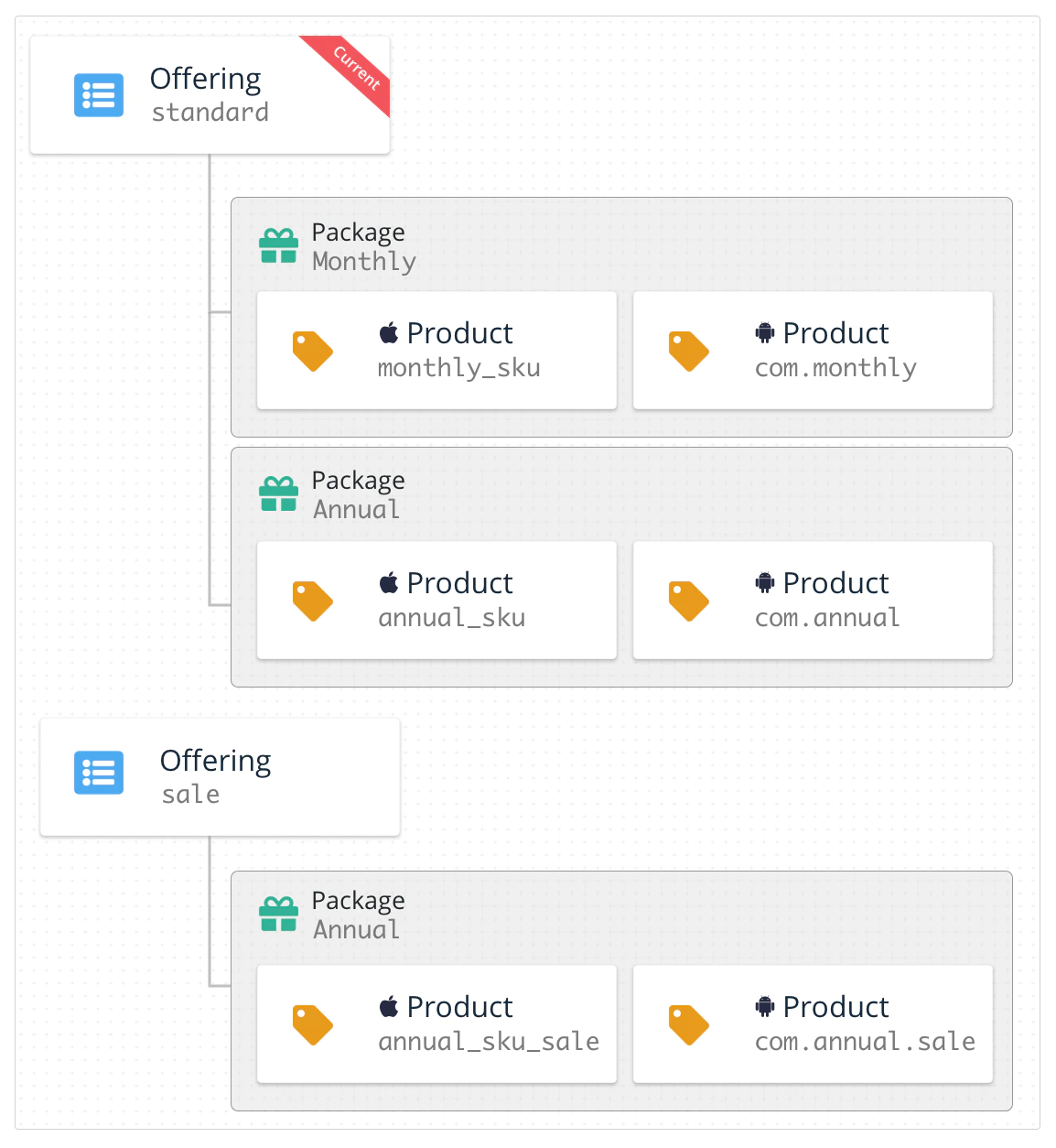
一旦你的应用内产品已在 App Store Connect, Google Play Console, Amazon Appstore,或者 Stripe 中配置好后,就需要将这份配置复制到 RevenueCat dashboard。RevenueCat 使用 Entitlements 系统来控制高级功能的访问权限,并使用 Offerings 管理向客户提供的产品组合。
Entitlements 是客户购买特定产品后“有权”获得的访问级别。 Offerings 让你能轻松组织想在 paywall 上“提供”的应用内产品,并远程配置它们。RevenueCat 建议 利用这些功能来简化您的 code,并让您无需发布应用更新即可更改产品。
查看 配置产品 来设置您的产品,然后将它们组织到 Offerings 或 Entitlements 中。
4. 使用 RevenueCat Purchases SDK
RevenueCat SDK 可在各平台无缝实现购买和订阅,同时与 RevenueCat 服务器同步 token。
如果您在使用 SDK 时遇到问题,请参阅 SDK 故障排除 以获取指导。
📘
请仅使用您的公开 SDK 密钥来配置 Purchases
你可以从以下位置获取公开的 SDK key: API 密钥 选项卡(位于 项目设置 下的 dashboard 中)。
你只应配置一次 内购 共享实例,通常是在应用启动时。之后,同一实例会在整个应用中共享,只需访问 .shared SDK 中的实例。
请参阅 RevenueCat 关于 配置 SDK 的指南,了解更多信息和最佳实践。
请确保配置好 内购 仅需使用您的 SDK 公钥即可。您可以在 RevenueCat 中了解更多关于不同 API 密钥的信息 身份验证指南.
import { CapacitorPurchases } from '@capgo/capacitor-purchases'
import { isPlatform } from '@ionic/vue' // use the right one for your framework

CapacitorPurchases.setDebugLogsEnabled({ enabled: import.meta.env.DEV }) // Enable to get debug logs in dev mode
if (isPlatform('ios')) {
    CapacitorPurchases.setup({ apiKey:'appl_******'})
} else if (isPlatform('android')) {
    CapacitorPurchases.setup({ apiKey:'goog_******'})
}
在开发阶段,RevenueCat 建议启用更详细的调试日志。有关这些日志的更多信息,请参阅其 调试 指南。
如果您计划在现有的 code 购买流程中使用 RevenueCat,请参考其关于 观察者模式.
📘
使用用户 ID 配置购买
如果您的应用中已有用户身份验证系统,您可以在配置时提供用户标识符,或稍后通过调用
.logIn()来提供。欲了解更多信息,请查看 RevenueCat 关于 识别用户.
SDK 将自动获取 已配置的 Offerings 并从 Apple、Google 或 Amazon 获取产品信息。因此,当用户打开购买界面时,可用产品已加载完毕。
以下是获取 Offerings 的示例。你可以利用 Offerings 来组织你的付费墙界面。请参阅 RevenueCat 关于 展示产品 的指南,了解更多信息和最佳实践。
▶️ 获取并展示可用产品
📘
使用用户 ID 配置购买
如果你的 App 拥有用户身份验证系统,你可以在配置时或稍后通过调用
.logIn()来提供用户标识符。欲了解更多信息,请查看 RevenueCat 关于 识别用户.
SDK 将自动获取已 配置的 Offerings 并从 Apple、Google 或 Amazon 获取产品信息。因此,当用户打开购买界面时,可用产品已加载完毕。
以下是获取 Offerings 的示例。你可以利用 Offerings 来组织你的付费墙界面。请参阅 RevenueCat 关于 展示产品 的指南,了解更多信息和最佳实践。
const { offerings } = await CapacitorPurchases.getOfferings()
if (offerings.current !== null) {
    // Display current offering with offerings.current
}
的指南。如果获取 Offerings, 产品或可用的 packages 为空,则是由于相关应用商店的配置问题导致的。
App Store Connect 中出现此问题最常见的原因是“付费应用程序协议”已过期,或者产品未处于“准备提交”状态。在 Google Play 中,这通常是因为应用未发布在封闭测试轨道,且未添加有效的测试用户。
您可以在 RevenueCat 的以下内容中找到更多故障排除信息: 帮助中心.
▶️ 进行购买
SDK 提供了一种简化购买流程的方法。该 purchase:package 会从获取的 Offering 中提取 package,并调用相应的应用商店处理交易。
下方的 code 示例展示了购买 package 并确认其解锁 “your_entitlement_id” 内容的过程。有关该 purchase:package 方法的更多详情,请参阅 RevenueCat 关于 进行购买的指南.
const purchase = async (p: Package): Promise<PurchaserInfo | null> => {
  try {
    // console.log('purchase', p)
    const data = await CapacitorPurchases.purchasePackage({
      identifier: p.identifier,
      offeringIdentifier: p.offeringIdentifier,
    })
    const purchaserInfo = data.purchaserInfo
    // console.log('listenBuy', purchaserInfo)
    if (purchaserInfo.activeSubscriptions.includes(p.identifier)) {
      // set the user as paid
    }
    return purchaserInfo
  }
  catch (e) {
    console.error('listenBuy error', e)
  }
  return null
}
▶️ 检查订阅状态
您可以在需要获取最新状态时随时调用此方法,在应用的整个生命周期内重复调用它是安全的。 内购 自动缓存最新内容 CustomerInfo 每次更新时都会进行缓存——因此在大多数情况下,该方法会直接从缓存中读取,运行速度极快。
通常在决定向用户展示哪些 UI,或者用户执行需要特定权限的操作时,会调用此方法。
📘
💡 小贴士!
除了判断订阅是否处于激活状态外,你还可以获取更多订阅信息。请参阅 RevenueCat 关于 订阅状态 的指南,以了解订阅是否设置为自动续订、用户的信用卡是否存在问题等详情。
RevenueCat 支持用户恢复应用内购买,从而重新激活他们之前通过 同一商店账号 (Apple、Google 或 Amazon 账号)购买的所有内容。我们建议所有 App 都应提供某种方式让用户触发恢复方法。请注意,如果用户丢失了购买权限(例如:卸载/重新安装 App、丢失账号信息等),Apple 要求必须提供恢复机制。
  const res = await CapacitorPurchases.restoreTransactions()
  const purchaserInfo = res.purchaserInfo
  const ids: string[] = [] // extract active subscriptions ids
  purchaserInfo.activeSubscriptions.forEach((id) => {
    ids.push(id)
  })
如果两个不同的 App User ID 从同一个底层商店账户(Apple、Google 或 Amazon 账户)恢复交易。 RevenueCat 可能会尝试在两个 App User ID 之间创建别名,并在后续将其视为同一用户。详情请参阅 RevenueCat 关于 恢复购买 的不同可配置恢复行为的指南。
由于 SDK 在任何平台上都能无缝运行,用户购买信息的变化可能来自多种渠道。你可以通过实现一个可选的代理方法来响应客户信息的任何变化, CustomerInfo 通过实现一个可选的代理方法, purchases:receivedUpdated:.
每当 SDK 收到来自 CustomerInfo 调用的更新 getCustomerInfo(), purchase(package:), purchase(product:),或者 restorePurchases().
CustomerInfo 更新是 不 从 RevenueCat 后端推送到你的 App 中的。如上所述,更新只能通过向 RevenueCat 发起的出站网络请求来触发。
根据你的 App 需求,你也可以选择忽略该代理方法,只需在下次 App 启动时,或在 SDK 方法的 completion blocks 中处理客户信息的变化即可。
CapacitorPurchases.addListener('purchasesUpdate', (data) => {
  console.log('purchasesUpdate', data)
})
👍
大功告成!
你现在已经实现了一套功能完备的订阅购买系统,而且没花一个月去写服务器 code。恭喜!
示例应用
若要下载更多关于集成 SDK 的完整示例,请前往 RevenueCat 示例应用资源库。
我很快会发布一个使用 Capacitor 和 Vue.js 的示例应用。
如果你需要更深入地使用 Capacitor SDK,请查看文档 此处.
下一步
\
- 如果还没做,请查看 RevenueCat 的 权益指南,确保产品配置正确.
- 如果你想使用自己的用户标识符,请阅读关于 设置 App 用户 ID .
- 如果你正从其他系统迁移到 RevenueCat,请参阅 RevenueCat 关于 迁移现有订阅的指南.
- 准备好测试集成后,可以参考 RevenueCat 关于 测试与调试的指南.
- 如果你符合 App Store 小企业计划的条件,请查看 RevenueCat 关于 如何申请并通知 RevenueCat 的指南
如果你需要在 App 中使用 Live update
点击下方加入 👇
在此注册以获取账号
继续通过应用内购买实现 capacitor
如果你正在使用 capacitor 的应用内购买 要规划支付和购买,请将其与 Capgo 定价 关于 Capgo 定价中的产品工作流, 支付系统 关于支付系统的实现细节, @capgo/native-purchases 有关 @capgo/native-purchases 的实现细节, 快速入门 有关“入门指南”中的实现细节,以及 营收实战手册 有关实现细节,请参阅 Revenue Playbook。





