
API Keys
Copy a setup prompt with the install steps and the full markdown guide for this plugin.
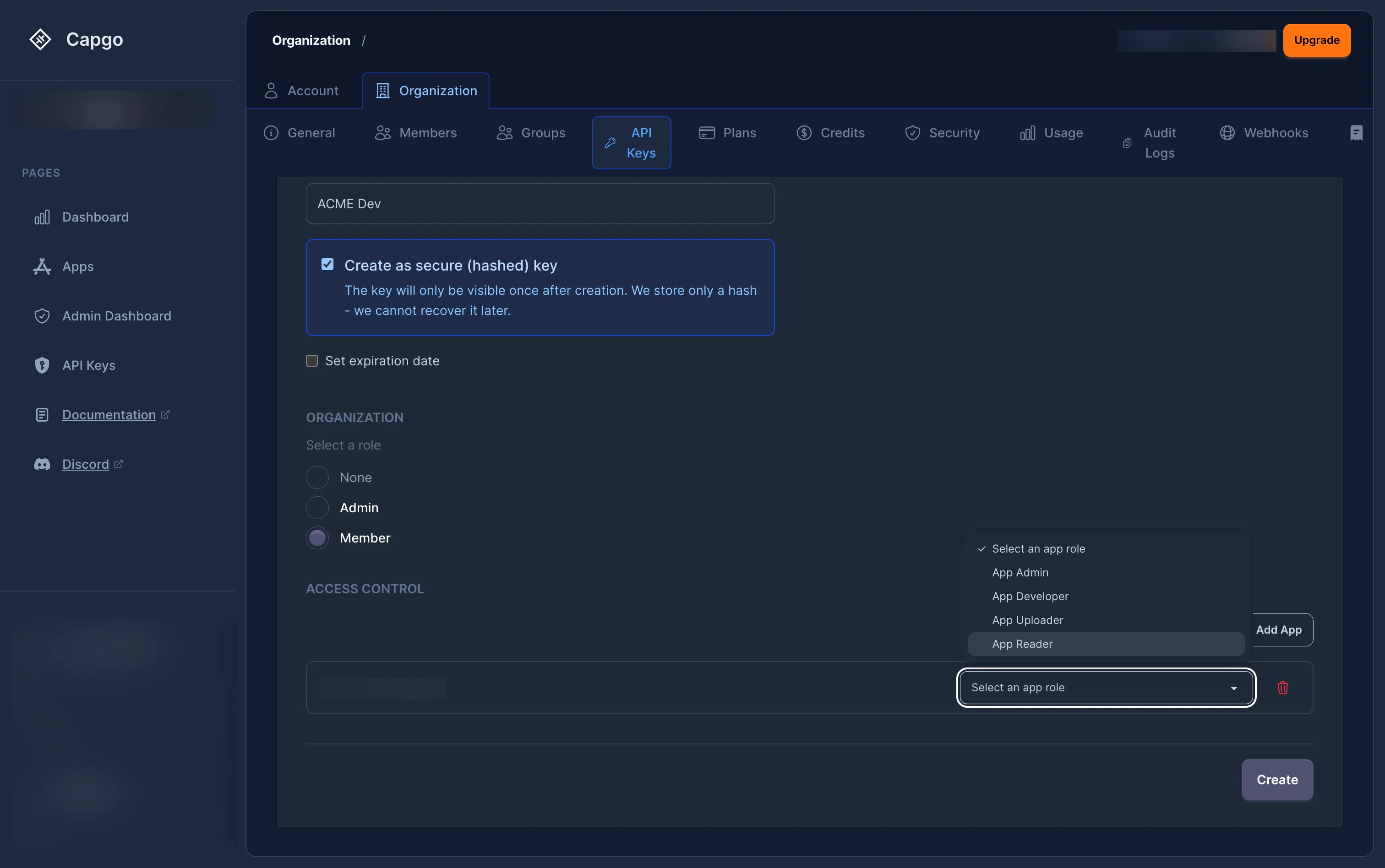
API keys are used to authenticate requests to the Capgo API. Keys are organization-specific and can be assigned RBAC roles for fine-grained access control. Each key can also have an optional expiration date and can be created as a “secure” (hashed) key where the plain-text value is only shown once.
Using an API key
Section titled “Using an API key”Use the authentication header documented by the endpoint. For API-key requests, authorization is accepted:
curl -H "authorization: YOUR_API_KEY" https://api.capgo.app/...Some endpoints also accept a dedicated key header. The Channels API accepts authorization or capgkey; use one of those headers for preview-channel automation.
RBAC Permissions
Section titled “RBAC Permissions”API keys use the same role-based access control (RBAC) system as user accounts. When creating or managing keys through the web app or API, you assign roles at two levels:
- Organization role — Defines the key’s baseline permissions across the entire organization (for example,
org_adminororg_member). - App roles — Per-app permissions (for example,
app_admin,app_developer,app_uploader,app_reader, orapp_preview).
If an API key has explicit role bindings, only those bindings are evaluated for permission checks. The key owner’s personal permissions are not inherited by the key.
Preview channel automation
Section titled “Preview channel automation”Bind app_preview only to the preview app for CI that creates a temporary, non-public preview channel, uploads and promotes a bundle, then deletes both.
{ "name": "PR preview key", "hashed": true, "bindings": [ { "role_name": "app_preview", "scope_type": "app", "org_id": "<OWNING_ORG_UUID>", "app_id": "<APP_UUID>" } ]}org_id is the UUID of the app’s owning organization. app_id is the app record’s internal UUID, not the public app identifier used by CLI commands (for example, com.example.app). The binding remains organization-bound even when the key has no organization-wide role.
The app-level app_preview role includes only app.read, app.read_bundles, app.upload_bundle, and app.create_channel. When that key creates a channel, Capgo automatically adds a channel_preview binding on the newly created channel. That child binding grants channel.read, channel.promote_bundle, and channel.delete only for the channel the key created.
app_preview retains app.read, so this is not strict channel-read isolation: the key may enumerate channel metadata in the selected app. The automatic child binding limits lifecycle mutations to the channel the key created.
Capgo records the App Preview key that uploaded each bundle. The key can promote only its own bundle to each preview channel it creates. It has no channel lifecycle access to an existing default/main channel, a channel created by another preview key, or another key’s bundle. For this workflow, omit public and never use --default.
Use channel delete <preview-channel> <public-app-id> --delete-bundle for cleanup. This is an atomic, ownership-checked preview cleanup route; it removes only the calling key’s preview channel and linked bundle. app_preview does not grant generic bundle.delete.
For the dashboard setup and a complete CLI example, see Use an App Preview key for preview workflows.
Organization creation permission
Section titled “Organization creation permission”Creating organizations with an API key now uses an explicit global permission: org.create.
This permission is separate from normal org/app role bindings because a new organization does not exist yet when POST /organization/ is called. To create organizations with an API key:
- The API key must include
org.createinglobal_permissions. - The same API key must also have a current organization-scoped
org_adminororg_super_adminbinding. - New API keys do not receive
org.createby default. Enable Allow creating organizations when creating or editing an RBAC API key in the dashboard. - Existing write-capable org admin/super admin API keys were backfilled with
org.createso existing integrations can continue creating organizations.
When an API key creates an organization, Capgo automatically assigns that same API key as org_super_admin on the newly created organization. This lets the integration manage the organization it just created without needing a separate manual role binding.
If you create an API key through the API, include global_permissions alongside the org admin binding:
{ "name": "Provisioning key", "hashed": true, "bindings": [ { "role_name": "org_admin", "scope_type": "org", "org_id": "00000000-0000-0000-0000-000000000000" } ], "global_permissions": ["org.create"]}org.create only applies to creating organizations. Deleting an organization still requires delete permission on the target organization, typically through org_super_admin.
Secure (Hashed) Keys
Section titled “Secure (Hashed) Keys”When creating a secure key, the server generates the key material and returns the plain-text value once. Only a hash is stored. This means:
- The plain-text key cannot be retrieved after creation.
- Regeneration produces a new plain-text key (shown once) and updates the stored hash.
- Hashed keys are recommended for production use.
Some organizations enforce hashed keys via the enforce_hashed_api_keys org policy.
Expiration
Section titled “Expiration”Keys can have an optional expiration date. Expired keys are rejected at the permission check layer.
Organization policies can enforce:
- Mandatory expiration (
require_apikey_expiration) — All new keys must have an expiry. - Maximum TTL (
max_apikey_expiration_days) — The expiry cannot be further than N days from now.
Security Best Practices
Section titled “Security Best Practices”- Principle of Least Privilege: Assign the most restrictive role that still allows your integration to function
- Regular Rotation: Rotate your API keys periodically using the regenerate feature
- Secure Storage: Store API keys securely and never commit them to version control
- Use Hashed Keys: Create secure (hashed) keys for production integrations
- Set Expiration: Always set an expiration date on keys used for temporary or CI/CD access
- Scope Restrictions: Restrict keys to specific apps with the minimum required role
Common Use Cases
Section titled “Common Use Cases”- CI/CD Integration: Create keys scoped to specific apps with the
app_uploaderorapp_developerrole, and set an expiration date. - PR Preview Channels: Use
app_previewon only the preview app or apps when CI needs to upload a bundle, create a temporary channel, and atomically clean up its own channel and bundle. - Deployment Automation: Use keys with the
app_developerrole for automated deployment scripts. - Monitoring Tools: Create keys with the
app_readerrole for external monitoring integrations. - Admin Access: Use keys with the
org_adminrole sparingly for administrative tools. - Third-Party Integrations: Create keys restricted to specific apps with the minimum required role.
- Organization Provisioning: Use an
org_adminororg_super_adminRBAC key withorg.createonly for trusted automation that needs to create organizations.
Keep going from API Keys
Section titled “Keep going from API Keys”If you are using API Keys to plan authentication and account flows, connect it with @capgo/capacitor-social-login for the implementation detail in @capgo/capacitor-social-login, @capgo/capacitor-passkey for the implementation detail in @capgo/capacitor-passkey, @capgo/capacitor-native-biometric for the implementation detail in @capgo/capacitor-native-biometric, Two-factor authentication for the implementation detail in Two-factor authentication, and SSO (Enterprise) for the implementation detail in SSO (Enterprise).
Ship Capacitor apps without the wait
Build with your AI coding agent, ship fixes in minutes, build iOS and Android without a Mac, and observe every release.


Enterprise needs? Talk to our team