
API Keys
Copy a setup prompt with the install steps and the full markdown guide for this plugin.
API keys are used to authenticate requests to the Capgo API. Keys are organization-specific and can be assigned RBAC roles for fine-grained access control. Each key can also have an optional expiration date and can be created as a “secure” (hashed) key where the plain-text value is only shown once.
Using an API key
Section titled “Using an API key”Pass your API key in the x-api-key header of every request:
curl -H "x-api-key: YOUR_API_KEY" https://api.capgo.app/...The authorization header is also accepted but is primarily intended for JWT tokens. When the value is a UUID-formatted API key it works, but x-api-key is the recommended header for all key types (including secure/hashed keys).
RBAC Permissions
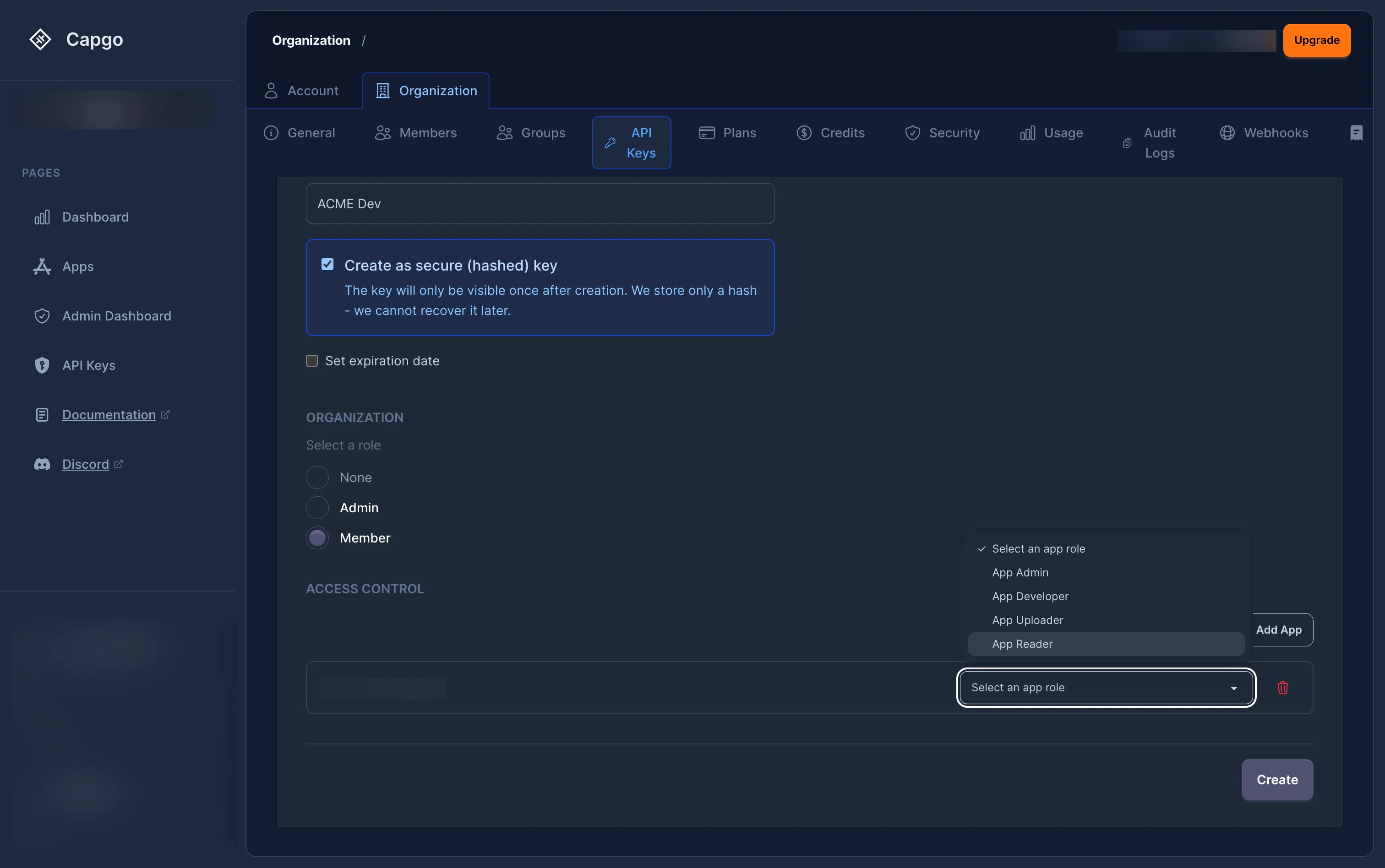
Section titled “RBAC Permissions”API keys use the same role-based access control (RBAC) system as user accounts. When creating or managing keys through the web app, you assign roles at two levels:
- Organization role — Defines the key’s baseline permissions across the entire organization (e.g.
org_admin,org_member). - App roles — Optional per-app permissions (e.g.
app_admin,app_developer,app_uploader,app_reader).
If an API key has explicit role bindings, only those bindings are evaluated for permission checks. The key owner’s personal permissions are not inherited by the key.
Organization creation permission
Section titled “Organization creation permission”Creating organizations with an API key now uses an explicit global permission: org.create.
This permission is separate from normal org/app role bindings because a new organization does not exist yet when POST /organization/ is called. To create organizations with an API key:
- The API key must include
org.createinglobal_permissions. - The same API key must also have a current organization-scoped
org_adminororg_super_adminbinding. - New API keys do not receive
org.createby default. Enable Allow creating organizations when creating or editing an RBAC API key in the dashboard. - Existing write-capable org admin/super admin API keys were backfilled with
org.createso existing integrations can continue creating organizations.
When an API key creates an organization, Capgo automatically assigns that same API key as org_super_admin on the newly created organization. This lets the integration manage the organization it just created without needing a separate manual role binding.
If you create an API key through the API, include global_permissions alongside the org admin binding:
{ "name": "Provisioning key", "hashed": true, "bindings": [ { "role_name": "org_admin", "scope_type": "org", "org_id": "00000000-0000-0000-0000-000000000000" } ], "global_permissions": ["org.create"]}org.create only applies to creating organizations. Deleting an organization still requires delete permission on the target organization, typically through org_super_admin.
Secure (Hashed) Keys
Section titled “Secure (Hashed) Keys”When creating a secure key, the server generates the key material and returns the plain-text value once. Only a hash is stored. This means:
- The plain-text key cannot be retrieved after creation.
- Regeneration produces a new plain-text key (shown once) and updates the stored hash.
- Hashed keys are recommended for production use.
Some organizations enforce hashed keys via the enforce_hashed_api_keys org policy.
Expiration
Section titled “Expiration”Keys can have an optional expiration date. Expired keys are rejected at the permission check layer.
Organization policies can enforce:
- Mandatory expiration (
require_apikey_expiration) — All new keys must have an expiry. - Maximum TTL (
max_apikey_expiration_days) — The expiry cannot be further than N days from now.
Security Best Practices
Section titled “Security Best Practices”- Principle of Least Privilege: Assign the most restrictive role that still allows your integration to function
- Regular Rotation: Rotate your API keys periodically using the regenerate feature
- Secure Storage: Store API keys securely and never commit them to version control
- Use Hashed Keys: Create secure (hashed) keys for production integrations
- Set Expiration: Always set an expiration date on keys used for temporary or CI/CD access
- Scope Restrictions: Restrict keys to specific apps with the minimum required role
Common Use Cases
Section titled “Common Use Cases”- CI/CD Integration: Create keys scoped to specific apps with the
app_uploaderorapp_developerrole, and set an expiration date - Deployment Automation: Use keys with the
app_developerrole for automated deployment scripts - Monitoring Tools: Create keys with the
app_readerrole for external monitoring integrations - Admin Access: Use keys with the
org_adminrole sparingly for administrative tools - Third-Party Integrations: Create keys restricted to specific apps with the minimum required role
- Organization Provisioning: Use an
org_adminororg_super_adminRBAC key withorg.createonly for trusted automation that needs to create organizations
Keep going from API Keys
Section titled “Keep going from API Keys”If you are using API Keys to plan authentication and account flows, connect it with @capgo/capacitor-social-login for the implementation detail in @capgo/capacitor-social-login, @capgo/capacitor-passkey for the implementation detail in @capgo/capacitor-passkey, @capgo/capacitor-native-biometric for the implementation detail in @capgo/capacitor-native-biometric, Two-factor authentication for the implementation detail in Two-factor authentication, and SSO (Enterprise) for the implementation detail in SSO (Enterprise).