
Encryption
Copy a setup prompt with the install steps and the full markdown guide for this plugin.
Capgo provides robust end-to-end encryption for your app bundles, ensuring that your JavaScript code and assets are protected during transmission and storage. This encryption system is designed to give you complete control over your app’s security while maintaining the convenience of live updates.
Overview
Section titled “Overview”Capgo’s encryption system uses industry-standard cryptographic methods to protect your bundles from unauthorized access. When encryption is enabled, your bundles are encrypted before leaving your development environment and remain encrypted until they’re decrypted by your app on the user’s device.
What Encryption Actually Protects: Unlike OTA systems that only sign updates, Capgo encrypts the uploaded bundle before storage and delivery. This protects the bundle contents from casual access in storage or transit and ensures only someone with your private key can produce a valid encrypted update. It does not make shipped web assets impossible to reverse engineer: the public key used by the client to decrypt updates is distributed in the app, so a determined attacker can still extract it and inspect bundle contents with enough effort.
Security model
Confidentiality with respect to Capgo
Section titled “Confidentiality with respect to Capgo”Your RSA private key is generated and kept on your machine. The Capgo CLI never transmits your private key, and Capgo does not store it. Capgo also does not store your full RSA public key: uploads include only a short key_id (the first 20 characters of the PEM body) so channels can match the key pair you used.
Encrypted full bundles are stored and delivered as AES-128-CBC ciphertext. Capgo services, CDN, object storage, and anyone on the delivery path who sees only the hosted artifacts cannot read your JavaScript, HTML, or assets without your private key.
Maximum confidentiality from Capgo
Section titled “Maximum confidentiality from Capgo”Default encryption already keeps bundle contents confidential in Capgo storage and in transit. If you also want to reduce what Capgo could learn by linking your update channel to a particular store binary, use the following guide.
Use a dedicated Capgo app ID. Set plugins.CapacitorUpdater.appId (your Capgo app_id) to a value that is not the same as your iOS bundle ID or Android application ID. Store and MDM builds embed your RSA public key in capacitor.config. When the Capgo app_id matches the store package name, it is easier to associate the Capgo app with a published binary that contains that public key. A separate Capgo app ID avoids that direct link.
Capgo Builder and the public key. Capgo Builder uploads zip your project with capacitor.config (and the native tree), including plugins.CapacitorUpdater.publicKey after key save. To keep the public key out of Builder uploads:
- Build native apps locally or in your own CI when confidentiality from Capgo matters, and avoid uploading those trees through Capgo Builder while the public key is in config, or
- Add the public key with
key saveonly after any Builder uploads that must not expose the key have already completed, or - If you rely on Capgo Builder for native builds, treat the workflow as providing strong integrity (signed checksums) but do not assume confidentiality from Capgo once the public key has been included in a Builder upload.
Encrypt delta uploads. Delta (partial) file bodies are plaintext unless you use @capgo/capacitor-updater 6.14.4 or newer (partial encryption is auto-enabled for encrypted uploads on supported updater versions) or pass --encrypt-partial on bundle upload. Even with partial encryption, file names listed in delta manifests are not encrypted; only per-file hashes are RSA-wrapped.
Integrity
Section titled “Integrity”After decryption, the updater computes SHA-256 over the bundle and compares it to the checksum recovered from the RSA-wrapped signature. On mismatch, the bundle is removed and never activated:
- Android checks the checksum after decryption and before unzipping the archive.
- iOS decrypts and unzips first, then verifies the checksum before the bundle can be set active.
When a public key is configured, checksums that are missing or not properly RSA-signed are rejected.
Key handling
Section titled “Key handling”For each full zip upload, the CLI generates a fresh random AES-128 session key and 16-byte IV, encrypts the bundle with AES-128-CBC, and encrypts the session key with your RSA-2048 private key using PKCS#1 v1.5 type 1 padding. Devices recover the AES key with the RSA public key embedded in the app. Keys and IVs are not reused across separate CLI bundle uploads. Within one delta upload, all encrypted partial files share that upload’s session key and IV.
The public key used for decryption is embedded in your shipped app. Plaintext bundle content is available on devices that run your app through the same decrypt path the updater uses, comparable to other assets in the app package.
Failures and reporting
Section titled “Failures and reporting”Decryption and checksum failures are reported as stats events (download_fail, checksum_fail, decrypt_fail) to the Capgo stats endpoint or your self-hosted stats handler. Stats are sent from the device; nothing is reported back to third-party bundle hosts based on decrypt success or failure. Each attempt is usually a device-initiated full download, so padding-oracle style probing is impractical, and modified plaintext still fails the signed checksum.
Future hardening
Section titled “Future hardening”A future major release may add a versioned format with AES-GCM and RSA-PSS over the hash as defense in depth alongside today’s design. That would be an incremental hardening step, not an emergency security fix for the current format.
How Encryption Works
Section titled “How Encryption Works”Capgo uses a hybrid encryption approach that combines RSA and AES encryption for optimal security and performance:
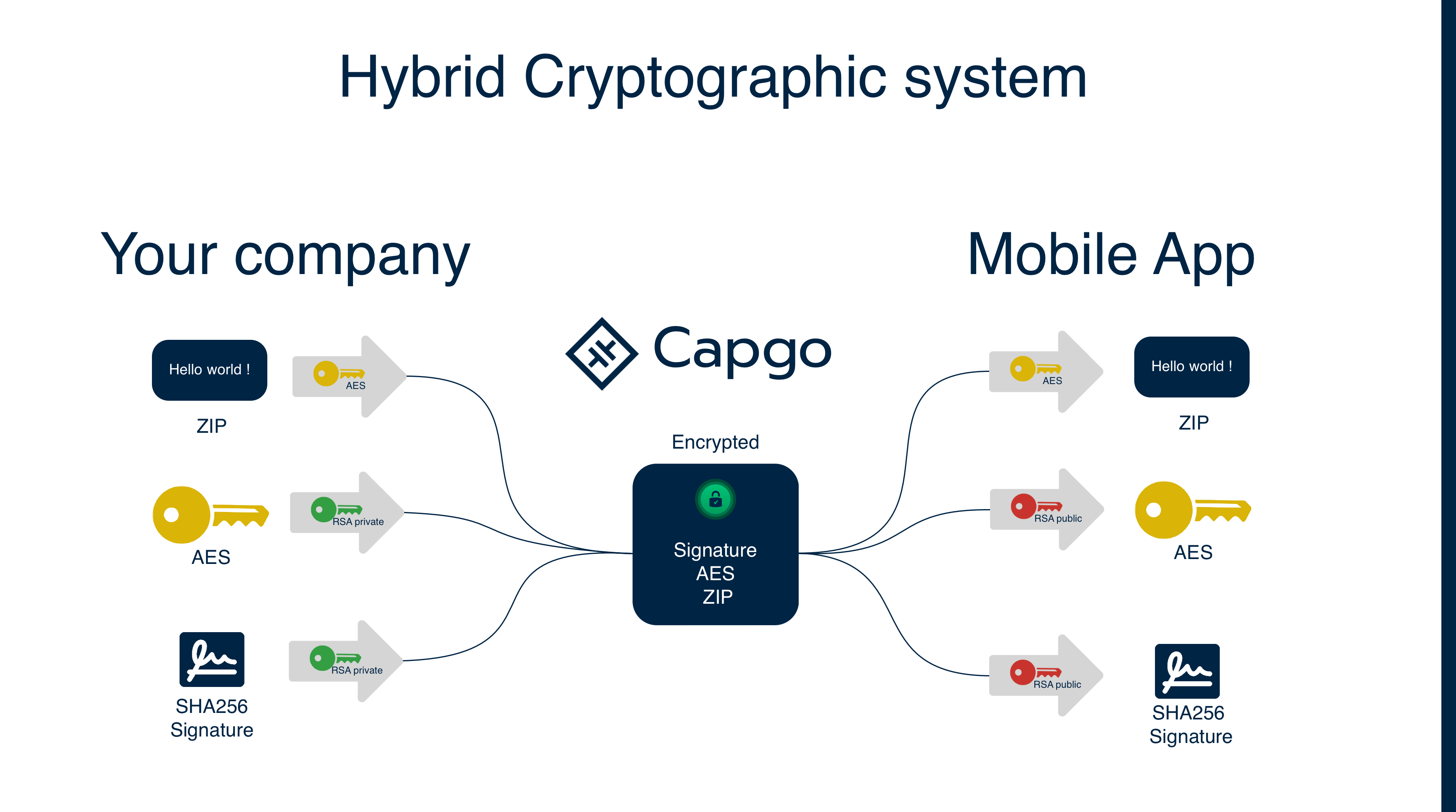
1. Key Generation
Section titled “1. Key Generation”- Private Key: Generated and stored securely in your development environment (used for encryption)
- Public Key: Derived from your private key and stored in your app’s Capacitor config (used for decryption)
- Session Keys: Random AES keys generated for each bundle upload
2. Encryption Process
Section titled “2. Encryption Process”- A random AES session key is generated for each bundle upload
- Your bundle is encrypted using the AES session key
- The bundle checksum is calculated
- Both the AES session key and checksum are encrypted together using your RSA private key (creating the “signature”)
- The encrypted bundle and encrypted signature are stored
The checksum is encrypted alongside the AES key to prevent tampering. Since only your RSA private key can create this signature, and only the corresponding public key can decrypt it, this ensures that both the AES session key and the expected checksum are authentic and haven’t been modified by an attacker.
3. Decryption Process
Section titled “3. Decryption Process”- Your app downloads the encrypted bundle and encrypted signature
- The Capgo SDK uses your RSA public key (stored in the app) to decrypt the signature
- This reveals the AES session key and the original checksum
- The AES session key is used to decrypt the bundle
- A checksum of the decrypted bundle is calculated and compared with the original checksum for integrity verification
This process ensures that even if an attacker intercepts the encrypted bundle, they cannot modify the AES session key or provide a fake checksum, because they would need your private key to create a valid signature that the public key can decrypt.
Capgo vs Other Platforms
Section titled “Capgo vs Other Platforms”| Feature | Capgo | Other OTA Platforms |
|---|---|---|
| Bundle Content | Encrypted in storage/transit; still inspectable by a determined reverse engineer with the app binary | Publicly readable |
| Security Method | True end-to-end encryption | Code signing only |
| Privacy Level | Strong delivery/storage protection; not anti-reverse-engineering | Platform can access your code |
| Protection | Content + integrity + authenticity | Integrity + authenticity only |
Why This Matters:
- Code signing only verifies that updates haven’t been tampered with and come from the right source
- Capgo encryption protects the bundle while it is stored and delivered and makes forged encrypted updates much harder because the attacker would need your private key
- Reverse engineering is still possible after the app ships, because the client contains the public key needed to decrypt and load the update
Encryption Methods
Section titled “Encryption Methods”Capgo uses Encryption V2 as the standard encryption method:
Encryption V2 (Current Standard)
Section titled “Encryption V2 (Current Standard)”- Uses RSA-4096 for enhanced security
- AES-256-GCM for authenticated encryption
- Provides integrity verification
- Better performance and security
Encryption V1 (Deprecated)
Section titled “Encryption V1 (Deprecated)”- Uses RSA-2048 for key encryption
- AES-256-CBC for bundle encryption
- No longer available in the current CLI
- Legacy apps using V1 must migrate to V2
Setting Up Encryption
Section titled “Setting Up Encryption”Step 1: Generate Encryption Keys
Section titled “Step 1: Generate Encryption Keys”First, generate your encryption keys using the Capgo CLI:
# Generate new encryption keys (creates files in current directory)npx @capgo/cli@latest key createThis creates:
.capgo_key_v2: Your private key (keep this secure!).capgo_key_v2.pub: Your public key (used by your app)
These files are created in the current directory where you run the command.
Step 2: Save Your Public Key to Capacitor Config (Required)
Section titled “Step 2: Save Your Public Key to Capacitor Config (Required)”You must save your public key to the Capacitor config so your mobile app can decrypt bundles:
# Save public key from file to Capacitor config (required)npx @capgo/cli@latest key save --key ./.capgo_key_v2.pub
# Or save public key data directlynpx @capgo/cli@latest key save --key-data "$CAPGO_PUBLIC_KEY"
Step 3: Sync Capacitor Platform (Required)
Section titled “Step 3: Sync Capacitor Platform (Required)”After saving the public key, you must sync the Capacitor platform to copy the updated config to the native layer:
# Sync the platform to copy config to nativenpx cap syncEncrypting Bundles
Section titled “Encrypting Bundles”Method 1: Encrypt During Upload
Section titled “Method 1: Encrypt During Upload”The simplest way is to encrypt during the upload process:
# Upload with automatic encryptionnpx @capgo/cli@latest bundle upload --key-v2
# For external storage, you must encrypt first (see Manual Encryption Workflow below)
Method 2: Manual Encryption Workflow
Section titled “Method 2: Manual Encryption Workflow”For more control, you can manually encrypt bundles:
-
Create a zip bundle:
Terminal window npx @capgo/cli@latest bundle zip com.example.app --path ./dist --key-v2 -
Encrypt the bundle:
Terminal window npx @capgo/cli@latest bundle encrypt ./com.example.app.zip CHECKSUM_FROM_STEP_1 -
Upload to your storage (e.g., S3) and register with Capgo:
Terminal window # First upload the encrypted bundle to your storage (e.g., AWS S3)aws s3 cp ./encrypted-bundle.zip s3://your-bucket/encrypted-bundle.zip# Then register with Capgo using the external URLnpx @capgo/cli@latest bundle upload --external https://your-storage.com/encrypted-bundle.zip --iv-session-key IV_SESSION_KEY_FROM_STEP_2
Key Management
Section titled “Key Management”Storing Keys Securely
Section titled “Storing Keys Securely”Private Key Options:
-
File-based (local development):
Terminal window # Key stored as .capgo_key_v2 file in project rootnpx @capgo/cli@latest bundle upload --key-v2 -
Environment variable (CI/CD):
Terminal window # Store in environment variable for CIexport CAPGO_PRIVATE_KEY="$(cat .capgo_key_v2)"npx @capgo/cli@latest bundle upload --key-data-v2 "$CAPGO_PRIVATE_KEY"
Public Key Setup (Required):
# Must save public key to Capacitor config for mobile appnpx @capgo/cli@latest key save --key ./.capgo_key_v2.pubProduction Environment:
- Store private keys in secure key management services (AWS KMS, Azure Key Vault, etc.)
- Use CI/CD secret management for private keys
- Never commit private keys to version control
Key Usage:
- Private Key: Used by CLI for encryption during bundle upload (keep secure)
- Public Key: Stored in app configuration for decryption on device (safe to commit)
Rotate after a private-key compromise
Section titled “Rotate after a private-key compromise”Rotate the key pair when the private key is suspected or confirmed compromised. A routine calendar rotation is not required. This is a native-key migration, not an OTA-only change.
-
Generate a replacement key pair:
Terminal window npx @capgo/cli@latest key create -
Save the replacement public key to your Capacitor config:
Terminal window npx @capgo/cli@latest key save --key ./.capgo_key_v2.pub -
Sync and ship a native release: Run
npx cap sync, then distribute a new native app version containing the replacement public key. -
Target the new native version: Devices still running the old native binary cannot decrypt updates encrypted with the replacement key. Use Version Targeting to restrict replacement-key bundles to the new native version while the rest of the fleet updates through the store or MDM.
-
Switch your upload secret: As soon as that native release is live, replace the private key in CI and upload only bundles targeted to native versions that contain the replacement public key.
Security Best Practices
Section titled “Security Best Practices”Key Security
Section titled “Key Security”- Never share private keys between environments or team members
- Use different keys for different environments (dev, staging, production)
- Rotate after a compromise: replace the key pair when the private key is suspected or confirmed compromised; a routine calendar rotation is not required
- Store keys securely using proper key management systems
Bundle Security
Section titled “Bundle Security”- Always verify bundle integrity after decryption
- Monitor for unusual download patterns or failures
- Use HTTPS for all bundle URLs (required for mobile apps)
- Implement proper error handling for decryption failures
Access Control
Section titled “Access Control”- Limit access to encryption keys to authorized personnel only
- Use role-based access for key management operations
- Audit key usage and access regularly
- Implement proper backup and recovery procedures
Troubleshooting Encryption
Section titled “Troubleshooting Encryption”Common Issues
Section titled “Common Issues”Decryption failures:
- Verify the private key matches the public key used for encryption
- Check that the
ivSessionKeyis correct - Ensure you’re using Encryption V2 (V1 is no longer supported)
Key-related errors:
- Confirm the private key format is correct (PEM format)
- Verify the key hasn’t been corrupted during storage/transfer
- Check that the key has proper permissions in your app configuration
Performance issues:
- Large bundles may take longer to encrypt/decrypt
- Consider using Delta updates to reduce bundle sizes
- Monitor device performance during decryption
Debug Commands
Section titled “Debug Commands”Check encryption status:
npx @capgo/cli@latest app debugTest encryption/decryption workflow:
# Test the complete workflow: zip → encrypt → decrypt → unzipnpx @capgo/cli@latest bundle zip com.example.app --key-v2npx @capgo/cli@latest bundle encrypt ./com.example.app.zip CHECKSUM --jsonnpx @capgo/cli@latest bundle decrypt ./encrypted-bundle.zip IV_SESSION_KEYCompliance and Standards
Section titled “Compliance and Standards”Capgo’s encryption implementation follows industry standards:
- AES-256: FIPS 140-2 approved encryption algorithm
- RSA-4096: Strong asymmetric encryption for key protection
- GCM Mode: Provides both confidentiality and authenticity
- Secure Random: Cryptographically secure random number generation
This makes Capgo suitable for applications requiring compliance with:
- GDPR (General Data Protection Regulation)
- HIPAA (Health Insurance Portability and Accountability Act)
- SOC 2 (Service Organization Control 2)
- ISO 27001 (Information Security Management)
Performance Considerations
Section titled “Performance Considerations”Encryption Overhead
Section titled “Encryption Overhead”- Bundle size: Encrypted bundles are slightly larger (~1-2% overhead)
- Processing time: Encryption/decryption adds minimal latency
- Memory usage: Temporary increase during encryption/decryption operations
Optimization Tips
Section titled “Optimization Tips”- Use Delta updates to minimize encrypted data transfer
- Optimize your bundle size by converting images to WebP format
- Minimize JavaScript and CSS files before bundling
- Remove unused dependencies and code
- Monitor device performance on older/slower devices
Next Steps
Section titled “Next Steps”- Learn about Custom Storage to use encryption with your own infrastructure
- Explore Channels to manage encrypted bundles across environments
- Set up CI/CD Integration to automate encrypted deployments
Keep going from Encryption
Section titled “Keep going from Encryption”If you are using Encryption to plan security and compliance, connect it with Compliance for the implementation detail in Compliance, Capgo Security Scanner for the product workflow in Capgo Security Scanner, Capgo Security for the product workflow in Capgo Security, Capgo Trust Center for the product workflow in Capgo Trust Center, and Organization Security for the implementation detail in Organization Security.
Ship Capacitor apps without the wait
Build with your AI coding agent, ship fixes in minutes, build iOS and Android without a Mac, and observe every release.


Enterprise needs? Talk to our team