
Test Native Builds Without Live Updates
Copy a setup prompt with the install steps and the full markdown guide for this plugin.
When testing a new native binary, make sure it starts from the web assets bundled in that binary—not from a previously downloaded live update. Use one or combine the safeguards below.
1. Bump the Native Baseline Version
Section titled “1. Bump the Native Baseline Version”Set CapacitorUpdater.version from the version used for your native release, and increase it for every native build. A newer native baseline makes the installed binary distinct from older bundles and, with the default resetWhenUpdate: true, removes downloaded bundles when the newer native app is installed.
import type { CapacitorConfig } from '@capacitor/cli';import pkg from './package.json';
const config: CapacitorConfig = {  plugins: {    CapacitorUpdater: {      // Keep this aligned with, and increase it for, every native build.      version: pkg.version,      autoUpdate: 'atBackground',    },  },};
export default config;
For example, a binary built with version: '1.4.1' has a higher native baseline than an existing 1.4.0 bundle. Do not reuse a native version when you need to verify the bundled assets.
2. Block Emulator and Development-Build Updates in the Console
Section titled “2. Block Emulator and Development-Build Updates in the Console”Open your app in the Capgo console, go to Channels, select the channel used by the build, and open the Information tab. Turn off both Allow development build and Allow Emulators.
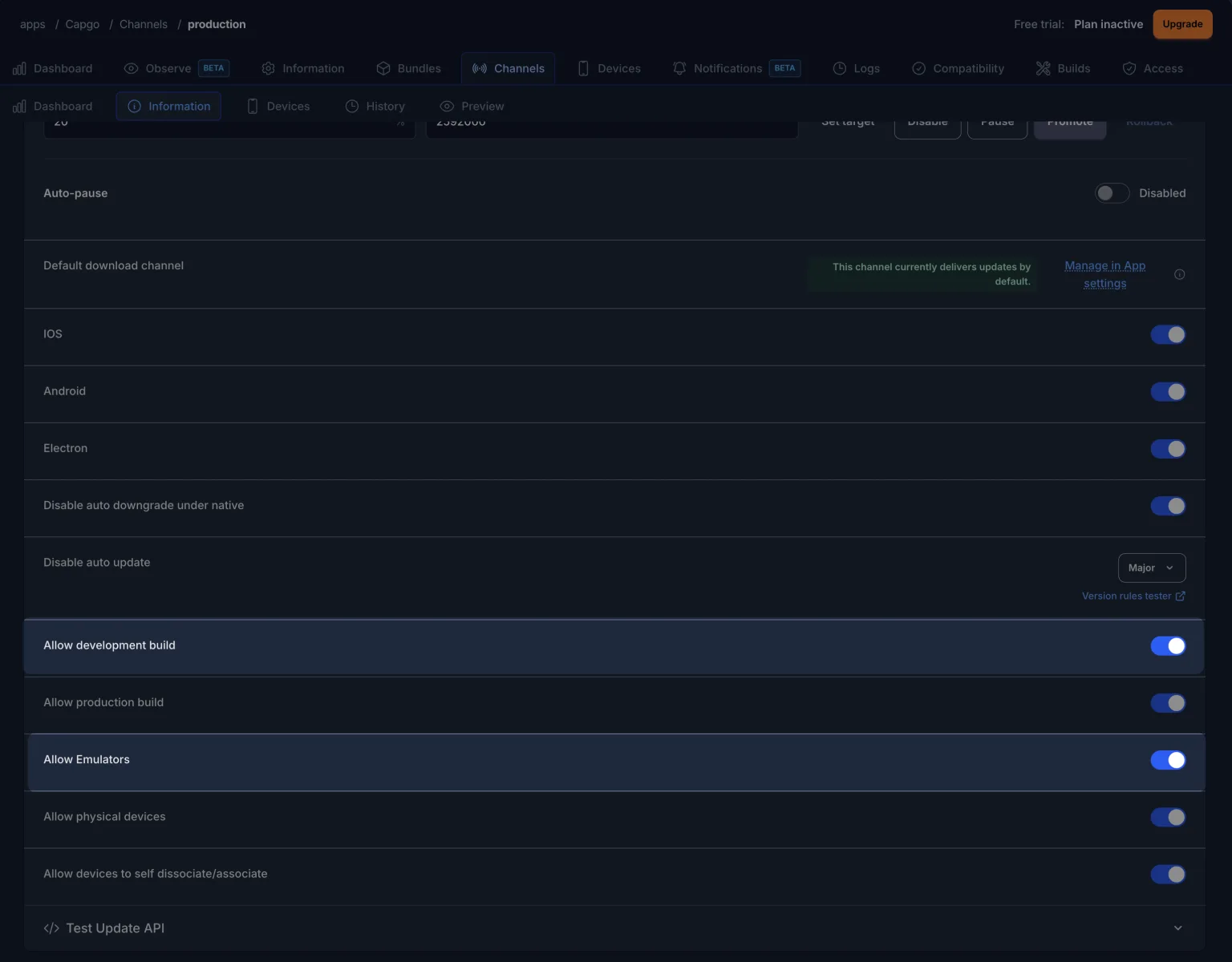
This channel policy blocks update delivery only for the selected build types. Production-signed physical devices can still receive updates according to the channel’s other settings.
3. Enable Live Updates Only in Native CI Builds
Section titled “3. Enable Live Updates Only in Native CI Builds”For teams that want local, emulator, and developer builds to be safe by default, make live updates opt-in through an environment variable. The config below disables update checks unless CAPGO_LIVE_UPDATES is exactly true:
import type { CapacitorConfig } from '@capacitor/cli';import pkg from './package.json';
const liveUpdatesEnabled = process.env.CAPGO_LIVE_UPDATES === 'true';
const config: CapacitorConfig = {  appId: 'com.example.app',  appName: 'Example App',  plugins: {    CapacitorUpdater: {      // Bump package.json for every native build.      version: pkg.version,      // Local builds are off; native CI explicitly enables live updates.      autoUpdate: liveUpdatesEnabled ? 'atBackground' : false,    },  },};
export default config;
Set the variable only in the CI step that synchronizes and builds the native app:
- run: CAPGO_LIVE_UPDATES=true npx cap sync- run: ./build-native-app.shRun npx cap sync after setting the variable because Capacitor copies this configuration into the native projects during sync. Without the variable, local builds and emulator builds keep autoUpdate: false and do not check for live updates.
Quick Checklist
Section titled “Quick Checklist”- Increase the version used by
CapacitorUpdater.versionfor the native binary. - Disable Allow development build and Allow Emulators on the channel when testing those build types.
- Build locally without
CAPGO_LIVE_UPDATES. - Set
CAPGO_LIVE_UPDATES=trueonly beforenpx cap syncin the native CI job that should receive live updates.
Related
Section titled “Related”- Channels — Channel routing and policies.
- Update Behavior — When updates are checked and applied.
- Version Targeting — Keep bundles compatible with native versions.
Ship Capacitor apps without the wait
Build with your AI coding agent, ship fixes in minutes, build iOS and Android without a Mac, and observe every release.


Enterprise needs? Talk to our team