
Logs
Copy a setup prompt with the install steps and the full markdown guide for this plugin.
Logs and Log Insights
Section titled “Logs and Log Insights”The app Logs tab opens Log Insights by default. Use Insights to prioritize categories, versions, and devices for a 1, 3, 7, or 30 day period. Switch to the Logs subtab when you need the underlying device events, filters, and timestamps described below.
Understanding Application Logs
Section titled “Understanding Application Logs”The raw Logs subtab provides a detailed history of update events and diagnostic information for your application. It is useful for confirming the device-level evidence behind an Insight, troubleshooting an update path, and understanding how devices interact with Capgo. Open an app, choose Logs, then choose the Logs subtab.
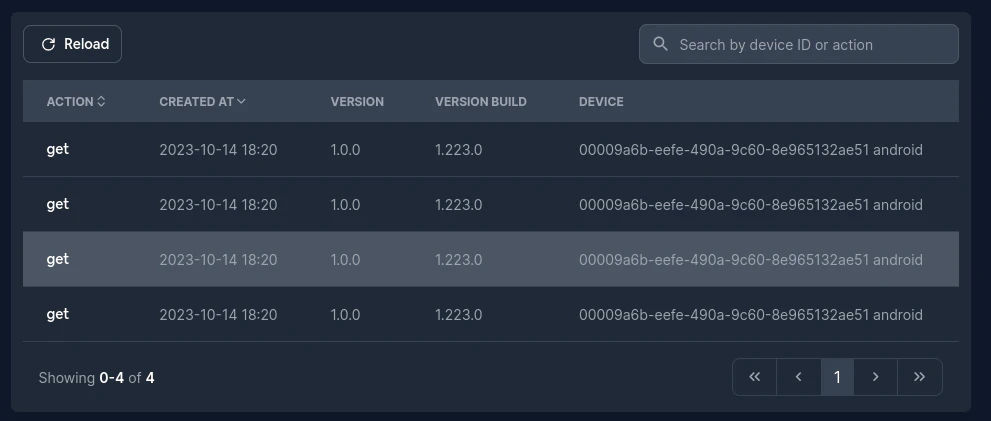
The raw Logs interface includes:
- Logs subtab — the navigation control for individual log rows.
- Reload button — refreshes the log list with the latest data.
- Time range and action filters — narrow the event stream by time and action.
Each row shows:
- Timestamp (UTC)
- Device ID
- Action code (what happened)
- Version name (bundle or
builtin)
Click a row to jump to the device detail page for its full history.
Filtering by Date Range
Section titled “Filtering by Date Range”You can filter logs by a specific time period using the date picker:
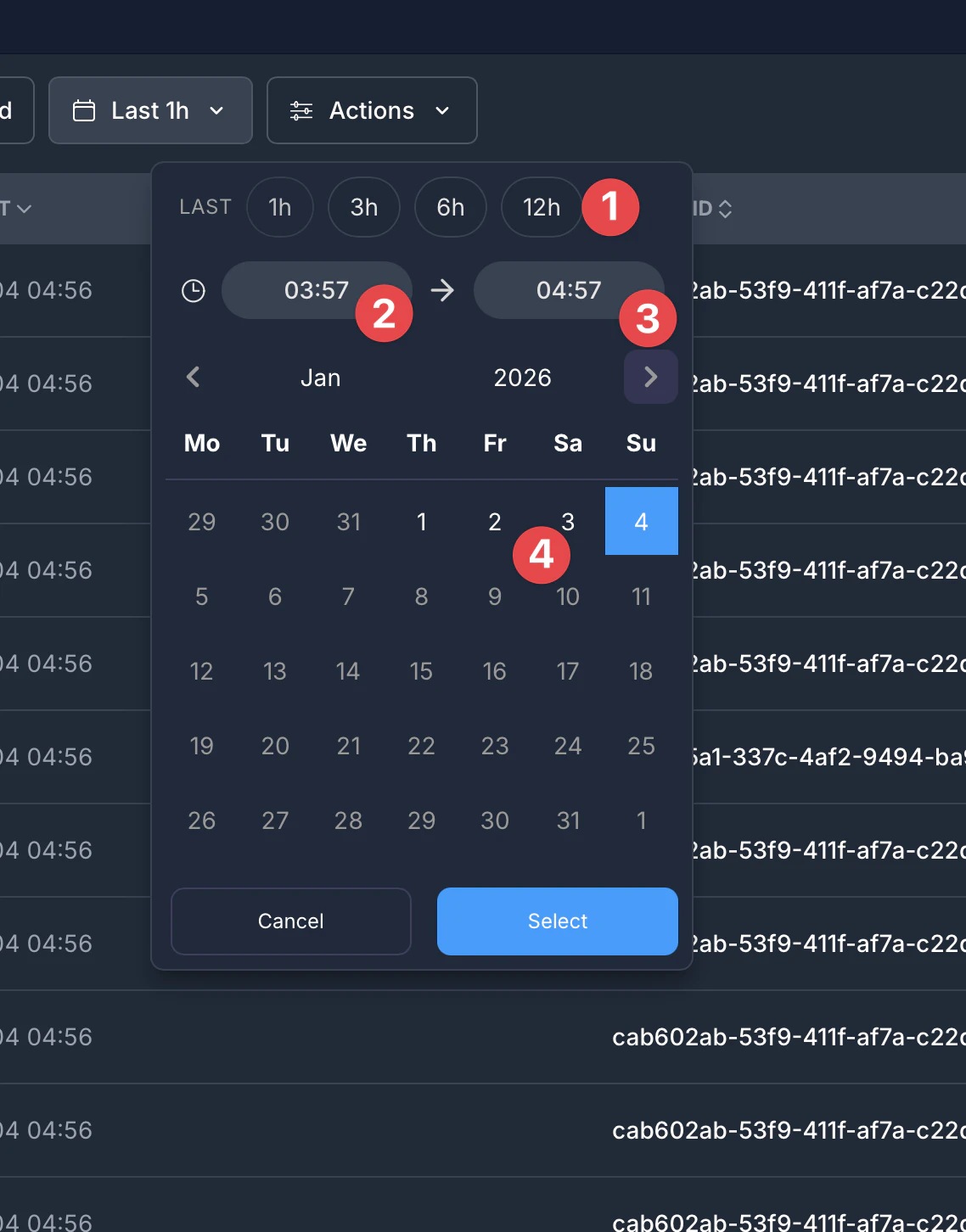
- Quick Presets - Select common time ranges: Last 1h, 3h, 6h, or 12h
- Start Time - Set a custom start time for the range
- End Time - Set a custom end time for the range
- Calendar - Pick specific dates using the calendar view
Click “Select” to apply your chosen date range, or “Cancel” to dismiss the picker.
Filtering by Action Type
Section titled “Filtering by Action Type”The Actions dropdown lets you filter logs by specific event types:
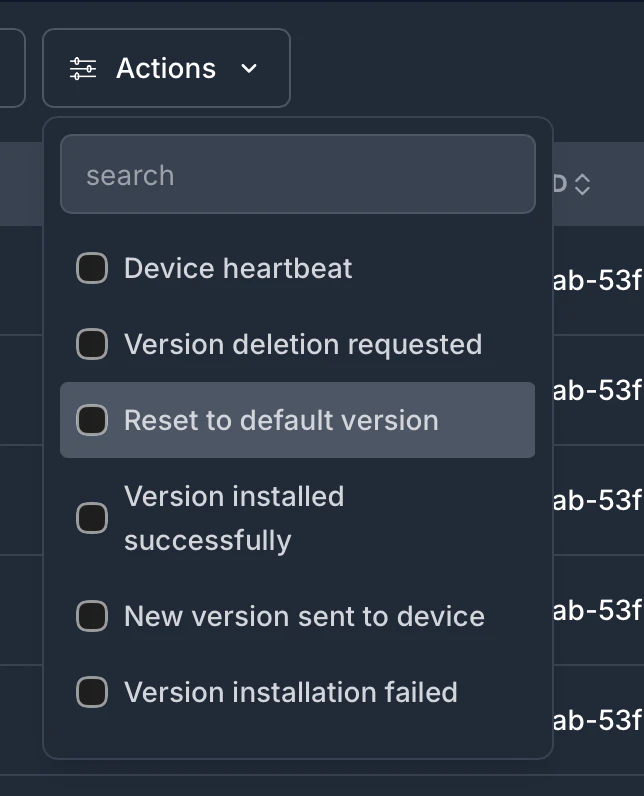
Available action filters include:
- Device heartbeat - Periodic health checks from devices
- Version deletion requested - When a bundle version is deleted
- Reset to default version - When a device reverts to the builtin bundle
- Version installed successfully - Successful bundle installation
- New version sent to device - When Capgo sends an update to a device
- Version installation failed - When bundle installation fails
Use the search box at the top to quickly find specific action types. You can select multiple actions to show logs matching any of the selected types.
Sample log snippet (fake data)
Section titled “Sample log snippet (fake data)”| Time (UTC) | Device ID | Action | Version | What it tells you |
|---|---|---|---|---|
| 2025-01-14 10:00:01 | A1B2C3 | get | 2.4.1 | Device asked Capgo if an update is available |
| 2025-01-14 10:00:03 | A1B2C3 | download_manifest_start | 2.4.1 | Delta download kicked off; SDK is about to download the changed delta files |
| 2025-01-14 10:00:07 | A1B2C3 | download_40 | 2.4.1 | Bundle download is 40% complete |
| 2025-01-14 10:00:12 | A1B2C3 | download_zip_complete | 2.4.1 | Zip finished downloading |
| 2025-01-14 10:00:13 | A1B2C3 | set | 2.4.1 | Bundle installed and marked as next to run |
| 2025-01-14 10:05:00 | B9C8D7 | disableAutoUpdateToMajor | 1.9.0 | Channel policy blocked a jump to 2.x |
| 2025-01-14 10:05:05 | B9C8D7 | rateLimited | builtin | Device hit the request limit; SDK backs off until restart |
Example Log Scenarios
Section titled “Example Log Scenarios”To help you understand what the logs tell you, here are example sequences showing real device update journeys:
Successful Update Flow
Section titled “Successful Update Flow”This is what a healthy update looks like in your logs:
| Time | Device ID | Action | Version | What it means |
|---|---|---|---|---|
| 10:00:01 | a1b2c3d4 | get | 1.2.0 | Device checked for updates and received version 1.2.0 info |
| 10:00:02 | a1b2c3d4 | download_10 | 1.2.0 | Download started, 10% complete |
| 10:00:03 | a1b2c3d4 | download_50 | 1.2.0 | Download at 50% |
| 10:00:05 | a1b2c3d4 | download_complete | 1.2.0 | Download finished successfully |
| 10:00:06 | a1b2c3d4 | set | 1.2.0 | Bundle installed and activated |
Device Already Up-to-Date
Section titled “Device Already Up-to-Date”When a device checks but already has the latest version:
| Time | Device ID | Action | Version | What it means |
|---|---|---|---|---|
| 14:30:00 | e5f6g7h8 | noNew | 1.2.0 | Device is already on the latest version, no update needed |
Failed Update with Rollback
Section titled “Failed Update with Rollback”When an update fails and the device rolls back:
| Time | Device ID | Action | Version | What it means |
|---|---|---|---|---|
| 11:15:00 | i9j0k1l2 | get | 1.3.0 | Device received update info |
| 11:15:02 | i9j0k1l2 | download_complete | 1.3.0 | Download completed |
| 11:15:03 | i9j0k1l2 | set | 1.3.0 | Bundle was set |
| 11:15:10 | i9j0k1l2 | update_fail | 1.3.0 | App crashed or notifyAppReady() wasn’t called - rollback triggered |
| 11:15:11 | i9j0k1l2 | reset | builtin | Device reverted to the built-in version |
Action needed: Check that your app calls notifyAppReady() after successful initialization. See the plugin documentation for details.
Download Failure
Section titled “Download Failure”When network issues prevent the download:
| Time | Device ID | Action | Version | What it means |
|---|---|---|---|---|
| 09:45:00 | m3n4o5p6 | get | 1.2.0 | Device received update info |
| 09:45:01 | m3n4o5p6 | download_30 | 1.2.0 | Download started but… |
| 09:45:15 | m3n4o5p6 | download_fail | 1.2.0 | Download failed (network timeout, connection lost, etc.) |
Action needed: The device will retry automatically on next app launch. No action required unless this happens frequently.
Plan Limit Reached
Section titled “Plan Limit Reached”When your account reaches its device limit:
| Time | Device ID | Action | Version | What it means |
|---|---|---|---|---|
| 16:00:00 | q7r8s9t0 | needPlanUpgrade | - | This device won’t receive updates until you upgrade or the billing cycle resets |
Action needed: Upgrade your plan or wait for the next billing cycle.
Channel Configuration Blocking Updates
Section titled “Channel Configuration Blocking Updates”When channel settings prevent an update:
| Time | Device ID | Action | Version | What it means |
|---|---|---|---|---|
| 12:00:00 | u1v2w3x4 | disableAutoUpdateToMajor | 2.0.0 | Device on v1.x can’t auto-update to v2.x (major version jump blocked) |
| 12:05:00 | y5z6a7b8 | disableEmulator | 1.2.0 | Emulator detected, and channel blocks emulators |
| 12:10:00 | c9d0e1f2 | disableDevBuild | 1.2.0 | Dev build detected, and channel blocks dev builds |
Action needed: These are intentional protections. If you want to allow these updates, modify your channel settings.
Log codes (Capgo backend enum)
Section titled “Log codes (Capgo backend enum)”These codes come from the stats_action enum used by the dashboard API (capgo/src/types/supabase.types.ts). If you see a new code in the UI, it was emitted by the SDK or backend and validated against this list.
Happy path & lifecycle
| Code(s) | Meaning |
|---|---|
get | Device asked Capgo for the bundle linked to its channel |
download_manifest_start, download_manifest_complete | Delta download began / finished (for bundles uploaded with delta files) |
download_zip_start, download_zip_complete | Zip archive download began / finished |
download_10 … download_90 | Download progress milestones |
download_0 | 0% progress marker for the first progress event |
download_complete | Entire bundle downloaded |
set | Bundle staged for next launch |
reset | Device reverted to the builtin bundle |
delete | Bundle removed from local storage |
uninstall | App uninstall detected |
app_moved_to_foreground, app_moved_to_background | App lifecycle events recorded by SDK |
ping | Health/heartbeat check from device |
setChannel, getChannel | Channel overridden or fetched via SDK call |
New policy-block / throttle quick fix
Section titled “New policy-block / throttle quick fix”| Code | Why this happens | What to do next |
|---|---|---|
invalidIp | Capgo detected traffic that looks like bot traffic (Google/cloud infrastructure IP). | Ignore on real users; retry from real devices and normal networks, or check after some time. |
needPlanUpgrade | Organization reached plan/device limit. | Upgrade plan in dashboard or wait for next billing cycle. |
semver_error | Native app version in config is missing or not valid semver (x.y.z). | Set plugins.CapacitorUpdater.version to valid semver, then verify it in the SemVer tester and rebuild the app. |
disablePlatformIos | iOS is disabled in channel policy. | If this was accidental, enable iOS in that channel and republish routing. If you intentionally block iOS in this track, keep it off and move iOS builds to a separate channel. |
disablePlatformAndroid | Android is disabled in channel policy. | If this was accidental, enable Android in that channel and republish routing. If you intentionally block Android in this track, keep it off and move Android builds to a separate channel. |
disableAutoUpdate | Channel auto-update mode blocks this update style. | Change channel auto-update policy (major/minor/patch/metadata/none) to allow your intended rollout. |
disableAutoUpdateUnderNative | Channel is set to block updates older than the device baseline. | Push a version at or above the native baseline, or disable that under-native protection. |
disableAutoUpdateMetadata | Channel requires min_update_version metadata and the app is older. | Set min_update_version for the target bundle or release from a newer native version. |
disableAutoUpdateToMajor | The channel blocks major version jumps. | Keep major versions in the same channel strategy, or allow major jumps for this track. |
disableAutoUpdateToMinor | The channel blocks minor version jumps. | Keep minor versions in the same channel strategy, or allow minor jumps for this track. |
disableAutoUpdateToPatch | The channel blocks patch-level jumps for this flow. | Align your release cadence, or open patch jumps in channel policy for this track. |
disableEmulator | Emulator updates are not allowed for this channel. | If this was accidental, turn on emulator updates in a test channel where you validate emulators. If intentional, keep this channel emulator-blocked and use another channel for emulator builds. |
disableDevBuild | Dev builds are blocked for this channel. | If this was accidental, allow dev updates or move this device to a dev-enabled channel. If this is intentional, keep this channel locked to release builds only. |
disableProdBuild | A device build in production mode called /updates, while your channel blocked it. | If this was accidental, allow production updates in that channel and republish. If this is intentional, keep the restriction and send production builds to the proper channel/build. |
cannotGetBundle | Capgo could not build a valid download URL for the selected bundle. | Re-upload the bundle (with --delta if you want delta files) and check R2/public bundle settings. |
cannotUpdateViaPrivateChannel | App tried to self-switch to a private channel that does not allow self-assignment. | Enable allow_device_self_set on the channel or switch to a public/allowed channel. |
channelMisconfigured | Channel auto-update rule is missing required data (version_number without min_update_version). | Fill the missing config for that rule or switch to a simpler auto-update mode. |
missingBundle | Bundle has no downloadable payload (missing external_url/r2_path and no delta files). | Rebuild/re-upload the version and verify the bundle has real file content. |
NoChannelOrOverride | No channel matched this device (no cloud default + no config fallback + no override). | Set a channel default in dashboard or keep a test defaultChannel in that build. |
rateLimited | Too many update/channel calls in a short time (often render-loop setChannel/getChannel). | Stop calling in render. Only call on user action. Use defaultChannel in capacitor.config. |
keyMismatch | The app and bundle encryption key IDs differ (device_key_id vs bundle_key_id). | In the console, compare device and bundle key IDs. If they differ, publish with the same key and matching CLI/plugin version; key encoding can differ between versions. |
disableDevice | A real phone/tablet was blocked because this channel is set to block real devices. | If accidental, turn on real-device updates in that channel. If intentional, keep it blocked and route real devices to another channel. |
disablePlatformElectron | Electron is blocked in this channel. | If this was accidental, enable Electron in this channel and republish routing. If intentional, keep it blocked and send Electron users to a dedicated channel. |
customIdBlocked | A custom device ID was sent, but this app does not accept custom IDs. | Turn off custom ID sending or enable custom IDs only if your workflow requires it. |
blocked_by_server_url | The app has server.url configured, so Capacitor serves remote URL instead of local files. | Remove/clear server.url for production builds and keep update payloads local. |
backend_refusal | The updater is v4, which the backend no longer accepts. | Upgrade plugin/CLI to v5+ (prefer v8), with Capacitor v5+, then rebuild and republish bundle metadata. |
| Configuration or policy blocks |
| Code(s) | Why the update was blocked |
|---|---|
disableAutoUpdate, disableAutoUpdateToMajor, disableAutoUpdateToMinor, disableAutoUpdateToPatch, disableAutoUpdateMetadata, disableAutoUpdateUnderNative | Channel strategy forbids this semver jump |
disablePlatformIos, disablePlatformAndroid | Platform is disabled on the channel |
disableDevBuild, disableEmulator | Dev builds or emulators not allowed |
disableProdBuild, disableDevice, disablePlatformElectron | Production builds, real devices, or Electron are blocked for this channel. |
customIdBlocked | Custom device IDs are not accepted for this app. |
cannotUpdateViaPrivateChannel, NoChannelOrOverride, channelMisconfigured | Channel selection or override failed |
missingBundle, cannotGetBundle | The channel points to a bundle Capgo cannot serve |
needPlanUpgrade | Org hit its plan/device limit |
Download / integrity / install failures
| Code(s) | Meaning |
|---|---|
download_fail | Bundle download failed (network or response error) |
download_manifest_file_fail, download_manifest_checksum_fail, download_manifest_brotli_fail | A delta file couldn’t be retrieved or validated |
checksum_fail, checksum_required | Integrity check failed or checksum missing |
unzip_fail, directory_path_fail, canonical_path_fail, windows_path_fail | File system or unzip validation failed |
decrypt_fail | Decryption failed (encrypted bundle) |
update_fail | Bundle installed but app never called notifyAppReady(); rollback triggered |
download_zip_* with no subsequent set | Download finished but install phase never completed |
Runtime / platform events
Section titled “Runtime / platform events”| Code(s) | Meaning |
|---|---|
app_crash, app_crash_native | Crash events from JavaScript or native runtime layers. Metadata often includes stack, source, and active version info. |
app_anr | Android reported an Application Not Responding. |
app_killed_low_memory, app_killed_excessive_resource_usage | App process termination due to memory or resource limits. |
app_initialization_failure, app_memory_warning | Startup was interrupted or memory pressure was observed before normal runtime. |
webview_javascript_error, webview_unhandled_rejection, webview_resource_error, webview_security_policy_violation, webview_unclean_restart, webview_render_process_gone, webview_content_process_terminated | WebView lifecycle and JS/rendering errors. Install Sentry in both JS and native layers to capture stack traces, session/device context, and URL/state for faster fixes. |
os_version_changed, native_app_version_changed | OS or native app version changed; this helps separate platform-level rollout effects from web bundle behavior. |
➡️ Need deeper per-code guidance? See Full Log Code Reference and Debugging Guide.
Getting More Details About a Log
Section titled “Getting More Details About a Log”If you click on a specific log entry, it will typically take you to the device’s page. This allows you to see the full history for that particular device, which can be very helpful for diagnosing device-specific issues or understanding its update journey.
Keep going from Logs
Section titled “Keep going from Logs”If you are using Logs to plan dashboard and API operations, connect it with API Overview for the implementation detail in API Overview, Introduction for the implementation detail in Introduction, API Keys for the implementation detail in API Keys, Devices for the implementation detail in Devices, and Bundles for the implementation detail in Bundles.
Ship Capacitor apps without the wait
Build with your AI coding agent, push fixes to users in minutes, build signed iOS and Android apps without a Mac, and roll back in one click.


Enterprise needs? Talk to our team