
You’ve just shipped. Then someone opens the app on a phone, taps checkout, and the button is half off screen because of one broken CSS rule. The fix takes you two minutes. Getting that fix to users is the hard part, because the normal path means a new build, a new submission, and another wait for review. That gap between a ready fix and a fixed app is where over the air updates earn their place.
Table of Contents
- Why Over the Air Updates Matter
- Understanding How OTA Updates Work
- The Proven Benefits and Real Risks
- Platform Rules and App Store Considerations
- Technical Approaches for JavaScript and Capacitor Apps
- Observability and Security Best Practices
- How Capgo Streamlines OTA Delivery
- Building Your OTA Release Strategy
Why Over the Air Updates Matter
That checkout bug is familiar because it’s rarely the code that’s slow. You spot the overflow, you change one line, and you test it locally in minutes. Then the fix sits in a store queue while users keep hitting the same broken screen, support keeps answering the same tickets, and your team argues about whether to rush an expedited submission or batch it with other changes.
Over the air updates, usually shortened to OTA, remove that queue for a specific class of change. In a Capacitor, Ionic, or other web based app, you can publish updated JavaScript, CSS, HTML, and assets directly to installed devices. The app downloads the new web bundle, verifies it, and runs it inside the native shell you already shipped through the store.
Think of the trade clearly before you build any process around it.
- What OTA speeds up: Copy fixes, layout repairs, image swaps, style changes, and JavaScript logic that runs within the existing native container.
- What OTA doesn’t replace: New native plugins, permission changes, native SDK upgrades, icon or entitlement changes, and anything compiled into the binary.
- What changes for your team: Release risk moves from store timing to your own testing, targeting, and rollback discipline.
That last point matters more than most explainers admit. When you bypass the submission delay for eligible changes, you also bypass a forced pause that sometimes caught sloppy releases. Your safety has to come from channels, staged exposure, and monitoring instead.
Practical rule: OTA shortens the distance between finding a web layer bug and fixing it for users. It doesn’t shorten the work of deciding whether the fix is safe.
That’s why teams treat OTA as a release strategy, not a convenience feature. If you’re trying to increase release velocity without making every fix a store event, the win isn’t just speed. It’s control over which changes deserve a full native release and which can travel through the faster, narrower web path.
Understanding How OTA Updates Work
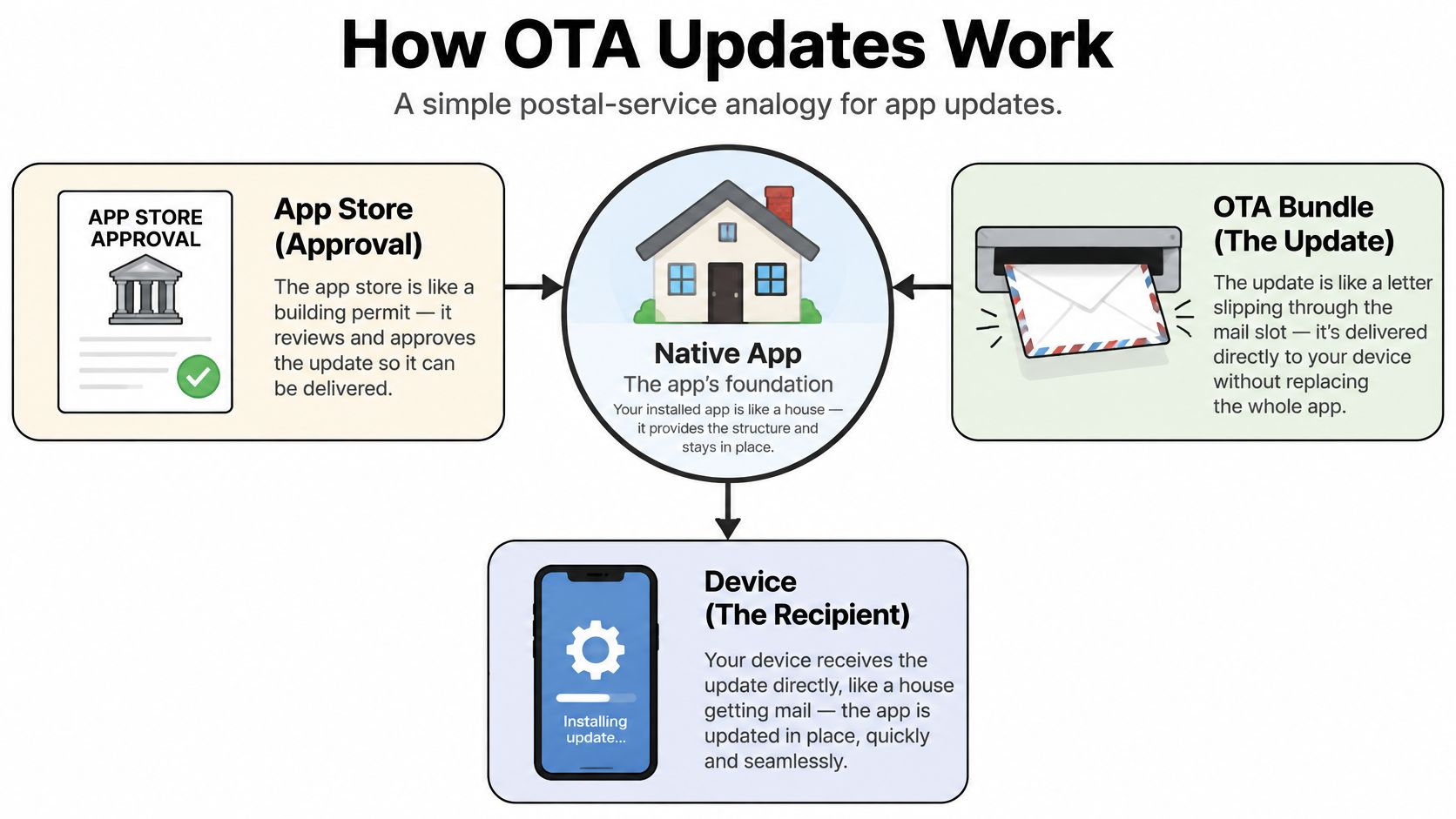
A postal analogy makes the architecture easier to reason about. The native app is the house. The app store is the building permit that lets you build or alter that house. An OTA bundle is a letter you slip through the mail slot after the house is already approved and occupied.
You can’t add a room by mail. You can send new instructions, revised paperwork, and replacement pictures for the walls, as long as the house itself stays structurally the same.
The pieces on the device and on your server
First, your built app contains a native binary plus an embedded web bundle. The binary includes the runtime, native plugins, permissions, and store metadata. The web bundle holds the files your interface renders.
Second, a small client SDK or plugin inside the app asks an update service whether a newer compatible bundle exists for that device. It checks things like app version, channel, and bundle version before downloading anything.
Third, the update service returns a manifest that identifies the target bundle. The device downloads the files, verifies integrity, stores them separately from the embedded bundle, and applies them on a restart or at another safe moment you configure. If the new bundle fails early, the app should fall back to the last known good bundle rather than trapping the user in a crash loop.
Why Capacitor style apps fit this model
Capacitor and Electron apps render much of their interface from web assets inside a native container. That separation is exactly what OTA depends on. You’re not replacing the container. You’re replacing the web content the container already knows how to load.
The confusion usually starts when JavaScript calls a native capability. Changing the JavaScript that requests a photo is a web change. Adding camera access or swapping the camera plugin is a native change, and that belongs in a store release. Teams exploring adjacent stacks can compare this mental model with fast fixes for React Native apps, where the same boundary between JavaScript and native code decides what’s eligible.
The Proven Benefits and Real Risks
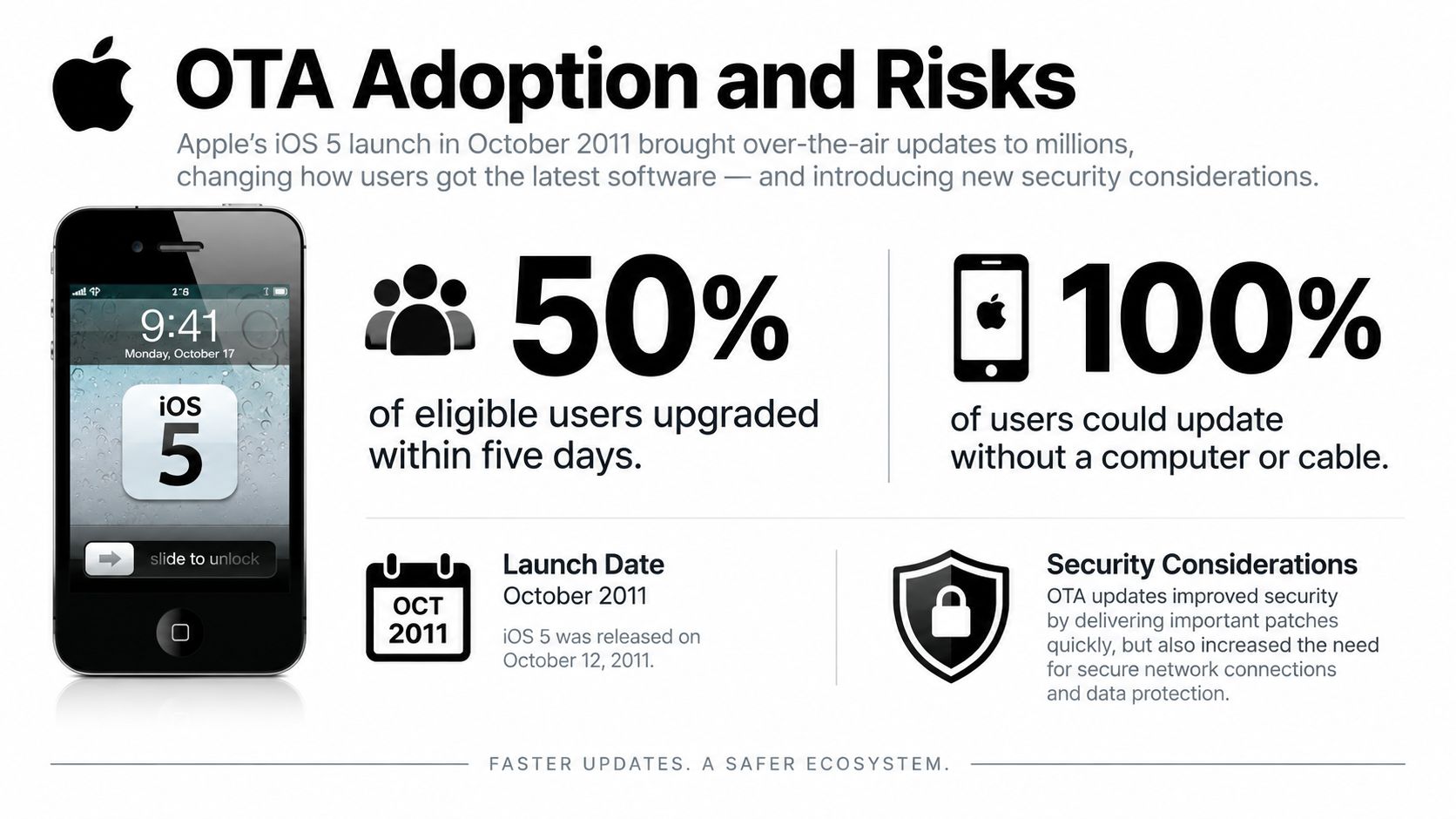
OTA isn’t a new distribution idea. Apple introduced over the air iOS updates with iOS 5 in October 2011, letting users upgrade directly on the device without a computer or iTunes. After iOS 5.1 launched on March 7, 2012, 50% of OTA eligible users tracked by developer David Smith had upgraded within five days, and 77% had upgraded after 15 days, according to MacRumors reporting on David Smith’s iOS 5.1 adoption tracking.
Read that carefully. The denominator was OTA eligible users, not every iPhone in the world. When older, incompatible devices were included, adoption after 15 days was lower. That’s the first operational lesson. Your adoption chart only means something when you know which devices could receive the update in the first place.
Android’s early history shows the opposite failure mode. In February 2011, only 0.8% of Android users were running Android 2.3 Gingerbread, while 57.6% remained on Android 2.2 Froyo, as documented in Ben Dodson’s comparison of Android and iOS update distribution. Users could receive updates wirelessly, yet manufacturers and carriers filtered releases at different speeds. Wireless delivery removed the cable, but it didn’t remove the gatekeepers.
Where the benefit ends and your responsibility starts
For a modern app team, the benefits are concrete. You can fix a broken screen sooner, test a copy change without rebuilding binaries, and stop a bad web release by pointing devices back to a previous bundle. The release cycle for eligible changes compresses because fewer parties sit between your team and the device.
The risks compress too. A defective bundle can reach your whole audience before anyone reads a crash report. A JavaScript change can also alter pricing, consent, authentication, or eligibility behavior in ways that matter far beyond layout. Technically it’s still web code. Operationally and legally, it may be a product change with regulatory consequences.
There’s also a dependency risk. If your update source, channel configuration, or signing path breaks, devices can’t safely fetch the next bundle. Speed without a recoverable distribution path just gives you a faster way to strand users on an old version.
Platform Rules and App Store Considerations
Most short explainers stop at a slogan. Web changes are fine, native changes are not. That slogan is a useful starting point, but it won’t help you decide a hard case at release time.
Apple’s position is more nuanced for downloaded interpreted code. It may be used only when it doesn’t change the app’s primary purpose, create an app marketplace, or bypass operating system security controls, a boundary summarized in Otakit’s breakdown of OTA policies for the App Store and Google Play. So the question isn’t only what language the change is written in. It’s also what the change does.
A button color is easy. A new payment flow, a different consent screen, changed pricing logic, or revised account eligibility rules are harder, even if every line is JavaScript. Those changes can affect user disclosures, store review expectations, and obligations in specific regions.
Android update urgency as a useful comparison
Google Play in app updates aren’t the same mechanism as a Capacitor web bundle update, but the urgency model is instructive. Google Play’s flexible update flow downloads and installs in the background while the user continues using the app, whereas the immediate flow blocks interaction until the update is installed and the app restarts. Google also exposes an update priority value from 0 through 5 through the Play Developer API.
Borrow that thinking. Routine interface changes shouldn’t interrupt a session. A security fix that makes continued use unsafe deserves a more forceful path, and in many cases a native store release with clear app store review management rather than a silent web patch.
OTA vs Store Release Decision Matrix
| Change Type | Delivery Path | Required Testing | Rollback Consequence |
|---|---|---|---|
| Copy or CSS fix | OTA | Visual check on target devices | Previous bundle restores prior interface |
| JavaScript bug fix | OTA | Regression test affected flows | Check local data written by faulty code |
| Payment or consent behavior | Review first, often store | Legal, product, and end to end testing | Reverting code may not undo user impact |
| Native plugin or permission | Store release | Full native build and device testing | Users need another store update |
| Primary purpose change | Store release | Full review preparation | OTA rollback doesn’t resolve policy risk |
When a change sits in the middle rows, document why you chose the path. That note becomes evidence for support, compliance, and your future self.
Technical Approaches for JavaScript and Capacitor Apps
An OTA pipeline looks simple from the publish button. Underneath, several controls have to agree before a device should trust and run a new bundle.
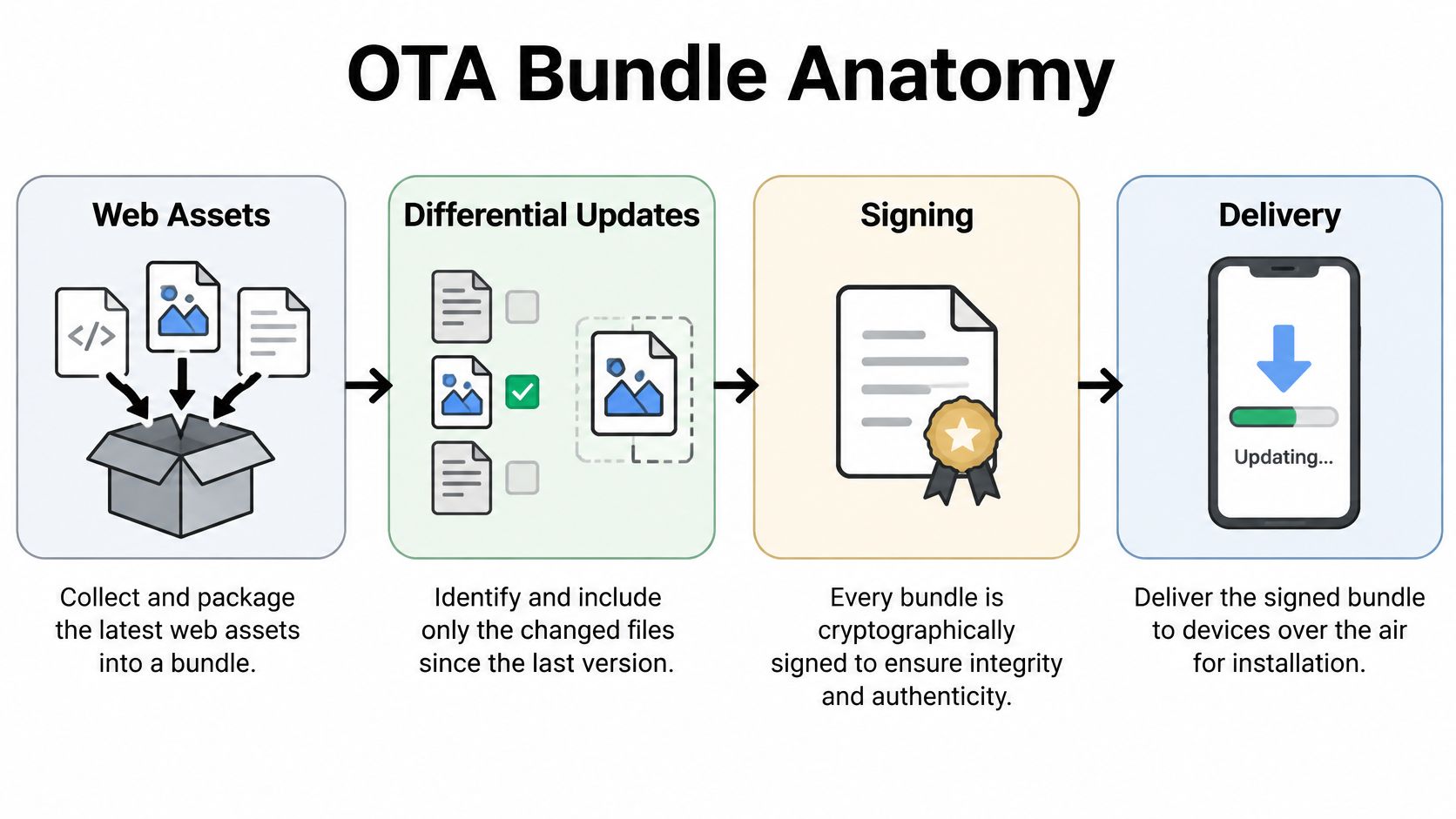
Start with packaging. Your build produces web assets, usually HTML, JavaScript, CSS, images, and fonts. The update system packages those files with a manifest and an immutable version identifier. Immutability matters because debugging becomes guesswork if the same version name can point to different files at different times.
Next comes differential delivery where your system supports it. Instead of sending every asset again, the service sends only changed files or a patch against what the device already has. That reduces download size and failure exposure, especially on poor connections. It also creates a testing obligation, because you need confidence that a device moving from an older bundle assembles the same final state as a fresh install.
Targeting, staging, and getting back out
Signing sits between packaging and delivery. The device should reject a bundle that doesn’t match the expected signature or hash, even if it arrives from a familiar looking network path. Signing proves the artifact came through your release process and wasn’t altered in transit.
Version targeting then decides which native shells may receive the bundle. This is your compatibility firewall. If new JavaScript expects a plugin method that older binaries don’t have, those binaries must be excluded by a minimum native version rule, not by hope. A broader guide to cross-platform development is useful context here, because shared web code still runs across different native capabilities and operating system versions.
Channels separate audiences such as internal testers, beta users, and production. Staged rollouts expose a bundle gradually while you watch installation outcomes and app behavior. Keep the previous bundle available as a stable fallback, and make sure your team knows how to pause exposure without publishing a fresh fix under pressure.
Rollback sounds like the end of the pipeline, but you should design it before the first release. Know which bundle is known good, whether older code can read newer local data, and how you’ll handle devices that already migrated storage. For the practical file level questions behind these swaps, how to update files safely in a live app covers the mechanics your release checklist should reflect.
Don’t treat rollback as an undo button for data. It restores code. It may not restore the state that bad code created.
Observability and Security Best Practices
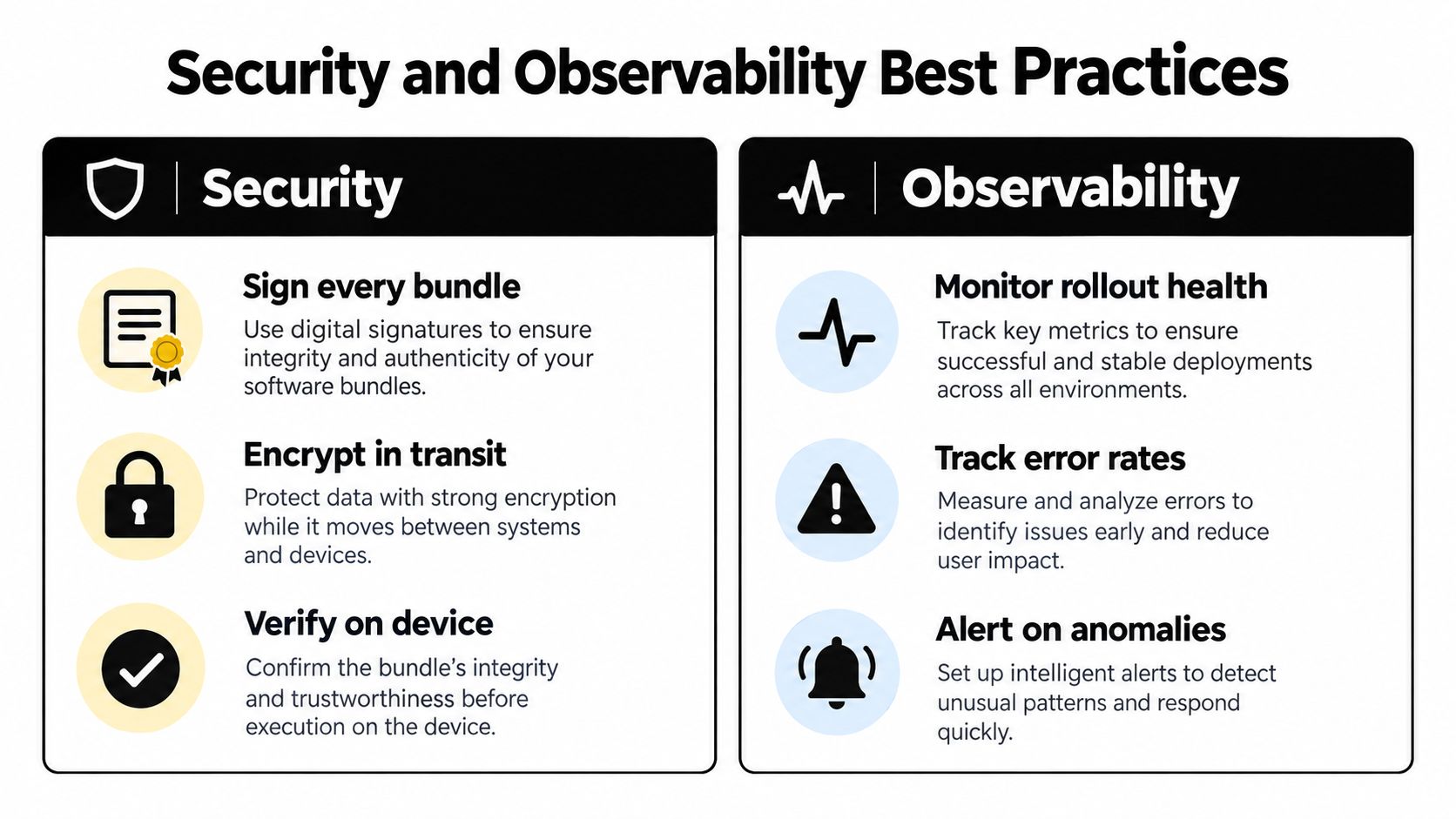
Security and observability belong in the same runbook because an incident will ask both questions at once. What reached the device, who authorized it, and how do you know?
Start with artifact trust. Update bundles should be signed, encrypted where appropriate, and verified with hashes or signatures before installation; deployments should be logged and users informed when changes affect data, permissions, or user experience. That’s not paperwork. It’s how a device distinguishes your release from a corrupted or malicious substitute, and how your team reconstructs events later.
A threat model driven runbook
- Separate permissions: The person or pipeline that builds a bundle shouldn’t automatically be able to promote it to production.
- Protect signing credentials: Treat key access like production database access, with limited holders and auditable use.
- Record provenance: Log the commit, bundle identifier, channel, approver, and rollout changes for every deployment.
- Check eligibility on the device: Validate native compatibility before installation, not after a crash.
- Keep a kill switch: Pause a channel or force fallback when failures cross a threshold you’ve agreed in advance.
- Define rollback limits: State when rolling forward is safer because local data or server contracts have moved on.
Platform governance adds another dependency. Apple notes that apps installed through an alternative marketplace or web distributor depend on that distributor for future updates, and if that marketplace is deleted or stops operating, those apps no longer receive updates, as explained in Apple Support guidance on alternative app distribution. Your monitoring should therefore track update source availability and devices stranded on obsolete versions, not just successful downloads.
Observability turns those controls into decisions. Watch adoption by channel and native version, installation failures by reason, signature failures, crash signals after activation, and the share of devices still on the fallback bundle. Strong signature verification practices for update bundles only help if verification failures are visible and alertable.
For fintech, healthcare, and agency teams managing many client apps, saying the update was reverted isn’t a complete incident answer. You also need evidence of exposure, affected devices, and whether sensitive local state changed before withdrawal.
How Capgo Streamlines OTA Delivery
A platform doesn’t remove the decisions covered above. It gives those decisions consistent controls instead of asking every team to assemble the plumbing from storage, signing, device targeting, and dashboards.
Capgo’s Live Updates distribute web bundles through release channels with staged rollouts, version targeting, and rollback controls. A team can keep internal, beta, and production audiences separate, then promote a bundle through the same channel model it uses during an incident. Progressive delivery assigns a bundle to a persistent portion of devices while retaining a stable fallback, and rollouts can pause automatically when a configured failure threshold is exceeded.
The important design point is that live updates sit beside native delivery rather than pretending to replace it. Capgo also provides cloud native builds and store submission support, so a plugin change follows the binary path while a web fix follows the bundle path. That separation matches the decision matrix your team should already be using.
On the operations side, Observe tracks release adoption, installation failures, success rates, and device logs. Failure reporting distinguishes network or device problems from bundle problems and rollbacks, which helps you answer a more useful question than whether a release looks red. Was the bundle defective, or did a group of devices never receive it cleanly?
Release monitoring in short intervals connects a rollout decision to observed device behavior while exposure is still limited. For a solo developer, that means less infrastructure to maintain. For an agency or enterprise team, it means the same channel discipline and evidence can be applied across applications without inventing a new process for each client.
Building Your OTA Release Strategy
Your strategy can fit on one page, but it should be written before an urgent fix tests it. Start by classifying the change, not by opening the publish screen.
Ask five questions in order. Is this purely web layer code or an asset? Does it alter the app’s primary purpose, payment behavior, consent, authentication, pricing, or eligibility logic? Which minimum native version can run it safely? Which channel and audience should see it first? If it misbehaves, do we roll back, roll forward, or require a store release?
Then assign fairness in urgency.
- Low priority: Routine copy, styling, and content changes that can arrive in the background.
- Medium priority: Performance or workflow fixes that should roll out in stages with close adoption monitoring.
- High priority: Security or core functionality problems where continued use creates material risk and may justify blocking delivery or a native release.
Set the operational cadence around that classification. Test on an internal channel using production like data boundaries. Expand only when install outcomes and app signals stay acceptable. Record the known good bundle, the failure threshold that pauses exposure, and the person authorized to make that call.
A calm OTA release is mostly decided before publish. The channel, threshold, owner, and exit path should already be named.
Review stranded devices as part of the same cadence. An elegant rollout that leaves an old native population behind without a migration plan creates two products to support. Tie minimum version policy, store releases, and bundle channels together through app release automation so routine checks happen in your pipeline rather than in someone’s memory.
That gives you a repeatable test for the next hard case. Can this change be delivered live without creating a store policy, compatibility, or compliance incident? If you can’t answer with evidence, slow down and take the store path.
Capgo helps Capacitor and Ionic teams ship eligible JavaScript, CSS, and asset fixes through controlled channels with staged rollouts, rollback, and release monitoring, while keeping native changes on the proper store path. If you’re ready to turn that decision framework into a working release process, visit Capgo to set up your first live update channel.





