


迁移总结
- Capgo 是一项服务,帮助开发团队将实时应用发送到已部署的应用。
- Capacitor 使用 jQuery Mobile、Framework 7、Sencha、KendoUI、Ionic 或自定义解决方案编写的 JS 应用程序都可以迁移。 不需要现有的 Ionic 应用。.
- Colt 为 App Center Build (构建 Android/iOS 应用) 提供等效服务。对于 Test、Diagnostics 和 Analytics 服务。
注意
如果您的应用仍在使用 Cordova,则需要 首先迁移到 Capacitor 然后再迁移到 Capgo。
由 Ionic 团队开发,Cordova 的精神继承者,Capacitor 允许开发者接近原生工具和功能,目标是提供更好的用户体验和性能。
幸运的是,迁移过程很简单,大多数 Cordova 插件与 Capacitor 兼容。 开始迁移.
关于 Capgo
Capgo, handles updating apps over time. Development teams can focus completely on the unique features of their app and outsource the complicated app delivery process to Capgo.
Capgo 负责应用的更新。开发团队可以专注于应用的独特功能,并将复杂的应用交付过程外包给 __CAPGO_KEEP_1__。
Capgo 必备条件
像 App Center 一样 Capgo 支持在 Azure DevOps、Bitbucket、GitHub 和 GitLab 上托管的应用
安装 Capgo CLI
注意
在您的计算机上安装 Node 和 NPM 之后,才能继续 请始终使用当前 LTS 版本 Capgo 不要使用旧版本
创建 package.json 并 Capacitor 配置文件
注意
在开始之前,我建议在一个新的 Git Branch 上进行修改。
因为 Capgo 由于capacitor capacitor.config.json 创建一个文件。创建它的最简单方法是在你的应用根目录下运行:
npm install @capacitor/core然后,使用CLI问卷初始化Capacitor:
npx cap initCLI会问你一些问题,包括你的应用名称和你希望使用的应用包 ID。
最后,将新文件提交到你的项目:
git add .git commit -m "added package json and capacitor config" && git push迁移Code
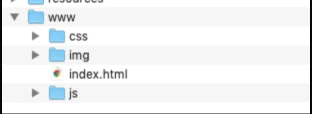
现在你已经在项目中添加了新的必需文件,你可以开始关注实际应用本身了。 Capgo 迁移__CAPGO_KEEP_0__ Capgo 整个构建好的应用程序应该位于一个名为 dist.
如果您的构建好的code不在一个 dist 目录中,请在Capacitor配置文件中修改此值。
以下是应用程序目录结构的示例:
Capgo配置
您的应用程序准备就绪后,需要注册并获取__CAPGO_KEEP_0__密钥以上传您的第一个版本!首先 Capgo 注册API账户 您已登录Capgo,请导航到账户页面,然后点击__CAPGO_KEEP_1__密钥,接着点击‘写’键复制到剪贴板.
Once you’re logged into Capgo, navigate to the Account page then click on API key, then click on the ‘write’ key to copy it to your clipboard.
安装 Capgo SDK
从命令行,直接在您的 Capacitor 应用程序文件夹根目录下,运行以下命令:
npm i @capgo/capacitor-updater && npx cap sync
将插件安装到您的 Capacitor 应用程序中。
然后将此 code 添加到您的应用程序中,代替 CodePush:
import { CapacitorUpdater } from '@capgo/capacitor-updater'

CapacitorUpdater.notifyAppReady()
这将告诉本机插件安装成功。
部署实时更新(CodePush替代品)
Live Update 功能通过使用已安装的 Live Update __CAPGO_KEEP_1__ Capgo SDK 登录到 __CAPGO_KEEP_0__ 云
登录到Capgo
apikey all apikey 在您的帐户中,使用 CLI 登录:
npx @capgo/cli@latest login YOURKEY添加您的第一个应用
让我们从创建应用开始,使用 Capgo 云和 CLI
npx @capgo/cli@latest app add
此命令将使用 Capacitor 配置文件中定义的所有变量来创建应用
上传您的第一个捆绑包
运行命令来构建您的 code 并将其发送到 Capgo
npx @capgo/cli@latest bundle upload --channel production默认情况下,版本名称将是您的 package.json 文件。
检查入 Capgo 如果构建存在
您甚至可以使用我的 移动沙盒应用.
设置默认频道
您将应用发送到Capgo后,需要设置频道 default 让应用接收来自Capgo的更新
npx @capgo/cli@latest channel set production -s default配置应用验证更新
将此配置添加到主JavaScript文件
import { CapacitorUpdater } from '@capgo/capacitor-updater'

CapacitorUpdater.notifyAppReady()
然后执行 npm run build && npx cap copy 更新应用
在设备上接收Live Update
为了让您的应用接收来自Deploy的live update,您需要在设备或模拟器上运行应用。最简单的方法是使用以下命令在模拟器或连接到计算机的设备上启动本地应用。
npx cap run [ios | android]打开应用,放到后台,然后再次打开,日志中应该显示应用已更新。
恭喜! 🎉 您已成功部署第一个Live Update。这只是您可以使用Live Updates的开始。要了解更多,请查看完整 Live Updates 文档.
移除 App Center 依赖项
现在我们已经将 Capgo 的服务集成到应用中,你应该移除任何 App Center 的引用。除此之外,移除未使用的 code/服务还可以减少应用的大小。移除 SDK 也可以减少应用的大小。
首先,打开终端,然后卸载 App Center 插件:
cordova plugin remove cordova-plugin-appcenter-analytics cordova-plugin-appcenter-crashes cordova-plugin-code-pushNext, 打开 config.xml 并移除以下 preference 值。它们将类似于:
<preference name="APP_SECRET" value="0000-0000-0000-0000-000000000000" /><preference name="CodePushDeploymentKey" value="YOUR-ANDROID-DEPLOYMENT-KEY" /><preference name="CodePushPublicKey" value="YOUR-PUBLIC-KEY" />如果您在应用中使用 App Center 分析,则移除以下 preferences 元素: APPCENTER_ANALYTICS_ENABLE_IN_JS 并 APPCENTER_CRASHES_ALWAYS_SEND.
移除以下 <access /> 元素:
<access origin="https://codepush.appcenter.ms" /><access origin="https://codepush.blob.core.windows.net" /><access origin="https://codepushupdates.azureedge.net" />移除 CSP 中的 CodePush 引用 meta 标签在 index.html 文件(https://codepush.appcenter.ms):
<meta http-equiv="Content-Security-Policy" content="default-src https://codepush.appcenter.ms 'self' data: gap: https://ssl.gstatic.com 'unsafe-eval'; style-src 'self' 'unsafe-inline'; media-src *" />最后,在您的应用中,移除任何 code App Center 服务的引用,例如 codePush.sync();.
下一步
您已经从 App Center 迁移到 Capgo,利用了 Live Updates。这只是您可以使用 Capgo 的开始。探索服务的其他功能,包括 Channel(多个环境)和覆盖。Cloud CLI 集成,使用 Capgo 在您的 CI/CD 平台(例如 GitHub 动作,GitLab,Jenkins 等)中。
自动发送应用更新
如果您的 code hosted 在 GitHub 上,您可以在几步中设置自动构建和发布,感谢 GitHub 动作。
我已经写了第二篇文章来允许您这样做。
致谢
感谢 伊恩尼克基于此文章 此文章 使用Chat-GPT-3重写并适配。
Keep going from Migrating from App Center to Capgo
如果您正在使用 Migrating from App Center to Capgo 规划迁移和企业运营,请连接到 Capgo 企业版 为Capgo企业产品工作流程 Ionic企业插件替代品 为Ionic企业插件替代品工作流 Capgo 替代方案 为Capgo替代方案的产品工作流程 Capgo咨询 为Capgo咨询的产品工作流程 Capgo高级支持 为Capgo高级支持的产品工作流程





