
Friday afternoon, a production fix is ready, but your Capacitor app’s live update mechanism has turned deployment into a guessing game. One device reports the new bundle, another keeps an older asset set, and the rollback path behaves differently depending on which version arrived first. The updater looked like a small integration when you installed it. Replacing it is closer to setting up a differential: the old assembly must be removed cleanly, the new one must match its base, and every measurement needs to be repeatable.
That comparison matters because an update system isn’t just a download button. It tracks versions, reconstructs bundles, applies native and JavaScript boundaries, and decides what happens when a package is incomplete or incompatible. The practical question isn’t only how to replace differential delivery. It’s how to replace the updater without creating a second failure mode during the migration.
Table of Contents
- Recognizing the Need for a New Updater
- Removing the Old Mechanism Safely
- Installing and Configuring the New Platform
- Adjusting Build and CI Pipelines
- Rolling Out and Monitoring Success
Recognizing the Need for a New Updater
The first warning usually arrives as an operational mystery. A release passes local testing, the server shows a successful upload, and support still receives reports that users see an old screen. The engineering team compares bundle identifiers, native build versions, channel assignments, and device logs, then discovers that the updater accepted a package built against a different base than the one stored locally.
That resembles a differential with an incorrect gear setup. The parts may look compatible, but the assembly produces noise under load. In a Capacitor app, the equivalent noise appears as inconsistent asset state, failed extraction, endless retries, or a rollback that restores only part of the expected bundle.
A useful diagnostic pass starts with symptoms rather than assumptions:
- Version mismatch: Confirm that the installed native shell, downloaded bundle, and updater metadata agree on their intended compatibility range.
- Unclear rollback: Test whether a failed update returns the complete previous bundle or leaves stale files behind.
- Weak observability: Check whether you can identify the affected device, package version, channel, failure stage, and last successful launch.
- Uncontrolled targeting: Look for production users receiving artifacts intended for beta, staging, or a customer-specific stream.
- Inefficient delivery: Measure whether the system sends a complete archive when only a few web assets changed. The background to this design trade-off is covered in how delta updates reduce payload size.

Diagnose before choosing replacement
Don’t treat every failed update as proof that the updater itself is defective. A bad build artifact, incorrect channel rule, broken signing secret, or native compatibility change can produce the same visible symptom. Capture the failure path first, including the package identity, base version, device state, and whether the app launched successfully after applying the update.
Replacement becomes justified when the mechanism can’t provide reliable answers or safe recovery. If your team can’t prove which devices received a bundle, can’t invalidate a bad release quickly, or can’t guarantee that a missing base falls back to a complete package, patching configuration may only postpone the next incident.
The engineering principle is the same as with a gear assembly. Confirm the failing component before removing the housing. A complete updater migration has a larger upfront cost, but it gives you a clean protocol, explicit version rules, and a testable rollback boundary instead of another adjustment layered onto an uncertain installation.
Removing the Old Mechanism Safely
Treat removal as a controlled isolation procedure. The goal isn’t to delete a package and hope the next build reveals what remains. The goal is to prevent two update mechanisms from competing over the same web directory, startup hook, configuration key, or delivery endpoint.
Start by freezing the migration branch and recording the current behavior. Save the active plugin version, native configuration, environment variables, CI commands, channel names, and the location where downloaded bundles are stored. You need this inventory to distinguish intentional changes from accidental omissions when the first clean build runs.
Establish a clean baseline
Create a disposable branch or working copy, then inspect the dependency tree and Capacitor configuration. Identify the legacy updater package by its actual package name rather than by a generic search for “update.” Review package.json, lockfiles, capacitor.config.ts, iOS project settings, Android resources, and startup code that calls download, sync, install, or rollback methods.
Remove the dependency with the package manager used by the repository. For example, with npm:
npm uninstall <legacy-updater-package>
npx cap sync
Use the equivalent command for pnpm or Yarn if that’s what the project standardizes on. The placeholder is intentional. A migration guide shouldn’t invent a package name and encourage a destructive command against the wrong dependency.
Then search the repository for the old plugin identifier, API calls, endpoint names, configuration keys, and event listeners. Delete obsolete imports and initialization code from the application layer. Remove dead wrappers too. Leaving a local abstraction that calls a removed updater makes later debugging much harder because the build may succeed while startup behavior fails.
Clean native residue
Open the iOS and Android projects after the dependency removal. Remove native references that the package manager didn’t clear, including manually added pods, Gradle dependencies, manifest entries, resource values, URL schemes, receiver declarations, and initialization hooks. Don’t delete files merely because their names look related. Confirm that each file belongs exclusively to the legacy updater and that no shared Capacitor configuration depends on it.
Run a native dependency refresh and compile both platforms before installing the replacement. This separates cleanup failures from integration failures. A clean native build doesn’t prove the migration works, but a failing clean build proves the old mechanism hasn’t been fully neutralized.
The same discipline applies to scripts. Remove old upload jobs, endpoint variables, signing steps, artifact copy commands, and release notifications from CI. Check pull-request workflows as well as production workflows. A forgotten preview job can publish an incompatible package to a channel that looks harmless until a tester receives it.
Practical rule: Never migrate by changing the old updater and adding the new updater in the same commit. Make the removal observable, build it, and only then introduce the replacement.
Before moving on, install the cleaned app on a test device and verify that it no longer attempts to contact the old service. Clear app data where appropriate, inspect startup logs, and confirm that the app still loads its bundled web assets normally. This baseline is your control sample for the next stage. For a broader comparison of approaches, review CodePush alternatives for Capacitor, Ionic, and Cordova.
Installing and Configuring the New Platform
A replacement updater should enter a project as an explicit protocol, not as an opaque library. Define what a bundle contains, which native versions can apply it, how channels map to audiences, and what the client does when its stored base is unavailable. If those rules aren’t clear before installation, the migration will pass a happy-path test while remaining unsafe in production.
Add the client deliberately
Install the new updater package using the repository’s package manager, then synchronize the native projects:
npm install <new-updater-package>
npx cap sync
Use the vendor’s documented package name and configuration keys in the actual project. Keep the dependency change separate from unrelated Capacitor upgrades so a failing native build has a narrow cause.
Initialize the updater at a predictable point in application startup. It should know the current native build, the active channel, the local web bundle version, and the server policy for checking updates. Avoid scattering update calls across multiple screens. A single service should own checks, downloads, verification, installation decisions, and error reporting.
The client must distinguish a JavaScript bundle update from a native application update. A web bundle can’t add a native plugin, alter platform permissions, or safely assume that a new native bridge exists. Encode compatibility in the release metadata and make the updater reject packages outside the supported native range.
Create channels before publishing
Set up separate streams for internal testing, staging, and production. A channel is more than a label. It is a guardrail that determines which audience can receive a package and gives you a controlled place to validate startup, navigation, authentication, offline behavior, and native bridge calls.
Define the promotion path in writing:
- Development builds locally without publishing.
- Internal receives signed artifacts for engineering and QA devices.
- Staging exercises production-like services and release configuration.
- Production accepts only an artifact that passed the earlier checks.
Keep channel assignment outside the application bundle where possible, using managed environment configuration rather than hard-coded test values. A production build that accidentally points to a beta stream is a release-process failure, not a user error.
Protect the bundle boundary
The service should publish a complete, deterministic web bundle even when transport optimization later sends only changed files. Generate the artifact from a clean workspace, exclude source maps or development files unless you have a deliberate reason to ship them, and record a content identity for the resulting package.
Require integrity verification before installation. The client should validate the downloaded data, reconstruct the expected directory, and switch to it atomically. If verification fails, preserve the currently working bundle and report the failure with enough context to diagnose it.
The broader OTA model, including safe update timing and native limitations, is outlined in how to perform OTA updates.
Store configuration in the platform’s secret manager or protected CI variables, not in the repository. Separate read access for build jobs from administrative permissions that can delete releases or change production targeting. The updater should also expose a complete-package fallback. If the device lacks the required base version, the system must not attempt to apply an unanchored patch.
Adjusting Build and CI Pipelines
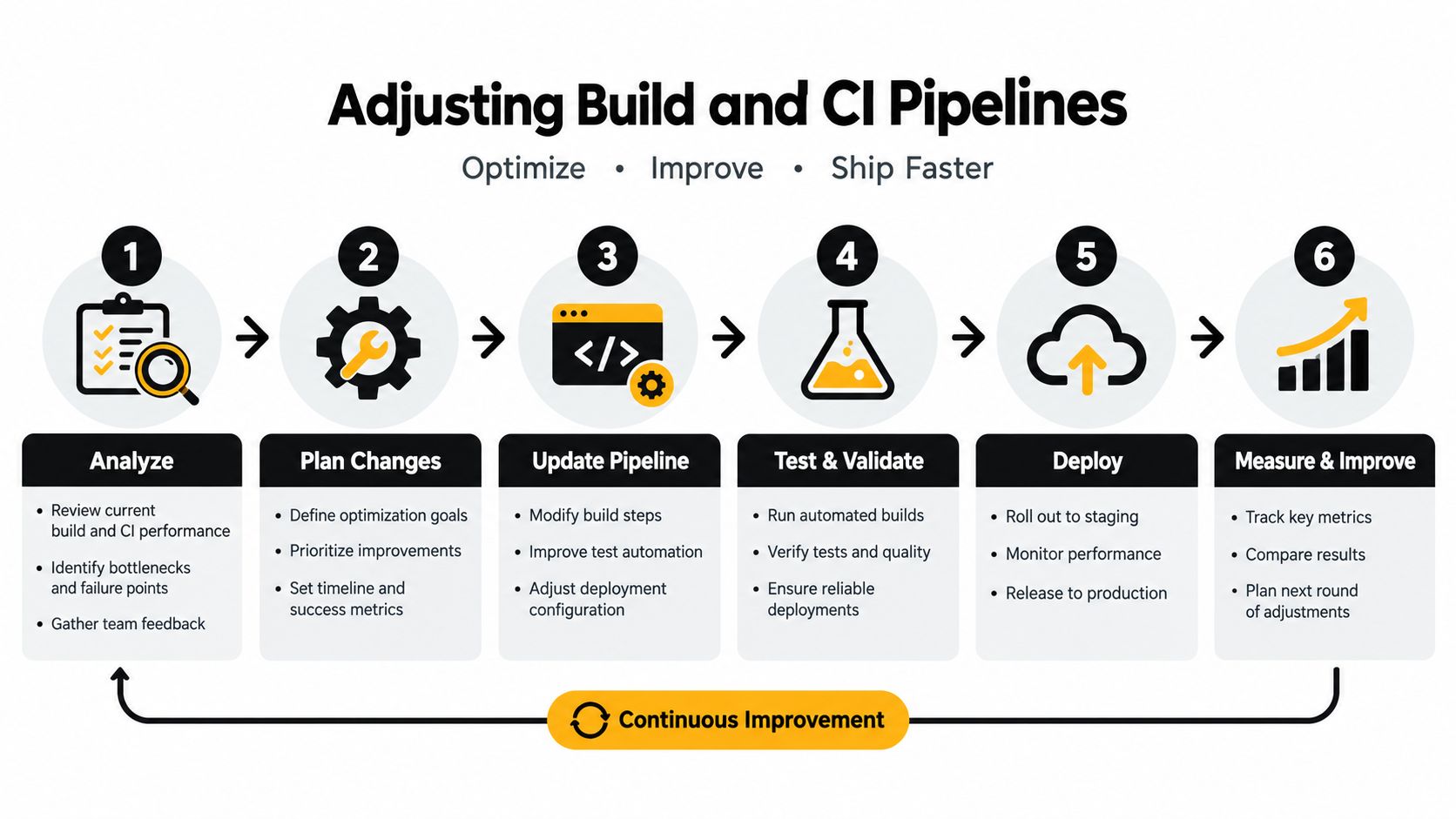
Manual publishing is acceptable for an experiment and dangerous as a release system. A reliable pipeline turns a source revision into a known artifact, runs checks against that artifact, signs it, publishes it to the intended channel, and records the result. The same input should produce the same release decision whether the job runs on a developer workstation or a hosted runner.
Build the artifact in a clean environment
Start with a reproducible sequence. Install locked dependencies, run linting and tests, build the web layer, and generate the Capacitor output from the resulting files. Don’t calculate a differential against a developer’s working directory. Compare two immutable, versioned bundles produced by CI.
A practical pipeline separates concerns:
- Validation: Run unit tests, type checks, linting, and a production web build before any upload.
- Compatibility: Confirm that the bundle’s required native capabilities match the target app builds.
- Packaging: Create a deterministic archive or file manifest and exclude temporary files.
- Signing: Sign the release with protected credentials held by the CI environment.
- Publication: Send the artifact to the channel selected by the branch, tag, or release approval.
- Verification: Query the delivery service and confirm that the published version, checksum, and channel agree.
Make version identity unambiguous
Use a release identifier that connects the source revision, native compatibility, and published bundle. Don’t rely on a mutable label such as “latest” when troubleshooting. The updater needs to report the exact installed version and the exact candidate version, while the release system needs to retain enough history to roll back or republish intentionally.
A useful manifest records:
| Field | Why it matters |
|---|---|
| Bundle version | Identifies the installed and candidate web assets |
| Native compatibility | Prevents a web bundle from assuming unavailable bridge code |
| Channel | Defines the intended audience |
| Base version | Anchors differential reconstruction |
| Integrity value | Detects corruption or tampering |
| Release status | Supports promotion, pause, and rollback decisions |
The base version is especially important for differential delivery. RFC 3229 describes the general model: a client identifies its stored representation, requests a differencing algorithm, and receives a response representing the change rather than the complete resource. The application-level equivalent should calculate a patch only when the device’s known base is valid and should send the full bundle when it isn’t.
Secure the publishing path
Treat the CI runner as a privileged release machine. Restrict who can trigger production publication, keep signing material out of logs, rotate credentials through the platform’s secret controls, and prevent untrusted pull requests from accessing release secrets. The DevArmor CI/CD security practices provide useful context for hardening permissions, secrets, and pipeline boundaries.
Add a dry-run or staging publication step before production. Test the downloaded artifact on a clean simulator or device, then exercise first launch, relaunch, interrupted download, rejected signature, and rollback behavior. Keep the release job idempotent where possible. Re-running a failed job shouldn’t create an ambiguous collection of packages with overlapping identifiers.
For a concrete implementation pattern, use the Capacitor CI/CD pipeline setup guide. The objective isn’t merely to automate uploads. It is to make every release auditable from source commit to device state.
Rolling Out and Monitoring Success
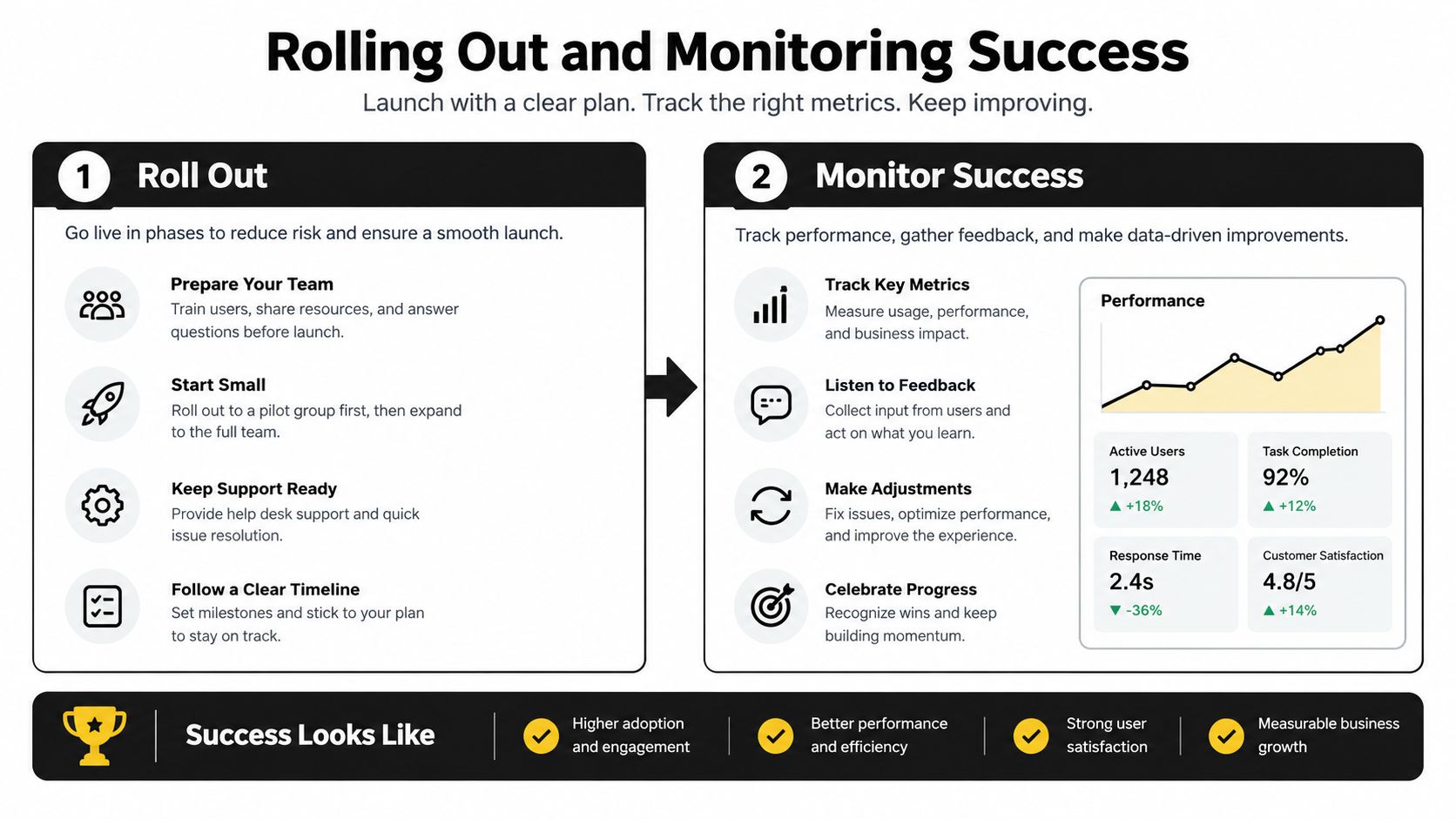
A rollout is where updater design gets tested under load. On day one, a package that looked clean in staging hits devices with older bases, interrupted downloads, low storage, and app versions your QA matrix did not cover. Treat percentage-based targeting as a dial, while the actual safety mechanism is the ability to stop promotion and return users to a known-good bundle. Roll out the same way you would set up a new differential gearset. Start with a controlled fitment check, listen for trouble, then open it up only after the mesh is proven stable.
Observe the whole update path
Watch the entire path, not just the transfer. Devices can download every byte and still fail on signature verification, extraction, activation, or the first launch after the swap. Log each stage with the bundle version, native app version, channel, platform, a privacy-conscious device identifier, and an error category the team can act on.
The minimum signals should answer a few operational questions:
- Did the device discover the candidate?
- Did it receive the complete bundle or a differential patch?
- Did integrity validation pass?
- Did activation complete?
- Did the app launch successfully afterward?
- Did the client remain healthy on its next normal session?
That event trail gives different teams what they need. Support needs a per-device timeline to explain what happened on one phone. Release owners need adoption, failure, and rollback trends across the fleet. A practical model for tracking OTA update success in Capacitor apps maps cleanly to those stages and makes dashboard design much easier.
Use rollback as a release feature
Set rollback conditions before you publish. Good triggers include a rise in launch failures, repeated integrity errors, a growing set of devices stuck on the candidate, or a crash pattern isolated to one platform. Keep the last known-good bundle on the device and make the switch back reversible without waiting for an app store release.
Rollback also needs evidence retention. Keep the failed package metadata and logs so the team can reproduce the issue, identify the affected compatibility range, and decide whether to restore the previous assignment or ship a corrected artifact. A rollback that clears the symptom for users but wipes out the trail usually leads to the same failure showing up again in the next release.
The transport model behind differential delivery has been around for a long time. HTTP delta encoding became a formal web standard through RFC 3229, published by the Internet Engineering Task Force in January 2002, and the RFC 3229 specification is still useful for one practical reason. A delta only helps when the client has a valid base version and reconstructing the result costs less than sending the full resource.
That is why application-aware updaters tend to work better than relying on generic HTTP delta behavior. The service knows the base bundle, the client can verify the reconstructed output, and the updater can fall back to a full package when the fit is wrong. The engineering choice is whether the delivery protocol makes compatibility, integrity, rollback, and observability explicit, and the answer determines whether differential delivery helps at all.





