
Your app is ready for its next market. The product team has approved the translated copy, marketing has prepared the launch, and customer support has updated its scripts. Then testing reveals that a checkout button is hardcoded in English, dates appear in the wrong order, currencies use unfamiliar separators, and a longer translation pushes the primary action off-screen. The launch isn’t blocked by translation quality alone. It’s blocked by decisions made in the codebase months earlier.
That situation is the practical starting point for app internationalization. Internationalization, usually shortened to i18n, prepares the product so languages, regions, writing systems, and cultural conventions can be added without rewriting business logic. Localization then adapts the prepared product for a particular market.
The commercial case is visible in the app economy. A 2026 snapshot of 730,024 iOS App Store apps found that the median app supports exactly one language, while 68.6% ship in a single language. Apps earning an estimated $10,000 or more per month support a median of five languages, and 50.7% of that top revenue tier ships in five or more languages. Those figures don’t prove that localization alone creates revenue, but they show that multilingual support is much more common among apps with broader commercial ambitions.
This guide moves from the mental model to engineering patterns, platform differences, workflow automation, testing, and migration. It applies to native mobile products, web applications, Capacitor hybrid apps, and Electron desktop software. Privacy and regional compliance also belong in the launch plan, so teams working through regulatory requirements can pair this guide with a GDPR compliance checklist.
Table of Contents
- Introduction to App Internationalization and Why It Matters Now
- What App Internationalization Really Means
- Core Patterns Every Internationalized App Needs
- Platform Specific Considerations for Mobile Web Capacitor and Electron
- Tooling Libraries and Translation Workflows That Scale
- Testing QA Performance and Security for Global Apps
- Putting It All Together With Code Examples and Migration Checklist
Introduction to App Internationalization and Why It Matters Now
A team often discovers internationalization days before a market launch. Product asks for a language selector, design adjusts several screens, and engineering finds user-facing text distributed across components, validation rules, notifications, analytics labels, and native configuration files. Dates and numbers create the same problem. A date stored as display text cannot be safely reformatted, while a price assembled from separate strings may need a different order in another locale.
That late discovery creates three expensive choices: delay the launch, accept visible defects, or modify code that was never designed to vary by locale. Treating i18n as an architectural capability changes the workflow. Market expansion becomes a controlled operation involving resources, presentation, testing, and release configuration instead of a rewrite.
Practical rule: Build the app so a new locale changes resources and presentation, not business rules.
Translation is only one part of global readiness. A translated sentence can still break a layout that cannot accommodate its length. A correctly translated currency can still mislead users when the underlying value is stored as formatted text. A language selector can also produce inconsistent behavior when the web layer and native layer detect different locales.
Late i18n discovery raises operational cost. Engineers must trace strings across old components, translators receive incomplete context, reviewers test rushed changes, and release teams coordinate fixes across several platform packages. For Capacitor and Electron teams, a live-update workflow can shorten this loop by delivering approved localization resources and presentation fixes without waiting for a new store review, where the platform and release policy allow it. The important shift is treating localization changes as managed release artifacts, not as a final translation handoff.
The path forward is straightforward:
- Prepare the foundation: Separate user-facing resources from application logic and model locale-sensitive values correctly.
- Handle language behavior: Support plural rules, text expansion, writing direction, formatting, and accessible language changes.
- Adapt each platform: Account for iOS, Android, browsers, Capacitor WebViews, and Electron packaging.
- Keep releases moving: Connect extraction, translation, review, testing, and deployment so new strings do not wait for a late project phase.
- Verify the interface: Test long text, right-to-left layouts, locale combinations, fallback behavior, performance, and update safety.
App internationalization is a release-engineering discipline. It keeps later product changes localizable, lets teams correct language issues through the appropriate delivery path, and includes regional privacy work such as a GDPR compliance checklist.
What App Internationalization Really Means
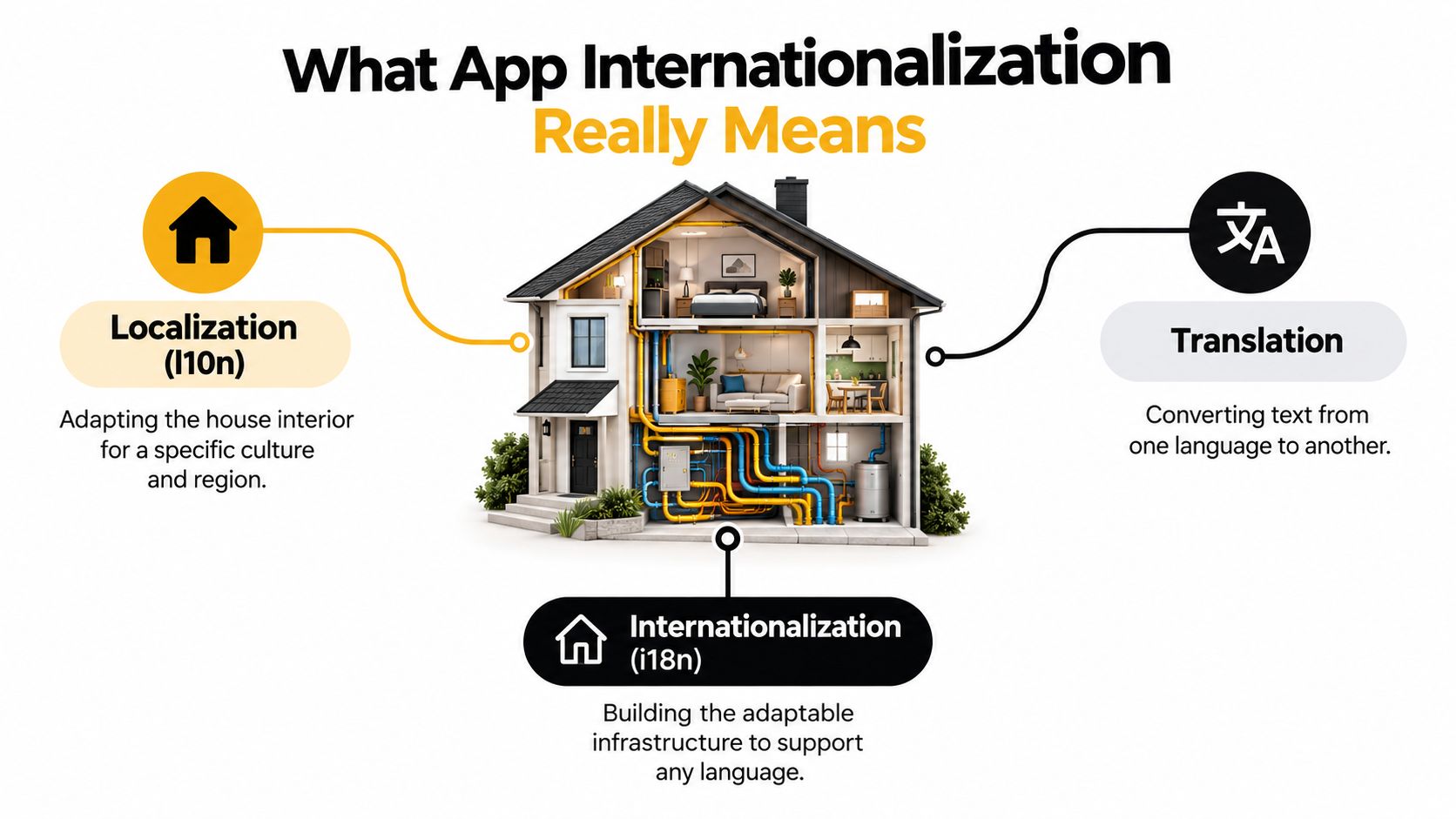
Start with a house analogy. Internationalization is the adaptable wiring and plumbing installed before anyone decorates the rooms. Localization is decorating and furnishing that house for a particular region. Translation is changing the language on labels, instructions, and signs.
The order matters. If the wiring is embedded inside walls that were designed for one appliance, adding a new appliance becomes expensive. In software, hardcoded strings, fixed-width controls, concatenated sentences, and locale-specific business logic create the same kind of constraint.
Three terms, three responsibilities
Internationalization, or i18n, is the design and development work that allows an app to support different languages and regions without changing its core behavior. It includes resource loading, locale selection, formatting, text direction, font support, and flexible layouts.
Localization, or l10n, adapts the prepared app to a specific locale. That can include translated interface copy, region-specific formats, local terminology, culturally appropriate imagery, and market-specific defaults.
Translation converts content from one language to another. It deals mainly with meaning and wording, though a good translation workflow also needs context, screenshots, character limits, and information about where each string appears.
A useful implementation boundary is the locale resource. Instead of placing Payment failed directly in a component, the component requests a semantic key such as payment.error. The English resource maps that key to English text, while another resource maps the same key to a different translation. The component still knows that it needs a payment error. It doesn’t need to know how that error is worded.
The same separation applies beyond strings. Store monetary values as values, not as strings with symbols attached. Store timestamps as timestamps, not as already-formatted dates. Pass locale information to formatters instead of embedding separators or month names in business code.
Why the foundation reduces risk
When resources and formatting rules sit outside business logic, adding a language doesn’t require changing purchase calculations, authentication flows, or data models. Engineers can update a resource bundle, translators can work in a translation management system, and QA can test the resulting interface without destabilizing unrelated behavior.
That separation also improves ownership. Designers can define expansion-safe components, translators can review context, product managers can decide which markets to support, and engineers can enforce missing-key and fallback rules. Each discipline gets a clear place in the workflow.
A team that skips i18n often treats every new locale as a special exception. A team that designs for it treats locale as input. That single shift makes global support easier to reason about.
Core Patterns Every Internationalized App Needs
Good i18n becomes concrete through a small set of repeatable patterns. Apply them at the component, data, and release layers rather than adding a language switcher on top of a single-locale codebase.
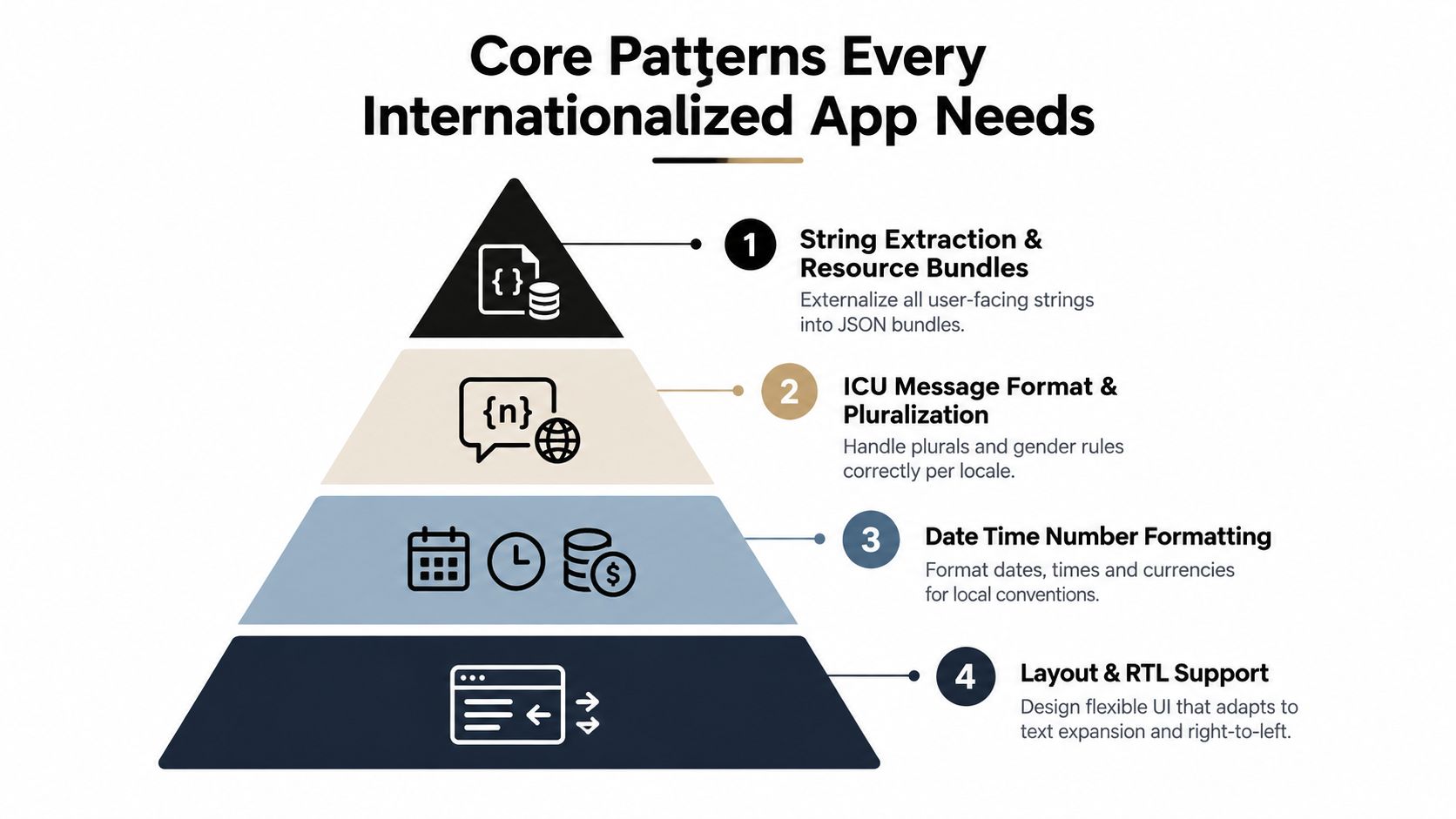
Extract strings into resources
This transformation is the first practical step:
Before:
showToast("Your profile was saved");After:
showToast(t("profile.saved"));Resource file:
{
  "profile": {
    "saved": "Your profile was saved"
  }
}
Use keys that describe meaning, not the English sentence. profile.saved remains useful if the English wording changes, while a key based on the original sentence can become misleading. Include translator context where the same word could mean different things, such as whether “Present” is a button action or a status.
A properly internationalized app externalizes every user-facing string, along with dates, numbers, currencies, and symbols, into locale resources or formatters. This engineering blueprint for mobile i18n explains why that separation lets teams add languages without changing business logic.
Use message formats for grammar
This is unsafe:
`${count} items`A hardcoded pattern assumes every locale uses the same plural behavior and word order. Unicode CLDR provides the common localization data layer for dates, times, time zones, numbers, currencies, and plural categories. As the localization best-practices guidance on CLDR explains, plural rules differ by locale, so apps need locale-aware selection rather than one fixed pattern.
An ICU-style message might look like this:
{count, plural,
  =0 {No items}
  one {# item}
  other {# items}
}
The formatter chooses the correct branch. Keep the full message together so translators can reorder the number and noun when grammar requires it.
Format values with locale-aware APIs
Don’t assemble a date manually:
`${day}/${month}/${year}`Use a formatter:
new Intl.DateTimeFormat(locale, {
  dateStyle: "medium"
}).format(date)
The same principle applies to numbers and currencies:
new Intl.NumberFormat(locale, {
  style: "currency",
  currency: currencyCode
}).format(amount)Intl, ICU, and CLDR-backed libraries handle conventions that vary by region. They also keep display logic close to the presentation layer, where it belongs.
Design for direction and expansion
Text doesn’t expand predictably across languages. Buttons need flexible widths, cards need adaptable heights, and labels shouldn’t depend on one line. Use layout systems that allow content to grow, and test controls with long pseudo-translations before translators begin final review.
Right-to-left support needs more than flipping text alignment. Icons, navigation order, padding, animations, and directional gestures may need mirroring. Use logical properties such as margin-inline-start instead of left-only rules where the platform supports them. Images, fonts, and embedded text also require review. A font that renders one script well may not cover another, and an image containing English words may need a localized asset rather than a translated overlay.
For interface-specific guidance, teams using Capacitor can also consult these cross-platform UI and UX practices.
Platform Specific Considerations for Mobile Web Capacitor and Electron
The core rules stay consistent, but each runtime supplies different locale signals and packaging constraints. A native app can read device preferences through platform APIs. A browser exposes language preferences through browser settings and JavaScript APIs. A hybrid app has both a WebView and native shell, which means teams must decide where locale truth lives.
| Platform | Locale Detection | Formatting Approach | Key Gotcha |
|---|---|---|---|
| iOS | Device or app language settings, with app-specific behavior where supported | Foundation formatters and JavaScript Intl for web content |
Native screens and WebView screens can drift if they use separate locale state |
| Android | Device and app language settings, depending on implementation | Android locale APIs and JavaScript Intl in web content |
Resource qualifiers and WebView resources need a deliberate fallback strategy |
| Web | Browser language preferences, user choice, or URL and account settings | JavaScript Intl, ICU-backed libraries, and server-side locale handling |
Server and client locale decisions must agree to avoid inconsistent rendering |
| Capacitor | Native preference plus WebView state | Native formatters, JavaScript Intl, and shared resource bundles |
A live JavaScript update can change localized content without changing native resources |
| Electron | Operating-system locale, app preference, or account setting | JavaScript Intl, Node-side logic, and renderer resources |
Packaged locale assets must be included and loaded correctly in production builds |
Native mobile applications
iOS and Android each provide native localization systems, but many teams also render substantial UI through JavaScript. Decide whether native and web layers share locale codes, translation keys, and fallback rules. Keep locale selection explicit so a user-selected language does not get replaced by the device preference during the next launch.
Store metadata deserves separate attention. A localized app can still lose discoverability if its title, subtitle, and description remain in one language. A 2023 analysis of leading U.S. apps entering foreign markets found that 60% localized their iOS title, almost 90% localized their product description, and 6 in 10 localized their subtitle. On Android, 70% localized the title and 89% localized the description. These are store-front decisions, not runtime UI decisions, so assign them to the launch checklist rather than assuming the engineering bundle handles them.
Web applications
The web needs a stable relationship between URL, server rendering, browser preference, and account preference. If the server renders English while the browser immediately switches to German, users may see a flash or hydration mismatch. Choose a priority order, persist the user’s selection, and make the fallback locale deterministic.
Lazy-load locale bundles when the application has substantial translated content. Keep the default experience fast, but ensure an offline or failed-fetch path can render a safe fallback.
Capacitor and Electron
Capacitor apps often share a web codebase across iOS, Android, and the browser. That makes shared resources efficient, but native plugins may still expose platform-specific locale behavior. The WebView should receive a normalized locale from one authoritative source, rather than independently guessing from browser and device settings. Teams evaluating those boundaries can review how Capacitor handles platform differences.
Electron adds a packaging concern. The renderer may load locale files differently in development and in a packaged application, so production builds must verify that resources are present, addressable, and updated together. If JavaScript bundles can receive live updates, define whether locale files are part of the same signed bundle and how a failed update rolls back.
Tooling Libraries and Translation Workflows That Scale
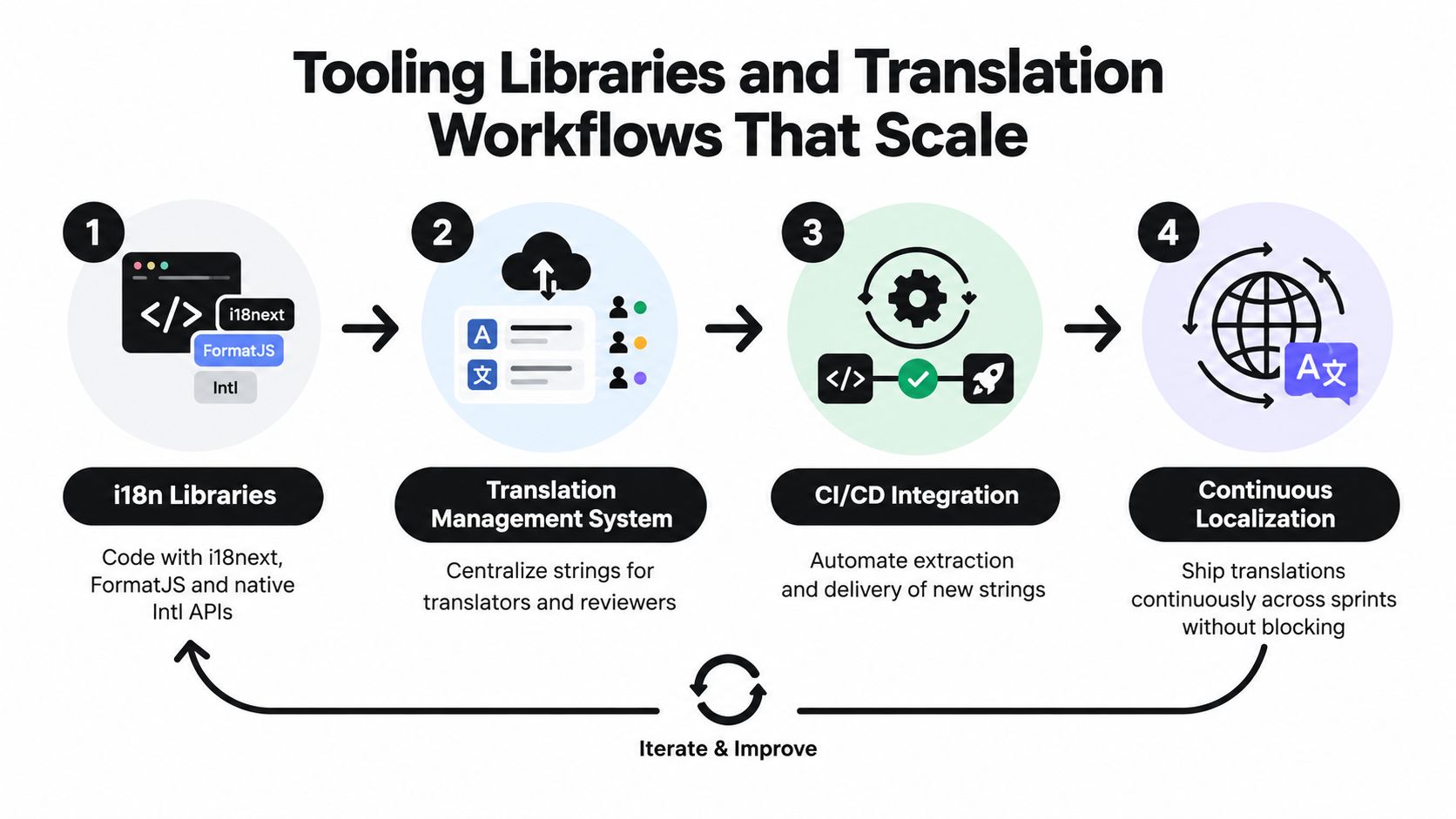
A translation library does not create a localization workflow by itself. A team may use i18next, FormatJS, or native Intl APIs and still miss a release if key ownership, context, review, delivery, and rollback are unclear. Treat every new string like a software artifact that moves through the same controls as code.
A scalable workflow follows a clear chain:
- A developer adds a semantic key with context, screenshots, variables, and character limits where they matter.
- Automation extracts or validates the key and sends it to a translation management system.
- Translators and reviewers use the same source while the build checks placeholders and required locales.
- CI retrieves approved resources and packages them with the application or sends them through an approved update channel.
- QA checks changed locales instead of repeating every linguistic review from the beginning.
- Release controls manage exposure, starting with internal, beta, or targeted users before a broader rollout.
Why the pipeline matters
The bottleneck is often waiting for approved content, not writing the code. A 2026 developer survey on i18n workflows found that 64% of respondents identified translation workflow efficiency as their top challenge, 78% said waiting for translations delays releases, and 52% lacked systematic translation QA beyond manual spot-checking. The same source reports that 41% had adopted over-the-air systems and 28% planned to do so in 2026. These findings connect localization with release delivery rather than treating it as a separate content cycle.
CI should catch predictable failures before packaging:
- Missing keys: Fail or warn when a source key has no fallback.
- Placeholder drift: Verify that variables such as
{count}exist in every translated message. - Orphaned keys: Flag resources that no longer appear in the application.
- Invalid syntax: Reject malformed JSON, ICU messages, or resource files.
- Locale coverage: Report which supported locales changed and which still need review.
For CI integration patterns, see the developer experience tools overview.
Live updates as release engineering
For Capacitor and Electron teams, a localization fix can travel inside a signed JavaScript, CSS, copy, configuration, and asset bundle. A live-update platform such as Capgo can target channels, deliver differential updates containing only changed files, expose adoption and failure metrics, and provide automatic rollback protection. This creates a release-engineering path for correcting a mistranslated label or layout rule without waiting for a full store submission, provided the team defines its update policy, review process, signing rules, and native compatibility boundaries.
Live updates do not replace store releases. Native strings, permissions, platform APIs, and changes that exceed the installed native runtime still require the appropriate distribution path. They provide a faster lane for compatible localization changes, where a small content fix can otherwise wait for the next application release.
Testing QA Performance and Security for Global Apps
Internationalization testing should expose assumptions before users do. A single translated screenshot isn’t enough because failures often depend on a particular combination of locale, data length, screen size, writing direction, and platform.
Start with hostile content
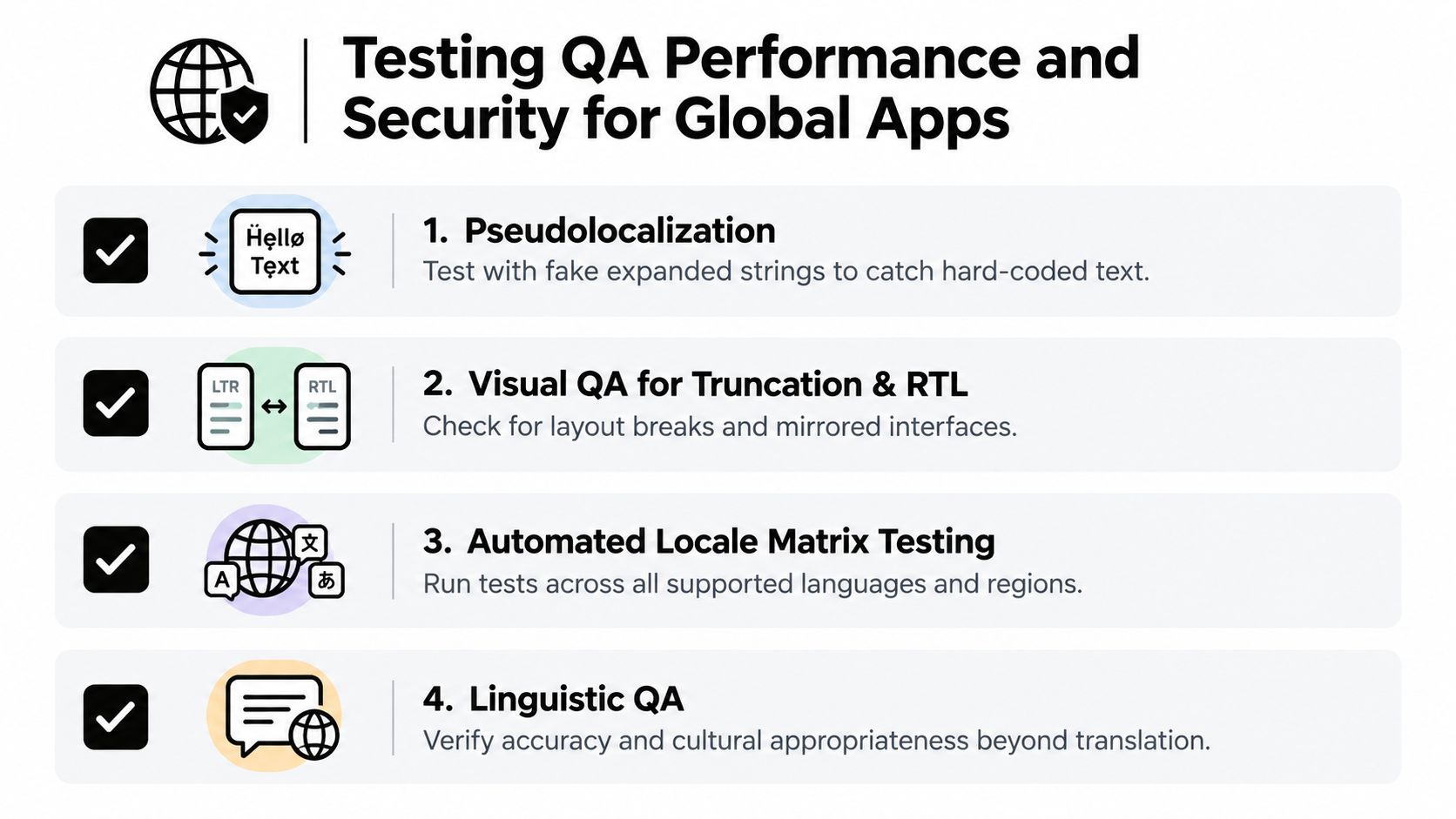
Pseudolocalization replaces normal strings with test text that is deliberately longer, accented, or surrounded by markers. It helps reveal hardcoded strings, clipped labels, fixed-height cards, and controls that only work in English. Test both empty and populated states because plural messages and validation errors often take different layout paths.
RTL testing needs a complete navigation pass. Check text alignment, back buttons, icons, charts, swipe gestures, form fields, and mixed-direction content such as an Arabic sentence containing a product code. Don’t mirror every icon automatically. Directional icons may need mirroring, while brand marks and some object icons should remain unchanged.
Automate the locale matrix
Build a test matrix around supported language and region combinations, not language names alone. A language can have different conventions across regions, especially for dates, numbers, currencies, calendars, and time zones.
- Functional checks: Confirm locale selection, persistence, fallback, plural branches, and error messages.
- Visual checks: Capture key screens with long strings, RTL enabled, and narrow widths.
- Linguistic checks: Give reviewers context, screenshots, variables, and the intended action.
- Regression checks: Test update installation, interrupted downloads, offline startup, and rollback behavior.
Performance requires discipline as locale resources grow. Split large bundles by locale or feature when appropriate, lazy-load nonessential languages, and cache validated resources. Avoid making the first screen depend on a slow translation request unless the application has a reliable fallback.
Security belongs in the same review. Treat locale identifiers and user-supplied translated content as input, validate resource structure, protect translation-management credentials, and verify the integrity of remotely delivered bundles. A live-update workflow should use signed artifacts, controlled channels, version compatibility checks, observable failures, and a tested rollback path. Teams designing deployment controls can also review this guide to multi-region deployment.
Putting It All Together With Code Examples and Migration Checklist
A checkout screen shows why migration order matters. Start with the code users touch most, then replace each assumption with a locale-aware boundary. Hardcoded labels, dates, currencies, plural messages, and fixed-width layouts should become separate migration tasks, with a fallback locale preventing missing resources from leaving blank controls.
For example, replace currency concatenation in an existing component.
Before:
price.textContent = currencySymbol + amount;After:
price.textContent = new Intl.NumberFormat(locale, {
  style: "currency",
  currency: currencyCode
}).format(amount);
Keep amount as a raw numeric value. The formatter decides symbol placement, separators, decimal conventions, and other regional details. This avoids scattering locale rules through checkout logic.
A practical migration checklist:
- Inventory: Find user-facing strings, formatted values, images containing text, and locale assumptions.
- Externalize: Move copy into resource files with semantic keys and translator context.
- Normalize locale state: Define detection, user override, persistence, and fallback behavior.
- Replace manual formatting: Use platform or JavaScript locale-aware formatters.
- Harden layouts: Test expansion, truncation, bidirectional text, fonts, and RTL mirroring.
- Automate validation: Check missing keys, placeholders, resource syntax, and changed locales in CI.
- Release safely: Ship compatible localization changes through the store process or a controlled live-update channel, using signing, staged exposure, monitoring, and rollback.
Choose one high-traffic flow, such as onboarding or checkout, for the first pass. Once its resource boundary and validation pipeline work, apply the same conventions across the app rather than attempting an uncontrolled rewrite.
For CapacitorJS and Electron teams, Capgo supports signed live-update bundles for compatible JavaScript, CSS, copy, configuration, and asset changes. Channels, differential delivery, observability, and rollback protection can connect a localization fix to an existing CI/CD workflow, reducing dependence on a store review for every compatible correction. Evaluate that release path against your deployment controls before extending it to other locales.





