
The popular advice is simple: choose native for quality and cross-platform for speed. That advice is too blunt to guide a serious product. Modern teams aren’t choosing between two neatly separated roads. They’re choosing how much code to share, which layer owns the user experience, how quickly they need new device capabilities, and who will absorb the maintenance cost when the abstraction stops fitting.
For cross platform mobile app development vs native, the useful question isn’t “Which approach is best?” It’s “Which parts of this product deserve shared implementation, and which parts need platform-specific control?” A content-heavy MVP, a regulated financial product, a real-time 3D experience, and an internal operations tool can all justify different answers.
| Approach | Best fit | Main advantage | Hidden cost |
|---|---|---|---|
| Native | Advanced hardware, extreme performance, strict compliance | Maximum platform control | Separate codebases and teams |
| React Native | Business apps with JavaScript expertise | Shared product logic with native platform access | Bridge and platform-specific debugging |
| Flutter | Consistent, animation-rich interfaces | Controlled rendering and broad code sharing | Embedded engine footprint and custom platform work |
| Kotlin Multiplatform | Shared domain logic with native UI | Native experience with selective reuse | More architectural coordination |
| Capacitor | Web-first products and existing web teams | Fast path from web application to mobile | WebView and plugin limitations |
Table of Contents
- The Modern Mobile Architecture Landscape
- Performance Benchmarks and Runtime Realities
- Developer Velocity and Maintenance Overhead
- App Store Economics and Ecosystem Scale
- Choosing the Right Architecture for Your Use Case
- Bridging the Gap with Capacitor and Live Updates
- Strategic Recommendations for Mobile Teams
The Modern Mobile Architecture Landscape
The native-versus-cross-platform binary is obsolete. In current architecture discussions, the substantive choice is Native, React Native, Flutter, Kotlin Multiplatform, or a web-based wrapper such as Capacitor, and each option shares code at a different layer.
Recent coverage describes this as a four-way decision between native, React Native, Flutter, and Kotlin Multiplatform. It also reports that cross-platform work can be 30–40% cheaper for content-heavy MVPs, while the saving may narrow to 10–20% for feature-heavy apps after bridge work, platform-specific polish, and dual-platform quality assurance are included. Those figures come from recent architecture analysis of native and cross-platform development, and they illustrate why “cross-platform” isn’t a sufficiently precise architecture label.
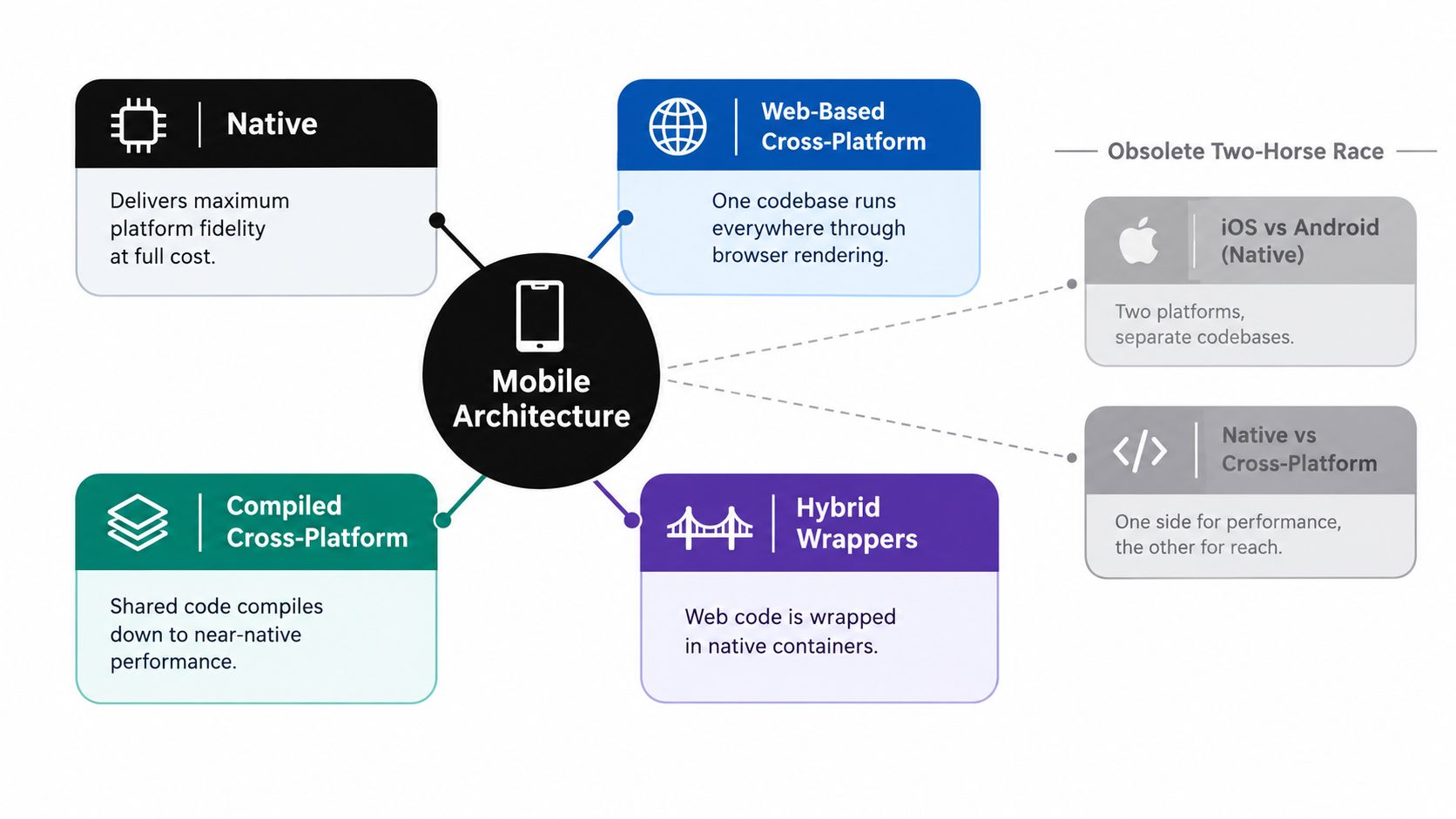
Four different ways to share work
Native development gives iOS and Android teams direct access to Swift, Kotlin, platform SDKs, accessibility APIs, hardware features, and operating system conventions. You pay for that control with duplicated product work, separate release tracks, and coordination between teams.
React Native shares much of the application layer while rendering through native platform components. It suits teams with strong JavaScript or TypeScript capability, especially when the product already has React expertise. The difficult work starts when a required API lacks a mature module, when animation timing becomes sensitive, or when a bug appears only on one operating system.
Flutter takes more control over rendering through its own engine. That can produce a consistent visual system and predictable animation behavior, but teams must consider the engine footprint and the effort required to reproduce platform-native interactions accurately.
Kotlin Multiplatform sits somewhere else. It can share domain logic, networking, validation, and state management while leaving the interface native. That makes it attractive to enterprises that want reuse without giving up platform fidelity. Capacitor follows a different model again, wrapping web code in native containers and exposing device capabilities through plugins.
Industry analysis frames cross-platform as the correct default for roughly 80% of new mobile builds, with native reserved for the remaining 20% where hardware access or extreme performance dominates, as reported in this mobile technology stack analysis. Treat that as a planning benchmark, not an automatic architecture decision. Your app’s camera pipeline, Bluetooth Low Energy workflow, compliance boundary, or offline behavior can matter more than the average project.
For a broader treatment of the layers involved, see this guide to mobile application architecture. The practical lesson is straightforward: define the boundaries first, then choose the framework.
Performance Benchmarks and Runtime Realities
“Native is always faster” is a useful warning for a graphics-heavy product, but it’s a poor general rule. Standard business applications spend much of their time waiting for networks, databases, user input, and operating system services. In those products, a well-engineered cross-platform runtime can feel entirely responsive.
The gap becomes easier to see under sustained animation, large scrolling surfaces, image decoding, intensive gestures, and high-refresh displays. A benchmark summary reports Flutter sustaining 110–120 FPS on 120 Hz displays more consistently, while React Native ranged around 95–115 FPS, depending on image-decode pressure and list virtualization. Read the results in their testing context through this 2026 React Native and Flutter performance benchmark.
| Framework | Standard 60Hz FPS | 120Hz Display FPS | Idle Memory | Rendering Engine |
|---|---|---|---|---|
| Native | Platform-dependent | Platform-dependent | Platform-dependent | Native platform renderer |
| React Native | 52–58 FPS under load | 95–115 FPS | About 120 MB | Native rendering with JavaScript runtime |
| Flutter | 60 FPS in complex scenarios | 110–120 FPS | About 145 MB | Embedded Flutter engine |
The figures above come from benchmark summaries comparing React Native and Flutter. The React Native versus Flutter benchmark overview reports 60 FPS for Flutter in complex scenarios, React Native at roughly 52–58 FPS under load, and an idle-memory comparison of about 120 MB for React Native versus 145 MB for Flutter.
Where overhead appears
React Native’s performance depends on the work crossing between JavaScript and native layers, although its modern rendering architecture reduces the cost in many common flows. Long lists, frequent layout changes, image processing, and chatty native-module calls can still expose the boundary. Developers should profile those paths rather than infer performance from framework reputation.
Flutter’s embedded engine gives it a more controlled rendering pipeline. That helps explain its stronger consistency in animation benchmarks, but it doesn’t make Flutter automatically smaller, cheaper to integrate, or more native-feeling. Teams still need platform code for capabilities the framework doesn’t expose cleanly.
Native remains the safer choice for demanding 3D graphics, advanced AR, low-latency media processing, intensive on-device machine learning, and hardware workflows where every frame or millisecond matters. For most forms, feeds, dashboards, commerce flows, and account management, architecture quality, asset handling, and network design usually matter more than the framework label.
Use mobile app performance optimization techniques to establish real device baselines. Test low-end Android hardware, older iPhones, poor connectivity, cold starts, background recovery, and long sessions. A benchmark on a developer laptop won’t reveal the rendering failure your customers will report.
Developer Velocity and Maintenance Overhead
Cross-platform wins the first release more often than it wins the entire product lifecycle. A shared codebase can shorten the path to a usable product, but it doesn’t remove App Store configuration, Android build differences, device testing, native permissions, release signing, or platform-specific defects.
Recent guidance reports that cross-platform development can reduce launch time by up to 50% and costs by 30–40% on simpler builds, while teams may later pay a “native tax” when they need fast access to operating system features or deeper hardware APIs. See the 2026 comparison of native and cross-platform development economics for the underlying claim.
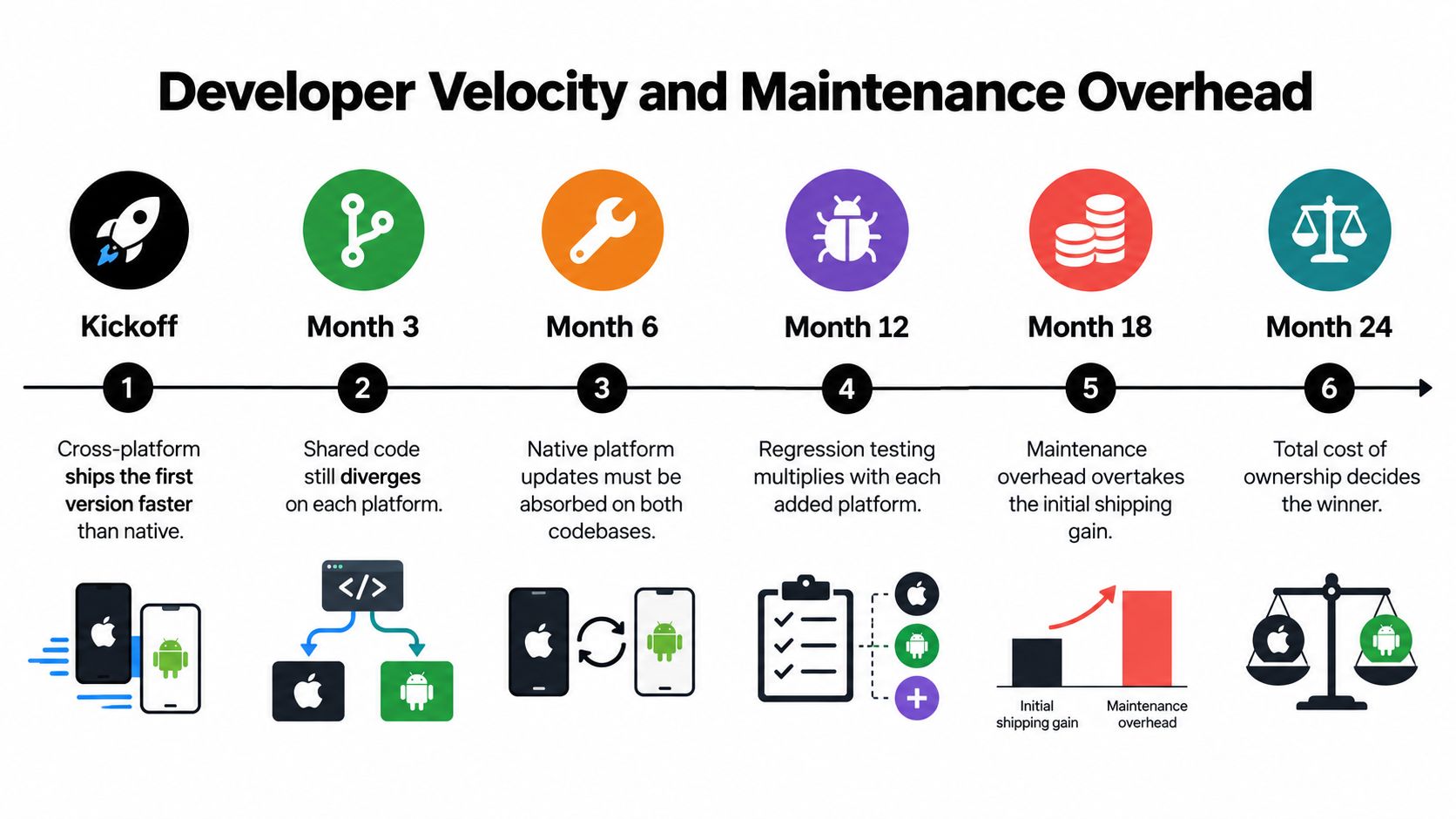
The shared-code illusion
“Write once, run anywhere” describes code reuse, not identical behavior. A shared screen can still require separate handling for keyboard insets, permission prompts, background execution, push notification tokens, deep links, biometrics, and system navigation.
Native teams carry duplication from the beginning. Cross-platform teams often carry coordination debt that arrives later. A new iOS SDK may require a plugin update, a custom native module, a build configuration change, and a test pass on both platforms. The code is shared, but the product contract isn’t.
Practical rule: Track native escape hatches from the first sprint. If a capability might require Swift or Kotlin, record the ownership, test plan, and upgrade path before the feature reaches production.
The framework also changes hiring and workflow. React Native can be efficient when a team already understands React, TypeScript, automated testing, and native build tooling. Teams assessing that combination may benefit from this practical React Native hiring guide for startups, particularly when deciding whether they need mobile specialists rather than only web engineers.
Maintenance is a release-system problem
Capacitor teams have a different lever. JavaScript, CSS, copy, configuration, and web assets can often be updated without rebuilding the native shell. That doesn’t eliminate store review for native changes, and it doesn’t permit every kind of update, but it can separate routine web-layer fixes from native release work.
Your mobile developer experience should therefore measure more than build duration. Track how quickly a team can reproduce a device-specific defect, test a native plugin, roll back a faulty bundle, and explain which users received a change. Those controls determine whether code sharing produces genuine velocity or merely postpones complexity.
App Store Economics and Ecosystem Scale
The commercial destination is still native, regardless of how the application is built. A Flutter, React Native, Kotlin Multiplatform, or Capacitor product must eventually satisfy Apple’s and Google’s packaging, review, signing, permissions, billing, privacy, and release requirements.
In 2023, Apple’s App Store generated about $85.1 billion, while Google Play generated about $47.6 billion, according to this analysis of native and cross-platform app development. The figures show why a team targeting both platforms can’t treat one store as an afterthought. Cross-platform code reuse reduces duplicated engineering work, but it doesn’t merge the two commercial ecosystems.
Shared code doesn’t mean shared distribution
Each store has its own operational surface:
- Release tooling: Teams still manage platform-specific signing, build settings, entitlements, package identifiers, and submission workflows.
- Policy interpretation: A feature that passes review on one platform can require different disclosures, permission handling, or user flows on the other.
- Monetization: Subscriptions, in-app purchases, tax treatment, refunds, and restore behavior need platform-aware implementation and testing.
- Production support: Customers report device-specific failures, and support teams need enough telemetry to distinguish a web-layer defect from a native integration issue.
For an MVP, this overhead may be a reasonable price for reaching both ecosystems quickly. For a feature-heavy enterprise product, the shared-code advantage can narrow because each new capability adds platform-specific QA and integration work. The architecture should reflect the product’s revenue risk, not only the first development estimate.
Store delivery also affects incident response. Teams should understand the difference between a native binary release and a permitted web-layer update, including the policy constraints around each. This comparison of App Store distribution and direct updates is a useful starting point for designing that release boundary.
Choosing the Right Architecture for Your Use Case
Architecture selection works best as a sequence of exclusions. Start with the capabilities that cannot tolerate compromise, then choose the approach that leaves the fewest expensive exceptions.
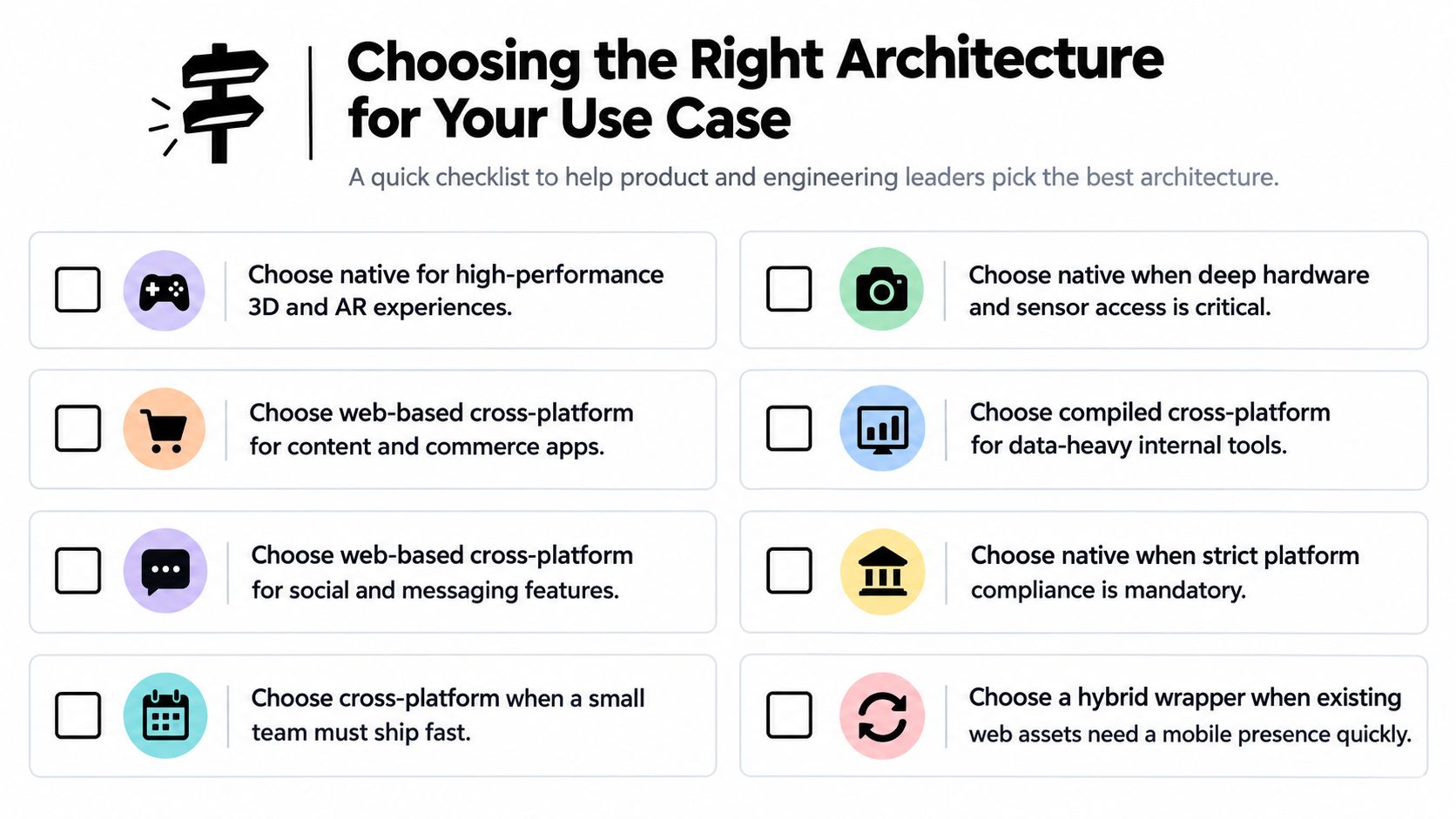
Match the workload to the architecture
| Product profile | Recommended starting point | Why |
|---|---|---|
| Content, commerce, or social MVP | Capacitor or React Native | Fast iteration and broad platform reach |
| Data-heavy internal tool | Flutter or React Native | Shared workflows and controlled delivery |
| Existing web product needing mobile presence | Capacitor | Reuses web capabilities and team skills |
| High-performance 3D, AR, or media tool | Native | Direct rendering and hardware control |
| Shared domain logic with distinct platform UX | Kotlin Multiplatform | Reuses core logic while keeping native interfaces |
| Strictly regulated financial or healthcare workflow | Native, or a carefully bounded hybrid | Direct platform integration and clearer control boundaries |
Industry analysis places roughly 80% of new builds in the cross-platform default category and the remaining 20% in use cases where native hardware access or extreme performance matters, as described in this mobile stack benchmark. That ratio is useful for prioritization, not permission to ignore requirements.
Choose native when the product depends on advanced AR, Bluetooth Low Energy, CarPlay or Android Auto, specialized camera processing, low-latency audio, intensive on-device machine learning, or strict platform compliance. Native also makes sense when the interface must follow each operating system’s interaction model closely and the business can support separate mobile expertise.
Choose React Native when the team has strong React capability and most product behavior fits conventional mobile interfaces. Choose Flutter when a controlled visual system, custom components, and animation consistency are more important than adopting native UI primitives. Choose Kotlin Multiplatform when the business wants to share domain logic but expects iOS and Android experiences to remain distinctly native.
Capacitor is a practical fit for content, commerce, account, messaging, and internal applications that already have a capable web product. A startup still validating its product should also review this startup mobile app development guide before committing to a team structure or delivery scope.
Decision test: List the five features most likely to trigger native code. If those features define the product’s value, start native. If they’re peripheral integrations around standard workflows, share the core and isolate the exceptions.
Bridging the Gap with Capacitor and Live Updates
Capacitor is most useful when a team starts with a web application rather than pretending the web layer is a native renderer. It packages HTML, CSS, and JavaScript inside native iOS and Android containers, then exposes device capabilities through plugins and custom native code.
That model gives web teams a fast route to mobile, but it has boundaries. A WebView-heavy interface can struggle with demanding graphics, complex gesture systems, background execution, and tightly integrated hardware. The right response isn’t to hide those constraints. It’s to keep the web layer responsible for product flows that fit it, and move exceptional capabilities into native plugins.
Separate the native shell from the updateable product layer
A disciplined Capacitor architecture draws a hard boundary:
- Web bundle: UI, copy, JavaScript behavior, CSS, feature flags, and compatible assets.
- Native shell: App permissions, entitlements, plugins, signing, lifecycle behavior, and operating system integrations.
- Delivery controls: Version compatibility, staged channels, monitoring, rollback, and audit records.
Capgo is one option for this delivery layer. It provides live updates for CapacitorJS and Electron apps, delivering signed JavaScript, CSS, copy, configuration, and asset bundles to targeted channels. It also supports adoption and failure visibility, version history, channel controls, and rollback protection. Native changes still require a store build, so teams must define precisely which fixes belong in an over-the-air bundle and which require review.
The Capacitor live updates implementation guide explains the operating model in more detail. The important architectural insight is that live updates don’t make a hybrid app native. They make the web portion more operationally responsive, which can materially reduce the waiting time for compatible fixes.
Use signed bundles, compatibility checks, staged rollout channels, and an automatic rollback path. Keep native plugin versions aligned with the web bundle’s expectations. Without those safeguards, a faster update mechanism can spread a broken release faster.
Strategic Recommendations for Mobile Teams
Treat cross-platform as an architecture strategy, not a budget shortcut. The teams that succeed with it define their shared boundaries early, keep native integrations small and owned, and test platform behavior continuously rather than discovering differences during release week.
Start with a capability map. Mark each feature as web-layer, shared-runtime, platform plugin, or fully native. Then assign a clear owner for every native boundary. This prevents the common failure mode where a cross-platform team depends on one overloaded iOS or Android specialist for every difficult integration.
Build for divergence deliberately
Use a shared design system for brand elements, but don’t force identical interaction patterns where iOS and Android users expect different behavior. Keep navigation, permissions, system back behavior, keyboard handling, accessibility, and purchase flows platform-aware.
Review the architecture whenever the product adds a capability, not only when performance fails. Ask whether the new feature introduces background execution, sensor access, protected data, real-time rendering, or a compliance requirement. If it does, update the boundary and the test strategy before implementation begins.
A well-organized team also separates three kinds of testing:
- Shared product tests for business rules, data transformations, and core workflows.
- Platform contract tests for permissions, lifecycle events, notifications, storage, and native plugins.
- Device experience tests for rendering, gestures, accessibility, battery behavior, and recovery from interruption.
Native isn’t a badge of quality, and cross-platform isn’t automatically efficient. The winning choice minimizes the most expensive risk in your product. For many teams, that means shared code with deliberately native edges. For a smaller set of products, native ownership from the beginning is cheaper than repeatedly paying to escape an abstraction.
If you’re building with Capacitor, Capgo can provide signed live delivery for compatible web-layer changes, targeted channels, observability, and rollback controls. Visit Capgo to evaluate how its update workflow could help your team ship fixes faster while keeping native releases reserved for changes that genuinely require them.





