

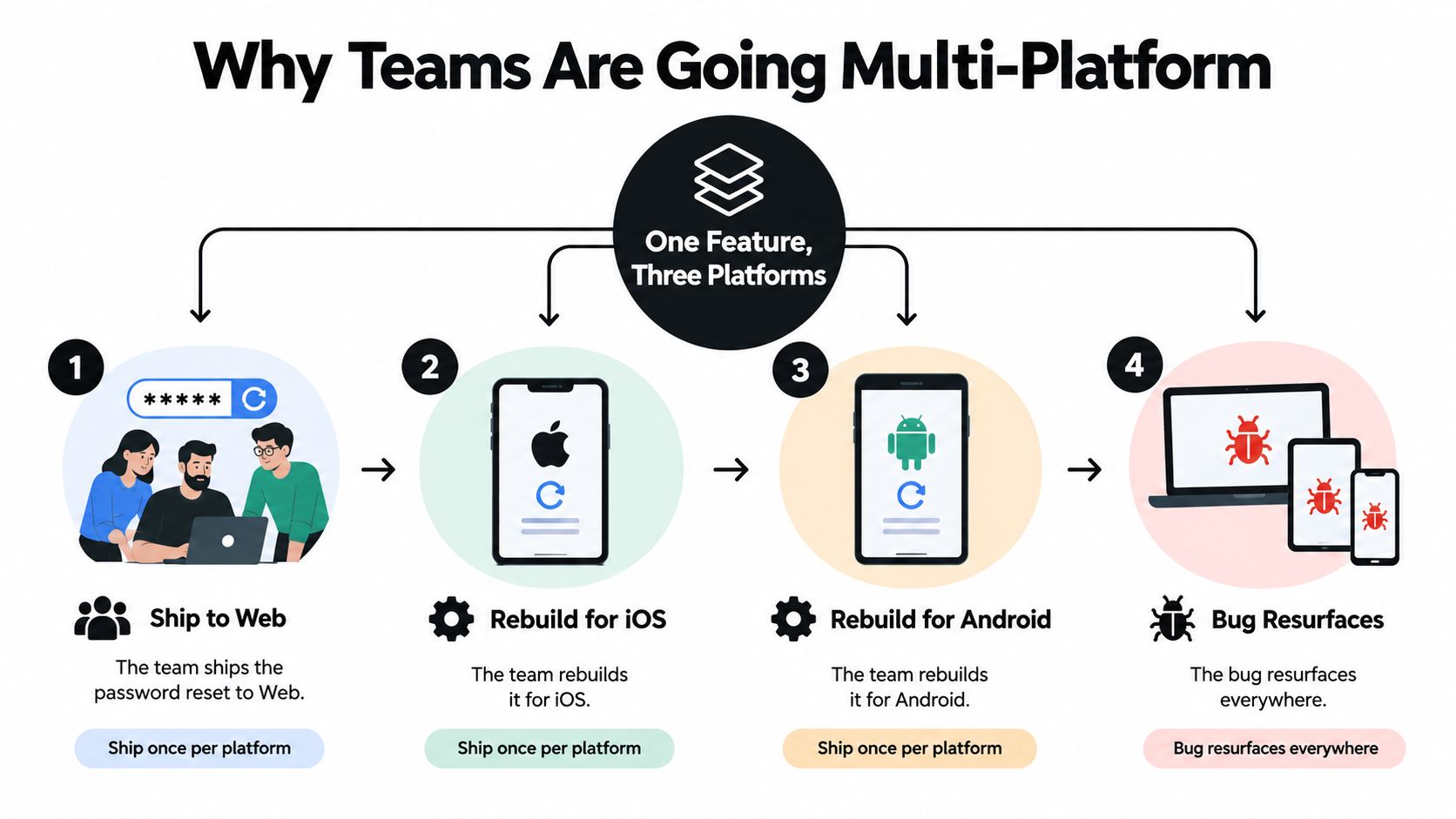
A four-person product team ships a password-reset feature to the web. Then someone rebuilds it for iOS, another developer adapts it for Android, and a bug that was fixed in the browser returns on one of the mobile flows weeks later. The team hasn’t built three different products, but it maintains three delivery paths.
That situation explains the appeal of multi platform software development. Shared logic, unified tooling, and modular releases can help a team write a feature once, reach more devices, and fix defects without repeating the same work. The promise is practical, not ideological: shorten the distance between an idea, a tested build, and the user who needs it.
The trade-off is just as practical. Users don’t care whether your business logic lives in one repository. They care whether the password reset feels natural on their device, works with the platform’s conventions, and stays current after release. Architecture must therefore solve two problems together, how to structure shared code without flattening platform identity, and how to deliver updates quickly enough that the advantage reaches users in days rather than weeks.
Table of Contents
- Why Teams Are Going Multi-Platform
- The Three Core Architectural Patterns
- Choosing a Single-Codebase Framework
- The Real Pros and Cons of Shared Code
- Micro-Frontends and Modular Delivery
- How to Match Architecture to Your Team and App
- Release Strategy and Live Update Delivery
- Putting It All Together
Why Teams Are Going Multi-Platform
The password-reset example creates a familiar tension. A small team wants one implementation, one set of tests, and one source of truth for authentication rules. At the same time, each platform has different navigation patterns, keyboard behavior, accessibility expectations, permissions, and release controls.
Java helped establish the portability idea at enterprise scale when Sun Microsystems introduced its “write once, run anywhere” approach through the Java Virtual Machine in 1995, followed by Java 1.0 in 1996. More recently, one industry summary reports that Flutter and React Native together powered over 40% of new mobile apps by 2025, a signal that shared-code delivery has moved far beyond an experimental niche. The history and current role of cross-platform development show why teams continue to pursue portability.
The promise is a shorter feedback loop
A shared implementation can centralize business rules for authentication, pricing, data validation, analytics, and API models. Developers can then spend more time improving the experience and less time translating the same rule across separate projects. The benefit grows when the product targets web, iOS, Android, desktop, or embedded surfaces with similar workflows.
The market reflects sustained investment in this direction. A recent report values the global software development platform market at $58.2 billion in 2025 and projects it to reach $118.7 billion by 2034, at a compound annual growth rate of 8.5%. The same report places the broader application development software category at $138.41 billion in 2025, with a projection of $826.48 billion by 2034. The software development platform market figures indicate strong demand for tools that standardize delivery across environments.
Practical rule: Share the parts that express product behavior. Keep the parts that express device behavior close to the platform.
That rule prevents a common mistake. Teams sometimes treat one codebase as the goal, then force every screen to look and behave identically. A better goal is one consistent product rule set with platform-appropriate presentation. The web can use browser navigation, iOS can use native gestures, and Android can follow its own conventions while all three surfaces agree on what a valid password reset means.
A multi-platform project succeeds when it shortens the feedback loop between idea and user. Before choosing tools, answer two questions: which parts should be shared without damaging the experience, and which release mechanism will get safe fixes to installed users without making every correction wait for a complete platform cycle? Teams comparing the boundary between web and native experiences can use this native applications versus web applications guide as a starting point.
The Three Core Architectural Patterns
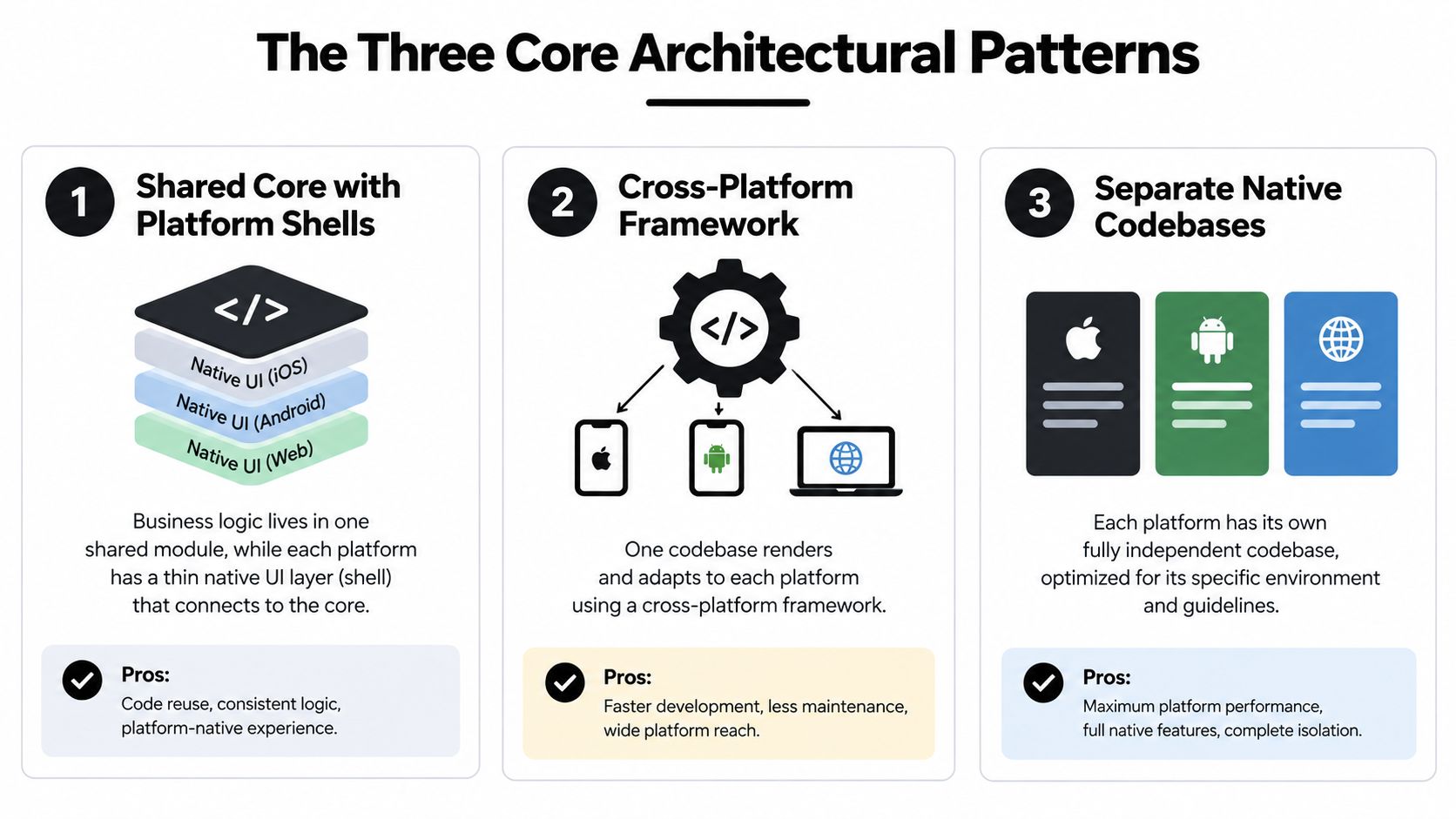
Most multi-platform systems combine three recurring patterns. They differ less by marketing label than by where the team places the boundary between shared behavior and platform-specific presentation.
Shared core with platform shells
A shared core stores business logic, domain models, validation, networking, and state rules in one module. Each platform owns a thinner shell that translates those rules into its own UI components and device APIs.
Think of it as a common trunk with platform branches. The trunk carries the product’s meaning, while each branch grows toward a different operating system. A native iOS shell might use Swift and SwiftUI, while an Android shell uses Kotlin and Jetpack Compose. Both consume the same authentication or checkout logic.
This pattern gives teams strong control over platform behavior. It also creates more UI work, because developers still implement and test each surface. It works well when the app depends heavily on native capabilities, strict accessibility behavior, advanced animation, or platform-specific security controls.
Single-codebase frameworks
A single-codebase framework lets a team write most application code in one project, then render or compile it for multiple targets. React Native, Flutter, and Capacitor fit this broad family, although they use different rendering models and runtime boundaries.
The useful analogy is a universal translator. The team speaks one application language, and the framework translates that work into a web view, native components, or framework-rendered pixels. The result can accelerate product iteration, but it doesn’t remove the need to understand native build systems, permissions, signing, or device testing.
Frameworks also remain central to a growing delivery market. The market report cited earlier projects continued expansion in software development platforms and application development software, including substantial investment in tools that reduce duplicated engineering work. Treat that as a market signal, not a guarantee that one framework fits every product.
Micro-frontends and modular delivery
Micro-frontends divide the product into independently owned surfaces such as login, search, settings, cart, and checkout. Each module can have its own repository, tests, team ownership, and deployment path, while a shell composes the experience.
This is a set of Lego kits shipped to the same box. Each kit has an explicit interface, and the box provides the rules for how pieces connect. The approach can improve team autonomy, but it introduces distributed state, version compatibility, and shared design-system work.
These patterns aren’t mutually exclusive. A production system might use a shared domain core, a Capacitor shell for most screens, native modules for biometrics, and independently delivered checkout or account surfaces. The architectural question isn’t “Which pattern wins?” It’s “Where should ownership, rendering, and release boundaries sit?” A deeper treatment of those boundaries appears in this guide to mobile application architecture.
Choosing a Single-Codebase Framework
Framework selection becomes clearer when you compare rendering families rather than brand names. The important questions are what draws the interface, which language your team already knows, how much community and package support you can rely on, and how easily the app can reach native APIs when the abstraction stops being enough.
Web-technology wrappers, such as Capacitor and Ionic, reuse web skills and place the application in a web view inside a native shell. They suit web-first teams and content-heavy products, particularly when the interface already exists as a responsive web application. Native access comes through plugins and platform code, so teams must test the boundary carefully.
Bridge-based frameworks, such as React Native, use JavaScript or TypeScript while rendering native components and communicating with platform code through framework mechanisms. They can provide a familiar component model and broad ecosystem, but bridge-related work may add latency when the app repeatedly crosses between JavaScript and native execution.
Self-contained engines, such as Flutter, use Dart and draw their own interface through a rendering engine. This gives the team tighter visual consistency and can support demanding animations, though the team is adopting a distinct language, toolkit, and widget ecosystem.
| Framework | Rendering model | Language | Ecosystem maturity | Best fit |
|---|---|---|---|---|
| Capacitor and Ionic | Web view inside a native shell | JavaScript or TypeScript | Mature web ecosystem with native plugins | Web-first products, content-heavy apps, and teams with strong web skills |
| React Native | Native components coordinated through a JavaScript runtime | JavaScript or TypeScript | Broad ecosystem and established production use | Teams with React expertise that need native-feeling mobile surfaces |
| Flutter | Framework-rendered pixels through its own engine | Dart | Established cross-platform toolkit with a distinct ecosystem | Consistent custom UI, animation-rich experiences, and controlled rendering |
Performance needs should shape the decision, but don’t rely on a framework label alone. An empirical benchmark comparing five cross-platform frameworks with a native Android baseline found that performance was often lower than native, while the size of the gap depended on the framework and metric, with some frameworks matching or exceeding native on selected measures. The benchmark study supports a simple engineering practice, benchmark the user flows that matter.
Independent comparative reviews also identify rendering architecture as a major differentiator. Flutter’s direct rendering model is associated with near-native UI performance, while JavaScript-based approaches can encounter bridge-related latency during rendering and device access. This comparative review of cross-platform rendering is useful when evaluating animation, frequent UI updates, and sensor-intensive interaction.
Choose among these families by balancing team skills, performance requirements, and native access. A team fluent in React may ship more safely with React Native. A web-first organization may gain more from Capacitor. A visually controlled product may prefer Flutter. The winner is the option your team can test, debug, and update under real release pressure.
For a focused comparison of two common choices, see React Native versus Capacitor.
The Real Pros and Cons of Shared Code
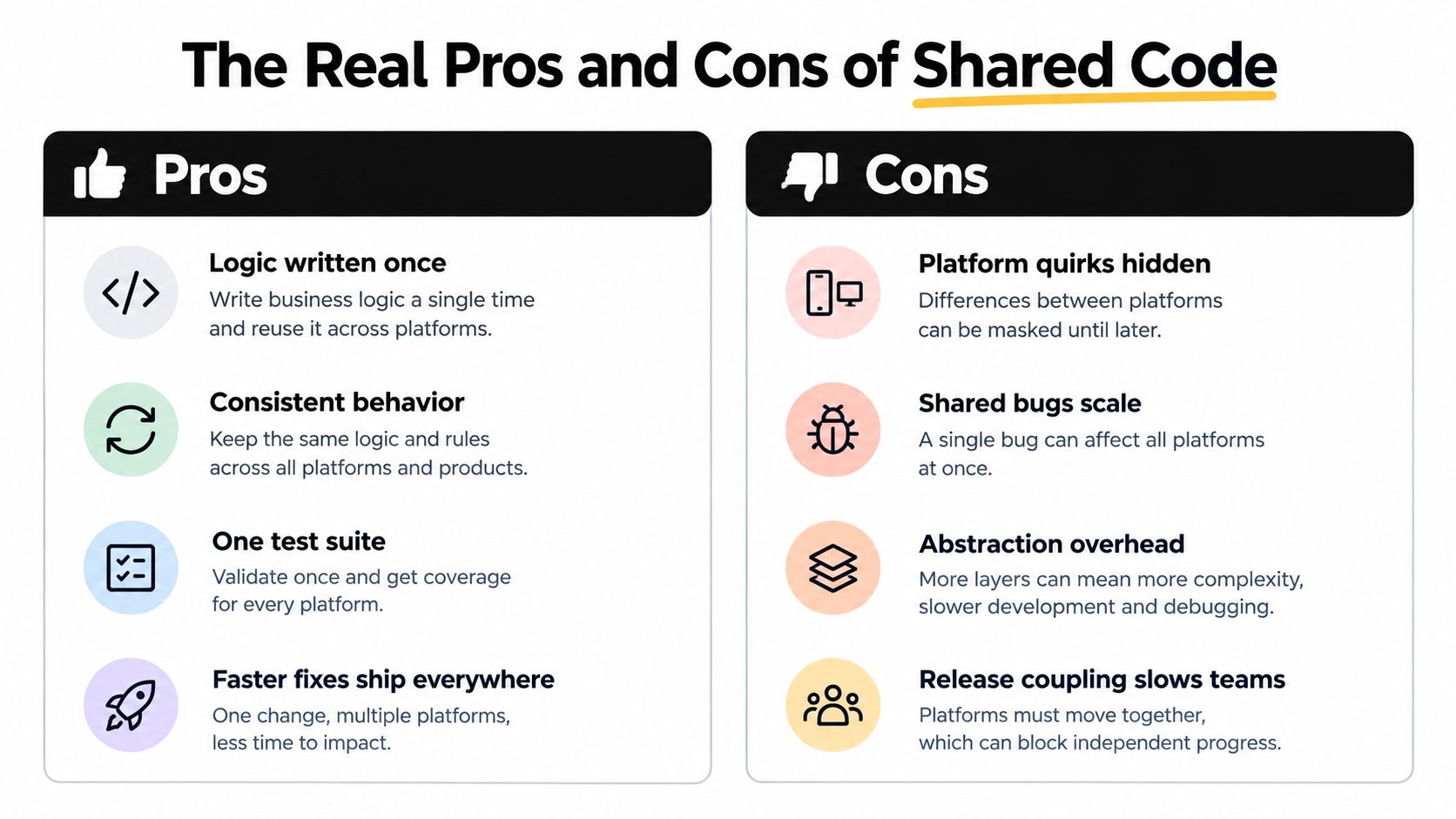
Shared code creates value when the reused layer contains stable product rules. It creates friction when the team tries to hide meaningful platform differences behind a single abstraction.
The obvious gains are straightforward. Developers can implement API models, validation, permissions policy, data transformations, and business workflows once. Product and engineering teams can coordinate around one definition of behavior, while tests protect a common source of truth rather than several independently drifting implementations.
Where reuse pays off
Shared code tends to work well when platforms expose similar flows and the product changes frequently. A pricing rule, account state machine, or request serializer shouldn’t produce different answers just because a user opened the app on another device.
Teams also gain a coordinated fix path. A defect in shared validation can be corrected centrally, tested once at the shared layer, and included in the next delivery to each target. That doesn’t remove platform regression testing, but it reduces the chance that one implementation quietly diverges from another.
The economics aren’t linear. One practical review describes shared-code approaches for content-heavy apps and MVPs as often 30% to 40% cheaper and up to 50% faster, while system-feature-heavy apps can see savings shrink to 0% or become negative after native modules, platform-specific polish, and dual-platform quality assurance enter the project. The analysis of native and cross-platform economics makes the key point, feature mix matters more than framework popularity.
Where the abstraction leaks
A camera, Bluetooth connection, background task, payment flow, or sensor pipeline may expose platform differences that the shared layer can’t express cleanly. Developers then add escape hatches, custom plugins, conditional branches, and native debugging knowledge. The project still has shared code, but the shared layer now carries the cost of understanding several operating systems.
Performance can also fall off a cliff when work crosses a JavaScript/native boundary too often. Serialization, inter-process communication, repeated device calls, and inefficient state updates can turn a seemingly small interaction into a visible delay. The answer isn’t to reject shared code automatically. Profile the actual interaction, then move the expensive path closer to the platform when necessary.
Use guardrails before committing:
- Define reuse by layer: Measure which business rules, models, tests, and UI components can be shared. Don’t count duplicated configuration as meaningful reuse.
- Name native escape routes: Document how the app will reach biometrics, background execution, sensors, notifications, and other platform services.
- Budget for maintenance: Framework upgrades, plugin changes, build failures, and platform SDK updates are part of the product, not exceptional work.
- Test boundaries first: Include device-specific flows in the earliest prototype, rather than discovering native integration problems after the shared UI is complete.
Shared code is an economic decision, not a moral position. It pays when reuse is deep and the platform differences are limited. It turns negative when engineers spend more time repairing the abstraction than delivering product behavior.
Micro-Frontends and Modular Delivery
A restaurant kitchen offers a useful model for micro-frontends. Each station owns a dish from preparation through plating, and the dessert station can change its workflow without forcing the grill station to redeploy. The head chef still defines the menu, timing, and standards, but ownership stays close to the work.

On the web, a Next.js shell might load an independently deployed cart micro-frontend through module federation. A separate team could own a checkout island written in Vue, while another team maintains a Svelte search surface. Each module owns its tests and release process, and the shell defines navigation, authentication context, analytics conventions, and design-system constraints.
This structure changes the unit of delivery. A cart fix doesn’t need to wait for an unrelated settings change, provided the cart’s contract with the shell remains compatible. The team must still manage runtime failures, loading states, dependency versions, and security boundaries, but a modular product can align deployment with team ownership.
A similar pattern works on mobile, although the mechanics differ. A Capacitor or native shell can organize feature modules, a super-app can load mini-app bundles, and platform channels can defer loading until the user needs a capability. The goal is the same, keep independent product surfaces from becoming one release-shaped bottleneck.
Micro-frontends are not free decomposition. Distributed state becomes harder to reason about, shared design systems require governance, and stitching modules together can add runtime work during startup. Teams also need clear contracts for authentication, navigation, error handling, telemetry, and data ownership. The micro-frontend pattern is most useful when independent teams or release cadences justify those coordination costs.
How to Match Architecture to Your Team and App
Start with information your team already has, not with a framework popularity chart. Three inputs usually determine the shape of a workable system: team size and skill mix, the level of feature parity required across platforms, and how urgently fixes must reach users after release.
A small team building an MVP for iOS and Android usually benefits from a single-codebase framework with a thin native shell. Capacitor suits a web-first team that wants to reuse an existing interface, while React Native fits a team already invested in React and native component patterns. The first prototype should include the hardest device integration, not only the easiest screens.
A larger organization with a mature web product faces a different problem. If several teams own distinct product areas, micro-frontends behind a shared design system can align ownership with delivery. If the product includes demanding graphics, complex background processing, or deep hardware integration, a shared core with native shells may be safer than forcing every surface through one renderer.
Urgent updates add another constraint. A mission-critical app needs staged rollouts, observability, rollback planning, and clear separation between changes that can travel through the web layer and changes that require a native binary. Architecture and delivery should be selected together.
| Team Profile | Recommended Architecture | Framework Family | Release Cadence |
|---|---|---|---|
| Small web-first team building an MVP | Single codebase with a thin native shell | Capacitor or Ionic | Frequent web-layer releases with scheduled native builds |
| React-focused product team targeting mobile | Shared application layer with native escape routes | React Native | Coordinated app releases with feature flags |
| Large product with independently owned surfaces | Micro-frontends behind a shared shell and design system | Web federation, modular native, or hybrid | Independent module releases with shell compatibility checks |
| Platform team supporting critical workflows | Shared core plus modular delivery and native integrations | Framework choice based on device requirements | Staged cohorts, monitored promotion, and planned native releases |
The right answer can change as the product matures. Begin with the smallest architecture that protects the experience, then record the reasons for every native exception and every module boundary. Those records will tell you whether the system is simplifying delivery or merely moving complexity into infrastructure.
Release Strategy and Live Update Delivery
A single-codebase build doesn’t remove app store review. It does create a more standardized artifact pipeline across iOS, Android, web, and desktop, which makes versioning, rollback, and channel management easier to coordinate. The release strategy should distinguish between the code that requires a native binary and the code that can safely travel as a web or JavaScript bundle.
Start with a release contract:
- Package the update: Build the JavaScript, CSS, configuration, and assets that belong to the application version.
- Sign the bundle: Verify authenticity before an installed app accepts the update.
- Target a cohort: Send the release to internal testers, a beta channel, or a controlled production group.
- Monitor outcomes: Watch adoption, crashes, failed updates, and user-facing errors.
- Promote or revert: Expand the cohort when results are healthy, or return users to the previous known-good bundle.
Semantic versioning helps teams describe compatibility between shared bundles, shells, and native plugins. Feature flags can keep a newly delivered surface inactive until its backend, analytics, and support processes are ready. These controls matter more as the number of modules and platform targets grows.
Live update delivery adds another layer. Capgo, among similar OTA systems, delivers signed JavaScript, CSS, copy, configuration, and asset bundles to Capacitor and Electron apps, allowing teams to target channels and apply eligible changes on the next launch without waiting for store review. Its Capgo live update workflow illustrates the boundary between remotely delivered web-layer changes and native release work.
OTA doesn’t replace native releases. Swift or Kotlin modules, new entitlements, new permissions, and changes that alter the native container still require a full platform build and the relevant store process. A safe team makes that boundary explicit in its CI pipeline, so developers don’t promise a live fix for a change the installed binary can’t support.
The most reliable workflow combines both paths. Ship a stable native foundation, deliver compatible web-layer improvements through controlled channels, and keep a rollback path ready before the first production rollout.
Putting It All Together
Before committing to a stack, ask:
- Code ownership: Will one team own the codebase, or do several teams need independent delivery?
- Rendering boundary: Should the app use a web view, native components, framework-rendered pixels, or native UI per platform?
- Module shape: Is a monolithic interface appropriate, or do login, cart, checkout, and settings need separate ownership?
- Release control: Will CI produce one coordinated release, or will staged channels promote changes gradually?
- Update path: Which changes can use OTA delivery, and which changes require a native binary and store submission?
A small web-first team can prototype a Capacitor wrapper around its existing product. A large organization with independent product areas can evaluate a micro-frontend shell and shared design system. A team that treats update urgency as a product requirement should design channels, signing, monitoring, and rollback into the delivery pipeline from the beginning.
The architecture, release strategy, and live update layer should all serve the same promise, ship one feature across platforms without tripling the work, then improve it without waiting for every change to pass through a store.
Capgo gives CapacitorJS and Electron teams a way to deliver signed JavaScript, CSS, configuration, and asset updates through targeted channels while keeping native changes on the normal build path. If your multi-platform project needs controlled rollouts, version history, observability, and rollback planning, visit Capgo to evaluate the delivery workflow.





