

The popular advice says to choose between native and cross-platform frameworks first, then worry about deployment once the product is ready. That order is backwards for many teams shipping app development for iOS and Android in 2026. Code reuse affects build effort, but release governance determines how quickly you can recover from a broken configuration, a platform-specific regression, or a store review delay.
A production mobile app isn’t just a binary compiled from Swift, Kotlin, React Native, Flutter, or Capacitor. It’s a living distribution system with signed artifacts, review gates, staged audiences, device-specific behavior, rollback rules, and operational telemetry. The teams that handle this system deliberately can share business logic without pretending that iOS and Android behave identically.
Table of Contents
- The Real Bottleneck in Modern Mobile Engineering
- Evaluating Native Cross-Platform and Webview Approaches
- Navigating Performance Constraints and Platform Divergence
- Automating CI/CD and Bypassing Store Review Delays
- Adapting to Evolving Store Policies and AI Requirements
- Designing a Resilient Release Governance Strategy
- The Economic Scale of the Dual-Store Ecosystem
The Real Bottleneck in Modern Mobile Engineering
The expensive mobile decision often arrives after the framework choice. Once an app is live, teams must coordinate two stores, respond to incidents, validate operating-system changes, and explain behavior on specific devices. A shared codebase can reduce build effort, but it does not remove those release responsibilities.
The market’s scale makes this operational work difficult to dismiss. The global mobile app development market was valued at USD 302.1 billion in 2025 and is projected to reach USD 844.50 billion by 2034, implying a 12.1% CAGR from 2026 to 2034, according to Straits Research’s mobile app development market analysis. Android accounted for 56.8% of the market in 2025, while iOS represented 39.6% and had a reported value of USD 119.63 billion in the same source. For many businesses, supporting both platforms is an operating requirement, not an optional engineering exercise.
Build-time reuse is only one variable
Cross-platform development works well for shared business logic, including authentication, networking, forms, content, and account workflows. Microsoft’s cross-platform modern app architecture guidance supports a similar division: share backend APIs and core logic, while isolating platform-specific clients and performance-sensitive modules.
Release operations expose the limits of that reuse. A JavaScript, CSS, copy, configuration, or asset fix may not need a new native capability, yet a conventional pipeline can still package it as a full binary release. If a UI bundle or remote configuration causes an incident, store review can delay a small correction and extend customer support work.
Practical rule: Choose the architecture that fits the product, then design updates and rollback as part of the product itself.
That system needs release ownership, targeted channels, signed updates, adoption visibility, and controls that can pause or reverse a rollout. Teams also need tracking app performance with analytics. Crash reports rarely show whether a release is safe to expand without device, version, channel, and adoption context.
The modern bottleneck is the gap between a fix being ready and reaching the right users safely. Teams that plan for store reviews, hotfix paths, and platform divergence from the start are better equipped to operate two mobile products, even when much of the implementation is shared.
Evaluating Native Cross-Platform and Webview Approaches
There are three practical architectural paths. Fully native apps use Swift or Objective-C on iOS and Kotlin or Java on Android. Cross-platform UI frameworks such as React Native and Flutter share much of the application layer while retaining access to native SDKs. Webview-oriented approaches such as Capacitor and Ionic let teams reuse web technologies and package them with native runtime access.
The right comparison isn’t “which framework is fastest?” It’s “which operational cost can this team carry for the life of the product?”
| Approach | Code Reuse | Native API Access | Release Flexibility |
|---|---|---|---|
| Native Swift and Kotlin | Low across platforms, high within each platform | Direct and complete | Binary releases are platform-specific, with maximum control inside each client |
| Cross-platform UI, such as React Native or Flutter | High for shared application logic and much of the interface | Strong, with native modules for exceptions | Shared releases are efficient, but framework bridges and native dependencies require coordinated testing |
| Webview wrapper, such as Capacitor or Ionic | Very high for web UI, content, and application workflows | Available through plugins and custom native bridges | Web assets can be updated separately from native capabilities when the delivery system supports it |
Native apps
Native development is the safest choice when the product depends on advanced graphics, demanding animation, deep operating-system integration, or strict control over platform behavior. Swift and Kotlin teams can adopt platform SDKs directly and avoid an abstraction layer when Apple or Google introduces a new capability.
The hidden cost is organizational. Two native codebases mean two sets of build tooling, dependency updates, test matrices, release branches, and engineers who must understand equivalent behavior in different languages. A feature isn’t finished when it works on one platform. It’s finished when product, design, security, support, and release owners can explain how the two implementations differ and why.
Cross-platform UI frameworks
React Native and Flutter work well when the product has substantial shared behavior and the team wants one primary feature-development path. They reduce duplication, but they don’t eliminate native engineering. Camera pipelines, background execution, biometric flows, high-frequency gestures, advanced notifications, and device-specific AI often need native modules or platform-specific treatment.
Teams considering the tradeoff can use this comparison of cross-platform mobile development and native development as a starting point, then validate the decision against their actual feature backlog. A framework demo won’t reveal the maintenance cost of a custom bridge that must survive operating-system updates.
Webview wrappers
Capacitor and Ionic are efficient when the existing product already lives in React, Vue, or another web stack. They can package a familiar UI layer while exposing native APIs through plugins, which makes them attractive to agencies, enterprise teams, and product groups with strong web engineering skills.
They aren’t appropriate for every interaction. A webview can feel excellent for account management, commerce, editorial content, dashboards, and workflow-heavy products, but it can struggle when every frame, gesture, or hardware interaction must match native expectations. The deciding factor is whether the app’s distinctive value sits in its interface and business workflow or in deep device behavior.
Navigating Performance Constraints and Platform Divergence
Shared code is valuable until it crosses a boundary where the two operating systems impose different timing, rendering, power, or interaction rules. At that point, forcing parity creates more complexity than a deliberate platform split.
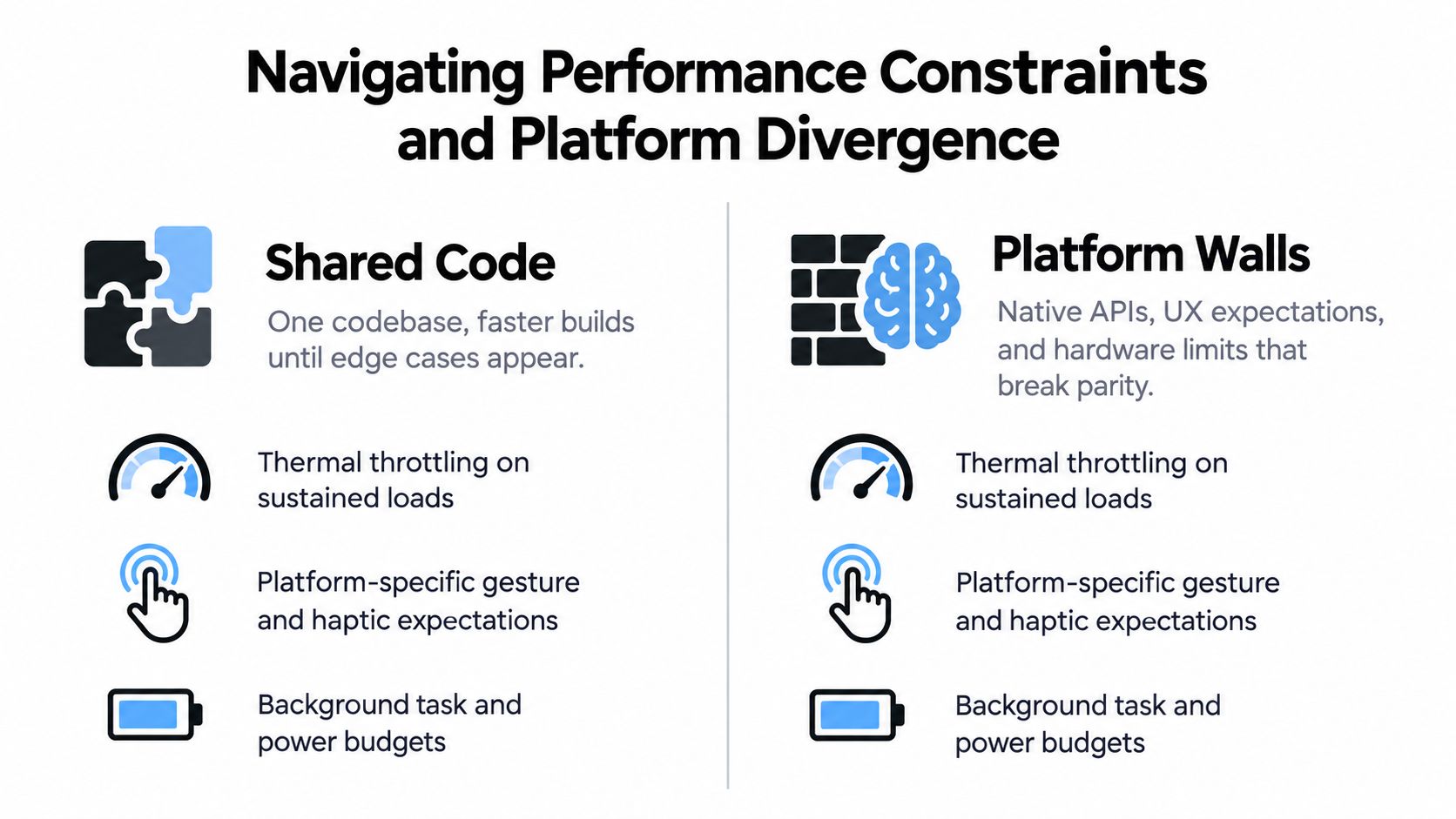
Cold start is a useful example. Android teams commonly target a process cold start below 2,000 milliseconds, while iOS guidance is often expressed as reaching the first frame in roughly 400 milliseconds, as outlined in this comparison of Android and iOS development effort. These aren’t interchangeable platform contracts, but they show why the same initialization strategy can feel acceptable on one system and sluggish on the other.
Keep startup work deliberately small
Initialization often becomes slow because teams load every dependency, restore every service, perform synchronous I/O, and fetch non-critical data before drawing the first useful screen. The fix isn’t to make the entire app lazy by default. It’s to classify startup work by user necessity.
- Render-critical work: Load only what the first screen needs to become interactive.
- Session work: Start analytics, cache hydration, and secondary service setup after the initial frame where possible.
- Deferred work: Delay recommendations, prefetching, and low-priority synchronization until the user has a stable interface.
- Failure-prone work: Isolate network calls and optional integrations so one unavailable service doesn’t block launch.
Synchronous I/O is especially costly because it holds the user-visible path hostage. Measure the time from process launch to the first meaningful frame on representative devices, not just on a developer workstation.
Share logic, isolate the edges
A durable cross-platform design normally shares API contracts, validation rules, domain models, feature flags, and state transitions. It isolates presentation details, accessibility behavior, navigation conventions, rendering-heavy components, and native modules that need predictable latency.
That boundary also applies to device features. Camera capture, background location, Bluetooth, secure storage, haptics, and intensive animation may share a product contract while using different implementations. The interface can remain consistent without pretending that identical code is the same thing as identical behavior.
Platform parity should describe the user promise, not force every line of implementation to match.
A shared backend API gives both clients a common source of truth, while native or platform-idiomatic SDKs handle hardware and operating-system constraints. This arrangement preserves maintainability without turning every exception into a cross-platform workaround.
The operational consequence is important. Once a team accepts controlled divergence, the release system must identify which platform, device group, region, or channel receives each change. Architecture creates the option to diverge. Governance keeps that divergence safe.
Automating CI/CD and Bypassing Store Review Delays
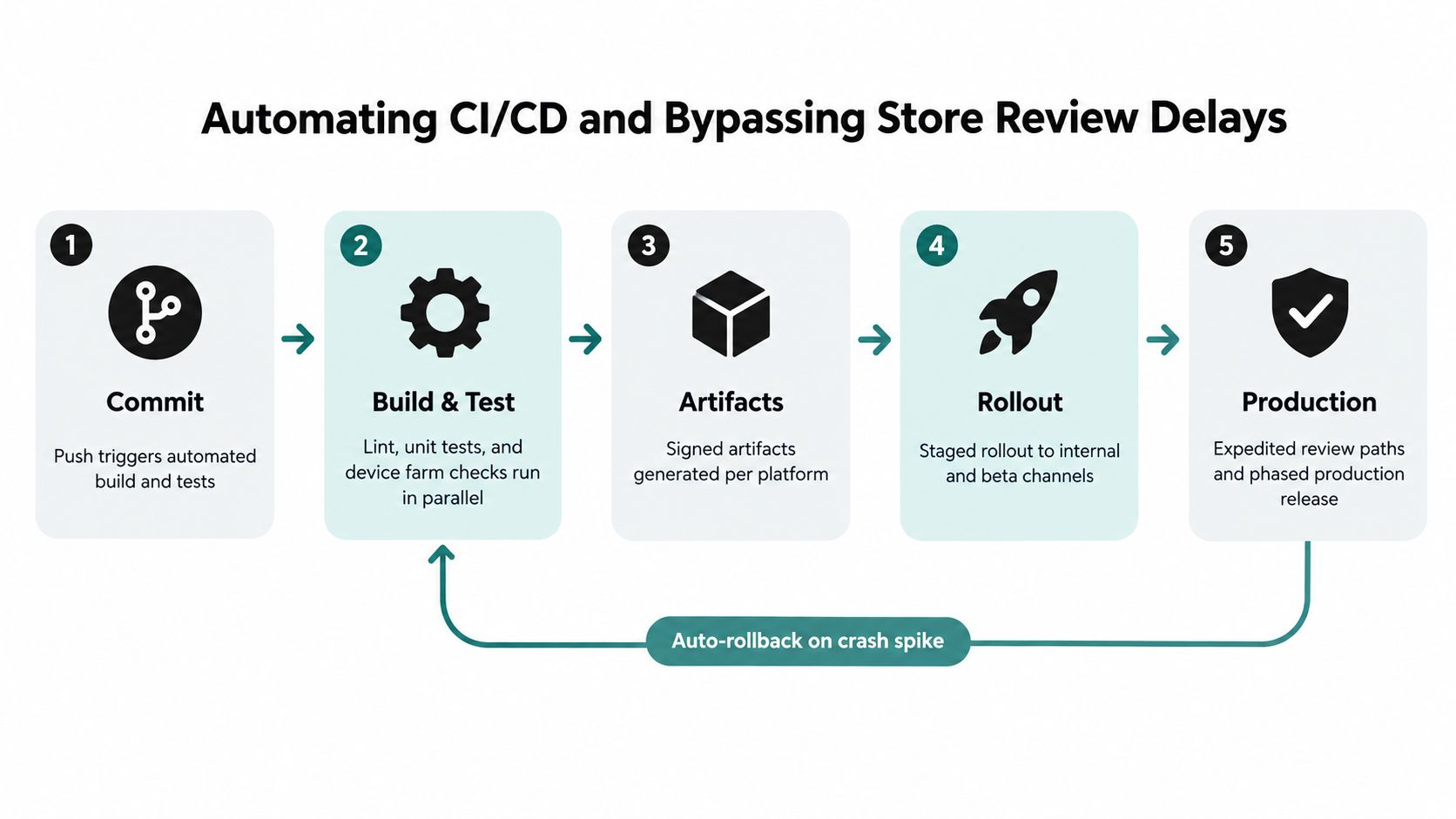
A mobile pipeline should produce more than an installable file. It should establish which source revision, dependencies, signing credentials, environment, channel, and test results produced that file. Without that chain, a release owner can’t reliably answer what changed or reproduce a customer failure.
Build the pipeline around release evidence
A practical pipeline has distinct gates:
- Commit validation: Run formatting, static analysis, unit tests, and dependency checks as soon as a change enters the repository.
- Platform builds: Generate signed iOS and Android artifacts in controlled cloud or hosted environments, especially when the team doesn’t want every developer to maintain a local Apple build setup.
- Device verification: Exercise critical flows on representative physical devices or a device farm. Include cold launch, login, purchase, deep links, notifications, and upgrade paths.
- Channel deployment: Send the build to internal testers, beta users, staging accounts, or a limited production audience before broad distribution.
- Release decision: Expand, pause, or roll back based on crash behavior, failed requests, support reports, and adoption evidence.
The store remains essential for native binaries and new capabilities. It isn’t the only route for every change inside a packaged web application. With a webview or Capacitor architecture, teams can deliver signed JavaScript, CSS, copy, configuration, and asset bundles independently when the change stays within the approved native capability boundary.
That distinction is operationally powerful, but it needs safeguards. Live delivery must verify bundle integrity, enforce compatibility with the installed native shell, support channel targeting, and retain a known-good version. A remote update that calls a native method absent from the installed binary can fail just as badly as a defective store release.
A platform such as Capgo’s app release automation workflow illustrates this model with channel-based delivery, update history, and rollback controls for Capacitor applications. It should be evaluated alongside other deployment systems against the team’s security, compliance, hosting, and support requirements.
Before using a live update, classify the change:
- Safe bundle change: Copy, styling, assets, and compatible application logic can often use a signed web bundle.
- Binary-required change: New permissions, native plugins, entitlements, SDK behavior, and operating-system integrations require store distribution.
- High-risk change: Authentication, payments, data migrations, and regulated workflows need an explicit approval path even when the file is technically updateable.
Store review delays don’t disappear. A mature pipeline routes only eligible changes around that delay and keeps binary releases disciplined.
Adapting to Evolving Store Policies and AI Requirements
A shared codebase doesn’t shield a team from platform policy. Apple and Google still evaluate the resulting application, its permissions, its declarations, its SDK targets, and its behavior. When policy changes, the cost appears in build images, native plugins, automated tests, release notes, compliance reviews, and sometimes in separate platform implementations.
Android’s policy schedule is a concrete example. New apps and updates submitted to Google Play must target Android 16, API level 36, after 31 August 2026, according to Appy Pie’s coverage of mobile app development trends. Teams planning a cross-platform release need to update the Android toolchain, verify every plugin, test behavior under the new target, and confirm that the iOS path hasn’t been affected by shared changes.
Treat policy work as a release stream
A platform update shouldn’t enter the main production channel just because the framework vendor has published compatibility. Create a policy-validation stream that can build the app against new SDKs, run permission and background-task tests, and expose native regressions before a deadline becomes a store-blocking incident.
On-device AI increases the need for this separation. Current platform direction emphasizes on-device processing, privacy-aware design, and platform-specific tooling, rather than complete convergence, as discussed in recent mobile app development trend coverage. A shared product may expose one AI feature, but iOS and Android can differ in model availability, hardware acceleration, permission behavior, battery impact, and fallback requirements.
The implementation should make those differences explicit:
- Common contract: Define the user outcome, input shape, consent behavior, and failure experience once.
- Platform adapter: Use Core ML, ML Kit, or another appropriate native path behind a platform-specific interface.
- Capability detection: Decide at runtime whether the device can support local inference, reduced-quality processing, or a server fallback.
- Controlled rollout: Release the feature to a constrained channel before expanding it across platforms and regions.
Teams should also maintain a policy inventory covering permissions, privacy disclosures, encryption, background execution, age or content rules, and SDK targets. The inventory belongs in release planning, not in a document that nobody checks until submission fails. Guidance on Apple policy updates for Capacitor apps can help identify issues, but each product still needs its own review against current store requirements.
Cross-platform by default is a useful starting point. It becomes a liability when it turns platform differences into hidden conditionals and last-minute release exceptions.
Designing a Resilient Release Governance Strategy
CI/CD answers whether the team can build and test a release. Release governance answers who may ship it, to whom, under which conditions, and how the team will recover. That distinction matters most when several customers, regions, or compliance profiles use the same application.
Use channels as risk boundaries
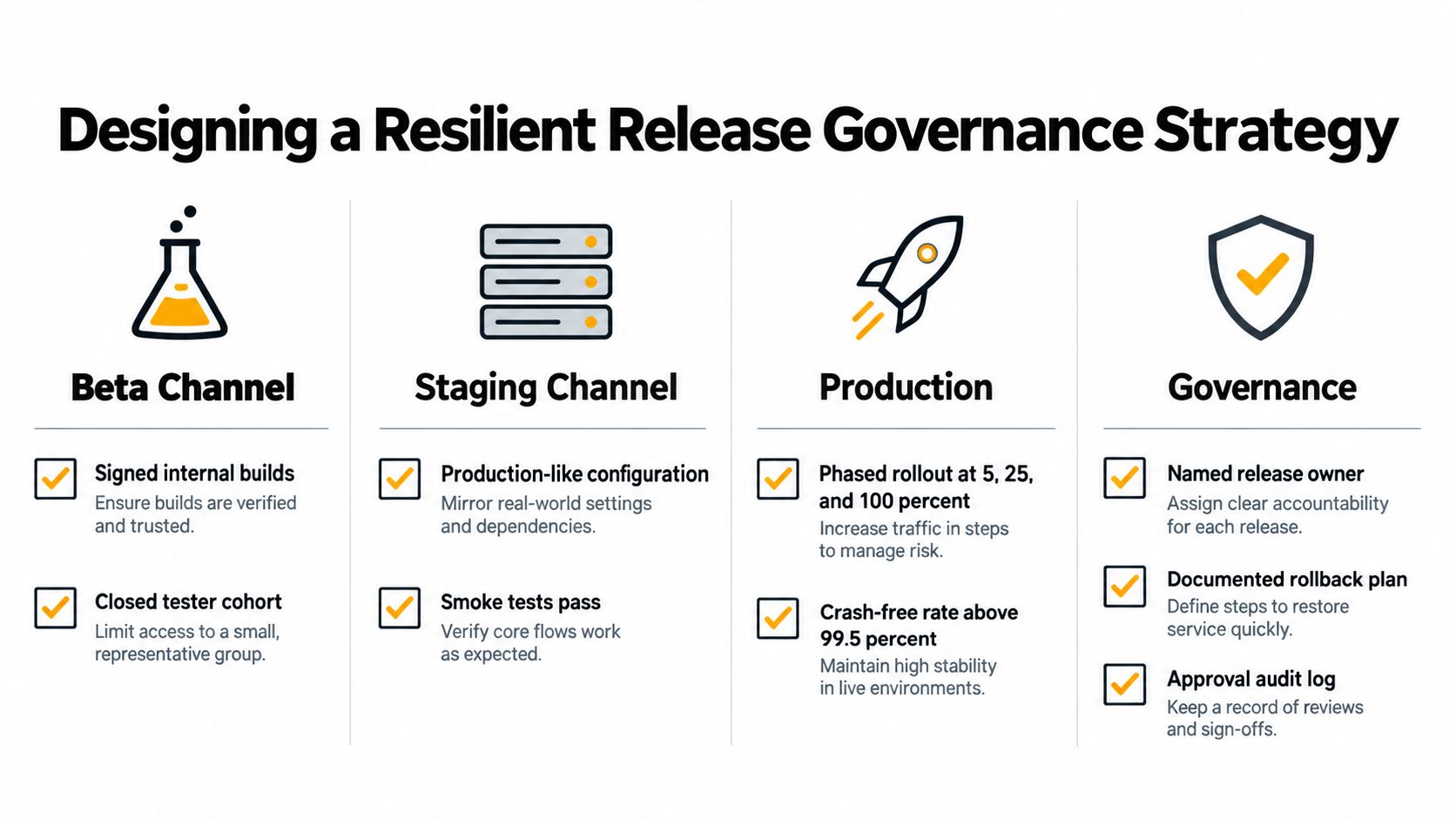
A workable model separates audiences rather than treating production as one undifferentiated pool.
- Beta: Internal staff and a closed tester cohort validate signed builds, upgrade paths, and platform-specific behavior.
- Staging: A production-like environment tests real integrations, feature flags, migration behavior, and support procedures.
- Production: A constrained audience receives the release first, followed by expansion only when operational signals remain healthy.
- Customer-specific streams: Regulated or enterprise customers can receive approved versions without forcing every tenant onto the same schedule.
The exact thresholds should reflect the product’s risk. A payments flow, clinical workflow, or identity feature deserves stricter approval than a copy correction. The governance document should name a release owner, define required reviewers, record the artifact and bundle versions, and state the rollback action in plain language.
Observe the device, not just the deployment
A dashboard showing “deployed” doesn’t tell support whether users installed the update, opened the affected flow, or encountered a platform-specific error. Per-device logs, adoption state, failure reasons, app version, native shell version, channel, and region give engineers the context to distinguish a bad bundle from an incompatible environment.
A rollback plan isn’t complete until someone can execute it without rebuilding the application.
Automatic rollback protection can stop a rollout when a defined failure signal crosses its threshold, while manual controls let a release owner pause a suspicious but ambiguous change. Version history should make the previous known-good bundle identifiable, and channel guardrails should prevent a beta artifact from reaching general production by mistake.
Teams adopting this workflow can use a structured mobile release management process to formalize ownership, approvals, staged delivery, and incident response. The tool matters less than the discipline. Every release needs a clear audience, an observable outcome, and a recovery path.
The Economic Scale of the Dual-Store Ecosystem
The expensive part of supporting iOS and Android often begins after the code compiles. Apple’s App Store, launched in 2008, moved app installation from carrier- and device-controlled processes to a centralized marketplace, as documented in App Radar’s history of app stores. By 2009, it had reached 35,000 apps and 1 billion downloads, then grew later that year to 85,000 apps and 2 billion downloads. Google Play had already reached 2,300 apps in March 2009, establishing the two-store structure that still governs mobile delivery.
Later milestones show the scale behind that operational burden. Apple recorded 30 billion downloads and $5 billion paid to developers, followed by 45 billion downloads and $9 billion paid out. Google Play reached 20 billion downloads with 600,000 apps, and later 102 billion downloads with $26 billion in sales, according to the same historical account.
Those figures turned release management into a business concern. Compatibility testing, monetization, review readiness, staged rollout, and recovery planning all affect revenue and support load. A single defect can reach users across two ecosystems with different SDKs, store rules, device profiles, and expectations.
The market also demands deliberate coverage. As noted earlier, Android held 56.8% of the mobile app development market in 2025, while iOS represented 39.6%. Launching on one platform first can be sensible, but the roadmap still needs an explicit plan for the other platform’s users, release channel, and support requirements.
Architecture remains part of that decision. Native code fits deep device integration and platform-specific behavior. Cross-platform code can reduce duplication for shared workflows, while webview approaches may suit content-heavy or frequently updated experiences. None of these choices removes release-time work. Teams still need store-bound binaries, eligible live updates, staged adoption, device-level observability, and a recovery path when platform behavior diverges.
Cost reviews should include more than engineering hours. Use mobile cost optimization practices to examine build infrastructure, testing, release staffing, support volume, and incident recovery. A low-cost initial implementation can become expensive when every urgent correction requires coordinated native changes and another store review.
Share stable behavior, isolate platform-sensitive code, and assign each release a risk-based delivery plan.
Capgo provides live updates for CapacitorJS and Electron apps, delivering signed JavaScript, CSS, copy, configuration, and asset bundles to targeted channels without requiring a new store submission for eligible changes. Teams needing controlled rollouts, per-device observability, and automatic rollback protection can visit Capgo to evaluate its fit for an iOS and Android release workflow.





