
Every solid TypeScript API example for Capacitor begins the same way: with a typed plugin interface. Spell out your methods, options, and Promise results explicitly, and your web code and the native layer share one contract that TypeScript actually enforces.
Table of Contents
- Build a Strongly Typed Capacitor Plugin Interface
- Quick Lookup for API Design
- Adoption Signals
- Benefits for Capacitor Teams
- Making the Business Case
- Type Listener Arguments Correctly
- Define Update Contracts
- Guard Channels and Compatibility
- Register Listeners Safely
- Choose the Right Cleanup Method
- Type Inputs and Outputs Precisely
- Organize Code for Change
- How Should I Type Dynamic Native Results?
- How Can Listeners Avoid Unhandled Rejections?
- How Do I Protect Capgo Updates?
Build a Strongly Typed Capacitor Plugin Interface
The interface describes the API your web code sees. The native implementation behind it has to honor that contract — and TypeScript checks method names, parameters, and return values before your app ever runs.
import { registerPlugin } from ‘@capacitor/core’;
export interface DeviceStatus { online: boolean; batteryLevel?: number; }
export interface DevicePlugin {
getStatus(): Promise
export const Device = registerPlugin
There’s a lot going on in those few lines:
- Explicit return types keep every result predictable.
- Typed options objects catch missing or misspelled properties at compile time.
- Promise-based methods model native work that finishes asynchronously.
- A generic
registerPlugincall is what connects the web API to the native bridge. - Interfaces document the contract without adding a byte of runtime code.
Every call site gets the same treatment:
const status = await Device.getStatus(); console.log(status.online);
await Device.setLabel({ label: ‘Production’ });
Swap { label: 'Production' } for { name: 'Production' } and the compiler flags it on the spot. That beats discovering the mismatch after a mobile release.
The interface is also where you model optional values and failure cases. If a native method can’t always produce a battery reading, batteryLevel?: number tells every caller to handle undefined.
The diagram below shows how typed methods, options, return values, bridge definitions, and compile-time checks connect inside a Capacitor API.
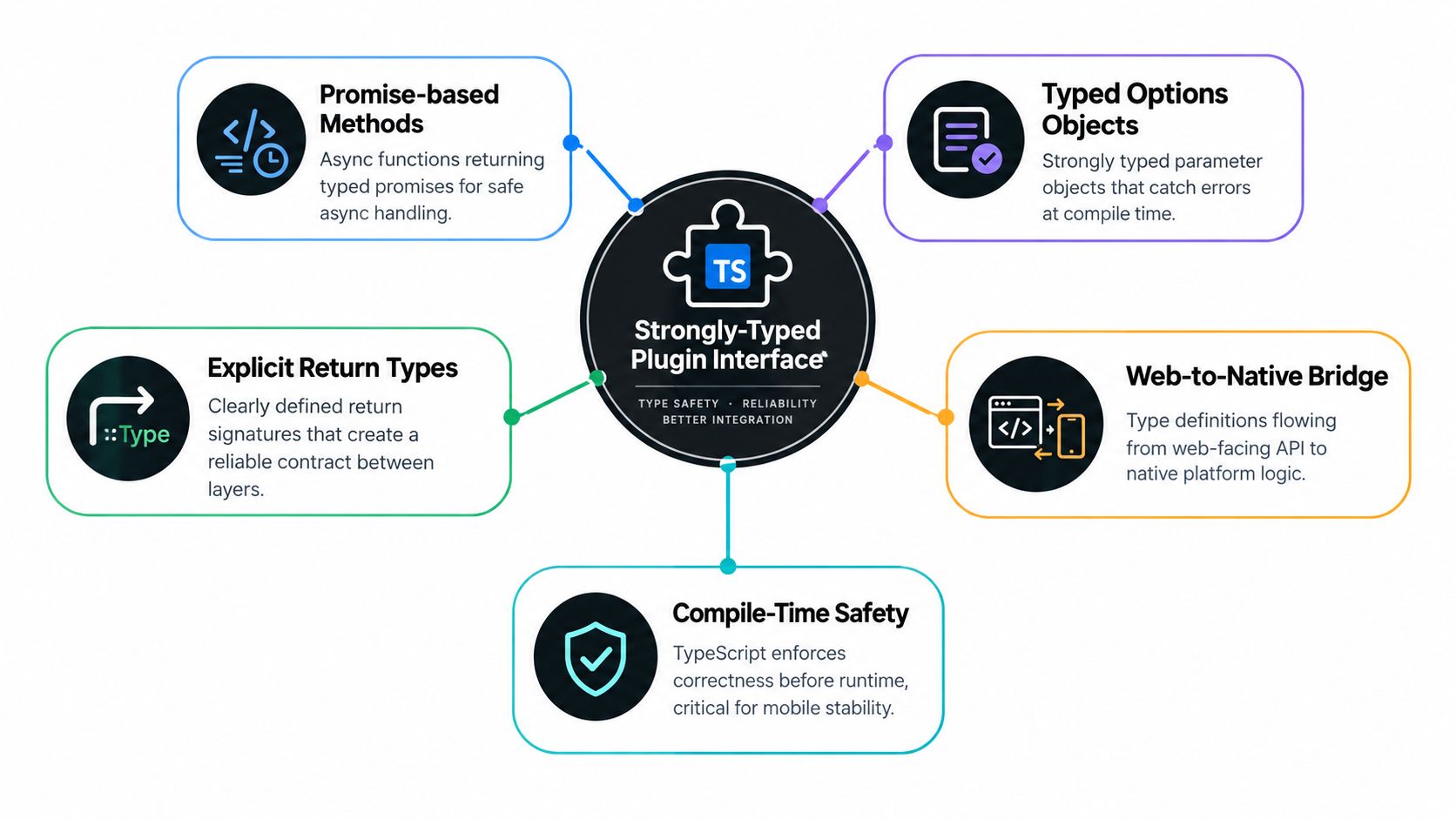
The core idea: type definitions flow from the web-facing interface toward native platform logic, and compile-time checks stand guard at every call site.
Quick Lookup for API Design
| Element | Purpose | Example |
|---|---|---|
| Method signature | Defines callable behavior | getStatus() |
| Options type | Controls input shape | { label: string } |
| Promise result | Represents async work | Promise<DeviceStatus> |
| Result interface | Defines returned data | online: boolean |
For a deeper reference, read the guide to building APIs in TypeScript. Two habits worth keeping: leave secrets and signing credentials out of client code, and test the interface against each platform implementation before you publish.
Mobile teams juggle JavaScript, native code, device permissions, and asynchronous platform services all at once. A strong TypeScript contract works like a shared checklist at each of those boundaries, making expectations explicit before any code lands on an iOS or Android device.

For a concrete TypeScript API example, compare a method that returns Promise<DeviceStatus> with one hands back untyped data. The typed version tells your editor and every reviewer exactly which fields exist. The untyped version pushes that discovery work onto runtime logs, manual testing, and, worst case, production incidents.
Adoption Signals
TypeScript has moved well past its front-end niche. Adoption climbed to 35% of developers in 2024, up from just 12% in 2017, and more than one million GitHub contributors listed it as their primary language by 2025. Dig into the full TypeScript adoption findings if you want the raw numbers.
That trajectory matters for mobile organizations in practical ways. Hiring, onboarding, and code review increasingly revolve around shared types. Someone joining a Capacitor project can read an interface and understand the expected native behavior without tracing through every implementation.
Typed APIs also make release work easier to reason about. When a method demands a specific options object, a renamed property or a missing field fails at compile time instead of silently producing a half-formed native request.
Strong typing shifts critical feedback left, when a fix takes minutes instead of an emergency hotfix release.
Benefits for Capacitor Teams
Cross-platform apps typically expose one web-facing API that sits on top of several native implementations. TypeScript cannot prove every native detail behaves identically, but it can keep your calls consistent across the entire application.
Apply explicit types to:
- Method inputs, including required and optional options
- Promise results, so success data always has a predictable shape
- Events and listeners, so callbacks handle known payloads
- Errors and status values, so fallback paths stay visible
That structure pays off when integrating device plugins or operational services. It also helps teams reviewing update automation, where a wrong channel, bundle identifier, or compatibility field can ripple out to a large user base.
For a deeper dive into related patterns, read our guide to generating typed APIs with OpenAPI. It covers how shared definitions reduce the manual drift that normally creeps in between API documentation and application code.
Making the Business Case
Strict typing does ask for some upfront investment, especially when older JavaScript code carries inconsistent data shapes. The return shows up over time: smaller refactors, clearer ownership, and far fewer integration surprises.
Start with the boundaries that carry the most risk:
- Define response interfaces for native and remote calls.
- Type your options objects and event payloads.
- Turn on strict compiler checks incrementally.
- Require type checks before publishing any update.
For enterprise mobile teams, that foundation keeps maintenance predictable across platforms, releases, and contributors.
Capacitor’s ScreenOrientationPlugin makes a great TypeScript API example because it maps a handful of simple web methods onto platform-specific device behavior. The public contract stays identical across platforms, while iOS and Android each deal with their own native details underneath.
import { registerPlugin } from ‘@capacitor/core’;
export type OrientationType = | ‘portrait-primary’ | ‘portrait-secondary’ | ‘landscape-primary’ | ‘landscape-secondary’;
export interface OrientationData { type: OrientationType; angle: number; }
export interface LockOptions { orientation: OrientationType; }
export interface ScreenOrientationPlugin {
orientation(): Promise
export const ScreenOrientation =
registerPlugin
Here’s the quick reference for each signature:
orientation()— reads the current orientation asynchronouslylock()— accepts only a known orientation valueunlock()— hands control back to normal device behavioraddListener()— fires a typed payload whenever orientation changes
Since every method returns a Promise, you can use the same calling pattern against the native bridge and against a browser implementation. No branching, no special cases.
const current = await ScreenOrientation.orientation();
if (current.type.startsWith(‘landscape’)) {
console.log(Angle: ${current.angle});
}
await ScreenOrientation.lock({ orientation: ‘landscape-primary’, });
Type a misspelled value like landscape-main and the build fails on the spot. That’s a compile error you fix in seconds — not a platform-specific runtime bug you chase through device logs.
Type Listener Arguments Correctly
Listeners deserve the same rigor as regular methods. Avoid any here, because it hides the difference between an event payload and the result orientation() returns.
const handleChange = (data: OrientationData) => { document.body.dataset.orientation = data.type; };
const subscription = await ScreenOrientation.addListener( ‘screenOrientationChange’, handleChange, );
await subscription.remove();
Only share a single OrientationData type when both native implementations guarantee the same fields. If one platform omits angle, mark it optional and force callers to handle undefined.
| Design choice | Safer pattern |
|---|---|
| Inputs | Named options interfaces |
| Results | Explicit Promise types |
| Events | Literal event names |
| Cleanup | Return a removable subscription |
The interface is the bridge contract, not the native implementation. Keep it small, predictable, and testable.
For platform behavior, permissions, and installation steps, read the Capacitor Screen Orientation plugin guide. One last habit worth adopting: test both valid calls and rejected calls under strict TypeScript settings. That combination catches wrong method names, missing fields, and incompatible listener payloads long before you package your mobile application.
Capgo gives Capacitor teams a way to push JavaScript, CSS, configuration, and asset fixes without sitting through app store review. The trick is treating its update pipeline like any other typed API boundary, so channels, rollout rules, compatibility checks, and rollback decisions stay explicit before a bundle ever reaches a user’s device.

Define Update Contracts
Start by pinning down exactly what values your automation accepts. Literal unions keep you from accidentally deploying to the wrong channel, and interfaces make the relationship between a bundle and its required native version self-documenting.
type Channel = ‘beta’ | ‘staging’ | ‘production’;
interface UpdateRequest { channel: Channel; bundleVersion: string; minNativeVersion: string; rolloutPercent: number; signed: boolean; }
interface UpdateResult { accepted: boolean; appliedOnNextLaunch: boolean; rollbackEnabled: boolean; }
A straightforward TypeScript API example validates the request before handing it off to the Capgo client:
async function publishUpdate(
request: UpdateRequest,
): Promise
return capgo.publish(request); }
The exact client method name shifts between Capgo SDK versions, so wrap it behind your own interface. That isolation pays off every time you upgrade and keeps vendor-specific details from leaking across your codebase.
Guard Channels and Compatibility
Picking a channel shouldn’t be casual. A production release demands stricter checks than a beta experiment, especially when the web bundle calls native capabilities that didn’t exist in earlier app versions.
function canDeploy( request: UpdateRequest, installedNativeVersion: string, ): boolean { return request.signed && installedNativeVersion >= request.minNativeVersion; }
Don’t compare versions with plain strings. Pull in a proper semantic-version library so 1.10.0 sorts after 1.9.0. Before anything hits a channel, run through a checklist:
- Confirm the bundle is signed.
- Verify the target channel matches intent.
- Compare native and bundle compatibility ranges.
- Publish to a limited audience first.
- Watch failure signals and keep rollback ready.
A typed update pipeline turns release policy into code that reviewers and CI can actually inspect.
Capgo’s differential delivery and channel controls slot into that pattern nicely, and its device-level observability lets teams trace adoption or failure signals after the fact. For the event instrumentation side of things, see this guide to custom event tracking with Capgo.
Signing keys and admin credentials belong on the server or CI system, not in the shipped app. Apply the update on next launch, test rollback with an intentionally rejected bundle, and log every decision with a typed result. That combination keeps fast delivery compatible with disciplined mobile release control.
Typed listeners are what make asynchronous APIs easy to trust. Whether a callback tracks screen orientation or a Capgo update event, it should receive the same payload shape on every platform — and the compiler should be the one enforcing that.
interface UpdateEvent { version: string; channel: ‘beta’ | ‘production’; available: boolean; }
type Listener
interface UpdateService {
addListener(
event: ‘updateAvailable’,
callback: Listener
This TypeScript API example pins the event name to a literal and ties the callback to a typed payload. Your editor autocompletes version for free, and the compiler rejects any callback that expects unrelated data. It’s a small amount of setup, and it pays off every time the API changes.
Prefer to see it in action? Watch the walkthrough:
Register Listeners Safely
Inside a component, keep the subscription handle around so cleanup stays explicit. The same pattern drops into Angular lifecycle hooks, React effects, and Vue mount hooks without changes.
let orientationHandle: { remove: () => Promise
async function start() { orientationHandle = await ScreenOrientation.addListener( ‘screenOrientationChange’, ({ type, angle }) => { console.log(type, angle); }, ); }
async function stop() { await orientationHandle?.remove(); orientationHandle = undefined; }
Run cleanup when a screen disappears — not only when the whole app closes. Skip it, and navigation leaves callbacks attached to native event sources. You end up with duplicate work and stale state updates that are painful to trace.
Each framework gives you a hook for this:
- Angular — trigger cleanup from
ngOnDestroy - React — return an async-safe cleanup function from
useEffect - Vue — remove the subscription in
onBeforeUnmount
Every
addListenercall should have a matching removal path.
Choose the Right Cleanup Method
A returned handle is the right call when one component owns one subscription. removeAllListeners() shines when a service holds several listeners and is being fully reset.
async function resetUpdates(service: UpdateService) { await service.removeAllListeners(); }
Don’t fire the broad method from a shared component while other screens still depend on the service. When ownership is local, stick with individual remove() handles.
| Situation | Recommended action |
|---|---|
| One component subscription | Call handle.remove() |
| Service shutdown | Call removeAllListeners() |
| Repeated registration | Guard initialization |
| Unknown payload | Validate before use |
For Capgo notifications, keep update payloads separate from device events. Then test registration, delivery, and cleanup on their own — the Capgo custom event tracking guide has more on the integration side.
Before you ship, check three things: unmounting actually removes handlers, rejected promises are caught, and no callback can update a destroyed component. That discipline keeps reactive Capacitor apps responsive across Angular, React, and Vue.

A well-built TypeScript API example starts with names that describe intent. Use verbs for methods, nouns for interfaces, and stick to consistent suffixes like Options, Result, and Event. Clear names cut onboarding time because developers grasp the contract without opening the implementation.
Keep public interfaces small. Expose capabilities through focused methods rather than dumping loosely related operations onto a single object.
getStatus()reads state.updateConfig(options)changes configuration.addListener(event, callback)subscribes to changes.
Type Inputs and Outputs Precisely
Reach for named option interfaces when parameters may grow:
interface PublishOptions { channel: ‘beta’ | ‘production’; rolloutPercent: number; }
interface PublishResult { version: string; accepted: boolean; }
async function publish(
options: PublishOptions,
): Promise
Generics earn their place when an API wraps different payloads but needs to preserve their specific types:
interface ApiResponse
async function request
But don’t add generics just to look flexible. A generic should express a real relationship between input and output — otherwise a concrete interface is easier to read and maintain.
Make invalid states difficult to represent, especially at native, network, and update boundaries.
Document behavior right beside the contract. Cover permissions, units, rejected promises, optional fields, and whether a method applies immediately or on the next launch. Inline comments should explain decisions, not restate method names.
Organize Code for Change
Separate types, client logic, platform adapters, and tests into predictable files. Export public types from one entry point and keep implementation details private.
| Concern | Recommended location |
|---|---|
| Public interfaces | types.ts |
| API methods | client.ts |
| Native adapters | platform/ |
| Compatibility tests | tests/ |
For breaking plugin changes, introduce a new major interface or compatibility layer, keep deprecated methods around temporarily, and write down migration steps. Learn more about API versioning strategies before changing consumers.
Run strict type checks and contract tests in CI before shipping. For Capgo workflows, verify channel values, native compatibility, signed bundles, and rollback behavior as typed release rules — this keeps fast updates under control as teams, platforms, and integrations grow.
How Should I Type Dynamic Native Results?
Don’t let any leak into your code when a native method hands back unpredictable data. Instead, spell out the fields you can count on, mark genuinely optional values with ?, and sanitize uncertain input at the boundary before anything downstream touches it.
interface NativeResult { success: boolean; value?: string; }
async function readValue(): Promise
This approach keeps your callers safe while making the uncertainty explicit in the type itself. For a broader look at this interface pattern, revisit building APIs in TypeScript.
How Can Listeners Avoid Unhandled Rejections?
Asynchronous callbacks need to be defensive by design. Catch failures inside the listener itself rather than trusting the event system to swallow rejected promises silently.
const handleUpdate = (event: UpdateEvent): void => { void applyUpdate(event).catch((error: unknown) => { console.error(‘Update failed’, error); }); };
Hold onto the subscription reference and remove it when the component unmounts. That prevents duplicate callbacks and stale state updates — the listener lifecycle section walks through this in detail.
Every asynchronous listener needs both an error path and a cleanup path.
How Do I Protect Capgo Updates?
Signing keys and administrative credentials stay on your server or CI system. Period. The client should only ever receive signed bundles and use typed results to display status — never to create signatures.
Before publishing, set up separate channel unions, run compatibility checks, configure rollout limits, and plan your rollback path. Capgo handles signed delivery, channel controls, next-launch application, and rollback protection for Capacitor and Electron apps. Their docs show how typed release workflows can tighten up your update pipeline.





