Why do engineering teams spend weeks debating WebViews versus native widgets, yet barely spend ten minutes asking how a broken checkout button gets fixed on a Friday afternoon? Most framework comparisons stop at rendering speed and syntax. That misses half the job.
App development with JavaScript succeeds or stalls on two fronts at once: how the code executes on real hardware, and how fast you can ship a safe fix when something breaks in production. Choosing between a progressive web app, Capacitor, React Native, or Electron isn’t just a runtime decision. It’s a release-pipeline decision that governs which updates land in minutes, which changes wait on App Store and Google Play review, and which security or accessibility checks must pass before anything reaches users.
Table of Contents
- JavaScript App Options Compared at a Glance
- How Each Model Runs and What Ships Without Store Review
- Keeping Scrolling and Taps Smooth on Real Phones
- Splitting Bundles to Cut Startup Time
- Release Gates for Dependencies, Accessibility and Crashes
- Pick Your Stack and Ship a First Build
JavaScript App Options Compared at a Glance
JavaScript stays at the center of cross-platform engineering because one language covers browser interfaces, server APIs, build automation, and mobile runtimes. In the Stack Overflow 2025 Developer Survey, 66% of respondents reported using JavaScript for extensive development work during the previous year, ranking ahead of SQL at 58.6% and Python at 57.9%. Those figures come from a voluntary developer survey rather than a global census, yet they reflect why hiring, testing tools, and typed SDKs stay deep across the ecosystem.
That shared ecosystem pays off immediately when web and mobile clients talk to the same backend services. A team building a mobile trading interface in TypeScript can share validation schemas and request clients across web and phone builds, for instance when developers browse Solana swap API docs from Solana Tracker to wire up swap endpoints once instead of rewriting them in Swift and Kotlin. Choosing a runtime then comes down to where your product must run, how deep into device hardware it needs to reach, and how updates get delivered.
| Approach | Runs on | Native access | Best fit | Live updates without store review |
|---|---|---|---|---|
| Web app or PWA | Any modern browser | Browser APIs only | Content sites, dashboards, internal tools | Yes, on deploy |
| Capacitor | iOS, Android and web | Plugins for camera, filesystem, push and more | Existing web apps moving to app stores | Yes, with a live-update service |
| Ionic | iOS, Android and web | Through Capacitor plugins | Teams that want prebuilt mobile UI components | Yes, through Capacitor |
| Cordova | iOS and Android | Plugin model inside a WebView | Legacy hybrid apps under maintenance | Yes, with a live-update service |
| Electron | Windows, macOS and Linux | Node.js APIs and OS integration | Desktop tools and offline utilities | Yes, through the app updater |
| React Native | iOS and Android | Native UI components through a JavaScript bridge | Apps needing native-feeling UI and smooth interaction | Yes, with an OTA service |
Reading the Shortlist Without Mixing Up Layers
Two rows in that table trip developers up regularly. Ionic isn’t a standalone mobile runtime. It’s a library of mobile-first UI components (toggles, sheets, navigation headers styled for iOS and Material Design) that pairs with Capacitor to access device hardware. You can run Capacitor with plain React, Vue, Svelte, or Angular without touching Ionic, or pair them when you don’t want to hand-build mobile navigation patterns.
Cordova sits in a different bucket. It pioneered the WebView plugin model, but modern teams rarely choose it for greenfield builds because Capacitor treats native iOS and Android projects as standard source code instead of generated artifacts. If you inherit a Cordova codebase, treat it as maintenance territory until you plan a migration.
Start from the code you already maintain, list every operating system you must ship to this year, and narrow the table to one or two matching rows before writing a prototype.
Notice the final column in the comparison above. Every model on the list can ship web-layer or JavaScript updates without waiting on app store review, though each enforces strict boundaries around native binaries and permissions. Reviewing a solid mobile application architecture guide helps clarify how shared code connects to platform layers before you lock in your shortlist.
How Each Model Runs and What Ships Without Store Review
JavaScript wasn’t originally built to drive multi-platform apps. Brendan Eich created it at Netscape in 1995, Netscape shipped JavaScript 1.0 with Netscape 2 in 1996, and the first edition of the ECMA-262 specification (ECMAScript) was adopted in June 1997, according to the W3Schools JavaScript history reference. Standardizing the language turned it from a single-browser scripting tool into portable syntax that modern WebViews, mobile engines, and desktop runtimes can all execute reliably.
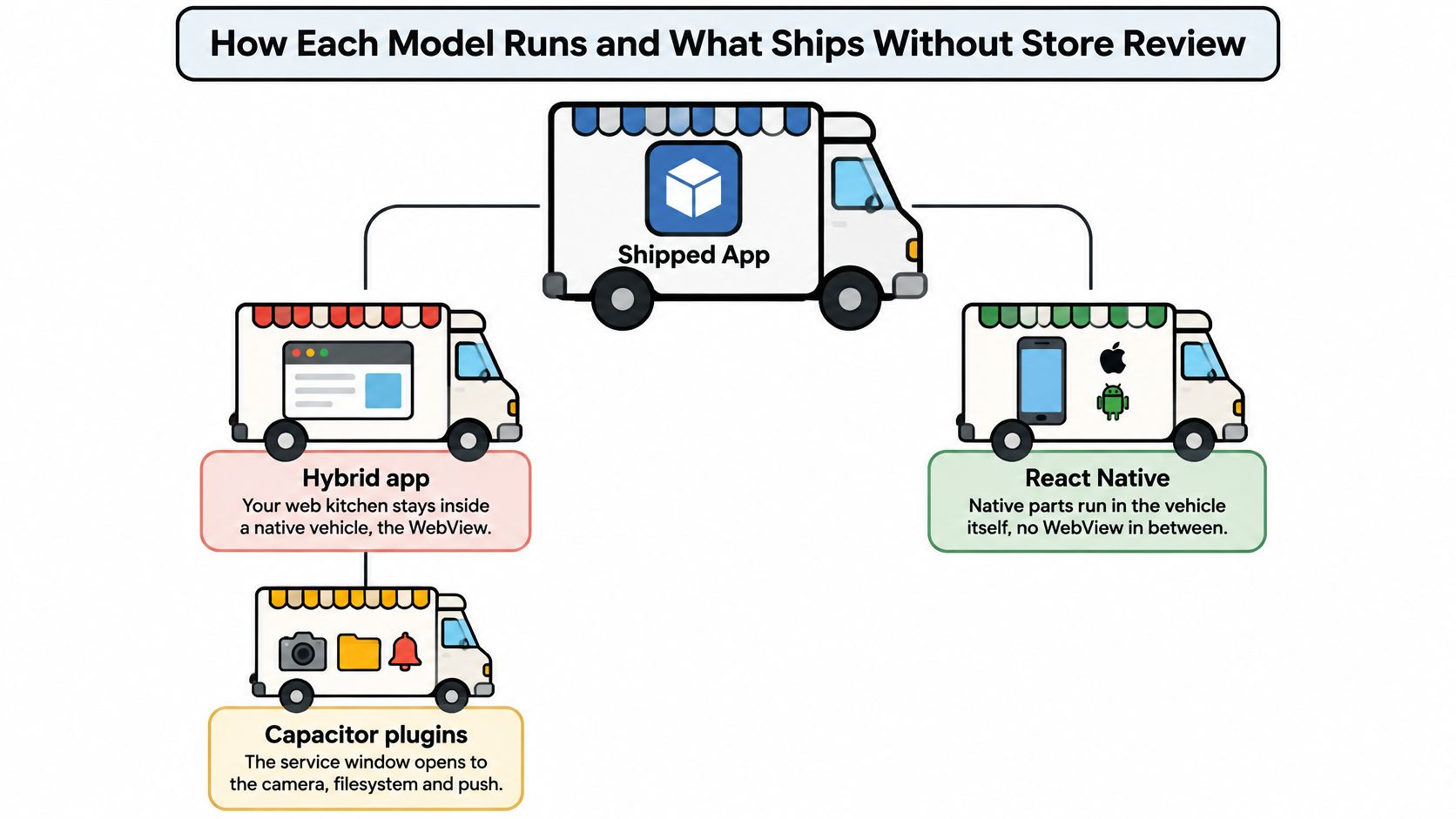
Picture the runtime differences like a food truck. A hybrid app built with Capacitor keeps your entire web kitchen (HTML, CSS, and JavaScript) inside a native vehicle called a WebView. When the kitchen needs something from outside, Capacitor plugins open the service window to the device camera, local filesystem, biometrics, or push notifications.
React Native takes a different mechanical route. Your application logic still runs inside a JavaScript engine, but there’s no browser rendering HTML. Instead, your code sends instructions across a bridge so iOS and Android draw actual native UI controls. Electron skips mobile conventions altogether and ships its own building: a bundled Chromium renderer for the interface paired with a Node.js runtime for direct operating-system access.
Tracing One Feature Across Every Layer
Take a straightforward notes app that lets users browse entries offline and attach a photo. In a Capacitor build, the scrollable list screen and search bar live entirely in web code rendered by the WebView. Offline note storage writes through a local storage or SQLite plugin, while tapping the attach button crosses the native bridge to invoke the iOS or Android camera picker and returns a file path to JavaScript.
In React Native, that same list screen instantiates native UITableView or RecyclerView primitives under the hood, while the photo picker calls a native module. In Electron, the interface renders in Chromium while Node.js reads and writes note files directly on disk.
Where the Store Review Line Sits
Understanding those layers immediately reveals what you can ship today versus what must go through Apple App Store and Google Play review. Anything confined to the web or JavaScript bundle can ship over the air. Anything that alters compiled native binaries, system entitlements, or store listings requires a native build and store submission.
| Change | Live update | Store release needed |
|---|---|---|
| JavaScript logic and UI code | Yes | No |
| CSS, layout and copy | Yes | No |
| Images, fonts and static assets | Yes | No |
| Runtime flags and feature toggles | Yes | No |
| capacitor.config.ts changes | No | Yes |
| Native plugin install or upgrade | No | Yes |
| Permissions and store metadata | No | Yes |
Here’s how that boundary plays out on a real release calendar. Say a login button overlaps the keyboard on small screens after a design tweak. That’s a CSS and layout fix, so it ships as a web bundle the same day. Now suppose you need to upgrade the camera plugin to support a new OS permission prompt. Because that modifies compiled native dependencies and manifest permissions, it waits for a store build.
A well-run over-the-air update workflow follows a predictable sequence on the device. The app checks for a new bundle in the background, downloads the payload, verifies integrity, and applies it on the next cold launch with automatic rollback protection if startup fails. Instead of blasting every user at once, teams push a staged rollout to a fixed percentage of devices while keeping the previous version as a stable fallback, pausing automatically if failures cross a configured threshold after a minimum sample size.
With Capgo, teams update JavaScript, CSS, copy, runtime flags, and static assets in minutes while native code, capacitor.config.ts changes, native plugin configuration, and native package installs or upgrades still go through normal App Store and Google Play review. Because each app is reviewed on its own merits, no live-update tool can guarantee App Store approval, and changes to native binaries, permissions, plugins, or material functionality always require a store submission.
Release boundary rule: If a pull request touches compiled native code,
capacitor.config.ts, permissions, or plugins, cut a native store release. Otherwise, ship a staged web bundle with written rollback criteria agreed before deploy.
Keeping Scrolling and Taps Smooth on Real Phones
A mid-range phone exposes what a fast laptop hides: you flick a list upward, nothing moves for a split second, and then the screen jumps six rows ahead. The reason is architectural. Browser JavaScript, DOM layout, user input handling, and screen painting all share a single main thread, so whenever your code occupies it, everything else waits in line.

According to the MDN in-depth microtask guide, each turn of the event loop runs at most one task, drains the entire microtask queue, and only then lets the browser paint. The catch is that the queue keeps draining until it is completely empty, including new microtasks queued during the drain itself. A tight loop of resolved Promises or queueMicrotask() callbacks looks tiny in source code, yet it can lock the main thread and starve scrolling, taps, and animations.
Watching the Long-Task Budget in Practice
MDN advises keeping jobs short and breaking expensive work into separate tasks so the browser gets regular windows to paint. Performance tooling draws the same line: a task that occupies the main thread too long is flagged as a long task, and long tasks are what users experience as visible jank. The practical rule is simple. No single block of JavaScript should monopolize the thread long enough to swallow a frame.
Consider a hybrid inventory screen that fetches a catalog and transforms 20,000 product records inside a render helper every time the user types in the filter box. On a developer’s MacBook, the array pass finishes quickly enough to hide the flaw. On a three-year-old mid-range Android phone, every keystroke freezes the cursor for a fraction of a second. Moving that transformation into a Web Worker takes the CPU work off the main thread completely. Scrolling and input stay responsive while the worker streams back filtered IDs, because worker threads run in parallel and never compete with painting.
Main-Thread Debugging Checklist
Before blaming your framework or WebView for jank, run through these profiling steps and pair them with broader app performance optimization practices:
- Profile on low-end Android hardware: Connect a budget physical Android phone over USB rather than relying on an iOS Simulator or desktop Chrome throttling, which hides thermal throttling and slower single-core execution.
- Trace long tasks during real gestures: Record a Chrome DevTools or Safari Web Inspector performance trace while scrolling fast and tapping navigation tabs, then flag every task the timeline paints red. Those are the blocks stealing frames.
- Offload heavy compute to Web Workers: Move JSON parsing of large payloads, client-side encryption, CSV exports, and image resizing into background workers, or break them into scheduled chunks via
setTimeoutorscheduler.yield()so each turn yields to painting. - Break recursive microtask chains: Audit
Promise.resolve().then(...)loops and reactive state watchers that trigger cascading synchronous updates inside a single frame.
The last item deserves emphasis because it is the one profilers make hardest to see. A microtask chain rarely shows up as one obvious long block; it shows up as dozens of small blocks packed inside one frame, with no paint in between. When a trace looks busy but no single task dominates, look for reactive watchers or Promise chains requeuing themselves.
Upgrading your API servers or adding a CDN will not rescue a choppy screen. Faster networks shrink download waits, but they do nothing for interaction stalls caused by JavaScript hogging the main thread.
Splitting Bundles to Cut Startup Time
Even clean runtime code feels slow if users stare at a blank splash screen for three seconds while the JavaScript engine chews through megabytes of code they haven’t asked for yet. Code splitting attacks that launch penalty by reducing how many bytes the phone must parse, compile, and evaluate before the first screen becomes interactive.
As Chrome’s modern web performance guidance explains, monolithic bundles drive up parse time and memory consumption on mobile devices, while splitting downloads only the code needed for the active view. The same guidance notes that smaller evaluation units shorten long main-thread tasks and improve Interaction to Next Paint (INP). In hybrid mobile apps, clean module boundaries also make live updates safer because UI features and assets can ship independently from compiled native plugins.
Here’s a practical sequence for splitting an existing JavaScript app bundle:
- Keep the app shell and first screen inside the entry chunk. Only bundle navigation framing, authentication checks, and the initial view so the device evaluates the minimum code required to paint and accept taps.
- Switch secondary routes to dynamic
import(). Settings screens, billing views, user profiles, and help centers don’t need to parse at launch; let your router fetch them only when tapped. - Separate large vendor libraries into cacheable chunks. Isolate stable dependencies like date parsers, charting engines, or rich-text editors so updating your app logic doesn’t invalidate the cached vendor code on every release.
- Lazy-load heavy feature modules on demand. If only a fraction of sessions open a barcode scanner, PDF viewer, or analytics chart, load that module right when the user taps the feature trigger.
- Benchmark before and after on a representative mid-range phone. Check compressed transfer size, script evaluation duration, cache-hit rates, and INP on physical hardware, tracking the same mobile app performance metrics across every release.
Balancing Chunk Size Against Network Overhead
Maximum splitting isn’t the goal. Breaking an app into dozens of tiny files adds HTTP request overhead, and larger bundles generally compress better with Brotli or Gzip than fragmented micro-chunks.
Say an entry bundle weighs several megabytes because onboarding flows, account settings, and exportable monthly reports all sit inside main.js. Pulling those three areas out into route chunks cuts first-load evaluation work sharply without creating a waterfall of tiny fetches. On a mid-range phone, compare total compressed bytes transferred on first open, main-thread script evaluation time, repeat-visit cache hits, and INP after a tap.
Code splitting pays off most when the code you defer is heavy to parse and rarely needed during the first ten seconds of a session.
Release Gates for Dependencies, Accessibility and Crashes
Shipping a JavaScript app fast is easy when nobody checks what rides inside node_modules or whether a screen reader can get past the login modal. Modern npm ecosystems let small teams move quickly, yet every transitive package you pull in expands your app’s security boundary far beyond the code your team wrote.
Locking Down the Mobile Supply Chain
Mobile teams often treat dependency security as a CI or web-server concern, forgetting that compromised JavaScript executes right inside a user’s installed app. In September 2025, CISA reported that the Shai-Hulud npm compromise affected more than 500 packages and targeted GitHub tokens along with AWS, Google Cloud, and Azure credentials. As detailed in NowSecure’s analysis of the npm mobile supply-chain attack, independent mobile-security researchers also identified approximately 190 iOS and Android applications whose dependency chains contained at least one affected package.
Lockfiles and npm audit alone aren’t enough for mobile release hygiene. Build these controls directly into your pipeline:
- Pin and verify exact dependency trees: Commit lockfiles (
package-lock.jsonorpnpm-lock.yaml), runnpm ciin CI, and block unreviewed major or minor jumps automatically. - Generate an SBOM and verify package provenance: Produce a Software Bill of Materials on every build so you know exactly which transitive packages ship inside the compiled native binary versus the downloadable web bundle.
- Strip long-lived secrets from client bundles: Never embed cloud credentials, admin API keys, or static signing tokens inside JavaScript assets; issue short-lived scoped tokens from your backend instead.
- Separate network telemetry from bundle anomalies: Monitor outbound runtime requests and error signatures so you can tell a compromised or corrupted bundle apart from routine carrier drops or OS-specific device faults.
Proving Accessibility Across Both Platforms
Many teams assume a cross-platform framework handles accessibility out of the box. In reality, shared JavaScript does the exact opposite when semantics are missing: one inaccessible custom <div> button or broken focus trap replicates the exact same defect across both iOS and Android simultaneously.
The impact isn’t theoretical. According to AllAccessible’s web accessibility statistics report, 95.9% of website homepages still had at least one WCAG failure in 2025, while 58% of people with disabilities reportedly preferred mobile apps over websites for common tasks. When a healthcare, banking, or retail app ships broken screen-reader flows, users get locked out on the channel they rely on most.
Automated linters catch missing alt text and bad color contrast, but they miss real mobile navigation bugs. Run manual journeys with VoiceOver on iOS and TalkBack on Android before every major release. Verify that focus moves predictably to the new heading after every route change, interactive targets are large enough for imprecise taps, external keyboard navigation works cleanly, and offline states announce themselves clearly instead of failing. Remember the release boundary here too: fixing ARIA roles, focus order, or contrast ships live in a web bundle, while fixing native modal traps, plugin dialogs, or OS permission prompts requires a native store submission.
Setting Measurable Release Gates and Rollback Rules
Security checks and accessibility audits only protect users when they act as hard release gates paired with solid mobile app quality assurance. Write your thresholds down before deploying so nobody argues under pressure during an incident:
- Pre-release gates: Block promotion if SBOM provenance fails, critical dependency advisories appear, automated and manual VoiceOver/TalkBack journeys regress, or cold-start time slips past your target budget on a mid-range test phone.
- Live-rollout pause thresholds: Define the exact crash rate, JS exception spike, or bundle activation failure percentage that automatically pauses a staged rollout once the minimum device sample reports in.
- Incident ownership by layer: Name who triggers an immediate rollback for remotely delivered JavaScript bundles (minutes to recover) and who owns hotfix binary builds and expedited store review when a native plugin or permission breaks (hours to days).
If your team hasn’t written down the exact failure threshold that pauses a rollout and who has authority to roll back, you don’t have a release process yet.
Pick Your Stack and Ship a First Build
Once you understand the runtime layers, main-thread constraints, and release gates, picking a stack becomes straightforward. Match your current codebase and target platforms directly to one option instead of chasing benchmarks.
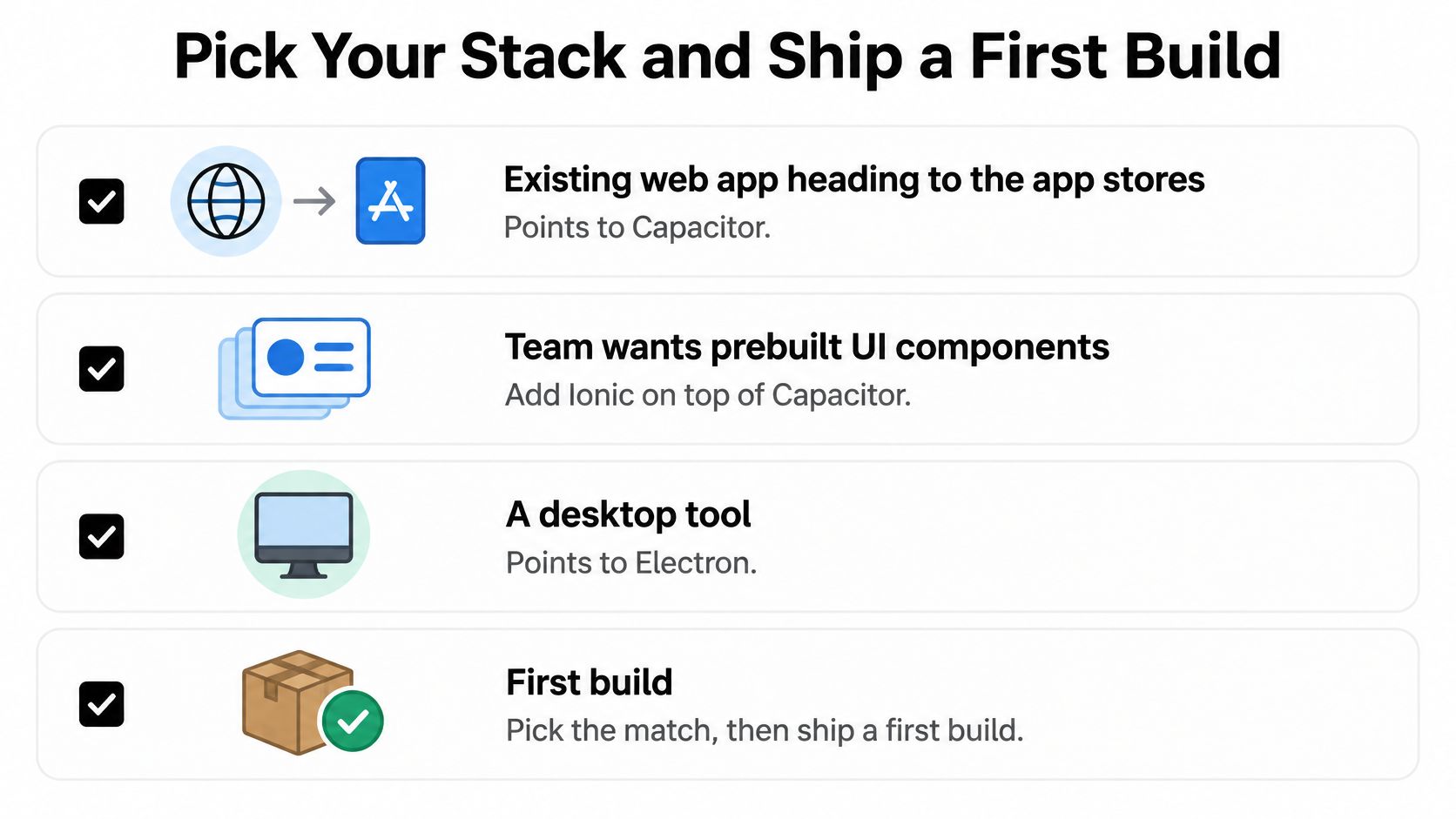
- Existing web app heading to iOS and Android stores: Pick Capacitor, and layer Ionic on top if you want prebuilt iOS and Material Design UI components instead of styling mobile controls from scratch.
- Desktop utility or offline workstation tool: Pick Electron, where Node.js filesystem access and desktop window controls come built in.
- JavaScript team building an app that demands native-feeling UI and complex gesture screens: Pick React Native so the OS renders native primitives directly.
- Legacy Cordova app already in production: Treat it as a planned migration to Capacitor rather than bolting major new features onto aging plugins.
Each stack introduces its own bundler and debugging workflow into your pipeline. Capacitor and Ionic projects typically pair with Vite for fast local builds and clean code splitting, and you inspect the running WebView over USB using Chrome DevTools for Android or Safari Web Inspector for iOS. React Native relies on Metro as its JavaScript bundler, while desktop teams package installers and auto-updaters with Electron Forge or electron-builder.
Your Six-Step First-Build Plan
Rather than spending a month perfecting architecture diagrams, prove the full pipeline end to end with a minimal build:
- Lock in your matching stack. Pick the single row that fits your existing code and platform list so the whole team commits to one build tool.
- Scaffold the project and verify it in a browser or local host. Run
npm run devwith Vite, start Metro, or boot Electron locally until hot reload works cleanly. - Wire up one real native capability on physical hardware. Add a single plugin (such as camera, share sheet, or local storage), install the debug build on an actual phone, and inspect logs over USB DevTools.
- Generate signed release binaries. Produce signed iOS and Android builds for TestFlight and Play Console internal testing. If you develop on Windows or Linux without a local Mac, Capgo Native Build creates signed iOS and Android builds in the cloud and handles store submission with no Mac needed.
- Connect live updates with guardrails. Configure staged delivery to a small initial cohort and document your automatic pause and rollback rules before inviting external testers. Capgo works with Capacitor, Ionic, Cordova, Electron, iOS, and Android, and every plan includes a 14-day unlimited free trial with no credit card required.
- Run your release gates on the candidate build. Generate the SBOM, check long tasks and bundle evaluation on a mid-range phone, and walk through the core user journey with VoiceOver and TalkBack enabled.
The walkthrough below shows how a complete JavaScript-to-mobile pipeline looks from local code through native packaging and live updates.
Pick one small, real user-facing change this week, push the initial binary through internal testing, and deliver a follow-up web tweak through your staged live-update pipeline. Once that loop works smoothly on a real phone, your team can scale features with confidence.
Capgo brings live web-code updates, cloud-based signed iOS and Android builds, staged rollouts, automatic rollback, and release monitoring into one workflow for Capacitor, Ionic, Cordova, and Electron teams. Start a 14-day unlimited free trial with no credit card required and ship your next JavaScript app update in minutes at Capgo.