
You’ve got a bug in production, the app-store build is already in review, and support keeps asking why a simple copy fix can’t go out today. That’s the reason teams start asking what is OTA. It’s not about magic remote control, it’s about knowing exactly which changes can ship without a new store binary, and which ones can’t.
OTA, or over-the-air updating, is a delivery method. It moves software or firmware over a network to a connected device, usually through cellular or Wi‑Fi, instead of a cable, physical media, dealership visit, or manual install. In mobile apps, that usually means updating JavaScript, CSS, HTML, configuration, or assets inside an already-installed native shell, while the native binary still follows store rules. That distinction is the part many teams miss, and it’s the reason OTA is really a release-classification problem as much as a delivery mechanism.
Table of Contents
- Understanding What OTA Updates Actually Are
- How Over The Air Updates Work From Start to Finish
- The Exact Boundaries of What Can and Cannot Go OTA
- Comparing OTA Updates Against Traditional App Store Releases
- Setting Up a Capgo Based OTA Update Pipeline
- Building OTA Governance for Enterprise and Regulated Apps
- Frequently Asked Questions About OTA Updates
Understanding What OTA Updates Actually Are
A mobile team can ship a visual fix, a copy edit, or a new asset bundle without touching the native shell. That is OTA in practice. MDN’s OTA glossary captures the delivery side of it, and that matters because the core question is always what can move safely over the network.
For Capacitor and Electron apps, the line is clear. OTA can refresh the web layer, so bug fixes, styling updates, text changes, and static assets can go out without a new store submission. Changes to Swift, Kotlin, Objective-C, Java, plugins, permissions, or embedded libraries still require a store-distributed binary, because those changes alter the reviewed native package.
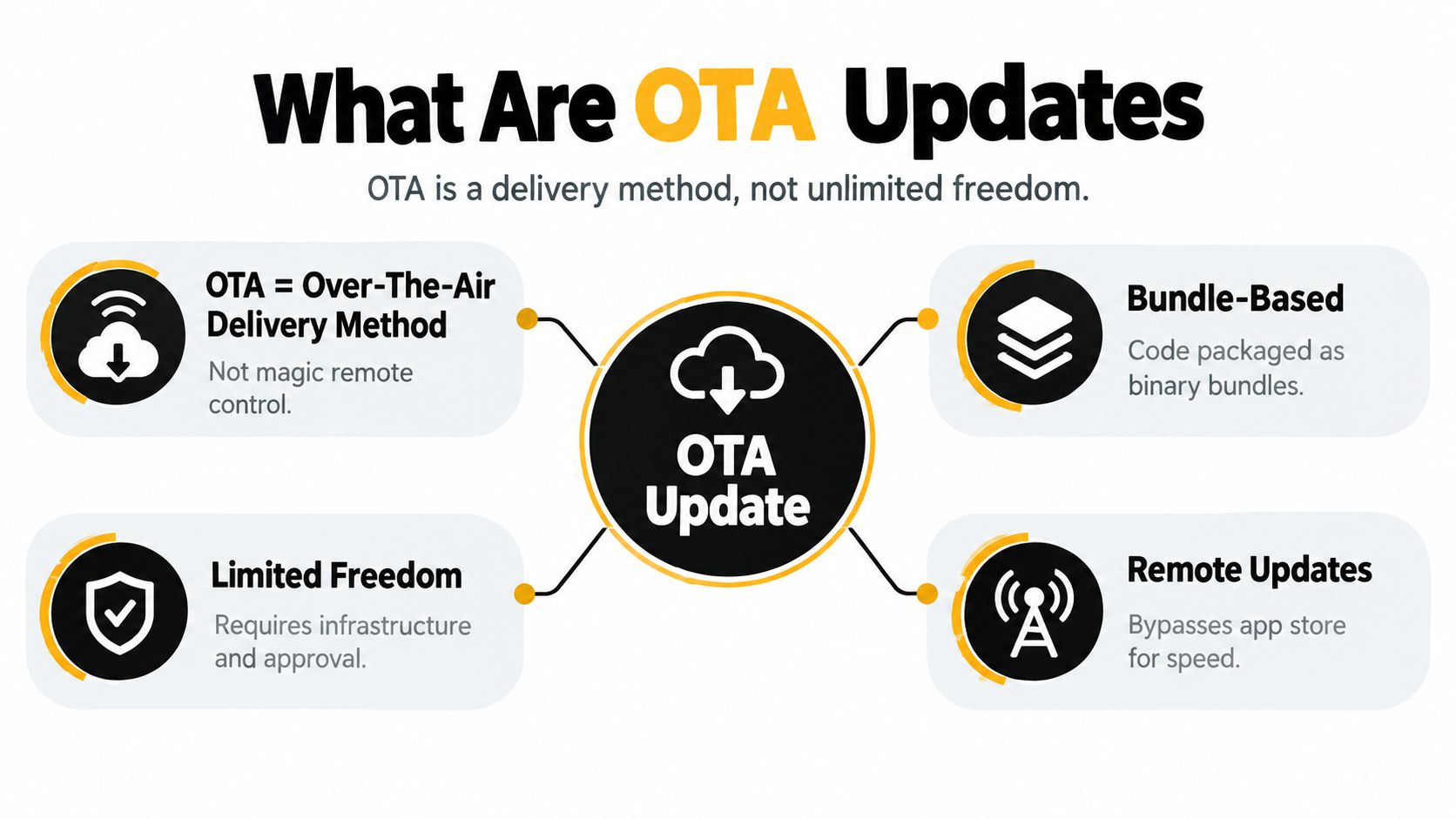
Practical rule: if the change affects compiled app behavior or platform permissions, it belongs in a store release. If it only changes the web layer inside an approved shell, OTA may be the right path.
That release-classification decision is the part many teams miss. The job is not to ask whether the app can download content remotely. The job is to decide whether the change stays inside the approved native envelope or crosses into code the store must review.
For a more mobile-focused explanation of that boundary, see the Capgo overview of OTA updates.
How Over The Air Updates Work From Start to Finish
A production OTA pipeline starts long before the device sees anything. The update package is built, signed, uploaded, and tied to a channel so only the intended devices can fetch it. That is the opposite of a simple file copy, and it’s why the safeguards matter in real deployments.
The automotive record shows why this discipline exists. Tesla pushed an early consumer-vehicle OTA update to approximately 100 Model S drivers in 2012, later the market reached approximately 309 models across 23 brands by late 2023, and a February 2022 Tesla recall for a heat-pump issue was resolved remotely instead of sending every owner to a service bay, all according to WardsAuto’s OTA coverage. That progression proves the same thing mobile teams learn the hard way, remote delivery only works when authentication, compatibility, and rollback are treated as first-class requirements.
The pipeline in practice
A sane OTA flow looks like this:
- Bundle creation. The team builds a new web bundle from the approved app code.
- Signed distribution. The bundle is uploaded to the OTA service and signed.
- Client fetch. The app checks for updates on launch or on a controlled schedule.
- Validation and install. The device verifies the signature and manifest before activation.
- Active release. The new bundle becomes the running version only after checks pass.
- Rollback if needed. If the startup or crash signals look wrong, the system falls back to the last known-good bundle.
If you can’t prove who signed the bundle, don’t ship it. If you can’t revert cleanly, don’t call it production-grade.
The same model applies to hybrid apps using an update layer on top of the store binary. Capgo’s live updates walkthrough is useful here because it maps the rollout mechanics to Capacitor teams that need something concrete, not just a definition.
The Exact Boundaries of What Can and Cannot Go OTA
A release is OTA only when it stays inside the approved native shell. Once a change touches compiled code, the release class changes. For Capacitor and hybrid apps, that usually means JavaScript, CSS, HTML, configuration, and other non-native assets can move through OTA, while Swift, Objective-C, Kotlin, Java, plugins, permissions, or embedded libraries still require a store binary. OWASP’s iOS code guidance sets out the same boundary for iOS code loading.
A useful way to decide is to start with the failure mode. If the update changes what the app can execute natively, submit a store build. If it only changes what the approved shell renders or configures, OTA may be acceptable.
A practical decision checklist
Run these checks before every release:
- Does the commit change the native dependency graph? If yes, ship a store build.
- Does it alter permissions, plugins, or embedded libraries? If yes, ship a store build.
- Does it only touch web assets or configuration inside the approved shell? OTA may be appropriate.
- Would the update materially change app purpose, payment flow, or user-facing behavior? Treat it as risky even if it is technically possible.
- Can you show an audit trail, approval boundary, and fallback path? If not, do not use OTA for that release.
A Capacitor team can turn that into a simple release rule: web-layer fixes stay in OTA, anything that affects native execution goes back through the store. That line becomes sharper on iOS, where Apple applies its own restrictions to over-the-air code changes, as explained in Capgo’s Apple restriction guide.
| Release Type | Delivery Method | Example Changes |
|---|---|---|
| OTA bundle | Remote update to the installed shell | JavaScript bug fix, CSS tweak, copy update, image swap |
| Store binary | App Store or Play release | Native plugin change, permission change, SDK migration |
| Store binary | App Store or Play release | Swift, Kotlin, Objective-C, Java, or embedded library changes |
| OTA bundle, if approved | Remote update with strict governance | Configuration changes, asset replacements, small web-layer fixes |
OWASP also recommends not trusting only client-provided data, signing update-policy responses, and using a cached policy with a safe offline fallback. Those controls matter because OTA mistakes fail fast and spread fast.
Comparing OTA Updates Against Traditional App Store Releases
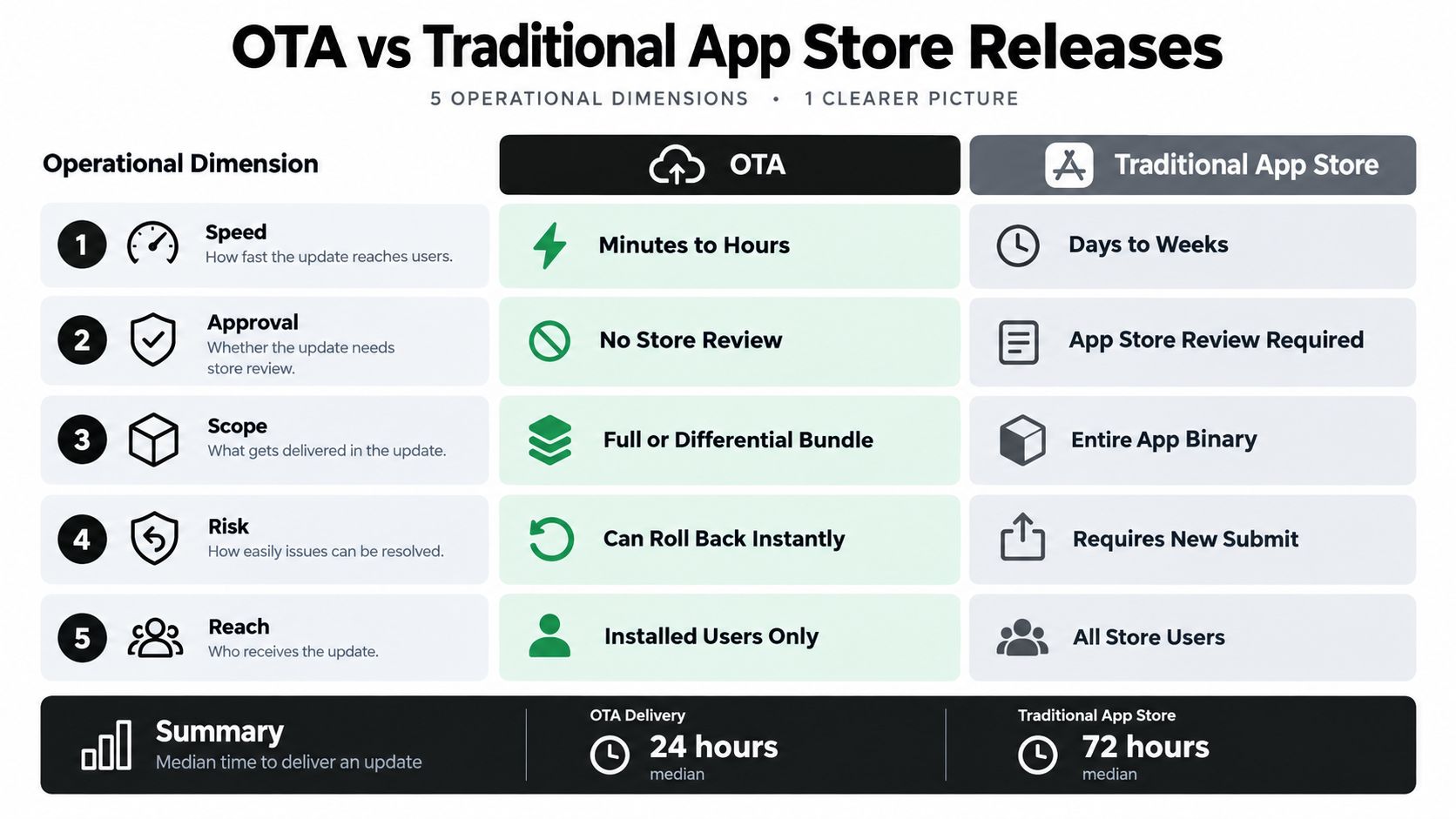
OTA isn’t “better” in every dimension, it’s different. Store releases give you the widest native change scope, but they also force a rebuild, submission, and review cycle. OTA skips that cycle for eligible web-layer changes, which is why teams use it for fixes that would otherwise sit behind review while users keep hitting the bug.
A production-grade OTA mechanism is still a hardened pipeline. The Android app-update guidance describes the shape of that pipeline well, with cryptographic signing, HTTPS transport, manifest validation, monotonic version rules, atomic installation, staged channels, and rollback all working together. It also warns against trusting only client data and recommends a cached policy with a safe offline fallback, which is exactly the mindset you want when a remote artifact can affect every installed user at once. See Google’s app update guidance for the underlying security posture.
The trade-offs that matter
| Dimension | OTA updates | Store releases |
|---|---|---|
| Delivery speed | Faster for eligible changes | Slower because of rebuild and review |
| Change scope | Web layer only | Native and web layer |
| Rollback | Can be immediate if the platform supports it | Requires another submission |
| Risk profile | Narrower scope, but a bad bundle can hit many devices | Broader native changes, but more gatekeeping |
| Compliance burden | Needs internal governance and auditability | Needs store review and release controls |
Some teams use Capgo for this layer because it publishes signed web bundles to channels, applies updates on next launch, and keeps logs, version history, and rollback controls in one place. That’s useful, but only if the binary stays the source of truth for anything native.
I’ve seen the same pattern across mobile teams, the bug isn’t “we need OTA,” the bug is “we don’t know which release path fits this change.” Once that classification is clear, the rest becomes a controlled operations problem instead of a debate.
Setting Up a Capgo Based OTA Update Pipeline
The cleanest setup starts with a boring rule, only send OTA what your native shell already approved. From there, the pipeline is straightforward, a developer changes JavaScript or CSS, a build step produces the bundle, and the update service publishes a signed package to the right channel. That keeps your release path fast without pretending the store no longer exists.
What to configure first
- Channel structure. Separate beta, staging, production, and customer-specific streams so you can target devices intentionally.
- Signed publishing. Make signature checks mandatory before activation.
- Differential updates. Ship only changed files when the platform supports it, which keeps updates smaller and simpler to deliver.
- Rollback protection. Hold the previous bundle until the new one passes startup health checks.
- Observability. Track per-device logs, adoption, failures, and version history so support can see what happened.
The operational payoff is obvious in incident response. If a styling bug or web-layer defect appears, you can ship a targeted fix without forcing users through a full reinstall path. If the change touches native code, you stop and cut a store release instead.
A good implementation roadmap helps teams make that split without turning it into tribal knowledge. This Houston DevOps implementation roadmap is a useful external reference for teams that want the release discipline around CI/CD, environment control, and deployment governance, even though it isn’t OTA-specific.
A simple rollout order
- Publish to staging.
- Verify install and startup logs.
- Move to a narrow production channel.
- Watch failure signals.
- Expand only after the bundle behaves normally.
Capgo’s OTA update guide fits naturally here if you want the mechanics for publishing bundles and wiring the pipeline into a real app. The important part is that OTA runs alongside store releases, not instead of them.
Building OTA Governance for Enterprise and Regulated Apps
In regulated teams, OTA is a governance decision before it’s a delivery decision. The hard question isn’t whether the bundle can technically reach a device, it’s whether the release should be allowed to bypass a store cycle without weakening compliance or changing the product in a way reviewers would care about. Bitrise’s OTA guidance captures that gap well, especially where Apple’s rule allows interpreted-code updates within the approved app purpose but rejects updates that change the app’s features or functionality.

The governance questions worth formalizing
- Can this exact release go OTA? If there’s any native or permission change, the answer is no.
- What evidence will we keep? Retain approval notes, channel history, and rollback records.
- Does this alter payment flow or app purpose? Treat that as a store-release candidate, even if the code is only partially changed.
- Who can approve a channel push? Keep that boundary explicit, especially in fintech and healthcare.
- What happens offline? Use a safe cached policy and a fallback bundle if the update server can’t be reached.
The safest OTA program is the one that can say no quickly.
That matters because compliance teams don’t just ask “did users get the update?” They ask whether the delivery path changed the risk profile, whether the release can be reconstructed later, and whether the app still behaves like the version that was approved.
Capgo’s enterprise overview is a practical companion if your org needs OTA release history, channel control, and operational visibility without turning every patch into a store submission.
The rule of thumb is simple. Use OTA for JavaScript fixes, copy updates, asset changes, and configuration tweaks. Use a store release for native plugin updates, permission changes, SDK migrations, and major feature additions. If the change would surprise a reviewer, it probably belongs in the store.
Frequently Asked Questions About OTA Updates
Does OTA bypass app-store review entirely? No. It only bypasses review for changes that stay inside the approved native shell. Native code, permissions, and platform behavior still need a store binary.
Can OTA affect app ratings? Not directly by itself. Ratings move because users experience the shipped app, so a bad OTA bundle can still hurt reviews if it breaks startup, crashes, or changes core behavior unexpectedly.
What happens if the update fails on a bad network connection? A production pipeline should keep the last known-good bundle and fall back safely. That’s why integrity checks, cached policy, and atomic install matter.
How do I handle rollback? Keep the previous bundle until the new one passes startup health checks, then promote it. If crash or boot-failure signals go wrong, stop the rollout and revert automatically.
Should I tell users about OTA changes? Yes, especially in regulated or enterprise apps. Release notes should explain visible behavior changes, even when the update ships outside the store.
Is OTA only for mobile apps? No. It also applies to firmware and other connected devices, but mobile teams usually care about web-layer updates inside a native shell.
Does OTA replace store releases? It shouldn’t. It’s a fast path for eligible changes, not a replacement for native upgrades or compliance-sensitive releases.
If you need a tighter OTA workflow for Capacitor or Electron, Capgo gives you signed live updates, targeted channels, rollback protection, and release observability for the web layer that can move safely without a new binary. If that’s the release problem your team is solving, visit Capgo and evaluate whether its update pipeline fits your app’s native and web-layer split.





