


Most Capacitor iOS problems fall into five groups: wrong toolchain, dependency resolution (SPM or CocoaPods), compile errors from plugins, code signing, and runtime issues such as “plugin is not implemented” or a blank WebView. Start with bunx cap doctor, confirm you have Xcode 26 selected, run bunx cap sync ios, and read the first error in the Xcode build log, not the last.
This guide lists the errors we see most in Capacitor 8 projects, what causes each one, and the fix. For Android, see the Capacitor Android troubleshooting guide.
Quick triage checklist
Run these before chasing a specific error:
bunx cap doctor            # Capacitor, CLI and plugin versions should match
node -v                    # 22 or later for Capacitor 8
xcodebuild -version        # 26.x
xcode-select -p            # should point to the Xcode you expect
bun run build && bunx cap sync ios- Versions:
@capacitor/core,@capacitor/iosand@capacitor/climust share the same major. Mismatches cause odd compile and runtime errors. See fix Capacitor version mismatch errors. - One Xcode: if you have several Xcode versions,
xcode-select -pdecides which one the CLI uses. Fix it withsudo xcode-select -s /Applications/Xcode.app. - Which package manager: if
ios/App/CapApp-SPMexists, the project uses SPM. Ifios/App/Podfileexists, it uses CocoaPods.
Toolchain errors
Xcode or SDK too old
Symptoms: value of type 'WKWebView' has no member 'isInspectable', Swift syntax errors inside Capacitor, or compiling for iOS 15.0, but module 'X' has a minimum deployment target of iOS 16.0.
Capacitor 8 requires Xcode 26. In GitHub Actions, macos-latest doesn’t always point to the image with the newest Xcode. Pin an image that includes Xcode 26 and select it explicitly:
- run: sudo xcode-select -s /Applications/Xcode_26.0.appCheck the runner image docs for the exact path. For the module-minimum error, raise your app’s deployment target to the plugin’s minimum, or use an older plugin version.
ITMS-90725: SDK version issue on upload
The build was made with an SDK older than Apple currently accepts. Since April 28, 2026, uploads must be built with Xcode 26 and the iOS 26 SDK. See Apple’s Xcode 26 requirement for Capacitor apps. Capgo Build already builds on Xcode 26 if you don’t want to maintain Mac runners.
Swift Package Manager errors
Missing package product 'CapApp-SPM'
Xcode hasn’t resolved the local package, or its cache is stale.
- File > Packages > Reset Package Caches.
- File > Packages > Resolve Package Versions.
- If the app was migrated from CocoaPods, check that
CapApp-SPMis added under the project’s Package Dependencies tab and linked to the App target.
product 'X' required by package 'capapp-spm' target 'CapApp-SPM' not found
A plugin’s Package.swift uses a package or product name that doesn’t match what the Capacitor CLI generated from its npm name. This is a plugin bug. Update the plugin, or patch it. Plugin authors can find the naming rule in migrate a Capacitor plugin to SPM.
“Some installed Capacitor plugins are not compatible with SPM”
This warning during cap sync means at least one plugin has no Package.swift. It’s left out of the app, so calls to it fail with “not implemented”. Upgrade the plugin, replace it with one that supports SPM, or use CocoaPods for now.
Duplicate package identity or target name
Two plugins share a package identity or a target name (often a generic name like Plugin). Since CLI 8.4 you can fix it from the Capacitor config:
const config: CapacitorConfig = {
  // ...
  experimental: {
    ios: {
      spm: {
        packageOptions: {
          '@acme/capacitor-foo': { symlink: true },
          '@acme/capacitor-bar': { moduleAliases: { Plugin: 'AcmeBarPlugin' } },
        },
      },
    },
  },
};
symlink makes the CLI reference the plugin through a symlink folder with a unique path. moduleAliases renames a conflicting module for that dependency. Report the conflict upstream too.
Don’t edit CapApp-SPM/Package.swift
The CLI rewrites it on every sync. Local edits disappear. Use the experimental.ios.spm config options instead.
CocoaPods errors
No such module 'Capacitor'
You opened App.xcodeproj instead of App.xcworkspace. Use bunx cap open ios. If the workspace is open and the error persists, run bunx cap sync ios to reinstall pods.
CocoaPods could not find compatible versions for pod "X"
Two causes:
- Stale spec repo: run
cd ios/App && pod install --repo-update. - Conflicting pins: two plugins need incompatible versions of the same pod. The error prints the chain. Upgrade the plugin with the strict pin, align versions (for Firebase, keep all Firebase plugins on the same SDK version), or patch the podspec.
If it keeps failing, delete ios/App/Podfile.lock and ios/App/Pods, then sync again. This also upgrades every pod, so test afterwards.
The sandbox is not in sync with the Podfile.lock
Run bunx cap sync ios. It happens after branch switches or partial installs.
Unable to find compatibility version string for object version '70'
Your project.pbxproj uses a format your CocoaPods version can’t read. Update CocoaPods (brew upgrade cocoapods or bump it in your Gemfile). As a last resort, back up the file and lower objectVersion.
Sandbox: rsync(...) deny(1) file-write-create
Xcode’s user script sandboxing blocks the CocoaPods framework embed script. Set Build Settings > User Script Sandboxing to No on the App target.
could not find module 'Capacitor' for target 'x86_64-apple-ios-simulator'
The simulator build is running for Intel. On Apple Silicon this usually means Xcode runs under Rosetta or an old EXCLUDED_ARCHS[sdk=iphonesimulator*] = arm64 setting is left over from a past workaround. Run Xcode natively, remove that setting from the App target and any post_install hook, then clean and rebuild.
Compile errors
Command PhaseScriptExecution failed with a nonzero exit code
This is a wrapper. Expand the failing build phase in the Report navigator and read the script output. Common causes in Capacitor apps:
- A Run Script needs
nodeand Xcode can’t find it, because Xcode doesn’t load your shell profile and Node is installed with nvm, fnm or Volta. Use the full path tonodein the script, or exportPATHat the top of it. - A crash reporting upload script (Sentry, Crashlytics) is missing credentials in CI.
- CocoaPods embed script blocked by user script sandboxing (see above).
'X' is only available in iOS 16.0 or newer
A plugin uses an API above your deployment target. Raise the target in Xcode, in the Podfile (platform :ios, '16.0') if you use CocoaPods, and check the plugin’s README for its minimum.
Swift 6 concurrency errors in a plugin
Messages like Sending 'x' risks causing data races show up when a plugin or your app target uses Swift 6 language mode. Capacitor 8 doesn’t officially support Swift 6. Keep the App target on Swift 5 language mode until the plugin is updated.
Code signing
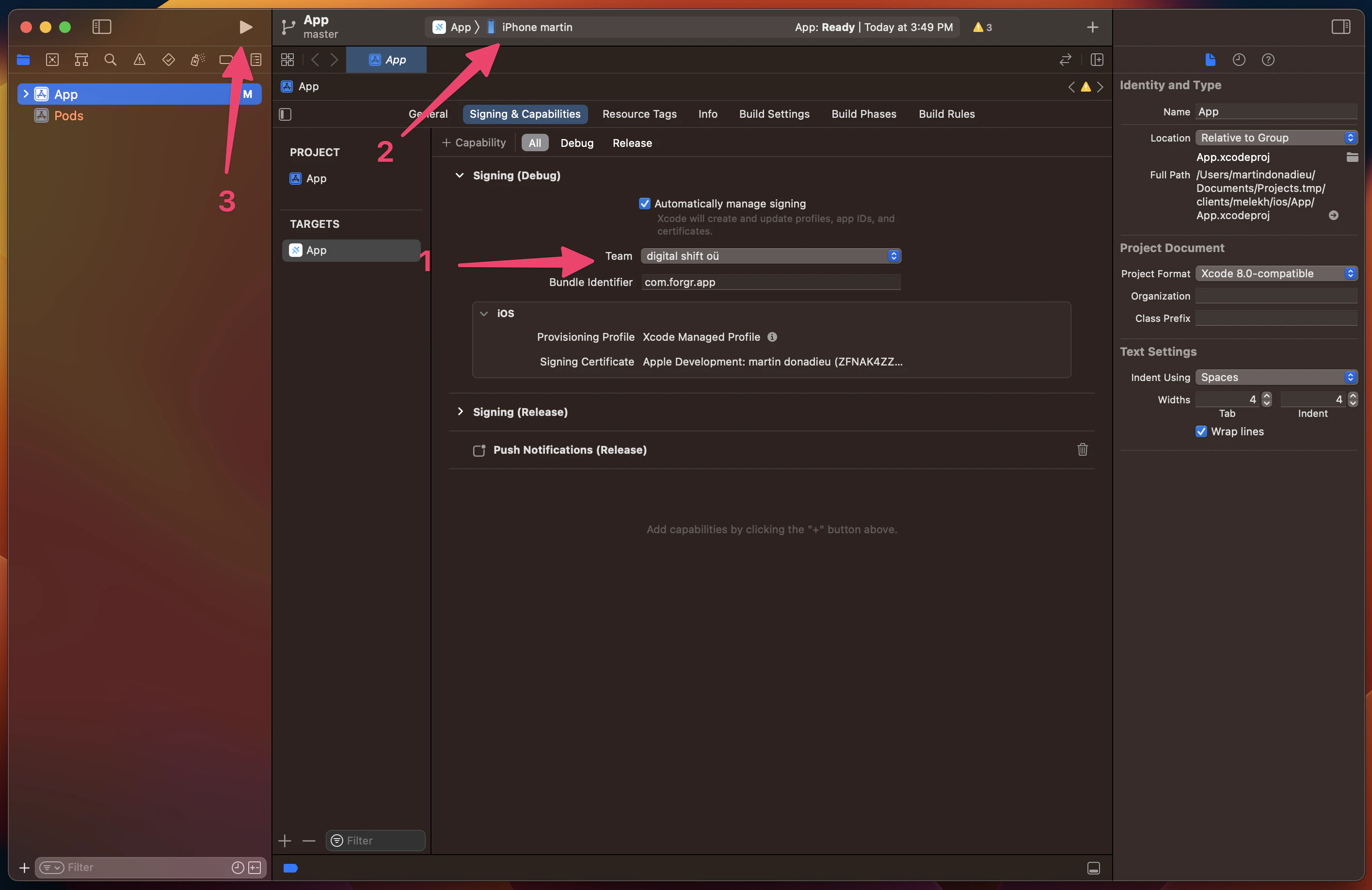
Signing for "App" requires a development team
Open App target > Signing & Capabilities and pick a team. In CI, pass DEVELOPMENT_TEAM to xcodebuild or use a signing tool. If the error names a pod resource bundle instead of App, disable signing for bundle targets in the Podfile post_install hook.
Provisioning profile "X" doesn't include the ... entitlement
You added a capability (Push Notifications, Associated Domains, Sign in with Apple) without regenerating the profile. Enable it on the App ID in the Apple Developer portal, then refresh profiles. Our iOS certificate generator helps create certificates without a Mac keychain dance, and the UDID finder helps register test devices.
Unable to install "App" on device
Enable Developer Mode on the device (Settings > Privacy & Security > Developer Mode), trust the developer certificate, and make sure the device’s UDID is in the provisioning profile for development builds.
Runtime errors
"X" plugin is not implemented on ios
The JavaScript side found no native implementation. Check in this order:
- The plugin is in
package.jsonand you ranbunx cap sync iosafter installing it. - For SPM: the plugin appears in
ios/App/CapApp-SPM/Package.swift. If not, it has noPackage.swift. - For CocoaPods: the plugin appears in the
capacitor_podsblock of the Podfile andpod installprinted no warnings. - You don’t have two plugins registering the same JS name (for example two push notification plugins).
WKAppBoundDomainsis not inInfo.plist, or if it is,limitsNavigationsToAppBoundDomainsis set andlocalhostis listed. App-bound domains block plugin script injection otherwise.- Clean build folder and rebuild. Stale builds keep old plugin registrations.
Blank white screen on launch
Inspect the WebView with Safari Web Inspector first. Most blank screens are a JavaScript error.
- Wrong
webDir:capacitor.config.tspoints to a folder that doesn’t containindex.html. Checkios/App/App/public. - Build target too new: your bundler emits syntax older WebKit doesn’t support. iOS 15 is the minimum for Capacitor 8, so target
safari15or later in Vite/esbuild and check yourbrowserslist. - Absolute asset paths: a
baseset to a CDN or subpath in your bundler config breaks local loading. - Live reload unreachable: the dev server must listen on your LAN IP (
--host 0.0.0.0), the phone must be on the same network, and the app needs the Local Network permission (Settings > Privacy & Security > Local Network). Removeserver.urlfrom the config before release builds. - Live update bundle broken: if the app uses OTA updates, a bad bundle can blank the screen. Capgo’s updater rolls back automatically when
notifyAppReady()isn’t called in time. See the updater docs.
Content under the notch or home indicator
Add viewport-fit=cover to your viewport meta tag and pad with env(safe-area-inset-top) and env(safe-area-inset-bottom). Capacitor 8’s System Bars plugin controls status bar style and visibility on both platforms.
Keyboard covers inputs
Configure the Keyboard plugin resize mode (native, body, ionic or none) and test on a real device. Simulators handle the keyboard differently.
App Store Connect errors
ITMS-91053: Missing API declaration: your app or a plugin uses a required-reason API without a privacy manifest entry. Add aPrivacyInfo.xcprivacyto the App target with the reasons, and update plugins that ship their own manifest.ITMS-90725: SDK version issue: rebuild with Xcode 26.Invalid Bundle. The bundle ... contains disallowed file 'Frameworks': a framework is embedded inside an extension or another framework. Check Embed settings for app extensions.
How to debug when the error isn’t listed
- Safari Web Inspector for JS errors and network calls. Debug builds are inspectable on iOS 16.4+. For release builds set
ios.webContentsDebuggingEnabled: truetemporarily. - Xcode console for native logs, including Capacitor’s
⚡️bridge messages that show each plugin call. - Console.app with the device selected for crash and system logs.
- Isolate: create a fresh app with
bun create @capacitor/app, add only the suspect plugin, and see if the error reproduces.
The ultimate guide to debugging Capacitor apps goes deeper into each tool. If the root cause is a plugin bug, a patch is usually the quickest unblock while you wait for a release.





