
Rollback is a recovery operation that reverses a software or configuration change and restores an earlier known-good state. In Kubernetes, deployment history retains 10 old ReplicaSets by default, while PostgreSQL ROLLBACK discards updates made by the current transaction, not previously committed data.
A release goes live, the first users open the app, and support tickets arrive before the product team has finished celebrating. A checkout screen crashes, a new API response breaks an older client, or a configuration change sends requests down the wrong path. The team needs to restore service without guessing which files changed or asking every user to reinstall.
That’s what rollback is for. It isn’t prevention, and it isn’t a magic undo button. The new release has already been applied. Rollback is the controlled response when that release causes errors, degraded performance, crashes, or unsafe behavior. In practice, it usually redeploys the previous application version or restores a versioned configuration, then verifies that the service has returned to an acceptable state. The failure analysis techniques your team uses afterward still matter, because rollback stabilizes the incident but doesn’t explain its cause.
Table of Contents
- The Reality of Deployment Failures
- How Modern Systems Preserve Release History
- The Hidden Danger of Database and Data Reversals
- Making the Operational Decision to Revert
- Instant Recovery in Mobile and Cross-Platform Apps
- Building a Resilient Release Strategy
- Key Takeaways for Safer Deployments
The Reality of Deployment Failures
A mobile team ships a new bundle containing a navigation change and a backend compatibility update. The staged audience receives it first. Within minutes, users report that a primary screen won’t load. Monitoring shows rising errors, but the team can’t yet tell whether the problem comes from the bundle, the API, a feature flag, or a dependency.
The safe response isn’t to debate the perfect diagnosis while the affected audience grows. If the team has a known-good artifact, it can stop the rollout and restore that version. The application returns to a previously validated state while engineers investigate the defect and prepare a correction.
Rollback is recovery, not prevention
Prevention attempts to stop a bad change before it reaches users. Tests, code review, dependency checks, canary releases, and approval gates serve that purpose. Rollback begins after prevention has failed or after an unexpected interaction has appeared in production.
A rollback can target several parts of a delivery system:
- Application code: Redeploy the prior executable or web bundle.
- Configuration: Restore a versioned setting, routing rule, or feature configuration.
- Assets: Return to compatible images, scripts, or content files.
- Feature exposure: Disable a new capability through a kill switch or audience control.
- Data: Abort an active transaction or restore data from a backup, subject to much stricter constraints.
The last category needs separate treatment. Reverting application code is often straightforward when artifacts are immutable and dependencies remain compatible. Reverting committed data can cause loss, corruption, or regulatory problems. A release rollback therefore shouldn’t imply that every related database operation can safely move backward.
Why frequent delivery needs fast recovery
Modern continuous delivery makes releases more frequent. That creates a practical requirement: the operational cost of a failed change must stay limited. A team that can deploy quickly but needs a long manual process to recover has optimized only half of delivery.
Manual reversal remains possible, but it relies on operators remembering which files changed, which servers were updated, and which configuration belonged to the previous release. That process becomes fragile during an incident. Automated systems improve the path by retaining immutable artifacts, monitoring health signals, and reverting when predefined conditions are met.
Practical rule: Treat rollback as a rehearsed production capability, not as an emergency button that someone will figure out during the outage.
A rollback also isn’t a permanent fix. It restores service temporarily, but the underlying defect remains. Engineers still need to identify the trigger, assess any data written during the failed release, and ship a corrected version or make another deliberate operational decision.
How Modern Systems Preserve Release History
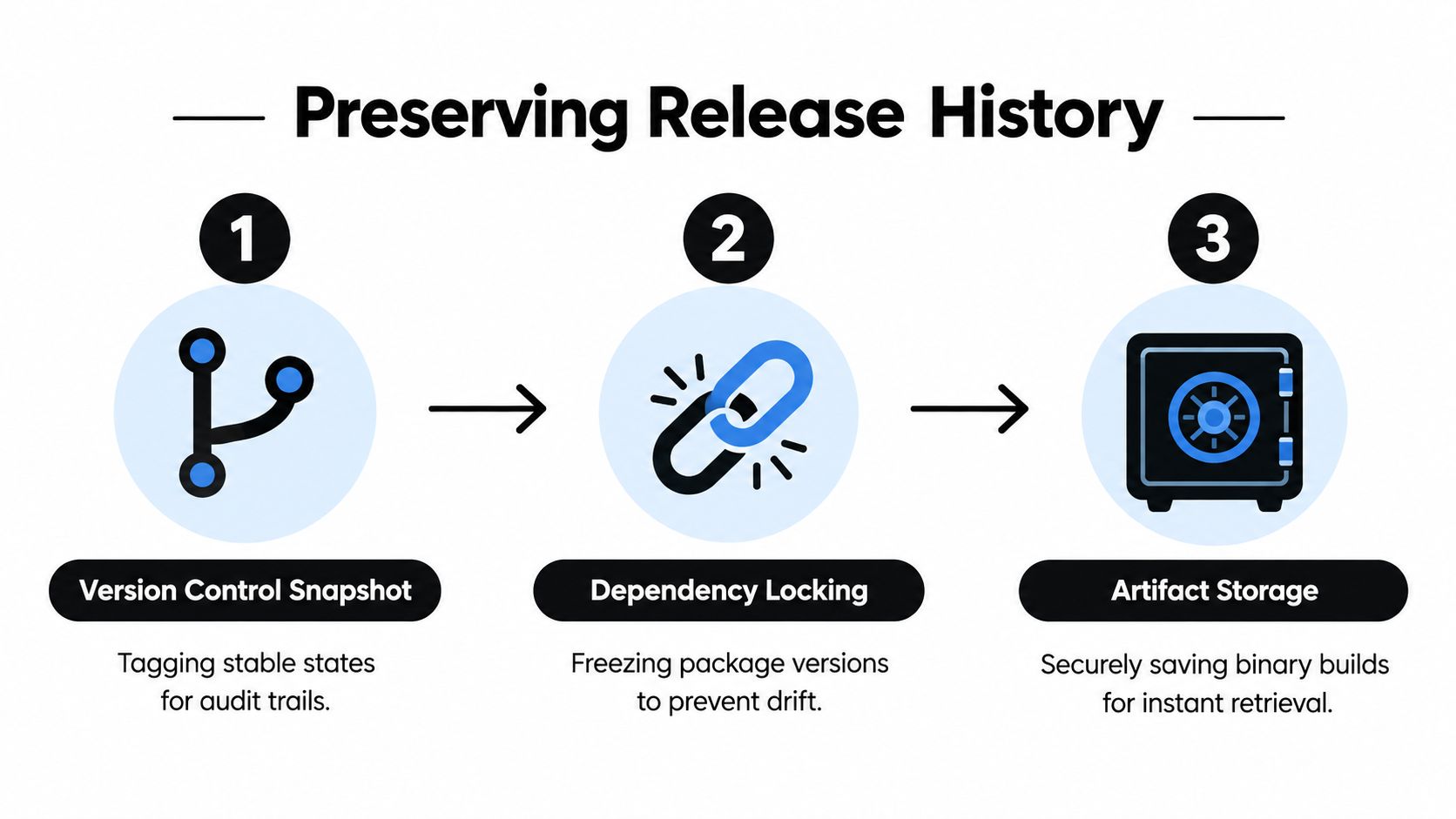
A recovery system can only restore what it can identify and retrieve. Keeping an old source commit isn’t enough if the build was produced with drifting dependencies, the binary was overwritten, or the native shell no longer supports the bundle.
Modern release systems solve this by preserving a chain of evidence from source to deployed artifact. The team tags a stable revision, locks the dependency graph, builds an addressable artifact, and records which artifact reached each environment. That record gives operators a specific target instead of an ambiguous instruction such as “go back to the previous version.”
Kubernetes as a concrete model
Kubernetes illustrates the structure clearly. A Deployment controls ReplicaSets, and those ReplicaSets preserve deployment revisions. Kubernetes retains 10 old ReplicaSets by default, and teams can change that retention with spec.revisionHistoryLimit. Setting the value to 0 disables rollback entirely, as documented in the Kubernetes Deployment reference.
An operator can return to the immediately preceding revision or select an exact historical revision. The rollback changes the Deployment’s Pod-template configuration, including fields such as the container image and labels. It doesn’t automatically reverse unrelated fields such as replica count. Afterward, rollout-status checks confirm whether the target revision became healthy.
That distinction matters for mobile and web-bundle delivery. A system should record:
- The active version: Which release each environment, channel, or device received.
- The artifact identity: A content-addressable or otherwise immutable build, not a file that can be replaced in place.
- Dependency compatibility: Whether the prior bundle works with the current native shell, APIs, services, and data schema.
- The recovery result: Whether devices or instances successfully adopted the restored release.
“Previous” must mean a specific artifact
A label such as previous is useful only when it resolves to an immutable release. If a team overwrites the file behind that label, the recovery target can change without anyone noticing. If the artifact has expired from storage, the deployment system may know the revision number but lack the bytes needed to restore it.
For a Capacitor application, the web bundle also runs inside a native shell. A prior JavaScript bundle may depend on native plugins, permissions, or bridge behavior that the current shell changed. Restoring it without checking compatibility can replace one incident with another.
The Capgo approach to version control and rollbacks reflects the broader principle: release history must be explicit, retrievable, and connected to the audience that received each build. Rollback succeeds when the team can answer three questions quickly: what was active, what was stable, and what can safely run with the surrounding system now?
The Hidden Danger of Database and Data Reversals
A failed deployment can leave the team with an urgent instruction: “Just restore the previous version.” That may work for executable code. It can be unsafe for a database, where committed customer activity may be impossible to reverse cleanly.
Application rollback and data rollback are different operations with different failure modes. A code release can often be replaced with another immutable artifact. A schema migration may have renamed or removed a field, transformed stored values, or changed the assumptions used by later writes. Orders, payments, messages, records, and consent are valid user data. They should not disappear because an application release failed.
Why code and schema can move out of sync
Suppose release A understands the old schema, while release B adds a column or changes how a value is stored. After B is deployed and its migration runs, restoring A can make the older code query fields that no longer exist or interpret new data incorrectly.
The reverse creates a different failure. Reverting the database while release B processes remain active can make writes fail or leave partial state. Reverting both code and database may look cleaner, yet it can erase legitimate activity created after deployment. The distinction between application rollback and data rollback belongs in every release plan, not only in database operations.
PostgreSQL shows what a transactional rollback does. ROLLBACK aborts the current transaction and discards updates made inside that transaction, so a partially applied group of writes does not become durable. It cannot undo changes committed by an earlier transaction. Running ROLLBACK outside a transaction block does not reverse stored data.
Design migrations to move forward
A safer release design keeps application versions and schema changes compatible during a transition. Teams should also document SQLite encryption practices for Capacitor apps alongside schema compatibility, access controls, and recovery procedures.
An expand-and-contract migration commonly follows this sequence:
- Expand: Add the new schema capability without removing the old one.
- Adopt: Deploy code that can read and write both representations, or introduce the new path while retaining the old path.
- Migrate: Move existing records through a controlled process, with monitoring and reconciliation.
- Contract: Remove the old structure only after dependent versions no longer require it.
This sequence makes a code rollback more plausible because the older application can still use a schema that supports its contract. It does not make every rollback safe. It lowers the chance that recovery introduces a new incompatibility.
Fintech, healthcare, and e-commerce systems also need auditability, privacy controls, payment-state handling, and a reconciliation plan. A forward fix may be safer than reversing valid transactions or restoring a snapshot that removes later user activity.
Database rule: Roll back code freely only when its dependencies and data contract support that action. Treat committed data as a forward-moving record unless a separate, tested restoration procedure proves otherwise.
Before deployment, classify each release component by its reversibility. Code, configuration, feature exposure, assets, schema, and user data follow different recovery rules. A tested backup can help after catastrophic corruption, but restoring a backup does not replace backward-compatible migration design.
Making the Operational Decision to Revert
Rollback is an operational decision, not merely a deployment command. Someone must decide whether the observed problem comes from the release, whether the previous state is safe, whether enough users are affected to justify reversal, and whether a forward fix would reduce risk more effectively.
DORA treats change-failure rate as deployments that require immediate intervention, often a rollback or hotfix, and separately tracks failed-deployment recovery time. That makes rollback both a reliability event and a delivery-performance outcome, as described in the history of DORA metrics.
Define the trigger before the incident
Good teams agree on rollback conditions while the release is still being designed. A trigger might combine crash signals, error rates, failed health checks, support reports, or a canary comparison. One noisy event shouldn’t necessarily reverse a release, but a clear pattern across a monitored audience should have a defined response.
Automatic rollback is appropriate only when the failure is well understood, reversible, and observable through reliable signals. An automated system that responds to every anomaly can worsen an incident by oscillating between versions, hiding the underlying fault, or repeatedly reintroducing an incompatible dependency.
For a mobile application, the decision needs extra context:
- Offline users: Some devices won’t check for updates immediately.
- Mixed versions: Old and new clients can coexist for a long time.
- Staged exposure: A channel or canary may reveal a problem before production does.
- Native compatibility: A restored web bundle must work with the installed shell.
- Data effects: A code rollback may not reverse writes already accepted by the backend.
Rollback versus roll-forward
Rollback restores an earlier state. Roll-forward ships a corrective change. Neither is universally safer.
Rollback usually fits a reversible presentation defect, a bad configuration, or a release that fails before it changes persistent state. Roll-forward may be safer when the migration has already run, users have created valid records, or the earlier application version lacks support for the current schema. A kill switch can be safer still when the faulty feature can be isolated without replacing the whole release.
The runbook should name the incident commander, the person authorized to execute the action, the health signals that confirm success, and the communication path for product and support. It should also state when the team stops trying to revert and begins fixing forward.
A useful runbook records:
- The target revision and its artifact location.
- The compatibility checks for native clients, services, dependencies, and schema.
- The blast-radius control, such as a channel, cohort, or canary.
- The success criteria, including recovery signals and user impact.
- The follow-up owner, responsible for the corrected release and incident review.
The difference between pausing a rollout and rolling back is operationally important. Pausing limits further exposure. Rollback actively changes what affected users receive. Teams should know which action they need before selecting either one.
Instant Recovery in Mobile and Cross-Platform Apps
Traditional mobile release recovery depends on app-store distribution. If the defect lives in the native binary, the team must prepare a corrected or previous binary, submit it to the relevant store, and wait for distribution to reach users. That process can be appropriate for native changes, but it creates friction when the defect is limited to JavaScript, CSS, configuration, copy, or web assets.
Over-the-air delivery changes the recovery path for those web-layer changes. A live update system can publish a signed bundle to a controlled audience, allow devices to apply it on the next launch or update check, and preserve the previous bundle as a fallback. It doesn’t remove the need for store review when native code or platform permissions change, and it doesn’t make data rollback safe.
Store distribution and live updates solve different problems
| Recovery need | Store-based binary release | Signed live update |
|---|---|---|
| Native plugin or permission change | Appropriate | Not a replacement |
| JavaScript or CSS defect | Slower recovery path | Suitable when policy and compatibility allow |
| Audience control | Store channels and rollout controls | Targeted channels and staged delivery |
| Recovery target | Published binary | Versioned web bundle |
| Main dependency | Store distribution | Updater, signing, compatibility, and observability |
A platform such as Capgo supports Capacitor live updates by delivering signed web bundles to targeted channels, retaining version history, applying updates on a later launch or update check, and providing rollback protection when a new bundle fails configured health checks. Differential delivery can send only changed files, while channels can separate beta, staging, production, or customer-specific audiences. These capabilities help teams reduce the scope of a failed web-layer release, but they don’t bypass the need to validate native-shell compatibility or backend data contracts.
Automatic fallback needs a trustworthy health signal
An updater shouldn’t mark a bundle healthy merely because the download completed. It should distinguish between retrieval, installation, launch, and actual application health. If the new bundle crashes or fails its health checks on the next launch, the device can return to the last stable version without downloading a full app-store binary.
That recovery still has boundaries. A device may be offline, the failed update may have already changed server-side data, or the prior bundle may be incompatible with the installed native shell. Per-device logs and version adoption data help support determine which users received which bundle and whether the fallback worked.
The Capacitor update rollback configuration guidance should sit beside a release policy, not replace one. Sign every artifact, restrict who can publish to production channels, preserve the fallback version, and test the failure path on real devices. Fast distribution is valuable only when the system can prove that the restored bundle is the intended one.
Building a Resilient Release Strategy
Rollback readiness is a property of the whole release system. An old build in object storage doesn’t provide meaningful protection if the team can’t identify its dependencies, can’t see which devices adopted it, or has never tested recovery against production-like data.
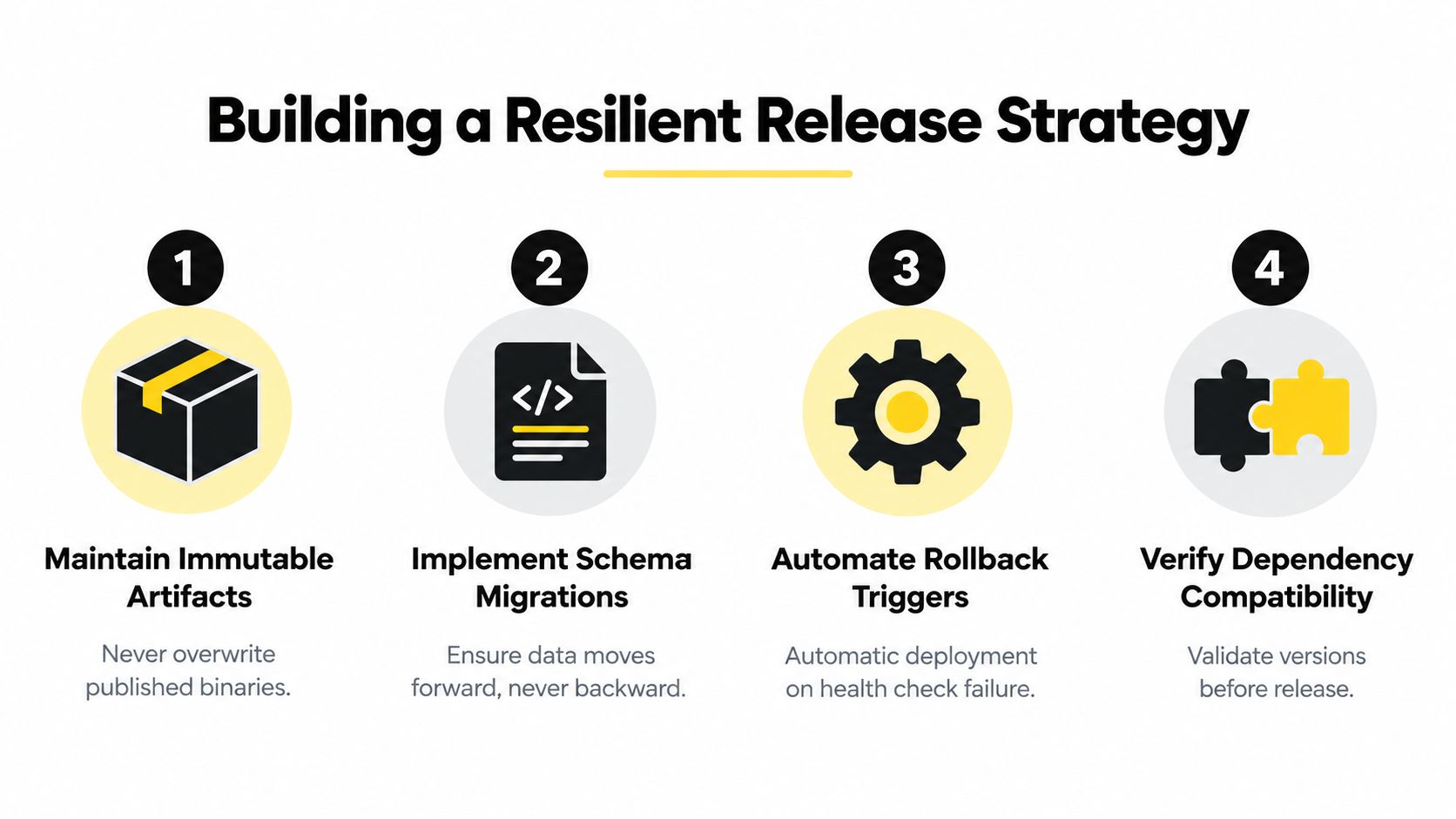
Start with the artifact chain. Tag stable source states, lock dependencies, preserve signed builds, and never overwrite a published release. Then connect each artifact to an environment, channel, and deployment event. The team should be able to reconstruct what happened without relying on a developer’s local machine.
Four controls that reduce recovery risk
- Immutable artifacts: Store every production bundle under a unique identity. A “previous” pointer can select a release, but it must not mutate the release itself.
- Compatible migrations: Use expand-and-contract techniques so older and newer application versions can coexist during a controlled transition.
- Guarded automation: Automate fallback only for signals that distinguish a real release failure from a transient service problem.
- Dependency validation: Check the native shell, plugins, APIs, services, and schema before allowing a target revision to become active.
Observability closes the loop. Capture per-device version, launch result, update status, failure reason, and adoption state. Those records let support answer whether a user is still on the failed bundle, already received the fallback, or never downloaded the update.
Teams should rehearse the recovery path with realistic data and mixed client versions. A test that restores code against an empty development database can miss the incompatibility caused by real records, old schema variants, queued writes, and partially completed migrations. Recovery testing should also verify authorization, signing, artifact retrieval, channel targeting, and the communication plan.
Recovery is not measured by the existence of an old build. It is measured by how precisely the team can control impact and restore a compatible state.
Release planning should include explicit ownership for dependency coordination. Teams that need a broader framework for managing dependencies in agile can use that planning discipline to align mobile, backend, database, and product changes before deployment.
A practical readiness review asks:
- Can the team identify the exact artifact active on each channel?
- Can it pause exposure without changing already installed code?
- Can it restore a signed, compatible bundle?
- Can it prove that the database remains safe after an application rollback?
- Can it detect failures per version rather than only at aggregate service level?
- Can it choose roll-forward when reversal would damage valid data?
If any answer is unclear, the release process has a recovery gap. Fixing that gap before the next incident is cheaper than improvising while users are waiting.
Key Takeaways for Safer Deployments
Rollback reverses an applied software or configuration change to restore a known-good state. It doesn’t prevent defects, repair the underlying cause, or automatically undo committed database changes.
Keep application artifacts immutable and addressable. Track the active version, dependencies, native-shell compatibility, and audience for every release. Treat schema migrations and user data as separate recovery targets, because a code rollback can leave the database changed and a database rollback can destroy valid records.
Use staged delivery, reliable health signals, explicit authorization, and a tested runbook. For mobile teams, signed over-the-air bundles can provide rapid recovery for compatible web-layer changes, while native changes still require the appropriate binary release path. Measure recovery by reduced blast radius and verified service restoration, not by the presence of an old build.
Capgo gives Capacitor and Electron teams signed live-update bundles, targeted channels, version history, per-device observability, and rollback protection for compatible web-layer releases. Review your current recovery path and see how Capgo can help you pause exposure, restore a known-good bundle, and keep incident response controlled.





