
Your cross-platform app passes on a simulator, the desktop browser, and the developer’s flagship phone. Then a small JavaScript, CSS, copy, configuration, or asset update reaches real users and exposes a broken layout on one Android manufacturer, a failed deep link, or an update that won’t install after a network interruption. That’s the normal failure pattern when teams test features in isolation but don’t test the release path.
A useful mobile apps testing checklist treats quality as a release-control system. It connects functional and UI verification with device coverage, network and resource limits, security, OTA installation, staged delivery, CI/CD gates, rollback, and post-release monitoring. The matrix should reflect your supported devices, OS versions, Capacitor, Ionic, or Electron architecture, and business risk. A fintech checkout needs different release controls from a simple content reader.
Use the ten steps below as short, decisive checks. Link them to your broader SaaS quality testing checklist, then record a clear pass, fail, or approved exception for every release candidate.
Table of Contents
- 1. Functional Testing Across Multiple Devices and OS Versions
- 2. Update Delivery and Installation Testing
- 3. Network Connectivity and Performance Testing
- 4. Security and Data Privacy Testing
- 5. UI and Usability Testing
- 6. Battery, Memory, and Resource Consumption Testing
- 7. Offline Functionality and Data Synchronization Testing
- 8. Crash and Error Handling Testing
- 9. User Acceptance Testing and Beta Testing
- 10. Continuous Integration, Automated Testing, and CI/CD Pipeline Validation
- 10-Point Mobile App Testing Checklist Comparison
- Turn the Checklist Into a Release Gate
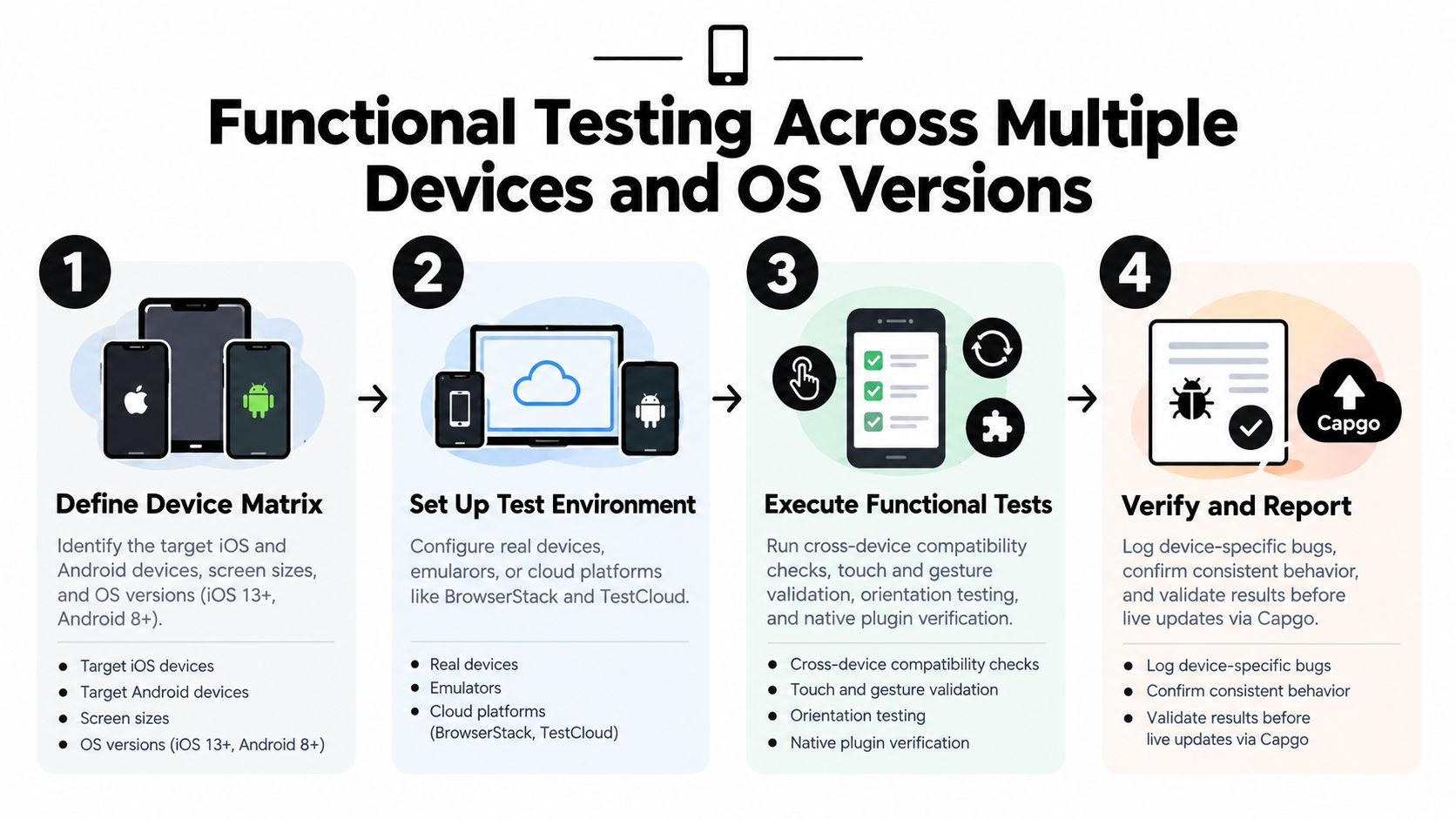
1. Functional Testing Across Multiple Devices and OS Versions
A feature that works in a browser isn’t automatically reliable inside a native shell. Capacitor apps depend on both web behavior and native bridges, while Ionic layouts respond differently to screen dimensions, system bars, keyboards, gestures, and platform conventions. Test the complete user journey on real devices, not just isolated components.
Start with the flows that protect revenue or account access. Exercise sign-up, login, onboarding, search, payments, notifications, deep links, logout, and session recovery. Repeat those flows on small and large iPhones, Samsung Galaxy and Google Pixel devices, and any OnePlus or other manufacturer represented in your analytics. Include the oldest supported OS and a current release. A device matrix built from real user analytics is more useful than a list chosen by developer preference. Industry guidance recommends covering at least one device from every major manufacturer, including a mid-range Android model, as fragmentation remains a central mobile testing risk (mobile app testing guidance).
Make the matrix risk based
Cloud services such as BrowserStack can extend coverage without requiring every handset in-house, but real devices still matter for touch response, camera behavior, battery impact, and OEM-specific differences. Keep a small physical lab for the devices that generate the most sessions, crashes, or support tickets.
- Check platform bridges: Verify camera, file access, biometrics, push notifications, payments, and share actions on each relevant platform.
- Check lifecycle changes: Background the app, force-close it, rotate the screen where supported, reopen it, and test multitasking.
- Check live updates: Apply a JavaScript or CSS update before and after the native build version changes. Use the Android distribution chart to inform Android coverage decisions.
Release rule: A simulator pass is evidence for the simulator. It isn’t evidence that every supported device can complete the flow.
2. Update Delivery and Installation Testing
An OTA update can be technically valid and still fail operationally. The bundle may download but activate only after a relaunch, install while the app is backgrounded, or encounter insufficient storage. Test the complete journey from channel assignment through download, verification, activation, and recovery.
Create staging, beta, and production channels that resemble the deployment configuration. A test update might change only CSS, copy, or an asset, because small web-bundle changes can still break a platform-specific screen. Test the transition from the existing version to the candidate version with user data, saved preferences, authentication state, and interrupted sessions intact.
The update must also behave safely when conditions change. Interrupt the download, move the app between foreground and background, enable airplane mode, and repeat the launch. Test low-storage conditions and confirm that a failed update leaves the last working version available. Validate signed-bundle verification and make rollback an explicit test case, not an assumption. The Capacitor app update validation checklist provides a practical companion for this lifecycle.
Treat channels as control points
Use a narrow internal channel for engineering validation, a broader beta channel for realistic device and network feedback, and production only after the release criteria are met. Record the candidate version, channel, test devices, update result, and rollback result.
If your updater provides per-device logs, inspect them during the test rather than waiting for a support report. Confirm that the app activates the intended bundle, reports its state, and remains usable if installation is deferred.
3. Network Connectivity and Performance Testing
A mobile app rarely runs on a perfect connection. Test Wi-Fi, cellular networks, high latency, packet loss, slow downloads, connection drops, and recovery during an active operation. A download that succeeds in Chrome DevTools may still behave differently when the device changes networks or the operating system suspends background work.
Begin with quick throttling for repeatable checks. Then use real devices on actual cellular connections and test in places where signal quality changes. Start an update, API request, upload, checkout, or sync operation, then remove connectivity halfway through. The app should show progress, preserve safe state, retry when appropriate, and explain what the user can do next. It shouldn’t freeze behind an indefinite spinner.
Performance belongs in the release gate because users abandon slow mobile experiences. One Google benchmark cited in an industry summary reports that 53% of mobile visits end when loading takes more than 3 seconds, so startup and responsiveness deserve explicit thresholds rather than subjective approval (mobile app testing statistics).
Verify transitions, not just conditions
Offline testing before launch is useful, but the most revealing failures happen during transitions. Test connected to disconnected, disconnected to connected, Wi-Fi to cellular, and foreground to background while an operation is underway.
- Check timeout behavior: Confirm every remote operation has a bounded wait and a readable failure message.
- Check resumability: Interrupt large downloads and verify whether the operation resumes safely or restarts without corrupting local state.
- Check background work: Confirm update downloads don’t disrupt active user tasks.
- Check diagnostics: Group failures by network condition so engineers can distinguish server, device, and connectivity problems. For terminology and practical context, use this explanation of network latency in mobile applications.

4. Security and Data Privacy Testing
Security testing must cover the app, its native plugins, its update pipeline, and the people and systems authorized to publish releases. An encrypted API call doesn’t protect a signing key stored in a repository, and a secure bundle doesn’t compensate for sensitive data written to logs.
Inspect transport security, certificate validation, authentication, token storage, permissions, deep links, local databases, clipboard behavior, and exported Android components. Confirm that personally identifiable information isn’t exposed in debug logs, crash payloads, analytics events, or update diagnostics. Review the permissions requested at first launch and after an update, including behavior when a user grants, denies, or later revokes access.
For regulated products, map the test evidence to the applicable controls. A healthcare app may need a different privacy review from an e-commerce app, but both should verify that an update doesn’t remove an existing security control or introduce an unsafe dependency. Use the OWASP Mobile Application Security Verification Standard as a review framework, and include update delivery in penetration-testing scope. The app quality assurance guide can help structure that work.
Protect the release mechanism
Keep signing keys in controlled secret storage, restrict publishing permissions, rotate credentials according to policy, and review every change to the updater configuration. Test that invalid, tampered, expired, or incorrectly targeted bundles are rejected rather than activated.
Security approval should answer two questions separately. Can users’ data remain protected, and can only authorized people deliver executable content?
5. UI and Usability Testing
Visual regressions often arrive through harmless-looking changes. A new font rule can push a button below the viewport, a copy edit can overflow a card, and a theme adjustment can make text disappear in dark mode. Test the interface after updates on real screens with real touch interaction.
Run core flows at small and large dimensions, on phones and tablets where supported, in portrait and in other orientations where applicable. Check keyboard avoidance, safe areas, notches, dynamic system bars, scrolling, loading states, error messages, dialogs, modals, and orientation changes. Repeat visual checks after a CSS-only update, because the native binary may remain unchanged while the rendered experience changes.
Automated screenshot comparison can catch spacing, color, and asset changes, but it can’t decide whether an onboarding explanation is clear. Pair visual regression with task-based usability sessions involving people who match the target audience. Test VoiceOver and TalkBack on real devices, including focus order, labels, announcements, gestures, and modal behavior.
Make accessibility continuous
Accessibility shouldn’t be a final sign-off box. Recent guidance recommends integrating mobile accessibility into design, development, automated UI tests, release pipelines, and manual testing with people with disabilities (mobile accessibility testing trends). WCAG 2.2 mobile guidance addresses touch target size, dragging alternatives, obscured focus, redundant entry, and accessible authentication, areas generic checklists often miss.

6. Battery, Memory, and Resource Consumption Testing
A release can pass every functional test and still make the app unpleasant to use. Measure memory, CPU, battery activity, storage use, startup behavior, and background work before approving a bundle that changes rendering, synchronization, media, maps, or notifications.
Use Xcode Instruments for iOS profiling and Android Profiler for Android investigations. Capture a baseline on the previous release, then repeat the same workflow on the candidate. Keep the workflow realistic: open the app repeatedly, browse long lists, upload media, leave it idle, background it, return to it, and install an update while another task is active.
Test constrained hardware
High-end devices conceal resource problems. Include a mid-range or lower-resource device from your supported audience, especially for large Ionic interfaces, image-heavy screens, and Electron applications running on constrained desktops. Watch for memory growth across repeated navigation, abandoned network requests, WebView leaks, excessive timers, and background tasks that continue after the user leaves a screen.
- Check bundle weight: Set a project-specific budget for update size and investigate unexpected growth.
- Check installation storage: Test downloads and activation when free storage is limited.
- Check background activity: Verify that update installation and synchronization don’t create unnecessary CPU or battery work.
- Check before and after: Compare the candidate with the current production version using the same device, account, data set, and workflow.
A differential update can reduce transferred content when only selected web assets change, but smaller delivery doesn’t guarantee lower runtime consumption. Profile both the update package and the running application.
7. Offline Functionality and Data Synchronization Testing
Offline behavior needs a defined contract. Decide which screens remain usable without connectivity, what data is cached, which actions queue locally, and how the app communicates that state. “Works offline” is too vague to test or approve.
Use airplane mode for repeatable interruption tests, then create realistic transitions. Open cached content, edit a record, submit a form, queue several actions, close the app, reopen it, restore connectivity, and observe the synchronization order. Verify that retries don’t duplicate payments, messages, bookings, or other irreversible actions. If two versions of the same record change, test the conflict policy and make the chosen outcome visible to the user.
Protect local consistency
Inspect the local database and queued-operation state after failures. A request that times out may have completed on the server, so the client must reconcile safely rather than blindly retrying. Test expired authentication while offline, revoked permissions after reconnection, cleared caches, interrupted migrations, and an update applied between queued operations.
For Capacitor and Ionic apps, include native plugin behavior in the offline plan. Camera capture, file selection, geolocation, and local notifications may continue working while API-backed features cannot. For Electron, test sleep and wake cycles, network changes, local file access, and application restarts.
Offline testing isn’t just “turn Wi-Fi off.” The release gate should cover the moment connectivity disappears, the work that follows, and the state after it returns.
8. Crash and Error Handling Testing
Error handling determines whether a defect becomes a recoverable interruption or a lost session. Trigger known failures deliberately, including malformed API responses, expired tokens, rejected permissions, unavailable native plugins, corrupt local data, JavaScript runtime exceptions, and interrupted update activation.
Integrate a crash system such as Sentry or Firebase Crashlytics, but test the evidence it produces. A stack trace without app version, bundle version, device model, OS version, channel, account state, and recent breadcrumbs may not identify the cause. Verify that logs are useful without including passwords, tokens, payment data, or other sensitive values.
Connect detection to action
Define which signals block a release, pause a rollout, alert an on-call engineer, or trigger rollback. A critical error on one device family may require a targeted channel response rather than a global rollback, while a broad activation failure needs immediate containment.
Create a test build that intentionally throws known exceptions and confirm that:
- Error boundaries work: The app preserves unaffected screens or offers a safe recovery path.
- Messages help users: They explain the next action without exposing technical details.
- Diagnostics identify scope: Engineers can filter failures by native version, web bundle, channel, device, and OS.
- Rollback is safe: The app returns to a known-good bundle and remains launchable.
- Alerts are actionable: Notifications include ownership, severity, and a runbook rather than noise.
Capgo’s per-device logs and release history can be used alongside crash tooling to compare update activation with subsequent failures. That correlation is more useful than treating crash reports as a separate QA inbox.
9. User Acceptance Testing and Beta Testing
Automated tests prove that scripted conditions pass. UAT proves that the product works for the people and workflows that matter. Give testers realistic accounts, permissions, data, devices, network conditions, and business tasks. Don’t limit the group to engineers who already know how the feature is supposed to work.
Use separate channels for staging, beta, and production. A beta channel should contain users who represent different device manufacturers, OS versions, accessibility needs, connectivity patterns, and account states. Ask them to complete defined tasks, report confusing behavior, and attach diagnostic context. A vague “looks good” doesn’t provide a release decision.
Make rollout decisions evidence based
Before broad delivery, define the signals that determine whether to continue, pause, or roll back. Review adoption, failed installations, crash patterns, support reports, and task completion feedback together. Anecdotal feedback can reveal a serious usability or accessibility issue, while aggregate metrics can show a broad installation problem that testers didn’t notice.
Document each decision with the candidate version, channel, audience, test window, observed failures, open risks, owner, and next action. The rollout percentage in a plan should be treated as a control variable, not a promise. Start with a deliberately limited audience, expand only when the evidence supports it, and preserve a rollback path throughout the rollout.
For enterprise customers, UAT may require tenant-specific configuration, identity providers, permissions, and compliance workflows. Test those conditions before exposing the update to every customer, especially when a shared web bundle serves multiple deployment profiles.
10. Continuous Integration, Automated Testing, and CI/CD Pipeline Validation
Automation creates release control only when the pipeline can stop an unsafe change. Separate fast unit tests, integration tests, and end-to-end tests so developers know what failed and why. Run unit tests on every commit, use integration tests for API contracts and malformed responses, and reserve E2E regression for revenue-critical flows such as login, onboarding, and checkout. This layered model is part of modern mobile testing guidance, which also includes network degradation, offline sync, push-notification states, deep links, billing sandboxes, accessibility, and OWASP MASVS review (mobile app testing guide).
A GitHub Actions workflow might lint and run unit tests on every pull request, build the Capacitor or Electron artifact, execute integration checks, and launch critical Cypress or Appium flows on selected real devices. A successful candidate can then deploy to a preview or beta channel through an API. The CI/CD integration testing guide can support that pipeline design, while this deployment pipeline guide from Webtwizz adds broader pipeline context.
Prevent flaky tests from becoming false confidence
Don’t chase total coverage at the expense of signal. Start with the flows that can lose revenue, expose data, block launch, or invalidate an update. Track execution time, retry count, failure evidence, and flake rate. Quarantine unstable tests with ownership and a repair deadline, instead of allowing retries to hide real regressions.
- Pull request gate: Block merging when required tests fail or the build cannot be reproduced.
- Release gate: Require functional, security, accessibility, update, and rollback evidence for the candidate.
- Delivery gate: Publish only to the intended channel with verified signing and audience rules.
- Post-release gate: Keep monitoring active and pause expansion when diagnostic signals deteriorate.
10-Point Mobile App Testing Checklist Comparison
| Item | Implementation Complexity 🔄 | Resource Requirements ⚡ | Expected Outcomes ⭐ | Ideal Use Cases 📊 | Key Advantages & Tips 💡 |
|---|---|---|---|---|---|
| Functional Testing Across Multiple Devices and OS Versions | High 🔄, device matrix + real-device validation | High ⚡, device lab or cloud testing (BrowserStack) | Consistent behavior across devices; fewer device-specific bugs ⭐⭐⭐ | Apps targeting diverse iOS/Android devices; CapacitorJS native-web bridges | Catches device-specific bugs early; tip: prioritize devices by analytics and use cloud labs |
| Update Delivery and Installation Testing | High 🔄, many update paths, rollback scenarios | Moderate ⚡, test channels, network simulation, Capgo API | Reliable update delivery, safe rollbacks, signed bundles ⭐⭐⭐ | Apps using Capgo live updates, staged rollouts, differential updates | Validate rollbacks and differential downloads; tip: create beta/staging channels and simulate interruptions |
| Network Connectivity and Performance Testing | Moderate 🔄, throttling and transition scenarios | Moderate ⚡, network simulators + real-network tests | App remains usable under poor networks; reliable update downloads ⭐⭐⭐ | Apps that download updates or operate in variable connectivity areas | Identify bottlenecks and resume logic; tip: test on real 4G/5G and simulate packet loss |
| Security and Data Privacy Testing | High 🔄, compliance + vulnerability scanning | High ⚡, security tools, pen testing, expertise | Protects data, ensures compliance (GDPR/HIPAA), prevents tampering ⭐⭐⭐ | Fintech, healthcare, enterprise apps requiring regulatory compliance | Enforces trust and reduces breach risk; tip: use OWASP guides, certificate pinning, regular pen tests |
| UI/UX and Usability Testing | Moderate 🔄, manual + automated accessibility checks | Moderate ⚡, designers, real devices, user sessions | Prevents UI regressions; improves accessibility and retention ⭐⭐⭐ | Apps with frequent UI updates or strong accessibility requirements | Combine automated checks with real-user testing; tip: run screenshot regression suites and test touch interactions |
| Battery, Memory, and Resource Consumption Testing | Moderate 🔄, profiling and long-run metrics | Moderate ⚡, Instruments/Profiler, device fleet | Prevents performance regressions and resource drains ⭐⭐⭐ | Resource-sensitive apps and lower-end devices | Optimize bundle sizes and leaks; tip: set performance budgets and profile before/after updates |
| Offline Functionality and Data Synchronization Testing | High 🔄, complex state and conflict handling | Moderate ⚡, offline scenarios, local DB checks | Reliable offline UX and correct sync behavior after reconnection ⭐⭐⭐ | Apps that must work offline or sync user data later | Ensures data integrity; tip: test airplane mode, queue/retry logic, and conflict resolution thoroughly |
| Crash and Error Handling Testing | Moderate 🔄, targeted fault injection and logging | Moderate ⚡, crash reporting tools (Sentry, Crashlytics) | Detects critical bugs early; enables automatic rollback on regressions ⭐⭐⭐ | All apps, especially those using live updates | Improves stability; tip: integrate crash reporting and set rollback triggers for critical error rates |
| User Acceptance Testing (UAT) and Beta Testing | Moderate 🔄, coordinating real users and staged rollouts | Moderate ⚡, beta cohorts, Capgo channels, analytics | Real-world feedback, validated feature fit, reduced production risk ⭐⭐⭐ | Pre-production releases, staged Capgo rollouts, enterprise UAT | Catches issues automation misses; tip: recruit diverse testers and monitor adoption/failure metrics |
| Continuous Integration, Automated Testing, and CI/CD Pipeline Validation | High 🔄, setup and maintenance of pipelines & tests | High ⚡, CI infrastructure, test suites, build agents | Faster, confident releases with fewer regressions ⭐⭐⭐ | Teams requiring frequent releases and automated deployments to Capgo | Enables automated, safe updates; tip: start with critical-path tests and integrate Capgo API for deployments |
Turn the Checklist Into a Release Gate
A checklist becomes valuable when it controls a decision. Start by defining the supported device matrix from user analytics, crash history, OS requirements, and business risk. Include representative iOS and Android devices, major manufacturers, screen sizes, and the lowest supported operating systems. Add Electron operating systems and hardware profiles when the same web application ships to desktop users.
Run functional checks against core journeys first. Then verify UI behavior, responsive layouts, orientation, keyboard handling, notifications, deep links, accessibility semantics, and assistive technology. Test the same candidate on real devices where touch, WebView behavior, system dialogs, lifecycle changes, and OEM differences can invalidate simulator results.
Apply pressure before delivery. Exercise slow and interrupted networks, offline transitions, background execution, limited storage, memory pressure, battery-sensitive workflows, and long sessions. Verify security controls, permission changes, dependency risks, signing, transport protection, local storage, and privacy-safe diagnostics. A release that performs well only under ideal conditions isn’t ready for a mobile audience.
The update path deserves its own approval. Install from the current production version, test a web-only change, interrupt downloads, relaunch from foreground and background states, and confirm that the intended bundle activates safely. Trigger rollback explicitly and confirm the previous working version remains launchable. For Capacitor, Ionic, and Electron teams, OTA delivery becomes part of quality engineering rather than a post-build convenience.
CI/CD should enforce the repeatable parts. Run unit tests on every commit, integration tests against contracts and failure responses, and E2E tests on critical workflows. Add security and accessibility checks to the pipeline, publish successful candidates to controlled channels, and quarantine flaky automation with visible ownership. The most useful automation isn’t the largest suite. It’s the suite that provides fast, trustworthy evidence for high-risk changes.
After release, review adoption, installation failures, crash patterns, per-device diagnostics, support reports, and channel performance. Record why the rollout continued, paused, or rolled back. Update the checklist whenever the app gains a native plugin, changes its minimum OS, adds a payment or identity flow, modifies accessibility behavior, or changes its OTA and CI/CD process.
Capgo can fit into this control system by delivering signed JavaScript, CSS, copy, configuration, and asset bundles to targeted channels, with update history, adoption and failure metrics, per-device logs, automated rollback protection, differential updates, and API-based CI/CD delivery. Use it as one part of a release process that still includes functional, security, accessibility, performance, and human acceptance evidence.
For CapacitorJS and Electron teams, Capgo provides controlled live updates, channel-based testing, per-device observability, differential delivery, and rollback protection for the release path described above. Visit Capgo to evaluate how its updater, CI/CD integrations, and release diagnostics can help you ship JavaScript, CSS, copy, configuration, and asset fixes with clearer operational control.





