
A 2024 review counted more than 350,000 health-related mobile apps in major app stores, with about 250 new apps released each day. That crowded shelf changes what mobile app development for healthcare requires: building the app is only the start. Teams also need a controlled way to classify features, protect patient data, show whether information has synced, and recover safely when a release goes wrong, as the 2024 review of health apps makes clear.
A useful way to treat compliance is as a release system, not a checklist at the end. Before patient data enters a build, every feature needs a regulatory label, every data flow needs a patient-visible state, and every release needs a tested rollback path.
Table of Contents
- Why Healthcare Apps Never Really Launch
- Which Healthcare Rules Apply to Your App
- How Patient Data Should Move on a Phone
- Clinical Connections Patients Can Actually See
- Release Gates for Unsafe Healthcare Builds
- Store Listing and Health Data Declarations
- Incident Response When Advice Can Harm
- Ship Web Fixes Without a Store Wait
- Pick a Release Path Before You Build
Why Healthcare Apps Never Really Launch
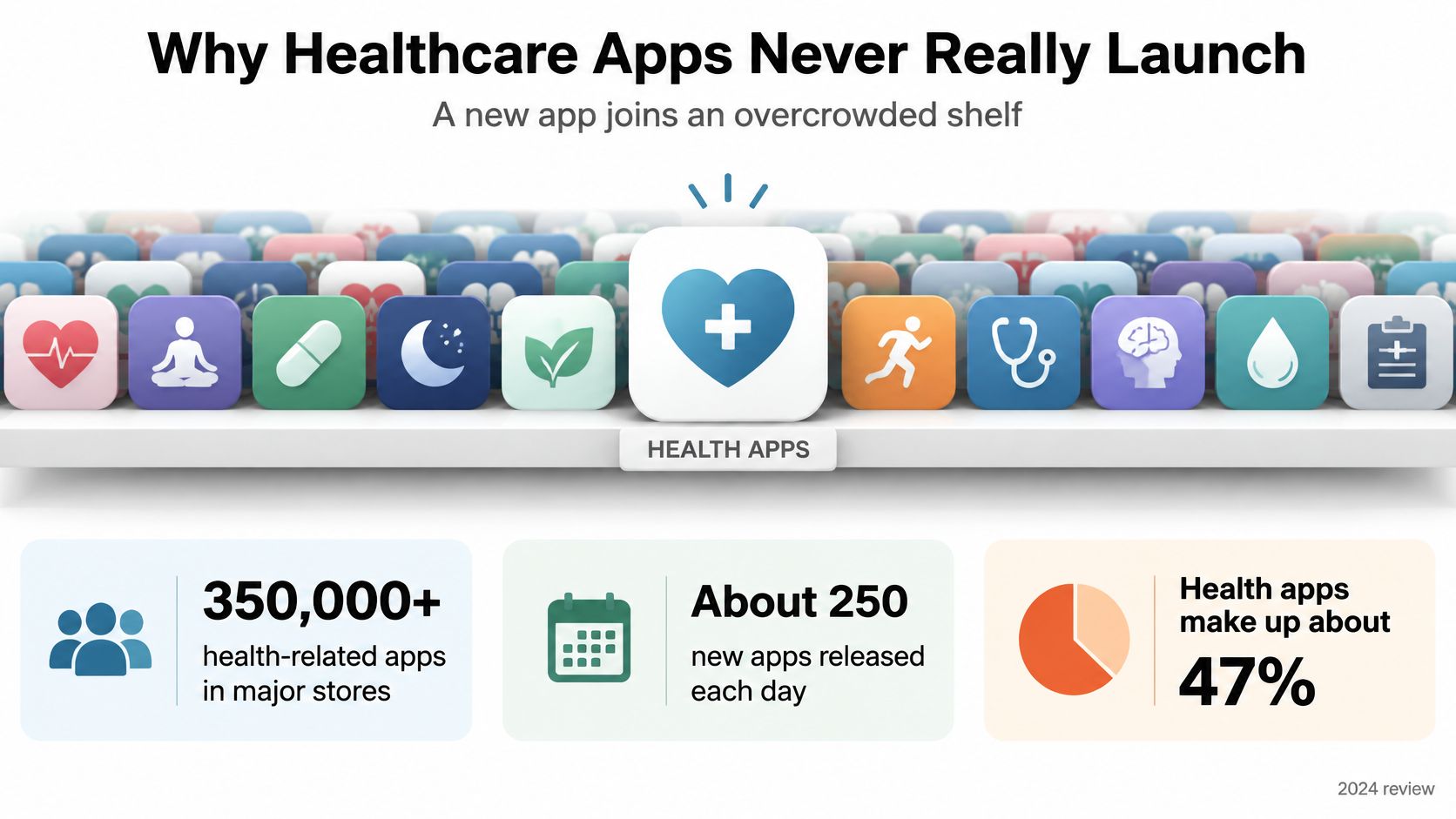
Healthcare apps compete for attention in an already crowded market. Patients choosing a medication reminder, symptom diary, or appointment tool are deciding whether to trust one option among many. That trust depends on more than the feature list.
A healthcare app operates every day, including after its first release. The store listing sets expectations, while onboarding must explain what to do, accessible screens must work for different users, and privacy language must be clear. Product analytics can reveal where people get stuck, but ongoing maintenance is still needed as operating systems, clinical workflows, and defects change.
Release planning should account for patient-visible failures. If someone cannot recover from a failed sign-in or cannot tell whether a questionnaire was saved, adding another feature will not solve the problem. A defect in a widely distributed build can affect patients directly. Release control belongs in the first design meeting, alongside workflow and feature scope.
Treat compliance as part of the release system: assign every feature a regulatory label, show patients the state of data syncing, and test rollback before patient data enters the app. These controls shape architecture and release decisions from the start.
A step counter and a tool recommending a clinical action may sit beside each other in a backlog, yet call for different safeguards. Classify each planned feature as wellness, care coordination, or possible medical-device software before choosing its architecture. That label helps the team define what must be reviewed and tested before release.
Which Healthcare Rules Apply to Your App
Assign each feature a regulatory label before implementation. The label should capture what the feature does, whose data it handles, and where it operates. Treat that decision as part of the release system: record the applicable rules, show patients the feature’s sync state, and test a rollback path before any patient data is involved. The table is a planning aid, not legal or regulatory advice.
| Rule | Who it covers | What triggers it | What the app must plan |
|---|---|---|---|
| HIPAA | U.S. covered entities and business associates | PHI created, received, maintained, or transmitted | Access control, audit logs, business associate agreements, minimum-necessary display |
| GDPR | Organizations processing EU or EEA personal data | Health data processed as a special category | Lawful basis, DPIA where required, and support for access, correction, and erasure |
| FDA device software policy | Developers of U.S. mobile medical apps | Software functions that may be devices, rather than wellness functions | Separate wellness from device software; apply design controls if the software is a device |
| European Health Data Space 2025 | Wellness apps in the EU health data space | Claims of EHR or national-system connection | State whether connection is possible, support interoperable export, and don’t share automatically |
| Global connectivity | Apps used beyond high-bandwidth regions | Differences in network access and mobile infrastructure | Offline tolerance, low-bandwidth operation, localization, SMS or push fallback |
For HIPAA, first determine whether the app handles protected health information on behalf of a covered entity or business associate. If it does, plan controlled access, appropriate audit records, a business associate agreement where applicable, and screens that reveal only what a person needs for the task. The relevant question is the data flow and the relationship between the app provider and the organization, not whether the app is about health. Teams can compare autism apps for HIPAA compliance as one focused example of how privacy considerations relate to app features and data handling.
Under GDPR, health data is a special category of personal data. Identify the lawful basis for processing, determine whether a data protection impact assessment is required, and design usable ways for people to exercise their data rights. These decisions shape consent wording, account settings, exports, and deletion behavior. Put them in the backlog before implementation, and use a guide to understanding regulatory compliance to help structure decisions by jurisdiction.
Give software functions their own device-software label. The FDA’s Policy for Device Software Functions and Mobile Medical Applications guidance helps developers assess whether a function may qualify as a medical-device function rather than wellness software. Review the intended function, including claims that the software diagnoses, treats, or directs care. A marketing edit cannot resolve a mismatch between what a feature does and how the product describes it.
Connectivity also affects feature scope and release decisions. A global app should define how it handles weak networks, localization, offline work, and a fallback such as SMS or a notification. Specify what the patient sees when a save or sync is pending, fails, or completes. Include those states in the feature’s requirements, because an unclear sync status can leave a patient uncertain about whether information reached the care team.
Apply the table to one feature, such as uploading a symptom questionnaire. Label the data, identify the regions and organizations involved, and decide whether the feature makes a medical claim. Remove rows that do not apply, but keep the decision with the feature record. If the function, audience, or data flow changes, review the label again before releasing the update. A tested rollback path gives the team a defined response if a change behaves unsafely, while the patient-facing sync state makes the feature’s current status clear.
How Patient Data Should Move on a Phone
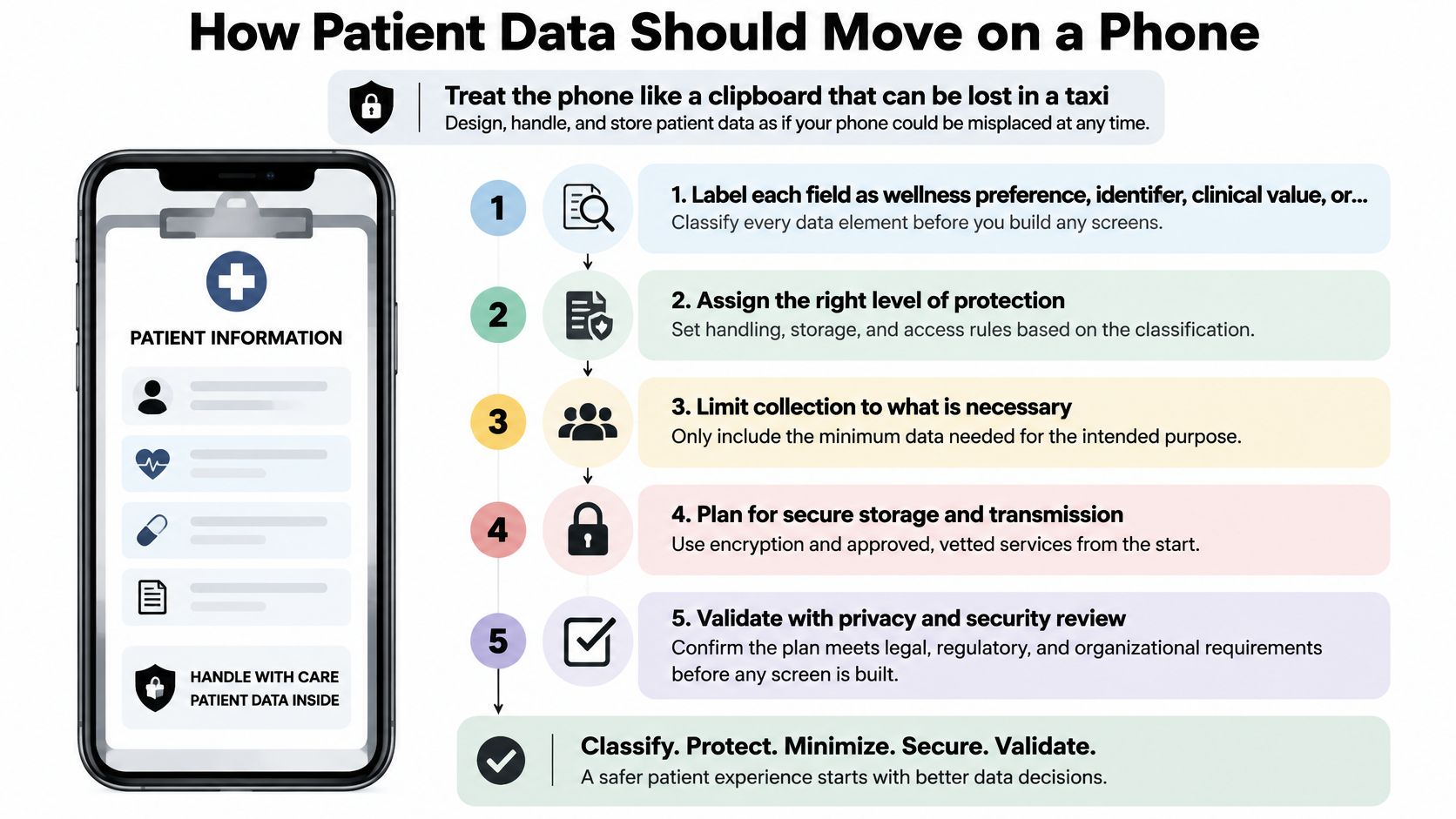
A patient-data flow should be reviewable before it reaches a device. For each feature, assign a regulatory label, identify every place its data can go, show patients whether it is local or syncing, and test how to roll it back before using real patient data.
-
Label each field. Classify it as a wellness preference, identifier, clinical value, or credential. A symptom entry and a notification preference have different exposure risks, so assign storage and access rules to each field rather than treating all app data alike.
-
Map every store. Include memory, the local database, the iOS Keychain or Android Keystore, logs, screenshots, backups, and push payloads. A medication name can appear on a notification banner even when the app’s database is protected.
-
Decide what stays local. Specify what never leaves the device and what may sync, under what conditions, and after what consent. Make the choice by data type and purpose. A patient-facing sync state should show whether information is local, queued, or sent, rather than hiding those states behind a general “sync health data” toggle.
-
Record access without copying the record. Log who viewed or exported a record and when, but keep clinical content out of the log line. This gives reviewers an access trail without creating another uncontrolled copy of patient information.
-
Test export and deletion. Verify both as carefully as login. Check that restoring a phone backup cannot bring back information after account deletion, and that a shared clinic tablet does not leave one patient’s session open for the next person.
Use transport encryption and encryption at rest for sensitive information. A practical guide to app encryption can help frame decisions about where data is protected. Short sessions limit exposure on unattended devices. Biometric access can simplify return access, but it should sit on top of account authentication, not replace it.
Capacitor teams can use native capabilities without relying on closed enterprise plugins. Capgo offers open-source replacements for Ionic enterprise plugins covering storage, authentication, biometrics, and more, including native-biometric, data-storage-sqlite, and social-login. Review each plugin’s handling of sensitive values against the feature’s data labels and threat model.
Before sign-off, put the full flow on one page: source field, store, recipient, retention period, and deletion path. Include failure cases, such as a crash log containing a clinical value or a backup restoring data after deletion. Define the rollback path before a release, then test it without patient data. If the flow cannot identify who receives the data and how the patient can remove it, the design is not ready.
Clinical Connections Patients Can Actually See
A FHIR client isn’t the same as a patient understanding what left the phone. A product can connect to a health system and still leave the user unsure whether sharing was authorized, whether a record arrived, or whether the information is waiting locally.
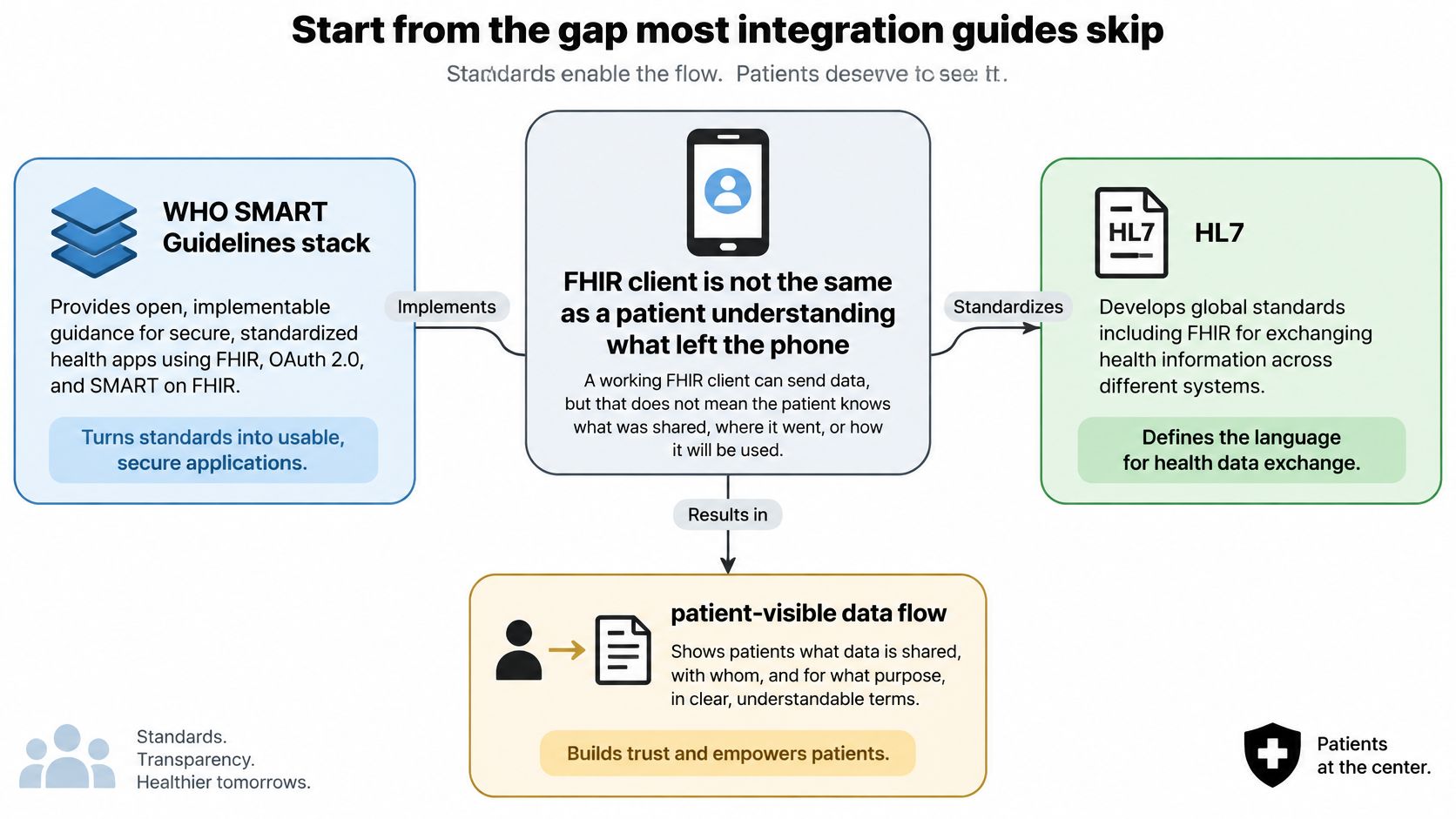
The WHO SMART Guidelines approach provides a standards-based foundation: HL7 FHIR supports patient-centered data exchange, ICD-11 supports consistent clinical terminology, and Clinical Quality Language supports computable decision support. These standards help teams avoid making every integration depend on a proprietary data model.
In a Capacitor or Ionic app, keep the domain model separate from transport logic. Map clinical resources to FHIR profiles, authorize access with OAuth 2.0 and OpenID Connect, and give intermittent connections explicit conflict-resolution rules. The WHO’s Android-oriented SDK pattern includes local storage, data-access, search, and synchronization APIs, along with partial support for FHIR Structured Data Capture questionnaires. That’s a useful model for collecting a questionnaire offline and syncing it later.
The interface should distinguish three claims instead of compressing them into one green checkmark:
| State | Meaning | What the screen shows |
|---|---|---|
| Compatible | An export format exists for this record type | Format name and version |
| Connected | The EHR accepted the patient’s credentials | Account, granted scope, and last check time |
| Transferred | This specific payload was accepted by the EHR | Timestamp and receipt; show failure rather than retrying silently |
These states are not interchangeable. “Compatible” means a format exists, not that the patient has connected an account. “Connected” means credentials worked, not that a particular record transferred. “Transferred” should be displayed only when the receiving system confirms acceptance of that payload.
Offline operation is a clinical consistency problem, not just a caching feature. Store the timestamp, source device, synchronization state, validation errors, and whether a value was entered locally or confirmed by the server. If the EHR rejects a record, show what failed and what the patient can do. A silent retry hides whether the information is current and can make a clinician believe they’re viewing data that never arrived.
The EU’s 2025 European Health Data Space regulation adds a practical product requirement: wellness apps should explain whether they can connect to EHRs or national health systems and support interoperable export where relevant. Interoperability doesn’t authorize automatic transmission; sharing requires consent and must be limited to its stated purpose, according to the European Health Data Space regulation. Give people a consent receipt, field-level sharing controls, an export preview, and a visible failure state. Teams assessing products that combine several personal health functions, including apps combining symptom and cycle tracking, can use the same distinction between compatibility, connection, and confirmed transfer.
A clinician should be able to answer three questions from the screen or audit trail: what was shared, when was it shared, and what remains only on this phone?
Release Gates for Unsafe Healthcare Builds
A release gate should connect each feature’s regulatory label to a test, an owner, and a rollback decision. Functional tests alone cannot show whether a healthcare app is safe or usable. In a study rating 211 health apps, the mean overall score was 3.02 out of 5, privacy and security averaged 2.21, and interoperability averaged 1.75 (health-app ratings study). Use these findings as context, then set pass criteria for the workflows your app supports.
| Gate | Threshold | Evidence | Why it blocks release |
|---|---|---|---|
| System Usability Scale | At least 68 | Patients and clinicians completing real tasks | Below the commonly accepted benchmark |
| Privacy and security baseline | Better than the study mean of 2.21/5 | Security test and log review | Exposes weak protection and handling |
| Interoperability behavior | Better than the study mean of 1.75/5 | Export, consent, and failed-sync scenarios | Connection claims can outrun actual transfer |
| Patient identity | Zero unresolved defects | Wrong-chart test cases | A mismatched record is a safety event |
| Medication, consent, or transmission | Zero unresolved defects | Scenario-based tests | Incorrect instructions or sharing can cause harm |
| Sync and crashes | No rise versus the last stable build | Failure rate by OS version | A regression may require a pause or rollback |
Set the System Usability Scale (SUS) floor at 68. Before testing, choose the two or three workflows most likely to affect care and define a task-completion threshold. Include accessibility, poor-network, offline, and security tests. Track abandonment, validation errors, latency, crash-free sessions, failed synchronization, and task completion by device and operating-system version.
Every feature also needs a patient-visible sync state and a tested rollback path before it handles patient data. A queued, sent, rejected, or confirmed status makes clear whether a record reached its destination. Keep rollback criteria specific to the release, including which failures pause rollout and who can authorize restoring the last stable build. For a practical app quality assurance process, connect each test result to its release gate and owner.
Record sign-off in plain language: SUS owner, zero-harm defect owner, task-completion owner, and sync-failure owner. Do not release a feature if a gate has no owner or lacks a passing result. Teams assessing the risks of clinical advice can review clinical liability when using AI.
Store Listing and Health Data Declarations
Treat store declarations as part of the release record, and make them match the regulatory label assigned to each feature. A mismatch between the app’s behavior and its listing creates confusion for both users and reviewers.
-
Complete App Store Connect privacy details. Answer the privacy nutrition label questions for every data type the app collects, including health and fitness data. Account for third-party SDKs that receive those data.
-
Complete the Google Play Data safety form. Disclose the same data types, purposes, and sharing behavior, then check that the app’s health declarations reflect what its features do.
-
Provide account deletion in the app. If the app lets someone create an account, make deletion accessible and test what happens to local data, backups, and connected services.
-
Match medical claims to the feature label. A wellness feature shouldn’t be described as diagnosing or treating a condition. Review the store listing against the intended function, not just the screen copy.
-
Give reviewers a safe route through the app. Explain how to reach the consent screen, export flow, and any escalation path without requiring real patient data. Keep review credentials and instructions separate from production accounts.
Keep a dated copy of each declaration with the release record. When a feature changes, update the disclosures and review notes in the same change set; otherwise, the store may describe a different data flow than the app now implements.
Incident Response When Advice Can Harm
Treat compliance as part of the release system. Before patient data is involved, assign each feature a regulatory label, show patients the state of any data sync, and test how to restore the previous advice. An incident plan should identify who can pause a rollout, what patients will see, and how the team will recover a known-good version.
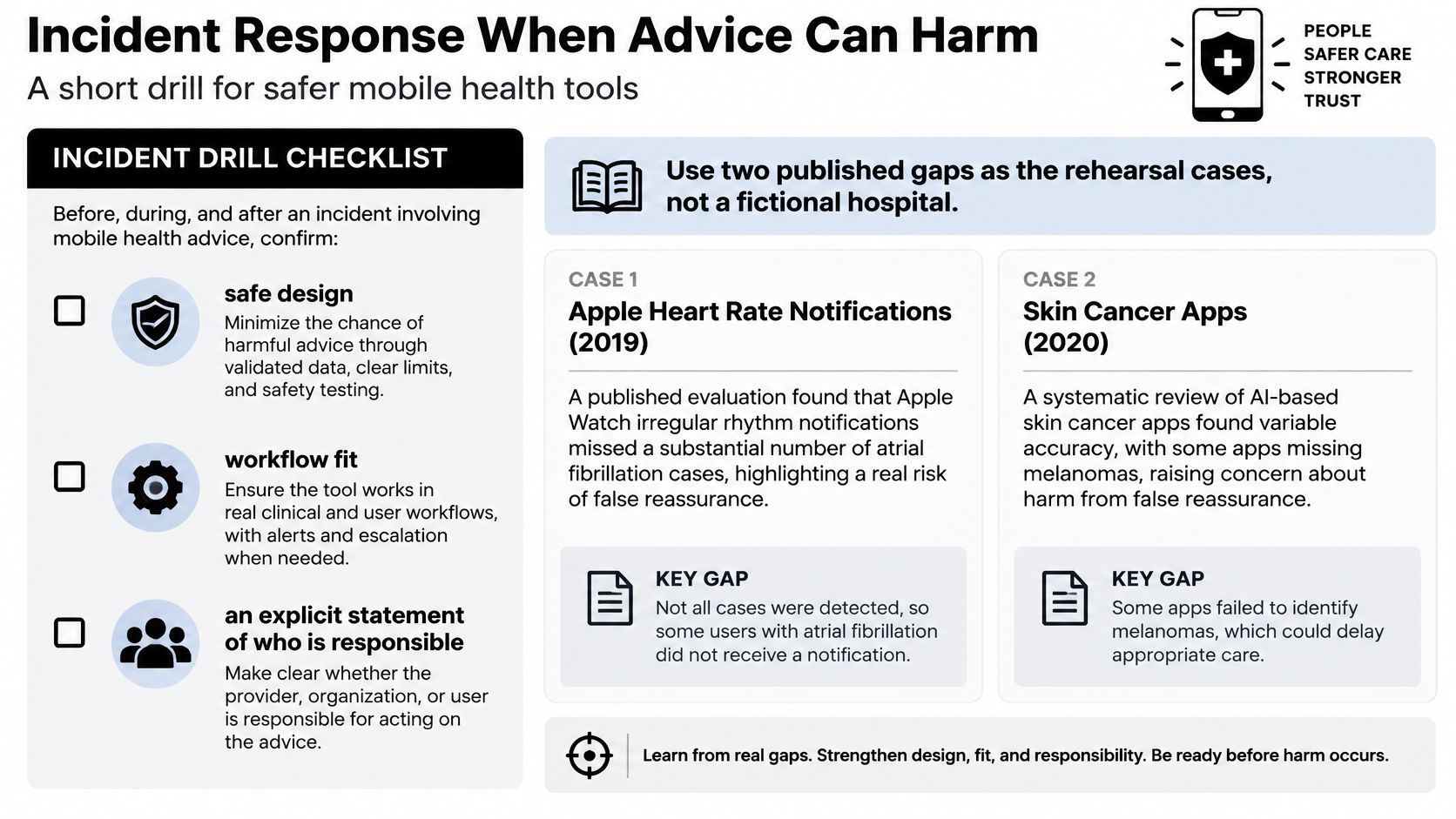
Use realistic drills to check whether patients can see uncertainty, understand why a recommendation was made, and find clinical guidance. Confirm that responsibility for the advice is clear and that the feature fits the clinician’s workflow. A symptom checker that gives a confident answer without an escalation route may affect whether someone seeks urgent care.
Before release, define how the app communicates uncertainty, escalates emergencies, and routes cases to human review. Test accessible and multilingual versions of the flow. Keep audit logs and record the model or clinical-rules version that generated each answer. That record should let the team identify the advice a patient saw and the release that produced it.
Accuracy in a test environment is only one part of safety. Monitor patient behavior after release: check whether advice may delay escalation, whether people abandon the flow, and whether a rule change alters recommendations. Treat a change to advice as a release event, with an assigned regulatory label, a visible sync state, and a tested path back to the prior version.
Operational rule: Keep a persistent fallback and test that the previous advice can be restored before a new version reaches patients.
For web-based clinical rules, prompts, or help screens, progressive delivery can limit exposure while the team investigates an incident. Native changes and regulated behavior changes still require the appropriate store and regulatory path. Write an incident card with four fields: trigger, person paged, patient-facing message, and steps to restore the prior advice. Use this mobile app incident response guide to turn the drill into an executable procedure.
Ship Web Fixes Without a Store Wait
Choose the release lane by what changed. A consent sentence, questionnaire layout, or escalation-screen copy fix may involve JavaScript, HTML, CSS, and static assets. Native code, new device permissions, and changes to regulated device behavior still require the appropriate app-store path. The trade-off is speed versus scope: eligible web changes can ship quickly, while native and regulated changes need their applicable review.
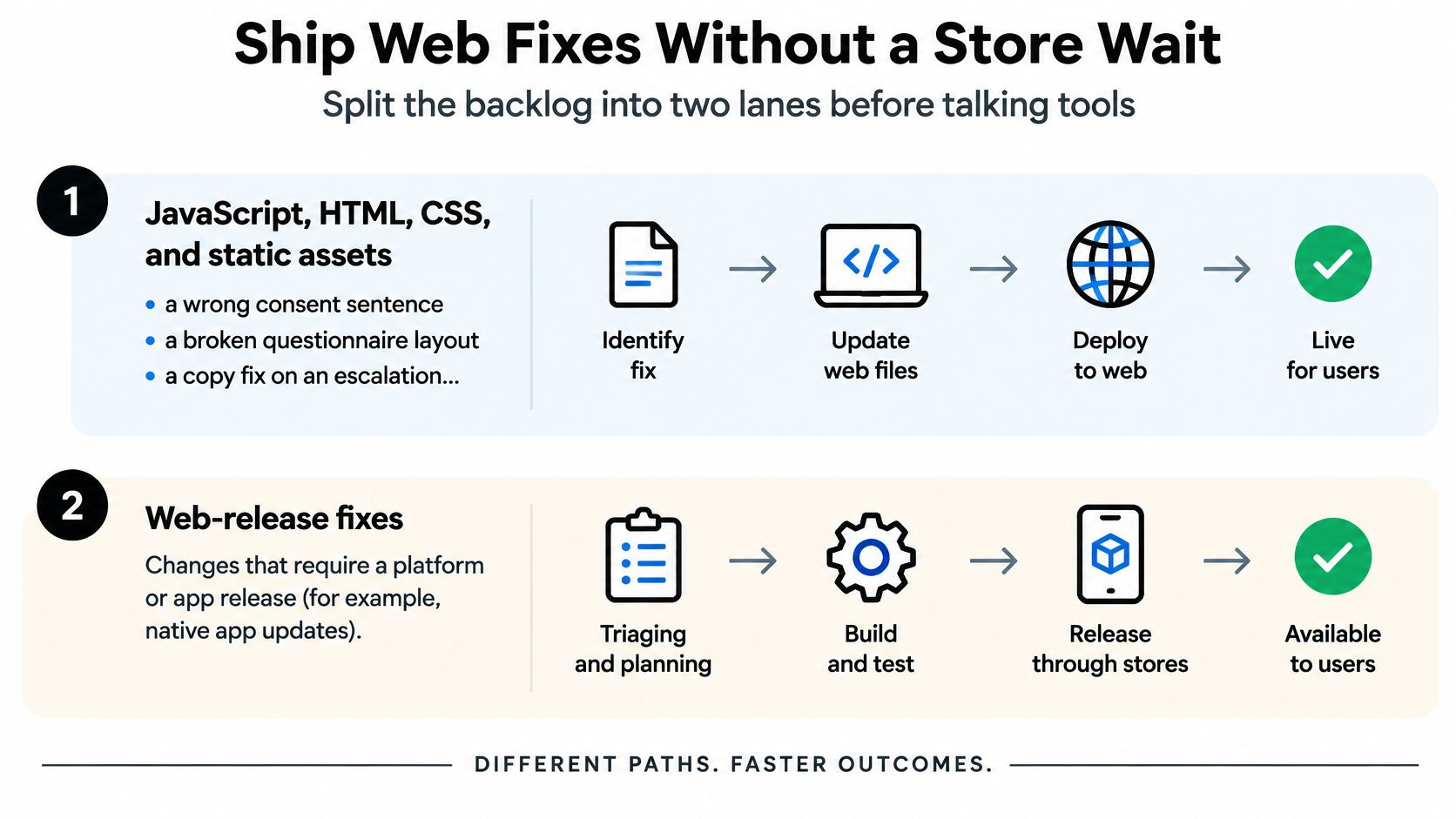
For Capacitor and Ionic teams, Capgo distributes eligible JavaScript, CSS, and asset changes to production apps in minutes instead of waiting for store review. Native changes still go through the stores. Capgo also creates signed iOS and Android builds in the cloud and supports store submission, without requiring a locally operated Mac.
Treat each update as a controlled release. Keep a known-good bundle available, assign the new bundle to a limited share of devices, and check adoption and failure signals at short intervals. Set a failure threshold that pauses rollout, and use separate channels for production, clinician beta testing, and pull-request previews. A guide to over-the-air updates explains how eligible web assets can be delivered separately from native releases. Rapid delivery changes the release timing, not the need to label each feature, show patients its sync state, and test rollback before patient data is involved.
A live-update platform is not a HIPAA certification. Review the data flow and contractual requirements if an update payload could include health data, including whether a business associate agreement is needed. Define which change categories qualify for rapid delivery, and keep regulated medical functions on the appropriate review path.
The practical rule: if a fix changes web code but not native or regulated behavior, use the web-code lane rather than leaving patients on a broken bundle through a multi-day review. Keep the store lane for changes that require it, and have a tested rollback path for both.
Pick a Release Path Before You Build
A team is ready to build when it can label each feature, choose its release lane, and name the person responsible for its gate. A polished first screen can’t substitute for those decisions. They determine whether the right reviewers, tests, and rollback controls are in place before patient data enters the system.
Start with three labels:
- Feature label: wellness, care workflow, or possible device software.
- Update lane: web-asset channel for eligible consent text and layout fixes, or store submission for native and regulated changes.
- Release owner: a named person for each gate, including SUS of at least 68 and zero open defects involving patient identity, medication instructions, consent, or transmission.
For a Capacitor or Ionic app, put a non-clinical screen on a staging live-update channel and rehearse rollback before handling patient data. Then start with a small production channel, monitor synchronization and crash rates, and widen distribution only when the incident card names a person who can act on it.
That discipline is more useful than starting with a long feature list. It lets the team test the release system with low-risk content before a clinical workflow depends on it.
Capgo provides live updates for eligible JavaScript, CSS, and asset fixes, plus cloud-based native builds for iOS and Android, so your team can keep web fixes and store releases on separate paths. Try a staged rollout and rollback rehearsal before patient data enters the app, then visit Capgo to see whether its Capacitor and Ionic release tools fit your workflow.