
An OTA app is a mobile app that can apply approved over-the-air (OTA) updates after install, usually to the JavaScript, HTML, CSS, and asset layer inside a native shell. An OTA update is that delivery: a software change pushed over the internet without replacing the whole store binary.
OTA is the path teams reach for when a JavaScript fix, copy change, CSS tweak, or approved asset update needs to ship now instead of waiting on review.
You’ve probably lived this already. A broken checkout label, a typo in a production screen, or a styling regression gets fixed in minutes, then sits behind someone else’s release queue while customers keep seeing the bug.
Table of Contents
- The Waiting Problem Every Mobile Team Knows
- What OTA Really Means Beyond the Acronym
- Full Packages, Differential Patches, and Snapshots
- Signing, Transport, and Rollback as Security Basics
- Capacitor, Ionic, Electron, and Native Apps Side by Side
- Rollout Channels and Rollback as an Operational Loop
- Common Pitfalls and the Guardrails That Prevent Them
The Waiting Problem Every Mobile Team Knows
A developer ships a small production fix before lunch, then spends the afternoon watching the review status. The code is ready, but the release is not, because the app store has its own approval path and timing. Apple says it reviews apps, updates, bundles, in-app purchases, and in-app events submitted through App Store Connect, with stated targets of at least 50% under 24 hours and 90% under 48 hours. For a team correcting a string, a layout issue, or a non-native asset, that wait can feel like time spent standing outside the door while the fix is already built. Apple’s app review process and timing targets
OTA gives you a second delivery lane for eligible application-layer changes. The store still controls the native binary and anything tied to platform permissions or executable behavior. For a Capacitor workflow, see Capacitor live updates on Capgo and read Capgo’s guide to app store vs direct updates to map exactly which changes belong in each lane.
OTA is not a shortcut around review. It is a controlled path for the parts of the app that can change without replacing the native shell. That means the central question is not whether an update is small, but whether it stays inside the boundary that the store and your runtime already allow.
What OTA Really Means Beyond the Acronym
OTA stands for over-the-air. In practice, it means the update reaches a device or app remotely over the internet, instead of through a cable, a manual reinstall, or a new physical package. For mobile apps, that usually means the native shell stays in place while the runtime pulls fresh web-layer assets such as JavaScript, CSS, text, configuration, and other permitted resources. Capgo’s explanation of live updates for Capacitor
Two meanings people mix together
In operating-system work, OTA can mean a firmware or system update delivered directly to a phone or device. In app work, it often means a bundle that updates the web layer without replacing the native container. Android’s OTA documentation covers the system side, including update paths for the OS and system-partition components, while frameworks like Capacitor apply the same delivery model to web assets inside a reviewed app shell. Android’s OTA architecture
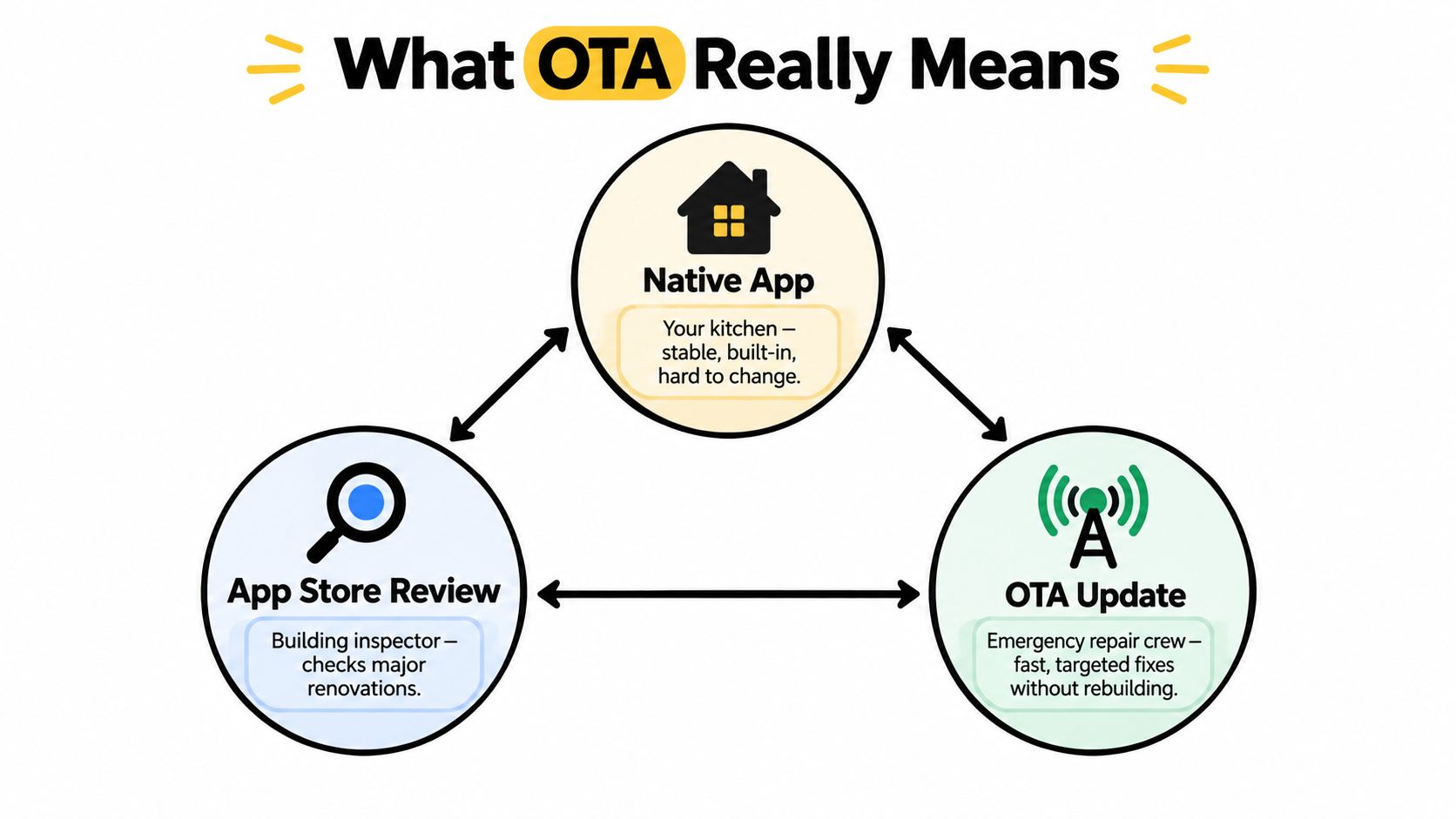
The distinction matters because app store review and OTA do different jobs. The app store acts like the building inspector in a kitchen remodel, checking major structural work before it ships. OTA is the repair crew that can swap drawer handles, fixtures, and wall art without tearing out the room. That comparison holds only inside the approved shell. Once the change reaches into new native behavior, the boundary has been crossed.
Working rule: if the change alters executable code, permissions, entitlements, or the app’s core purpose, it is not OTA territory.
Apple’s App Review Guideline 2.5.2 draws that line clearly. Capacitor and Ionic OTA delivery stays inside the reviewed shell, while the store still controls anything that changes native behavior. For Apple and Google rules in one place, see OTA apps: App Store and Google Play rules. The same boundary is why teams using live updates for Capacitor should separate web-layer fixes from changes that require a new binary, as described in Capacitor live updates and release boundaries and Guideline 2.5.2 and OTA limits for Capacitor and Ionic.
Full Packages, Differential Patches, and Snapshots
OTA systems do not all ship the same payload shape. Some send the whole bundle again, some send only what changed, and some keep a snapshot of state so the client can activate safely and still roll back if needed. The best choice depends on how often files change and how costly it is to move them.
A full package is the simplest model. It reissues the entire bundle, which is easy to reason about but heavier to download. Differential delivery is narrower, because it sends only the differences between versions. That fits mobile JS bundles that change often and should not waste user data on every release. Snapshot-style systems go one step further. They preserve a compact record of the previous state, so the client can switch versions with less storage overhead and a cleaner rollback path. Why delta updates reduce payload size
| OTA Update Shapes Compared | What ships | Best fit | Trade-off |
|---|---|---|---|
| Full package | The entire bundle again | Small apps, infrequent releases, simple pipelines | Easier to build, heavier to download |
| Differential patch | Only changed files or blocks | JS bundles, asset-heavy updates, frequent fixes | More logic to generate and apply |
| Snapshot-style update | Compact representation of state between checkpoints | Systems that need rollback-friendly activation | More moving parts in the updater |
Picking the shape that matches the app
For a Capacitor or Electron team, the central question is whether the payload format matches the release pattern. If one image or one text file changes, forcing a full re-download makes every update feel heavier than it should. If the package is tiny and rare, a delta engine may add complexity without paying back much.
Practical rule: choose the update shape that mirrors how your files really change, not the one with the flashiest architecture diagram.
Android uses the same idea at the OS layer. Virtual A/B updates keep boot-critical partitions rollback-friendly, while dynamic-partition changes are represented as compressed snapshots. That reduces the need to duplicate everything physically and helps the device activate changes with less wasted storage. Android’s Virtual A/B update model
If your release cadence is weekly and only one or two files change, a differential patch usually earns its keep. If you ship a full bundle quarterly, the delta engine is overhead you do not need.
Signing, Transport, and Rollback as Security Basics
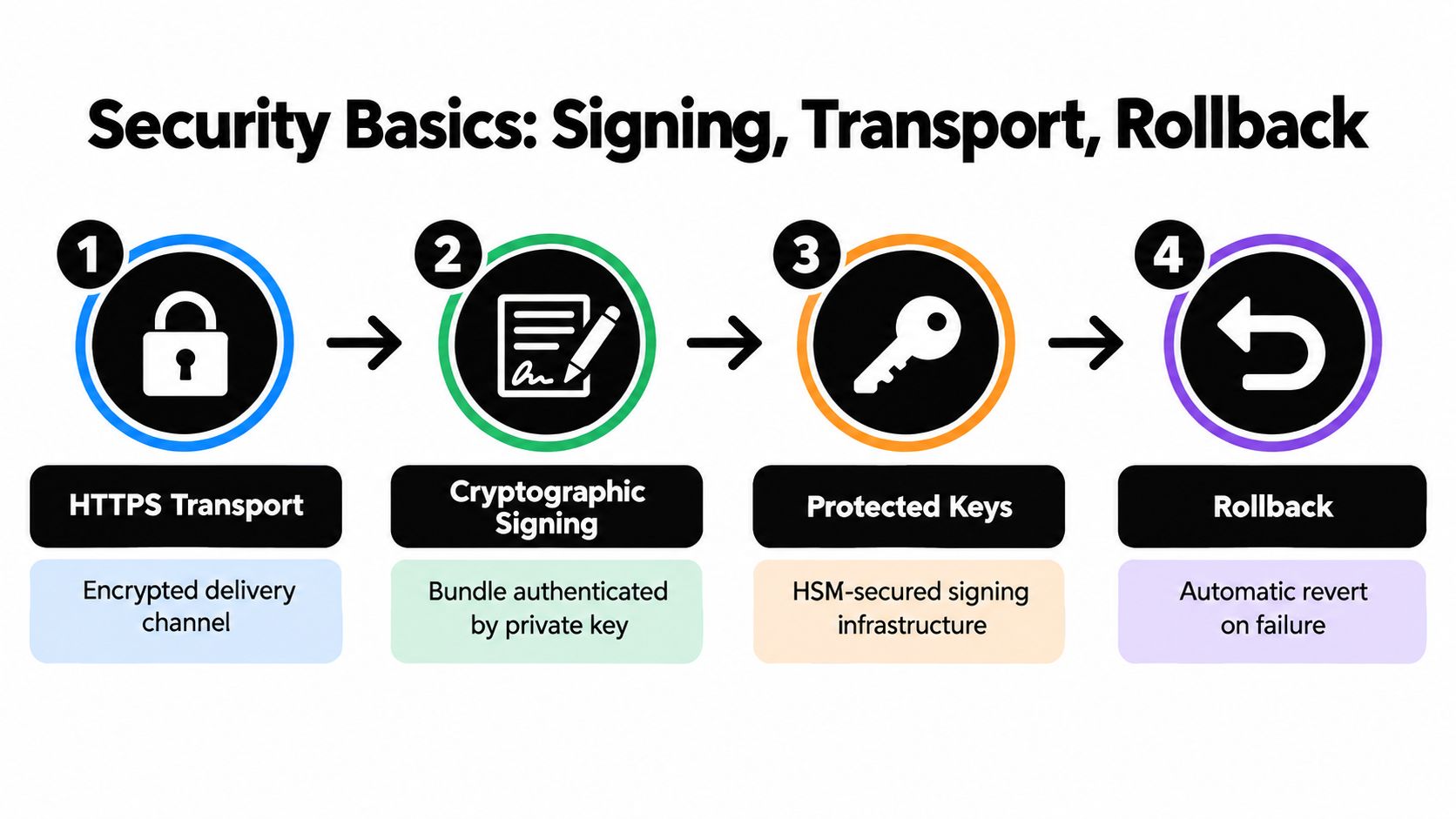
OTA is a privileged delivery path, so security has to be layered and deliberate. Start with encrypted transport, add a signed bundle, protect the signing keys, and make rollback available when the new bundle misbehaves. Signature verification for live updates
Each control blocks a different attack
HTTPS transport protects the channel, but transport encryption alone cannot prove who created the payload. Cryptographic signing covers that gap. NIST says digital signatures provide integrity and source authentication, so the runtime can confirm the package was not altered and that it came from the authorized signer. NIST on code-signing integrity and source authentication
Android makes the trust check concrete. OTA packages must be signed with a key the system recognizes, or installation is rejected before the bundle runs. Key protection matters just as much as signature verification. Strict access controls and rotation procedures reduce the risk of a leaked key turning every other safeguard into theater. For a practical implementation view, see signature verification for live updates.
Rollback is part of security, not an emergency add-on
Rollback belongs in the same control chain as signing because a bad bundle that stays active creates both security and reliability risk. Compatibility checks reduce crashes caused by mismatched native interfaces, staged deployment limits the blast radius, and health-based rollback returns the app to a known-good state when the update fails. The exact immutable artifact has to be validated, not just the manifest or a download URL. If only metadata is checked, an attacker can swap payload files after validation.
A signed package still needs an exit path. If the update cannot be rolled back cleanly, the release process is exposing users to avoidable risk.
Capacitor, Ionic, Electron, and Native Apps Side by Side
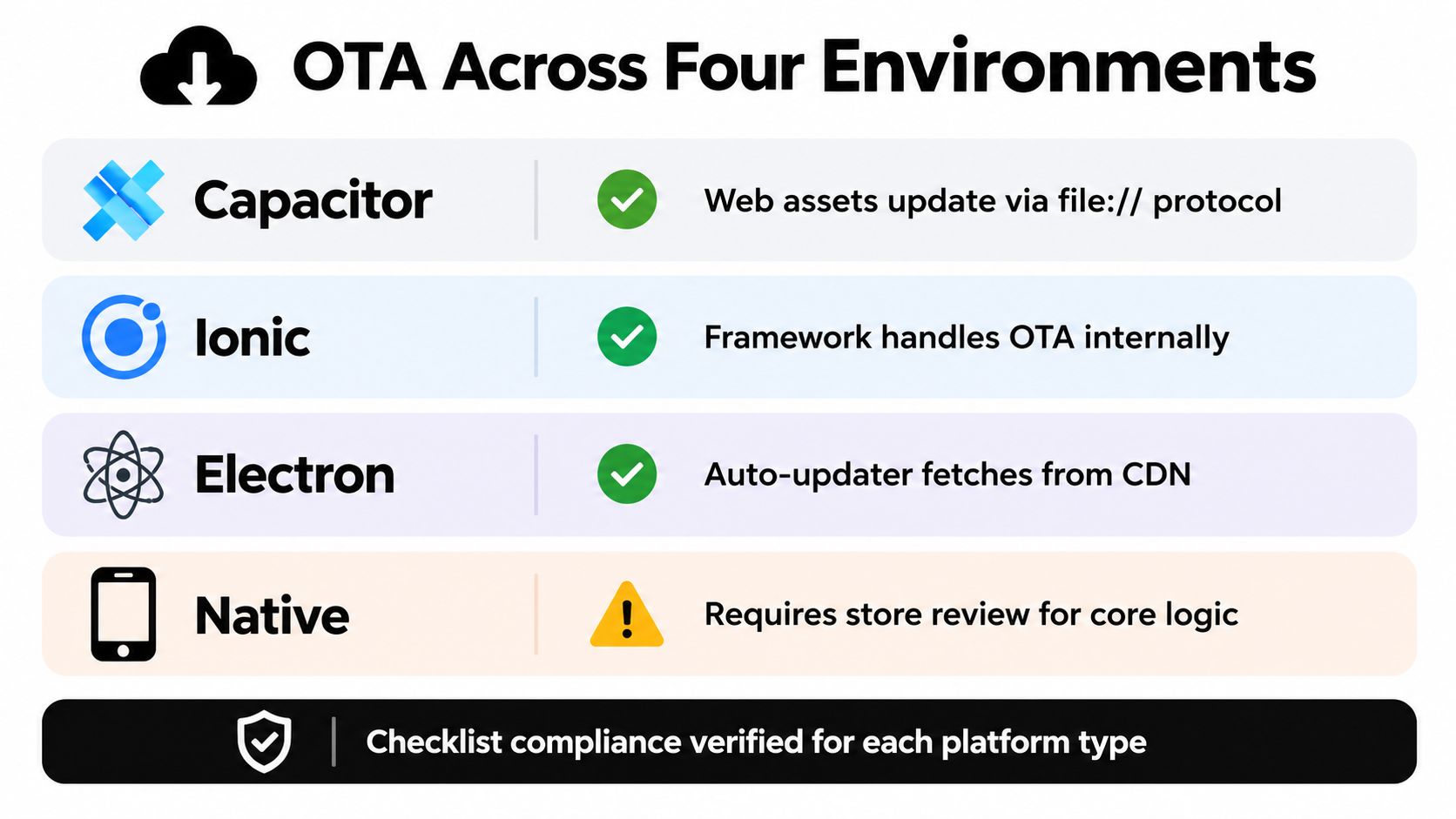
The OTA answer changes depending on the runtime. Capacitor and Ionic live inside a native shell, so OTA usually means shipping trusted web-layer assets while the native binary stays untouched. Electron has a broader update surface because it isn’t bound to App Store or Play review in the same way, but signer trust still matters because auto-updates can be tampered with if integrity checks are weak. OTA limits for Capacitor and Ionic
A quick platform-by-platform view
| Platform | OTA fit | What still needs store review |
|---|---|---|
| Capacitor | JS, CSS, copy, config, compatible assets | Native code, permissions, entitlements |
| Ionic | Same as Capacitor, with channel targeting layered on top | Anything that changes executable behavior |
| Electron | Auto-update bundles from a trusted server or CDN | Not App Store or Play review, but still needs signed integrity |
| Native apps | OS-level OTA exists for the device itself | App logic changes still go through the store lane |
Native Android app updates through Google Play are still store-mediated, while system OTA on Android is a separate mechanism for the operating system and system partitions. On iOS, the app binary itself doesn’t get OTA code changes that alter executable behavior. That’s the part product teams often blur, but the platform rules keep them separate.
Use a checklist before you call something OTA
- Native code changed? If yes, route it through store review.
- Permissions or entitlements changed? If yes, it’s a store release.
- SDK surface or app purpose changed? If yes, treat it as a binary update.
- Only web assets, copy, or approved configuration changed? If yes, OTA may be the right lane.
- Can the runtime verify the bundle, target the right cohort, and roll back? If no, hold the release.
That checklist is the practical boundary line. It keeps teams from using OTA as a loophole and helps them use it for what it’s best at, shipping eligible fixes inside a reviewed shell.
Rollout Channels and Rollback as an Operational Loop
The value of OTA isn’t raw speed, it’s the loop around speed. A team publishes a signed bundle to a specific channel, the client checks whether it qualifies, downloads the delta or bundle, activates it on launch, and reports back whether the new version held up. That turns update delivery into a controlled system instead of a one-way push. Capgo’s phased rollout approach for live updates

Channels keep release risk visible
Distinct streams work well for development, internal QA, beta, staged production, and full production. A bundle can be aimed at one cohort, one device class, one customer ID range, or one app version, then promoted only when the signals look healthy. That’s the same basic idea behind a blue green deployment strategy, but applied to mobile bundles that users download on launch instead of to backend servers that switch traffic immediately. Blue green deployment strategy from GoReplay
Apple’s transparency data shows the scale these systems run against, with an average of more than 46.6 billion automatic app updates and about 701 million manual app updates per week in 2025. Apple’s 2025 transparency data At that volume, a channel model isn’t cosmetic, it’s how teams keep a bad release from becoming everyone’s problem at once.
Rollback needs to be automatic, not ceremonial
A good OTA loop includes clear failure signals. Crash spikes, install failures, reboot problems, or boot-health checks should move the client back to the last known-good bundle without waiting for a human to notice the dashboard. Some platforms, including Capgo, expose channels, per-device logs, adoption and failure metrics, version history, CI/CD integration, and rollback protection so support and engineering can see what happened after release.
Useful habit: publish one bundle, watch one cohort, confirm one healthy baseline, then widen the release only when the data supports it.
That loop is why OTA feels less like a file transfer and more like release orchestration. The bundle is important, but the control plane around it is what keeps the release safe.
Common Pitfalls and the Guardrails That Prevent Them
A common OTA mistake is moving quickly without knowing who received the update, what failed, or whether the new bundle depends on a native capability that is not there yet. Once a team gets used to pushing changes in minutes, it is easy to skip the discipline that made the store lane feel slower in the first place.
The first failure mode is simple non-adoption. A device may be offline, busy, or incompatible, so publication succeeds but installation does not. The second is partial adoption, where a staged rollout reaches only some users and the team mistakes limited exposure for broad success. The third is silent breakage, where a JavaScript bundle assumes a newer native interface and everything looks fine until a specific screen opens.
Guardrails that close those gaps
- Signature verification before activation catches tampered bundles.
- Compatibility checks keep mismatched runtimes from loading the wrong payload.
- Health-based rollback stops a bad release from sticking.
- Per-device logs and version history show what each user ran.
- A written OTA eligibility rule keeps native changes out of the live-update lane.
Regulated teams need one more layer, auditability. If a patch touches customer-facing behavior, the team should be able to show exactly what changed, which cohort received it, and why the change stayed inside the reviewed native shell. That audit trail keeps OTA from becoming an untracked release channel.
Apple’s review targets, 50% under 24 hours and 90% under 48 hours, are the operational floor, not the ceiling. OTA exists for the eligible changes that should land between those windows, not for the ones that belong in a store submission. The decision checklist is simple. If the fix changes native code, requires a new entitlement, or depends on a platform capability that is not already present, it is not OTA-shippable. If it stays inside the signed bundle, works against the current runtime, and can be rolled back cleanly, it fits the live-update lane.





