
The most popular advice about app state management is also the least useful: pick one global store and put everything in it. That approach treats API responses, modal visibility, unsaved form input, authentication, and navigation filters as if they had the same lifecycle. They don’t. A Capacitor or Electron application runs across a web layer and native or desktop runtime, so state must be separated by where it comes from, how long it should live, who owns it, and what happens when the network or process disappears.
State management became foundational because mobile runtimes are volatile. Apps can be destroyed and recreated after orientation changes or low-memory conditions, and Android provides instance-state restoration and lifecycle callbacks such as onSaveInstanceState() for that reason, as documented in a UC Riverside study of reliable mobile app state management. The same study examined 966 apps and 4,808 activities, finding that 452 apps, or 46.8%, contained at least one activity with non-empty state, while 1,896 activities had non-empty state overall. State isn’t an optional abstraction you add after the UI works. It is part of the runtime contract.
Table of Contents
- Rethinking the Global Store Model
- Architectural Patterns for Cross-Platform Apps
- Persistence and Offline-First Synchronization
- Performance Tuning and Testing Strategies
- Platform-Specific Guidance for Capacitor and Electron
- Migrating to a Modern Hybrid Architecture
- Best Practices and Common Mistakes to Avoid
Rethinking the Global Store Model
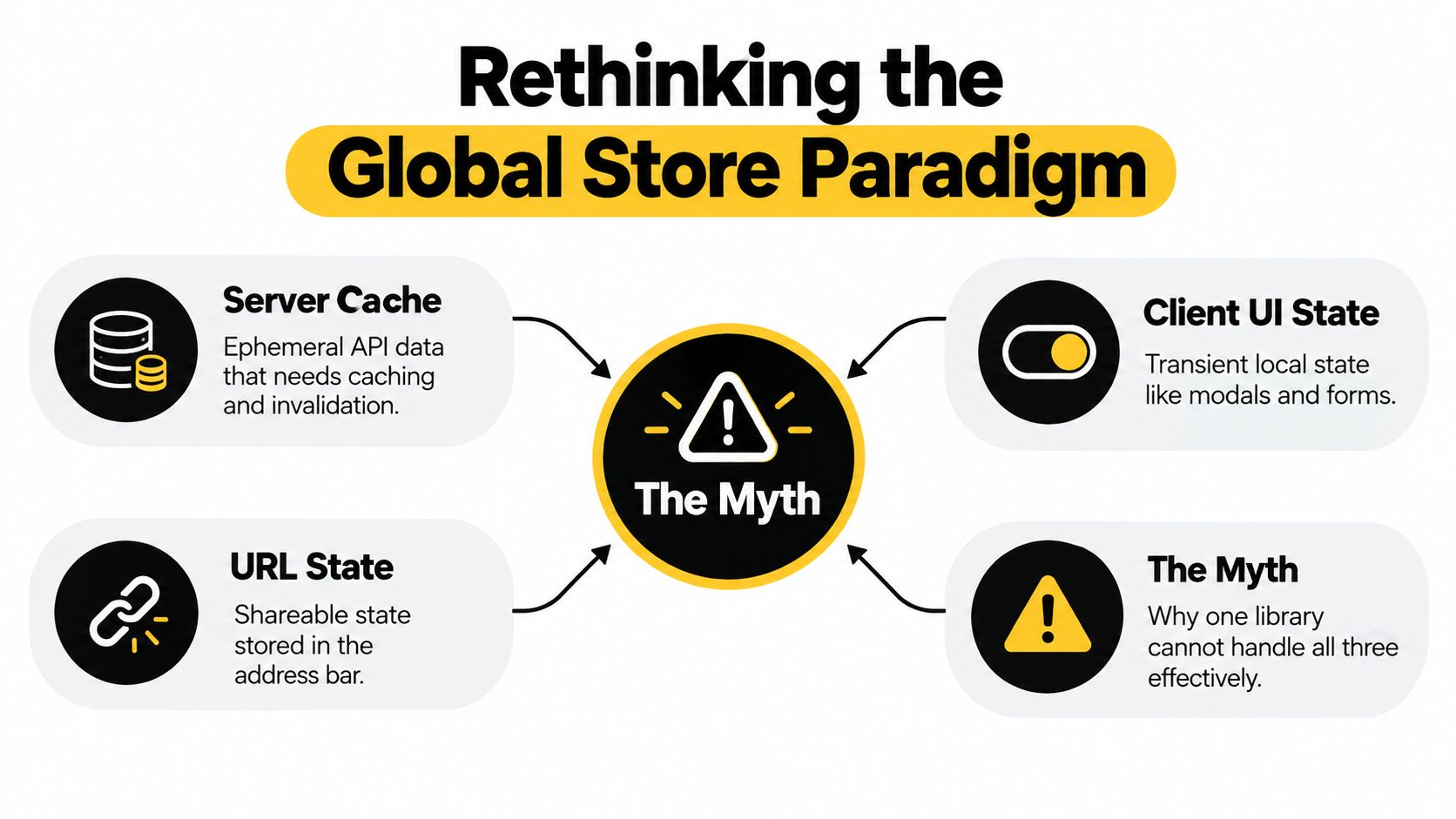
Redux versus Context versus MobX is the wrong starting point. A store can coordinate updates, but it cannot determine whether a value belongs to the server, the current screen, a form workflow, or the address bar. Putting every value into one global container creates duplicated API caches, stale URL parameters, and subscriptions that make unrelated screens rerender.
A durable design assigns each value an owner and a recovery policy:
- Server state belongs to the data-fetching and caching layer. API responses, loading status, errors, freshness, invalidation, and retries all describe a remote resource. The server remains authoritative, so the client should not maintain a second permanent source of truth.
- Client or UI state stays near the component or feature that owns it. Modal visibility, selected tabs, expanded rows, theme preferences, and temporary interaction flags usually need no application-wide persistence.
- Form state follows a separate workflow. Draft input, validation messages, dirty status, and submission progress may need to survive navigation inside a form, but they should not automatically become shared business state.
- URL state belongs to the router. Search terms, filters, sorting choices, selected records, and pagination in the address bar can be bookmarked, shared, restored, and inspected without copying them into another store.
Why one store creates architectural drag
The 2024 detailed review of Application State Management examines state management across web and mobile applications. Its coverage reflects a practical shift from scattered UI variables toward explicit, lifecycle-aware architecture. Android’s progression from instance-state bundles to ViewModel and SavedStateHandle follows the same direction, but it does not mean every value belongs in one shared container.
A global store still has a defined role. Session identity, permissions, app-level preferences, connectivity policy, and carefully bounded cross-feature workflows may require shared ownership. Problems begin when that store becomes a dumping ground for values with a more suitable owner.
Practical rule: If a value can be reconstructed from the server, the URL, or the current component, keep it out of global state unless a specific workflow requires otherwise.
This boundary also supports independently owned modules. Teams splitting a product into deployable areas can apply the ownership principles used in micro-frontend architecture, rather than building one dependency graph across the application. In a Capacitor or Electron codebase, a hybrid model works better: remote data uses cache and synchronization rules, UI values remain local, and durable workflow state gets explicit persistence. That separation limits competing writers and makes recovery after reloads, suspended processes, or offline periods easier to reason about.
Architectural Patterns for Cross-Platform Apps
Once state has an owner, the implementation choice becomes much narrower. Most client-side state fits one of three patterns: localized component state, a small shared store, or event-driven communication between isolated modules. None is universally superior. The wrong choice usually appears when a team selects a pattern before identifying update frequency, ownership, and recovery requirements.
| Pattern | Complexity | Memory Footprint | Best Use Case |
|---|---|---|---|
| Localized component state | Low | Low | Screen-specific toggles, drafts, disclosure panels, temporary selection |
| Centralized lightweight store | Moderate | Moderate | Shared session preferences, theme, active workspace, cross-feature UI coordination |
| Event bus architecture | Moderate to high | Variable | Loosely coupled modules, plugin notifications, native bridge events, isolated feature boundaries |
Local state should be the default
A component-local value has a short dependency path. When a modal opens, a row expands, or a form field changes, the owning feature can update without notifying the entire application. This reduces accidental coupling and makes unit tests direct. It also limits retained memory when mobile screens are suspended or desktop windows remain open for long sessions.
Local state becomes awkward when several distant features need the same value or when a workflow crosses route boundaries. In those cases, lifting state to a feature store is usually better than placing it in an application-wide singleton. A small store such as Zustand or Pinia can expose focused selectors and explicit actions without requiring every component to subscribe to every change.
The trade-off is discipline. Lightweight stores are easy to create, so teams can end up with many overlapping stores and unclear ownership. Name the owner, define mutation methods, and avoid exposing a mutable object that any component can rewrite.
Events are useful, but they aren’t a database
An event bus works well for notifications such as “the native share completed,” “the window became active,” or “a background task received new data.” It helps plugins and modules communicate without importing one another. It works poorly as the only record of business state because events are transient. A subscriber that was suspended, unloaded, or registered late may miss the message.
Use events to announce that something happened, then let the receiving module query its authoritative store or data layer. Keep event names narrow and payloads versioned where native and web code may evolve separately.
For broader architectural context, mobile app development insights from Bridge Global are useful when weighing shared code against platform-specific behavior. The same boundary applies to app state: share domain rules where they are stable, but isolate lifecycle adapters and native integration points. A practical mobile application architecture should make those boundaries visible in the folder structure and dependency graph.
Persistence and Offline-First Synchronization
An in-memory store is not durable state. The operating system can suspend or terminate a mobile process, a desktop user can close a window, and a network can disappear while a mutation is in flight. Offline-first design starts by deciding what the user must be able to recover, then choosing storage and synchronization rules around that requirement.
Build a durable write path
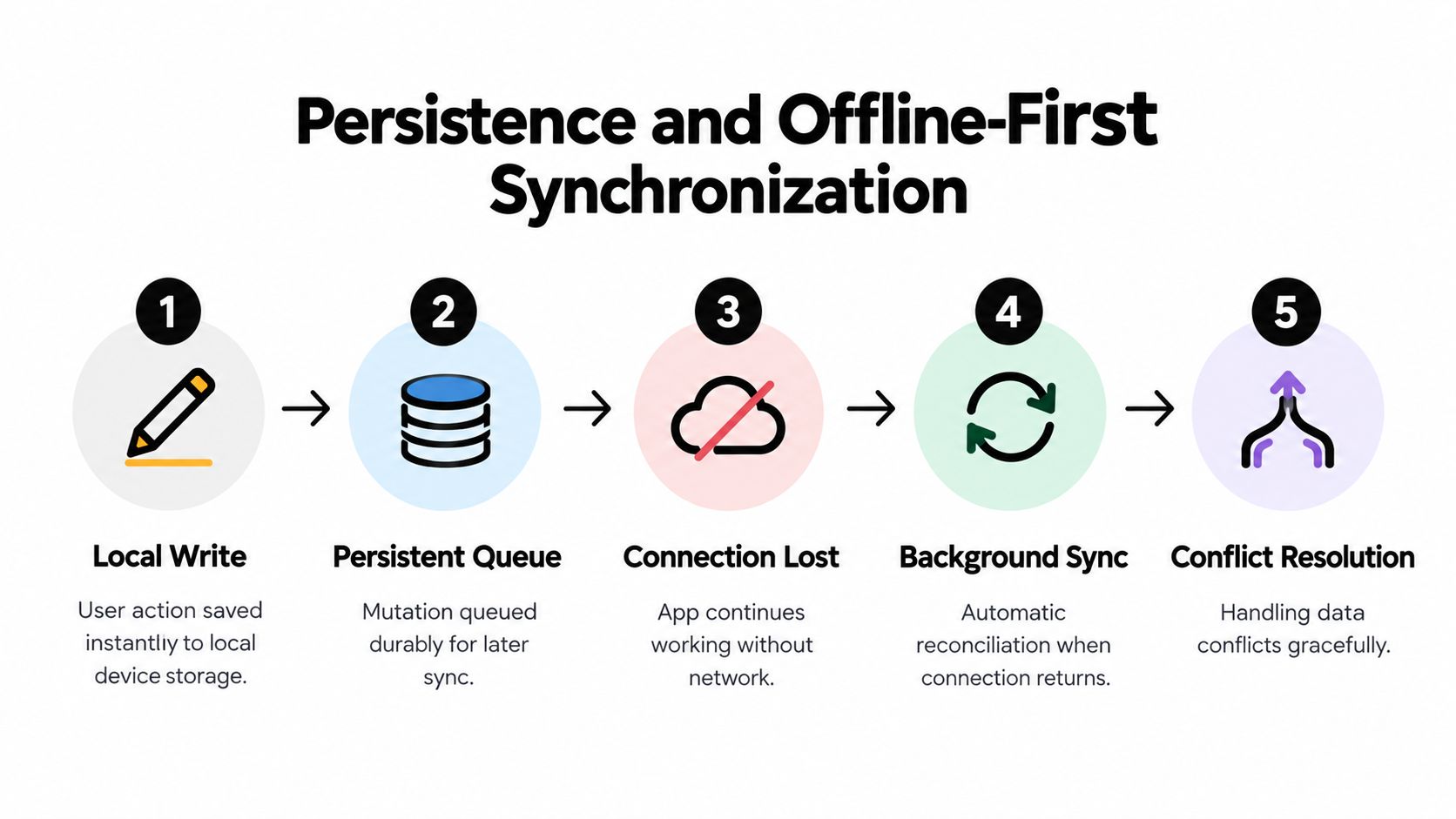
A reliable flow separates the immediate user experience from remote acknowledgement:
- Write locally first. Apply the user action to a local database or durable document store so the interface responds without waiting for the network.
- Queue the mutation. Store an operation with its entity identifier, operation type, payload, creation context, and retry status. A queue held only in memory disappears with the process.
- Render an honest status. Distinguish saved locally, pending synchronization, synchronized, and failed. Users need to know whether a change is durable on the device or confirmed remotely.
- Sync when conditions allow. Reconnect listeners, app foreground events, and scheduled background work can trigger retries. The sync worker should be idempotent because interrupted requests may be sent again.
- Resolve conflicts deliberately. The server response must determine whether the local operation was accepted, rejected, merged, or requires user review.
SQLite is a practical choice for relational records and transactional queues in native-backed applications. IndexedDB can suit browser-oriented storage and Electron renderer code, provided the team handles schema upgrades and transaction boundaries carefully. Keep serialization explicit. Persist domain data and recovery metadata, not component instances, closures, or references to native objects.
Conflict policy is a product decision
Last-write-wins is simple, but it can discard legitimate edits. Field-level merging works when independent fields can safely combine. Domain-specific rules are safer for inventory, approvals, financial records, or clinical workflows, where an automatic merge could change meaning. Some conflicts should block synchronization and ask the user to choose.
The sync layer should also separate read reconciliation from mutation replay. Refetching server data doesn’t prove that a queued mutation succeeded, and replaying a mutation doesn’t guarantee that the resulting record still matches the current server representation. Record server versions or equivalent validators, return structured conflict responses, and retain enough queue history to explain failures.
For the user-facing portion of this design, creating an offline screen in Vue, Angular, or React provides a useful interface concern: offline mode should be a visible application state, not an exception hidden in a console.
The following video can complement implementation work around offline behavior and synchronization:
Performance Tuning and Testing Strategies
State performance problems rarely begin with a single slow reducer. They emerge when broad subscriptions cause unrelated components to render, derived values recompute unnecessarily, large object graphs stay referenced, or synchronization work runs on the UI thread. Measure update propagation rather than guessing which library is fastest.
A 2026 benchmark using a dashboard with 100 connected components and 10,000 iterations measured MobX at 0.3 ms for simple changes, 0.4 ms for nested changes, and 0.6 ms for derived changes, while Redux Toolkit measured 0.8 ms, 1.2 ms, and 1.5 ms in the corresponding tests. The same benchmark recorded 2.8 MB for Zustand and 4.2 MB for Redux Toolkit in its memory comparison. These are benchmark-specific observations, not universal production guarantees, but they illustrate why subscription granularity and update strategy matter. See the comparative React state management benchmark for the test context.
Tune the update boundary
Start with selectors. A component should subscribe to the smallest meaningful slice, not the entire session object or API response. Keep derived data memoized when computation is expensive, but don’t memoize every primitive by reflex. Memoization also adds retention and comparison work, so profile before and after.
Virtualize long lists, normalize records when updates target individual entities, and avoid replacing a large root object for a small field change. In Electron, watch renderer memory over long sessions because windows may remain alive much longer than a mobile screen. In Capacitor, avoid synchronous persistence during a burst of input. Debounce drafts or persist meaningful checkpoints, while ensuring a crash cannot lose data the product promises to retain.
A Springer-linked study found that changing the state management approach reduced program execution time by an average of 17% across test scenarios, supporting the idea that reducing unnecessary synchronization and recomputation can produce material runtime gains. The result appears in the study of web application state management performance, and it shouldn’t be treated as a guaranteed improvement for every stack.
Test transitions, not just values
A state test that checks isLoading after a successful request misses the dangerous paths. Test the sequence:
- Hydration: persisted data loads, invalid records are rejected, and defaults fill only missing fields.
- Interruption: a request is cancelled or the app backgrounds during a mutation.
- Replay: queued operations retry safely and don’t duplicate server effects.
- Conflict: the server rejects an outdated version and the UI exposes a recoverable resolution.
- Isolation: a local UI update doesn’t cause unrelated features to render or mutate.
Mock server-state adapters at the network boundary, then use integration tests for complete workflows. Add instrumentation in development and CI to detect unexpected subscriber counts, unbounded queues, and state transitions that occur after a feature has unmounted. The most valuable test fixture is often a realistic lifecycle sequence, not another isolated reducer assertion. Use app performance optimization guidance when turning those measurements into a repeatable release check.
Platform-Specific Guidance for Capacitor and Electron
A web application can assume that its JavaScript process remains available longer than a mobile app can. Capacitor and Electron remove that assumption in different ways. Capacitor places the web layer inside a mobile lifecycle managed by iOS or Android, while Electron keeps a Chromium renderer connected to a desktop process model with windows that can appear and disappear independently.
Capacitor requires lifecycle-aware hydration
Treat backgrounding as a checkpoint opportunity, not proof that the process will resume. On an app-state change, flush critical pending mutations, record the current synchronization cursor, and release resources that shouldn’t remain active. On foreground, rehydrate what was lost, verify authentication, refresh stale server data, and restart subscriptions only after the local store is ready.
The JavaScript store shouldn’t directly own native plugin internals. Camera sessions, biometric prompts, push registration, filesystem handles, and background tasks each have platform lifecycle rules. Wrap them in adapters that translate native callbacks into domain events or commands. The store can then represent states such as unavailable, requesting, active, failed, or completed without retaining a native object that becomes invalid after suspension.
A webview boundary also makes serialization important. Pass plain data across the Capacitor bridge, validate plugin responses, and version messages when a live update may leave different web bundles interacting with installed native code. How Capacitor bridges web and native code explains the boundary that makes this adapter approach necessary.
Electron needs process ownership
Electron’s main process should own privileged operations and durable coordination, while renderers own view-specific state. Use typed IPC commands for actions such as reading secure settings, writing files, or coordinating windows. Don’t expose broad filesystem access to every renderer, and don’t treat an event sent to one window as a durable application record.
Multi-window applications need an explicit synchronization model. The main process can distribute authoritative updates, while each renderer maintains local presentation state. If two windows edit the same record, the application needs version checks or a conflict policy, not merely a broadcast event. A closed window must be able to reconstruct state when it opens again, so the main process or persistence layer must remain the source for recoverable data.
Capacitor and Electron can share domain models, API clients, queue formats, and reducers. They shouldn’t necessarily share lifecycle code. The strongest cross-platform architecture has a common state vocabulary and platform-specific durability, bridge, and recovery adapters.
Migrating to a Modern Hybrid Architecture
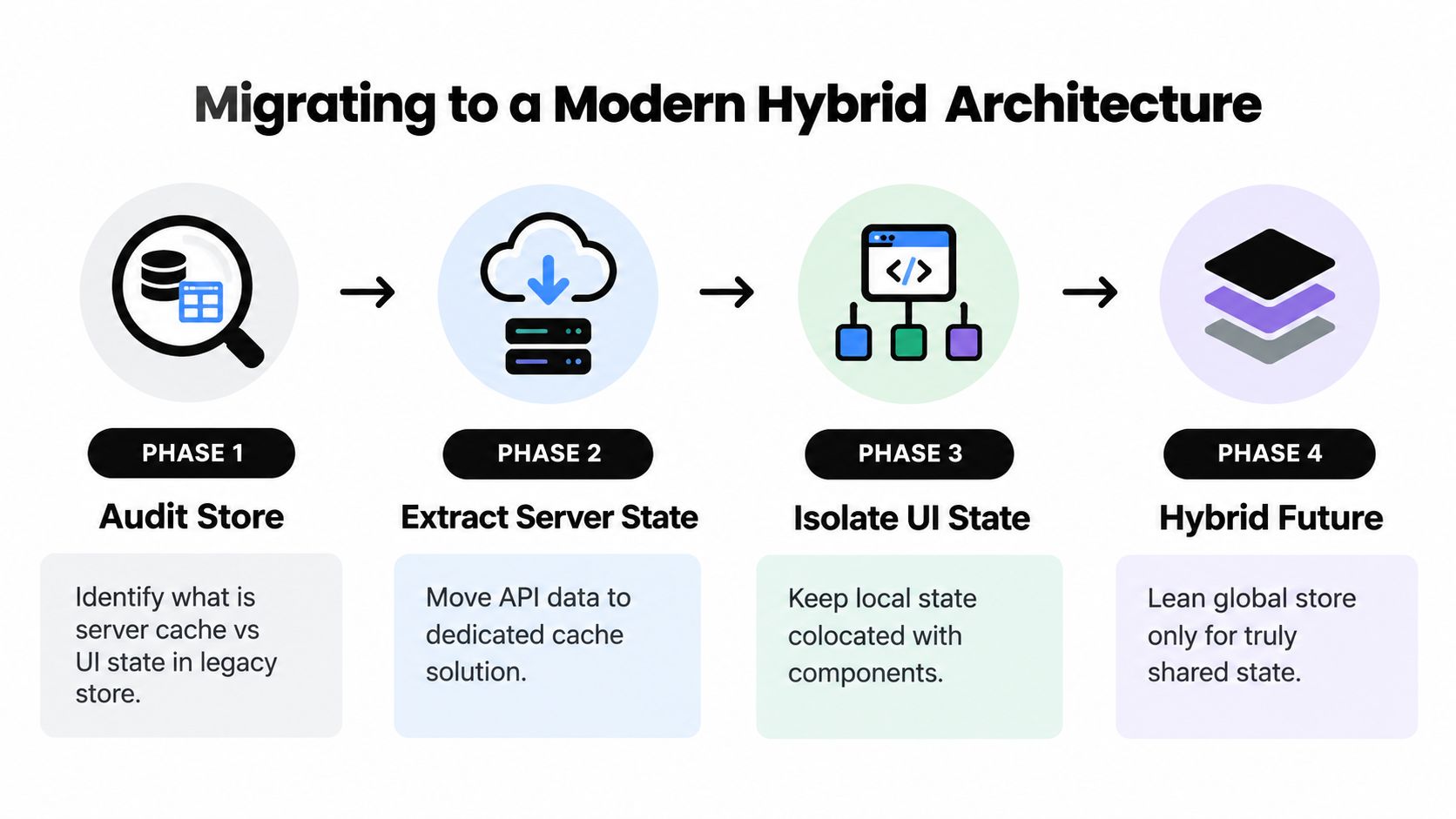
A legacy global store rarely needs a rewrite. It needs an inventory and a sequence of safe extractions. Migration works best when each feature can move one state class at a time while the old store remains available for untouched screens.
Start with ownership, not technology
Create a state catalogue for the existing store. For every field, record its source, consumers, mutation paths, persistence requirement, and recovery behavior. Mark whether it is server-derived, route-derived, form-owned, feature-local, or shared. This exercise often reveals that the global store contains several unrelated systems hidden behind one API.
Move server state first. Replace manually mirrored API fields with a dedicated fetching and caching layer that owns request status, invalidation, retries, and revalidation. Keep selectors temporarily compatible so existing screens can migrate without changing every call site at once. Delete the duplicated server copy only after the new source has passed integration tests.
Next, return URL state to the router. Search filters and selected resources should survive reloads and sharing through route parameters or query state. Remove synchronization effects that copy URL values into a store and then copy store values back into the URL. Those loops create race conditions and make browser history harder to trust.
Extract feature state incrementally
Move modal state, wizard progress, and local selection into the nearest feature boundary. If multiple components need the value, use a feature store with a narrow interface. Reserve the remaining global store for cross-cutting concerns such as session policy, theme, permissions, or an explicitly shared workflow.
Use a compatibility layer during the transition. It can read from the new source while exposing the old selector shape, allowing features to migrate behind flags. Release each extraction independently, monitor error paths and hydration behavior, and keep a rollback route until the new ownership model proves stable.
For Capacitor and Electron teams, Capgo can deliver signed JavaScript, CSS, configuration, and asset bundles through targeted channels, with rollout controls, version history, device logs, adoption and failure metrics, and automatic rollback protection. That makes it possible to ship a state-management refactor incrementally, while native changes still follow the relevant platform release process. The operational benefit is control over the migration, not a reason to skip tests or compatibility planning.
Best Practices and Common Mistakes to Avoid
State architecture fails when review questions stay vague. Use these checks in design reviews and pull requests:
- Name the owner in code: Ask, “Which module can change this value, and what API enforces that boundary?” Reject a store added only because two components currently need the same field.
- Define the recovery contract: For each persisted value, document whether reload, app restart, logout, and account switching preserve or clear it. A draft invoice may survive a restart, while a selected workspace may require revalidation.
- Make synchronization observable: Log request IDs, record versions, retry counts, and conflict outcomes. Set an alert for repeated retry or conflict failures before users report missing updates.
- Review commands, not object shape: A mutation should state its business intent, validate inputs, and expose an audit-friendly action name. Direct writes that bypass those checks belong in review discussions.
- Test hostile sequences: Run tests for hydration racing with navigation, an interrupted write followed by retry, duplicate delivery, offline edits from two windows, and logout during a pending request.
- Check the removal path: A migration is incomplete if an old selector, persistence adapter, or event listener still writes to the former store. Add a test that fails when both sources can update the same field.
A practical PR question is, “What happens if this process disappears after the write starts but before acknowledgement?” The answer should identify durable data, retry ownership, deduplication, and the user-visible failure state.
Capgo helps CapacitorJS and Electron teams ship JavaScript, CSS, configuration, and asset updates through targeted channels, with signed bundles, rollout controls, device-level logs, and rollback protection. Use Capgo to deliver state-management refactors and recovery fixes incrementally, then validate them with lifecycle and synchronization tests.





