
Payment system
Copy a setup prompt with the install steps and the full markdown guide for this plugin.
What is this about?
Section titled “What is this about?”This page aims to answer some questions about the payment system in capgo.
Q: How can I upgrade my capgo plan?
Section titled “Q: How can I upgrade my capgo plan?”A: You can upgrade your capgo plan by going to the settings and clicking on the Plans tab (1).
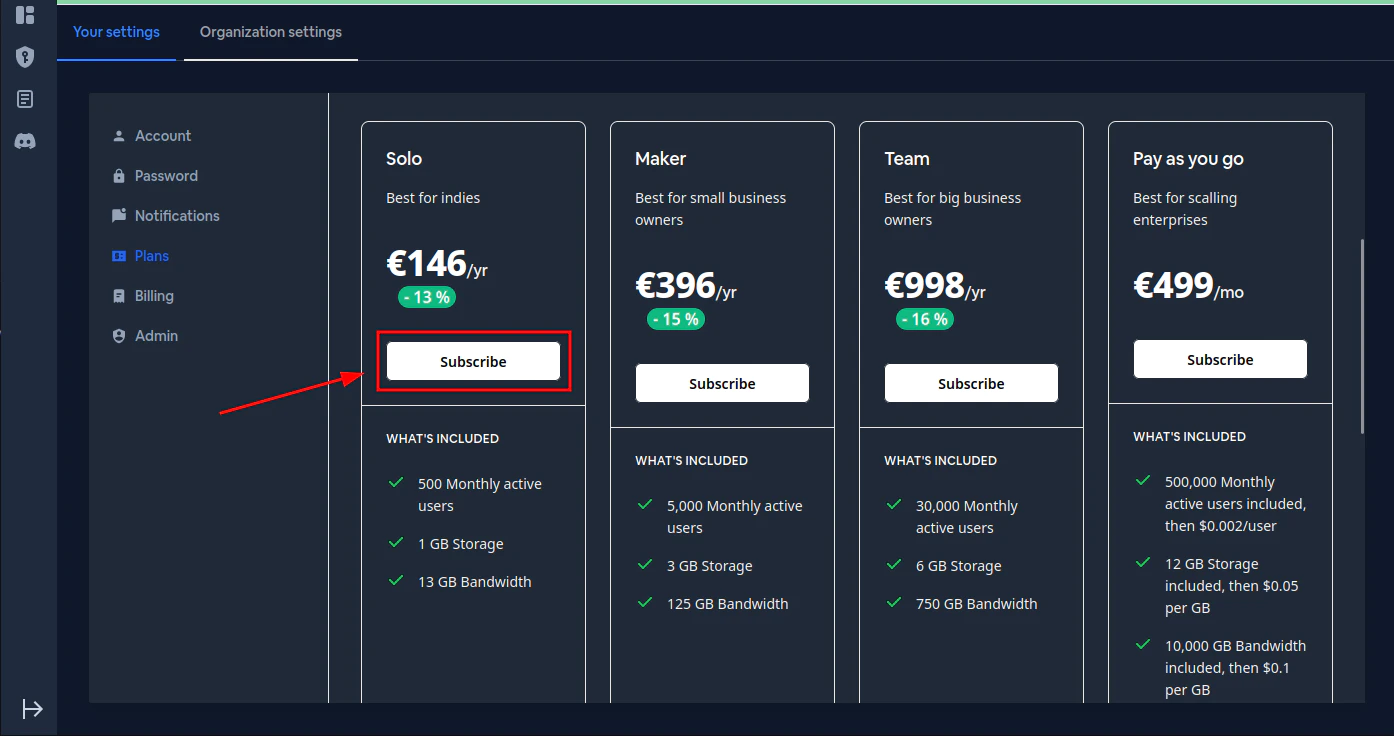
On this page you can:
- Toggle between Monthly Plan and Yearly billing (with a 20% discount for yearly)
- Choose from four plans: Solo, Maker, Team, or Enterprise
- Click Subscribe (2) on the plan that best fits your needs
Each plan shows:
- Monthly price and annual billing total
- Monthly active users included and overage pricing
- Storage and bandwidth allowances
- Build minutes/hours
- Features like dedicated support, custom domain, and SOC II compliance
If you don’t want to commit to a plan, you can use credits instead - click “Learn about credits” to see how pay-as-you-go works.
After clicking Subscribe, a Stripe checkout page will open where you can enter your payment information securely.
Credits
Section titled “Credits”Credits provide a flexible alternative to upgrading your plan. They’re useful when:
- Temporary spikes - You’re temporarily going above your plan limits (e.g., a viral moment, seasonal traffic) and don’t want to upgrade permanently
- Plan mismatch - The next plan tier doesn’t fit your needs for other reasons (maybe you need more bandwidth but not more MAU)
- Pay-as-you-go preference - You prefer paying only for what you use beyond your base plan
Q: How do I access the Credits page?
Section titled “Q: How do I access the Credits page?”A: Go to the settings and click on the Credits tab (1).

The Credits page shows:
- Credits tab - Navigate here from the Organization settings
- Credits Balance - Shows your available credits (e.g., 0.00 / 0.00) and credits used in the current period
- Credits Used (USD) - The estimated dollar value of credits consumed during the current billing period, plus available credits remaining
- Need more credits? - Purchase additional credits instantly to keep your users receiving updates without disruption. Choose from preset amounts ($50, $100, $500, $5000) or enter a custom amount. The estimated total including taxes is shown before checkout
- Credit pricing - Expand this section to see the pricing tiers for different usage types (MAU, storage, bandwidth)
- Credit transactions - View your credit purchase and usage history
Q: How do I buy credits?
Section titled “Q: How do I buy credits?”A: On the Credits page, select the amount you want to purchase (or use the dropdown for custom amounts), then click Buy credits. You’ll be redirected to Stripe checkout where you can adjust the quantity and complete payment.
Q: When are credits used?
Section titled “Q: When are credits used?”A: Credits are automatically consumed when you exceed your plan limits for monthly active users, storage, or bandwidth. They provide a flexible way to handle overages without service interruption
Q: Are payments secure?
Section titled “Q: Are payments secure?”A: Yes, payments are fully managed by stripe. Capgo never gets access to your credit card details. Stripe takes security very seriously. Learn more about stripe security policy
Q: Will capgo automatically upgrade my plan when I exceed the limit?
Section titled “Q: Will capgo automatically upgrade my plan when I exceed the limit?”A: No, capgo will never change your plan.
Q: Will cagpo send me an email when my plan is near its limits?
Section titled “Q: Will cagpo send me an email when my plan is near its limits?”A: Yes, capgo will send you an email informing you about the usage.
Q: Will the plan I purchase affect the organizations I am invited to?
Section titled “Q: Will the plan I purchase affect the organizations I am invited to?”A: No, the plan will only affect the organization you have currently selected. Please refer to the organization documentation.
Q: What if I need a more tailored plan?
Section titled “Q: What if I need a more tailored plan?”A: Please contact capgo’s support directly
Q: What is the refund policy for capgo?
Section titled “Q: What is the refund policy for capgo?”A: A refund policy can be found here
Keep going from Payment system
Section titled “Keep going from Payment system”If you are using Payment system to plan payments and purchases, connect it with Capgo Pricing for the product workflow in Capgo Pricing, @capgo/native-purchases for the implementation detail in @capgo/native-purchases, Getting Started for the implementation detail in Getting Started, Revenue Playbook for the implementation detail in Revenue Playbook, and Using @capgo/native-purchases for the native capability in Using @capgo/native-purchases.
Ship Capacitor apps without the wait
Build with your AI coding agent, push fixes to users in minutes, build signed iOS and Android apps without a Mac, and roll back in one click.


Enterprise needs? Talk to our team