
A critical fix goes live on Tuesday morning. The deployment pipeline turns green, the release notes look clean, and support still lights up with complaints about the bug the fix was supposed to remove. That gap is the whole problem. A release can ship, install, and still fail to reach users in a meaningful way.
That’s why adoption metrics examples matter for live updates in Capacitor and similar release systems. Different metrics answer different questions about the same bundle. Some tell you whether the update reached devices, some show how fast it spread, some reveal whether it improved stability, and some expose whether the rollout was controlled.
The list below groups the most useful metrics by reach, speed, quality, and control. Each one comes with a formula, a dashboard view, a live-update example, a failure mode, and a practical threshold you can use in a release meeting.
Table of Contents
- 1. Update Adoption Rate
- 2. Version Distribution
- 3. Time to X% Adoption
- 4. Staged Rollout Adoption Curve
- 5. Update Install Success Rate
- 6. Rollback Rate
- 7. Stale Device Rate
- 8. Differential Update Efficiency Ratio
- 9. Crash-Free Sessions on Updated Cohort
- 10. Channel Adoption Distribution
- 10 Adoption Metrics Comparison
- Turning These Adoption Metrics Into a Release Routine
1. Update Adoption Rate
Update adoption rate is the core number for a live update. It measures the percentage of active devices running the target bundle or version inside a defined window after release. In practice, that means devices on the new version divided by total active devices in the same period. For a live fix, it answers a direct question: did the update land on the devices that matter?

A fintech team can use this to judge whether a login patch is replacing the old bundle. An e-commerce team can compare 24-hour adoption across iOS and Android after a checkout fix. The dashboard should show the target version, the eligible device pool, and the share that has already switched. For broader context on adoption tooling, browse DAP benefits and KPIs to see how platform-level adoption metrics compare.
Practical rule: define “active device” in writing before the release ships. If the denominator changes from one release to the next, the metric stops being comparable.
The threshold should match severity. A security fix deserves a tighter target than a UI tweak, and the team should write that down before the rollout starts. Track this metric alongside the number of devices checking for updates, because slow polling can make a healthy release look sluggish. Watch the same pattern in Capgo’s OTA success tracking guide for Capacitor apps, where the release view is tied to actual install progress.
If the definition of adoption changes every week, the metric stops being usable for release decisions.
2. Version Distribution
Version distribution shows how your active users are spread across all live bundles at a moment in time. Think of it as a fragmentation map. If too many people are still scattered across old versions, your support team is carrying more code paths than it should.

A healthcare app might discover that a legacy bundle is still active on a meaningful slice of devices and decide a forced update is worth the friction. An agency managing several client builds can use the same view to decide which Capacitor plugin versions are safe to retire. The point isn’t just age, it’s how many distinct runtime realities your team still has to support.
What the dashboard should show
The chart should break out current bundle, previous bundle, and older bundles still in the wild. Add crash counts beside each version so the team can tell whether an old release is merely common or actively risky. If a version is old and unstable, it’s a strong candidate for deprecation.
Use semantic versioning for both native and web bundles so the report stays readable. A support policy like “last three bundle versions only” gives the dashboard a clear pass or fail. Without a policy, version history becomes a museum instead of an operating tool.
For a practical implementation view, Capgo’s app version history guide is the right companion piece. The useful decision here is simple. If fragmentation is high and the risk from old code is rising, the team should stop treating every version as equally worth supporting.
3. Time to X% Adoption
Time to X% adoption turns reach into speed. Instead of asking whether users eventually updated, it asks how long it took to hit a target share, such as 50%, 80%, or 95%. For a live fix, speed matters because the issue keeps affecting users until the new bundle is active.

A team that handles incident response can set a goal of reaching a chosen threshold within a fixed window and then report the median each month. A product team can compare two checkout releases and see which one users picked up faster. The dashboard view should be a curve, not a single number, because the tail tells you where adoption stalls.
Use median and tail behavior together
Averages hide the stragglers. Median shows the typical rollout speed, while a higher percentile exposes the slower cohorts that may be stuck on old launches or infrequent app opens. If you only report the average, you can miss the group that is still waiting on the fix.
This metric is especially useful for apps that update on next launch. If people don’t reopen the app often, your release can be technically available but functionally delayed. Capgo’s real-time update metrics guide is a good fit here, because the dashboard needs to reflect actual arrival time, not just publish time.
The threshold should be written by severity level. Critical fixes need a tighter target than cosmetic changes, and the team should decide that before rollout starts. If the release is still climbing but the issue is urgent, you already know the update pipeline is the bottleneck.
4. Staged Rollout Adoption Curve
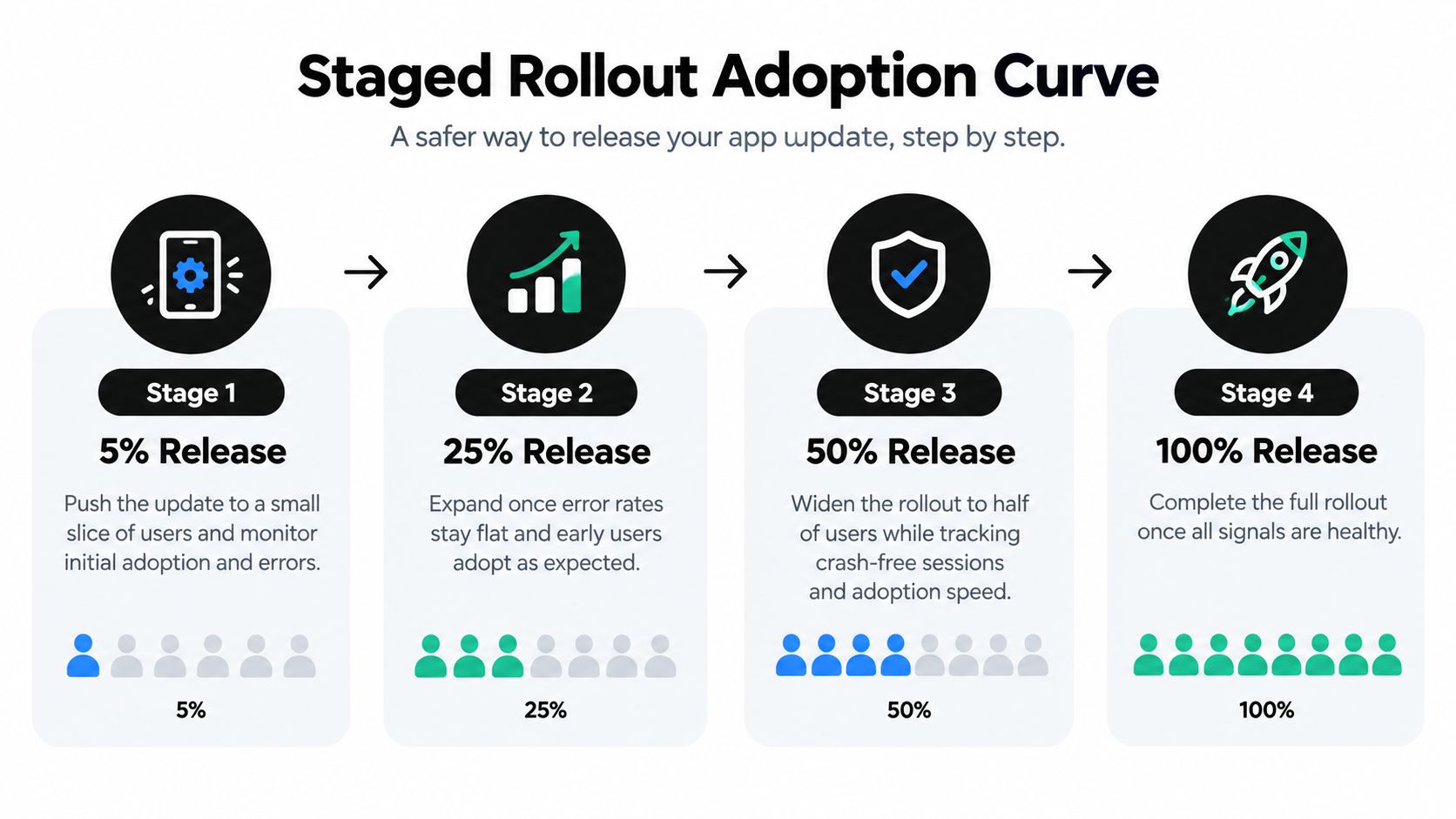
A staged rollout adoption curve shows how exposure expands from a small cohort to the full user base. It tracks adoption at each release gate, such as 5%, 25%, 50%, and 100%. That curve gives release owners proof before they widen the blast radius. Use the dashboard to compare each cohort’s uptake, error trend, and crash trend, so a go/no-go call is based on the same view every time.
A healthcare team can release to a tiny audience first, check that error rates stay flat, then expand. An enterprise team can aim a customer-specific stream at one account before moving the same bundle into production. Each stage needs one owner and one decision point. If the next cohort behaves differently from the previous one, stop the rollout. Widening into a problem is exposure, not progress.
The dashboard should show the current stage, the adoption level reached, and the health trend observed at that stage. Add a clear go/no-go label so the review stays unambiguous. For teams that need a live-update rollout playbook, Capgo’s phased rollout guide for Capacitor live updates is a practical reference. To visualize cohort behavior across stages, see the attribution team’s retention curve guide. A healthy staged rollout is deliberate. It keeps the team from treating speed as success when the goal is safe expansion.
5. Update Install Success Rate
Update install success rate measures the share of update attempts that download, verify, and apply successfully on a device. This is not the same as adoption. A bundle can be available to everyone and still fail at the download or verification step.
A team seeing poor success on a specific Android build might trace it to compression settings or signing issues. An e-commerce app could find that failed downloads cluster in one region, then shift delivery traffic to a closer edge. The dashboard needs a step-by-step lifecycle view so delivery problems don’t get confused with runtime problems.
Break the pipeline into stages
Log the major steps separately, such as download started, download complete, signature verified, and bundle applied. If one stage drops, the fix lives there. If the whole chain is weak, the problem may be network, packaging, or device compatibility.
Set alerts when the success rate dips below the baseline you trust. Teams often use a high bar here because a live update should be routine, not fragile. Capgo’s OTA monitoring guide for Capacitor apps is useful for structuring that observability.
A good threshold is one that triggers action before users notice the failure pattern. If verification errors appear in CI, the release should never reach production. The practical decision is simple, separate delivery faults from application faults, or every incident review will blur the underlying cause.
6. Rollback Rate
Rollback rate measures how often a release gets reverted after a problem appears. It can be tracked by release or by device, and both views matter. For live updates, rollback is the safety valve, so this metric tells you how often the valve had to open.
A fintech team may see an automatic rollback trigger when crash rates spike early in a rollout. An agency can use rollback trends across client apps to decide where QA needs to get stricter. The dashboard should separate automatic rollback from manual rollback because those causes say different things about the process.
What to review after each rollback
- Trigger source: Was it crash-based, support-based, or manually initiated?
- Time to rollback: Did the system recover fast enough to reduce user impact?
- Blast radius: How many devices were exposed before rollback finished?
The threshold here isn’t a fixed universal number. It’s a policy question. If a release rolls back often, the team should look for gaps in pre-release checks, device coverage, or staged rollout logic.
A rollback is not automatically failure. Sometimes it is the correct outcome, especially when the release is clearly worse than the previous build. The failure is letting rollback become a routine substitute for release discipline.
7. Stale Device Rate
Stale device rate shows the share of active devices that have not updated within a defined window, such as 30 or 60 days. It matters because stale devices miss fixes, security patches, and new features. In regulated environments, that lag can become a compliance issue.
A healthcare app might send an in-app prompt when devices fall too far behind. An enterprise customer may require all field devices to be updated within a set window, and the release team tracks compliance weekly. The dashboard should separate actively used devices from known exceptions like offline or kiosk hardware.
A stale-device chart is only useful if the team can act on it. If the metric includes devices that can’t update by design, the signal turns noisy fast.
The threshold should differ by release type. Security-related updates need tighter staleness limits than feature tweaks. If the stale cohort grows after a release, the issue may be rollout friction, weak prompting, or users who open the app too infrequently to catch the update window.
Use in-app notices before forcing the update. That gives users a path forward without turning every reminder into a hard stop. The practical decision is whether the team is trying to improve compliance, reduce support risk, or push a feature. The metric should reflect the goal.
8. Differential Update Efficiency Ratio
Differential update efficiency ratio measures how many bytes you saved by sending only changed files instead of a full bundle. It’s a bandwidth metric, but it also affects install time and data cost. Smaller updates usually mean less user friction, especially on metered connections.
A team that mostly changes CSS and copy may see strong savings and use that to justify frequent small releases. Another product team might split images into a separate asset channel so code deltas stay lean. The dashboard should compare delta size by release type, not just in aggregate.
Why this metric changes adoption behavior
Smaller updates tend to feel lighter to users. That doesn’t guarantee adoption, but it can remove one obvious reason for delay. If users are on slower networks, a compact bundle is much more likely to be applied before they give up.
This is one of the clearest places where engineering choices affect release behavior. Keep static assets separate from fast-moving code. Then compare copy fixes, config changes, and feature bundles so you can tell which release type is bloating the delta.
If the delta stays small, the release has less to fight against. That’s the whole point.
This metric doesn’t need a complex threshold, it needs a baseline. The team should know what “normal” looks like for each release type and investigate when a tiny change produces an oversized payload. That usually means the bundle structure needs cleanup.
9. Crash-Free Sessions on Updated Cohort
Crash-free sessions on the updated cohort measures the share of sessions on the new release that do not crash. It’s a quality metric, but it’s also an adoption metric because a release that crashes too much can’t be considered healthy adoption. Comparing the updated group with the previous version helps isolate the effect of the change.
A team might see crash-free sessions drop on the new bundle and trigger rollback. An indie developer can compare the updated build against the old one for the first 48 hours and look for regressions. The dashboard should show the new cohort and the previous cohort side by side, because context matters more than the raw number alone.
What belongs in the comparison
Include native crashes, JavaScript errors, and failed loads for Capacitor apps. A clean native crash rate can still hide front-end breakage if the web layer is unstable. If the updated cohort is worse than the baseline, the release should not stay in flight just because adoption is high.
This metric also needs a minimum sample size before anyone draws hard conclusions. Small cohorts can swing around too much to be trusted. The threshold should be set as a relative regression rule, not only as a static absolute number.
Use this metric with rollback rate, not instead of it. One tells you how the release behaved, the other tells you what the system did in response. Together, they give you a much better read on whether the update should stay live.
10. Channel Adoption Distribution
Channel adoption distribution shows how active devices are spread across beta, staging, production, or customer-specific streams. It tells you whether the right people are seeing the right release at the right time. It also catches one of the easiest mistakes to make, testing traffic leaking into production or production users sitting in a test channel.
A regulated e-commerce team can confirm that no production devices accidentally landed on beta after a release. An agency can track customer-specific channels and retire the ones nobody uses anymore. The dashboard should show channel membership clearly enough that misroutes are obvious at a glance.
Use channels as guardrails, not labels
Channels only help when they’re enforced. If testers, internal staff, and customer pilots all drift into the same stream, the release process loses its safety boundary. Keep the channels documented, and review the distribution before each major release.
Set alerts for unexpected membership, especially beta devices appearing in production or vice versa. That one check can catch accidental exposure before it becomes a support problem. A clean channel map also makes post-mortems faster because the team can see who got what, and when.
The practical threshold is whether the distribution matches intent. If it doesn’t, the release process is leaking. In a live-update system, that’s not a cosmetic issue, it’s a control issue.
10 Adoption Metrics Comparison
| Metric | 🔄 Implementation Complexity | ⚡ Resource Requirements | 📊 Expected Outcomes | 💡 Ideal Use Cases | ⭐ Key Advantage |
|---|---|---|---|---|---|
| Update Adoption Rate | Low, version checks and active-device definition | Low, periodic aggregation and segmentation | % of active devices on target version over time | Go/no-go decisions, hotfix monitoring, cross-platform checks | Clear, single-number release health indicator |
| Version Distribution (Fragmentation Index) | Moderate, per-version counts and time-series visualization | Moderate, historical storage and segmentation | Visibility into user spread across versions and support burden | Prioritizing compatibility/testing and forced updates | Reveals which old versions require support |
| Time to X% Adoption (Adoption Velocity) | Moderate, timestamped events and cumulative curves | Moderate, percentile calculations and plots | Speed metrics (median/p90) to reach adoption thresholds | Incident response, benchmarking release speed | Benchmarks how quickly users receive fixes |
| Staged Rollout Adoption Curve | High, orchestration of staged percentages and gating rules | High, per-stage monitoring, pause/expand controls | Controlled, staged exposure with pause/halt signals | Risky releases, regulated environments, audited rollouts | Limits blast radius and enables safe expansion |
| Update Install Success Rate | Moderate, instrumentation of download/verify/apply stages | Moderate–High, per-device logs, failure-stage tracking | % of successful installs; failure-stage breakdowns | Troubleshooting delivery or verification failures | Pinpoints where updates fail for faster debugging |
| Rollback Rate | Low–Moderate, track rollbacks and classify automatic/manual causes | Low, event tracking and post-mortem records | % of releases/devices reverted and time-to-rollback | Validating safety nets, measuring release quality | Direct measure of release problems and rollback effectiveness |
| Stale Device Rate | Low, compute last-update age per active device | Low, last-seen/update timestamps and segmentation | % of active devices not updated within N days | Security/compliance reporting, outreach or forced updates | Identifies devices missing patches or features |
| Differential Update Efficiency Ratio | High, compute delta bytes vs full bundle per release | Moderate, build diffs and per-release telemetry | Ratio of bytes saved; average savings per release/device | Metered networks, frequent small releases, architecture changes | Quantifies bandwidth savings and justifies small updates |
| Crash-Free Sessions on Updated Cohort | Moderate, cohorting sessions and crash attribution | Moderate, crash reporting, segmentation, statistical checks | Crash-free % for new vs baseline cohorts; regression detection | Regression alerts, staged rollouts, release health checks | Isolates release impact on stability for rollback decisions |
| Channel Adoption Distribution | Low–Moderate, track channel assignments and changes | Low, channel metadata and membership monitoring | Share of devices per channel; unexpected exposures | Beta testing validation, enterprise pilots, channel governance | Validates targeting rules and prevents accidental exposure |
Turning These Adoption Metrics Into a Release Routine
The best release dashboard doesn’t try to show everything at once. It starts with channel adoption distribution and update install success rate so you know the bundle is aimed at the right audience and landing on devices. Then it tracks the staged rollout adoption curve and time to X% adoption to show how quickly the release spreads.
After that, the quality checks take over. Crash-free sessions on the updated cohort tells you whether the new build is behaving, while rollback rate shows whether the safety net had to intervene. Version distribution and stale device rate round out the picture by showing how fragmented the fleet is and how many devices are lagging behind.
A release review gets much easier when the team chooses a small set of metrics and writes down the definitions before shipping. Pick three metrics for the next release, define the denominator, set the threshold, and review them in the same meeting every time. If you’re working in a Capacitor live-update flow, that rhythm is often what turns raw adoption data into a release process people can trust.
For teams that also need strong retention and data governance practices, Sift’s guide on data retention policies for social teams is a useful reminder that measurement only works when the underlying data stays clean and usable. The release habit matters more than the dashboard itself. Once the team can explain what “good” looks like, every update becomes easier to ship, defend, and improve.
Capgo gives Capacitor and Electron teams a live-update path for shipping JavaScript, CSS, copy, config, and asset fixes without waiting for store review. If you want the release data to match the release process, visit Capgo and see how signed bundles, channel guardrails, rollback protection, and adoption metrics fit into one workflow.





