
Facebook登录设置
复制一个带有安装步骤和本插件全markdown指南的设置提示。
在本指南中,您将学习如何使用Capgo Social Login设置Facebook登录。您需要以下内容:
- Facebook开发者账户
- 您的应用程序的包名/捆绑ID
- 生成 Android 的 key hash 所需的终端访问权限
基本设置
基本设置如果您尚未创建 Facebook 应用程序,请遵循以下步骤:
-
创建 Facebook 应用
遵循教程 创建应用
-
将 Facebook 登录添加到您的应用
在 Facebook 开发者控制台中,向您的应用添加 Facebook 登录产品
-
在发布应用之前,遵循此 教程 发布它
重要信息
重要信息部分这里是您需要的整合信息的关键位置:
-
CLIENT_TOKEN: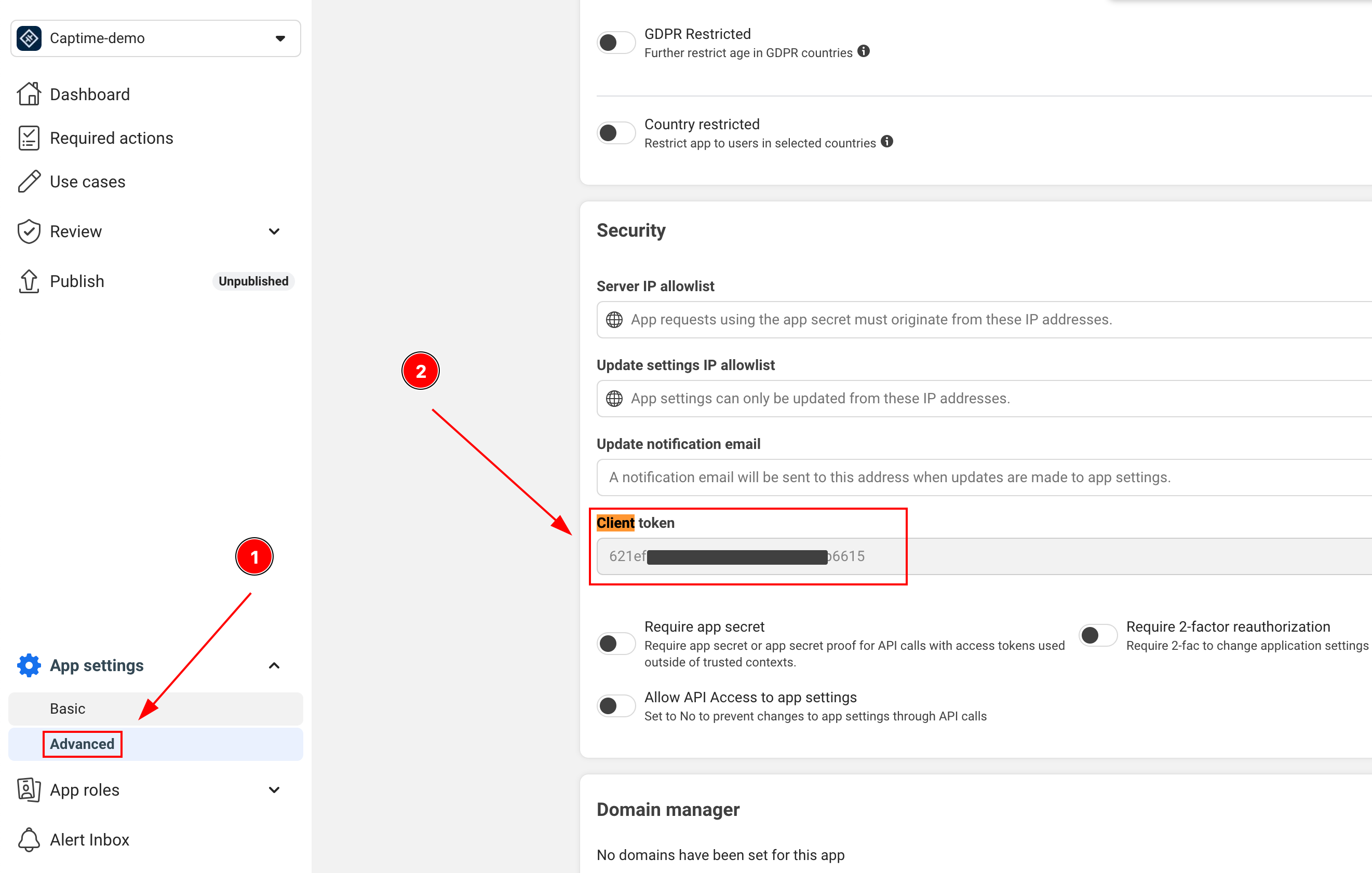
-
APP_ID: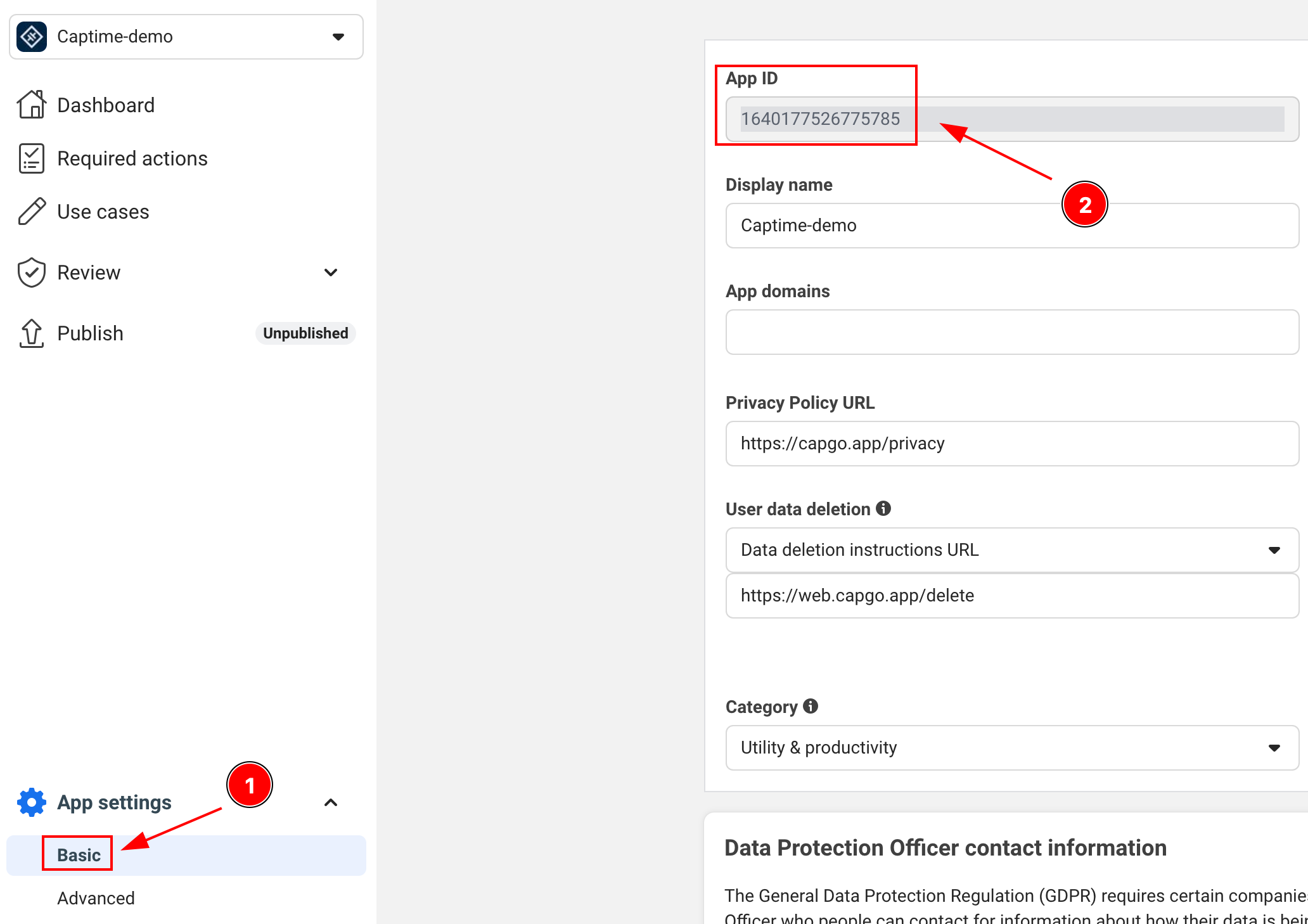
-
APP_NAME: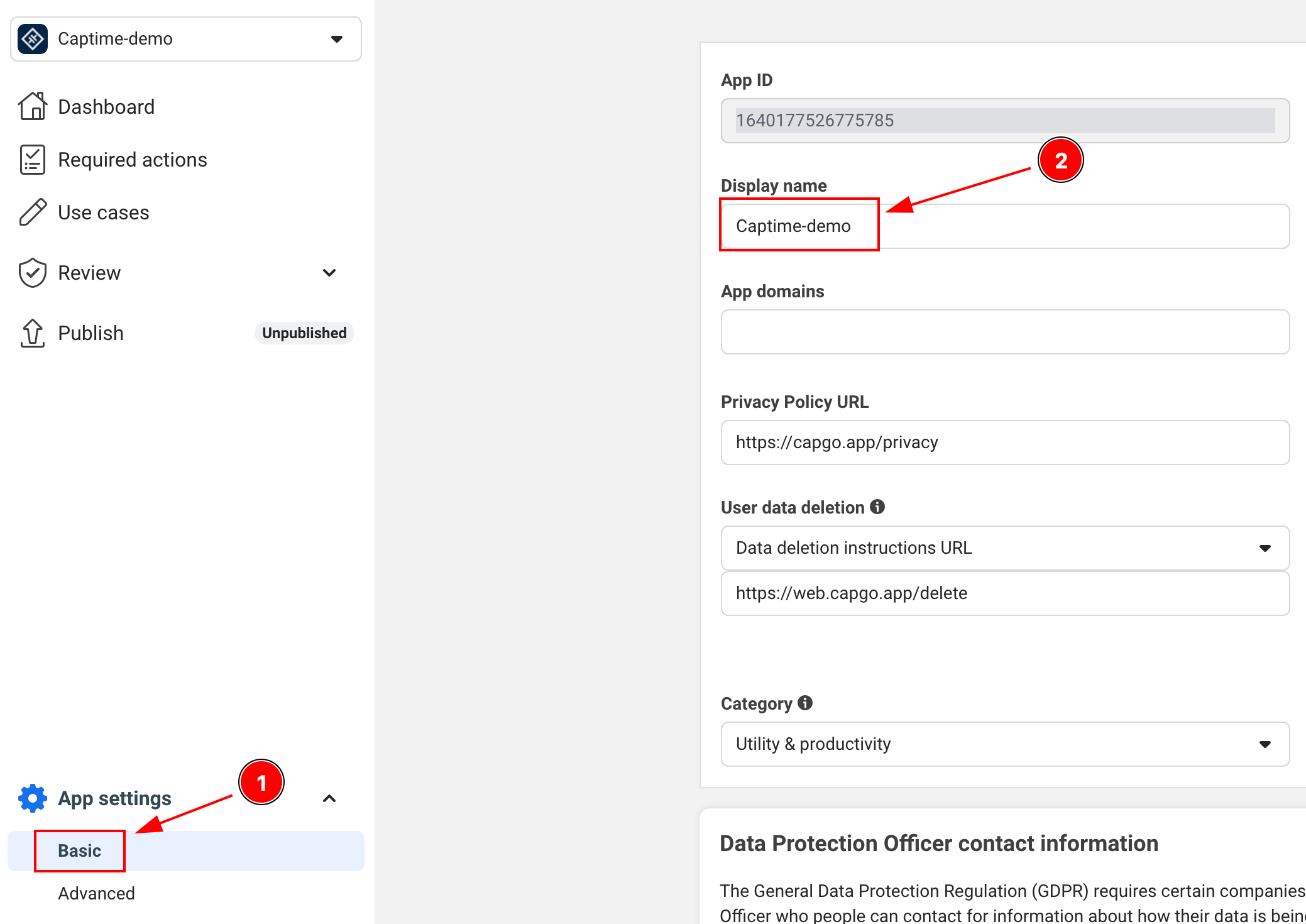
Facebook商业登录
商业登录部分本插件支持Facebook商业登录,用于商业相关功能和权限。商业账户可以请求额外的权限,包括Instagram和页面管理。
支持的商业权限包括:
instagram_basic- Instagram基本显示APIinstagram_manage_insights- Instagram 视图访问权限pages_show_list- 人员管理的页面列表pages_read_engagement- 从页面读取参与度数据pages_manage_posts- 在页面管理帖子business_management- 管理商业资产
- 查看 - Facebook 权限参考 - 查看完整的权限列表。
- 配置要求:
- - 你的 Facebook 应用必须在 Facebook 开发者控制台中配置为商业应用。
- - 商业权限可能需要 Facebook 应用审查在生产环境中使用之前。
- - 你的应用必须符合 Facebook 商业用途政策。
Instagram 基本访问
Instagram 基本访问await SocialLogin.initialize({ facebook: { appId: 'your-business-app-id', clientToken: 'your-client-token', },});
const res = await SocialLogin.login({ provider: 'facebook', options: { permissions: [ 'email', 'public_profile', 'instagram_basic', 'pages_show_list', 'pages_read_engagement', ], },});
const profile = await SocialLogin.providerSpecificCall({ call: 'facebook#getProfile', options: { fields: ['id', 'name', 'email', 'instagram_business_account'], },});页面管理
页面管理const res = await SocialLogin.login({ provider: 'facebook', options: { permissions: [ 'email', 'pages_show_list', 'pages_manage_posts', 'pages_read_engagement', ], },});
const profile = await SocialLogin.providerSpecificCall({ call: 'facebook#getProfile', options: { fields: ['id', 'name', 'accounts{id,name,instagram_business_account}'], },});重要说明:
- 您可以在测试用户和开发应用中测试商业权限,避免 App Review。
- 大多数商业权限在生产环境中使用之前需要 Facebook App Review。
- 商业 API 有不同的速率限制。请在发布前查看 Facebook 的当前平台文档。
- 遵循 Facebook 商业集成指南 在配置应用程序时。
Android 设置
Android 设置-
将互联网权限添加到您的
AndroidManifest.xml确保以下行存在:
<uses-permission android:name="android.permission.INTERNET"/> -
生成您的 Android 密钥哈希
这是 Facebook 需要的关键安全步骤。打开您的终端并运行:
终端窗口 keytool -exportcert -alias androiddebugkey -keystore ~/.android/debug.keystore | openssl sha1 -binary | openssl base64 -A当提示输入密码时,请使用:
android -
将密钥哈希添加到您的Facebook应用
- 转到您的应用的Facebook开发者控制台
- 导航到设置 > 基本
- 滚动到底部到“Android”部分
- 如果Android尚未添加,请点击“添加平台”,并填写详细信息
- 添加您生成的密钥哈希
- 对于生产环境,添加两种密钥哈希(debug和release)
-
更新您的
AndroidManifest.xml包括:<application>...<activity android:name="com.facebook.FacebookActivity"android:configChanges="keyboard|keyboardHidden|screenLayout|screenSize|orientation"android:label="@string/app_name" /><activityandroid:name="com.facebook.CustomTabActivity"android:exported="true"><intent-filter><action android:name="android.intent.action.VIEW" /><category android:name="android.intent.category.DEFAULT" /><category android:name="android.intent.category.BROWSABLE" /><data android:scheme="FB[APP_ID]" /></intent-filter></activity></application>
iOS设置
标题为“iOS设置”-
在Facebook开发者控制台中添加iOS平台
- 转到你的应用的仪表盘在Facebook开发者
- 导航到设置>基本
- 向页面底部滚动并点击“添加平台”
- 选择iOS并填写所需详细信息
-
打开您的Xcode项目并导航到Info.plist
-
在Info.plist中添加以下条目:
<key>FacebookAppID</key><string>[APP-ID]</string><key>FacebookClientToken</key><string>[CLIENT-TOKEN]</string><key>FacebookDisplayName</key><string>[APP-NAME]</string><key>LSApplicationQueriesSchemes</key><array><string>fbapi</string><string>fb-messenger-share-api</string></array><key>CFBundleURLTypes</key><array><dict><key>CFBundleURLSchemes</key><array><string>fb[APP-ID]</string></array></dict></array> -
修改
AppDelegate.swiftimport FBSDKCoreKit@UIApplicationMainclass AppDelegate: UIResponder, UIApplicationDelegate {func application(_ application: UIApplication, didFinishLaunchingWithOptions launchOptions: [UIApplication.LaunchOptionsKey: Any]?) -> Bool {// Override point for customization after application launch.// Initialize Facebook SDKFBSDKCoreKit.ApplicationDelegate.shared.application(application,didFinishLaunchingWithOptions: launchOptions)return true}func application(_ app: UIApplication, open url: URL, options: [UIApplication.OpenURLOptionsKey: Any] = [:]) -> Bool {// Called when the app was launched with a url. Feel free to add additional processing here,// but if you want the App API to support tracking app url opens, make sure to keep this callif (FBSDKCoreKit.ApplicationDelegate.shared.application(app,open: url,sourceApplication: options[UIApplication.OpenURLOptionsKey.sourceApplication] as? String,annotation: options[UIApplication.OpenURLOptionsKey.annotation])) {return true;} else {return ApplicationDelegateProxy.shared.application(app, open: url, options: options)}}}
在您的应用程序中使用Facebook登录
标题:在您的应用程序中使用Facebook登录-
在您的应用程序中初始化Facebook登录
import { SocialLogin } from '@capgo/capacitor-social-login';// Initialize during app startupawait SocialLogin.initialize({facebook: {appId: 'APP_ID',clientToken: 'CLIENT_TOKEN',}}) -
实现登录功能
async function loginWithFacebook() {try {const result = await SocialLogin.login({provider: 'facebook',options: {permissions: ['email', 'public_profile'],limitedLogin: false // See Limited Login section below for important details}});console.log('Facebook login result:', result);// Handle successful login} catch (error) {console.error('Facebook login error:', error);// Handle error}} -
获取用户资料
成功登录后,您可以检索更多的资料信息:
async function getFacebookProfile() {try {const profileResponse = await SocialLogin.providerSpecificCall({call: 'facebook#getProfile',options: {fields: ['id', 'name', 'email', 'first_name', 'last_name', 'picture']}});console.log('Facebook profile:', profileResponse.profile);return profileResponse.profile;} catch (error) {console.error('Failed to get Facebook profile:', error);return null;}}// Example usage after loginasync function loginAndGetProfile() {const loginResult = await loginWithFacebook();if (loginResult) {const profile = await getFacebookProfile();if (profile) {console.log('User ID:', profile.id);console.log('Name:', profile.name);console.log('Email:', profile.email);console.log('Profile Picture:', profile.picture?.data?.url);}}}令牌类型限制: The
getProfile: 只有当您有一个 : 访问令牌 : (允许跟踪的标准登录). 如果用户拒绝跟踪或您正在使用有限登录(仅限 JWT 令牌),则此调用将失败。 在这种情况下,请使用初始登录响应提供的配置文件数据。
⚠️ 重要: 后端令牌处理
标题:⚠️ Critical: Backend Token Handling您的后端必须处理 两个不同的令牌类型 因为 iOS 用户可以根据他们的 App Tracking Transparency 选择接收 access tokens 或 JWT tokens,而 Android 用户总是接收 access tokens。
Token 类型
平台 Token 类型| 平台 | 受限登录设置 | 用户 ATT 选择 | 结果 Token 类型 |
|---|---|---|---|
| iOS | true | 任何 | JSON Web Token |
| iOS | false | 允许跟踪 | 访问令牌 |
| iOS | false | 拒绝跟踪 | JWT令牌(自动覆盖) |
| Android | 任何 | 访问令牌(始终) |
后端实现
后端实现-
检测令牌类型并处理
async function loginWithFacebook() {try {const loginResult = await SocialLogin.login({provider: 'facebook',options: {permissions: ['email', 'public_profile'],limitedLogin: false // iOS: depends on ATT, Android: ignored}});if (loginResult.accessToken) {// Access token (Android always, iOS when tracking allowed)return handleAccessToken(loginResult.accessToken.token);} else if (loginResult.idToken) {// JWT token (iOS only when tracking denied or limitedLogin: true)return handleJWTToken(loginResult.idToken);}} catch (error) {console.error('Facebook login error:', error);}} -
Firebase 集成示例
import { OAuthProvider, FacebookAuthProvider, signInWithCredential } from 'firebase/auth';async function handleAccessToken(accessToken: string, nonce: string) {// For access tokens, use OAuthProvider (new method)const fbOAuth = new OAuthProvider("facebook.com");const credential = fbOAuth.credential({idToken: accessToken,rawNonce: nonce});try {const userResponse = await signInWithCredential(auth, credential);return userResponse;} catch (error) {console.error('Firebase OAuth error:', error);return false;}}async function handleJWTToken(jwtToken: string) {// For JWT tokens, send to your backend for validationtry {const response = await fetch('/api/auth/facebook-jwt', {method: 'POST',headers: {'Content-Type': 'application/json',},body: JSON.stringify({ jwtToken })});const result = await response.json();return result;} catch (error) {console.error('JWT validation error:', error);return false;}} -
后端 JWT 验证
// Backend: Validate JWT token from Facebookimport jwt from 'jsonwebtoken';import { Request, Response } from 'express';app.post('/api/auth/facebook-jwt', async (req: Request, res: Response) => {const { jwtToken } = req.body;try {// Verify JWT token with Facebook's public key// See: https://developers.facebook.com/docs/facebook-login/limited-login/token/validating/#standard-claimsconst decoded = jwt.verify(jwtToken, getFacebookPublicKey(), {algorithms: ['RS256'],audience: process.env.FACEBOOK_APP_ID,issuer: 'https://www.facebook.com' // From: https://www.facebook.com/.well-known/openid-configuration/?_rdr});// Extract user info from JWTconst userInfo = {id: decoded.sub,email: decoded.email,name: decoded.name,isJWTAuth: true};// Create your app's session/tokenconst sessionToken = createUserSession(userInfo);res.json({success: true,token: sessionToken,user: userInfo});} catch (error) {console.error('JWT validation failed:', error);res.status(401).json({ success: false, error: 'Invalid token' });}}); -
通用后端令牌处理器
// Handle both token types in your backendasync function authenticateFacebookUser(tokenData: any) {if (tokenData.accessToken) {// Handle access token - validate with Facebook Graph APIconst response = await fetch(`https://graph.facebook.com/me?access_token=${tokenData.accessToken}&fields=id,name,email`);const userInfo = await response.json();return {user: userInfo,tokenType: 'access_token',expiresIn: tokenData.expiresIn || 3600};} else if (tokenData.jwtToken) {// Handle JWT token - decode and validate// See: https://developers.facebook.com/docs/facebook-login/limited-login/token/validating/#standard-claimsconst decoded = jwt.verify(tokenData.jwtToken, getFacebookPublicKey());return {user: {id: decoded.sub,name: decoded.name,email: decoded.email},tokenType: 'jwt',expiresIn: decoded.exp - Math.floor(Date.now() / 1000)};} else {throw new Error('No valid token provided');}}
重要考虑因素
重要考虑因素访问令牌(标准登录):
- ✅ Android: 总是可用(iOS-only 限制不适用)
- ✅ iOS: 只有当用户明确允许 App 跟踪时
- ✅ 可以用来访问 Facebook Graph API
- ✅ 更长的过期时间
- ✅ 可获得更多用户数据
- ❌ 在 iOS 上变得不常见 因为用户越来越多地拒绝跟踪
JWT Token (iOS-Only Privacy Mode):
- ❌ Android: 从未发生 (不受支持)
- ✅ iOS: 当跟踪被拒绝或
limitedLogin: true - ✅ 遵守 iOS 用户隐私偏好
- ❌ 只包含基本用户信息
- ❌ 更短的过期时间
- ❌ 无法访问 Facebook Graph API
- ⚠️ 现在 iOS 用户最常见的场景
平台特定行为:
- iOS 应用: 必须处理两种类型的令牌:访问令牌和 JWT 令牌
- Android 应用: 只需处理访问令牌
- 跨平台应用: 必须实现两种令牌处理方法
Secure Context Requirements (Web/Capacitor)
Secure Context Requirements (Web/Capacitor)Crypto API Limitations
Crypto API Limitations更新后的Facebook登录流程需要 Web Crypto API 仅在 安全上下文:
// This requires secure context (HTTPS or localhost)async function sha256(message: string) { const msgBuffer = new TextEncoder().encode(message); const hashBuffer = await crypto.subtle.digest("SHA-256", msgBuffer); // ❌ Fails in insecure context // ...}开发环境问题
开发环境问题常见问题: ionic serve 使用 HTTP URL 的 Facebook 登录会出现问题
| 环境 | 加密 API 可用 | Facebook 登录正常工作 |
|---|---|---|
http://localhost:3000 | ✅ 是 | ✅ 是 |
http://127.0.0.1:3000 | ✅ 是 | ✅ 是 |
http://192.168.1.100:3000 | ❌ 否 | ❌ 否 |
https://any-domain.com | ✅ 是 | ✅ 是的 |
解决方案Capacitor开发
标题:解决方案Capacitor开发-
使用localhost进行web测试
终端窗口 # Instead of ionic serve --host=0.0.0.0ionic serve --host=localhost -
在Ionic中启用HTTPS
终端窗口 ionic serve --ssl -
在实际设备上进行测试
终端窗口 # Capacitor apps run in secure context on devicesionic cap run iosionic cap run android -
替代 nonce 生成 (Alternative nonce generation)
async function generateNonce() {if (typeof crypto !== 'undefined' && crypto.subtle) {// Secure context - use crypto.subtlereturn await sha256(Math.random().toString(36).substring(2, 10));} else {// Fallback for development (not secure for production)console.warn('Using fallback nonce - not secure for production');return btoa(Math.random().toString(36).substring(2, 10));}}
Firebase 集成注意事项 (Firebase Integration Note)
Firebase 集成注意事项 (Section titled “Firebase Integration Note”)最近的 Firebase 文档要求使用 JWT 令牌和非法 nonce 进行 Facebook 认证,无论登录设置如何。这一方法适用于两种情况: limitedLogin: true 和 (and) limitedLogin: false:
// Both modes can return JWT tokens depending on user choice const loginResult = await SocialLogin.login({ provider: 'facebook', options: { permissions: ['email', 'public_profile'], limitedLogin: false, // true = always JWT, false = depends on user tracking choice nonce: nonce } });开发限制 (Development Limitation): 如果您在网络 IP (不是 localhost) 上使用 ionic serve ,Facebook 登录将因加密 API 限制而失败。请使用 localhost 或 HTTPS 进行 web 测试。
故障排除
常见问题和解决方案-
常见问题和解决方案
- Android 上的密钥哈希错误
- 请确认您已在 Facebook 控制台中添加了正确的密钥哈希
- 对于发布版本,请确保已添加了 debug 和 release 密钥哈希
-
请确认您使用的密钥库正确
- Facebook 登录按钮未显示出
- 确保您的Facebook App ID和Client Token正确
- 确保您已正确初始化SDK
-
常见iOS问题
- 确保所有Info.plist条目正确
- 验证URL方案已正确配置
- 确保您的包ID与Facebook控制台中注册的ID匹配
测试
测试部分-
在测试之前,在Facebook开发者控制台中添加测试用户
- 转到角色>测试用户
- 创建测试用户
- 使用这些凭证进行测试
-
测试两种debug和release版本
- 使用debug密钥哈希的debug版本
- 使用release密钥哈希的release版本
- 在模拟器和物理设备上测试
请记住测试完整的登录流程,包括:
- 成功登录
- 登录取消
- 错误处理
- 注销功能
继续从Facebook登录设置
标题为“继续从Facebook登录设置”如果您正在使用 Facebook 登录设置 用于规划身份验证和帐户流程,连接它 使用 @capgo/capacitor-social-login 用于 @capgo/capacitor-social-login 原生能力 @capgo/capacitor-社交登录 用于 @capgo/capacitor-social-login 实现细节 @capgo/capacitor-passkey 用于 @capgo/capacitor-passkey 实现细节 @capgo/capacitor-native-生物识别 用于 @capgo/capacitor-native-biometric 实现细节, 双因素身份验证 用于双因素身份验证实现细节


