
Android Play Store IAP 검토 지침
Android 앱을 Google Play에서 승인받으려면 Google의 정책을 준수해야 하며, 특히 인앱 구매 및 구독이 포함된 앱의 경우 더욱 그렇습니다. 이 가이드에서는 검토를 성공적으로 통과하는 데 필요한 모든 내용을 다룹니다.
Google Play 결제 요구사항
Section titled “Google Play 결제 요구사항”필수 결제 시스템
Section titled “필수 결제 시스템”디지털 상품 및 서비스의 경우 반드시 Google Play의 결제 시스템을 사용해야 합니다.
디지털 상품(Play 결제를 사용해야 함):
- 프리미엄 기능 구독
- 인앱 통화 또는 크레딧
- 디지털 콘텐츠(전자책, 음악, 비디오)
- 게임 업그레이드 및 파워업
- 앱 잠금 해제 및 프리미엄 등급
실제 상품(Play 결제 사용 불가):
- 실제 상품
- 실제 서비스
- 비영리 단체에 대한 일회성 기부
:::주의 2025 요구 사항
새로운 앱은 구독 카탈로그를 처리하기 위해 monetization.subscriptions API를 사용해야 합니다. 기존 결제 API는 더 이상 사용되지 않습니다.
:::
기본 구매를 통한 구현
Section titled “기본 구매를 통한 구현”import { NativePurchases, PURCHASE_TYPE } from '@capgo/native-purchases';
// Ensure billing is available on the deviceconst { isBillingSupported } = await NativePurchases.isBillingSupported();if (!isBillingSupported) throw new Error('Google Play Billing not available');
// Fetch subscription products (Store data is required—never hardcode pricing)const { products } = await NativePurchases.getProducts({ productIdentifiers: ['premium_monthly', 'premium_yearly'], productType: PURCHASE_TYPE.SUBS,});
// Plan identifiers are the Base Plan IDs you create in Google Play Consoleconst transaction = await NativePurchases.purchaseProduct({ productIdentifier: 'premium_monthly', planIdentifier: 'monthly-plan', // REQUIRED on Android, ignored on iOS productType: PURCHASE_TYPE.SUBS,});
console.log('Purchase token for server validation:', transaction.purchaseToken);투명성 및 공개 요구 사항
Section titled “투명성 및 공개 요구 사항”선불 가격 공개
Section titled “선불 가격 공개”Google Play에서는 구매 전 모든 비용을 명확하게 공개하도록 요구합니다.
필수 요소:
- 사용자의 현지 통화로 표시된 정확한 가격
- 청구 빈도(월별, 연간 등)
- 구독에 포함되는 내용
- 입문 제안에 대한 총 비용
- 요금이 발생하는 경우
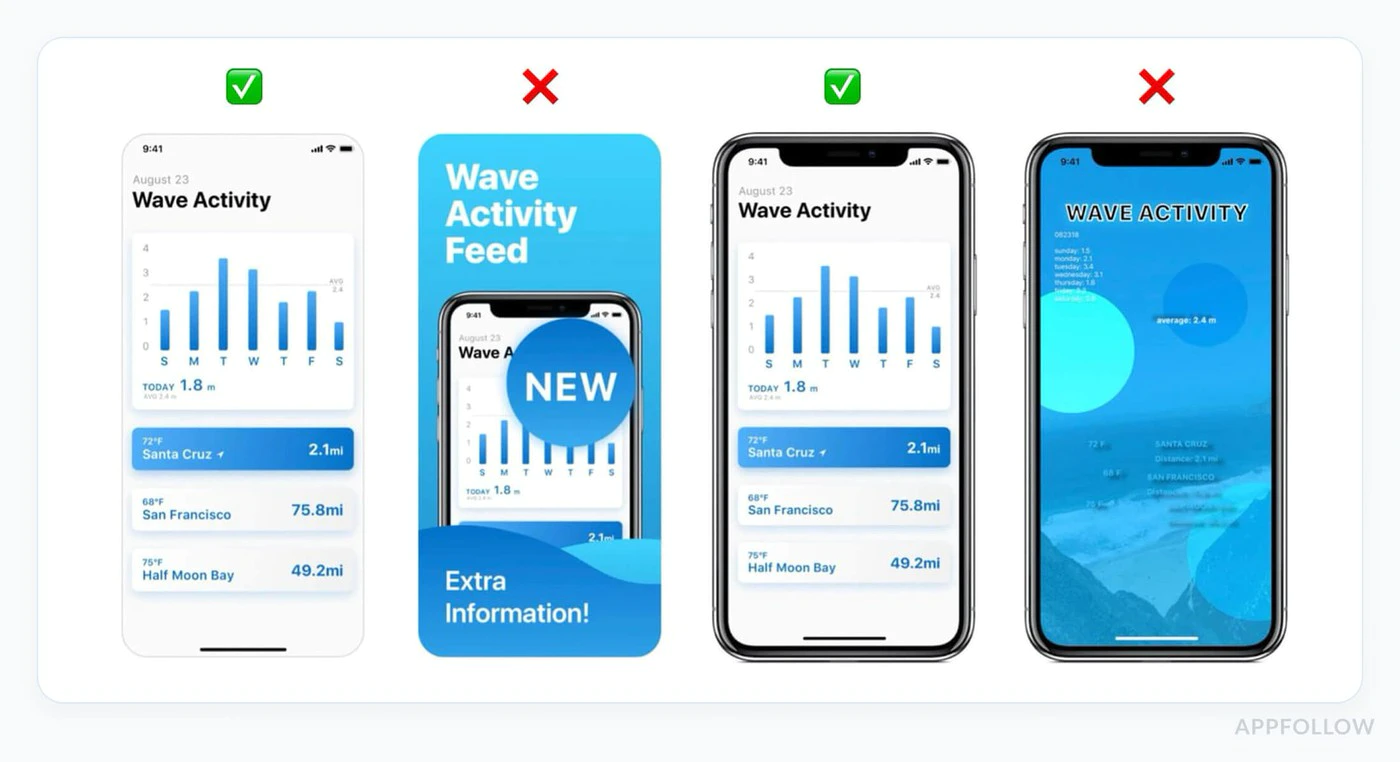
호환 UI의 예:
function SubscriptionCard({ product }) {  return (    <div className="subscription-card">      <h3>{product.title}</h3>
      {/* Show intro offer if available */}      {product.introductoryPrice && (        <div className="intro-offer">          <p className="intro-price">{product.introductoryPriceString}</p>          <p className="intro-period">            for {product.introductoryPricePeriod}          </p>        </div>      )}
      {/* Regular price */}      <div className="regular-price">        <p className="price">{product.priceString}</p>        <p className="period">per {product.subscriptionPeriod}</p>      </div>
      {/* Clear description */}      <p>{product.description}</p>
      {/* Renewal terms */}      <p className="terms">        Renews automatically. Cancel anytime in Google Play.      </p>
      <button onClick={() => handlePurchase(product)}>        Subscribe Now      </button>    </div>  );}
자동 갱신 공개
Section titled “자동 갱신 공개”구독이 자동 갱신되기 전에 Google에는 다음이 필요합니다.
- 갱신이 발생한다는 명확한 알림
- 가격 알림
- 취소에 대한 쉬운 접근
플랫폼 간 가격 일관성
Section titled “플랫폼 간 가격 일관성”중요 규칙: 가격은 앱을 사용할 수 있는 모든 플랫폼에서 일관되어야 합니다.
위반 예:
- iOS: $9.99/월
- Android: $7.99/월
- 웹: $11.99/월
중요한 이유: 사용자는 가격 차이를 캡쳐하여 Google에 신고하여 정책 위반을 유발할 수 있습니다.
개인정보 보호정책 요구사항
Section titled “개인정보 보호정책 요구사항”필수 개인정보 보호정책
Section titled “필수 개인정보 보호정책”앱에 인앱 구매가 포함되어 있는 경우 다음을 수행해야 합니다.
-
Play Store 목록의 링크
- Play Console에 개인정보처리방침 URL 추가
- 공개적으로 접근 가능해야 함
- 앱과 동일한 언어로 작성되어야 합니다.
-
앱 내 링크
- 앱 설정에 개인정보 보호정책 표시
- 사용자 데이터를 수집하기 전에 표시
- 쉽게 검색 가능하게 만들기
구현 예:
function SettingsScreen() {  const openPrivacyPolicy = () => {    window.open('https://yourapp.com/privacy', '_blank');  };
  const openTerms = () => {    window.open('https://yourapp.com/terms', '_blank');  };
  return (    <div>      <h2>Settings</h2>
      <button onClick={openPrivacyPolicy}>        Privacy Policy      </button>
      <button onClick={openTerms}>        Terms of Service      </button>
      <button onClick={() => NativePurchases.showManageSubscriptions()}>        Manage Subscriptions      </button>    </div>  );}
데이터 안전 섹션
Section titled “데이터 안전 섹션”Google Play에서는 데이터 안전 섹션에 자세한 공개가 필요합니다.
IAP 앱의 경우 다음을 선언하세요.
- 구매내역 수집
- 이메일 주소(영수증용)
- 기기 ID(사기 방지용)
- 결제정보 처리
- 분석 데이터 수집
데이터 안전 섹션은 법적 구속력을 갖습니다. 부정확한 선언으로 인해 앱이 제거될 수 있습니다.
일반적인 거부 사유
Section titled “일반적인 거부 사유”1. 누락되거나 잘못된 결제 구현실패하는 이유:
Section titled “1. 누락되거나 잘못된 결제 구현실패하는 이유:”- 디지털 상품에 대한 Google Play 청구를 사용하지 않음
- 더 이상 사용되지 않는 결제 API 사용
- 구독을 위한 맞춤형 결제 솔루션 구현
예방:
// ✅ Correct: Use native-purchases (uses Google Play Billing)await NativePurchases.purchaseProduct({  productIdentifier: 'premium_monthly'});
// ❌ Wrong: Custom payment processor for subscriptions// await CustomPayment.charge(user, 9.99);
2. 불분명한 가격 또는 숨겨진 비용
Section titled “2. 불분명한 가격 또는 숨겨진 비용”실패하는 이유:
- 구매를 클릭한 후에만 가격이 표시됩니다.
- 추가 비용은 사전에 공개되지 않습니다.
- 모호한 구독 조건
예방:
function PurchaseScreen({ product }) {  return (    <div>      {/* Show ALL costs upfront */}      <h2>Premium Subscription</h2>
      <div className="pricing">        <p className="price">{product.priceString}/month</p>        <p className="taxes">Taxes may apply based on location</p>      </div>
      <div className="features">        <h3>Includes:</h3>        <ul>          <li>Ad-free experience</li>          <li>Unlimited cloud storage</li>          <li>Priority support</li>        </ul>      </div>
      <div className="terms">        <p>          Subscription renews automatically unless cancelled at least          24 hours before the end of the current period.        </p>        <p>          Manage or cancel in Google Play Subscriptions.        </p>      </div>
      <button onClick={handlePurchase}>        Start Subscription      </button>    </div>  );}
3. 사기성 구독 패턴
Section titled “3. 사기성 구독 패턴”실패하는 이유:
- 프리미엄 옵션 사전 선택
- 더 저렴한 대안 숨기기
- 취소를 어렵게 만드는 경우
- 거짓 긴급성(“3자리만 남았어요!”)
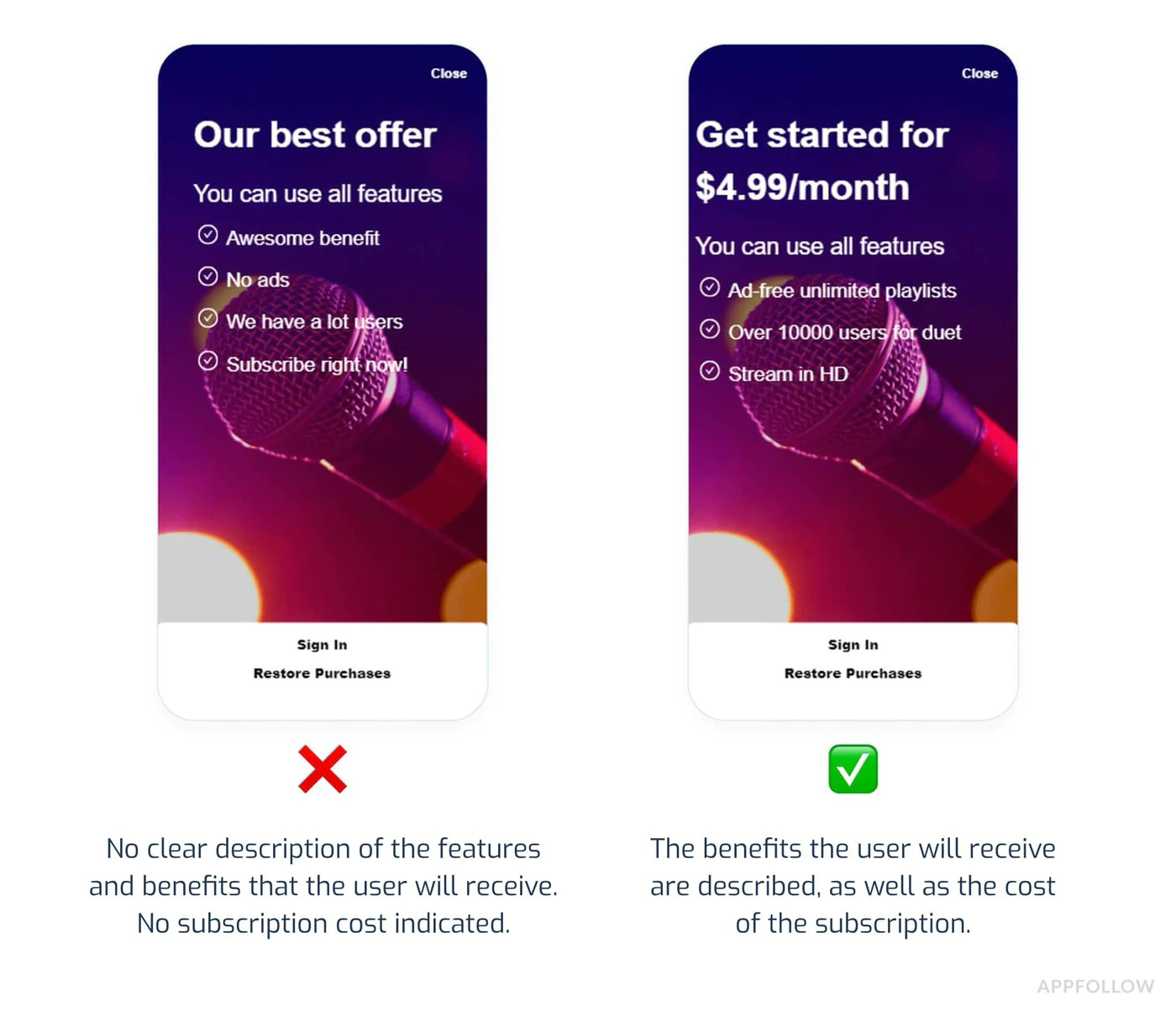
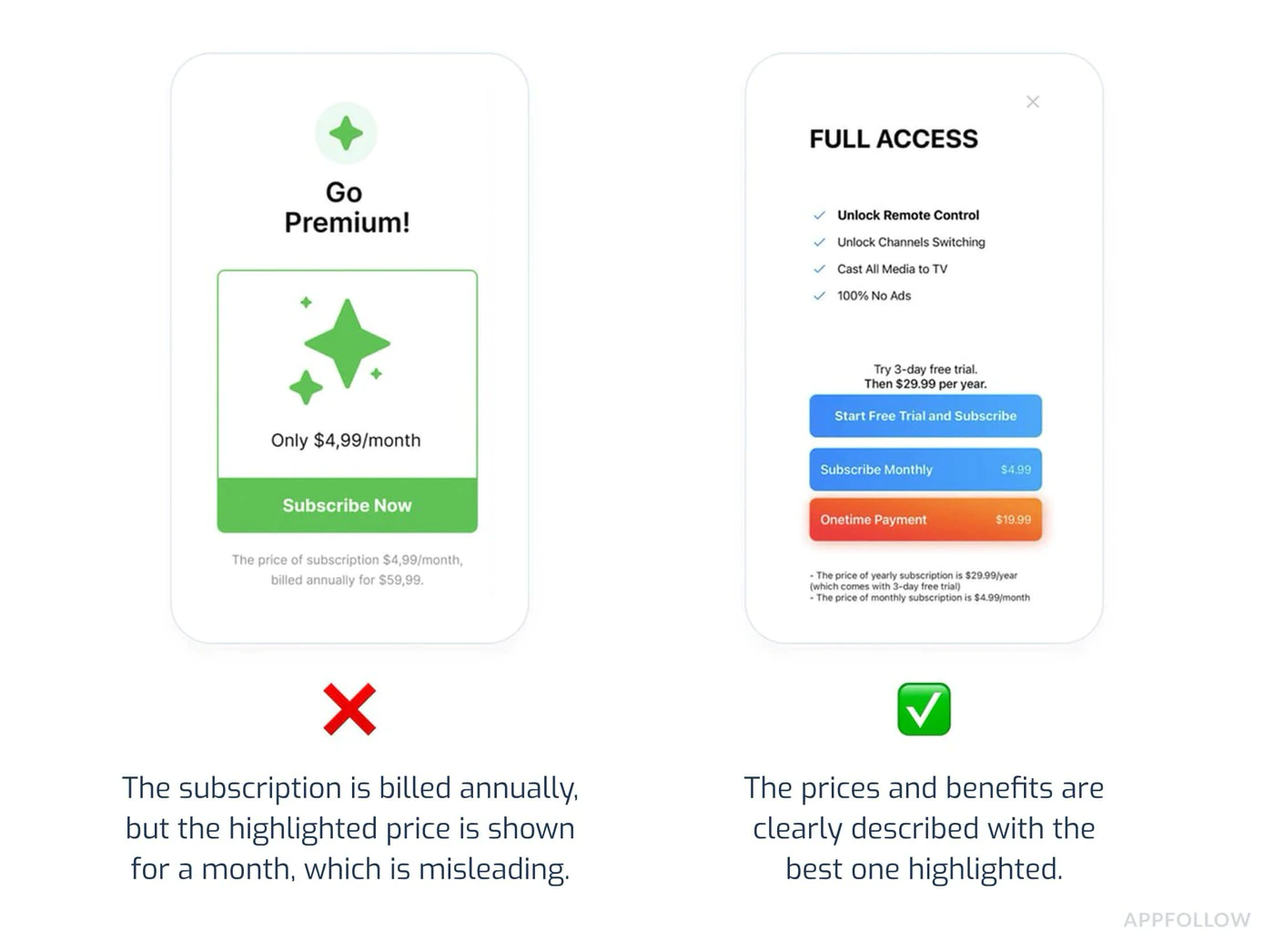
예방:
- 모든 구독 등급을 동일하게 표시
- 취소를 명확하고 접근 가능하게 만듭니다.
- 카운트다운 타이머나 가짜 희소성을 피하세요.
- 값비싼 옵션을 강요하기 위해 어두운 패턴을 사용하지 마세요.
4. 불완전한 테스트
Section titled “4. 불완전한 테스트”실패하는 이유:
- 구매 시 앱이 다운됩니다.
- 제품이 로드되지 않습니다.
- 구매 확인이 표시되지 않습니다.
- 구매 후 프리미엄 기능이 잠금 해제되지 않습니다.
예방:
import { NativePurchases, PURCHASE_TYPE } from '@capgo/native-purchases';
// Comprehensive testing before submissionasync function testPurchaseFlow() {  try {    // 1. Test product loading    const { products } = await NativePurchases.getProducts({      productIdentifiers: ['premium_monthly', 'premium_yearly'],      productType: PURCHASE_TYPE.SUBS,    });    console.log('✓ Products loaded:', products.length);
    // 2. Test purchase flow    const transaction = await NativePurchases.purchaseProduct({      productIdentifier: 'premium_monthly',      planIdentifier: 'monthly-plan',      productType: PURCHASE_TYPE.SUBS,    });    console.log('✓ Purchase completed', transaction.transactionId);
    // 3. Verify entitlements    const { purchases } = await NativePurchases.getPurchases({      productType: PURCHASE_TYPE.SUBS,    });    if (      purchases.some(        (purchase) =>          purchase.productIdentifier === 'premium_monthly' &&          ['PURCHASED', '1'].includes(purchase.purchaseState ?? '') &&          purchase.isAcknowledged,      )    ) {      console.log('✓ Premium features unlocked');    }
    // 4. Test restore    await NativePurchases.restorePurchases();    console.log('✓ Restore works');
  } catch (error) {    console.error('✗ Test failed:', error);  }}
5. 개인정보 보호정책 위반
Section titled “5. 개인정보 보호정책 위반”실패하는 이유:
- 앱에 개인정보 보호정책 링크가 없습니다.
- 개인정보취급방침에 액세스할 수 없습니다.
- 수집된 데이터는 공개되지 않습니다.
- 데이터 안전 섹션이 부정확함
예방:
- Play Store 목록에 개인정보 보호정책 추가
- 앱 설정에 링크 포함
- 데이터 안전 섹션을 정확하게 작성하세요.
- 새로운 데이터 수집 추가 시 정책 업데이트
개발자 제공 결제 시스템(2025 업데이트)
Section titled “개발자 제공 결제 시스템(2025 업데이트)”지역 규정 준수
Section titled “지역 규정 준수”Google은 이제 특정 지역에서 대체 결제 시스템을 허용합니다.
적격 지역:
- 유럽경제지역(EEA)
- 한국
- 인도(곧 제공 예정)
대체 결제 사용 시 요구 사항:
- Google Play 청구를 옵션으로 제공해야 합니다.
- 선택에 관해 사용자에게 명확한 의사소통
- 현지 규정을 준수합니다.
- 서비스 수수료는 그대로 적용됩니다(감소).
사용자는 다음을 수행할 수 있어야 합니다.
- 활성 구독을 쉽게 봅니다.
- 지원팀에 문의하지 않고 취소
- 취소가 적용되는 시기 이해
구현:
import { NativePurchases } from '@capgo/native-purchases';
function ManageSubscriptionButton() {  const openManagement = async () => {    try {      // Opens Google Play subscription management      await NativePurchases.showManageSubscriptions();    } catch (error) {      // Fallback to direct URL      const playStoreUrl = 'https://play.google.com/store/account/subscriptions';      window.open(playStoreUrl, '_blank');    }  };
  return (    <button onClick={openManagement}>      Manage Subscription in Google Play    </button>  );}
취소 유예 기간
Section titled “취소 유예 기간”필수 공개:
- 취소는 언제부터 적용되나요?
- 사용자는 기간이 종료될 때까지 계속 액세스할 수 있나요?
- 부분 환불이 가능한가요?
function CancellationInfo() {  return (    <div className="cancellation-info">      <h3>Cancellation Policy</h3>      <ul>        <li>Cancel anytime in Google Play</li>        <li>Access continues until end of billing period</li>        <li>No refunds for partial periods</li>        <li>Resubscribe anytime to regain access</li>      </ul>
      <button onClick={() => NativePurchases.showManageSubscriptions()}>        Manage in Google Play      </button>    </div>  );}
제출 전 체크리스트
Section titled “제출 전 체크리스트”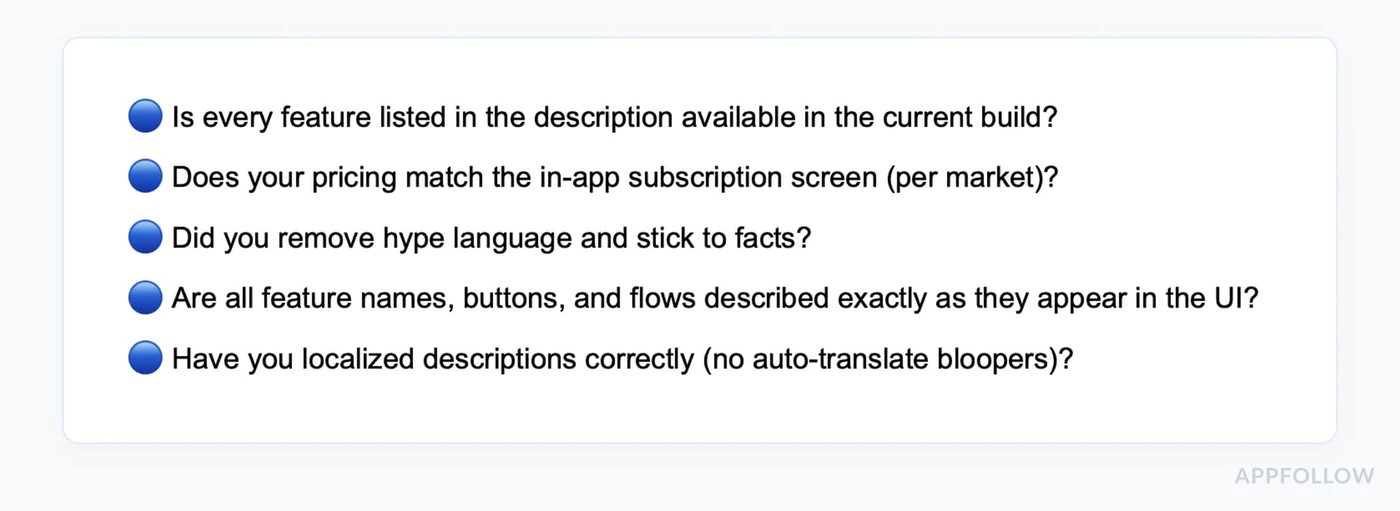
-
결제 구현 확인
- Google Play 청구 사용(기본 구매를 통해)
- Play Console에서 생성된 모든 구독 제품
- 제품이 활성화되고 게시됩니다.
- 모든 대상 국가에 대해 가격 설정
-
구매 흐름 테스트
- 라이센스 테스트 계정 생성
- 각 구독 등급을 테스트하세요.
- 제품이 올바르게 로드되었는지 확인
- 테스트 구매 완료
- 프리미엄 기능 잠금 해제 확인
- 테스트 구독 복원
- 여러 장치에서 테스트3. 모든 사본 검토
- 구매하기 전에 가격이 명확하게 표시됩니다.
- 모든 수수료는 사전에 공개됩니다.
- 구독 조건이 명확합니다.
- 취소 절차 설명
- 오해의 소지가 있는 주장은 하지 않습니다.
-
개인정보 보호 규정 준수
- Play Console에 연결된 개인정보취급방침
- 앱에서 액세스할 수 있는 개인정보 보호정책
- 데이터 안전 섹션을 정확하게 작성함
- 정당화되고 문서화된 권한
-
콘텐츠 등급
- 콘텐츠 등급 설문지 작성
- 등급이 실제 콘텐츠와 일치하는지 확인하세요.
- 설문지에 인앱 구매를 선언하세요.
-
스토어 등록정보 준비
- 정확한 앱 설명
- 스크린샷은 현재 버전을 보여줍니다.
- 기능 그래픽이 요구 사항을 충족합니다.
- 모든 필수 자산이 업로드되었습니다.
타임라인 검토
Section titled “타임라인 검토”최초 검토: 평균 7일(더 빠를 수 있음) 업데이트: 일반적으로 초기 제출보다 빠릅니다. 정책 위반: 즉시 정지 가능 이의신청: 검토에 7~14일 소요
:::tip 롤링 리뷰 Apple과 달리 Google는 지속적으로 앱을 검토합니다. 정해진 시간이 아닌 검토 기간 중 언제든지 앱이 게시될 수 있습니다. :::
제출 전 테스트
Section titled “제출 전 테스트”라이센스 테스트
Section titled “라이센스 테스트”-
테스트 계정 추가:
- Play Console로 이동
- 설정 > 라이선스 테스트
- 테스트용 Gmail 계정 추가
-
샌드박스에서 테스트:
import { NativePurchases, PURCHASE_TYPE } from '@capgo/native-purchases';
// Test purchases with license test accountasync function testInSandbox() {  const { isBillingSupported } = await NativePurchases.isBillingSupported();  if (!isBillingSupported) {    console.error('Billing not supported in this environment');    return;  }
  // Fetch products (returns test pricing when using a license tester)  const { products } = await NativePurchases.getProducts({    productIdentifiers: ['premium_monthly'],    productType: PURCHASE_TYPE.SUBS,  });
  console.log('Test products:', products);
  // Make test purchase (no charge)  const transaction = await NativePurchases.purchaseProduct({    productIdentifier: 'premium_monthly',    planIdentifier: 'monthly-plan',    productType: PURCHASE_TYPE.SUBS,  });
console.log('Test purchase complete:', transaction.transactionId);}- 테스트 배너 확인:
- 테스트 계정으로 구매 시
- “테스트 구매” 알림이 표시되어야 합니다.
- 실제 요금이 발생하지 않습니다.
내부 테스트 트랙
Section titled “내부 테스트 트랙”프로덕션 릴리스 전:
- Play Console에서 내부 테스트 트랙 만들기
- APK/AAB 업로드
- 테스터 이메일 주소 추가
- Play Store(테스트 트랙)에서 테스터 다운로드
- 구매 흐름이 처음부터 끝까지 작동하는지 확인하세요.
기본 구매 모범 사례
Section titled “기본 구매 모범 사례”모든 구매 상태 처리
Section titled “모든 구매 상태 처리”import { NativePurchases, PURCHASE_TYPE } from '@capgo/native-purchases';
async function handlePurchase(productId: string, planIdentifier?: string) { try { setLoading(true);
const transaction = await NativePurchases.purchaseProduct({ productIdentifier: productId, planIdentifier, productType: planIdentifier ? PURCHASE_TYPE.SUBS : PURCHASE_TYPE.INAPP, });
console.log('Purchase token:', transaction.purchaseToken ?? transaction.receipt);
// Success - check entitlements from the store const { purchases } = await NativePurchases.getPurchases({ productType: planIdentifier ? PURCHASE_TYPE.SUBS : PURCHASE_TYPE.INAPP, });
const isOwned = purchases.some( (purchase) => purchase.productIdentifier === productId && (purchase.purchaseState === 'PURCHASED' || purchase.purchaseState === '1') && purchase.isAcknowledged, );
if (isOwned) { unlockPremiumFeatures(); showSuccess('Premium activated!'); }
} catch (error: any) { // Handle specific error cases switch (error.code) { case 'USER_CANCELLED': // User backed out - no error needed console.log('Purchase cancelled'); break;
case 'ITEM_ALREADY_OWNED': // They already own it - restore instead showInfo('You already own this! Restoring...'); await NativePurchases.restorePurchases(); break;
case 'ITEM_UNAVAILABLE': showError('This subscription is currently unavailable. Please try again later.'); break;
case 'NETWORK_ERROR': showError('Network error. Please check your connection and try again.'); break;
default: showError('Purchase failed. Please try again.'); console.error('Purchase error:', error); } } finally { setLoading(false); }}복원 구매 구현
Section titled “복원 구매 구현”import { NativePurchases, PURCHASE_TYPE } from '@capgo/native-purchases';
function RestorePurchasesButton() { const [loading, setLoading] = useState(false);
const handleRestore = async () => { setLoading(true);
try { await NativePurchases.restorePurchases();
const { purchases } = await NativePurchases.getPurchases({ productType: PURCHASE_TYPE.SUBS, });
const hasSubscription = purchases.some( (purchase) => purchase.productType === 'subs' && purchase.isAcknowledged, );
if (hasSubscription) { unlockPremiumFeatures(); showSuccess('Subscriptions restored!'); return; }
// Check one-time unlocks if needed const { purchases: iaps } = await NativePurchases.getPurchases({ productType: PURCHASE_TYPE.INAPP, }); const hasInApp = iaps.some((purchase) => purchase.productIdentifier === 'premium_unlock');
if (hasInApp) { unlockPremiumFeatures(); showSuccess('Previous purchases restored!'); return; }
showInfo('No previous purchases found.'); } catch (error) { showError('Failed to restore purchases. Please try again.'); } finally { setLoading(false); } };
return ( <button onClick={handleRestore} disabled={loading}> {loading ? 'Restoring...' : 'Restore Purchases'} </button> );}구독 상태 확인
Section titled “구독 상태 확인”import { NativePurchases, PURCHASE_TYPE } from '@capgo/native-purchases';
async function checkSubscriptionStatus() { try { const { purchases } = await NativePurchases.getPurchases({ productType: PURCHASE_TYPE.SUBS, });
const subscription = purchases.find( (purchase) => purchase.productIdentifier === 'premium_monthly' && (purchase.purchaseState === 'PURCHASED' || purchase.purchaseState === '1') && purchase.isAcknowledged, );
if (!subscription) { showPaywall(); return; }
console.log('Subscription active:', { productId: subscription.productIdentifier, expiresAt: subscription.expirationDate, willRenew: subscription.willCancel === false, purchaseToken: subscription.purchaseToken, });
unlockPremiumFeatures(); } catch (error) { console.error('Failed to check subscription:', error); }}앱이 거부되는 경우
Section titled “앱이 거부되는 경우”일반적인 정책 위반
Section titled “일반적인 정책 위반”결제 정책:
- Google Play 결제를 사용하지 않음
- 오해의 소지가 있는 구독 약관
- 숨겨진 비용
사용자 데이터 정책:
- 개인정보취급방침 누락
- 부정확한 데이터 안전 선언
- 과도한 권한
-
위반 통지 검토
- 인용된 특정 정책을 읽어 보십시오.
- Google에 플래그가 지정된 내용을 이해합니다.
- 제공한 예시를 확인하세요.
-
문제 해결
- 단순히 증상이 아닌 근본 원인을 해결합니다.
- 수정 후 철저한 테스트
- 모든 변경 사항을 문서화하세요.
-
이의신청 제출(해당하는 경우)
 Subject: Policy Violation Appeal - [App Name]Dear Google Play Review Team,I have received notification that my app violates [Policy X.Y].I have made the following changes to comply:1. [Specific change made]2. [Specific change made]3. [Specific change made]The updated version [version number] addresses all concerns raised.Test account for verification:Email: test@example.comPassword: TestPass123Thank you for your consideration.
-
다시 제출 또는 업데이트
- 수정된 버전 업로드
- 검토를 위해 다시 제출
- Play Console에서 상태 모니터링
추가 리소스
Section titled “추가 리소스”전문가의 도움이 필요하신가요?Play Store 검토 탐색은 특히 새로운 2025 테스트 요구 사항의 경우 복잡할 수 있습니다. 맞춤형 지원이 필요한 경우:
Section titled “전문가의 도움이 필요하신가요?Play Store 검토 탐색은 특히 새로운 2025 테스트 요구 사항의 경우 복잡할 수 있습니다. 맞춤형 지원이 필요한 경우:”저희 팀과 상담 전화 예약 다음과 같은 도움이 필요합니다.
- Play Store 검토 준비 완료
- 테스트 트랙 설정 및 테스터 모집
- IAP 구현 검토
- 데이터 안전 및 개인정보 보호 규정 준수
- 거부 문제 해결 및 이의 제기
- 앱 제출 프로세스 완료
우리 전문가들은 성공적인 Play Store 제출을 통해 수백 개의 앱을 안내했으며 2025년 요구 사항을 탐색하는 데 도움을 줄 수 있습니다.
구현에 도움이 필요하십니까?
- 기본 구매 문서 검토
- Android 샌드박스 테스트 가이드 확인
- Google Play 개발자 지원을 방문하세요.