
IAP용 Android Play Store Review Guidelines
이 플러그인의 설치 단계와 전체 마크다운 가이드가 포함된 설정 프롬프트를 복사하세요.
Android 앱을 Google Play에서 승인받으려면 Google의 정책을 준수해야 하며, 특히 인앱 결제 및 구독 기능이 포함된 앱은 더욱 주의가 필요합니다. 이 가이드는 성공적인 리뷰 통과를 위해 필요한 모든 내용을 다룹니다.
실제로 통하는 릴리스 경로
“효과적인 출시 경로” 섹션-
서명된 Android App Bundle 빌드하기
새로운 Google Play 앱은 사이드로딩 방식의 debug APK가 아닌 Android App Bundle로
.aab업로드해야 합니다.다음을 유지하세요
versionCode업로드할 때마다 증가하며, Play App Signing을 사용하는 경우 업로드 키를 안전하게 보관하세요.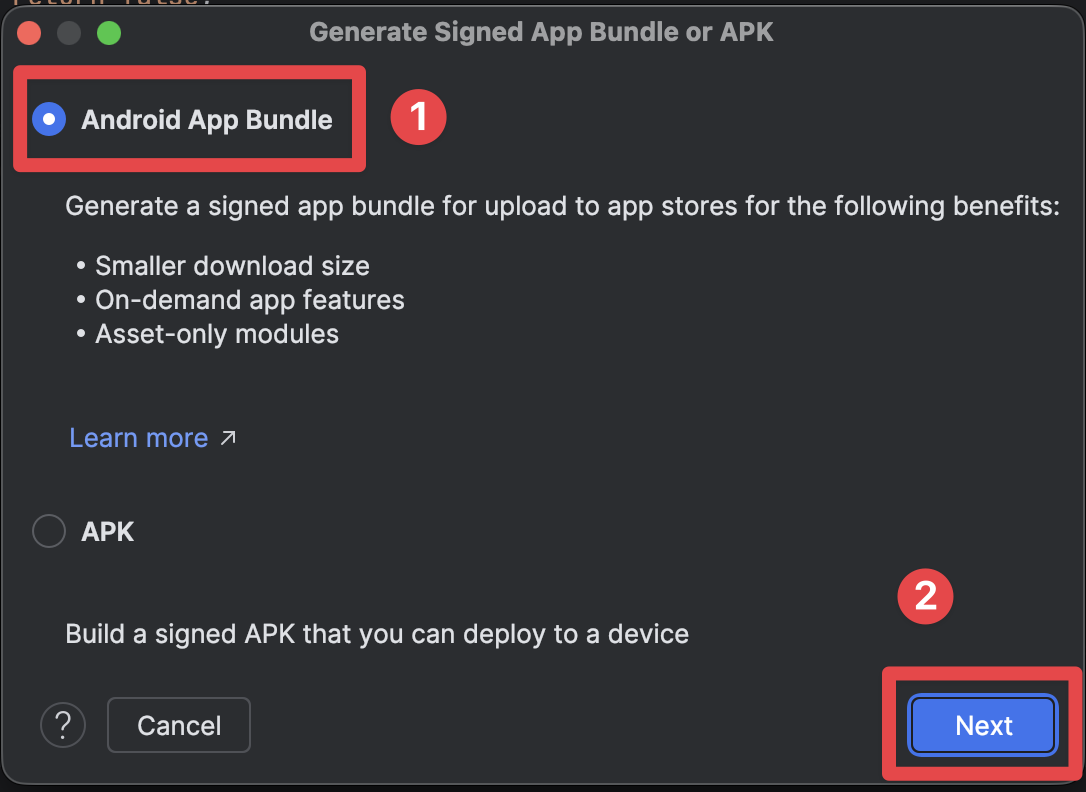
-
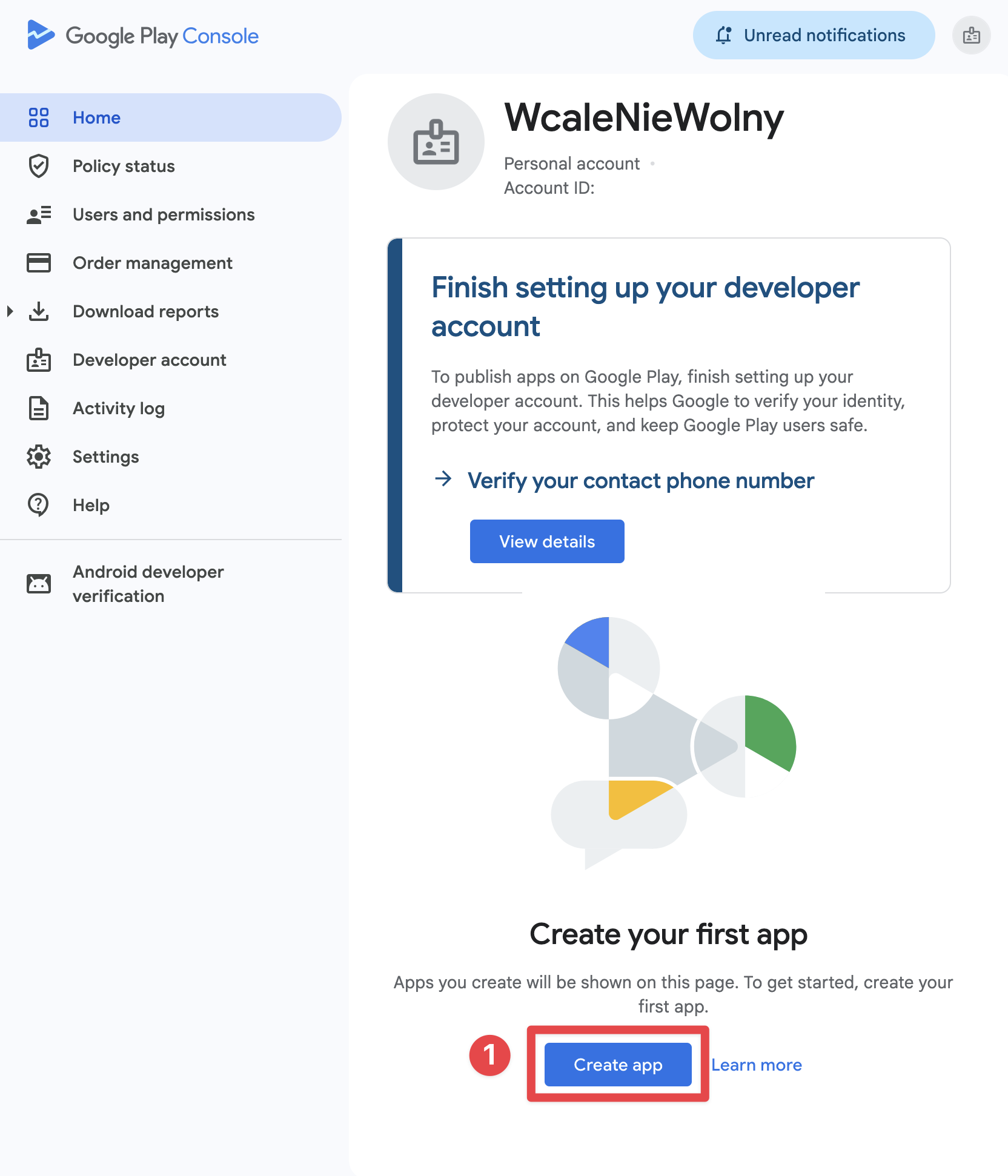
Play Console에서 앱 레코드 생성하기
아직 개발자 계정이 없다면, 다음 단계부터 시작하세요. Play Console 가입. 그런 다음, 홈 > 앱 만들기에서 언어를 선택하고 앱/게임 유형, 무료/유료 여부, 지원 이메일을 설정한 뒤 필수 선언 사항에 동의합니다.
무료/유료 설정은 신중하게 선택하세요. Google에서는 유료 앱을 나중에 무료로 전환할 수 있지만, 한 번 무료로 제공된 앱은 다시 유료로 전환할 수 없습니다.
-
앱 콘텐츠 및 스토어 등록정보 완료
프로덕션 검토 전에 Play Console 필수 선언 사항을 완료하세요:
- 개인정보처리방침
- 광고
- 앱 액세스
- 타겟층 및 콘텐츠
- 콘텐츠 등급
- 데이터 안전성
- 해당되는 경우 민감한 권한 선언 필요
-
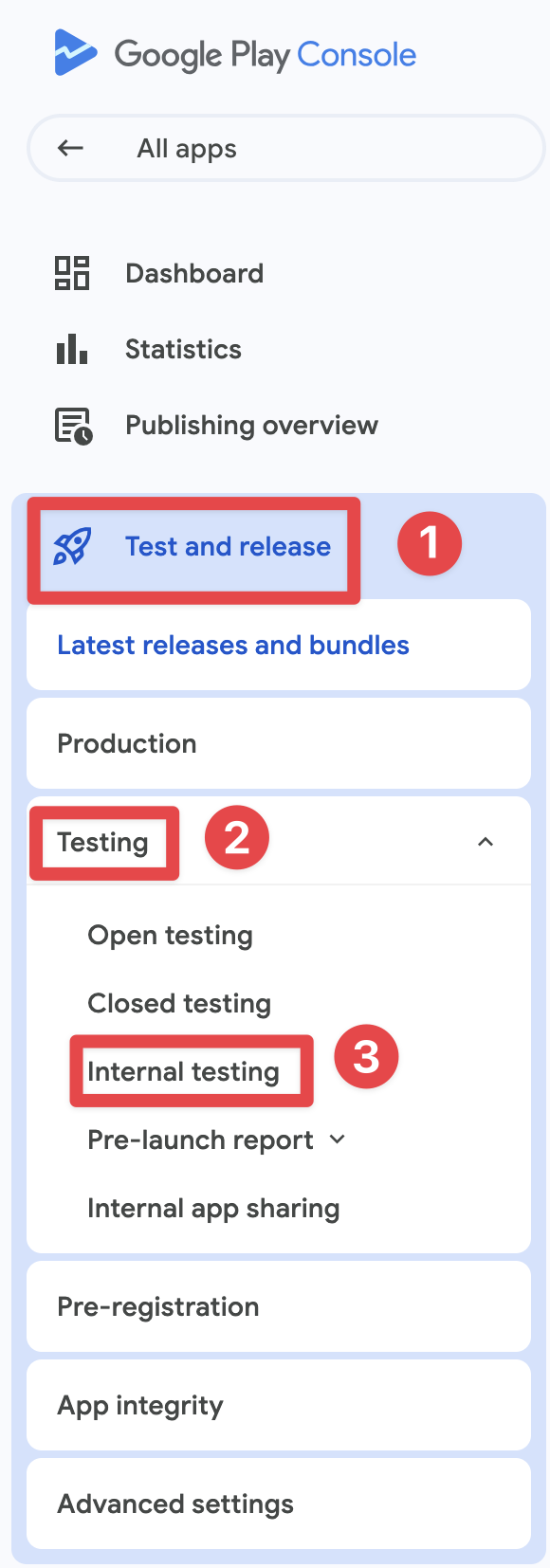
Play 설치 테스트 트랙 실행
다음으로 시작하세요 내부 테스트 빠른 QA를 위해 사용하세요. 2023년 11월 13일 이후 생성된 개인 개발자 계정인 경우, 프로덕션 액세스 권한을 얻기 전 반드시 다음 과정을 완료해야 합니다: 비공개 테스트 최소 12명의 테스터가 14일 연속으로 참여해야 합니다.
-
결제 엔드 투 엔드(E2E) 검증
로컬 APK가 아닌 Google Play에서 앱을 설치하세요. 그 다음 다음 사항을 확인합니다:
- Play에서 상품 정보가 올바르게 로드되는지 확인
- 결제 시트에는 다음이 표시됩니다: 테스트 구매 라이선스 테스터용
- 배너
- 구매 후 권한(Entitlements)이 활성화됩니다
Google Play Billing 요구사항
복구 및 구독 관리 흐름이 작동합니다필수 결제 시스템
“Google Play 결제 요구사항” 섹션“필수 결제 시스템” 섹션 해야 합니다 디지털 상품 및 서비스의 경우,
디지털 상품 (Play Billing 필수):
- 프리미엄 기능 구독
- 인앱 재화 또는 크레딧
- 디지털 콘텐츠 (전자책, 음악, 영상)
- 게임 업그레이드 및 파워업
- 앱 잠금 해제 및 프리미엄 등급
실물 상품 (Play Billing 사용 불가):
- 실물 상품
- 오프라인 서비스
- 비영리 단체 일시 후원
:::note 구독 설정
Play Console에서 Android 구독을 다음 구조로 구성하세요: 구독 -> 기본 요금제 -> 혜택 모델. native-purchases, Base Plan ID를 전달하세요. planIdentifier.
:::
Native Purchases를 통한 구현
“Native Purchases를 이용한 구현” 섹션import { NativePurchases, PURCHASE_TYPE } from '@capgo/native-purchases';
// Ensure billing is available on the deviceconst { isBillingSupported } = await NativePurchases.isBillingSupported();if (!isBillingSupported) throw new Error('Google Play Billing not available');
// Fetch subscription products (Store data is required—never hardcode pricing)const { products } = await NativePurchases.getProducts({ productIdentifiers: ['premium_monthly', 'premium_yearly'], productType: PURCHASE_TYPE.SUBS,});
// Plan identifiers are the Base Plan IDs you create in Google Play Consoleconst transaction = await NativePurchases.purchaseProduct({ productIdentifier: 'premium_monthly', planIdentifier: 'monthly-plan', // REQUIRED on Android, ignored on iOS productType: PURCHASE_TYPE.SUBS,});
console.log('Purchase token for server validation:', transaction.purchaseToken);투명성 및 고지 요구 사항
“투명성 및 공개 요구 사항” 섹션사전 가격 고지
“사전 가격 공개” 섹션Google Play는 구매 전 모든 비용을 명확히 공개하도록 규정합니다:
필수 항목:
- 사용자 현지 통화 기준 정확한 가격
- 결제 주기 (월간, 연간 등)
- 구독 포함 내역
- 소개 오퍼 총 비용
- 결제 예정 시점
규정 준수 UI 예시:
function SubscriptionCard({ product }) {  return (    <div className="subscription-card">      <h3>{product.title}</h3>
      {/* Show intro offer if available */}      {product.introductoryPrice && (        <div className="intro-offer">          <p className="intro-price">{product.introductoryPriceString}</p>          <p className="intro-period">            for {product.introductoryPricePeriod}          </p>        </div>      )}
      {/* Regular price */}      <div className="regular-price">        <p className="price">{product.priceString}</p>        <p className="period">per {product.subscriptionPeriod}</p>      </div>
      {/* Clear description */}      <p>{product.description}</p>
      {/* Renewal terms */}      <p className="terms">        Renews automatically. Cancel anytime in Google Play.      </p>
      <button onClick={() => handlePurchase(product)}>        Subscribe Now      </button>    </div>  );}
자동 갱신 고지
“자동 갱신 고지” 섹션구독 자동 갱신 전 Google 요구 사항:
- 갱신 예정에 대한 명확한 알림
- 가격 재안내
- 간편한 구독 해지 접근성
크로스 플랫폼 가격 명확성
“크로스 플랫폼 가격 투명성” 섹션여러 플랫폼에서 동일한 권한(entitlement)을 판매하는 경우, 사용자가 혼란을 느끼지 않도록 상품명, 결제 주기, 포함 혜택 및 갱신 관련 문구를 일관되게 유지해야 합니다.
세금, 현지 통화 또는 스토어 경제성 때문에 가격이 정당하게 다를 수 있지만, 구매 UI에서 그 차이를 숨기거나 Google Play가 청구할 갱신 비용과 다른 금액을 암시해서는 안 됩니다.
개인정보 처리방침 요구사항
“개인정보 처리방침 요구사항” 섹션필수 개인정보 처리방침
“필수 개인정보 처리방침” 섹션앱에 인앱 구매가 포함되어 있다면 다음을 따라야 합니다:
-
Play Store 등록정보에 링크 추가
- Play Console에 개인정보 처리방침 URL 추가
- 누구나 접근할 수 있어야 함
- 앱과 같은 언어여야 함
-
앱 내부에 링크 추가
- 앱 설정에서 개인정보 처리방침 표시
- 사용자 데이터를 수집하기 전에 표시
- 사용자가 쉽게 찾을 수 있어야 함
구현 예시:
function SettingsScreen() {  const openPrivacyPolicy = () => {    window.open('https://yourapp.com/privacy', '_blank');  };
  const openTerms = () => {    window.open('https://yourapp.com/terms', '_blank');  };
  return (    <div>      <h2>Settings</h2>
      <button onClick={openPrivacyPolicy}>        Privacy Policy      </button>
      <button onClick={openTerms}>        Terms of Service      </button>
      <button onClick={() => NativePurchases.manageSubscriptions()}>        Manage Subscriptions      </button>    </div>  );}
데이터 보안 섹션
“데이터 보안 섹션” 섹션Google Play는 데이터 보안 섹션에 다음과 같은 상세 정보를 공개하도록 요구합니다:
IAP 앱의 경우, 다음 항목을 선언해야 합니다:
- 구매 내역 수집
- 이메일 주소 (영수증 발송용)
- 기기 ID (사기 방지용)
- 결제 정보 처리
- 분석 데이터 수집
데이터 보안 섹션은 법적 구속력을 갖습니다. 부정확한 선언은 앱 삭제로 이어질 수 있습니다.
앱 콘텐츠 선언
“앱 콘텐츠 선언” 섹션Google Play 리뷰는 바이너리만 검토하는 것이 아닙니다. 프로덕션 출시 전에 다음 선언을 완료하세요: 정책 및 프로그램 > 앱 콘텐츠.
주의 깊게 검토해야 할 최소 항목:
- 개인정보처리방침: Play Console의 공개 URL과 필요한 경우 앱 내 진입점
- 광고: 앱의 광고 포함 여부 선언
- 앱 액세스: 특정 화면에 제한이 있는 경우 검토용 계정 또는 명확한 테스트 경로 제공
- 타겟층 및 콘텐츠: 앱의 실제 사용자층과 일치시키기
- 콘텐츠 등급: 앱이 '등급 미지정'으로 표시되지 않도록 IARC 설문 완료
- 데이터 안전성: 데이터 수집, 공유 및 보안 관행을 정확하게 명시하세요
흔한 거절 사유
“흔한 거절 사유” 섹션1. 결제 구현 누락 또는 오류
“1. 결제 구현 누락 또는 오류” 섹션거절 원인:
- 디지털 상품에 Google Play Billing을 사용하지 않음
- deprecated된 결제 API 사용
- 구독용 커스텀 결제 솔루션 구현
방지 방법:
// ✅ Correct: Use native-purchases (uses Google Play Billing)await NativePurchases.purchaseProduct({  productIdentifier: 'premium_monthly',  planIdentifier: 'monthly-plan',  productType: PURCHASE_TYPE.SUBS,});
// ❌ Wrong: Custom payment processor for subscriptions// await CustomPayment.charge(user, 9.99);
2. 불명확한 가격 또는 숨겨진 비용
“2. 불명확한 가격 또는 숨겨진 비용” 섹션거절 원인:
- 구매 클릭 후에만 가격이 표시됨
- 추가 요금을 사전에 고지하지 않음
- 모호한 구독 약관
방지 방법:
function PurchaseScreen({ product }) {  return (    <div>      {/* Show ALL costs upfront */}      <h2>Premium Subscription</h2>
      <div className="pricing">        <p className="price">{product.priceString}/month</p>        <p className="taxes">Taxes may apply based on location</p>      </div>
      <div className="features">        <h3>Includes:</h3>        <ul>          <li>Ad-free experience</li>          <li>Unlimited cloud storage</li>          <li>Priority support</li>        </ul>      </div>
      <div className="terms">        <p>          Subscription renews automatically unless cancelled at least          24 hours before the end of the current period.        </p>        <p>          Manage or cancel in Google Play Subscriptions.        </p>      </div>
      <button onClick={handlePurchase}>        Start Subscription      </button>    </div>  );}
3. 기만적인 구독 패턴
“3. 기만적인 구독 패턴” 섹션거절 원인:
- 프리미엄 옵션 사전 선택
- 저렴한 대안 숨기기
- 해지 절차를 어렵게 만들기
- 허위 긴박감 조성 (“남은 자리 3개!”)
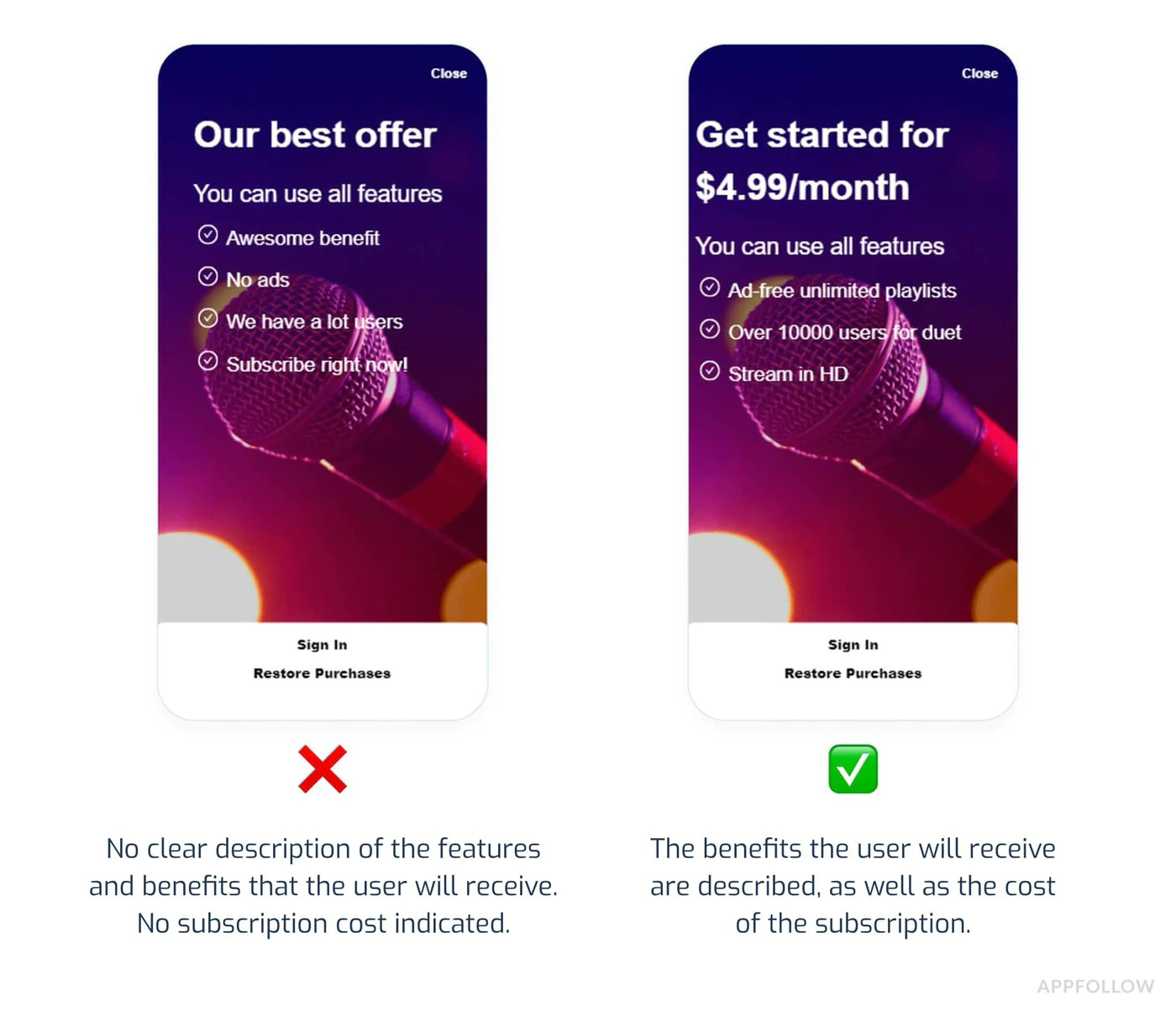
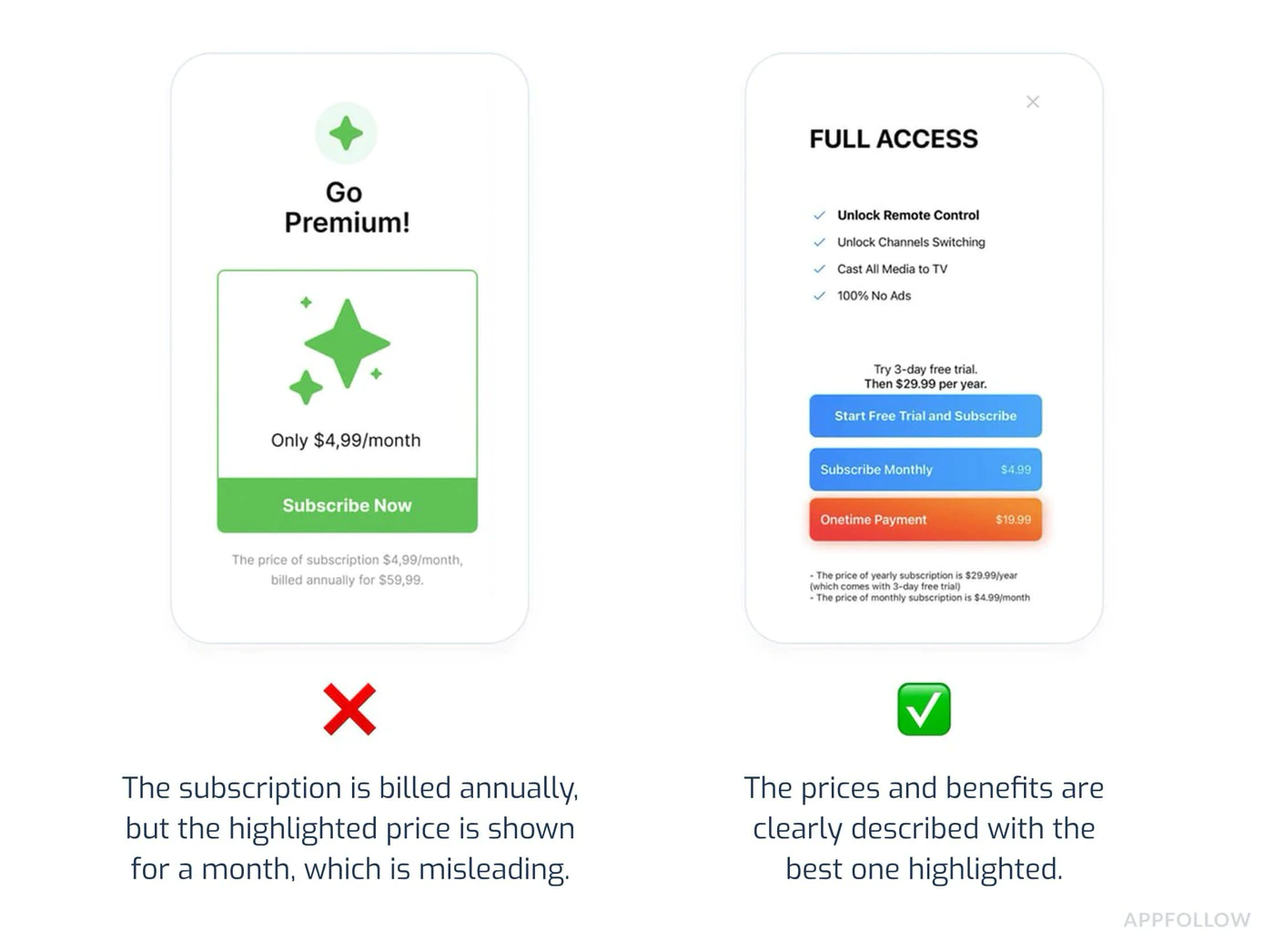
방지 방법:
- 모든 구독 요금제를 동등하게 표시
- 취소 절차를 명확하고 쉽게 만드세요
- 카운트다운 타이머나 가짜 희소성은 피하세요
- 다크 패턴으로 비싼 옵션을 유도하지 마세요
4. 불충분한 테스트
“4. 불충분한 테스트” 섹션거절 원인:
- 구매 시 앱이 크래시남
- 상품이 로드되지 않음
- 구매 확인이 표시되지 않음
- 구매 후 프리미엄 기능이 활성화되지 않음
- Play Store 테스트 트랙 대신 사이드로드한 빌드로만 테스트함
방지 방법:
import { NativePurchases, PURCHASE_TYPE } from '@capgo/native-purchases';
// Comprehensive testing before submissionasync function testPurchaseFlow() {  try {    // 1. Test product loading    const { products } = await NativePurchases.getProducts({      productIdentifiers: ['premium_monthly', 'premium_yearly'],      productType: PURCHASE_TYPE.SUBS,    });    console.log('✓ Products loaded:', products.length);
    // 2. Test purchase flow    const transaction = await NativePurchases.purchaseProduct({      productIdentifier: 'premium_monthly',      planIdentifier: 'monthly-plan',      productType: PURCHASE_TYPE.SUBS,    });    console.log('✓ Purchase completed', transaction.transactionId);
    // 3. Verify entitlements    const { purchases } = await NativePurchases.getPurchases({      productType: PURCHASE_TYPE.SUBS,    });    if (      purchases.some(        (purchase) =>          purchase.productIdentifier === 'premium_monthly' &&          ['PURCHASED', '1'].includes(purchase.purchaseState ?? '') &&          purchase.isAcknowledged,      )    ) {      console.log('✓ Premium features unlocked');    }
    // 4. Test restore    await NativePurchases.restorePurchases();    console.log('✓ Restore works');
  } catch (error) {    console.error('✗ Test failed:', error);  }}
5. 개인정보 처리방침 위반
“5. 개인정보 처리방침 위반” 섹션거절 원인:
- 앱 내 개인정보 처리방침 링크 누락
- 개인정보 처리방침 접근 불가
- 데이터 수집 사실 미고지
- Data Safety 섹션 정보 부정확
방지 방법:
- Play Store 등록 정보에 개인정보 처리방침 추가
- 앱 설정에 링크 포함
- Data Safety 섹션 정확히 작성
- 새로운 데이터 수집 항목 추가 시 업데이트 정책
대체 결제 프로그램
“대체 결제 프로그램” 섹션Google의 대체 결제 프로그램은 지역별로 다르며 변경될 수 있습니다. 표준 Google Play Billing 이외의 방식을 사용하려면, 구현 직전에 Play Console에서 해당 시장의 자격 요건, 필수 API 및 고지 문구를 반드시 확인하세요.
구독 관리
“구독 관리” 섹션간편한 해지
“간편한 해지” 섹션사용자는 다음을 수행할 수 있어야 합니다:
- 활성 구독 내역을 간편하게 확인
- 고객 지원 센터 문의 없이 취소 가능
- 취소 적용 시점 확인
구현 방법:
import { NativePurchases } from '@capgo/native-purchases';
function ManageSubscriptionButton() {  const openManagement = async () => {    try {      // Opens Google Play subscription management      await NativePurchases.manageSubscriptions();    } catch (error) {      // Fallback to direct URL      const playStoreUrl = 'https://play.google.com/store/account/subscriptions';      window.open(playStoreUrl, '_blank');    }  };
  return (    <button onClick={openManagement}>      Manage Subscription in Google Play    </button>  );}
해지 유예 기간
“취소 유예 기간” 섹션필수 고지 사항:
- 취소는 언제 적용되나요?
- 기간 종료 전까지 이용 가능한가요?
- 부분 환불이 가능한가요?
function CancellationInfo() {  return (    <div className="cancellation-info">      <h3>Cancellation Policy</h3>      <ul>        <li>Cancel anytime in Google Play</li>        <li>Access continues until end of billing period</li>        <li>No refunds for partial periods</li>        <li>Resubscribe anytime to regain access</li>      </ul>
      <button onClick={() => NativePurchases.manageSubscriptions()}>        Manage in Google Play      </button>    </div>  );}
제출 전 체크리스트
“제출 전 체크리스트” 섹션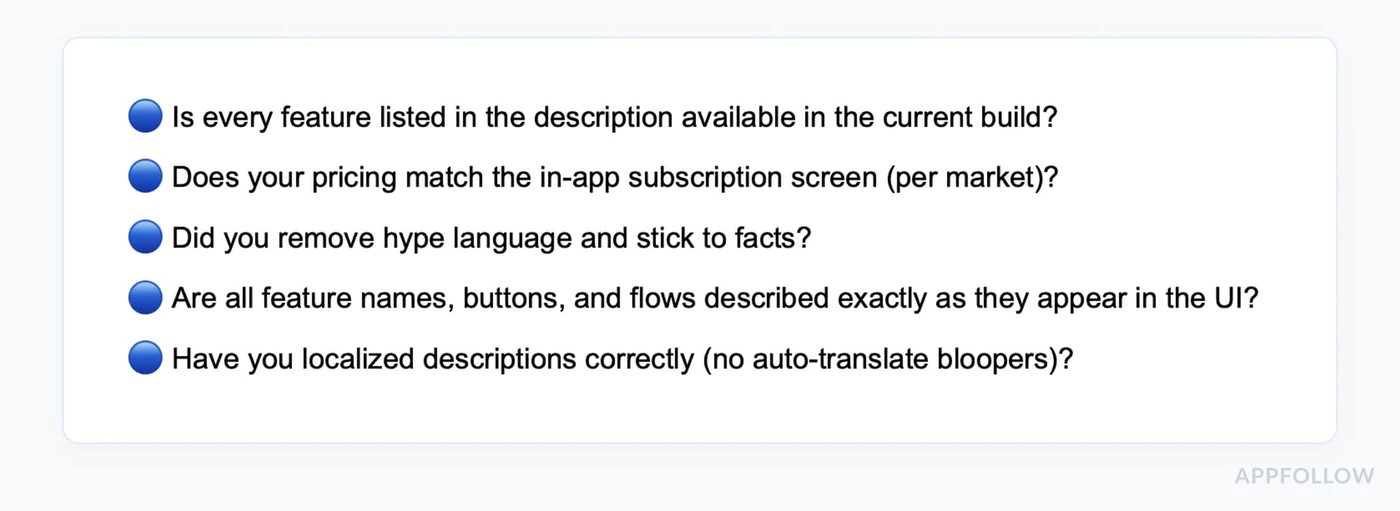
-
결제 구현 확인
- Google Play Billing 사용 (native-purchases 통해)
- Play Console에 모든 구독 상품 생성 완료
- 기본 요금제 및 혜택 올바르게 설정
- 상품 활성화 및 게시 완료
- 모든 대상 국가의 가격 설정 완료
-
테스트 구매 흐름
- 라이선스 테스트 계정 생성
- Play 테스트 트랙에서 빌드 설치
- 각 구독 티어 테스트
- 상품이 정상적으로 로드되는지 확인
- 결제 완료 테스트
- 다음 사항 확인: 테스트 구매 배너 표시 여부
- 프리미엄 기능 잠금 해제 확인
- 구독 복원 테스트
- 여러 기기에서 테스트
-
전체 문구 검토
- 구매 전 가격이 명확히 표시되는지 확인
- 모든 수수료 사전 고지 여부
- 구독 약관 명시
- 해지 절차 설명 완료
- 허위 정보 없음
-
앱 콘텐츠 및 개인정보 보호
- Play Console 내 개인정보 처리방침 링크
- 앱 내 개인정보 처리방침 접근 가능
- 광고 포함 여부 선언 완료
- 로그인이 필요한 앱의 경우 접속 방법 추가
- 데이터 보안 섹션 정확히 작성
- 권한 사용 근거 및 문서화 완료
-
콘텐츠 등급 및 타겟층
- 콘텐츠 등급 설문 완료
- 타겟 고객 및 콘텐츠 섹션 완료
- 평점과 실제 콘텐츠 일치 확인
- 설문조사에 인앱 결제 항목 선언
-
스토어 등록정보 준비
- 앱 설명의 정확성 확인
- 간략한 설명(80자 이내)
- 전체 설명(4000자 이내)
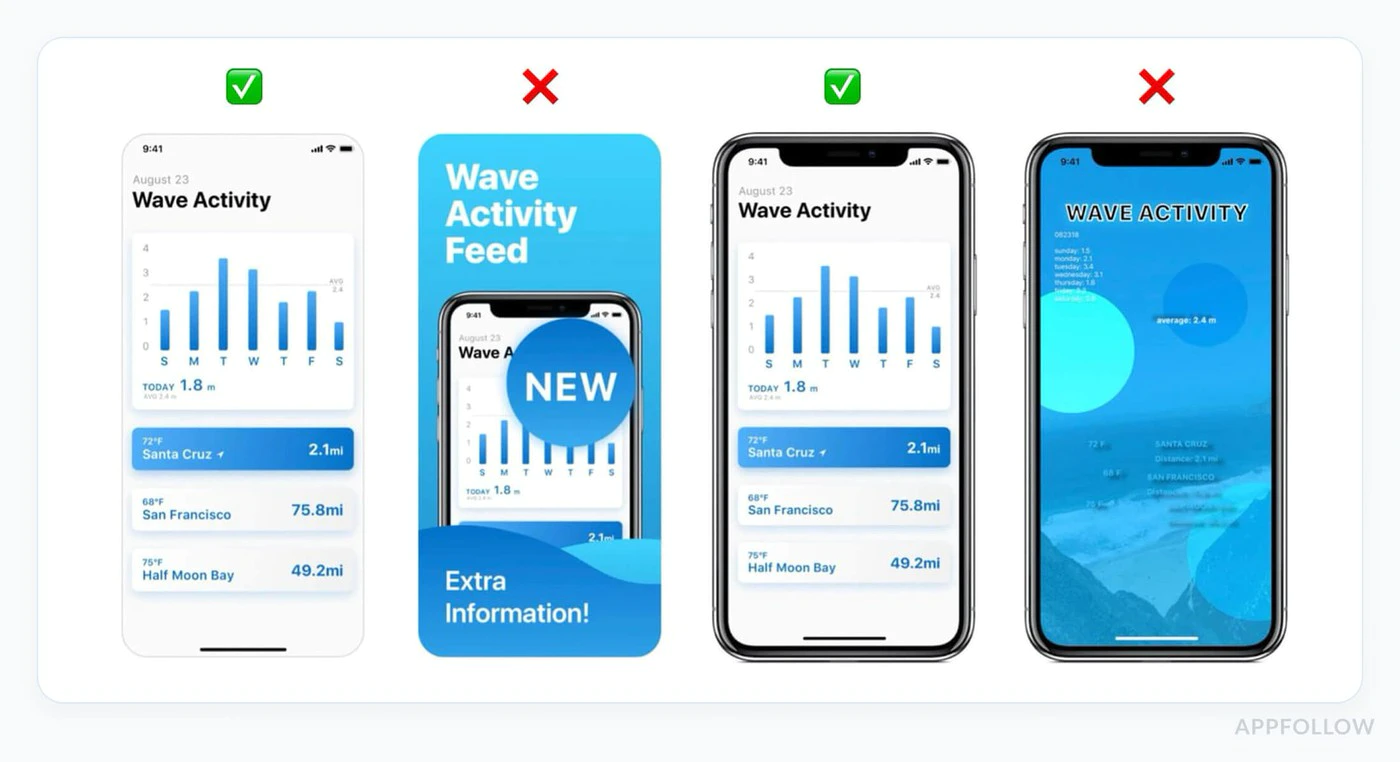
- 휴대전화 스크린샷 2장 이상 업로드
- 1024x500 그래픽 이미지 업로드
- 스크린샷에 최신 버전 반영
- 필수 에셋 업로드 완료
검토 일정
“리뷰 타임라인” 섹션신규 개인 계정의 프로덕션 액세스: 보통 신청 후 7일 이내 첫 프로덕션 리뷰: 보통 며칠이 걸리며, 결제나 정책 관련 문의가 제기되면 더 길어질 수 있습니다 업데이트: 첫 출시보다 빠른 경우가 많지만, 여전히 리뷰를 거칩니다 이의 신청: 며칠의 여유를 두고 정확한 수정 사항과 리뷰어용 안내를 준비하세요
:::tip 롤링 리뷰(Rolling Reviews) Apple과 달리 Google은 앱을 지속적으로 리뷰합니다. 앱은 정해진 시간이 아니라 리뷰 기간 중 언제든 라이브 상태가 될 수 있습니다. :::
제출 전 테스트
“제출 전 테스트” 섹션라이선스 테스트
“라이선스 테스트” 섹션-
테스트 계정 추가:
- Play Console로 이동
- 설정 > 라이선스 테스트
- 테스트용 Gmail 계정 추가
-
샌드박스에서 테스트:
import { NativePurchases, PURCHASE_TYPE } from '@capgo/native-purchases';
// Test purchases with license test accountasync function testInSandbox() {  const { isBillingSupported } = await NativePurchases.isBillingSupported();  if (!isBillingSupported) {    console.error('Billing not supported in this environment');    return;  }
  // Fetch products (returns test pricing when using a license tester)  const { products } = await NativePurchases.getProducts({    productIdentifiers: ['premium_monthly'],    productType: PURCHASE_TYPE.SUBS,  });
  console.log('Test products:', products);
  // Make test purchase (no charge)  const transaction = await NativePurchases.purchaseProduct({    productIdentifier: 'premium_monthly',    planIdentifier: 'monthly-plan',    productType: PURCHASE_TYPE.SUBS,  });
console.log('Test purchase complete:', transaction.transactionId);}- 테스트 배너 확인:
- 테스트 계정으로 구매 시
- “테스트 구매” 알림이 표시되어야 함
- 실제 결제는 발생하지 않음
내부 및 비공개 테스트 트랙
“내부 및 비공개 테스트 트랙” 섹션프로덕션 출시 전:
- 다음 파일을 생성합니다: 내부 테스트 빠른 QA를 위한 트랙 또는 비공개 테스트 더 넓은 범위의 테스트를 위한 트랙
- 서명된 빌드 업로드
.aab및 테스트 릴리스 게시 - 테스터 이메일 주소 추가 및 참여 링크 공유
- 테스터가 Google Play에서 빌드를 설치하도록 하세요
- Play 스토어를 통해 설치된 빌드에서 구매 흐름이 전체적으로 잘 작동하는지 확인하세요
- 개인 개발자 계정을 2023년 11월 13일 이후에 생성했다면, 프로덕션 출시 신청 전 최소 12명의 테스터가 14일 연속으로 비공개 테스트에 참여하도록 유지해야 합니다
Google Play Billing을 검증할 때, 사이드로딩한 디버그 빌드는 Play 스토어 설치 테스트 빌드를 대체할 수 없습니다.
Native Purchases 권장 사항
“Native Purchases 권장 사항” 섹션모든 구매 상태 처리하기
“모든 구매 상태 처리하기” 섹션import { NativePurchases, PURCHASE_TYPE } from '@capgo/native-purchases';
async function handlePurchase(productId: string, planIdentifier?: string) { try { setLoading(true);
const transaction = await NativePurchases.purchaseProduct({ productIdentifier: productId, planIdentifier, productType: planIdentifier ? PURCHASE_TYPE.SUBS : PURCHASE_TYPE.INAPP, });
console.log('Purchase token:', transaction.purchaseToken ?? transaction.receipt);
// Success - check entitlements from the store const { purchases } = await NativePurchases.getPurchases({ productType: planIdentifier ? PURCHASE_TYPE.SUBS : PURCHASE_TYPE.INAPP, });
const isOwned = purchases.some( (purchase) => purchase.productIdentifier === productId && (purchase.purchaseState === 'PURCHASED' || purchase.purchaseState === '1') && purchase.isAcknowledged, );
if (isOwned) { unlockPremiumFeatures(); showSuccess('Premium activated!'); }
} catch (error: any) { // Handle specific error cases switch (error.code) { case 'USER_CANCELLED': // User backed out - no error needed console.log('Purchase cancelled'); break;
case 'ITEM_ALREADY_OWNED': // They already own it - restore instead showInfo('You already own this! Restoring...'); await NativePurchases.restorePurchases(); break;
case 'ITEM_UNAVAILABLE': showError('This subscription is currently unavailable. Please try again later.'); break;
case 'NETWORK_ERROR': showError('Network error. Please check your connection and try again.'); break;
default: showError('Purchase failed. Please try again.'); console.error('Purchase error:', error); } } finally { setLoading(false); }}구매 복구 기능 구현하기
“구매 복구 기능 구현하기” 섹션import { NativePurchases, PURCHASE_TYPE } from '@capgo/native-purchases';
function RestorePurchasesButton() { const [loading, setLoading] = useState(false);
const handleRestore = async () => { setLoading(true);
try { await NativePurchases.restorePurchases();
const { purchases } = await NativePurchases.getPurchases({ productType: PURCHASE_TYPE.SUBS, });
const hasSubscription = purchases.some( (purchase) => purchase.productType === 'subs' && purchase.isAcknowledged, );
if (hasSubscription) { unlockPremiumFeatures(); showSuccess('Subscriptions restored!'); return; }
// Check one-time unlocks if needed const { purchases: iaps } = await NativePurchases.getPurchases({ productType: PURCHASE_TYPE.INAPP, }); const hasInApp = iaps.some((purchase) => purchase.productIdentifier === 'premium_unlock');
if (hasInApp) { unlockPremiumFeatures(); showSuccess('Previous purchases restored!'); return; }
showInfo('No previous purchases found.'); } catch (error) { showError('Failed to restore purchases. Please try again.'); } finally { setLoading(false); } };
return ( <button onClick={handleRestore} disabled={loading}> {loading ? 'Restoring...' : 'Restore Purchases'} </button> );}구독 상태 확인하기
“구독 상태 확인” 섹션import { NativePurchases, PURCHASE_TYPE } from '@capgo/native-purchases';
async function checkSubscriptionStatus() { try { const { purchases } = await NativePurchases.getPurchases({ productType: PURCHASE_TYPE.SUBS, });
const subscription = purchases.find( (purchase) => purchase.productIdentifier === 'premium_monthly' && (purchase.purchaseState === 'PURCHASED' || purchase.purchaseState === '1') && purchase.isAcknowledged, );
if (!subscription) { showPaywall(); return; }
console.log('Subscription active:', { productId: subscription.productIdentifier, expiresAt: subscription.expirationDate, willRenew: subscription.willCancel === false, purchaseToken: subscription.purchaseToken, });
unlockPremiumFeatures(); } catch (error) { console.error('Failed to check subscription:', error); }}앱 심사 거절 시
“앱이 거절되면” 섹션주요 정책 위반 사례
“주요 정책 위반 사례” 섹션결제 정책:
- Google Play Billing 미사용
- 오해의 소지가 있는 구독 약관
- 숨겨진 비용
사용자 데이터 정책:
- 개인정보 처리방침 누락
- 데이터 보안 선언 불일치
- 과도한 권한 요청
해결 단계
“해결 단계” 섹션-
위반 통지서 검토
- 인용된 특정 정책 확인
- Google이 지적한 사항 파악
- 제공된 예시 확인
-
문제 수정
- 증상만이 아닌 근본 원인 해결
- 수정 후 철저한 테스트
- 모든 변경 사항 기록
-
이의 신청 제출 (해당 시)
 Subject: Policy Violation Appeal - [App Name]Dear Google Play Review Team,I have received notification that my app violates [Policy X.Y].I have made the following changes to comply:1. [Specific change made]2. [Specific change made]3. [Specific change made]The updated version [version number] addresses all concerns raised.Test account for verification:Email: test@example.comPassword: TestPass123Thank you for your consideration.
-
재제출 또는 업데이트
- 수정 버전 업로드
- 검토를 위해 재제출
- Play Console에서 상태 모니터링
추가 리소스
“추가 리소스” 섹션- Google Play 개발자 정책 센터
- Google Play 결제 관련 문서
- 구독 베스트 프랙티스
- 리뷰를 위한 앱 준비
- 신규 개인 계정 테스트 요구사항
- Play Console 도움말
전문가 도움이 필요하신가요?
“전문가의 도움이 필요하신가요?” 섹션결제 규정 준수, 앱 콘텐츠 선언, 테스트 트랙 설정 등을 모두 고려해야 하는 Play Store 리뷰 과정은 복잡할 수 있습니다. 맞춤형 지원이 필요하다면:
팀과 상담 예약하기 다음 사항에 대해 도움을 드립니다:
- Play Store 리뷰 준비 완료
- 테스트 트랙 설정 및 테스터 모집
- IAP 구현 리뷰
- 데이터 보안 및 개인정보 보호 규정 준수
- 거절 문제 해결 및 이의 신청
- 전체 앱 제출 프로세스
저희 전문가들은 수백 개의 앱이 Play Store 제출에 성공하도록 도와왔으며, 현재 요구 사항을 충족할 수 있도록 안내해 드립니다.
구현에 도움이 필요하신가요?
- 다음을 참고하세요: Native Purchases 문서
- 체크 항목 Android 샌드박스 테스트 가이드
- 방문하기 Google Play 개발자 지원
IAP용 Android Play Store Review Guidelines에서 계속하기
“IAP 관련 Android Play Store 리뷰 가이드라인 준수하기” 섹션사용 중이라면 IAP용 Android Play Store Review Guidelines 보안 및 컴플라이언스 계획을 세우려면, 다음 항목과 연결하세요: @capgo/native-purchases 사용하기 @capgo/native-purchases 사용 시 네이티브 기능을 위해, 암호화 암호화 구현 상세 정보: 컴플라이언스 컴플라이언스 구현 상세 정보: Capgo 보안 스캐너 Capgo Security Scanner에서 제품 워크플로우는, 그리고 Capgo 보안 Capgo Security의 제품 워크플로를 위해.


