
iOS 구독 그룹 만들기
네이티브 구매 플러그인의 설치 단계와 전체 마크다운 가이드를 포함한 설정 지시를 복사합니다.
iOS 앱에서 여러 구독 수준을 관리하고 조직하기 위해 구독 그룹이 필수적입니다. 구독 그룹이 어떻게 작동하는지 이해하는 것은 업그레이드, 다운그레이드 및 크로스 그레이드 기능을 implement하는 데 중요합니다.
구독 그룹이란 무엇인가요?
구독 그룹이란 무엇인가요?구독 그룹은 사용자가 선택할 수 있는 관련된 구독의 집합입니다. 사용자는 한 그룹 내에서 한 번에 하나의 구독만 구독할 수 있습니다. 구독을 변경할 때 Apple은 자동으로 전환을 처리합니다.
구독 그룹이 왜 중요합니까?
구독 그룹이 왜 중요합니까?구독 그룹은 다음과 같은 기능을 제공합니다.
- 구독 그룹은 다음과 같은 기능을 제공합니다.가격 계층 구조
- 기본, 프리미엄 및 최상위 계획을 제공합니다. : 월, 년, 영구 옵션
- 업그레이드/다운그레이드 로직: 구독 변경을 자동으로 처리
- 간소화된 관리: 관련 구독을 그룹화
구독 등급
구독 등급그룹 내에서 각 구독은 가장 높은 가치 (등급 1) 에서 가장 낮은 가치 (등급 n) 로 등급을 매겨야 합니다. 이 등급은 구독 변경을 분류하는 데 사용됩니다.
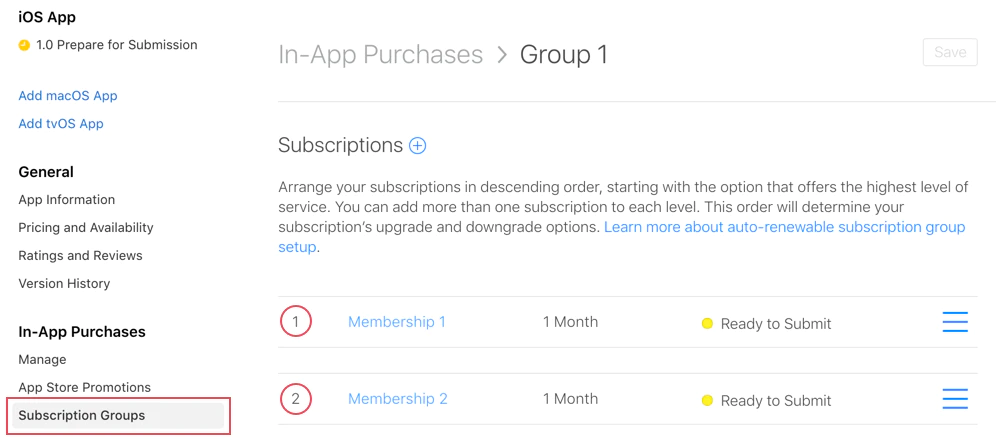
등급 예시
등급 1protectedTokens 최고 가치
- 1년 99.99 달러
- 1달 19.99 달러
레벨 2 중간 가치
- 1년 49.99 달러
- 1달 9.99 달러
레벨 3 최저 가치
- 1년 29.99 달러
- 1달 4.99 달러
구독 변경 유형
구독 변경 유형애플은 구독 등급에 따라 자동으로 3가지 유형의 구독 변경을 처리합니다.
1. 업그레이드
구독 등급 1 → 2로 업그레이드구독 등급을 높은 등급 으로 변경합니다.
행동:
- 즉시 적용 사용자는
- 부분 환불을 받습니다. __CAPGO_KEEP_0__ 남은 시간
- 새로운 구독이 즉시 시작됩니다.
예시:
// User currently has: Standard Monthly (Level 2)// User upgrades to: Premium Annual (Level 1)// Result: Immediate access to Premium, refund for unused Standard time2. 하위 등급으로 변경
2. 하위 등급으로 변경등급이 낮아지는 경우 (예: 등급 1 → 등급 2). 행동: 다음 갱신일부터
효과
- 다음 갱신일 다음 갱신일
- 현재 구독이 유지되며 기간이 끝날 때까지
- 만료 후 자동으로 새로운 구독이 시작됩니다.
예시:
// User currently has: Premium Annual (Level 1)// User downgrades to: Standard Monthly (Level 2)// Result: Premium access continues until annual renewal date, then switches3. Crossgrade
3. Crossgrade다른 구독으로 전환 같은 티어 레벨에.
행동은 기간에 따라 달라집니다:
다른 기간 → 하향 조정과 같이 동작합니다.
- 다음 갱신 날짜에서 적용됩니다.
- 예시: 월간 프리미엄 (레벨 1) → 연간 프리미엄 (레벨 1)
같은 기간 → 업그레이드
- 즉시 적용됩니다.
- 예시: 프리미엄 월간 (레벨 1) → 최고 월간 (레벨 1)
구독 그룹 만들기
구독 그룹 만들기 섹션-
구독으로 이동
앱 스토어 연결에서 앱을 선택하고 수익화 > 구독.
-
그룹 만들기
클릭 + “구독 그룹” 옆의 다음 버튼을 클릭하여 새로운 그룹을 만들 수 있습니다.
-
그룹 이름
이 그룹에 포함된 구독을 반영하는 설명적인 이름을 선택하세요.
- “프리미엄 접근권”
- “클라우드 저장소 플랜”
- “프로 기능”
-
구독 추가
그룹을 만들고 나서, 개별 구독을 추가하세요. 각 구독은 등급 랭킹을 가집니다.
-
등급 랭킹 설정
가장 높은 가치 (1)부터 가장 낮은 가치까지 구독을 배열하세요. 고려해야 할 점은:
- 연간 계획은 일반적으로 월간 계획보다 더 높게 등급付け됩니다.
- 가격이 높은 계층은 가격이 낮은 계층보다 위에 등급付け됩니다.
- 최종/최상위 계층은 가장 높게 등급付け됩니다.
앱에 사용하는 방법
앱에 사용하는 방법native-purchases 플러그인은 자동으로 구독 그룹 논리를 처리합니다.
import { NativePurchases, PURCHASE_TYPE } from '@capgo/native-purchases';
// Fetch all subscriptions in a groupconst { products } = await NativePurchases.getProducts({  productIdentifiers: ['premium_monthly', 'premium_annual', 'ultimate_monthly'],  productType: PURCHASE_TYPE.SUBS,});
// Display current subscription using StoreKit transactionsconst { purchases } = await NativePurchases.getPurchases({  productType: PURCHASE_TYPE.SUBS,});
const activeSubs = purchases.filter((purchase) => purchase.isActive);
// Detect pending downgrade/cancellation (StoreKit sets willCancel === true)const pendingChange = purchases.find((purchase) => purchase.willCancel === true);if (pendingChange) {  console.log('Subscription will stop auto-renewing on', pendingChange.expirationDate);}
// Purchase (StoreKit handles upgrades/downgrades automatically)await NativePurchases.purchaseProduct({  productIdentifier: 'premium_annual',  productType: PURCHASE_TYPE.SUBS,});
// Listen for StoreKit updates (fires on upgrades/downgrades/refunds)NativePurchases.addListener('transactionUpdated', (transaction) => {  console.log('Subscription updated:', transaction);});
구독 변경을 처리하는 방법
변경 유형을 감지하는 방법클립보드 복사
protectedTokensimport { NativePurchases, PURCHASE_TYPE } from '@capgo/native-purchases';
// Get current subscription infoconst { purchases } = await NativePurchases.getPurchases({ productType: PURCHASE_TYPE.SUBS,});
const currentSubscription = purchases.find( (purchase) => purchase.subscriptionState === 'subscribed',);
if (currentSubscription) { // StoreKit reports if user cancelled auto-renew if (currentSubscription.willCancel) { console.log( `User cancelled. Access remains until ${currentSubscription.expirationDate}`, ); }
if (currentSubscription.isUpgraded) { console.log('User recently upgraded to this plan.'); }}
// Listen for automatic upgrades/downgradesNativePurchases.addListener('transactionUpdated', (transaction) => { console.log('Subscription changed!', transaction); if (transaction.subscriptionState === 'revoked') { revokeAccess(); } else if (transaction.isActive) { unlockPremiumFeatures(); }});사용자 커뮤니케이션
사용자 커뮤니케이션 섹션변화 동작을 항상 명확하게 전달하세요:
업그레이드 경우:
“프리미엄 기능에 즉시 접근하실 수 있습니다. 현재 구독을 프로레이트합니다.”
다운그레이드 경우:
“프리미엄 접근권한을 [갱신일]까지 유지하시고, 그 후 표준으로 전환됩니다.”
크로스그레이드 경우:
“다음 갱신일인 [날짜]에 연간 결제 플랜으로 변경됩니다.”
서버 모니터링
서버 모니터링 섹션App Store Server Notifications v2를 사용하거나, 자체적인 수표 검증 백엔드와 함께 StoreKit 변경 사항을 데이터베이스에 반영하세요. 서버 알림을 데이터베이스 변경과 Pair하세요. transactionUpdated __CAPGO_KEEP_0__
__CAPGO_KEEP_1__
__CAPGO_KEEP_2____CAPGO_KEEP_3__
__CAPGO_KEEP_4__- __CAPGO_KEEP_5__
- __CAPGO_KEEP_6__
- __CAPGO_KEEP_7__
__CAPGO_KEEP_8__
__CAPGO_KEEP_9__- __CAPGO_KEEP_10__
- __CAPGO_KEEP_11__
- 가격만 고려하지 말고 가치도 생각해봐
사용자 경험
‘사용자 경험’이라는 제목의 섹션- 현재 구독을 명확하게 표시해
- 그룹 내 모든 옵션을 표시해
- 즉시 적용되는 변경 사항과 갱신 시 적용되는 변경 사항을 구분해
- 플랜 간 쉽게-switching을 허용해
- 업그레이드 시나리오 모두 테스트해
- 다운그레이드 시나리오 모두 테스트해
- 크로스 그레이드 동작을 확인해
- 체크 웹 훅 발동
일반적인 상황
일반적인 상황1단계: 3계층 월간 계획
1단계: 3계층 월간 계획Level 1: Ultimate Monthly ($19.99)Level 2: Premium Monthly ($9.99)Level 3: Basic Monthly ($4.99)- 기본 → 프리미엄: 즉시 업그레이드
- 프리미엄 → 초고급: 즉시 업그레이드
- 초고급 → 프리미엄: 갱신 시 다운그레이드
- 기본 → 초고급: 즉시 업그레이드
2단계: 혼합 기간 계획
2단계: 혼합 기간 계획Level 1: Premium Annual ($99.99/year)Level 2: Premium Monthly ($9.99/month)- 월 → 연: 재고 (재정기)
- 연 → 월: 다운그레이드 (재정기)
Scenario 3: 다중 계층 다중 기간
Scenario 3: 다중 계층 다중 기간Level 1: Ultimate Annual ($199/year)Level 2: Ultimate Monthly ($19.99/month)Level 3: Premium Annual ($99/year)Level 4: Premium Monthly ($9.99/month)Level 5: Basic Annual ($49/year)Level 6: Basic Monthly ($4.99/month)이 설정은 최대 유연성을 제공하면서 명확한 업그레이드/다운그레이드 논리를 유지합니다.
문제 해결
문제 해결구독이 그룹에 나타나지 않습니다:
- 그룹에 할당되어 있는지 확인하세요
- 최소 '제출 준비' 상태 이상인지 확인하세요
- 제품 ID가 정확한지 확인하세요.
업그레이드/다운그레이드 동작이 잘못된 경우:
- 레벨 순위 검토 (1 = 가장 높은 순위)
- 구독 계층이 합리적인지 확인하세요.
- 레벨이 올바르게 설정되었는지 확인하세요.
다른 그룹의 제품:
- 사용자는 동시에 여러 그룹에 구독할 수 있습니다.
- 관련 제품을 동일한 그룹에 유지하는 것이 의도된 것입니다.
getActiveProducts에서 여러 구독이 표시되는 경우:
- 구독이 다른 그룹에 있는지 확인하세요.
- 사용자가 가족 공유를 통해 구독하고 있는지 확인하세요.
- 앱 스토어 연결에서 구독 상태를 검토하세요.
추가 리소스
추가 리소스 섹션자세한 내용은 애플 공식 문서의 구독 그룹에 대한 설명을 참조하십시오.
Create iOS Subscription Group에서 계속 진행하세요
Create iOS Subscription Group에서 계속 진행하세요 섹션Create iOS Subscription Group을 사용하는 경우 Create iOS Subscription Group을 사용하여 스토어 승인 및 배포를 계획하고 있는 경우 Create iOS Subscription Group을 Using @capgo/native-purchases Using @capgo/native-purchases의 네이티브 기능을 위해 @capgo/native-purchases를 Using @capgo/native-purchases의 @capacitor-in-app-review Capgo의 구현 세부 정보에 대해 @capgo/capacitor-in-app-review Capgo의 @capgo/capacitor-in-app-review 사용 Capgo의 native 기능에 대해 @capgo/capacitor-in-app-review 사용 Capgo의 @capgo/capacitor-native-market Capgo의 구현 세부 정보에 대해 @capgo/capacitor-native-market, Capgo의 @capgo/capacitor-native-market 사용 Capgo의 native 기능에 대해 @capgo/capacitor-native-market 사용