
iOSサブスクリプショングループを作成
インストール
iOSアプリで複数のサブスクリプションレベルを管理するために、サブスクリプショングループは不可欠です。サブスクリプショングループのしくみを理解することは、アップグレード、ダウングレード、クロスグレード機能を実装するために不可欠です。
サブスクリプショングループとは?
サブスクリプショングループとは?サブスクリプショングループとは、ユーザーが選択できる関連サブスクリプションの集合体です。ユーザーは、グループ内で1つのサブスクリプションにのみサブスクライブできます。サブスクリプションを切り替えると、Appleは自動的に移行を処理します。
サブスクリプショングループの重要性
サブスクリプショングループの重要性サブスクリプショングループは次の機能を提供します。
- 段階的な価格設定: 基本、プレミアム、そして究極のプランを提供します
- 期間の差: 月額、年額、ライフタイムのオプション
- アップグレード/ダウングレードロジック: サブスクリプションの変更を自動的に処理
- シンプルな管理: 関連するサブスクリプションをグループ化
サブスクリプション レベル
サブスクリプション レベルグループ内で、各サブスクリプションは、値の高い順 (レベル 1) から値の低い順にランク付けされます。このランク付けは、サブスクリプションの変更を分類するために使用されます。
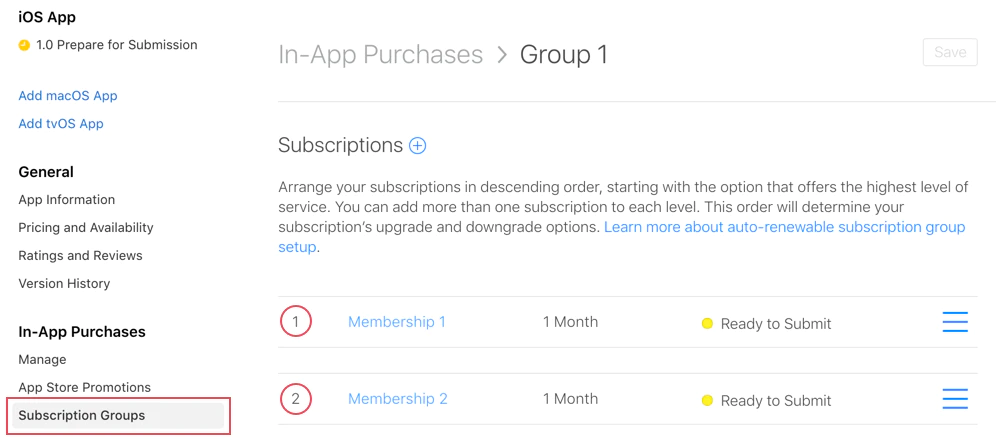
レベル例
レベル例示レベル1 (最高値)
- プレミアム年間($99.99/年)
- 究極の月額($19.99/月)
レベル2 (中間値)
- スタンダード年間($49.99/年)
- プレミアム月額($9.99/月)
レベル3 (最低値)
- ベーシック年間($29.99/年)
- 標準月額 ($4.99/月)
サブスクリプション変更の種類
サブスクリプション変更の種類レベルランキングに基づいて、Appleは自動的に3つの種類のサブスクリプション変更を処理します。
1. アップグレード
セクション「1. アップグレード」より高いレベルの higher-tier 動作:
即時効果
- 即時効果 protectedTokens
- ユーザーは 残り時間分の割引 がもらえる
- 新しいサブスクリプションはすぐに始まる
例:
// User currently has: Standard Monthly (Level 2)// User upgrades to: Premium Annual (Level 1)// Result: Immediate access to Premium, refund for unused Standard time2. ダウングレード
セクション「2. ダウングレード」レベルを 下げる サブスクリプション (例: レベル 1 → レベル 2).
動作:
- 効果が発生する時期 次回の更新日
- ユーザーは現在のサブスクリプションを期限まで保持します
- サブスクリプションが期限切れになった後、自動的に新しいサブスクリプションが開始されます
例:
// User currently has: Premium Annual (Level 1)// User downgrades to: Standard Monthly (Level 2)// Result: Premium access continues until annual renewal date, then switches3. クロスグレード
セクション「3. クロスグレード」同じレベルのサブスクリプションに切り替える 同じレベルのサブスクリプションに切り替える.
期間が異なる場合の動作は次のとおりです
期間が異なる → Native Purchases の動作を変更します ダウングレード
- 次回の更新日以降に効果を発揮します
- 例:月額プレミアム (レベル 1) → 年間プレミアム (レベル 1)
同じ期間 → Native Purchases の動作を変更します アップグレード
- 即時効果
- 例:プレミアム月額 (レベル 1) → アップルティム月額 (レベル 1)
サブスクリプション グループの作成
「サブスクリプション グループの作成」のセクション-
サブスクリプションに移動
App Store Connectで、選択したアプリを選択し、 「Monetize > Subscriptions」.
-
「グループの作成」
Click + 「グループの名前」
-
グループの名前を選択してください。
「プレミアムアクセス」
- 「クラウドストレージプラン」
- 「プロ機能」
- 「サブスクリプションの追加」
-
グループを作成した後、個々のサブスクリプションを追加します。各サブスクリプションにはレベルランキングが付与されます。
「次へ」
-
レベルランキングの設定
サブスクリプションを値段の高い順に並べる
- 年間プランは月額プランよりも高い順に並べる
- 価格の高いプランは価格の低いプランよりも上に並べる
- プレミアムプランは最高に並べる
アプリ内での使用
アプリ内での使用native-purchases プラグインは自動的にサブスクリプション グループのロジックを処理します
import { NativePurchases, PURCHASE_TYPE } from '@capgo/native-purchases';
// Fetch all subscriptions in a groupconst { products } = await NativePurchases.getProducts({  productIdentifiers: ['premium_monthly', 'premium_annual', 'ultimate_monthly'],  productType: PURCHASE_TYPE.SUBS,});
// Display current subscription using StoreKit transactionsconst { purchases } = await NativePurchases.getPurchases({  productType: PURCHASE_TYPE.SUBS,});
const activeSubs = purchases.filter((purchase) => purchase.isActive);
// Detect pending downgrade/cancellation (StoreKit sets willCancel === true)const pendingChange = purchases.find((purchase) => purchase.willCancel === true);if (pendingChange) {  console.log('Subscription will stop auto-renewing on', pendingChange.expirationDate);}
// Purchase (StoreKit handles upgrades/downgrades automatically)await NativePurchases.purchaseProduct({  productIdentifier: 'premium_annual',  productType: PURCHASE_TYPE.SUBS,});
// Listen for StoreKit updates (fires on upgrades/downgrades/refunds)NativePurchases.addListener('transactionUpdated', (transaction) => {  console.log('Subscription updated:', transaction);});
サブスクリプションの変更を処理する
サブスクリプションの変更を処理する変更の種類を検出する
「変更タイプの検出」セクションimport { NativePurchases, PURCHASE_TYPE } from '@capgo/native-purchases';
// Get current subscription infoconst { purchases } = await NativePurchases.getPurchases({ productType: PURCHASE_TYPE.SUBS,});
const currentSubscription = purchases.find( (purchase) => purchase.subscriptionState === 'subscribed',);
if (currentSubscription) { // StoreKit reports if user cancelled auto-renew if (currentSubscription.willCancel) { console.log( `User cancelled. Access remains until ${currentSubscription.expirationDate}`, ); }
if (currentSubscription.isUpgraded) { console.log('User recently upgraded to this plan.'); }}
// Listen for automatic upgrades/downgradesNativePurchases.addListener('transactionUpdated', (transaction) => { console.log('Subscription changed!', transaction); if (transaction.subscriptionState === 'revoked') { revokeAccess(); } else if (transaction.isActive) { unlockPremiumFeatures(); }});ユーザーとのコミュニケーション
「ユーザーとのコミュニケーション」セクション常に、変更の動作を明確に伝えます:
アップグレードの場合:
「プレミアム機能への即時アクセスが得られます。現在のサブスクリプションの割引が適用されます。」
ダウングレードの場合:
「プレミアムアクセスは[更新日]まで維持され、次に標準に切り替わります。」
クロスグレードの場合:
「次回の更新時点で、年間課金に切り替わります。[date]」
サーバー監視
サーバーモニタリングApp Storeサーバーノーティフィケーション v2 または受領検証バックエンドを使用して、StoreKitの変更をデータベースに反映するために使用します。サーバーノーティフィケーションをリスナーと組み合わせて、クライアントとバックエンドを同期させます。 transactionUpdated ベストプラクティス
グループの組織
関連するサブスクリプションを同じグループに保持する無関係な機能を混ぜない (例: ストレージと広告の削除)
異なる機能セットごとに別々のグループを作成する- レベルランキング戦略
- ベストプラクティス
- グループの組織
関連するサブスクリプションを同じグループに保持する
無関係な機能を混ぜない (例: ストレージと広告の削除)- 年間プラン → 月額プランと同じレベルで高レベル
- 価格が高いレベル → 高レベル
- 価格だけではなく価値を考慮する
ユーザー体験
「ユーザー体験」セクション- 現在のサブスクリプションを明確に表示する
- グループ内のすべてのオプションを表示する
- 即時変更と再契約時変更を区別する
- プランを簡単に切り替える
テスト
「テスト」セクション- アップグレードシナリオのすべてのテスト
- すべてのダウングレードシナリオをテストする
- クロスグレード動作を検証する
- ウェブホックの発火を確認する
共通シナリオ
共通シナリオシナリオ 1: 月額 3 つのレベル
シナリオ 1: 月額 3 つのレベルLevel 1: Ultimate Monthly ($19.99)Level 2: Premium Monthly ($9.99)Level 3: Basic Monthly ($4.99)- 基本 → プレミアム: 即時アップグレード
- プレミアム → アンリミテッド: 即時アップグレード
- アンリミテッド → プレミアム: 再契約時にダウングレード
- 基本 → アンリミテッド: 即時アップグレード
シナリオ 2: 混合期間プラン
セクション「シナリオ 2: 混合期間プラン」Level 1: Premium Annual ($99.99/year)Level 2: Premium Monthly ($9.99/month)- 月額 → 年額: 再契約時クロスグレード
- 年額 → 月額: 再契約時ダウングレード
シナリオ 3: 多層多期間
セクション「シナリオ 3: 多層多期間」Level 1: Ultimate Annual ($199/year)Level 2: Ultimate Monthly ($19.99/month)Level 3: Premium Annual ($99/year)Level 4: Premium Monthly ($9.99/month)Level 5: Basic Annual ($49/year)Level 6: Basic Monthly ($4.99/month)この設定では、明確なアップグレード/ダウングレードロジックを維持しながら、最大限の柔軟性を提供します。
トラブルシューティング
セクション「トラブルシューティング」サブスクリプションがグループに表示されない場合
- 正しいグループに割り当てられていることを確認してください
- 少なくとも「提出準備中」という状態にありますか?
- 製品IDが正しいことを確認してください
アップグレード/ダウン グレードの挙動が間違っている場合
- レベルランキングを確認してください(1が最高)
- サブスクリプションの階層が妥当かどうか確認してください
- レベルが正しく設定されていることを確認してください
異なるグループの製品:
- ユーザーは同時に複数のグループにサブスクライブできます
- 関連する製品を同じグループに残すため、意図的にこのように設計されています
getActiveProductsが複数のサブスクリプションを表示している場合
- サブスクリプションが異なるグループにありますか?
- ユーザーがFamily Sharingを介してサブスクライブしていないことを確認する
- App Store Connectでサブスクリプションの状態を確認する
追加リソース
「追加リソース」のセクション詳細については、 サブスクリプション グループに関する公式のAppleドキュメントを参照してください.
「Create iOS Subscription Group」から続けてください
「Create iOS Subscription Group」から続けてください「Create iOS Subscription Group」を使用している場合 「Create iOS Subscription Group」を使用して、ストアの承認と配布を計画している場合、@__CAPGO_KEEP_0__/native-purchasesと接続する __CAPGO_KEEP_0__ capgo native capability を使用する場合の @capgo/native-purchases @capgo/capacitor-アプリ内レビュー @capgo/capacitor-in-app-レビューの実装詳細のために @capgo/capacitor-アプリ内レビューの使用 native capability については、@capgo/capacitor-in-app-review を使用します。 @capgo/capacitor-native-market @capgo/capacitor-native-marketの実装詳細について @capgo/capacitor-ネイティブマーケットを使用 native capability の使用にあたっては、@capgo/capacitor-native-market を使用します。


