
iOS サブスクリプションの紹介的なオファー
このプラグインのインストールステップとフルマークダウンガイドまでの全てのステップを含むセットアッププロンプトをコピーしてください。
導入オファーは、エントリ障壁を軽減し、サブスクリプションコンバージョンを増やすために、有効なユーザーに無料試用版または割引の導入価格を提供することを許可します。
導入オファーは、サブスクライバーのベースを拡大する最も効果的なツールの1つです。ユーザーに次のことができるようにします。
- プレミアム機能をリスクフリーで試す
- コミットする前に価値を体験する
- より低い価格のポイントから始める
- 製品に対する自信を築く
オファータイプ
「オファータイプ」iOSは、以下の3種類の紹介オファーをサポートしています。
1. 無料試用
1. フリートライアル顧客は、指定された期間無料でアクセスできます。試用期間が終了すると、キャンセルしない場合は標準価格で請求されます。
Examples:
- 7日間無料
- 14日間無料
- 1か月間無料
適しているのは:
- 高額のサブスクリプション
- 機能豊かなアプリ
- ユーザーハビットの構築
2. 1回払い
セクション「2. 1回払い」顧客は、初期期間をカバーするために割引価格で1回の支払いをします。
例:
- $1.99 2ヶ月 (その後 $9.99/月)
- $9.99 3ヶ月 (その後 $19.99/月)
最適なオプション:
- コミットメントの信号
- キャッシュフローのニーズ
- 価格感受性のテスト
4. ご利用に応じて
3. Pay As You Go複数の請求サイクルで価格が低くなります。
例:
- $1.99/月 x 3 か月 (次に $9.99/月)
- $4.99/月 x 6 か月 (次に $14.99/月)
適切なもの:
- 段階的なコミットメント
- 長期的な価値の示唆
- 認知されるリスクの低減
資格要件
資格要件ユーザーは、以下の条件を満たす場合にのみ、導入オファーを受け取ることができます。
- 製品の紹介オファーを受けていない
- 同一のサブスクリプショングループ内の製品の紹介オファーを受けていない
- 製品の有効なサブスクリプションを持っていない
前提条件
前提条件まずは 自動更新可能なサブスクリプションを作成する必要があります その後、紹介オファーを追加する必要があります。
紹介オファーの作成
セクションのタイトル “初期オファーの作成”-
サブスクリプションに移動
App Store Connectにアクセスし、 Monetize > サブスクリプション セクションに移動し、オファーを追加したいサブスクリプションを選択
-
サブスクリプション価格の追加
「Click the」 + アイコンをクリックして価格設定モーダルを開く
-
初期オファーの作成
オプションから 「初期オファーの作成」を選択 サブスクリプション価格
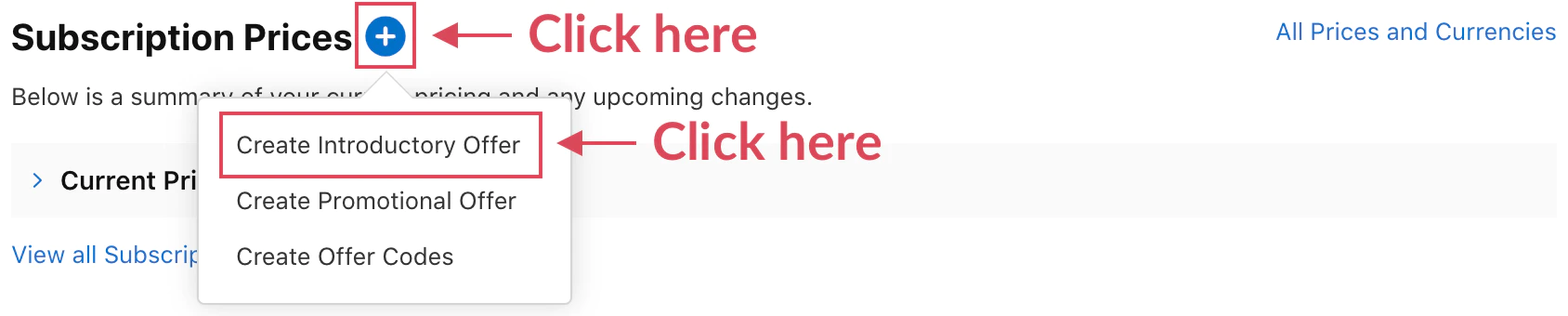
-
国と開始日を設定
国と地域: オファーが利用可能な場所を選択
- 最大の範囲で全ての国を選択
- 特定の市場に制限してテスト
開始日: オファーが利用可能になる日時
- 即時または将来の日時に設定
- マーケティングキャンペーンと調整するのに役立ち
終了日 (任意)Countries and Regions
- 空白のままにすると、常時利用可能
- 期間限定のキャンペーンの場合に日付を設定
-
オファータイプを選択
オファータイプの選択
無料 (無料トライアル)
- 期間を選択 (日、週、月)
- 例: 7 日、2 週間、1 か月
アップフロント支払い
- 単一の支払い価格を設定
- 支払いによってカバーされる期間を設定
- 例: 2 か月間で 1.99 ドル
Pay As You Go
- 期間ごとに割引価格を設定
- 期間の数を設定
- 例: 3 か月間 $2.99/月
-
確認
以下の内容を確認してください
- オファー種類と期間
- 価格の詳細
- 紹介期間後のお通常価格
- 利用可能日と国
-
保存
クリック 保存 __CAPGO_KEEP_0__
初回導入オファーの設定
初回導入オファーの設定例例 1: スタンダードフリートライアル
コピーType: FreeDuration: 7 daysThen: $9.99/month1-7日間無料
- 8日目:$9.99の初回課金
- 月間課金は続きます
- 例 2: 前払い割引期間
例 2: 前払い割引期間
Section titled “初期割引期間の例 2”Type: Pay Up FrontPrice: $4.99Duration: 3 monthsThen: $9.99/monthユーザージャーニー:
- Day 1:$4.99で課金
- 90日間のアクセス
- Day 91:$9.99/月で課金
例 3:段階的な導入
Section titled “例 3:段階的な導入”Type: Pay As You GoPrice: $2.99/monthPeriods: 6 monthsThen: $9.99/monthユーザージャーニー:
- 月 1-6:$2.99/月
- 月 7 以降:$9.99/月
アプリ内での使用
セクション: アプリ内での使用native-purchases プラグインは、初期オファーの表示および適格性を自動的に処理します。
import { NativePurchases, PURCHASE_TYPE } from '@capgo/native-purchases';
// Fetch products with intro offer informationconst { products } = await NativePurchases.getProducts({  productIdentifiers: ['com.yourapp.premium_monthly'],  productType: PURCHASE_TYPE.SUBS,});
const product = products[0];
// Display intro offer details (StoreKit sends localized metadata)if (product.introductoryPrice) {  console.log('Intro price:', product.introductoryPriceString);  console.log('Intro period:', product.introductoryPricePeriod);  console.log('Intro cycles:', product.introductoryPriceCycles);  console.log('Regular price:', product.priceString);} else {  console.log('No intro offer configured');}
// Purchase (StoreKit automatically applies intro pricing if eligible)try {  const transaction = await NativePurchases.purchaseProduct({    productIdentifier: 'com.yourapp.premium_monthly',    productType: PURCHASE_TYPE.SUBS,  });
  console.log('Subscription active, receipt length:', transaction.receipt?.length);  await validateReceiptOnServer(transaction.receipt);} catch (error) {  console.error('Purchase failed:', error);}
ユーザーに初期オファーを表示する
セクション: ユーザーに初期オファーを表示するUIのベストプラクティス
セクション: UIのベストプラクティス明確な価値提案:
Try Premium Free for 7 DaysThen $9.99/month. Cancel anytime.節約の強調:
Start at Just $1.99Get 3 months of Premium for only $1.99Then $9.99/month透明なコミュニケーション:
Your Free Trial• Access all premium features• No charge for 7 days• $9.99/month after trial• Cancel anytime, even during trial例の実装
「例の実装」のセクションfunction formatIntroOffer(product: any): string { if (!product.introductoryPrice) { return `${product.priceString} per ${product.subscriptionPeriod}`; }
const intro = product.introductoryPrice; const regular = product.priceString;
if (intro.price === 0) { // Free trial return `Try free for ${intro.periodString}, then ${regular}`; } else if (intro.cycles === 1) { // Pay up front return `${intro.priceString} for ${intro.periodString}, then ${regular}`; } else { // Enterprise return `${intro.priceString} for ${intro.cycles} ${intro.periodString}s, then ${regular}`; }}マーケティングのベストプラクティス
「マーケティングのベストプラクティス」のセクション試行期間戦略
「試行期間戦略」のセクション- 3-7 日: 急いで決断するアプリ、ゲーム
- 7-14 日: iOSアプリ向けの標準設定
- 14-30日: 専門ツールやプロフェッショナル向けアプリ
- 30+日: B2Bやエンタープライズ向けの高価値
価格心理学
「価格心理学」セクション- $0.99-$1.99: テスト用途に適した低コスト設定
- 50%オフ: 強い価値認識
- 初月無料: 共通で馴染みのパターン
コミュニケーションタイミング
コミュニケーションタイミングセクション- 試用期限前: 予定された課金のユーザーに思い出させる
- 強調値: 使用状況の統計、達成を表示する
- 簡単なキャンセル:transparentなプロセスで信頼を築く
イントロダクションオファーのテスト
イントロダクションオファーのテストセクションサンドボックステストを使用して動作を検証する:
import { NativePurchases, PURCHASE_TYPE } from '@capgo/native-purchases';
// In sandbox mode, accelerated subscription durations apply:// - 3 days free trial = 3 minutes// - 1 week free trial = 3 minutes// - 1 month free trial = 5 minutes
const { products } = await NativePurchases.getProducts({  productIdentifiers: ['premium_monthly'],  productType: PURCHASE_TYPE.SUBS,});
// Purchase with intro offerconst transaction = await NativePurchases.purchaseProduct({  productIdentifier: 'premium_monthly',  productType: PURCHASE_TYPE.SUBS,});
console.log('Intro purchase transaction:', transaction.transactionId);
// Wait for accelerated renewalsetTimeout(async () => {  const { purchases } = await NativePurchases.getPurchases({    productType: PURCHASE_TYPE.SUBS,  });  const premium = purchases.find((purchase) => purchase.productIdentifier === 'premium_monthly');  console.log('After trial state:', premium?.subscriptionState);}, 180000); // 3 minutes for weekly trial
重要な注意事項
重要な注意事項のセクション資格の条件
資格の条件のセクション- 1つの紹介オファーは、ユーザーごとにサブスクリプション グループごとに (ライフタイム)
- 新規サブスクライバーのみに適用
- キャンセル後は再利用できません
- サブスクリプション アップグレード/クロスグレードでは利用できません
StoreKit API
StoreKit APIのセクションintroductoryPriceStoreKit __CAPGO_KEEP_0__は、紹介オファーの詳細を表示eligibilityメソッドは、ユーザーが資格があるかどうかを確認- 購入時に自動適用
- 特別な購入方法は必要ありません
- 1つのサブスクリプションあたり同時に1つの紹介オファーのみ
- 他の割引タイプと組み合わせることはできません
- 有効性のルールを変更することはできません
- Appleが有効性の確認を実行します
トラブルシューティング
「トラブルシューティング」セクションオファーが表示されない場合:
- App Store Connectでオファーが有効になっているか確認してください
- ユーザーがイントロダクション オファーを使用していないことを確認する
- グループ内のユーザーがサブスクライブしていないことを確認する
- 新しいサンドボックス アカウントでテストする
エリギビリティ チェックが失敗している:
- App Store の同期を待つ (2-3 時間かかることがあります)
- 製品 ID が正しいことを確認する
- サブスクリプション グループの設定を確認する
- サンドボックスで新しいテスト アカウントでテストする
表示される価格が間違っている:
- 地域価格設定を確認する
- 通貨変換を確認する
- オファー日付が最新であることを確認する
- 最新情報を更新
サンドボックステストの問題:
- 加速された期間を使用 (3分=1週間)
- 各テスト用に新しいテストアカウントを作成
- 試行錯誤を自然に待つ
- 分析と最適化
セクション「分析と最適化」
これらのメトリクスを追跡セクション「これらのメトリクスを追跡」
イントロオファー受容率- 試行錯誤から有料化した率
- Analytics and Optimization
- 試行期間中のキャンセル
- 初回課金後の保持
- 収益の影響
A/B テストのアイデア
セクション「A/B テストのアイデア」- 無料試用期間と有料の導入
- 試用期間の長さの変化
- 割引率
- 単一の支払いと繰り返し割引
最適化戦略
セクション「最適化戦略」// Track offer performanceanalytics.track('intro_offer_displayed', { product_id: product.identifier, offer_type: product.introductoryPriceType, offer_duration: product.introductoryPricePeriod});
analytics.track('intro_offer_accepted', { product_id: product.identifier});
// Monitor conversionNativePurchases.addListener('transactionUpdated', (transaction) => { if (transaction.productIdentifier === product.identifier && transaction.isActive) { analytics.track('trial_converted', { transactionId: transaction.transactionId, productId: transaction.productIdentifier, }); }});次のステップ
「次のステップ」- サンドボックステストの設定 イントロダクションオファーのテスト
- 再度キャンペーンのためのプロモーショナルオファーの設定
- サブスクリプション分析の実装
- ターゲットマーケティングキャンペーンの作成
追加リソース
「追加リソース」詳細については、公式のAppleドキュメントの「イントロダクションオファー」 「iOSサブスクリプションのイントロダクションオファーを作成して続行する」.
「iOSサブスクリプションのイントロダクションオファーを作成して続行する」
「iOS サブスクリプションの紹介オファーから続けて」セクションのタイトル使用している場合 iOS サブスクリプションの紹介オファーを作成 支払いと購入を計画するために使用している場合 Using @capgo/native-purchases Using @capgo/native-purchasesのネイティブ機能 Capgo 価格体系 Capgo Pricingの製品ワークフロー 支払いシステム Payment systemの実装詳細 @capgo/native-purchases @capgo/native-purchasesの実装詳細 スタートガイド スタートガイドの実装詳細について