
创建iOS订阅组
准备复制
{'text':'订阅组对于在 iOS 应用中组织和管理多个订阅级别至关重要。了解它们的工作原理对于实现升级、降级和交叉级别功能至关重要。'}
{'text':'什么是订阅组?'}
{'text':'标题:什么是订阅组?'}{'text':'订阅组是一组相关订阅,用户可以选择其中一个。用户一次只能订阅一个组内的订阅。当他们切换订阅时,苹果会自动处理转换。'}
{'text':'为什么订阅组很重要?'}
{'text':'标题:为什么订阅组很重要?'}{'text':'订阅组使得:'}
- {'text':'阶梯定价'}: 提供基本、优质和极致计划
- 不同时长: 每月、每年和终身选项
- 升级/降级逻辑: 自动处理订阅变化
- 简化管理: 将相关订阅组合在一起
订阅等级
订阅等级在一个组内,每个订阅应该按从最高价值(等级1)到最低价值的顺序排列。这个排列决定了订阅变化的分类:
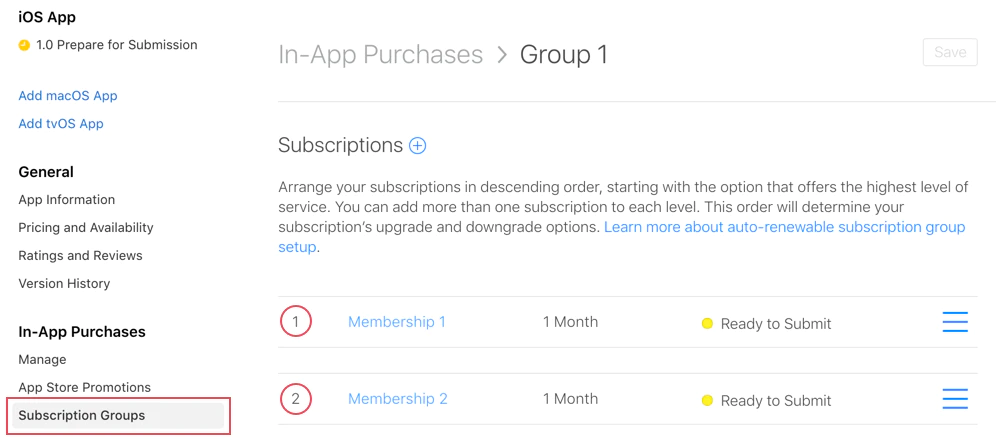
级别 1 (最高价值)
- 年度高级版 ($99.99/年)
- 月度 ultimate ($19.99/月)
级别 2 (中等价值)
- 年度标准版 ($49.99/年)
- 月度高级版 ($9.99/月)
级别 3 (最低价值)
- 年度基本版 ($29.99/年)
- 标准月费 ($4.99/月)
订阅变更类型
订阅变更类型苹果会根据订阅等级自动处理三个类型的订阅变更:
1. 升级
订阅升级从一个 更高等级 订阅(例如,等级2→等级1)
行为:
- 立即生效 移动到
- 用户收到 剩余时间的部分退款 剩余时间
- 新订阅马上开始
示例:
// User currently has: Standard Monthly (Level 2)// User upgrades to: Premium Annual (Level 1)// Result: Immediate access to Premium, refund for unused Standard time2. 降级
标题:2. 降级降级到 较低等级的 订阅(例如,等级 1 → 等级 2)
行为:
- 生效时间为 下一次续订日期
- 用户保持当前订阅直到期限结束
- 新订阅将自动开始在到期后
示例:
// User currently has: Premium Annual (Level 1)// User downgrades to: Standard Monthly (Level 2)// Result: Premium access continues until annual renewal date, then switches3. 升级
标题为“3. 升级”切换到另一个订阅 在同一等级.
行为取决于持续时间:
不同持续时间 → 与 降级
- 下次续订日期生效
- 例如:月度付费(级别1)→ 年度付费(级别1)
相同时长 → 与 升级
- 立即生效
- 例如:付费月度(级别1)→ 终极月度(级别1)
创建订阅组
标题:创建订阅组-
导航至订阅
In App Store Connect, 选择您的应用程序并转到 Monetize > 订阅.
-
创建组
点击 + “订阅组”旁边的下一步
-
命名组
选择一个描述性的名称,反映它包含的订阅:
- “高级访问”
- “云存储计划”
- “专业功能”
-
添加订阅
创建组后,添加单个订阅到它。每个订阅都将有一个等级排名。
-
设置等级排名
按最高价值 (1) 排序订阅,考虑以下几点:
- 年度计划通常优先于月度计划
- 价格更高的等级排在价格更低的等级之上
- 最高等级优先
在您的应用中使用
应用标题:在您的应用中使用原生订阅插件自动处理订阅组逻辑:
import { NativePurchases, PURCHASE_TYPE } from '@capgo/native-purchases';
// Fetch all subscriptions in a groupconst { products } = await NativePurchases.getProducts({  productIdentifiers: ['premium_monthly', 'premium_annual', 'ultimate_monthly'],  productType: PURCHASE_TYPE.SUBS,});
// Display current subscription using StoreKit transactionsconst { purchases } = await NativePurchases.getPurchases({  productType: PURCHASE_TYPE.SUBS,});
const activeSubs = purchases.filter((purchase) => purchase.isActive);
// Detect pending downgrade/cancellation (StoreKit sets willCancel === true)const pendingChange = purchases.find((purchase) => purchase.willCancel === true);if (pendingChange) {  console.log('Subscription will stop auto-renewing on', pendingChange.expirationDate);}
// Purchase (StoreKit handles upgrades/downgrades automatically)await NativePurchases.purchaseProduct({  productIdentifier: 'premium_annual',  productType: PURCHASE_TYPE.SUBS,});
// Listen for StoreKit updates (fires on upgrades/downgrades/refunds)NativePurchases.addListener('transactionUpdated', (transaction) => {  console.log('Subscription updated:', transaction);});
处理订阅变化
应用标题:处理订阅变化检测变化类型
检测变化类型import { NativePurchases, PURCHASE_TYPE } from '@capgo/native-purchases';
// Get current subscription infoconst { purchases } = await NativePurchases.getPurchases({ productType: PURCHASE_TYPE.SUBS,});
const currentSubscription = purchases.find( (purchase) => purchase.subscriptionState === 'subscribed',);
if (currentSubscription) { // StoreKit reports if user cancelled auto-renew if (currentSubscription.willCancel) { console.log( `User cancelled. Access remains until ${currentSubscription.expirationDate}`, ); }
if (currentSubscription.isUpgraded) { console.log('User recently upgraded to this plan.'); }}
// Listen for automatic upgrades/downgradesNativePurchases.addListener('transactionUpdated', (transaction) => { console.log('Subscription changed!', transaction); if (transaction.subscriptionState === 'revoked') { revokeAccess(); } else if (transaction.isActive) { unlockPremiumFeatures(); }});用户沟通
用户沟通始终清晰地说明变化行为:
升级:
“您将立即获得Premium功能。我们将根据您的当前订阅进行折扣。”
降级:
“您将保留Premium访问权限,直到[续费日期],然后切换到标准。”
交叉升级:
“您的计划将在下一次续费时更改为年度计费。”
使用 Apple 的 App Store Server Notifications v2 或您自己的收据验证后端来反映 StoreKit 的更改,以在您的数据库中镜像。将服务器通知与 transactionUpdated listener 配对,以便客户端和后端保持同步。
- 相关订阅保持在同一组内
- 不要混合无关的功能(例如,存储和广告移除)
- 为不同功能集创建单独的组
级别排名策略
Section titled “级别排名策略”- 每年计划 → 与月度计划相同等级的更高级别
- 更高价格的等级 → 更高级别
- 考虑价值,而不是仅仅价格
用户体验
用户体验- 显示当前订阅
- 在组中显示所有可用选项
- 标明哪些变化立即生效,哪些在到期时生效
- 允许轻松切换计划
测试
测试所有升级场景- Section titled “Testing”
- 测试所有降级场景
- 验证升级行为
- 检查 webhook 触发
常见场景
标题:常见场景场景 1:三个月度计划
标题:场景 1:三个月度计划Level 1: Ultimate Monthly ($19.99)Level 2: Premium Monthly ($9.99)Level 3: Basic Monthly ($4.99)- 基本 → 高级:立即升级
- 高级 → 最终:立即升级
- 最终 → 高级:降级(到期)
- 常见场景
场景 2:混合时长计划
标题:场景 2:混合时长计划Level 1: Premium Annual ($99.99/year)Level 2: Premium Monthly ($9.99/month)- 月度 → 年度:升级(在续订时)
- 年度 → 月度:降级(在续订时)
场景 3:多层级多时长
标题:场景 3:多层级多时长Level 1: Ultimate Annual ($199/year)Level 2: Ultimate Monthly ($19.99/month)Level 3: Premium Annual ($99/year)Level 4: Premium Monthly ($9.99/month)Level 5: Basic Annual ($49/year)Level 6: Basic Monthly ($4.99/month)这种设置提供了最大限度的灵活性,同时保持清晰的升级/降级逻辑。
故障排除
标题:故障排除订阅未出现在组中:
- 确认它已分配到正确的组
- 检查它是否至少处于“准备提交”状态
- 确保产品ID正确
升级/降级行为错误:
- 查看级别排名(1 = 最高)
- 确认订阅等级合理
- 检查级别设置是否正确
来自不同组的产品:
- 用户可以同时订阅多个组
- 这是故意的 - 将相关产品放在同一组
getActiveProducts显示多个订阅:
- 检查订阅是否分属于不同组
- 验证用户是否通过家庭共享订阅
- 在 App Store Connect 中查看订阅状态
更多资源
标题:更多资源有关详细信息,请参阅 苹果官方文档关于订阅组的说明.
继续从创建 iOS 订阅组
标题:继续从创建 iOS 订阅组如果您正在使用 创建 iOS 订阅组 来规划商店批准和分发,连接它与 使用 @capgo/native-purchases 为使用@capgo/native-purchases的原生能力 @capgo/capacitor内购评论 在@capgo/capacitor-in-app-review的实现细节中 使用@capgo/capacitor-in-app-review 为使用@capgo/capacitor-in-app-review的原生能力 @capgo/capacitor-原生市场 在@capgo/capacitor-native-market的实现细节中,并且 使用@capgo/capacitor-native-market 为使用@capgo/capacitor-native-market的原生能力


