
增量更新
复制包含安装步骤和该插件完整 Markdown 指南的配置 prompt。
Capgo 的 Live Update 系统只发送变更文件,而不是整个 JS bundle,因此能更快、更高效地交付更新。
对于网络较慢或按流量计费的用户来说,这尤其有利,因为它最大限度减少了需要下载的数据量。
第二个优势是,对于图片或视频等很少变动的大型资源,与压缩后的 JS 文件不同,它们只需下载一次。
增量更新工作原理
“Delta 更新工作原理”章节Capgo 中的 Delta 更新由安装在应用中的 Capgo plugin 处理。当您使用 --delta flag 并上传应用新版本时,Capgo 会执行以下操作:
- 构建中的每个文件都会作为 delta 文件单独上传
- 为每个 delta 文件生成校验和 (Checksums)
- 包含路径和校验和的 delta 文件列表将保存至 Capgo 数据库中
当运行应用的设备检查更新时,Capgo plugin 会接收新 bundle 的 delta 文件列表。它会将其与现有文件进行对比,并根据校验和与文件路径识别出已更改的文件。
随后,plugin 仅下载已更改的文件,而不是整个 JS bundle。它通过将这些下载的文件与现有的未更改文件进行合并,从而重构出应用的新版本。
哪些设备收到增量更新,哪些收到完整 zip 包
章节标题:“哪些设备获取 Delta,哪些获取完整 zip 包”A bundle uploaded with --delta 同时包含完整 zip 包和 delta 文件。在默认的 Zip + 增量更新 下载格式下,每个设备都会获得其支持的最佳包:
- 使用支持 Delta 的插件版本的设备(
5.10.0+,6.25.0+,7.0.35+,或8+)只下载有变更的 delta 文件。 - 使用不支持 Delta 的旧版插件的设备则下载完整 zip。
- 未上传 Bundle
--delta不包含 delta 文件,因此每台设备都会下载完整 zip。
启用 Delta 后,仍可能会看到一些完整的 zip 下载。这是因为部分设备仍在使用旧版插件的 Native Build。随着用户从应用商店更新应用,这种情况将会消失。
您可以针对每个 channel 通过 下载格式 进行设置。
Delta updates 还能降低您的 Capgo 带宽消耗。带宽仅计算设备实际下载的文件,因此使用 Delta 时,只有变更的文件会被计入,而不是整个 bundle。已缓存在边缘节点的单个文件或完整 zip 不计入带宽;中断的下载会从上次停止的地方恢复,且不会重复计算已下载的部分。详见 带宽是如何计算的?.
要在您的 Capgo 应用中启用 Delta updates,只需在上传新版本时使用 --delta 标志即可:
npx @capgo/cli@latest bundle upload --delta如果 autoUpdate 设置为即时应用模式("atInstall", "onLaunch",或 "always")在你的 capacitor.config中,CLI 会检测到它。在非交互式环境中,它会自动发送 Delta 更新;在交互式环境中,它会在上传前提示你确认。旧版 directUpdate 配置仍会被检测到。使用 --no-delta 来强制上传完整 bundle。
增量更新限制
标题为“Delta 更新限制”的章节- 空文件: CLI 会记录
Ignoring empty file...并且会从 delta 文件中排除 0 字节文件。这不会让上传失败,因此添加空文件会改变生成的 bundle,但不会中断部署。不要在 Delta bundle 路径中包含 0 字节文件。 - 路径中的空格: 当 bundle 路径包含空格时,Delta 上传会在上传文件前失败。上传 Delta 更新前,请重命名文件或目录以去掉空格。
强制执行增量更新
标题为“强制执行 Delta 更新”的章节如果你想确保所有上传都是 Delta 更新,并防止意外上传完整 bundle,可以使用 --delta-only 标志:
npx @capgo/cli@latest bundle upload --delta-only当 --delta-only 使用时,Capgo 只会上传 delta 文件,不会上传完整 zip。任何使用不支持 Delta 的插件版本的设备都无法下载该更新。
你可能需要使用 --delta-only 如果:
- 你始终希望使用 Delta 更新,绝不允许上传完整 bundle
- 你正在搭建 CI/CD pipeline,并希望确保所有自动上传都是 Delta 更新
- 你的 App 体积很大且带宽受限,因此需要尽量减小上传/下载体积
如果你需要在已设置 --delta-only 的情况下进行完整 bundle 上传,只需在运行上传命令时去掉 --delta-only。这会覆盖那一次上传的设置,让你可以在需要时推送完整 bundle。
故障排除
“故障排除”章节如果 Delta 更新似乎未生效(即设备即使改动很小,也总是在下载完整的 JS bundle),请再次确认:
- 你是否使用了
--delta标志,并且每次上传新版本时都使用它 - 如果使用
--delta-only,请确保没有误删--delta标志 - 您的设备运行的插件版本支持 Delta (
5.10.0+,6.25.0+,7.0.35+,或8+) - Channel 的下载格式不符合 仅 Full zip
- 您的设备网络连接稳定,且可以访问 Capgo 服务器
您也可以使用 Capgo webapp 查看上次 upload 的详情:
- 前往 webapp
- 点击您的 App
- 点击统计栏中的 bundle 数量。
- 选择最后一行
- 查看
Delta filesbundle。 暂无 Delta 文件 它会显示该 bundle 是否仅作为完整的 zip 文件上传。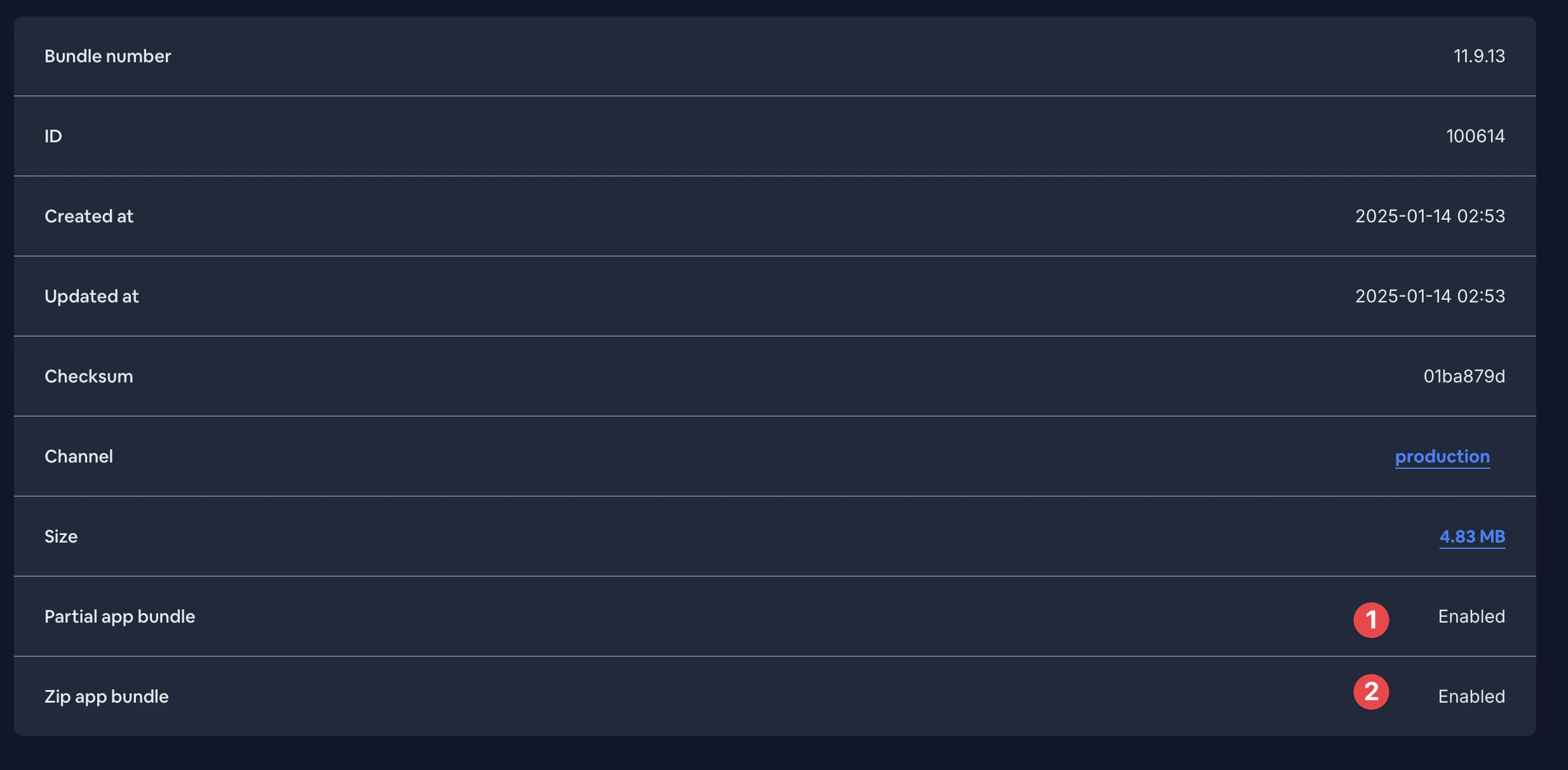
如果问题仍然存在,请联系 Capgo 支持团队以获取进一步帮助。他们可以检查服务器 logs,以确认您的 Delta 上传是否处理正确,以及设备是否正在接收 delta 文件。
大功告成!该 --delta 标志会告知 Capgo 上传 Delta 更新所需的单个 delta 文件。
请注意,每次您上传希望以 Delta 更新形式交付的新版本时,都需要使用 --delta 。如果您省略该标志,Capgo 将把整个 JS bundle 作为单个文件上传,即使只有一小部分发生了变化,设备也会下载整个 bundle。
继续了解增量更新
“Delta 更新之后继续”章节如果你正在使用 增量更新 要规划 live update 的交付,请将其与 Capgo Live Updates 用于 Capgo Live Updates 中的产品工作流, 概览 用于 Overview 中的实现细节, 功能 用于 Features 中的实现细节, 更新行为 有关 Update Behavior 中的实现细节,请参阅 更新类型 关于 Update Types 中的实现细节。


