
创建 iOS 自动续期订阅
复制包含安装步骤和该插件完整 Markdown 指南的配置 prompt。
自动续期订阅可让用户在您的 iOS 应用中持续访问内容、服务或高级功能。本指南将引导您在 App Store Connect 中创建订阅。
概览
“概览”章节自动续期订阅会在每个计费周期结束时自动续订,直到用户取消为止。它们非常适用于:
- 高级内容与功能
- 无广告体验
- 云存储与同步
- 流媒体服务
- 专业工具与实用程序
前提条件
“前提条件”章节在创建订阅之前,您必须:
- 创建订阅群组 用于整理您的订阅
- 需拥有有效的 Apple Developer Program 会员资格
- 在 App Store Connect 中填写银行和税务信息
创建订阅
标题为“创建订阅”的章节-
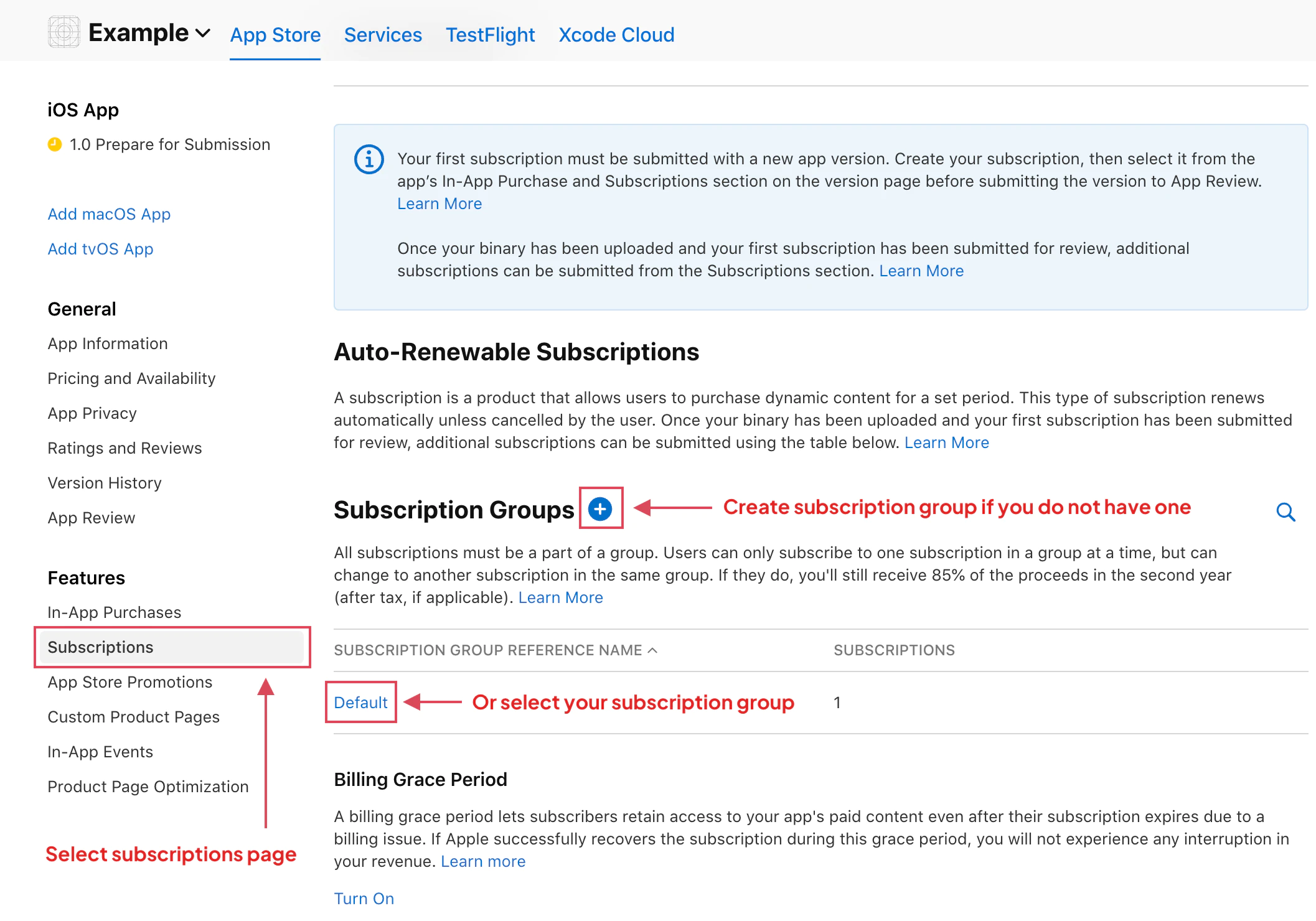
导航到“订阅”
在 App Store Connect 中,选择您的 App 并前往 盈利 > 订阅.
选择您的订阅群组,或根据需要创建新群组。
-
创建新订阅
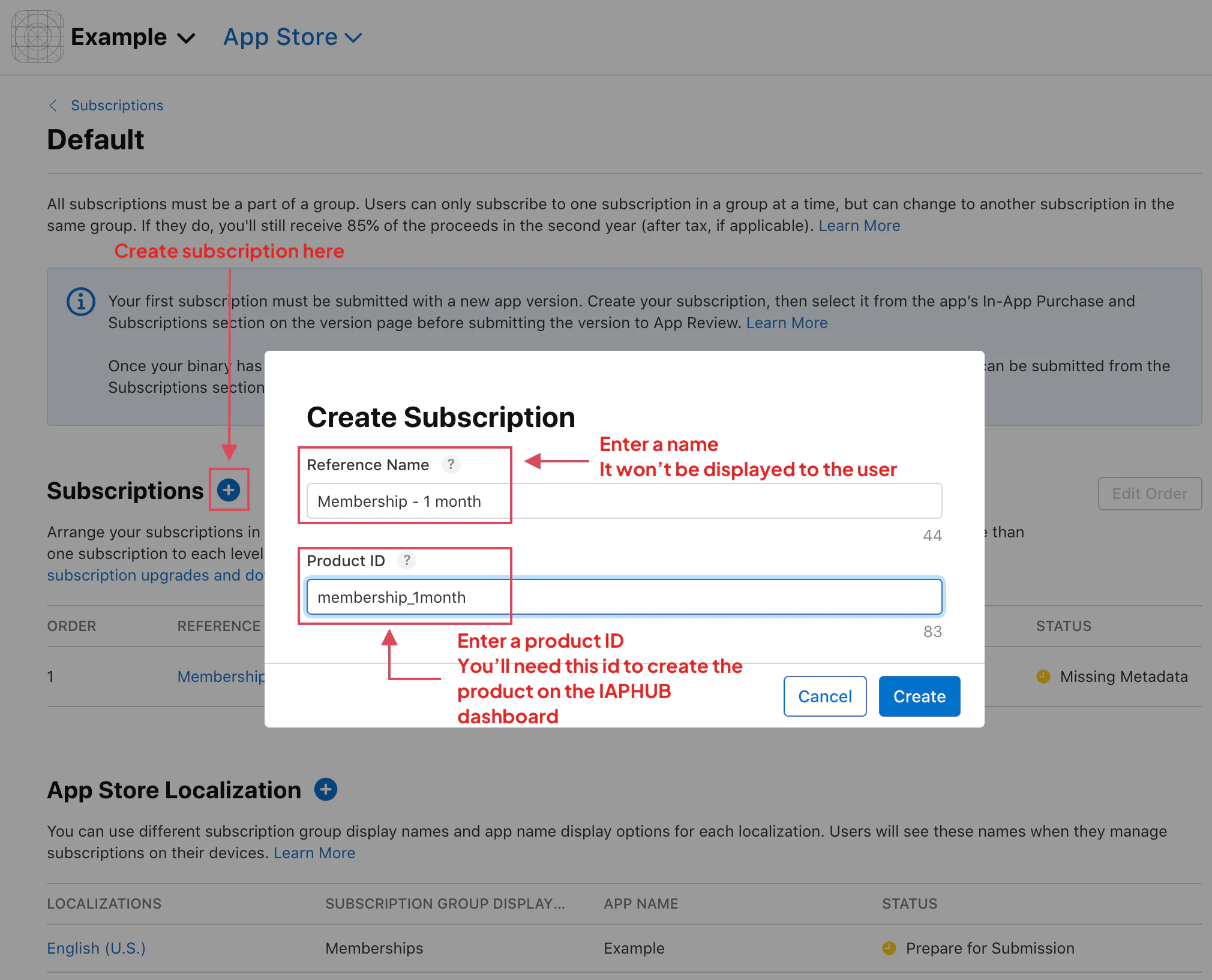
点击 + 点击订阅组旁边的图标以添加新订阅。
-
输入基本信息
参考名称: 仅供内部使用的描述性名称(不会向客户展示)
- 示例:“Premium Monthly”、“Ultimate Annual”、“Basic Plan”
产品 ID: 此订阅的唯一标识符(之后无法更改)
- 格式:
com.yourcompany.yourapp.premium_monthly - 使用具有描述性的全小写下划线命名
- 配置 native-purchases 插件时必填
-
配置时长
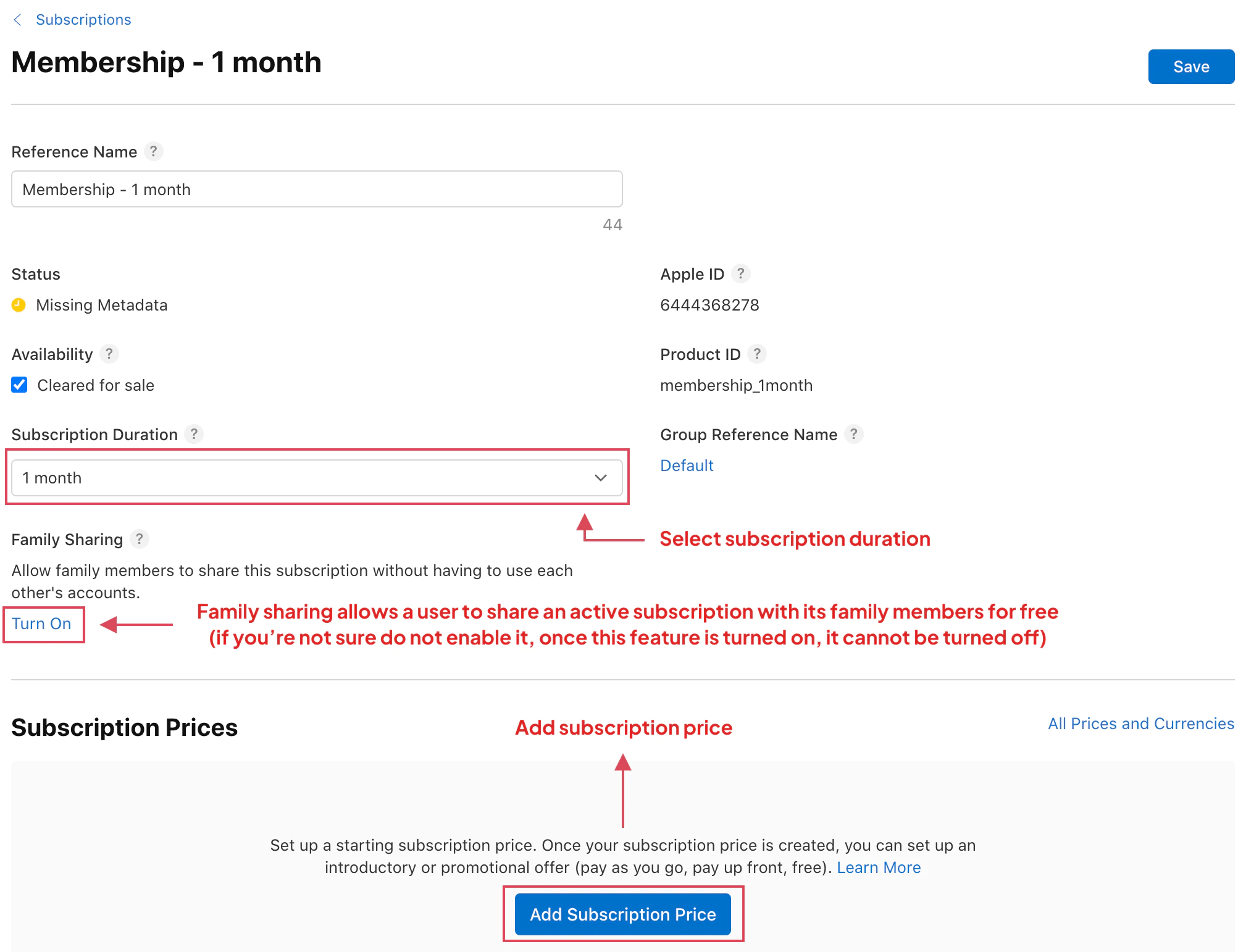
从可用选项中选择订阅时长:
- 1 周
- 1 个月
- 2 个月
- 3 个月
- 6 个月
- 1 年
时长决定了用户的计费周期。
-
设置定价
点击 添加订阅价格 配置价格:
基础区域:选择你的主要市场(通常是你所在的国家/地区)
价格:设置订阅价格
- Apple 会自动换算成其他货币
- 从 Apple 的价格分级中选择
- 考虑感知价值和市场行情
-
家人共享(可选)
决定是否启用家人共享,启用后最多可供 6 名家庭成员使用该订阅。
如果符合以下情况,请启用:
- 内容适合家庭使用
- 您希望提升产品的价值主张
- 您的商业模式支持该功能
如果符合以下情况,请勿启用:
- 订阅仅限个人使用
- 内容针对用户进行了个性化定制
- 您希望最大化单个用户的营收
-
添加本地化内容
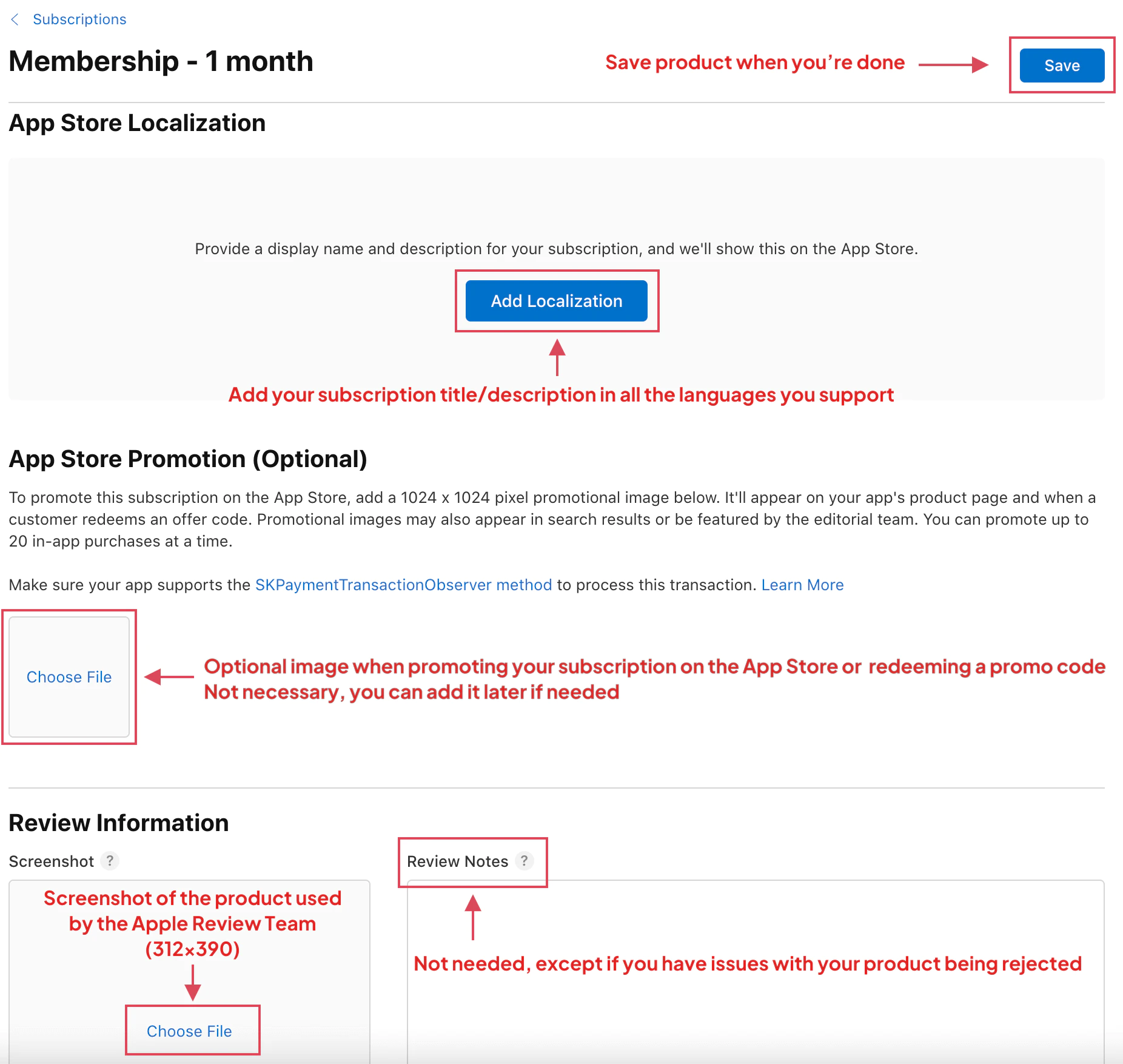
为您 App 支持的所有语言添加订阅显示信息:
订阅显示名称: 面向用户的名称(例如:“高级月度会员”)
描述: 订阅包含内容的简短描述
- 保持简洁并突出核心权益
- 列出关键功能
- 强调价值主张
-
App Store 宣传图(可选)
上传此订阅的宣传图(312x390 像素):
- 显示在 App Store 订阅页面中
- 应与您的 App 设计风格保持一致
- 包含订阅名称,便于识别
-
保存并提交
点击 保存 以创建订阅。
首次订阅:
- 必须随新 App 版本一起提交
- 请在下次 App Store 提交时包含此项
- 无法独立提交
后续订阅:
- 可直接从“订阅”页面提交
- 无需发布新版本 App
- 首个订阅获批后即可使用
订阅状态
标题为“订阅状态”的部分您的订阅将处于以下状态之一:
| 状态 | 描述 | 可测试? |
|---|---|---|
| 缺少元数据 | 设置未完成 | 是(沙盒) |
| 可提交 | 已完成但未提交 | 是(沙盒) |
| 等待审核 | 已提交至 Apple | 是(沙盒) |
| 审核中 | Apple 正在审核 | 是(沙盒) |
| 已通过 | 可供购买 | 是 |
| 已拒绝 | 需要修改 | 是(沙盒) |
在 App 中使用
“在应用中使用”章节创建完成后,请在应用中使用该产品 ID 来引用订阅:
import { NativePurchases, PURCHASE_TYPE } from '@capgo/native-purchases';
// Fetch subscription products direct from StoreKitconst { products } = await NativePurchases.getProducts({  productIdentifiers: [    'com.yourcompany.yourapp.premium_monthly',    'com.yourcompany.yourapp.premium_annual',  ],  productType: PURCHASE_TYPE.SUBS,});
products.forEach((product) => {  console.log(`${product.title}: ${product.priceString}`);  console.log(`Duration: ${product.subscriptionPeriod}`);  console.log(`Description: ${product.description}`);});
// Purchase a subscription (StoreKit 2 automatically handles intro pricing and offers)try {  const transaction = await NativePurchases.purchaseProduct({    productIdentifier: 'com.yourcompany.yourapp.premium_monthly',    productType: PURCHASE_TYPE.SUBS,  });
  console.log('Transaction ID:', transaction.transactionId);
  // StoreKit receipts are included on iOS for server-side validation  await sendReceiptToBackend(transaction.receipt);} catch (error) {  console.error('Purchase failed:', error);}
// Check subscription status using the store's dataconst { purchases } = await NativePurchases.getPurchases({  productType: PURCHASE_TYPE.SUBS,});
const premium = purchases.find(  (purchase) => purchase.productIdentifier === 'com.yourcompany.yourapp.premium_monthly',);
if (premium?.isActive) {  console.log('Expires:', premium.expirationDate);  console.log('Will renew:', premium.willCancel === false);  console.log('Store state:', premium.subscriptionState);  unlockPremiumFeatures();} else {  showPaywall();}
按月计费(12 个月合约)
“按月付费(12 个月合约)”章节如果您的 App Store Connect 订阅配置为按月计费且包含 12 个月合约,StoreKit 可以返回该产品的额外定价条款。请利用这些条款在购买前展示月费、合约总价以及完整的合约周期。
const yearlyProduct = products.find(  (product) => product.identifier === 'com.yourcompany.yourapp.premium_annual',);
const monthlyCommitment = yearlyProduct?.pricingTerms?.find(  (term) => term.billingPlanType === 'monthly',);
if (yearlyProduct && monthlyCommitment) {  console.log('Monthly charge:', monthlyCommitment.billingDisplayPrice);  console.log('Total commitment:', monthlyCommitment.commitmentInfo?.priceString);
  await NativePurchases.purchaseProduct({    productIdentifier: yearlyProduct.identifier,    productType: PURCHASE_TYPE.SUBS,    billingPlanType: 'monthly',  });}
有关完整的付费墙和权益流程,请参阅 iOS 按月合约计费方案.
最佳实践
标题为“最佳实践”的章节定价策略
“定价策略”章节- 按月方案: 降低准入门槛,培养使用习惯
- 按年方案: 价值更高、LTV 更高、流失率更低
- 多档套餐: 面向不同用户群体提供基础版、高级版和旗舰版
- 竞品分析: 研究同类应用的定价
产品 ID
标题为“Product IDs”的章节- 保持命名一致:
company.app.tier_duration - 在 ID 中包含档位和时长:
premium_monthly,ultimate_annual - 避免更改 Product ID(它们是永久的)
- 为团队记录所有 Product ID
家人共享
“家人共享”章节- 面向家庭类应用(游戏、教育、娱乐)开启此功能
- 评估其对营收的影响
- 彻底测试共享行为
- 在营销中告知用户支持共享功能
本地化
“本地化”章节- 翻译所有订阅名称和描述
- 考虑不同地区的定价差异
- 测试在所有支持语言下的显示效果
- 使用符合当地文化习惯的营销用语
宣传图
“宣传图”章节- 保持视觉风格一致
- 包含订阅名称和核心权益
- 根据季节性促销进行更新
- 与 App 的整体设计语言保持一致
常见订阅模式
“常见订阅模式”章节单一层级(Freemium)
“单一层级 (Freemium)”章节Free App + Premium Subscription- Basic: Free (limited features)- Premium Monthly: $4.99- Premium Annual: $39.99 (save 33%)多档定价(好、更好、最佳)
“多层级 (Good, Better, Best)”章节- Basic Monthly: $4.99- Premium Monthly: $9.99- Ultimate Monthly: $19.99
- Basic Annual: $49.99- Premium Annual: $99.99- Ultimate Annual: $199.99消耗型 + 订阅混合模式
“消耗型 + 订阅混合模式”章节- Credit packs (consumable)- Monthly subscription (unlimited credits)- Annual subscription (unlimited + bonus features)故障排除
“故障排除”章节App 内无法加载订阅:
- 核对 Product ID 是否完全一致(区分大小写)
- 检查订阅是否已加入订阅组
- 确保 Bundle Identifier 与 App Store Connect 一致
- 创建产品后请等待 2-3 小时
无法提交订阅:
- 填写所有必填项(名称、描述、价格)
- 添加至少一种本地化语言
- 确认银行/税务信息已通过审核
- 检查是否为首次订阅(需要 App 版本)
家人共享开关已禁用:
- 已启用(无法禁用)
- 在订阅详情中查看
- 若遇到问题,请联系 Apple Support
该价格档位不可用:
- 可能在某些地区受限
- 选择其他价格档位
- 如有价格疑问,请联系 Apple
“Invalid Product ID” 错误:
- 必须符合反向域名格式
- 不能包含空格或特殊字符
- 检查是否存在拼写错误
- 验证所有产品 ID 是否唯一
下一步
“后续步骤”章节- 创建推介优惠 以吸引新订阅用户
- Merchandise 每月承诺计费方案 适用于支持的年度订阅优惠
- 配置沙盒测试 用于测试您的订阅
- 设置用于挽回和留存的促销优惠
- 实现订阅分析追踪
更多资源
标题为“更多资源”的章节欲了解更多详情,请参阅 Apple 关于自动续期订阅的官方文档.
从“创建 iOS 自动续期订阅”继续
标题为“从‘创建 iOS 自动续期订阅’继续”的章节如果你正在使用 创建 iOS 自动续期订阅 要规划商店审核与分发,请将其与 使用 @capgo/native-purchases 关于“使用 @capgo/native-purchases”中的原生能力, @capgo/capacitor-in-app-review 有关 @capgo/capacitor-in-app-review 中的实现细节, 使用 @capgo/capacitor-in-app-review 有关《使用 @capgo/capacitor-in-app-review》中的原生能力, @capgo/capacitor-native-market 有关 @capgo/capacitor-native-market 的实现细节,以及 使用 @capgo/capacitor-native-market 有关使用 @capgo/capacitor-native-market. 时的原生能力


