
应用程序页面
应用程序页面显示什么?
Section titled “应用程序页面显示什么?”首先,我们先看一下应用程序的主页面:
在 Capgo 中,应用程序代表与 Capgo 的实时更新系统集成的移动应用程序。它允许您无缝管理更新、频道和设备。
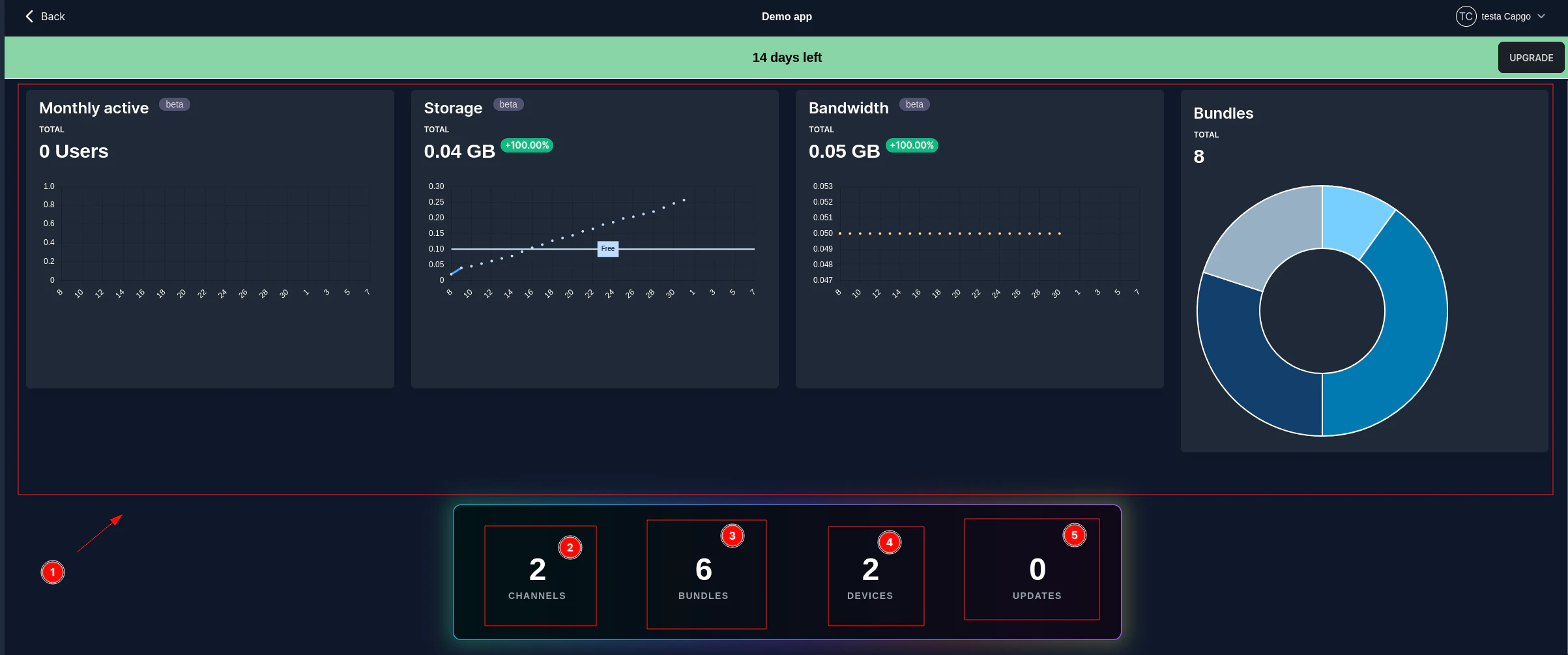
让我们仔细看看这一点。主应用程序页面分为几个关键区域:
-
顶部导航栏: 提供对应用程序管理的不同部分的访问:
-
统计数据显示: 可视化上一个计费周期的重要指标(数据反映的是计费日的使用情况,而不是当月的 1 号):
- 每月活跃用户 (8): 跟踪一段时间内的唯一活跃用户数量。
- 存储 (9): 显示当前存储消耗。
- 带宽 (10): 显示带宽使用情况。
- 活动捆绑包 (11): 显示不同应用程序捆绑包中活动设备的分布情况。
-
汇总卡: 提供关键计数的快速概述:
- 捆绑包上传 (12): 上传的应用程序捆绑包总数。
- 更新统计信息 (13): 执行的更新总数,包括请求、安装和失败。
- 部署统计数据 (14): 部署总数。
-
显示选项 (15-18): 过滤和查看统计数据的控件:
- 每日 (15): 查看每日统计数据。
- 累积 (16): 查看一段时间内的累积统计数据。
- 计费周期 (17): 查看当前计费周期的统计信息。
- 日期范围 (18): 选择自定义日期范围(例如过去 30 天)。
应用程序信息
Section titled “应用程序信息”此部分对应于顶部导航栏中的“信息”选项卡 (1)。您可以在此处查看和管理应用程序的重要详细信息和设置。
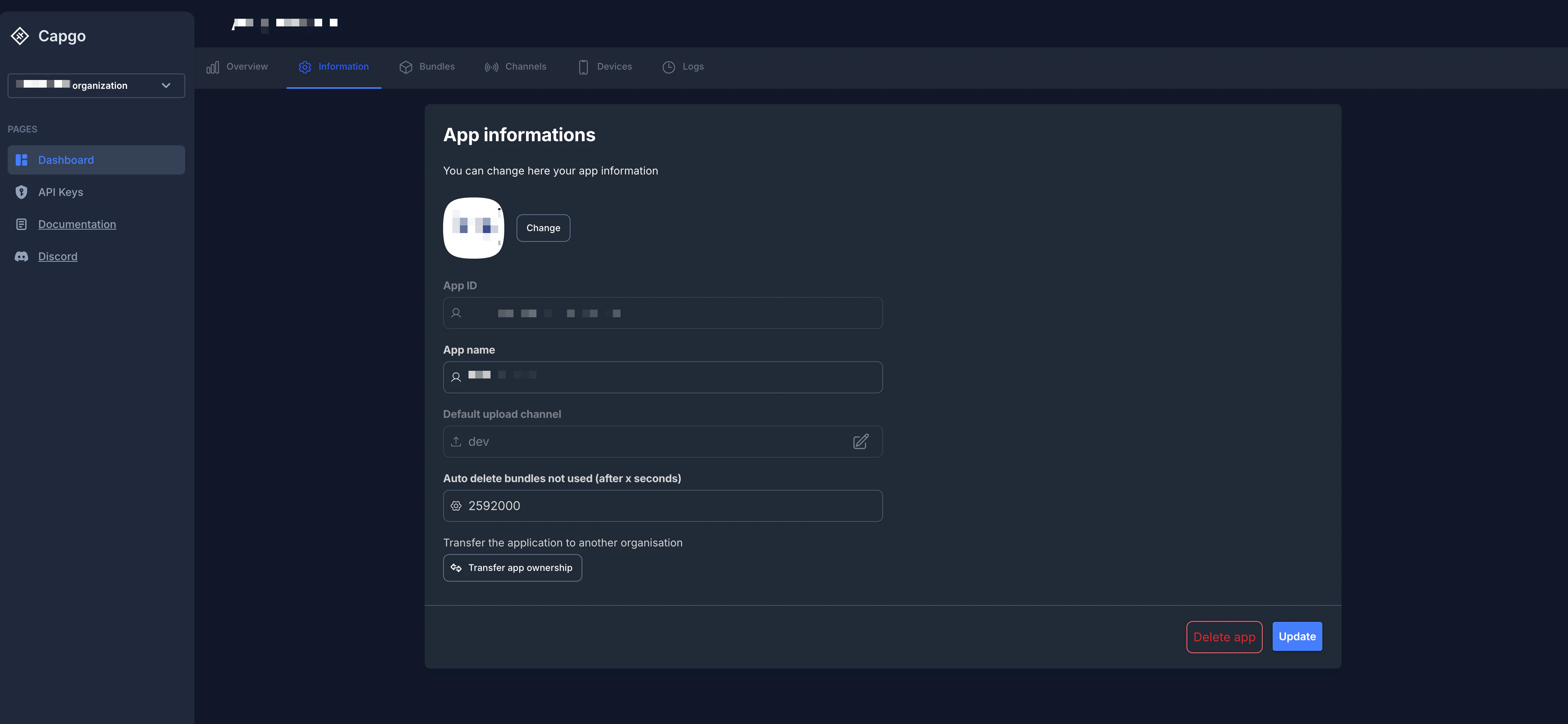
以下是可用字段和操作的细分:* 应用程序图标 (2): 显示应用程序的图标。您可以单击“更改”按钮上传新图标。
- 应用程序 ID (3): 您的应用程序在 Capgo 中的唯一标识符。该 ID 不可编辑。
- 应用程序名称 (4): 您的应用程序的显示名称。您可以根据需要修改它。
- 默认上传通道 (5): 指定新包上传到的默认通道。您可以单击编辑图标来选择不同的默认通道。
- 默认下载通道 (6): 指定设备下载更新的默认通道。您可以单击编辑图标来选择不同的默认通道。有关详细信息,请参阅下面的默认通道配置 部分。
- 自动删除未使用的捆绑包(x 秒后)(7): 此设置允许您自动删除在指定持续时间(以秒为单位)内未使用的旧捆绑包。设置为
0以禁用自动删除。这有助于管理存储并保持捆绑包列表干净。 - 向插件公开捆绑包元数据 (8): 启用后,捆绑包链接和注释字段将发送到 Capacitor 更新程序插件。此功能需要插件版本 7.35.0 或更高版本。
- 转移应用程序所有权 (9): 本部分提供了一个选项,用于启动将您的应用程序转移到您所属的其他组织。
- 删除应用程序按钮: 从 Capgo 永久删除您的应用程序。此操作不可逆转,并将删除所有关联的数据、捆绑包、通道和设备。
- 更新按钮: 保存您对此页面上可编辑字段所做的任何更改(例如,应用程序名称、默认上传频道、自动删除捆绑包设置)。
默认通道配置
Section titled “默认通道配置”默认下载频道是您的应用程序最重要的设置之一。它确定新设备首次连接到 Capgo 时将从哪个通道接收更新。
默认频道如何工作
Section titled “默认频道如何工作”当设备请求 Capgo 更新时,系统根据以下优先级(最高优先级优先)确定要使用哪个通道:
- 强制设备映射:如果在通道设置中将设备 ID 明确强制到某个通道,则该通道始终获胜。
- 云覆盖:如果设备已通过
setChannel()或在仪表板中手动分配给通道,则使用该覆盖。 - Capacitor 配置
defaultChannel:如果在capacitor.config.*文件中设置,则用于测试/测试版本。 - 默认下载通道:此处配置的设置 - 这是大约 99% 的生产用户将使用的设置。
特定于平台的默认通道
Section titled “特定于平台的默认通道”您可以配置特定于平台的默认通道,例如,一个用于 iOS,一个用于 Android,一个用于 Electron。这在以下情况下很有用:
- 您希望先于一个平台推出另一个平台的更新
- 每个平台需要不同的更新策略
- 您正在一个平台上测试新版本,同时保持另一个平台的稳定要设置特定于平台的默认值:
- 为每个平台创建单独的通道(例如
production-ios、production-android和production-electron) - 在每个通道的设置中,仅启用相关平台(iOS、Android 或 Electron 切换)
- 将两个通道标记为“默认” - 当通道针对不同平台时,Capgo 允许这样做
当设备请求更新时:
- iOS 设备将从启用 iOS 的默认通道接收更新
- Android 设备将从启用 Android 的默认通道接收更新
单个默认频道(推荐用于大多数应用程序)
Section titled “单个默认频道(推荐用于大多数应用程序)”对于大多数应用程序来说,支持所有三个核心平台的单个默认通道是最简单的方法:
- 创建一个通道(例如
production) - 确保启用 iOS、Android 和 Electron 切换
- 将其标记为默认通道
这可确保所有平台上的行为一致并简化您的发布工作流程。
更改默认频道
Section titled “更改默认频道”当您更改默认频道时:
- 新设备将立即开始接收新默认值的更新
- 现有设备已经有通道分配(通过覆盖或强制)将不会自动切换
- 要移动现有设备,您需要:
- 使用
setChannel()以编程方式覆盖它们 - 强制他们进入仪表板中的新频道
- 删除他们的设备条目(他们将使用新的默认值重新注册)
- 使用
提示:在将新的默认频道设为所有用户的默认频道之前,请务必使用一小组强制设备测试新的默认频道。