
iOS サブスクリプションの紹介オファーを作成する
お試しオファーを利用すると、対象となるユーザーに無料トライアルまたは割引されたお試し価格を提供して、参入障壁を軽減し、サブスクリプション コンバージョンを増やすことができます。
紹介オファーは、加入者ベースを拡大するための最も効果的なツールの 1 つです。これらにより、ユーザーは次のことが可能になります。
- プレミアム機能をリスクなしでお試しください
- コミット前の経験値
- 低価格帯から始める
- 製品に対する信頼を築く
オファーの種類
Section titled “オファーの種類”iOS は、次の 3 種類の紹介オファーをサポートしています。
1. 無料トライアル
Section titled “1. 無料トライアル”顧客は指定された期間中無料でアクセスできます。試用後、キャンセルしない場合は、通常の料金が請求されます。
例:
- 7日間無料
- 14日間無料
- 1ヶ月無料
こんな方に最適:
- 高価値のサブスクリプション
- 機能豊富なアプリ
- ユーザーの習慣を構築する
2. 前払い
Section titled “2. 前払い”顧客は、導入期間をカバーする単一の割引価格を支払います。
例:
- 2 か月間 $1.99 (その後は月額 $9.99)
- 3 か月間 $9.99 (その後は月額 $19.99)
こんな方に最適:
- コミットメントシグナル
- キャッシュフローのニーズ
- 価格感応度のテスト
3. 従量課金制
Section titled “3. 従量課金制”顧客は複数の請求サイクルに対して割引価格を支払います。
例:
- 3 か月間 $1.99/月 (その後は $9.99/月)
- 6 か月間 $4.99/月 (その後は $14.99/月)
こんな方に最適:
- 段階的な取り組み
- 長期的な価値の実証
- 認識されているリスクの軽減
ユーザーは次の場合にのみ紹介オファーを受け取ることができます。
- これまでに製品の紹介オファーを受け取ったことがない
- 同じサブスクリプション グループ内のどの製品の紹介オファーも受け取っていない
- 製品の有効なサブスクリプションを持っていない
紹介特典を追加する前に、まず 自動更新可能なサブスクリプションを作成 する必要があります。
紹介オファーの作成
Section titled “紹介オファーの作成”-
サブスクリプションに移動
App Store Connect で、アプリの 収益化 > サブスクリプション セクションに移動し、オファーを追加するサブスクリプションを選択します。
-
サブスクリプション価格を追加
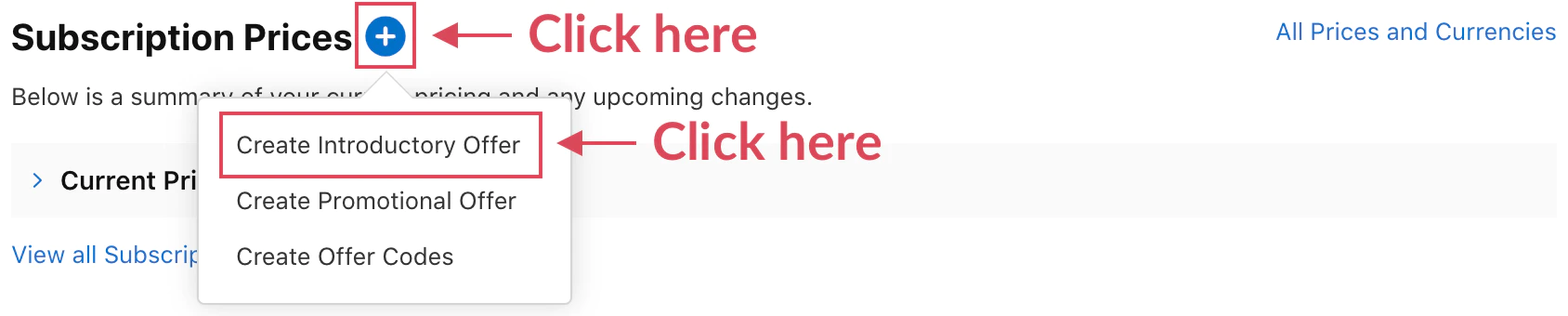
[サブスクリプション価格] の横にある + アイコンをクリックして、価格設定モーダルを開きます。
-
紹介オファーを作成
オプションから 「紹介オファーの作成」 を選択します。
-
国と開始日の構成
国と地域: オファーを利用できる国を選択してください
- リーチを最大化するにはすべての国を選択してください
- またはテストを特定の市場に限定する
開始日: オファーが利用可能になった日
- すぐに実行することも、将来的にスケジュールすることもできます
- マーケティング キャンペーンとの調整に役立ちます
終了日 (オプション): オファーの有効期限が切れる日
- 継続的に利用できる場合は空白のままにします
- 期間限定プロモーションの日付を設定します
-
オファーの種類を選択
次の 3 つのオファー タイプから 1 つを選択します。
無料 (無料トライアル)
- 期間を選択します (日、週、月)
- 例: 7 日、2 週間、1 か月前払い
- 一括支払い価格の設定
- 支払いの対象となる期間を設定する
- 例: 2 か月で 1.99 ドル
従量課金制
- 期間ごとに割引価格を設定
- 期間の数を設定します
- 例: 3 か月間 $2.99/月
-
レビューと確認
以下を示す概要を確認してください。
- 特典の種類と期間
- 価格の詳細
- 導入期間後の通常価格
- 利用可能日と国
-
保存
[保存] をクリックして紹介オファーを作成します。サンドボックス モードですぐにテストできるようになります。
オファーの構成例
Section titled “オファーの構成例”例 1: 標準の無料トライアル
Section titled “例 1: 標準の無料トライアル”Type: FreeDuration: 7 daysThen: $9.99/monthユーザージャーニー:
- 1日目~7日目:無料アクセス
- 8日目: 初回料金9.99ドル
- 月額料金は継続します
例 2: 前払い割引期間
Section titled “例 2: 前払い割引期間”Type: Pay Up FrontPrice: $4.99Duration: 3 monthsThen: $9.99/monthユーザージャーニー:
- 1日目: $4.99の請求
- 90日間のアクセス
- 91 日目: 月額 9.99 ドルが請求されます
例 3: 段階的な導入
Section titled “例 3: 段階的な導入”Type: Pay As You GoPrice: $2.99/monthPeriods: 6 monthsThen: $9.99/monthユーザージャーニー:
- 1 ~ 6 か月目: 月額 2.99 ドル
- 7 か月目以降: $9.99/月
アプリでの使用
Section titled “アプリでの使用”ネイティブ購入プラグインは、紹介オファーの提示と資格を自動的に処理します。
import { NativePurchases, PURCHASE_TYPE } from '@capgo/native-purchases';
// Fetch products with intro offer informationconst { products } = await NativePurchases.getProducts({  productIdentifiers: ['com.yourapp.premium_monthly'],  productType: PURCHASE_TYPE.SUBS,});
const product = products[0];
// Display intro offer details (StoreKit sends localized metadata)if (product.introductoryPrice) {  console.log('Intro price:', product.introductoryPriceString);  console.log('Intro period:', product.introductoryPricePeriod);  console.log('Intro cycles:', product.introductoryPriceCycles);  console.log('Regular price:', product.priceString);} else {  console.log('No intro offer configured');}
// Purchase (StoreKit automatically applies intro pricing if eligible)try {  const transaction = await NativePurchases.purchaseProduct({    productIdentifier: 'com.yourapp.premium_monthly',    productType: PURCHASE_TYPE.SUBS,  });
  console.log('Subscription active, receipt length:', transaction.receipt?.length);  await validateReceiptOnServer(transaction.receipt);} catch (error) {  console.error('Purchase failed:', error);}
ユーザーへの紹介オファーの表示
Section titled “ユーザーへの紹介オファーの表示”UI のベスト プラクティス
Section titled “UI のベスト プラクティス”明確な価値提案:
Try Premium Free for 7 DaysThen $9.99/month. Cancel anytime.節約を重視:
Start at Just $1.99Get 3 months of Premium for only $1.99Then $9.99/month透過的なコミュニケーション:
Your Free Trial• Access all premium features• No charge for 7 days• $9.99/month after trial• Cancel anytime, even during trialfunction formatIntroOffer(product: any): string { if (!product.introductoryPrice) { return `${product.priceString} per ${product.subscriptionPeriod}`; }
const intro = product.introductoryPrice; const regular = product.priceString;
if (intro.price === 0) { // Free trial return `Try free for ${intro.periodString}, then ${regular}`; } else if (intro.cycles === 1) { // Pay up front return `${intro.priceString} for ${intro.periodString}, then ${regular}`; } else { // Enterprise return `${intro.priceString} for ${intro.cycles} ${intro.periodString}s, then ${regular}`; }}マーケティングのベストプラクティス
Section titled “マーケティングのベストプラクティス”トライアル期間戦略
Section titled “トライアル期間戦略”- 3~7日: アプリ、ゲームをすぐに決定
- 7 ~ 14 日: ほとんどのアプリの標準
- 14~30日: 複雑なツール、プロフェッショナルなアプリ
- 30 日以上: 高価値の B2B またはエンタープライズ
価格設定の心理学
Section titled “価格設定の心理学”- $0.99-$1.99: 障壁が非常に低く、テストに適しています
- 50% オフ: 知覚価値が高い
- 初月無料: よくあるおなじみのパターン
通信タイミング
Section titled “通信タイミング”- 試用期間が終了する前に: 今後の請求についてユーザーに通知します
- ハイライト値: 使用状況の統計、実績を表示します。
- 簡単なキャンセル: 透明性のあるプロセスで信頼を構築
イントロオファーのテスト
Section titled “イントロオファーのテスト”サンドボックス テストを使用して動作を検証します。
import { NativePurchases, PURCHASE_TYPE } from '@capgo/native-purchases';
// In sandbox mode, accelerated subscription durations apply:// - 3 days free trial = 3 minutes// - 1 week free trial = 3 minutes// - 1 month free trial = 5 minutes
const { products } = await NativePurchases.getProducts({  productIdentifiers: ['premium_monthly'],  productType: PURCHASE_TYPE.SUBS,});
// Purchase with intro offerconst transaction = await NativePurchases.purchaseProduct({  productIdentifier: 'premium_monthly',  productType: PURCHASE_TYPE.SUBS,});
console.log('Intro purchase transaction:', transaction.transactionId);
// Wait for accelerated renewalsetTimeout(async () => {  const { purchases } = await NativePurchases.getPurchases({    productType: PURCHASE_TYPE.SUBS,  });  const premium = purchases.find((purchase) => purchase.productIdentifier === 'premium_monthly');  console.log('After trial state:', premium?.subscriptionState);}, 180000); // 3 minutes for weekly trial
重要な注意事項
Section titled “重要な注意事項”- サブスクリプション グループごとにユーザーごとに 1 つのイントロ オファー (生涯)
- 新規加入者のみに適用されます ・キャンセル後は再利用不可
- サブスクリプションのアップグレード/クロスグレードには利用できません
ストアキット API
Section titled “ストアキット API”introductoryPriceには、イントロ オファーの詳細が表示されますeligibilityメソッドはユーザーが資格があるかどうかを確認します- 購入時に自動的に適用されます
- 特別な購入方法は必要ありません
- サブスクリプションごとに一度に有効になるイントロ オファーは 1 つだけです
- 他の割引タイプとの併用はできません
- 資格ルールは変更できません
- Apple は適格性チェックを制御します
トラブルシューティング
Section titled “トラブルシューティング”紹介オファーが表示されない:
- App Store Connect でオファーがアクティブ化されているかどうかを確認します
- ユーザーがこれまでに紹介オファーを使用したことがないことを確認する
- ユーザーがグループ内の何もサブスクライブしていないことを確認してください
- 新しいサンドボックス アカウントでテストする
資格チェックに失敗しました:
- App Store の同期を待ちます (2 ~ 3 時間かかる場合があります)
- 製品IDが正しいことを確認してください
- サブスクリプション グループの構成を確認する
- 新しいテスト アカウントを使用してサンドボックスでテストする間違った価格表示:
- 地域の価格設定を確認する
- 通貨換算を確認する
- オファーの日付が最新のものであることを確認してください
- 製品情報を更新
サンドボックス テストの問題:
- 加速期間を使用します (3 分 = 1 週間)
- テストごとに新しいテスト アカウントを作成する
- トライアルが自然に完了するまで待ちます
- 更新回数の確認(サンドボックスでは最大6回)
分析と最適化
Section titled “分析と最適化”これらの指標を追跡する
Section titled “これらの指標を追跡する”- 紹介オファー承諾率
- トライアルから有料への変換率
- トライアル中のキャンセル
- 最初の充電後の保持
- 収益への影響
A/B テストのアイデア
Section titled “A/B テストのアイデア”- 無料トライアルと有料イントロの比較
- トライアルの長さのバリエーション
- 割引率
- 一括支払いと定期割引の比較
// Track offer performanceanalytics.track('intro_offer_displayed', {  product_id: product.identifier,  offer_type: product.introductoryPriceType,  offer_duration: product.introductoryPricePeriod});
analytics.track('intro_offer_accepted', {  product_id: product.identifier});
// Monitor conversionNativePurchases.addListener('transactionUpdated', (transaction) => {  if (transaction.productIdentifier === product.identifier && transaction.isActive) {    analytics.track('trial_converted', {      transactionId: transaction.transactionId,      productId: transaction.productIdentifier,    });  }});
次のステップ
Section titled “次のステップ”- サンドボックス テストを構成 してイントロ オファーをテストします
- ウィンバック キャンペーンのプロモーション オファーを設定する
- サブスクリプション分析の実装
- ターゲットを絞ったマーケティング キャンペーンを作成する
追加のリソース
Section titled “追加のリソース”詳細については、紹介オファーに関する公式 Apple ドキュメント を参照してください。