
iOSサブスクリプショングループの作成
サブスクリプショングループは、iOSアプリで複数のサブスクリプションレベルを整理・管理するために不可欠です。アップグレード、ダウングレード、クロスグレード機能を実装するには、その仕組みを理解することが重要です。
サブスクリプショングループとは?
Section titled “サブスクリプショングループとは?”サブスクリプショングループは、ユーザーが選択できる関連サブスクリプションのコレクションです。ユーザーは、グループ内の1つのサブスクリプションにのみ同時に登録できます。サブスクリプションを切り替えると、Appleが自動的に移行を処理します。
サブスクリプショングループが重要な理由
Section titled “サブスクリプショングループが重要な理由”サブスクリプショングループにより以下が可能になります:
- 段階的な価格設定: ベーシック、プレミアム、アルティメットプランの提供
- 異なる期間: 月次、年次、ライフタイムオプション
- アップグレード/ダウングレードロジック: サブスクリプション変更の自動処理
- 簡素化された管理: 関連するサブスクリプションをグループ化
サブスクリプションレベル
Section titled “サブスクリプションレベル”グループ内では、各サブスクリプションは最高価値(レベル1)から最低価値までランク付けする必要があります。このランキングによって、サブスクリプション変更の分類方法が決まります:
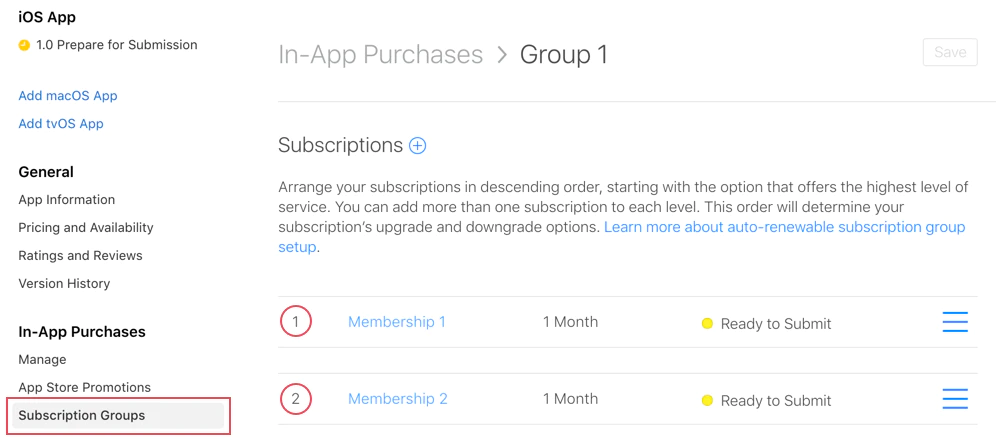
レベル1(最高価値)
- Premium Annual ($99.99/year)
- Ultimate Monthly ($19.99/month)
レベル2(中価値)
- Standard Annual ($49.99/year)
- Premium Monthly ($9.99/month)
レベル3(最低価値)
- Basic Annual ($29.99/year)
- Standard Monthly ($4.99/month)
サブスクリプション変更のタイプ
Section titled “サブスクリプション変更のタイプ”Appleは、レベルランキングに基づいて3種類のサブスクリプション変更を自動的に処理します:
1. アップグレード
Section titled “1. アップグレード”上位層のサブスクリプションへの移行(例:レベル2 → レベル1)。
動作:
- 即座に有効になります
- ユーザーは残り時間の按分返金を受け取ります
- 新しいサブスクリプションがすぐに開始されます
例:
// User currently has: Standard Monthly (Level 2)// User upgrades to: Premium Annual (Level 1)// Result: Immediate access to Premium, refund for unused Standard time2. ダウングレード
Section titled “2. ダウングレード”下位層のサブスクリプションへの移行(例:レベル1 → レベル2)。
動作:
- 次回更新日に有効になります
- ユーザーは期間が終了するまで現在のサブスクリプションを維持します
- 期限切れ後、新しいサブスクリプションが自動的に開始されます
例:
// User currently has: Premium Annual (Level 1)// User downgrades to: Standard Monthly (Level 2)// Result: Premium access continues until annual renewal date, then switches3. クロスグレード
Section titled “3. クロスグレード”同じ層レベルの別のサブスクリプションへの切り替え。
期間によって動作が異なります:
異なる期間 → ダウングレードのように動作
- 次回更新日に有効になります
- 例:Monthly Premium (Level 1) → Annual Premium (Level 1)
同じ期間 → アップグレードのように動作
- 即座に有効になります
- 例:Premium Monthly (Level 1) → Ultimate Monthly (Level 1)
サブスクリプショングループの作成
Section titled “サブスクリプショングループの作成”-
サブスクリプションに移動
App Store Connectでアプリを選択し、収益化 > サブスクリプションに移動します。
-
グループを作成
「サブスクリプショングループ」の横にある**+**をクリックして新しいグループを作成します。
-
グループに名前を付ける
含まれるサブスクリプションを反映する説明的な名前を選択します:
- “Premium Access”
- “Cloud Storage Plans”
- “Pro Features”
-
サブスクリプションを追加
グループを作成した後、個別のサブスクリプションを追加します。各サブスクリプションにはレベルランキングがあります。
-
レベルランキングを設定
最高価値(1)から最低価値までサブスクリプションを配置します。以下を考慮してください:
- 年次プランは通常、月次より高くランク付け
- 高価格層は低価格層より上にランク付け
- アルティメット/プレミアム層が最高ランク
アプリでの使用
Section titled “アプリでの使用”native-purchasesプラグインは、サブスクリプショングループロジックを自動的に処理します:
import { NativePurchases, PURCHASE_TYPE } from '@capgo/native-purchases';
// Fetch all subscriptions in a groupconst { products } = await NativePurchases.getProducts({  productIdentifiers: ['premium_monthly', 'premium_annual', 'ultimate_monthly'],  productType: PURCHASE_TYPE.SUBS,});
// Display current subscription using StoreKit transactionsconst { purchases } = await NativePurchases.getPurchases({  productType: PURCHASE_TYPE.SUBS,});
const activeSubs = purchases.filter((purchase) => purchase.isActive);
// Detect pending downgrade/cancellation (StoreKit sets willCancel === true)const pendingChange = purchases.find((purchase) => purchase.willCancel === true);if (pendingChange) {  console.log('Subscription will stop auto-renewing on', pendingChange.expirationDate);}
// Purchase (StoreKit handles upgrades/downgrades automatically)await NativePurchases.purchaseProduct({  productIdentifier: 'premium_annual',  productType: PURCHASE_TYPE.SUBS,});
// Listen for StoreKit updates (fires on upgrades/downgrades/refunds)NativePurchases.addListener('transactionUpdated', (transaction) => {  console.log('Subscription updated:', transaction);});
サブスクリプション変更の処理
Section titled “サブスクリプション変更の処理”変更タイプの検出
Section titled “変更タイプの検出”import { NativePurchases, PURCHASE_TYPE } from '@capgo/native-purchases';
// Get current subscription infoconst { purchases } = await NativePurchases.getPurchases({ productType: PURCHASE_TYPE.SUBS,});
const currentSubscription = purchases.find( (purchase) => purchase.subscriptionState === 'subscribed',);
if (currentSubscription) { // StoreKit reports if user cancelled auto-renew if (currentSubscription.willCancel) { console.log( `User cancelled. Access remains until ${currentSubscription.expirationDate}`, ); }
if (currentSubscription.isUpgraded) { console.log('User recently upgraded to this plan.'); }}
// Listen for automatic upgrades/downgradesNativePurchases.addListener('transactionUpdated', (transaction) => { console.log('Subscription changed!', transaction); if (transaction.subscriptionState === 'revoked') { revokeAccess(); } else if (transaction.isActive) { unlockPremiumFeatures(); }});ユーザーコミュニケーション
Section titled “ユーザーコミュニケーション”変更の動作を常に明確に伝えます:
アップグレードの場合:
“プレミアム機能に即座にアクセスできます。現在のサブスクリプションを按分します。”
ダウングレードの場合:
“[更新日]までプレミアムアクセスを維持し、その後スタンダードに切り替わります。”
クロスグレードの場合:
“プランは[日付]の次回更新時に年次課金に変更されます。“
サーバー監視
Section titled “サーバー監視”Apple App Store Server Notifications v2または独自のレシート検証バックエンドを使用して、データベースでStoreKitの変更をミラーリングします。サーバー通知をtransactionUpdatedリスナーと組み合わせて、クライアントとバックエンドの両方が同期を保ちます。
ベストプラクティス
Section titled “ベストプラクティス”グループの整理
Section titled “グループの整理”- 関連するサブスクリプションを同じグループに保管
- 関連しない機能を混在させない(ストレージと広告削除など)
- 異なる機能セットには別のグループを作成
レベルランキング戦略
Section titled “レベルランキング戦略”- 年次プラン → 月次より高いレベル(同じ層の場合)
- 高価格層 → より高いレベル
- 価格だけでなく価値を考慮
ユーザーエクスペリエンス
Section titled “ユーザーエクスペリエンス”- 現在のサブスクリプションを明確に表示
- グループ内の利用可能なすべてのオプションを表示
- どの変更が即座で、どれが更新時かを示す
- プラン間の簡単な切り替えを許可
- すべてのアップグレードシナリオをテスト
- すべてのダウングレードシナリオをテスト
- クロスグレードの動作を検証
- Webhookの発火を確認
一般的なシナリオ
Section titled “一般的なシナリオ”シナリオ1:3段階の月次プラン
Section titled “シナリオ1:3段階の月次プラン”Level 1: Ultimate Monthly ($19.99)Level 2: Premium Monthly ($9.99)Level 3: Basic Monthly ($4.99)- Basic → Premium: アップグレード(即座)
- Premium → Ultimate: アップグレード(即座)
- Ultimate → Premium: ダウングレード(更新時)
- Basic → Ultimate: アップグレード(即座)
シナリオ2:混合期間プラン
Section titled “シナリオ2:混合期間プラン”Level 1: Premium Annual ($99.99/year)Level 2: Premium Monthly ($9.99/month)- Monthly → Annual: クロスグレード(更新時)
- Annual → Monthly: ダウングレード(更新時)
シナリオ3:複数層・複数期間
Section titled “シナリオ3:複数層・複数期間”Level 1: Ultimate Annual ($199/year)Level 2: Ultimate Monthly ($19.99/month)Level 3: Premium Annual ($99/year)Level 4: Premium Monthly ($9.99/month)Level 5: Basic Annual ($49/year)Level 6: Basic Monthly ($4.99/month)この設定により、明確なアップグレード/ダウングレードロジックを維持しながら最大の柔軟性が得られます。
トラブルシューティング
Section titled “トラブルシューティング”サブスクリプションがグループに表示されない:
- 正しいグループに割り当てられているか確認
- 少なくとも「提出準備完了」ステータスであることを確認
- Product IDが正しいことを確認
誤ったアップグレード/ダウングレード動作:
- レベルランキングを確認(1 = 最高)
- サブスクリプション層が理にかなっているか確認
- レベルが正しく設定されているか確認
異なるグループからの製品:
- ユーザーは複数のグループに同時に登録できます
- これは意図的です - 関連製品を同じグループに保管
getActiveProductsが複数のサブスクリプションを表示:
- サブスクリプションが異なるグループにあるか確認
- ユーザーがファミリー共有経由で登録していないか確認
- App Store Connectでサブスクリプションステータスを確認
追加リソース
Section titled “追加リソース”詳細については、サブスクリプショングループに関する公式Apple文書を参照してください。