
Android Play Store IAP のガイドラインを確認する
Android アプリを Google Play で承認するには、特にアプリ内購入とサブスクリプションのあるアプリの場合、Google のポリシーに準拠する必要があります。このガイドには、審査に合格するために必要なすべてが記載されています。
Google Play 請求要件
Section titled “Google Play 請求要件”必須の請求システム
Section titled “必須の請求システム”デジタル商品やサービスの場合は、Google Play の課金システムを使用する必要があります。
デジタルグッズ (Play Billing を使用する必要があります):
- プレミアム機能のサブスクリプション
- アプリ内通貨またはクレジット
- デジタル コンテンツ (電子書籍、音楽、ビデオ)
- ゲームのアップグレードとパワーアップ
- アプリのロック解除とプレミアム層
物理的な商品 (Play Billing は使用できません):
- 物理的な商品
- 現実世界のサービス
- 非営利団体への 1 回限りの寄付
:::注意 2025 年の要件
新しいアプリは、サブスクリプション カタログを処理するために monetization.subscriptions API を使用する必要があります。従来の課金 API は非推奨になりました。
:::
ネイティブ購入による実装
Section titled “ネイティブ購入による実装”import { NativePurchases, PURCHASE_TYPE } from '@capgo/native-purchases';
// Ensure billing is available on the deviceconst { isBillingSupported } = await NativePurchases.isBillingSupported();if (!isBillingSupported) throw new Error('Google Play Billing not available');
// Fetch subscription products (Store data is required—never hardcode pricing)const { products } = await NativePurchases.getProducts({ productIdentifiers: ['premium_monthly', 'premium_yearly'], productType: PURCHASE_TYPE.SUBS,});
// Plan identifiers are the Base Plan IDs you create in Google Play Consoleconst transaction = await NativePurchases.purchaseProduct({ productIdentifier: 'premium_monthly', planIdentifier: 'monthly-plan', // REQUIRED on Android, ignored on iOS productType: PURCHASE_TYPE.SUBS,});
console.log('Purchase token for server validation:', transaction.purchaseToken);透明性と開示の要件
Section titled “透明性と開示の要件”価格の事前開示
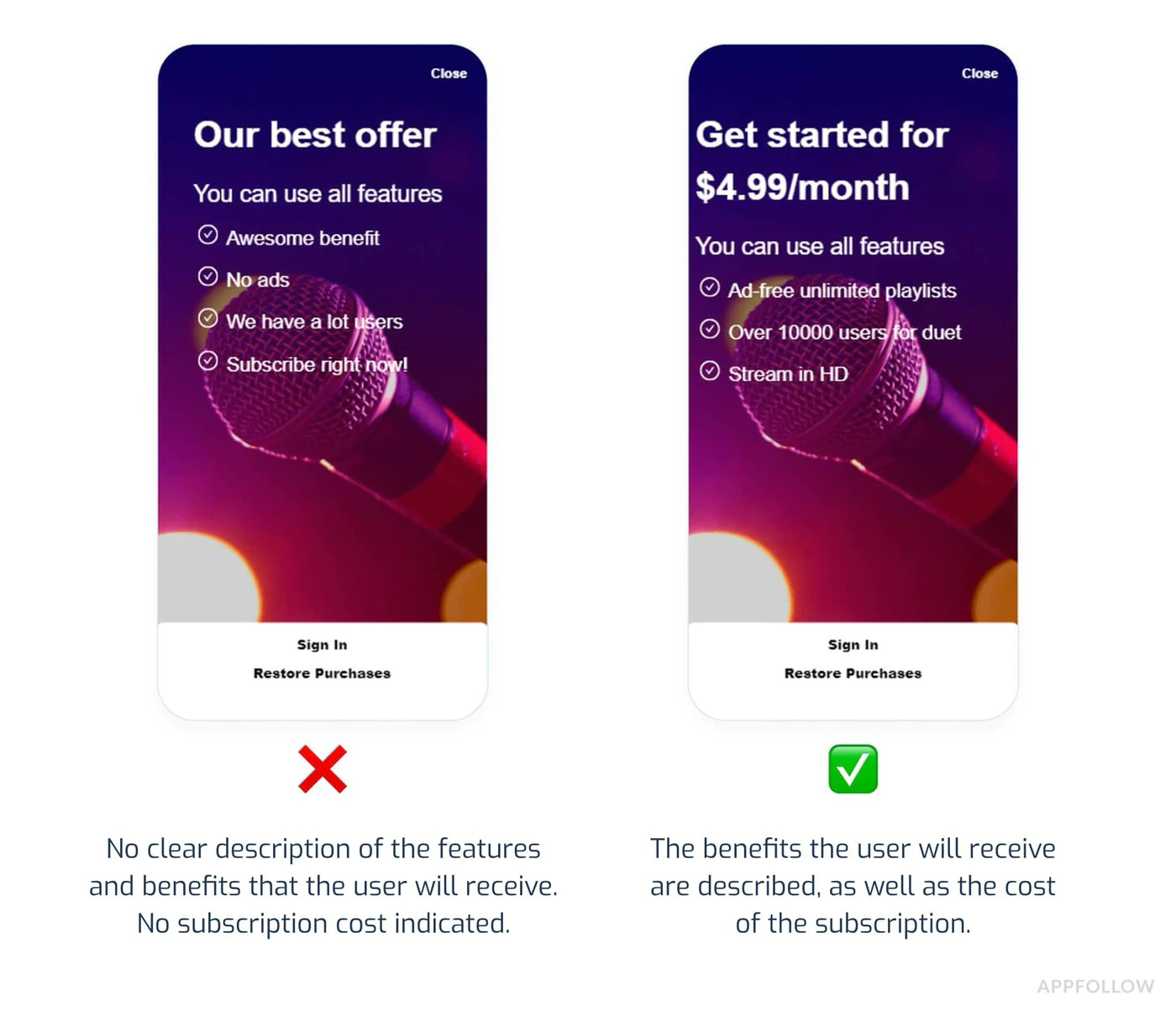
Section titled “価格の事前開示”Google Play では、購入前にすべてのコストを明確に開示することが義務付けられています。
必須要素:
- ユーザーの現地通貨での正確な価格
- 請求頻度 (毎月、毎年など)
- サブスクリプションに含まれるもの
- 紹介オファーの合計費用
- 料金が発生する場合
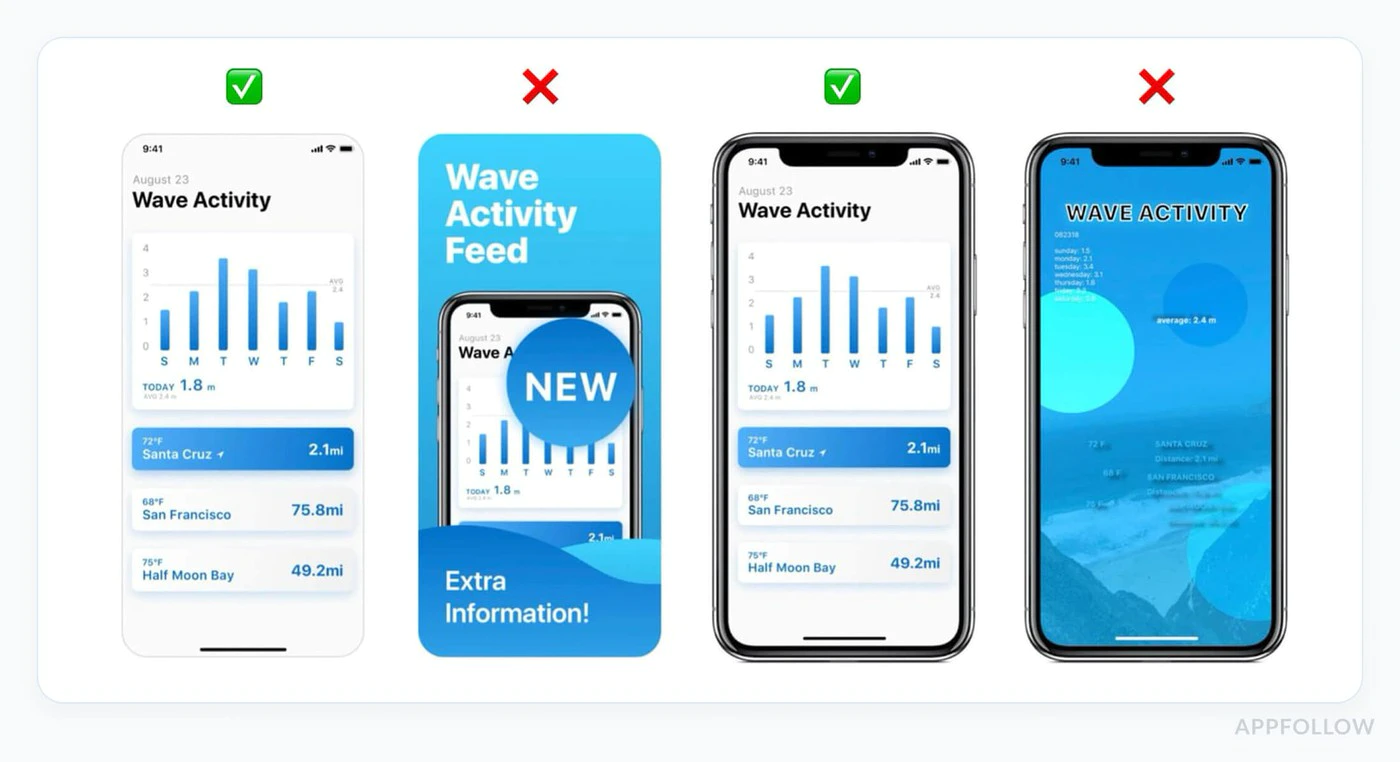
準拠した UI の例:
function SubscriptionCard({ product }) {  return (    <div className="subscription-card">      <h3>{product.title}</h3>
      {/* Show intro offer if available */}      {product.introductoryPrice && (        <div className="intro-offer">          <p className="intro-price">{product.introductoryPriceString}</p>          <p className="intro-period">            for {product.introductoryPricePeriod}          </p>        </div>      )}
      {/* Regular price */}      <div className="regular-price">        <p className="price">{product.priceString}</p>        <p className="period">per {product.subscriptionPeriod}</p>      </div>
      {/* Clear description */}      <p>{product.description}</p>
      {/* Renewal terms */}      <p className="terms">        Renews automatically. Cancel anytime in Google Play.      </p>
      <button onClick={() => handlePurchase(product)}>        Subscribe Now      </button>    </div>  );}
自動更新の開示
Section titled “自動更新の開示”サブスクリプションが自動更新される前に、Google には以下が必要です。
- 更新が行われることを明確に通知
- 価格のリマインダー
- キャンセルへの簡単なアクセス
プラットフォーム間の価格の一貫性
Section titled “プラットフォーム間の価格の一貫性”重要なルール: 価格は、アプリが利用可能なすべてのプラットフォームで一貫している必要があります。
違反の例:
- iOS: 月額 9.99 ドル
- Android: 月額 7.99 ドル
- ウェブ: $11.99/月
重要な理由: ユーザーは価格差のスクリーンショットを撮って Google に報告し、ポリシー違反を引き起こす可能性があります。
プライバシー ポリシーの要件
Section titled “プライバシー ポリシーの要件”必須のプライバシー ポリシー
Section titled “必須のプライバシー ポリシー”アプリにアプリ内購入が含まれている場合は、次のことを行う必要があります。
-
Play Store リスト内のリンク
- Play Console にプライバシー ポリシーの URL を追加
- パブリックにアクセスできる必要があります
- アプリと同じ言語である必要があります
-
アプリ内リンク
- アプリ設定でプライバシーポリシーを表示
- ユーザーデータを収集する前に表示する
- 簡単に見つけられるようにする
実装例:
function SettingsScreen() {  const openPrivacyPolicy = () => {    window.open('https://yourapp.com/privacy', '_blank');  };
  const openTerms = () => {    window.open('https://yourapp.com/terms', '_blank');  };
  return (    <div>      <h2>Settings</h2>
      <button onClick={openPrivacyPolicy}>        Privacy Policy      </button>
      <button onClick={openTerms}>        Terms of Service      </button>
      <button onClick={() => NativePurchases.showManageSubscriptions()}>        Manage Subscriptions      </button>    </div>  );}
データ セーフティ セクション
Section titled “データ セーフティ セクション”Google Play では、データ セーフティ セクションで詳細な開示が必要です。
IAP アプリの場合、次のように宣言します:
- 購入履歴の収集 ・メールアドレス(領収書用)
- デバイスID(不正行為防止用)
- 決済情報の取り扱い
- 分析データの収集
データ セーフティ セクションには法的拘束力があります。不正確な宣言はアプリの削除につながる可能性があります。
一般的な拒否理由
Section titled “一般的な拒否理由”1. 請求の実装が欠落している、または正しくない失敗する理由:
Section titled “1. 請求の実装が欠落している、または正しくない失敗する理由:”- Google Play デジタル グッズの課金を使用していない
- 非推奨の課金 API の使用
- サブスクリプション向けのカスタム支払いソリューションの実装
予防:
// ✅ Correct: Use native-purchases (uses Google Play Billing)await NativePurchases.purchaseProduct({  productIdentifier: 'premium_monthly'});
// ❌ Wrong: Custom payment processor for subscriptions// await CustomPayment.charge(user, 9.99);
2. 不明確な価格設定または隠れたコスト
Section titled “2. 不明確な価格設定または隠れたコスト”失敗する理由:
- 価格は購入をクリックした後にのみ表示されます
- 追加料金は事前に開示されていません
- 曖昧なサブスクリプション条件
予防:
function PurchaseScreen({ product }) {  return (    <div>      {/* Show ALL costs upfront */}      <h2>Premium Subscription</h2>
      <div className="pricing">        <p className="price">{product.priceString}/month</p>        <p className="taxes">Taxes may apply based on location</p>      </div>
      <div className="features">        <h3>Includes:</h3>        <ul>          <li>Ad-free experience</li>          <li>Unlimited cloud storage</li>          <li>Priority support</li>        </ul>      </div>
      <div className="terms">        <p>          Subscription renews automatically unless cancelled at least          24 hours before the end of the current period.        </p>        <p>          Manage or cancel in Google Play Subscriptions.        </p>      </div>
      <button onClick={handlePurchase}>        Start Subscription      </button>    </div>  );}
3. 欺瞞的なサブスクリプション パターン
Section titled “3. 欺瞞的なサブスクリプション パターン”失敗する理由:
- プレミアムオプションの事前選択
- より安価な代替品を隠す ・キャンセルが難しくなる
- 偽の緊急性 (「あと 3 枠しか残っていない!」)
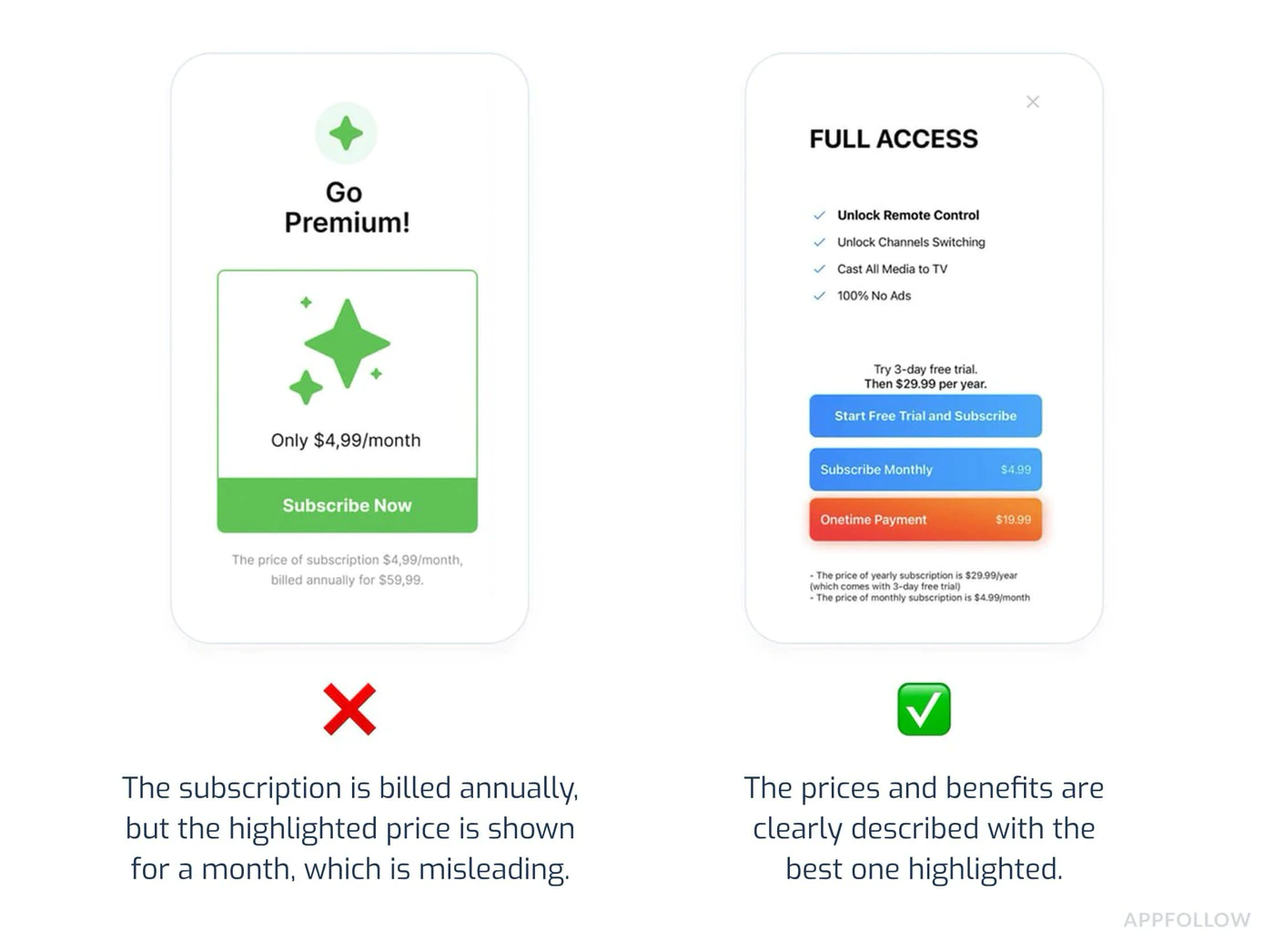
予防:
- すべてのサブスクリプション層を均等に表示します
- キャンセルを明確にし、アクセスしやすいものにする
- カウントダウンタイマーや偽の希少性を避ける
- 高価なオプションを押しつけるためにダークパターンを使用しないでください
4. 不完全なテスト
Section titled “4. 不完全なテスト”失敗する理由:
- 購入時にアプリがクラッシュする
- 製品が読み込まれない
- 購入確認が表示されない
- プレミアム機能は購入後にロック解除されません
予防:
import { NativePurchases, PURCHASE_TYPE } from '@capgo/native-purchases';
// Comprehensive testing before submissionasync function testPurchaseFlow() {  try {    // 1. Test product loading    const { products } = await NativePurchases.getProducts({      productIdentifiers: ['premium_monthly', 'premium_yearly'],      productType: PURCHASE_TYPE.SUBS,    });    console.log('✓ Products loaded:', products.length);
    // 2. Test purchase flow    const transaction = await NativePurchases.purchaseProduct({      productIdentifier: 'premium_monthly',      planIdentifier: 'monthly-plan',      productType: PURCHASE_TYPE.SUBS,    });    console.log('✓ Purchase completed', transaction.transactionId);
    // 3. Verify entitlements    const { purchases } = await NativePurchases.getPurchases({      productType: PURCHASE_TYPE.SUBS,    });    if (      purchases.some(        (purchase) =>          purchase.productIdentifier === 'premium_monthly' &&          ['PURCHASED', '1'].includes(purchase.purchaseState ?? '') &&          purchase.isAcknowledged,      )    ) {      console.log('✓ Premium features unlocked');    }
    // 4. Test restore    await NativePurchases.restorePurchases();    console.log('✓ Restore works');
  } catch (error) {    console.error('✗ Test failed:', error);  }}
5. プライバシーポリシー違反
Section titled “5. プライバシーポリシー違反”失敗する理由:
- アプリ内にプライバシー ポリシーへのリンクがない
- プライバシー ポリシーにアクセスできません
- データ収集は非公開
- データ セーフティ セクションが不正確
予防:
- Play Store リストにプライバシー ポリシーを追加
- アプリ設定にリンクを含める
- データ セーフティ セクションに正確に記入します
- 新しいデータコレクションを追加するときにポリシーを更新します
代替請求システム (2025 年更新)
Section titled “代替請求システム (2025 年更新)”地域のコンプライアンス
Section titled “地域のコンプライアンス”Google では、特定の地域で代替の請求システムが許可されるようになりました。
対象地域:
- 欧州経済領域 (EEA)
- 韓国
- インド (近日公開予定)
代替請求を使用する場合の要件:
- Google Play 請求をオプションとして提供する必要があります
- 選択についてユーザーに明確に伝える
- 現地の規制に準拠する
- サービス料は引き続き適用されます(減額されます)
サブスクリプション管理
Section titled “サブスクリプション管理”簡単なキャンセル
Section titled “簡単なキャンセル”ユーザーは次のことができる必要があります。
- アクティブなサブスクリプションを簡単に表示
- サポートに連絡せずにキャンセルする
- キャンセルがいつ有効になるかを理解する
実装:
import { NativePurchases } from '@capgo/native-purchases';
function ManageSubscriptionButton() {  const openManagement = async () => {    try {      // Opens Google Play subscription management      await NativePurchases.showManageSubscriptions();    } catch (error) {      // Fallback to direct URL      const playStoreUrl = 'https://play.google.com/store/account/subscriptions';      window.open(playStoreUrl, '_blank');    }  };
  return (    <button onClick={openManagement}>      Manage Subscription in Google Play    </button>  );}
キャンセル猶予期間
Section titled “キャンセル猶予期間”必須開示:
- キャンセルはいつ有効になりますか?
- ユーザーは期間が終了するまでアクセスし続けますか?
- 一部返金は可能ですか?
function CancellationInfo() {  return (    <div className="cancellation-info">      <h3>Cancellation Policy</h3>      <ul>        <li>Cancel anytime in Google Play</li>        <li>Access continues until end of billing period</li>        <li>No refunds for partial periods</li>        <li>Resubscribe anytime to regain access</li>      </ul>
      <button onClick={() => NativePurchases.showManageSubscriptions()}>        Manage in Google Play      </button>    </div>  );}
提出前チェックリスト
Section titled “提出前チェックリスト”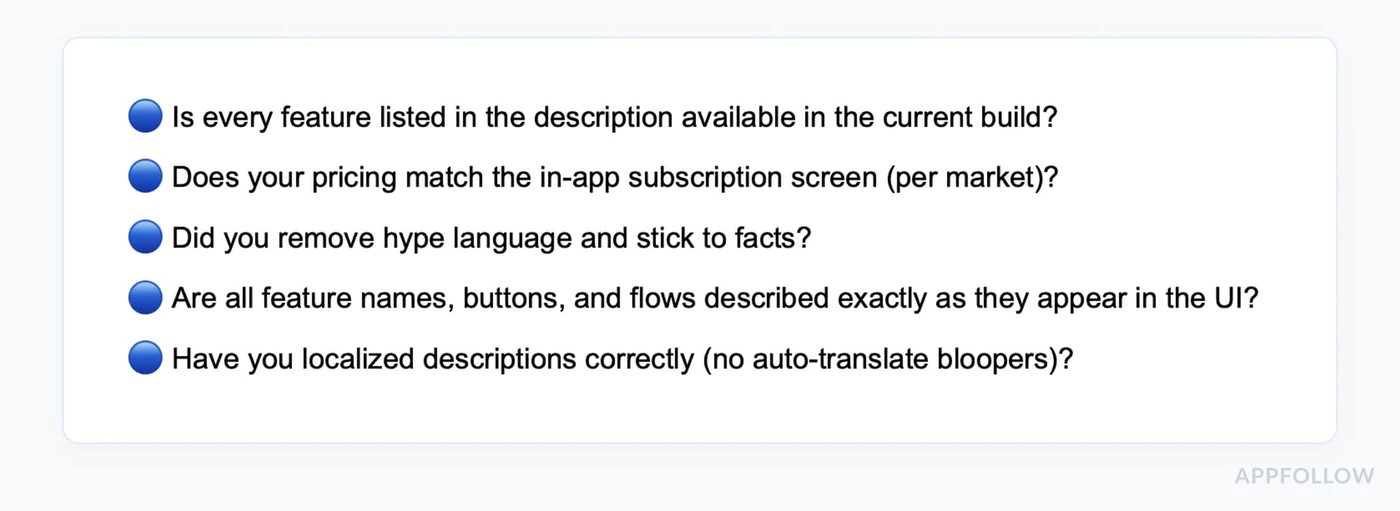
-
請求の実装を確認
- Google Play 請求の使用 (ネイティブ購入経由)
- Play Console で作成されたすべての定期購入製品
- 製品がアクティベートされ公開される
- すべての対象国向けに設定された価格
-
テスト購入フロー
- ライセンステストアカウントの作成
- 各サブスクリプション層をテストする
- 製品が正しくロードされていることを確認します
- テスト購入の完了
- プレミアム機能のロックが解除されていることを確認します
- サブスクリプションの復元をテストする
- 複数のデバイスでテストする3. すべてのコピーを確認
- 購入前に価格が明確に表示される
- すべての料金は事前に開示されます
- サブスクリプション条件が明確です
- キャンセル手順の説明
- 誤解を招くような主張はしないでください
-
プライバシーの遵守
- プライバシー ポリシーは Play Console にリンクされています
- アプリ内でプライバシーポリシーにアクセス可能
- データ セーフティ セクションを正確に完了しました
- 許可が正当化され文書化されている
-
コンテンツの評価
- コンテンツレーティングアンケートに記入してください
- 評価が実際のコンテンツと一致していることを確認する
- アンケートでアプリ内購入を宣言します
-
ストア掲載情報の準備
- アプリの説明が正確
- スクリーンショットには現在のバージョンが表示されます
- フィーチャーグラフィックが要件を満たしている
- 必要なすべてのアセットがアップロードされました
レビューのタイムライン
Section titled “レビューのタイムライン”初回レビュー: 平均 7 日 (もっと早くなる場合もあります) 更新: 通常、最初の提出よりも早く更新されます ポリシー違反: 即時停止の可能性あり 異議申し立て: 審査には 7 ~ 14 日かかります
:::tip ローリングレビュー Apple とは異なり、Google はアプリを継続的にレビューします。アプリは、決まった時間ではなく、レビュー期間中いつでも公開される可能性があります。 :::
提出前のテスト
Section titled “提出前のテスト”ライセンステスト
Section titled “ライセンステスト”-
テストアカウントを追加します:
- Play コンソールに移動します
- [セットアップ] > [ライセンス テスト]
- テスト用に Gmail アカウントを追加します
-
サンドボックスでのテスト:
import { NativePurchases, PURCHASE_TYPE } from '@capgo/native-purchases';
// Test purchases with license test accountasync function testInSandbox() {  const { isBillingSupported } = await NativePurchases.isBillingSupported();  if (!isBillingSupported) {    console.error('Billing not supported in this environment');    return;  }
  // Fetch products (returns test pricing when using a license tester)  const { products } = await NativePurchases.getProducts({    productIdentifiers: ['premium_monthly'],    productType: PURCHASE_TYPE.SUBS,  });
  console.log('Test products:', products);
  // Make test purchase (no charge)  const transaction = await NativePurchases.purchaseProduct({    productIdentifier: 'premium_monthly',    planIdentifier: 'monthly-plan',    productType: PURCHASE_TYPE.SUBS,  });
console.log('Test purchase complete:', transaction.transactionId);}- テスト バナーを確認します:
- テストアカウントで購入する場合
- 「テスト購入」通知が表示されるはずです
- 実際の料金は発生しません
内部テストトラック
Section titled “内部テストトラック”製品版リリース前:
- Play Console で内部テスト トラックを作成する 2.APK/AABをアップロードする
- テスターのメールアドレスを追加する
- テスターは Play Store (テスト トラック) からダウンロードします。
- 購入フローがエンドツーエンドで機能することを確認する
ネイティブ購入のベスト プラクティス
Section titled “ネイティブ購入のベスト プラクティス”すべての購入状態を処理する
Section titled “すべての購入状態を処理する”import { NativePurchases, PURCHASE_TYPE } from '@capgo/native-purchases';
async function handlePurchase(productId: string, planIdentifier?: string) { try { setLoading(true);
const transaction = await NativePurchases.purchaseProduct({ productIdentifier: productId, planIdentifier, productType: planIdentifier ? PURCHASE_TYPE.SUBS : PURCHASE_TYPE.INAPP, });
console.log('Purchase token:', transaction.purchaseToken ?? transaction.receipt);
// Success - check entitlements from the store const { purchases } = await NativePurchases.getPurchases({ productType: planIdentifier ? PURCHASE_TYPE.SUBS : PURCHASE_TYPE.INAPP, });
const isOwned = purchases.some( (purchase) => purchase.productIdentifier === productId && (purchase.purchaseState === 'PURCHASED' || purchase.purchaseState === '1') && purchase.isAcknowledged, );
if (isOwned) { unlockPremiumFeatures(); showSuccess('Premium activated!'); }
} catch (error: any) { // Handle specific error cases switch (error.code) { case 'USER_CANCELLED': // User backed out - no error needed console.log('Purchase cancelled'); break;
case 'ITEM_ALREADY_OWNED': // They already own it - restore instead showInfo('You already own this! Restoring...'); await NativePurchases.restorePurchases(); break;
case 'ITEM_UNAVAILABLE': showError('This subscription is currently unavailable. Please try again later.'); break;
case 'NETWORK_ERROR': showError('Network error. Please check your connection and try again.'); break;
default: showError('Purchase failed. Please try again.'); console.error('Purchase error:', error); } } finally { setLoading(false); }}購入の復元を実装する
Section titled “購入の復元を実装する”import { NativePurchases, PURCHASE_TYPE } from '@capgo/native-purchases';
function RestorePurchasesButton() { const [loading, setLoading] = useState(false);
const handleRestore = async () => { setLoading(true);
try { await NativePurchases.restorePurchases();
const { purchases } = await NativePurchases.getPurchases({ productType: PURCHASE_TYPE.SUBS, });
const hasSubscription = purchases.some( (purchase) => purchase.productType === 'subs' && purchase.isAcknowledged, );
if (hasSubscription) { unlockPremiumFeatures(); showSuccess('Subscriptions restored!'); return; }
// Check one-time unlocks if needed const { purchases: iaps } = await NativePurchases.getPurchases({ productType: PURCHASE_TYPE.INAPP, }); const hasInApp = iaps.some((purchase) => purchase.productIdentifier === 'premium_unlock');
if (hasInApp) { unlockPremiumFeatures(); showSuccess('Previous purchases restored!'); return; }
showInfo('No previous purchases found.'); } catch (error) { showError('Failed to restore purchases. Please try again.'); } finally { setLoading(false); } };
return ( <button onClick={handleRestore} disabled={loading}> {loading ? 'Restoring...' : 'Restore Purchases'} </button> );}サブスクリプションステータスを確認する
Section titled “サブスクリプションステータスを確認する”import { NativePurchases, PURCHASE_TYPE } from '@capgo/native-purchases';
async function checkSubscriptionStatus() { try { const { purchases } = await NativePurchases.getPurchases({ productType: PURCHASE_TYPE.SUBS, });
const subscription = purchases.find( (purchase) => purchase.productIdentifier === 'premium_monthly' && (purchase.purchaseState === 'PURCHASED' || purchase.purchaseState === '1') && purchase.isAcknowledged, );
if (!subscription) { showPaywall(); return; }
console.log('Subscription active:', { productId: subscription.productIdentifier, expiresAt: subscription.expirationDate, willRenew: subscription.willCancel === false, purchaseToken: subscription.purchaseToken, });
unlockPremiumFeatures(); } catch (error) { console.error('Failed to check subscription:', error); }}アプリが拒否された場合
Section titled “アプリが拒否された場合”一般的なポリシー違反
Section titled “一般的なポリシー違反”支払いポリシー:
- Google Play 課金を使用していない
- 誤解を招くサブスクリプション規約
- 隠れたコスト
ユーザーデータポリシー:
- プライバシーポリシーが欠落している
- 不正確なデータ安全宣言
- 過剰な権限
-
違反通知を確認します
- 引用された特定のポリシーを読む
- Google がフラグを立てた内容を理解する
- 提供された例を確認してください
-
問題を修正
- 症状だけでなく根本原因に対処する
- 修正後に徹底的にテストする
- 行われたすべての変更を文書化する
-
異議申し立てを送信します (該当する場合)
 Subject: Policy Violation Appeal - [App Name]Dear Google Play Review Team,I have received notification that my app violates [Policy X.Y].I have made the following changes to comply:1. [Specific change made]2. [Specific change made]3. [Specific change made]The updated version [version number] addresses all concerns raised.Test account for verification:Email: test@example.comPassword: TestPass123Thank you for your consideration.
-
再送信または更新
- 修正版をアップロードする
- レビューのために再送信します
- Play Console でステータスを監視する
追加のリソース
Section titled “追加のリソース”専門家の助けが必要ですか?Play Store レビューのナビゲートは、特に 2025 年の新しいテスト要件では複雑になる可能性があります。個別のサポートが必要な場合:
Section titled “専門家の助けが必要ですか?Play Store レビューのナビゲートは、特に 2025 年の新しいテスト要件では複雑になる可能性があります。個別のサポートが必要な場合:”- Play Store レビューの準備を完了する
- テストトラックのセットアップとテスターの募集
- IAP実装レビュー
- データの安全性とプライバシーのコンプライアンス
- 拒否のトラブルシューティングと異議申し立て
- アプリの提出プロセスを完了する
当社の専門家は、Play Store の提出を成功させるために何百ものアプリをガイドしており、2025 年の要件に対処するお手伝いをします。
導入に関してサポートが必要ですか?
- [ネイティブ購入ドキュメント]を確認してください(/docs/plugins/native-purchases/getting-started/)
- Android サンドボックス テスト ガイド を確認してください
- Google Play 開発者サポート にアクセスしてください。